Chapters 1–15 · 1546 sections
Chapters15
Section Groups52
Detailed Sections1546
Screens Mapped284
StatusFINAL
Finalized 9 June 2026
1
Section Group

Product Definition

The starting point of the DeepFeel™ system — defining what DeepFeel™ is, what AcuSmart™ is, who it serves, the problem it solves, and the exact boundary between what ships in the MVP and what comes later.

Purpose: Defines the foundation of the DeepFeel™ ecosystem and AcuSmart™ product module, so every subsequent design, development, and operational decision aligns with the same definitions.

The Three Things You'll Read About

Throughout this document, three named entities appear constantly. Understanding their relationship is the key to understanding everything else.

The Platform
DeepFeel™

The master brand and the global mobile app. It hosts every product module and provides the shared infrastructure — account, QR, wallet, rewards, referral — that everything else inherits.

First Product Module
AcuSmart™

The first product experience built on the DeepFeel™ platform. Future product modules would follow the same structure (see Section 1.9).

Engagement Layer
Dippie

DeepFeel™'s collectible companion characters that cross every product module. See Section 1.1 (Dippie, below) for the full system.

The short version: DeepFeel™ is the platform. AcuSmart™ is the first product module on that platform — a self-contained product experience (physical + digital) that inherits the platform's shared infrastructure. Dippie is the engagement layer that ties everything together. Sections 1.1, 1.2, and 1.3 explain each one in detail.
Reading guide
How this group is structured

Sections in this group shift between three lenses — so a linear reader knows when to expect strategy, product definition, or scope. Each subsection in Section 1 is tagged below. These lens tags are scoped to Section 1 only — later sections (2–13) don't carry them because their content is more structural and operational rather than mixed-mode. If you're skimming Sections 2+, the section group intro callout tells you the lens up front.

DeepFeel™ is a global app — available to anyone in the world.

Anyone, anywhere can sign up and use the app immediately. Country and language details are auto-handled in the background and adjustable anytime under Me → Settings. For the full country / region mechanism, see Section 8: Global Country / Region System.

1.1
PRODUCT DEFINITIONStrategic lens

What is DeepFeel™?

Purpose: Defines DeepFeel™ on two levels — as a wellness lifestyle brand and as a digital platform — and clarifies how the two connect.

DeepFeel™ is one master brand expressed through two layers. The brand defines what DeepFeel™ stands for — a wellness lifestyle built on "Deep in Feeling, Light in Living." The platform is how the brand reaches users — a mobile app, also named DeepFeel™, that connects every product, routine, reward, and collectible into one ecosystem. Same name. Same identity. Two layers of the same thing.

1.1.1 The Brand

Brand Tagline
Deep in Feeling, Light in Living.

DeepFeel™ is a wellness lifestyle ecosystem that transforms everyday self-care into a guided, rewarding, and emotionally connected experience.

By combining physical wellness, emotional gamification, and smart habit-building, DeepFeel™ bridges the gap between wellness products, digital interaction, loyalty rewards, and long-term user engagement.

From QR-powered product activation to guided routines, collectible Dippie experiences, points, rewards, and personalized app journeys, DeepFeel™ turns simple product usage into a meaningful daily wellness ritual.

Core Ecosystem Principles

01 · Body
Physical Wellness

Delivering guided relief, recovery, and self-care experiences through smart wellness products and interactive wellness systems.

02 · Mind
Emotional Gamification

Creating emotional attachment and long-term engagement through collectible experiences, reward psychology, progress systems, and interactive digital experiences.

03 · Habit
Smart Habit Experiences

Encouraging sustainable daily wellness routines through intelligent engagement loops, QR activation systems, reminders, rewards, tracking, and personalized interaction.

1.1.2 The Engagement Layer — Dippie

Part of DeepFeel™. Dippie is the emotional and gamified engagement layer of the DeepFeel™ ecosystem — the collectible companion system that turns ordinary product ownership into a memorable, shareable, and repeatable journey. It is a platform-level brand asset, not a separate product, which is why it lives here inside the DeepFeel™ definition.

Dippie Definition

Dippie collectible character
Collectible Companion System

Meet Dippie — DeepFeel™'s signature collectible companion characters.

Dippie is the collectible companion character system of the DeepFeel™ ecosystem — DeepFeel™'s signature characters that users collect through every product scan. Unlike a static mascot, Dippie is a living engagement layer designed to give every QR scan, product activation, and routine completion an emotional payoff.

Personality & mood
Mystery reveals
Earned via QR scan
Connective Role

Dippie is not a separate product. It is the emotional connective tissue that ties the DeepFeel™ platform, AcuSmart™ product module, loyalty wallet, referral system, and future product modules together into one cohesive experience.

The Role Dippie Plays

Across the user journey, Dippie acts as:

Engagement Role
9 ways Dippie shows up
01mascot
02guide
03collectible stamp
04emotional engagement layer
05social sharing asset
06repeat-purchase motivator
07campaign character
08loyalty engine
09connective tissue
Collectible Stamp · 7 Impressions
Meet the Dippie cast

Each Dippie carries a distinct mood and meaning. Users collect them through mystery reveals after scanning official DeepFeel™ products — and the more they collect, the more emotional and visual variety the Passport gains.

Hero Wink Dippie
01
01
Hero Wink
Confidence & charm
Seeking Dippie
02
02
Seeking
Curiosity & discovery
Pressing Dippie
03
03
Pressing
Focus & precision
Relieved Dippie
04
04
Relieved
Comfort & release
Sleepy Dippie
05
05
Sleepy
Wind down & rest
Happy Dippie
06
06
Happy
Joy & reward
Secret Golden Dippie
07
Rare
07
Secret Golden
Legendary & lucky
The 6 characters above form the base Dippie cast. A Golden Dippie exists as a rare mystery variant — not a 7th character, but a special golden version of any base Dippie, earned through low-probability reveals. More Dippie characters and campaign-specific Dippies will be added in future seasons — collect them all in your Dippie Passport.

Dippie System Mechanics

These are the system components that bring the role to life — the gameplay pieces that make Dippie collectable, shareable, and rewarding:

System Mechanics
9 core gameplay components
01Mystery Reveal
02Dippie Stamp
03Dippie Passport
04Golden Dippie (rare variant)
05Collection Progress
06Milestone Rewards
07Share Card
08Campaign Dippies
09Duplicate Strategy

Dippie Vision

Everything above — the mystery reveals, the stamps, the Passport, the Golden Dippie, the milestones — is in service of one larger goal:

To turn product ownership into an emotional collectible journey through mystery reveals, Dippie stamps, social sharing, campaign rewards, routine encouragement, and repeat purchase motivation.

1.1.3 Where to Learn More

This section defined what DeepFeel™ is as both a brand and a platform. The rest of the document explores how it operates in detail.

If you want to understand…Go to
How DeepFeel™ is positioned for marketing & retailSection 2.1.1
The full platform feature inventory (19 shared services)Section 4.2
The complete master App System DocumentSection 7
Country / region auto-detection mechanismSection 8
Language & localization rulesSection 9
Account & login systemSection 10
App sitemap & information architectureSection 13
1.2
PRODUCT DEFINITIONProduct lens

What is AcuSmart™?

Purpose: Defines AcuSmart™ as the first product module under the DeepFeel™ platform and clarifies its two integrated components — the physical product and the digital companion experience.

Flagship Product Module · 01

AcuSmart

The Connected Precision Relief System

A connected wellness system built on the DeepFeel™ platform — pairing a precision herbal liniment with an app-guided self-care experience.

Core Product Purpose

AcuSmart™ is designed to make daily self-care

Smarter Easier More interactive More rewarding More sustainable

— through guided precision rolling experiences supported by intelligent digital wellness interaction.

1.2.1 AcuSmart™ Relief

Physical Product · The Bottle

A cooling herbal liniment, delivered with surgical precision.

AcuSmart™ Relief is a physical cooling herbal relief liniment formulated for external topical application — paired with a precision-engineered applicator that turns every drop into a targeted self-care ritual.

01
The Liniment
Cooling herbal formula for external topical application
02
The Applicator
Dippie MagRoller™ — 360° Precision Magnetic Bead
03
The Motion
Dispenses and rolls onto acupoints in one motion
AcuSmart Relief bottle with Dippie MagRoller 360 Precision Magnetic Bead applicator
AcuSmart™ Relief
Precision Relief System
Dippie MagRoller™
360° Precision Magnetic Bead
Cooling Liniment
Herbal formula
QR Activation
Bottle label
AcuSmart™ Relief · Precision Relief System

Where it's designed to be applied

AcuSmart™ Relief is designed for application across 13 common discomfort areas — see Section 2.4 for the full list.

The physical product experience

The role of AcuSmart™ Relief is to provide the hands-on side of self-care — a clear five-step ritual the user follows in the moment of use:

01Open
02Roll
03Apply
04Follow guided app routine
05Complete self-care session

1.2.2 AcuSmart™ Module (the in-app experience)

AcuSmart™ Module is the first product module inside the DeepFeel™ mobile app platform. It's the in-app companion to AcuSmart™ Relief — the part of the AcuSmart™ system that lives on the user's phone. The module helps users understand where to apply, how to roll, how long to follow a routine, and how to use the product safely.

The module ships with 14 module-specific services spanning product education, QR activation, routine guidance, the 67 Relief Modes framework, safety, feedback, FAQ, and module analytics. This subsection is a high-level definition only — the canonical feature list with MVP success definitions for every service lives in Section 4.3 (AcuSmart™ Module MVP Scope). If you need to know what the module must do at MVP, go to 4.3.

1.2.3 How AcuSmart™ Works

At a high level, AcuSmart™ joins the physical product (Relief Liniment + Dippie MagRoller™) with the in-app companion experience (the AcuSmart™ Module) through a single QR-activated journey. The user buys the product through any channel, scans the QR inside the DeepFeel™ app, and the app handles verification, Dippie reveal, points, and module activation — then guides the user through area selection, a timed relief routine, and feedback. Over time the user returns to collect more Dippies, repeat routines, redeem rewards, and refer friends.

For the canonical 11-step product loop the MVP must validate end-to-end, see Section 4.1: MVP Scope Principle — that section is the single source of truth for the loop. For the screen-by-screen breakdown of each step in the loop, see Section 4.5: MVP Scope by User Journey.

1.2.4 Where to Learn More

This section defined what AcuSmart™ is. The rest of the document explores how it fits into the broader system — positioning, customer problems, MVP scope, and detailed module specifications.

If you want to understand…Go to
The customer problems AcuSmart™ solvesSection 1.6
How AcuSmart™ should and shouldn't be positionedSection 2.1.3
How DeepFeel™ and AcuSmart™ split responsibilities (detailed)Section 2.3
Safety language and external-use rulesSection 2.5
Approved and prohibited claims vocabularySection 2.6
What AcuSmart™ must ship in MVPSection 4.3
Detailed module-level problems and solutionsSection 6.4
1.3
PRODUCT DEFINITIONStrategic lens

DeepFeel™ as the platform

Purpose: Defines DeepFeel™'s role as the foundation platform layer that hosts every product module and that each module inherits — the layers it spans, its capabilities, and its long-term vision. The canonical platform scope and feature list live in Section 4.2; the detailed platform-vs-module split lives in Section 2.3.

DeepFeel™ is the platform layer of the ecosystem. Everything shared across products — identity, commerce access, collectibles, rewards, governance — lives here, so each new module inherits it instead of rebuilding it. The sub-parts below define the platform in full: the layers it spans, its capabilities, and the vision it serves.

1.3.1 The Platform

Global Mobile Platform · iOS & Android

One app. Worldwide.
Every module inherits.

DeepFeel™ is the global mobile platform that hosts every product module — starting with AcuSmart™. Available to anyone, anywhere, with country and language detected silently on first open.

1
Global app
19
Shared services
0
Setup steps
Available on
Get it on
Google Play
Download on the
App Store
●●●
Welcome back
My Wallet
1,240
Points · Global
Scan
Rewards
Global Account
Works worldwide
QR Scan
Universal
Rewards
Same logic
Zero-friction onboarding
Auto-detects country & language on first open
No setup step required. Users are inside the app within seconds.
Live in 1 tap
Shared infrastructure every module inherits
19 services
Global Account
One identity
QR Scan
All channels
Dippie Passport
Collectibles
Wallet
Global points
Rewards
Redemption
Referral
One-tier
Scan History
Full ledger
More to come
Future modules
Country & region only affect localized layers — language, currency, store locator, local support, campaigns. The core experience stays the same worldwide.
Section 8 →

For the complete list of DeepFeel™ platform capabilities, see the App System Document (Section 7).

That document is the canonical source for every shipped feature — account, QR, Dippie, wallet, rewards, referral, CRM, admin/CMS, analytics, governance, and more.

Build principle: one global platform, multiple product modules.

Standardized global points and rewards logic worldwide; country-specific commerce by currency; auto-applied, user-adjustable country and language. Country / region only affects localized layers — the core experience stays the same everywhere. For the technical mechanism, see Section 8.

1.3.2 Platform Vision

Everything above — the platform's capabilities and global-by-default architecture — points to one north-star outcome:

To be the global wellness platform that connects people to physical products, guided self-care, collectible engagement, and rewarding daily rituals — available to anyone, anywhere, regardless of country or language.

The vision expressed as the end-to-end engagement loop every product follows:

Physical product QR activation Product module Guided experience Dippie collection Points earning Rewards Repeat purchase Long-term customer relationship

DeepFeel™ must not be built as a single-product app.

It must be built as a scalable global product platform — where every DeepFeel™ product can connect to the app through QR scanning, education, loyalty, collectible engagement, rewards, and guided usage. AcuSmart™ is the first module; the architecture is designed so future products plug into the same shared services without rebuilding them.

1.3.3 The three layers

LayerRole
DeepFeel™The master platform and ecosystem — the foundation every module is built on.
AcuSmart™The first product module inside the platform (see 1.4).
DippieThe engagement layer that connects users to every module through collectibility, sharing, and progression (see 1.1).

Where to Learn More

This section defined DeepFeel™ as the platform layer — its capabilities and vision. The rest of the document specifies how it operates.

If you want to understand…Go to
The full DeepFeel™ brand definitionSection 1.1
How the platform is positioned for every teamSection 2.1
How DeepFeel™ and AcuSmart™ split responsibilities (detailed)Section 2.3
The complete platform MVP feature listSection 4.2
The canonical list of every shipped platform capabilitySection 7
1.4
PRODUCT DEFINITIONProduct lens

AcuSmart™ as the product module

Purpose: Defines AcuSmart™'s role as the first product module that sits on top of the DeepFeel™ platform, and what the module owns versus what it inherits. The full AcuSmart™ definition is in Section 1.2; the module MVP scope is in Section 4.3.

AcuSmart™ is the first product module inside the DeepFeel™ platform — a connected Precision Relief System that pairs a physical product with an app-guided experience. Where DeepFeel™ owns the shared ecosystem (1.3), AcuSmart™ owns everything product-specific that sits on top of it.

The module owns 14 product-specific services spanning product education, QR activation, routine guidance, the 67 Relief Modes framework, safety, feedback, FAQ, and module analytics. The canonical list with MVP success definitions lives in Section 4.3.

What AcuSmart™ is made of

01
Physical
The bottle
  • AcuSmart™ Relief cooling herbal liniment
  • External topical application
  • Dippie MagRoller™ — 360° precision applicator
02
Digital
The module
  • In-app companion experience
  • Where / how / how-long guidance
  • 67 Relief Modes & 67-second routines
03
Connection
QR-activated journey
  • Scan QR inside DeepFeel™ app
  • Verification, Dippie reveal, points
  • Module activation & guided routine

App ecosystem logic

DeepFeel™ AppMain ecosystem platform
AcuSmart™First product module inside DeepFeel™
AcuSmart™ BottlePhysical product — Relief Liniment + Dippie MagRoller™ in one

AcuSmart™ is the first product module, not the final limit of the app.

Future product modules follow the same module structure (product overview, guide, usage routine, QR/points rule, rewards, FAQ, safety, analytics). See 1.9 for future scope.

Where to Learn More

This section framed AcuSmart™ as the first product module. Section 1.2 and Section 2.3 specify it in full.

If you want to understand…Go to
The full AcuSmart™ definition (Relief + Module + How It Works)Section 1.2
How DeepFeel™ and AcuSmart™ split responsibilities (detailed)Section 2.3
External-use safety language and rulesSection 2.5
What AcuSmart™ must ship in MVPSection 4.3
1.5
PRODUCT DEFINITIONStrategic lens

Who is it for?

Purpose: Names the user groups DeepFeel™ is built for, at a glance. Full persona profiles, use cases, problems, and required screens for each user type live in Section 5: User Persona & Use Case.

DeepFeel™ serves 10 distinct user types across the product lifecycle. They fall into four natural clusters:

B
Buyer clusters
How they purchase
  • New AcuSmart™ Buyer
  • Existing DeepFeel™ Customer
  • Pharmacy / Retail Buyer
  • Online Buyer
U
Use-case clusters
Why they engage
  • Wellness Self-Care User
  • Collector / Gamified User
  • Referral User
O
Operator clusters
Who runs the system
  • Promoter / Retail Staff
  • Customer Support User
  • Admin / Internal Operator

Section 5 owns the canonical user type definitions.

The full one-line summary table for all 10 user types lives in Section 5.1. Detailed persona profiles, use cases, app needs, and required screens for each are in Section 5.2.

Where to Learn More

This section named the 10 user types DeepFeel™ serves. The rest of the document explores each in depth.

If you want to understand…Go to
Full persona profiles for each user typeSection 5.2
How user needs map to platform vs moduleSection 5.3
The problems each user persona facesSection 6.5
Which screens each user type needsSection 14.5
1.6
PRODUCT DEFINITIONStrategic lens

What problem does it solve?

Purpose: Names the two categories of problems DeepFeel™ exists to solve — customer problems (user friction with the product and ecosystem) and business problems (operational gaps that block growth) — and maps each one directly to its concrete solution. The complete problem-by-problem mapping with platform features, module features, and success metrics lives in Section 6: Problem-Solution Mapping.

DeepFeel™ solves two kinds of problems in parallel. On the customer side, users face real friction buying, using, and returning to the product — they don't know where to apply it, how to use the roller, whether the product is official, or what to do after purchase. On the business side, the brand faces operational gaps that no single product launch can fix on its own — anonymous buyers, weak repeat purchase, fragmented sales channels, and operations teams that depend on developers for every change.

Customer Problems (illustrated through AcuSmart™)

AcuSmart™ — the first product module — is where customer friction shows up most concretely. The quotes below are AcuSmart™-specific because that's the first shipped product, and represent a highlight subset of the broader user-problem mapping in Section 6.2 (Master Problem–Solution Table). Platform-level customer problems (account trust, reward clarity, referral confusion, support friction) are covered in the business problems table below and mapped in full detail across all 22 problems in Section 6.2.

AcuSmart™ closes the gap between buying a topical relief product and knowing how to use it correctly. Each user pain point maps to a specific app solution.

“I don't know where to apply it.”
Solution
Discomfort area guidance
“I don't know how to use the roller.”
Solution
Dippie MagRoller™ usage guide
“I don't know how much pressure to use.”
Solution
Gentle / medium / firm pressure guidance
“I don't know how long to roll.”
Solution
Guided timer and routine steps
“I bought the product but don't know what to do next.”
Solution
QR activation and first-use guide
“I want to know if my product is official.”
Solution
Product verification after QR scan
“I want rewards after buying.”
Solution
Points, Dippie Passport, and wallet connection
“I want a simple self-care routine.”
Solution
Guided AcuSmart™ routines

Business Problems

On the business side, DeepFeel™ closes operational gaps that prevent the brand from converting anonymous buyers, retaining loyalty, supporting every sales channel, and operating without constant developer dependency.

“Buyers are anonymous after purchase.”
Solution
QR scan converts buyers into registered, verified users
“Loyalty doesn't work across every sales channel.”
Solution
Universal QR scan-to-earn system (offline + online)
“Repeat purchase rate is low.”
Solution
Dippie collection, points wallet, expiring rewards, CRM nudges
“Operations team depends on developers for every change.”
Solution
Admin/CMS with no-code control over QR, content, rewards, campaigns
“No visibility into how customers actually use the product.”
Solution
Routine analytics, feedback capture, and BI dashboards
“Product is sold but we can't reach customers afterwards.”
Solution
CRM, notifications, referral, and Dippie engagement loop

Section 6 maps every problem in detail.

Section 6.2 lists all 22 problems end-to-end. Sections 6.3–6.4 expand platform and module problems into detailed PS cards. Sections 6.5–6.7 cross-reference problems by persona, journey stage, and feature. Section 6.10 maps each problem to its success metric.

Where to Learn More

This section gave a customer-facing and business-facing summary of the problems DeepFeel™ solves. The rest of the document goes deeper.

If you want to understand…Go to
The complete 20-row master problem-solution tableSection 6.2
Detailed platform-level problems & solutions (PS cards)Section 6.3
Detailed AcuSmart™ module problems & solutionsSection 6.4
Problems mapped to each user personaSection 6.5
Problems mapped to each journey stageSection 6.6
Why each feature exists (problems per feature)Section 6.7
Success metrics that prove the problems are being solvedSection 6.10
1.7
PRODUCT DEFINITIONExecution lens

What is included in MVP?

Purpose: Summarizes what the MVP must include at a glance — the minimum complete system needed to prove the product loop. The complete MVP scope (platform features, module features, priorities, screens, data objects, analytics, exclusions, acceptance criteria) lives in Section 4: MVP Scope.

The MVP focuses on one strong complete loop that the user travels end-to-end — from opening the app, through registration, QR scan, product verification, Dippie reveal, points earned, AcuSmart™ activation, guided routine, completion, and return engagement. The canonical 11-step MVP core loop is defined visually in Section 4.1: MVP Scope Principle — please reference that section as the single source of truth. Every MVP feature in this group exists to support that loop.

The MVP is built in two layers — a foundation layer (DeepFeel™ platform) that every product module inherits, and a module layer (AcuSmart™) that sits on top of it.

01
Module Layer · sits on top
AcuSmart™ MVP — the first product experience

The minimum AcuSmart™ experience needed to validate the loop. 14 module-specific services covering product education (Relief Liniment + MagRoller guidance), QR-based module activation, discomfort area selection, guided routines across all 67 Relief Modes, safety guidance, post-routine feedback, product verification & batch support (via QR), FAQ, and module-level analytics. The canonical list with MVP success definitions for each service lives in Section 4.3.

Built on top of
02
Foundation Layer · shared by every module
DeepFeel™ MVP — the platform

Country / region auto-detection, default language auto-apply, and country / language settings, account & consent, home dashboard, product catalogue, QR scan & verification, Dippie reveal & Passport, loyalty wallet, basic rewards catalogue, one-tier referral, in-app store (catalogue, cart, checkout, and payment), profile, notifications, support, admin/CMS, and analytics.

MVP also includes the engagement loops once planned for Phase 2.

My Dippie Passport, completion gift reward after 6 normal Dippies, Duplicate Dippie Strategy, Trade with Friends share post, reward redemption lock logic, and Golden Dippie 1g Gold Bar claim flow, routine history, favorite relief modes, notification inbox, improved CRM reminders, points expiry reminders, and reward redemption history all ship at launch — so the MVP delivers deeper retention from day one, not just the core loop. The full 67 Relief Modes are included as well. See Sections 4.2—4.3 for where each lands.

MVP includes the in-app store — purchase is built in from launch.

Users can buy AcuSmart™ products (bottle, refills, bundles) and Dippie accessories directly in the app through a full catalogue — cart — checkout — payment flow, with buy-again for fast repurchase. In-app purchase is the only sales channel at MVP. Retail chain store locations arrive in Phase 2; where-to-buy and external marketplace links are not used. See Section 4.2.

For the full MVP scope, see Section 4.

Section 4.2 details the DeepFeel™ Platform MVP scope with every feature and success definition. Section 4.3 details the AcuSmart™ Module MVP scope. Sections 4.4–4.10 cover priority tiering, journey-based scope, admin/CMS, data objects, analytics events, exclusions, and acceptance criteria. Section 4.11 covers what gets added after MVP — the Phase 2-5 roadmap.

Where to Learn More

This section gave the MVP at a glance. Section 4 provides the canonical MVP scope, priorities, and acceptance criteria.

If you want to understand…Go to
The canonical MVP core loop (11 steps)Section 4.1
Every DeepFeel™ platform MVP feature with success definitionsSection 4.2
Every AcuSmart™ module MVP feature with success definitionsSection 4.3
P0 / P1 / P2 priority tieringSection 4.4
MVP scope by user journey (6 journeys)Section 4.5
MVP admin / CMS scopeSection 4.6
Data objects and analytics events for MVPSections 4.7–4.8
What is explicitly excluded from MVPSection 4.9
MVP acceptance criteria (soft-launch checklist)Section 4.10
What gets added after MVP (Phase 2-5)Section 4.11
1.8
PRODUCT DEFINITIONExecution lens

What is Phase 2?

Purpose: Summarizes the first post-MVP phase at a glance. The complete phased plan (Phases 2—5) is the Post-MVP Roadmap in Section 4.11, which is the single source of truth.

The MVP (Phase 1, Sections 4.1—4.10) now ships the full 67 Relief Modes and the engagement loops once planned for Phase 2 (My Dippie Passport, completion gift reward, Duplicate Dippie Strategy, routine history, favorite modes, notification inbox, and CRM reminders). With those folded into launch, the first post-MVP phase — Phase 2 — More AcuSmart™ Depth — deepens the guided wellness experience and adds the first retail touchpoint: 8 items — 7 guidance features plus retail chain store locations.

Phase 2 — More AcuSmart™ Depth + Retail Locations (8 items)

G
Guidance depth
Richer guided routines
  • More body-area categories
  • More visual guides
  • Voice guidance
A
Accessibility & habit
Easier, stickier use
  • Beginner / elder-friendly mode
  • Streaks and habit badges
P
Personalization
Tailored to the user
  • Before-and-after feeling tracking
  • Personalized routine suggestions
R
Retail presence
Find it in stores
  • Retail chain store locations
  • Find nearby physical stores

Phase 2 deepens guidance on top of a full-featured launch.

Because the 67-mode library and the engagement loops already ship in MVP, Phase 2 focuses on making guided routines richer, more accessible, and more personalized, and introduces retail chain store locations as the first physical-retail touchpoint — it does not change the MVP's 11-step product loop. The canonical phased plan is Section 4.11.

Where to Learn More

This section summarized Phase 2. Section 4.11 owns the canonical roadmap.

If you want to understand…Go to
The full phased roadmap (Phases 2—5)Section 4.11
What the MVP (Phase 1) must includeSection 1.7
The canonical 11-step MVP core loopSection 4.1
1.9
PRODUCT DEFINITIONStrategic lens

What is the future scope?

Purpose: Outlines expansion beyond Phase 2 — the directional Phases 3—5 that grow DeepFeel™ across retail-partner operations, country rollout, and future product modules. The canonical plan lives in Section 4.11.

Beyond Phase 2's deeper guidance, DeepFeel™ grows across commerce, country reach, and new product modules. These are directional phases, sequenced after launch.

3
Phase 3
Retail partner operations (2 features)
  • Promoter demo mode
  • Retail training mode
4
Phase 4
Country expansion (7 markets)
  • SG Singapore
  • ID Indonesia
  • TH Thailand
  • TW Taiwan
  • HK Hong Kong
  • JP Japan
  • KR South Korea
5
Phase 5
Future product modules
  • Each follows the same module structure
  • Built on the shared platform
  • Directional examples only (see note)

Illustrative only — not a roadmap commitment.

Phase 5 module concepts (e.g. SleepSmart, GutSmart, BeautySmart, PainSmart, FamilySmart, WomenSmart) are directional examples of how DeepFeel™ could expand. Actual future modules are confirmed through product validation, market research, and business prioritization at the appropriate time. None of these names should be communicated externally as committed products.

Where to Learn More

This section gave the future scope at a glance. Section 4.11 is the canonical, detailed roadmap.

If you want to understand…Go to
The full phased roadmap (Phases 2—5) with every featureSection 4.11
What Phase 2 coversSection 1.8
How a new product module is structuredSection 2.3
1.10
PRODUCT DEFINITIONStrategic lens

The product one-liner

Purpose: Provides the canonical one-sentence description of DeepFeel™, plus the approved supporting lines for the platform, the first module, and the engagement layer. For positioning rules that govern how these are used, see Section 2.1.

Product one-liner

DeepFeel™ is a global wellness-lifestyle app that turns everyday product use into guided self-care, collectible rewards, and lasting daily habits — starting with AcuSmart™, its first connected Precision Relief System.

Supporting lines

UseLine
Brand taglineDeep in Feeling, Light in Living.
DeepFeel™ (platform)One global app, available worldwide, that connects people to physical products, guided self-care, collectible engagement, and rewarding daily rituals.
AcuSmart™ (first module)The Connected Precision Relief System — a cooling herbal liniment paired with the Dippie MagRoller™ and an app-guided self-care experience.
Dippie (engagement layer)DeepFeel™'s collectible companion characters, earned through every product scan.

Where to Learn More

This section gave the canonical one-liner and supporting lines.

If you want to understand…Go to
The full DeepFeel™ and AcuSmart™ definitionsSection 1.1, Section 1.2
Approved vs prohibited positioning vocabularySection 2.1
Approved and prohibited claims vocabularySection 2.6
1.11
PRODUCT DEFINITIONStrategic lens

Executive summary

Purpose: The one-screen summary of what this document specifies — the DeepFeel™ platform, the AcuSmart™ first module, and the build principle that governs both. Every section that follows expands on this.

DeepFeel™ is one global mobile app ecosystem built for product education, QR-based activation, customer loyalty, Dippie collectible engagement, rewards, referrals, country-specific commerce access, and future product module expansion. It is designed as one global platform that hosts multiple product modules — with standardized points and rewards logic worldwide, country-specific stores and local e-commerce by currency, auto-applied country and language logic that users can adjust in Settings, CMS-managed content, developer-ready requirements, and operation-ready governance.

AcuSmart™ is the first product module under the DeepFeel™ platform — a connected Precision Relief System that pairs a physical cooling external-use relief liniment and the Dippie MagRoller™ precision applicator with an app-guided experience: QR-based product activation, Dippie collection, points earning, safety guidance, 67 guided relief modes, 67-second routine sessions, post-routine feedback, and repeat engagement.

This document specifies the DeepFeel™ platform foundation and the complete AcuSmart™ module so the MVP can be built, reviewed, translated, and operated at scale.

Build principle.

One global platform. Multiple product modules. Standardized global points and rewards. Country-specific commerce by currency. Auto-applied, user-adjustable country and language. CMS-managed, developer-ready, and operation-ready.

Where to Learn More

This section summarized the whole product. The rest of the document is the detail behind it.

If you want to understand…Go to
The full DeepFeel™ brand + platform definitionSection 1.1
The full AcuSmart™ module definitionSection 1.2
The complete MVP scopeSection 4
The canonical list of every shipped capabilitySection 7
1.12
PRODUCT DEFINITIONStrategic lens

Product direction

Purpose: States where DeepFeel™ is headed — the north-star vision, the principles that govern every decision, and the phased trajectory from MVP to full platform. Positioning rules that enforce this direction live in Section 2.1; the phased plan lives in Section 4.11.

DeepFeel™'s north-star vision — to be the global wellness platform available to anyone, anywhere — is defined in Section 1.3.2 (Platform Vision). This section translates that vision into the principles and phased trajectory that guide every product decision.

Direction principles

01
Global by default
One app, worldwide
  • Single global app, not a country-locked family
  • Country / region is a setting, not a product variant
  • Standardized global points & rewards
02
Platform first
Modules inherit the core
  • AcuSmart™ is the first module, not the limit
  • Shared services every module reuses
  • New modules follow the same structure
03
Wellness, not medical
Lifestyle positioning
  • Lead with the wellness-lifestyle promise
  • Never positioned as medical / treatment
  • Loyalty mechanics support, not lead

Trajectory

StageDirection
Phase 1 — MVPProve the end-to-end product loop with AcuSmart™ — now including all 67 Relief Modes and the engagement loops (Section 4).
Phase 2Deepen the guided wellness experience (Section 1.8).
Phases 3—5Grow commerce/retail, country reach, and new product modules (Section 1.9).

Where to Learn More

This section set the product direction. Positioning (Section 2.1) and the roadmap (Section 4.11) operationalize it.

If you want to understand…Go to
The DeepFeel™ platform vision in detailSection 1.3.2
Positioning rules every team must followSection 2.1
The full phased roadmapSection 4.11
2
Section Group

DeepFeel™ vs AcuSmart™ Architecture

The architectural separation that defines what DeepFeel™ owns versus what AcuSmart™ owns — and how the platform scales beyond a single product module.

Purpose: Defines the architectural separation between the DeepFeel™ platform and the AcuSmart™ product module — what each one owns, controls, and is responsible for.

This separation is important because DeepFeel™ is designed to support multiple current and future product modules, while AcuSmart™ is the first connected product experience built inside the platform. The product roadmap also defines DeepFeel™ as the platform and AcuSmart™ as the product module, with shared platform features such as country / region auto-detection, default language auto-apply, country / language settings, login, profile, QR scan, wallet, rewards, referral, notifications, support, and CMS/admin dashboard.

2.1
PLATFORM VS PRODUCT MODULE

Strategic Positioning

Purpose: Defines the strategic positioning of each layer in the DeepFeel™ ecosystem — what DeepFeel™ is as a platform, what AcuSmart™ is as a product module, and what Dippie is as an engagement brand asset. Every marketing, sales, retail, and content decision must align with these positions.

2.1.1 DeepFeel™ Positioning

For the full definition of DeepFeel™ as a brand and as a platform, see Section 1.1. This section defines the positioning rules — how every team (marketing, sales, retail, content, customer support, legal, PR) must describe DeepFeel™ to customers, partners, and stakeholders.

DeepFeel™ is positioned as a global wellness platform — one app, available worldwide, that connects people to physical products, guided self-care, collectible engagement, and rewarding daily rituals.

Approved Positioning Vocabulary

Use
Approved language
  • Global wellness platform
  • One global app, available worldwide
  • Connected wellness ecosystem
  • Guided self-care experience
  • Collectible wellness engagement
  • Daily wellness ritual
  • Smart habit experience
Avoid
Prohibited framing
  • Medical app
  • Health diagnostic tool
  • Treatment platform
  • Country-specific app (e.g. "Malaysia app")
  • E-commerce app or shopping app
  • Game or NFT collectible platform
  • Social network

Positioning Rules Every Team Must Follow

RuleWhy
Always describe DeepFeel™ as a single global appPrevents fragmentation into perceived country-specific apps; reinforces "one app, worldwide" positioning
Never describe DeepFeel™ as a medical or treatment platformProtects regulatory standing across all markets; aligns with claims rules in Section 2.6
Always lead with the wellness lifestyle promise, not the loyalty mechanicsPoints, Dippie, and rewards are part of the experience — not the main story
Position Dippie as the engagement layer, not the productDippie supports collectability and emotional connection, but DeepFeel™ is not a "Dippie app"
Position product modules as part of the platform, not standalone appsAcuSmart™ is a module inside DeepFeel™, not a separate product app
Country / region is presented as a setting, not a product variantCountry / language settings live under Me → Settings — see Section 8 and Section 9
Never imply DeepFeel™ replaces medical care or professional adviceRequired for compliance across all markets

Positioning principle: one app, worldwide.

DeepFeel™ is positioned as a single global product, not a country-locked product family. For the technical mechanism behind country/region auto-detection and the global-vs-localized split, see Section 8: Global Country / Region System.

For the complete list of capabilities the DeepFeel™ platform delivers (account, QR, Dippie, wallet, rewards, referral, CRM, admin/CMS, analytics, and more), see the App System Document (Section 7).

2.1.2 Global vs Localized Split

To keep the app simple and globally accessible, DeepFeel™ uses a strict split between global standardized systems and localized presentation layers.

G
Global & Standardized
Same for every user worldwide
  • DeepFeel™ account
  • QR scan & product verification
  • Dippie Passport & collection
  • Points wallet & ledger
  • Rewards logic & redemption rules
  • One-tier referral system
  • Scan history
  • AcuSmart™ activation & module
  • Guided routines & safety content
L
Country / Region Controlled
Localized presentation only
  • Default language & language options
  • Store locator
  • In-app store (catalogue, cart, checkout, payment)
  • Local currency display
  • Product availability display
  • Local support contact
  • Optional country notice
  • Timezone
  • Local campaign visibility
  • Unsupported country fallback

2.1.3 AcuSmart™ Positioning

For the full definition of AcuSmart™ (physical product + digital module + how it works), see Section 1.2. This section focuses on the positioning rules every team — marketing, retail, content, packaging, customer support — must follow when describing AcuSmart™ to customers.

AcuSmart™ is a connected Precision Relief System — a cooling herbal relief liniment with a Dippie MagRoller™ applicator, paired with an app-guided self-care experience.

At a high level, AcuSmart™ should always be positioned as a guided self-care product experience — never as a medical treatment, disease cure, diagnostic tool, or replacement for medical advice. The detailed approved vocabulary, prohibited language, and full claims compliance rules every team must follow live in Section 2.6: AcuSmart™ Claims Positioning.

2.1.4 Dippie Positioning

Dippie is positioned as DeepFeel™'s emotional engagement layer — the collectible companion system that crosses every product module. For the full breakdown of Dippie's nine roles (mascot, guide, collectible stamp, emotional engagement layer, social sharing asset, repeat-purchase motivator, campaign character, loyalty engine, and connective tissue), see Section 1.1 → Dippie (The Role Dippie Plays).

For all customer-facing communication, Dippie should be presented as a collectible character system earned through product scans — never as a standalone product, a tradeable asset, or a financial instrument.

2.2
PLATFORM VS PRODUCT MODULE

Product Architecture

Purpose: Defines the full DeepFeel™ system architecture — the platform layer that powers all shared infrastructure, and the product module layer that houses AcuSmart™ and future product modules.

The architecture is organized in two clear layers. The Platform Layer provides shared infrastructure used by every product module — account, QR, loyalty, rewards, referral, notifications, support, admin, and analytics. The Product Module Layer houses product-specific experiences — starting with AcuSmart™ and designed to scale into future DeepFeel™ product modules. The diagram below shows the structural tree; the canonical feature lists with success definitions live in Section 4.2 (platform) and Section 4.3 (AcuSmart™ module).

DeepFeel™ Mobile App Ecosystem Platform (Global)
|
├── Platform Layer
|     ├── Country / Region Auto-Detect & Settings
|     ├── Language Auto-Apply & Settings
|     ├── Account / Login System (Global)
|     ├── User Profile / Me
|     ├── Product Catalogue
|     ├── QR Scan & Product Activation (Global)
|     ├── Product Verification
|     ├── Dippie Collectible System (Global)
|     ├── Loyalty Points Wallet (Global)
|     ├── Rewards Redemption
|     ├── One-Tier Referral (Global)
|     ├── Notifications / CRM
|     ├── Help & Support
|     ├── Privacy / Consent
|     ├── Admin / CMS
|     ├── Analytics Dashboard
|     └── Governance / Operations Controls
|
└── Product Module Layer
      |
      ├── AcuSmart™
      |     ├── Relief Liniment Product Education
      |     ├── Precision Roller Usage Guide
      |     ├── QR-Based Activation
      |     ├── Guided Relief Routines
      |     ├── 67 Relief Modes
      |     ├── Discomfort Area Selection
      |     ├── Safety Guidance
      |     ├── Dippie Unlock / Stamp Logic
      |     ├── Routine Feedback
      |     └── AcuSmart-Specific Analytics
      |
      └── Future Product Modules
Platform Layer
19 shared services · used by every product module · enumerated in Section 4.2
Product Module Layer
AcuSmart™ first · scales to future modules
2.3
PLATFORM VS PRODUCT MODULE

DeepFeel™ Platform vs AcuSmart™ Module

Purpose: Defines the complete scope each layer owns — DeepFeel™ owns the shared app ecosystem; AcuSmart™ owns the product-specific experience. This section enumerates every feature each layer is responsible for, the navigation each one exposes, the user journey through both layers, the AcuSmart™ module's user flow and content structures, and the safety + claims positioning that governs all AcuSmart™ communication.

At a Glance: What Belongs to AcuSmart™ vs DeepFeel™

Before diving into the detailed feature lists, here's the quick comparison — who owns what across 11 key areas:

AreaDeepFeel™ PlatformAcuSmart™ Module
Main RoleGlobal app ecosystemFirst product module
Product TypeDigital platformPhysical + digital Precision Relief System
Physical ProductNot applicableAcuSmart™ Relief
ApplicatorNot applicableDippie MagRoller™ — 360° Precision Magnetic Bead
QR SystemShared platform infrastructureAcuSmart™ QR activates the module
DippiePlatform collectible systemUsed in AcuSmart™ activation and engagement
Wallet / PointsGlobal platform walletAcuSmart™ scan earns points
Product EducationProduct catalogue frameworkRelief liniment and MagRoller usage guide
Guided RoutinePlatform supports product modulesAcupoint and discomfort area routines
SafetyGlobal safety frameworkExternal-use AcuSmart™ safety guidance
FeedbackPlatform feedback systemRoutine feedback after AcuSmart™ use

Ownership Inventory: What Each Layer Owns

The complete responsibility split. The platform owns everything shared across products; the module owns everything specific to the AcuSmart™ product experience.

PlatformDeepFeel™ owns
  • Account
  • Country / region
  • Language
  • QR scanner
  • Dippie Passport
  • Points wallet
  • Rewards
  • Referral
  • Notifications
  • Product catalogue
  • Support
  • Settings
  • Admin / CMS
  • Analytics
  • Legal framework
ModuleAcuSmart™ owns
  • AcuSmart™ product education
  • Relief Liniment guide
  • Dippie MagRoller™ guide
  • QR activation
  • 67 Relief Modes
  • Concern-to-routine mapping
  • Guided routine session
  • 67-second timer
  • Safety guidance
  • Routine feedback
  • AcuSmart™ support

The subsections below break each area down in detail — starting with the full platform and module feature lists.

2.3.1 DeepFeel™ Platform Scope

DeepFeel™ owns the shared app ecosystem — the foundation layer every product module inherits. For the full platform definition, see Section 1.3.1. The complete DeepFeel™ platform feature list with MVP success definitions lives in Section 4.2 (DeepFeel™ Platform MVP Scope) — that table is the canonical reference for every platform feature the system must deliver.

At an architectural level, the platform owns 19 shared services spanning country & language, account & consent, home, product catalogue, QR scan & verification, Dippie Passport, wallet, rewards, referral, notifications, profile, support, admin/CMS, analytics, and governance. The canonical row-by-row list — with MVP success definitions for each service — lives in Section 4.2 (DeepFeel™ Platform MVP Scope).

2.3.2 AcuSmart™ Module Scope

AcuSmart™ owns the product-specific experience inside DeepFeel™ — what users do once they've activated the AcuSmart™ module. For the full AcuSmart™ definition (Relief + Module + How It Works), see Section 1.2. The complete AcuSmart™ module feature list with MVP success definitions lives in Section 4.3 (AcuSmart™ Module MVP Scope) — that table is the canonical reference for every module feature the system must deliver.

At an architectural level, the AcuSmart™ module owns 14 product-specific services covering product education, QR activation, routine guidance, the 67 Relief Modes framework, safety, feedback, FAQ, and module analytics. The canonical row-by-row list — with MVP success definitions for each service — lives in Section 4.3 (AcuSmart™ Module MVP Scope).

2.3.3 App Ecosystem Logic

The correct logic is:

DeepFeel™ App
= Main ecosystem platform

AcuSmart™
= First product module inside DeepFeel™

AcuSmart™ Bottle
= Physical product — Relief Liniment + Dippie MagRoller in one

Relief Liniment
= Cooling herbal liquid inside the bottle

Dippie MagRoller
= 360° Precision Magnetic Bead on top of the bottle

DeepFeel™ App AcuSmart Module
= Digital companion experience

2.3.4 Platform vs Product Module Navigation

Each layer has its own navigation surface. The DeepFeel™ app exposes the ecosystem-level navigation; AcuSmart™ exposes the product-module navigation inside the app. The list below shows the full navigation surface for each layer — not the MVP bottom-tab subset, which is defined in Section 15.3.

DF
Ecosystem Layer
DeepFeel™ Main App Navigation
Home
Shop
Services
Rewards
Me
AS
Module Layer
AcuSmart™ Module Navigation
AcuSmart™ Home
Product Guide
Discomfort Area
Relief Modes
Routine Detail
Safety Guide
Routine Session
Routine Complete
Feedback
History (Phase 2)

Canonical screen-by-screen sitemap lives in Section 13.4 → AcuSmart™ Product Module.

2.3.5 AcuSmart™ User Flow

The AcuSmart™ user experience crosses both layers — the DeepFeel™ platform handles app entry, country/language, registration, QR scan, Dippie reveal, and loyalty actions; the AcuSmart™ module handles product activation, discomfort selection, routine guidance, application, and feedback. For the canonical end-to-end purchase-to-engagement flow, see Section 1.2.3: How AcuSmart™ Works.

If you want…Go to
The full purchase-to-engagement narrativeSection 1.2.3 "How AcuSmart™ Works"
The MVP core loop (11 steps the MVP must validate)Section 4.1
MVP scope organized by user journey typeSection 4.5
The complete screen inventory (all 284 screens across MVP and future phases)Section 14

2.3.6 Module Status States

Every product module on the DeepFeel™ platform exists in one of four states. The platform decides which state to show based on the user's activation status and country / region. This logic is defined once at the platform level so every future module behaves consistently; the canonical per-screen requirements and copy live in the linked sections.

StateWhen it appliesWhat the user seesDefined in
LockedLogged-in user has not yet scanned a valid product QR for the moduleModule name, short explanation, scan-to-activate CTA, product education preview, store shortcut, support linkSection 18.11 (template) · Section 19.7 (AcuSmart™)
ActivatedUser has successfully scanned and verified a valid product QRActivation confirmation, start-experience CTA, product guide, safety guidance, product-specific features (discomfort area, relief modes), feedback, supportSection 18.12 (template) · Section 19.8 (AcuSmart™)
Unsupported (region)User is in a country / region where local layers are not yet configuredGlobal ecosystem stays fully usable (scan, Dippie, points, activation, routines, support); only local layers (in-app store, local currency, local campaigns) degrade to a global fallbackSection 8.13 (Unsupported Country Fallback)
Coming SoonA future product module slot exists but no module is live yetCMS-driven placeholder indicating the module is not yet availableSection 13.4 / Section 17 (future module slots)

The state machine is platform-owned, not module-owned.

Activation is driven by QR scan + product verification (a shared platform service), so a module moves from Locked → Activated the same way for every product. Unsupported is a region condition handled by the country / region system, and Coming Soon is a CMS state for not-yet-live modules. AcuSmart™ is the first module to implement Locked and Activated; future modules inherit the same four-state model.

If you want…Go to
The generic locked / activated state requirements (any module)Section 18.11, Section 18.12
The AcuSmart™ locked / activated copy and CTA labelsSection 19.7, Section 19.8
The unsupported-country fallback behavior and messageSection 8.13
How QR scan activates a moduleSection 1.2.3, Section 2.3 (At a Glance)
2.4
PLATFORM VS PRODUCT MODULE

Routine Content Structure

Purpose: Defines the two parallel content systems AcuSmart™ uses for routine entry — user-friendly discomfort areas (what users feel) and structured relief modes (the 67 guided routines).

Discomfort Areas

Instead of only "acupoints," AcuSmart™ is structured around user-understandable discomfort areas:

Neck
Shoulders
Upper Back
Lower Back
Joints
Muscles
Arms
Legs
Knees
Wrists
Ankles
Post-activity tension
Daily body stiffness

Routine Entry Options

Users can enter AcuSmart™ routines through any of these paths:

Discomfort Area
Concern
Daily Routine
Dippie Mood
Recently Used
Recommended Routine

67 Relief Modes Structure

The 67 relief modes are framed as guided external application and relief routines, organized into five categories. The "67" in "67 Relief Modes" is a brand number — the total size of the mode library — and is also reflected in a signature 67-second guided session used as the default timer length across the system. Most modes follow this 67-second pattern; some modes (e.g., wind-down routines) may run longer or shorter where the experience requires it. The 67-second timer is the canonical default unless a specific mode is configured otherwise in the CMS.

67 AcuSmart™ Relief Modes
|
├── Body Area Relief Modes
|     ├── Neck Relief
|     ├── Shoulder Relief
|     ├── Upper Back Relief
|     ├── Lower Back Relief
|     ├── Joint Relief
|     ├── Muscle Relief
|     ├── Leg Relief
|     └── Arm Relief
|
├── Daily Lifestyle Modes
|     ├── After Work Reset
|     ├── Post-Exercise Relief
|     ├── Desk Worker Relief
|     ├── Travel Tension Relief
|     ├── Morning Mobility
|     └── Evening Wind Down
|
├── Product Application Modes
|     ├── Gentle Application
|     ├── Cooling Relief Routine
|     ├── Dippie MagRoller™ Routine
|     ├── Targeted Area Routine
|     └── Quick 67-Second Reset
|
├── Dippie Mood Modes
|     ├── Confidence Mode
|     ├── Explorer Mode
|     ├── Deep Focus Mode
|     ├── Ahh Mode
|     ├── Wind Down Mode
|     └── Daily Reset Mode
|
└── Secret / Campaign Modes
      └── Golden Dippie Lucky 7 Mode
2.5
PLATFORM VS PRODUCT MODULE

AcuSmart™ Safety Positioning

Purpose: Defines the product-specific external-use safety rules that must appear in all AcuSmart™ communication, packaging, and in-app guidance.

Because AcuSmart™ includes a physical topical liniment, the safety section must include product-specific external-use rules.

AcuSmart™ Safety Guidance

For external use only.
Do not apply to broken, irritated, or wounded skin.
Avoid contact with eyes, mouth, and sensitive areas.
Wash hands after use if product contacts fingers.
Do not use excessive pressure with the Dippie MagRoller™.
Stop use if irritation, rash, burning discomfort, dizziness, or unusual reaction occurs.
Keep out of reach of children.
Consult a healthcare professional if symptoms are severe, persistent, unusual, or worsening.
Do not use as a replacement for medical care.
2.6
PLATFORM VS PRODUCT MODULE

AcuSmart™ Claims Positioning

Purpose: Defines the approved and prohibited claims boundaries for all AcuSmart™ customer-facing copy, packaging, marketing, and in-app content.

All AcuSmart™ customer-facing copy, packaging, marketing, and in-app content must follow these claim boundaries.

Approved Claims
Use
May help provide cooling relief
Supports targeted external application
Helps guide users to apply product correctly
Supports daily self-care
Helps users follow a structured relief routine
Prohibited Claims
Avoid
Cures pain
Treats arthritis
Heals injury
Eliminates migraine
Medical treatment
Clinically guaranteed relief
2.7
PLATFORM VS PRODUCT MODULE

Operational Separation

Purpose: Defines how admin/CMS responsibilities and analytics events are split between the DeepFeel™ platform and the AcuSmart™ module — so operations, PM, and engineering teams know which layer owns what.

2.7.1 Admin / CMS Separation

Analytics and CMS responsibilities are split cleanly between the two layers: DeepFeel™ admin governs ecosystem-wide settings; AcuSmart™ CMS governs product-specific content. For the full MVP admin/CMS scope and feature list, see Section 4.6 (MVP Admin / CMS Scope).

LayerWhat It Controls
DeepFeel™ AdminCountry, language, users, product catalogue, QR codes, Dippie system, points rules, rewards, referral rules, notifications, support tickets, analytics, governance logs
AcuSmart™ CMSProduct information, Relief Liniment instructions, Dippie MagRoller™ guide, discomfort area content, 67 relief modes, safety guidance, routine steps, images/videos, application timing, product FAQ, AcuSmart™ analytics

2.7.2 Analytics Separation

Analytics events are also separated by layer. Platform analytics track ecosystem-wide behavior; module analytics track AcuSmart™-specific behavior. Both feed into the same DeepFeel™ analytics dashboard. For the complete MVP analytics event list, see Section 4.8 (MVP Analytics Events).

LayerEvent Categories Tracked
DeepFeel™ Platform EventsCountry/language detection, registration, login, QR scan, product verification, Dippie reveal, points earned, wallet, rewards, referral, profile, support
AcuSmart™ Module EventsModule opened, activated, product guides viewed, discomfort area selected, relief mode selected, safety viewed, routine started/completed, timer, feedback submitted
2.8
PLATFORM VS PRODUCT MODULE

Core Product Pillars

Purpose: Defines the 14 foundational pillars that make up the complete DeepFeel™ system — covering platform, product, engagement, loyalty, operations, and governance. Every feature, screen, and decision must trace back to at least one pillar.

PillarDescription
Global PlatformOne global account, QR scan, product verification, Dippie Passport, points wallet, rewards logic, referral, scan history, and AcuSmart™ module, with localized language defaults, in-app store availability & local payment gateway, currency display, support, campaigns, and optional country notice
Product CatalogueSupports AcuSmart™ and future product modules
QR Product ActivationConnects physical product to digital experience
Product VerificationConfirms official product ownership
Dippie Collectible SystemMystery reveal, Passport, stamps, rewards, sharing
Loyalty WalletPoints balance, transaction history, expiry, redemption
Rewards RedemptionTurns engagement into real reward value
One-Tier ReferralDirect referral only, no multi-level structure
Me ProfileUser control center
CRM & NotificationsReminders, reward nudges, campaign messages
AcuSmart™ ModuleProduct-specific relief guidance
CMS / AdminOperations control without developer dependency
Analytics / BIData for product, marketing, and management decisions
Governance / RiskApproval, release, compliance, finance, fraud, IP

14 pillars · One system.

These pillars represent the complete surface area of the DeepFeel™ ecosystem. Together they cover platform infrastructure, product activation, emotional engagement, loyalty mechanics, operations, and risk controls — the foundation every future product module will inherit.

3
Section Group

Business Objectives & Success Definition

The strategic targets DeepFeel™ must hit and how each one is measured — covering product usage, customer education, loyalty, referral, global expansion and localized market readiness, and future-module readiness.

Purpose: Before designing screens, flows, rewards, QR logic, Dippie collection, or AcuSmart™ routines, the business objectives must be clearly defined.

DeepFeel™ is not only a mobile app. It is a global app ecosystem platform that supports customer education, product activation, loyalty, referral, reward redemption, CRM, admin operations, and future product modules. AcuSmart™ is the first product module under this platform, so the business objectives must support both the DeepFeel™ platform and the AcuSmart™ Module. The product roadmap also defines DeepFeel™ as a global app ecosystem with country/language, product module system, QR points, loyalty wallet, referral, rewards, admin/CMS, and future product expansion.

Primary Business Objectives

The strategic outcomes DeepFeel™ must support. Each maps to a dedicated objective subsection below (3.1–3.11).

  • Increase product education
  • Improve correct product usage
  • Encourage QR scanning
  • Collect verified customer ownership data
  • Drive repeat purchase
  • Increase loyalty engagement
  • Support retail and e-commerce customers equally
  • Build first-party customer database
  • Create brand-owned engagement loop
  • Support global expansion
  • Prepare for future product modules

Success Indicators

The measurable signals that show the objectives are being met. Each indicator is tracked through the analytics events defined in the referenced section.

Account registrations
Sign-up completion
Section 10
QR scan rate
Scans per active user
Section 28
Dippie collection rate
Dippies revealed per scan
Section 25
Points earned
Points issued after verification
Section 30
Reward redemption rate
Redemptions vs eligible users
Section 32–32
AcuSmart™ activation rate
Activations per valid scan
Section 19
Relief mode starts
Routine sessions started
Section 22
Routine completion rate
Completed vs started routines
Section 23
Feedback submission rate
Feedback per completed routine
Section 23
Referral participation
Users who refer / qualify
Section 34
Repeat scan behavior
Returning scanners over time
Section 28
Store / e-commerce click-through rate
Buy-online / find-store taps
Section 35–35
3.1
BUSINESS OBJECTIVES & SUCCESS DEFINITION

Product Usage Objective

Purpose: Ensure customers understand how to use the physical product correctly after purchase, so better usage drives satisfaction and repeat purchase.

Why it mattersCustomers must understand how to use the physical product correctly after purchase. Better usage increases satisfaction and repeat purchase.
DeepFeel™ Platform RoleProvides product catalogue, QR activation, product education, reminders, and guided usage access.
AcuSmart™ Module RoleTeaches users where, when, and how to apply AcuSmart™ Relief Liniment with the precision roller.
Success DefinitionUsers activate AcuSmart™, start a guided routine, complete product application guidance, and return for repeat use.

MVP success target: First routine start rate 40%+ of activated users; routine completion rate 60%+ of users who start a routine.

3.2
BUSINESS OBJECTIVES & SUCCESS DEFINITION

Customer Education Objective

Purpose: Reduce post-purchase confusion and help users feel confident using the product without relying only on packaging or promoters.

Why it mattersReduces confusion after purchase and helps users feel confident using the product without relying only on packaging or promoters.
DeepFeel™ Platform RoleProvides app-based product guide, FAQs, notifications, support, and multi-language education.
AcuSmart™ Module RoleProvides relief liniment education, roller usage guide, discomfort area selection, safety guidance, and routine instructions.
Success DefinitionUsers can understand product usage within the app and complete a routine without asking customer service.

MVP success target: Product guide completion rate 50%+ of activated users.

3.3
BUSINESS OBJECTIVES & SUCCESS DEFINITION

QR Scan Objective

Purpose: Connect anonymous offline/online buyers to a verified user account through the universal QR scan, working across every purchase channel.

Why it mattersQR scan connects anonymous offline/online buyers to a verified user account, and works regardless of where the product was purchased (pharmacy, reseller, marketplace, roadshow, or official website).
DeepFeel™ Platform RoleManages QR scan, product verification, and scan history; the universal scan-to-earn system works across channels, countries, and product batches.
AcuSmart™ Module RoleAcuSmart™ product QR confirms ownership and activates the AcuSmart™ module — the same experience no matter where the product was purchased.
Success DefinitionA measurable percentage of buyers scan their QR; scans and points are credited across offline and online channels.

MVP success target: QR scan success rate 90%+ for valid QR; AcuSmart™ activation rate 70%+ of registered QR scanners.

3.4
BUSINESS OBJECTIVES & SUCCESS DEFINITION

Loyalty Objective

Purpose: Increase repeat engagement, repeat purchase, and long-term customer value through points, rewards, and the Dippie collectible system — making the app emotionally memorable, not only functional.

Why it mattersLoyalty increases repeat engagement, repeat purchase, and long-term customer value. A product app must also become emotionally memorable — Dippie creates personality and collectability.
DeepFeel™ Platform RoleProvides wallet, points ledger, rewards catalogue, Dippie Passport, collectible mechanics, badges, sharing cards, CRM reminders, and redemption history.
AcuSmart™ Module RoleAcuSmart™ scan and routine completion contribute to points, Dippie progress, and repeat usage habits; Dippie is used in activation and routine motivation.
Success DefinitionUsers earn points, view wallet, collect Dippies, redeem rewards, share Dippie cards, and repeat scan/purchase behavior.

MVP success target: Wallet view rate 50%+ of users who earn points; Dippie Passport view rate 50%+ after first reveal; reward catalogue view rate 30%+ of users with points.

3.5
BUSINESS OBJECTIVES & SUCCESS DEFINITION

Repeat Purchase Objective

Purpose: Drive repeat purchase — critical for commercial growth and retail sell-through — using collection, points, rewards, and in-app buy-again journeys.

Why it mattersRepeat purchase is critical for commercial growth and retail sell-through.
DeepFeel™ Platform RoleUses Dippie collection, points, expiring rewards, referral, CRM, and in-app buy-again journeys to encourage buying again.
AcuSmart™ Module RoleAcuSmart™ users may buy again to collect more Dippies, earn more points, or continue guided relief routines.
Success DefinitionUsers scan multiple products over time and redeem rewards linked to repurchase.

MVP success target: Repeat scan rate — track baseline after the first 60–90 days.

3.6
BUSINESS OBJECTIVES & SUCCESS DEFINITION

Referral Growth Objective

Purpose: Acquire new users at lower cost while encouraging existing users to share the ecosystem.

Why it mattersReferral helps acquire new users at lower cost while encouraging existing users to share the ecosystem.
DeepFeel™ Platform RoleProvides one-tier referral code, referral link, referral QR, qualification logic, and referral points.
AcuSmart™ Module RoleAcuSmart™ buyers can invite friends after product activation, Dippie reveal, or routine completion.
Success DefinitionUsers share referral code and referred users register and scan their first valid product QR.

MVP success target: Referral share rate 10–20% of active users.

3.7
BUSINESS OBJECTIVES & SUCCESS DEFINITION

Retail Support Objective

Purpose: Support the physical retail channel — ensuring buyers from pharmacies, resellers, and roadshows get the same verified app experience, and reducing support load created by QR, usage, and routine questions. Retail store locations arrive in Phase 2; promoter demo and retail training modes in Phase 3.

Why it mattersCustomers may buy from pharmacy, reseller, roadshow, or other physical retail; the app experience and loyalty must work regardless of channel. QR, points, rewards, and usage questions can create support volume if not designed properly.
DeepFeel™ Platform RoleProvides universal QR scan-to-earn across retail channels, FAQ, scan history, points ledger, ticket system, support categories, and admin visibility. Retail store locations (Phase 2) and promoter demo / retail training (Phase 3) extend retail support.
AcuSmart™ Module RoleProvides AcuSmart™ product FAQ, safety guidance, application instructions, and issue reporting; AcuSmart™ QR activates the same experience for any retail buyer.
Success DefinitionRetail buyers activate and use the app successfully; common questions are answered in-app and support resolves issues using scan and wallet records.

MVP success target: Support ticket rate for QR issues below 5–8% of scan attempts.

3.8
BUSINESS OBJECTIVES & SUCCESS DEFINITION

In-App E-Commerce Support Objective

Purpose: Let customers buy DeepFeel™ products directly in the app. In-app purchase is the MVP sales channel (Malaysia only at MVP, paid via senangPay); international markets and payment (HitPay / Stripe) follow with Phase 4 country expansion.

Why it mattersAn in-app store gives the business a direct, owned sales and repurchase channel — reducing dependence on external channels and supporting repeat purchase and first-party data.
DeepFeel™ Platform RoleProvides the in-app store (catalogue, cart, checkout, payment via senangPay at MVP), order confirmation, order history, status tracking (placed → shipped → delivered), and buy-again. Guests can browse; login is required to add to cart or check out.
AcuSmart™ Module RoleAcuSmart™ products, refills, bundles, and Dippie accessories are buyable in app; buy-again supports continued routines and Dippie collection.
Success DefinitionLogged-in users complete in-app purchases in Malaysia at MVP; repeat purchases flow through buy-again and order history.

MVP success target: In-app store conversion and repeat-purchase contribution — track baseline at MVP (Malaysia); expand metrics with Phase 4 markets.

3.9
BUSINESS OBJECTIVES & SUCCESS DEFINITION

Global Expansion Objective

Purpose: Scale beyond one market without rebuilding the app, using a strict global-vs-localized split so new countries launch as a setting, not a new product.

Why it mattersDeepFeel™ must scale beyond one market with localized language defaults, product availability display, in-app store availability & local payment gateway, local currency display, optional country notice, support contact, campaigns, and analytics filters.
DeepFeel™ Platform RoleProvides country / region auto-detection, default language auto-apply, country / language settings, localized in-app store availability & payment gateway, local currency display, optional country notices, support, campaigns, and analytics. Rewards logic remains global.
AcuSmart™ Module RoleAcuSmart™ content and safety guidance remain globally standardized but may be translated or locally reviewed where required; product availability display may vary by country.
Success DefinitionNew countries can be launched without rebuilding the entire app architecture; local reward catalogue display, voucher fulfilment, and redemption channels may vary by country where required.
3.10
BUSINESS OBJECTIVES & SUCCESS DEFINITION

First-Party Customer Data Objective

Purpose: Turn anonymous buyers into verified, registered users and generate first-party customer data and business intelligence the business owns.

Why it mattersQR scan connects anonymous offline/online buyers to a verified user account and creates first-party customer data. The app should help management understand customer behavior, product usage, market demand, and campaign performance.
DeepFeel™ Platform RoleManages account registration, QR scan, product verification, scan history, user profile, and consent; tracks registration, country, scan, wallet, reward, referral, Dippie, notification, and support events.
AcuSmart™ Module RoleAcuSmart™ product QR confirms ownership and activates the module; tracks discomfort area selection, relief mode usage, routine completion, and feedback.
Success DefinitionA measurable percentage of buyers become registered verified users; product and management teams receive actionable insights for product, marketing, retail, and future-module decisions.

MVP success target: Registration completion rate 60–75% of users who start registration.

3.11
BUSINESS OBJECTIVES & SUCCESS DEFINITION

Future Product Expansion Objective

Purpose: Ensure DeepFeel™ is not limited to AcuSmart™ — the platform must support additional product modules later using the same reusable infrastructure.

Why it mattersDeepFeel™ should not be limited to AcuSmart™. The app must support more product modules later.
DeepFeel™ Platform RoleProvides reusable platform infrastructure: login, QR, wallet, Dippie, rewards, referral, CMS, analytics, and support.
AcuSmart™ Module RoleAcuSmart™ acts as the first proof-of-concept module and sets the template for future modules.
Success DefinitionFuture products can be added using the same product module structure without rebuilding the platform.
4
Section Group

MVP Scope

What DeepFeel™ must launch with first, what should be prepared for the next phase, and what should be intentionally excluded from Version 1 — focused on proving the core product system before scaling.

Purpose: The MVP scope defines what DeepFeel™ must launch with first, what should be prepared for the next phase, and what should be intentionally excluded from Version 1.

DeepFeel™ should not try to build every possible feature at launch. The MVP must focus on proving the core product system — one complete loop from app open through repeat engagement. The canonical 11-step MVP core loop lives in Section 4.1: MVP Scope Principle; every MVP feature in this section group exists to support that loop.

The roadmap already defines DeepFeel™ as a global app ecosystem with auto country / region detection, default language auto-apply, product module system, AcuSmart™ as first module, QR scan-to-earn, wallet, one-tier referral, rewards, admin/CMS, and future product expansion. Country / region settings are accessible anytime under Me → Settings.

3.12
BUSINESS OBJECTIVES & SUCCESS DEFINITION

Metrics for Collectibility

Purpose: Defines collectible-specific KPIs so the Dippie loop can be measured as a growth and engagement system, not only as a visual reward.

KPIMeaning
Scan-to-stamp rateHow many users scan successfully and receive a Dippie stamp.
Dippie reveal completionUsers who complete or watch the reveal moment after a valid scan.
Collection page view rateHow often users open My Dippie Passport after receiving stamps.
Repeat scan rateRepeat purchase / repeat activation signal from additional valid product scans.
Duplicate toleranceWhether duplicate Dippies frustrate users or drive Keep Duplicate / Trade with Friends actions.
Share rateSocial potential from Dippie share cards and Trade with Friends share posts.
Golden Dippie discovery rateRare reward performance and campaign-controlled Golden Dippie effectiveness.
Dippie-to-routine conversionWhether Dippie discovery drives AcuSmart™ relief-mode usage.
Collection completion rateFull collector behavior, including completion of the 6 normal Dippies.
Referral after Dippie revealViral loop strength after the user experiences a Dippie reveal moment.

Measurement Rule

Dippie collectibility metrics must be reviewed alongside QR scan, rewards, referral, commerce, and routine-completion analytics so the team can understand whether Dippie increases repeat behavior beyond one scan.

4.1
MVP SCOPE

MVP Scope Principle

MVP Principle

The MVP should be built around one strong complete loop, not many half-built features.

MVP Core Loop

01Open App · Auto-Detect Country & Language
02Register / Sign In
03Scan QR
04Verify Product
05Reveal Dippie
06Earn Points
07Activate AcuSmart™
08Select Discomfort Area
09Follow Guided Routine
10Complete Session & Give Feedback
11View Wallet / Dippie Passport / Rewards

This loop proves whether the full DeepFeel™ ecosystem works.

4.2
MVP SCOPE

DeepFeel™ Platform MVP Scope

Purpose: Defines the shared platform systems DeepFeel™ must launch with — the foundation layer that powers AcuSmart™ and every future product module.

DeepFeel™ is the main app ecosystem platform. Its MVP must include the shared systems needed for AcuSmart™ and future product modules.

Platform AreaMVP FeatureWhy It MattersMVP Success Definition
Country Auto-DetectApp auto-detects user's country / region using IP location, device region, or device language on first openRemoves a friction step; lets users sign up without country confirmation; enables global accessCountry / region is set silently on first launch and is correct for the majority of users
Default Language Auto-ApplyApp auto-applies default language based on detected country / region and device languageUsers see the app in a usable language immediately, with no manual selection stepApp displays a correct supported language on first launch
Me → Settings (Country/Region)User can change country / region anytime in profile settingsSupports travelers, expats, and users in unsupported regionsUser can change country / region successfully and localized layers update accordingly
Me → Settings (Language)User can change language anytime in profile settingsSupports multilingual users and corrections to auto-detected languageUser can change language successfully
Account / LoginRegister and log in using phone/email/OTP/social loginRequired for QR ownership, points, rewards, referral, and profileUser can create account and return later
Terms & ConsentGlobal terms, privacy consent, marketing consent, and optional country notice where requiredProtects business and clarifies data useUser must accept required terms before full access
Home DashboardMain entry to Scan, AcuSmart™, Dippie Passport, Wallet, Rewards, Referral, ProfileGives user a clear starting pointUser understands what to do next after login
Product CatalogueShows AcuSmart™ as first product moduleSeparates DeepFeel™ platform from product modulesUser can enter AcuSmart™ from product catalogue
QR Scan SystemScan official AcuSmart™ QRConnects physical product to app ecosystemValid QR can be scanned successfully
Product VerificationConfirms official product ownershipBuilds trust and prevents fake/invalid activationScan result shows product verified
My Dippie PassportDippie collection page with collection progress bar, stamp quantity, Dippie detail, reward milestone, scan history shortcut, “Scan another product” CTA, and “Start relief mode” CTACreates emotional engagement, repeat purchase reason, and clear collection progressUser can view collected, locked, Golden, duplicate, and reward-eligible Dippie stamps after scan
Duplicate Dippie StrategyDetect duplicate Dippie stamps after successful QR scan; show duplicate pop-up; allow user to Keep Duplicate or Trade with Friends; preserve confirmation and stamp-lock logicPrevents disappointment, makes repeat scans useful, supports future passport completion cycles, and creates social sharing motivationDuplicate scan flow works end-to-end: duplicate is detected, choice is shown, quantity/trade state is saved, and locked redemption stamps cannot be reused
Loyalty WalletPoints balance and points historyMakes QR scan reward visible and trackablePoints appear after valid scan
Rewards CatalogueBasic reward list and redemption flowGives points a purposeUser can view rewards and redeem if enough points
One-Tier ReferralReferral code/link sharingSupports customer acquisition without multi-level complexityUser can share referral code
Notifications SettingsBasic push notification permission and preferencesPrepares CRM and routine remindersUser can manage basic notification preferences
Me ProfileAccount, country/language, wallet shortcut, Dippie shortcut, scan history, supportGives users control centerUser can manage account and view key activity
Support CenterFAQ and issue submissionHelps resolve QR, points, product, and reward issuesUser can submit help request
Admin / CMSManage country, language, product, QR, Dippie, points, rewards, contentAllows operations without app rebuildAdmin can update core data and content
AnalyticsTrack registration, scan, activation, wallet, reward, referral, routine eventsAllows PM to measure successCore user events are captured
4.3
MVP SCOPE

AcuSmart™ Module MVP Scope

Purpose: Defines the AcuSmart™ product module systems required at launch — the physical product plus digital guidance experience that proves the first module loop.

AcuSmart™ is the first product module under DeepFeel™. Its MVP must focus on proving the physical product plus digital guidance experience.

AcuSmart™ MVP Must Include — 14 Module-Specific Services

The MVP scope for the AcuSmart™ module is the canonical list below — 14 product-specific services that the module owns. Items like QR scan infrastructure, product verification, Dippie reveal mechanics, points crediting, and support ticket plumbing are platform-level and belong to DeepFeel™ — see Section 4.2 for those. Every item in this list must ship in V1.

1.  AcuSmart™ Product Introduction
2.  Relief Liniment Usage Guide
3.  Dippie MagRoller™ Usage Guide (360° Precision Magnetic Bead)
4.  QR-Based Module Activation
5.  Discomfort Area Selection
6.  Guided Relief Routines
7.  67 Relief Modes Framework
8.  Timer / Session Guide
9.  Safety Guidance (external-use warnings)
10. Routine Completion Screen
11. Feeling Feedback (post-routine)
12. AcuSmart™ Product FAQ
13. AcuSmart™ Analytics
14. MVP Relief Modes Content (priority routines first)

AcuSmart™ MVP Feature Detail

The table below expands each MVP item with its rationale and acceptance definition.

AcuSmart™ AreaMVP FeatureWhy It MattersMVP Success Definition
Product IntroductionExplain AcuSmart™ Precision Relief SystemHelps user understand what the product isUser can understand product purpose quickly
Relief Liniment GuideExplain external topical liniment usageSupports safe and correct product useUser understands where and how to apply
Dippie MagRoller™ GuideTeach 360° Precision Magnetic Bead — pressure, direction, timing, and application methodMakes product interaction clearer and unique to DeepFeel™User can follow Dippie MagRoller™ usage instructions
QR ActivationAcuSmart™ module activates after valid product QR scanLinks product ownership to digital experienceModule unlocks after successful scan
Discomfort Area SelectionUser selects neck, shoulders, back, joints, muscles, etc.Makes app easier than technical acupoint selectionUser can choose a clear area of concern
Guided Relief RoutinesStep-by-step application routinesHelps user apply product confidentlyUser can complete at least one guided routine
67 Relief Mode FrameworkStructure for 67 modes, even if not all fully detailed in MVPProtects long-term product promiseFramework exists and can scale
MVP Relief ModesLaunch with selected priority routines firstPrevents content overload and improves qualityCore routines are complete and usable
Timer / Session GuideGuided timing for application sessionCreates consistency and ritualUser completes timed routine
Safety GuidanceExternal-use warnings and stop-use rulesProtects user and brandSafety appears before usage
Routine CompletionCompletion screen after routineCloses the usage loopUser sees completion and next action
Feeling FeedbackSimple post-routine feedbackCollects user insight and perceived benefitUser can rate how they feel after session
AcuSmart™ FAQProduct usage questionsReduces support dependencyCommon product questions answered
AcuSmart™ AnalyticsTrack module open, area selected, routine started/completed, feedbackMeasures module successPM can review routine performance
4.4
MVP SCOPE

Recommended MVP Feature Priority

Purpose: Defines the priority tiering of MVP features so engineering, design, and operations all agree on what must ship first, what should ship soon after, and what can wait.

Canonical P0 / P1 / P2 definitions — used across the entire document.

P0 = Required for MVP launch · without this, the MVP core loop is incomplete or the user cannot be served. P1 = Important · ships shortly after launch to strengthen the experience (not tied to a specific phase number). P2 = Future / scale · deferred pending usage data, regulatory work, or operational maturity. These same definitions are used wherever P0 / P1 / P2 tags appear — for features here in Section 4.4, and for screens in Section 14.5.

P0 4.4.1 Must Build for Launch

These are non-negotiable. Without these, the DeepFeel™ and AcuSmart™ MVP loop is incomplete. The complete P0 feature lists with success definitions live in Section 4.2 (DeepFeel™ Platform — 20 features) and Section 4.3 (AcuSmart™ Module — 14 features). The table below summarizes P0 by category.

CategoryP0 Features (Summary)Layer
OnboardingCountry/language auto-detect, registration, terms, home dashboard, product catalogueDeepFeel™
QR & ActivationQR scanner, product verification, AcuSmart™ activationDeepFeel™ + AcuSmart™
EngagementDippie reveal, My Dippie Passport, collection progress bar, duplicate Dippie detection, Keep Duplicate quantity logic, Trade with Friends share post, points wallet, points ledgerDeepFeel™
Product EducationAcuSmart™ product page, Relief Liniment guide, Dippie MagRoller™ guideAcuSmart™
Guided RoutineDiscomfort area selection, guided routine flow, timer/session, safety guidance, completion, feedbackAcuSmart™
Loyalty & ReferralBasic rewards catalogue, one-tier referral basic flowDeepFeel™
Profile & SupportMe profile, support/FAQDeepFeel™
OperationsAdmin/CMS basics, analytics trackingDeepFeel™ + AcuSmart™

P1 4.4.2 Should Build Soon After MVP

These should be planned for shortly after launch, once the core loop is stable. They strengthen the experience without adding new product complexity. The table below groups P1 features by category — for the full post-MVP plan with timing context, see Section 4.11 (Post-MVP Roadmap).

CategoryP1 Features (Summary)Layer
Engagement DepthAdvanced Dippie share templates, campaign frames, and richer community trading tools. Core duplicate handling and basic trade-share post now ship in MVP.DeepFeel™
Routine PersonalizationPersonalized routine suggestions (routine history & favorites now ship in MVP)AcuSmart™
CRM & RetentionPush routine reminders, advanced CRM journeys (notification inbox now ships in MVP)DeepFeel™
Loyalty OperationsReward voucher managementDeepFeel™
Commerce & RetailCampaign banners; retail store locations in Phase 2; promoter demo mode in Phase 3 (in-app store ships in MVP)DeepFeel™ + AcuSmart™
Support & TrustCustomer support ticket historyDeepFeel™
GovernanceAdmin fraud review, CMS approval workflowDeepFeel™

P2 4.4.3 Future / Scale Features

These should not block MVP launch. They require usage data, regulatory work, or operational maturity that the MVP cannot deliver. The table below groups P2 deferrals by category and reason.

CategoryP2 Features (Summary)Why Deferred
Intelligence & ARAI personalized recommendations, AR point detectionNeeds usage data first; high complexity
Commerce DepthInternational payment & markets (HitPay / Stripe)In-app checkout ships in MVP (Malaysia, senangPay); international payment deferred to Phase 4
Community & SocialIn-app Dippie trading marketplace, gifting, full community wall, gamified leaderboardRequires anti-abuse and community design; basic Trade with Friends share post ships in MVP
Loyalty ExpansionMembership tiers, subscription systemLoyalty behavior not yet proven
Professional ServicesLive practitioner consultationMedical/legal complexity
CRM MaturityAdvanced CRM journeysNeeds user segments and behavior data
Scale ExpansionSimultaneous multi-market launch, multiple product modulesAcuSmart™ must stabilize first
Analytics DepthAdvanced BI dashboardsStart with essential analytics first
4.5
MVP SCOPE

MVP Scope by User Journey

Purpose: Defines the MVP scope from the user's perspective — six distinct journeys covering every essential flow from first app open to support request. Each card below groups screens by the journey they support. For the canonical full-platform screen inventory (284 screens across MVP and future phases), see Section 14: Screen Inventory Table.

1
New User Journey MVP
Open app
→ App auto-detects country / region (IP, device)
→ App auto-applies default language
→ Register / sign in (no country confirmation step)
→ Accept terms
→ Land on Home
→ See Home dashboard: Search with QR Scan, AcuSmart™ quick entry, Dippie Passport preview, points summary
→ (Optional) Change country / language anytime in Me → Country / Region & Language
Required MVP screens
S001 · App Launch (auto-detect)
S005 · Sign Up Screen
S006 · Sign In Screen
S011 · Terms & Privacy Consent
S016 · Home Dashboard
S166 · Country / Region & Language Settings
2
AcuSmart™ Activation Journey MVP
User buys AcuSmart™
→ Opens Scan
→ Scans QR
→ Product verified
→ Dippie revealed
→ Points earned
→ AcuSmart™ activated
Required MVP screens
S068 · QR Scanner
S073 · QR Verification Loading
S074 · Product Verified
S075 · Dippie Reveal
S076 · Dippie Stamp Success
S077 · Points Earned
S078 · AcuSmart™ Activated
3
AcuSmart™ Guided Use Journey MVP
Open AcuSmart™
→ Product Guide
→ Select Discomfort Area
→ View Recommended Routine
→ Read Safety Guidance
→ Follow Application Step
→ Complete Timer
→ Submit Feedback
Required MVP screens
S037 · AcuSmart™ Module Home
S042 · Relief Liniment Guide
S043 · Dippie MagRoller™ Guide
S047 · Discomfort Area Selection
S054 · Routine Detail
S055 · Safety Guidance
S057 · Routine Session
S062 · Routine Complete
S063 · Routine Feedback
4
Loyalty Journey MVP
User scans QR
→ Points credited
→ Wallet updates
→ User views points history
→ User views rewards
→ User redeems when eligible
Required MVP screens
S096 · Wallet Overview
S098 · Points History
S104 · Rewards Catalogue
S107 · Reward Detail
S108 · Redeem Confirmation
S101 · Redemption History
5
Referral Journey MVP
User opens Referral
→ Copies or shares code
→ Friend registers
→ Friend scans first valid QR
→ Referrer earns points
Required MVP screens
S113 · Referral Overview
S114 · My Referral Code
S115 · Referral Link Share
S121 · Referral History
S118 · Referral Rules
6
Support Journey MVP
User has issue
→ Opens Help
→ Selects issue type
→ Reads FAQ or submits ticket
→ Support team reviews scan/wallet data
Required MVP screens
S141 · Help Center
S142 · FAQ Home
S152 · QR Issue Ticket Form
S153 · Points Missing Ticket Form
S149 · AcuSmart™ FAQ
S151 · Create Support Ticket
4.6
MVP SCOPE

MVP Admin / CMS Scope

Purpose: Defines the admin and CMS systems required so the operations team can manage country, language, products, QR codes, Dippies, rewards, content, users, support, and analytics without developer involvement.

The MVP cannot rely on developers to manually change everything. A basic admin/CMS is required.

Admin Must Manage

Admin ModuleMVP Function
Country ManagementAdd/edit active countries
Language ManagementManage language availability
Product ManagementAdd/edit AcuSmart™ product information
QR ManagementUpload/generate/import/block QR codes
Points RulesSet QR scan points
Dippie ManagementManage Dippie list, images, reveal status
Reward ManagementAdd/edit reward catalogue
Referral RulesSet one-tier referral points
Content ManagementUpdate product guide, routines, safety copy
User ManagementView user account, scan history, points history
Support ManagementView and respond to tickets
AnalyticsView registration, scan, routine, reward, referral data
4.7
MVP SCOPE

MVP Data Objects

Purpose: Defines the minimum data objects the MVP must support — the canonical list of entities the backend, database, and CMS schema must implement.

The MVP must include these minimum data objects:

01User
02Country
03Language
04Consent Record
05Product
06Product Module
07QR Code
08Product Verification Record
09Dippie
10Dippie Stamp
11Dippie Passport / Collection
11ADuplicate Dippie Action
11BDippie Trade Share Card
11CDippie Redemption Lock Set
12AcuSmart™ Activation
13Discomfort Area
14Relief Mode
15Routine
16Routine Step
17Routine Feedback
18Wallet
19Points Transaction
20Reward
21Redemption
22Referral
23Notification Preference
24Support Ticket
25Admin User
26Analytics Event
4.8
MVP SCOPE

MVP Analytics Events

Purpose: Defines the canonical analytics event names the MVP must instrument — the events product, engineering, and BI teams will use to measure the entire user journey.

4.8.1 DeepFeel™ Platform Events

country_auto_detected language_auto_applied country_changed_in_settings language_changed_in_settings unsupported_country_fallback registration_started registration_completed login_success terms_accepted home_viewed product_catalogue_viewed qr_scanner_opened qr_scan_success qr_scan_failed qr_scan_duplicate product_verified dippie_reveal_started dippie_revealed dippie_stamp_success dippie_duplicate_detected dippie_duplicate_popup_viewed dippie_duplicate_keep_confirmed dippie_duplicate_trade_selected dippie_trade_share_generated dippie_stamp_quantity_updated dippie_redemption_stamps_locked points_earned wallet_viewed reward_catalogue_viewed reward_redeemed referral_page_viewed referral_code_shared referral_qualified profile_viewed support_ticket_created

4.8.2 AcuSmart™ Module Events

acusmart_module_opened acusmart_activated acusmart_product_guide_viewed relief_liniment_guide_viewed dippie_magroller_guide_viewed discomfort_area_selected relief_mode_selected safety_guidance_viewed routine_started timer_started timer_completed routine_completed feedback_submitted
4.9
MVP SCOPE

MVP Exclusion List

Purpose: Defines what the MVP explicitly excludes — the items every team must intentionally NOT build so scope creep is prevented and launch timeline is protected.

These should be clearly excluded from MVP to prevent scope creep.

AI diagnosis
AI medical recommendation
AR body-point detection
Live practitioner consultation
Multi-tier referral
International payment & non-Malaysia markets (Phase 4)
Subscription system
Full commerce engine
Full community feed
Dippie trading marketplace
Dippie gifting
Membership tiers
Advanced gamified leaderboard
Full BI dashboard
Multiple product modules
Too many countries at launch
Voice guidance
Offline reward claiming
Automatic pain diagnosis
Medical record storage
4.10
MVP SCOPE

MVP Acceptance Criteria

Purpose: Defines the soft-launch readiness gate — the complete checklist that must pass before the MVP is considered ready to ship to real users. This is the master MVP checklist covering the entire platform end-to-end. Section-specific acceptance criteria for individual systems (country / region in 8.21, localization in 9.16, account & login in 10.18) intentionally restate the items most critical to that system — they are scope-appropriate per-section gates, not duplicates. If an item appears in both 4.10 and a section-specific gate, both must pass.

The MVP is considered ready for soft launch only when:

User Onboarding
App auto-detects country / region on first launch
App auto-applies default language
User can register and sign in with no country confirmation step
User can accept terms and privacy consent
User can change country / region in Me → Settings
User can change language in Me → Settings
User can see AcuSmart™ in product catalogue
QR & Activation Flow
User can scan valid AcuSmart™ QR
App verifies product successfully
App reveals Dippie successfully
App stamps Dippie Passport
App awards points correctly
Wallet balance updates correctly
Points ledger records transaction
AcuSmart™ module unlocks after scan
My Dippie Passport & Duplicate Dippie
Duplicate Dippie detection happens immediately after successful QR scan when the assigned stamp already exists
Duplicate pop-up shows “You found a duplicate Dippie!” with Keep Duplicate and Trade with Friends options
Keep Duplicate increases stamp quantity, for example Dippie Hero Wink Stamp x2
Trade with Friends generates a DeepFeel-branded share post with stamp image, name, suggested caption, and social sharing options
Confirmed Keep Duplicate action is final and cannot be changed
If Trade with Friends is selected but the stamp is not yet stamped in system, user can still change to Keep Duplicate
Passport completion reward consumes only eligible unlocked unique stamps and locks consumed stamps as completed history
Extra duplicate stamps remain unlocked for future passport cycles or trading
System prevents repeated reward redemption using locked stamps
Guided Use Flow
User can read Relief Liniment guide
User can read Dippie MagRoller™ guide
User can select discomfort area
User can start guided routine
User can view safety guidance
User can complete timer/session
User can submit feedback
Loyalty, Referral & Profile
User can view rewards
User can share referral code
User can access profile/settings
User can submit support ticket
Admin Operations
Admin can manage QR codes
Admin can manage product content
Admin can manage rewards
Admin can view scan and points data
Compliance & Quality
Analytics events are tracked
Legal disclaimers are visible
No prohibited medical claims appear
QR duplicate and invalid cases are handled
Critical bugs are fixed
4.11
BEYOND MVP · PHASES 2—5

Post-MVP Roadmap

Purpose: Defines the phased expansion plan that grows DeepFeel™ from a strong MVP (Phase 1) into a full platform across depth, commerce, country, and future product modules. This section sits at the end of Section Group 4 because it directly extends the MVP scope into Phase 2 and beyond.

The MVP defined in Sections 4.1—4.10 is Phase 1 — and now also ships the full 67 Relief Modes, My Dippie Passport, Duplicate Dippie Strategy, Trade with Friends share post, reward lock logic, completion gift reward after 6 normal Dippies, Golden Dippie 1g Gold Bar claim flow, more Dippie animations, routine history, favorite relief modes, notification inbox, improved CRM reminders, points expiry reminders, and reward redemption history. It also ships the in-app store — catalogue, cart, checkout, and payment for AcuSmart™ products and Dippie accessories, with buy-again and QR product verification — as the only sales channel at launch. Once Phase 1 is stable and validated, future phases expand DeepFeel™ further:

Phase 2
More AcuSmart™ Depth
Scope: 8 items · deepen guided experience + first retail touchpoint
Planned
more body-area categories
more visual guides
voice guidance
beginner / elder-friendly mode
streaks and habit badges
before-and-after feeling tracking
personalized routine suggestions
retail chain store locations
Phase 3
Retail Partner Operations
Scope: 2 features · enable retail-partner demos and training
Planned
promoter demo mode
retail training mode
Phase 4
Country Expansion
Scope: 7 markets · localized rollout across the region
Future
Markets
SGSingapore
IDIndonesia
THThailand
TWTaiwan
HKHong Kong
JPJapan
KRSouth Korea
Each country should have
local language
local reward catalogue
optional country notices / local legal notices if required
local support contact
local campaign calendar
Phase 5
Future Product Modules
Scope: 6 illustrative modules · grow the DeepFeel™ ecosystem beyond AcuSmart™
Future

After AcuSmart™ is stable, DeepFeel™ can add more product modules, such as:

SleepSmart
GutSmart
BeautySmart
PainSmart
FamilySmart
WomenSmart
Illustrative only — not a roadmap commitment. The module names above are directional examples of how DeepFeel™ could expand. Actual future modules will be confirmed through product validation, market research, and business prioritization at the appropriate time. None of these names should be communicated externally as committed products.
Each future product should follow the same product module structure
Product Overview
→ Product Guide
→ Usage Routine
→ QR Points Rule
→ Rewards
→ FAQ
→ Safety
→ Analytics

The roadmap already states that DeepFeel™ should prepare for future product expansion and that AcuSmart™ is the first product module, not the final limit of the app.

5
Section Group

User Persona & Use Case

User personas define the real people who will use the DeepFeel™ app and the AcuSmart™ product module — and the use cases that justify every product decision that follows.

Purpose: User personas define the real people who will use the DeepFeel™ app and the AcuSmart™ product module.

This section helps the Product Manager, UI/UX designer, content team, developer, CRM team, customer support team, and management understand:

01Who the users are
02Why they need the app
03What problems they face
04What motivates them
05What app features they need
06What use cases must be designed
07What success looks like for each persona

DeepFeel™ should be designed for multiple users, but the MVP must prioritize the core journey — buying AcuSmart™, scanning QR, verifying product, revealing Dippie, earning points, activating the module, following a guided routine, and returning for repeat use. The canonical 11-step core loop the MVP must validate lives in Section 4.1: MVP Scope Principle.

5.1
USER PERSONA & USE CASE

User Type Matrix

Purpose: Defines the canonical user types DeepFeel™ and AcuSmart™ must serve, with a one-line summary of who each user is. Full persona profiles — including why each user needs DeepFeel™, why they need AcuSmart™, their key use case, and required app screens — live in Section 5.2: User Persona & Use Case Document.

#User TypeOne-Line Summary
01New AcuSmart™ BuyerCustomer who just bought AcuSmart™ Relief Liniment for the first time
02Existing DeepFeel™ CustomerRegistered user who has already scanned at least one product QR
03Pharmacy / Retail BuyerCustomer who bought from pharmacy, retail outlet, promoter, or roadshow
04Online BuyerCustomer who bought from Shopee, Lazada, TikTok Shop, brand website, or reseller
05Wellness Self-Care UserUser looking for daily self-care, relief routines, and guided body comfort support
06Collector / Gamified UserUser motivated by Dippie reveals, Passport completion, Golden Dippie, and milestone rewards
07Referral UserNew user invited by an existing DeepFeel™ user
08Promoter / Retail StaffFrontline staff explaining and demonstrating the product to customers
09Customer Support UserUser facing scan, points, reward, product, account, or safety issues
10Admin UserInternal operator managing app content, QR codes, users, rewards configuration, and analytics
11Customer Support AgentInternal staff resolving customer scan, points, reward, product, account, or safety issues
12Compliance ReviewerInternal reviewer approving product claims, health messaging, and content for regulatory compliance before publish
13Marketing UserInternal marketer managing campaigns, promotions, content, and performance analytics
14International UserCustomer outside the home market needing localized language, region settings, and market-appropriate product availability
15Repeat PurchaserReturning customer who buys DeepFeel™ products again and re-scans to keep earning points, Dippie, and rewards
ℹ️ Note (5.1 ↔ 5.2): All 14 user types in this matrix now have matching persona profiles in Section 5.2 (5.2.1–5.2.14). Profiles for types 11–14 (Customer Support Agent, Compliance Reviewer, Marketing User, International User) are drafted and pending review — confirm scope and wording. Open question: confirm whether Compliance Reviewer and Marketing User are true app users or internal-process roles that may belong in an admin roles/permissions section.

For full persona profiles, see Section 5.2.

Section 5.2 deep-dives each of these 15 user types with their full profile, key use case, app needs, and required screens. Section 5.3 maps user needs to platform vs module response.

Internal Teams

The user types above include internal operators. For organizational clarity, these map to the following internal teams:

Internal TeamResponsibility
Admin TeamManages countries, products, QR codes, rewards configuration, content, and analytics
Marketing TeamManages campaigns, promotions, content, and performance analytics
Retail TeamSupports pharmacy, retail outlet, and roadshow sales channels
Promoter TeamFrontline staff explaining and demonstrating the product to customers
Customer Service TeamResolves customer scan, points, reward, product, account, and safety issues
Compliance ReviewerApproves product claims, health messaging, and content for regulatory compliance before publish
Management TeamOversees business objectives, performance, and strategic direction
5.2
USER PERSONA & USE CASE

User Persona & Use Case Document

Purpose: Deep-dive persona profiles for each user type defined in Section 5.1 — capturing who they are, what they ask, why they need DeepFeel™ and AcuSmart™, their key use case, and the app screens required to support them. Section 5.1 names who the users are; this section explains how the product serves each one.

5.2.1 New AcuSmart™ Buyer

Who They Are

A first-time customer who bought AcuSmart™ Relief Liniment but may not know how to use it properly.

They may ask:

How do I use this product?
Where should I apply it?
How much pressure should I use?
How long should I roll?
Which direction should I roll? (360° precision rolling)
Can I earn points?
What is Dippie?
Why do I need to scan QR?
Why They Need DeepFeel™

They need the app to:

01scan product QR
02verify official product
03activate AcuSmart™ module
04collect first Dippie stamp
05earn first points
06access guided routines
07understand rewards and referral
Why They Need AcuSmart™

They need AcuSmart™ to:

01learn how to apply the relief liniment
02understand how to use the Dippie MagRoller™ (360° Precision Magnetic Bead)
03choose discomfort area
04follow safe external-use guidance
05complete a simple guided relief routine
Key Use Case

I bought AcuSmart™ and want to know how to use it correctly.

Required App Support
01QR scan onboarding
02Product verified screen
03Dippie reveal
04AcuSmart™ activation
05First-use product guide
06Discomfort area selection
07Guided routine
08Safety warning
09Feedback screen

5.2.2 Existing DeepFeel™ Customer

Who They Are

A registered user who has already scanned at least one product QR.

Why They Need DeepFeel™

They want to:

01collect more Dippies
02check points balance
03redeem rewards
04invite friends
05view scan history
06receive campaign notifications
07access future product modules
Why They Need AcuSmart™

They want to:

01repeat previous routines
02discover new relief modes
03save favorite routines
04improve daily self-care habits
05track routine history, MVP
Key Use Case

I already activated AcuSmart™ and want to keep using the app for routines, rewards, and collection.

Required App Support
01Me profile
02Dippie Passport
03Wallet
04Rewards
05Referral
06Routine history
07Recommended routines
08Notifications

5.2.3 Pharmacy / Retail Buyer

Who They Are

A customer who bought AcuSmart™ from pharmacy, health store, roadshow, or promoter.

Why They Need DeepFeel™

They need to know that even though they bought offline, they can still:

01scan QR
02verify product
03earn points
04unlock app features
05receive support
Why They Need AcuSmart™

They may need product usage education after leaving the store.

Key Use Case

I bought this from a pharmacy. Can I still earn points and use the app?

Required App Support
01Clear "scan no matter where you buy" message
02Simple QR scan
03Product verification
04Promoter demo support
05Product guide
06FAQ

5.2.4 Online Buyer

Who They Are

A customer who bought through Shopee, Lazada, TikTok Shop, official website, reseller, or online campaign.

Why They Need DeepFeel™

They want to:

01verify product authenticity
02earn points
03confirm the product is official
04access proper usage guidance
05contact support if QR or product issue occurs
Why They Need AcuSmart™

Online buyers may not receive face-to-face product explanation, so the app must educate them.

Key Use Case

I bought online and need the app to show me how to use AcuSmart™ properly.

Required App Support
01QR verification
02Product guide
03Safety instructions
04Discomfort area routine
05Support ticket
06In-app store / buy in app

5.2.5 Wellness Self-Care User

Who They Are

A user interested in guided self-care, body comfort, cooling relief, and simple daily routines.

They may experience discomfort across any of the 13 canonical AcuSmart™ areas — see Section 2.4 for the full list.

Why They Need DeepFeel™

They need the app to:

01guide them step by step
02remind them to use the product
03make self-care feel easy
04reward consistent use
05keep them engaged
Why They Need AcuSmart™

They need AcuSmart™ for:

01discomfort-area selection
02guided external application
03Dippie MagRoller™ routine
04safety reminders
05feedback after session
Key Use Case

I feel body discomfort and want a simple guided routine I can follow at home.

Required App Support
01Discomfort area selection
02Relief mode recommendation
03Guided application
04Timer
05Safety guidance
06Feedback
07Repeat routine

5.2.6 Collector / Gamified User

Who They Are

A user motivated by Dippie, collectible stamps, mystery reveal, Golden Dippie, sharing, and progress completion.

Why They Need DeepFeel™

They want to:

01reveal mystery Dippie
02complete Dippie Passport
03find Golden Dippie
04earn milestones
05share collection
06collect more through repeat scans
Why They Need AcuSmart™

AcuSmart™ becomes more engaging because product activation is tied to Dippie collection and routine unlock.

Key Use Case

I want to collect all Dippies and unlock rewards.

Required App Support
01Dippie reveal
02Dippie Passport
03Collection progress
04Duplicate Dippie handling
05Golden Dippie mystery
06Share card
07Milestone rewards

5.2.7 Referral User

Who They Are

A new user invited by an existing DeepFeel™ user.

Why They Need DeepFeel™

They need:

01clear referral code flow
02easy registration
03QR scan activation
04explanation of rewards
05trust in product verification
Why They Need AcuSmart™

They may buy AcuSmart™ because a friend shared Dippie or referral link.

Key Use Case

My friend invited me. I want to join, scan my product, and get started.

Required App Support
01Referral link/code
02Registration with referral
03First valid QR scan qualification
04Referral status
05Friend reward notification

5.2.8 Promoter / Retail Staff

Who They Are

Sales promoters, pharmacy staff, retail staff, roadshow staff, or customer-facing team members.

Why They Need DeepFeel™

They need to demonstrate:

01QR activation
02Dippie reveal
03product verification
04AcuSmart™ guided routine
05rewards and referral
06product education
Why They Need AcuSmart™

They need to show how the Relief Liniment and Dippie MagRoller™ are used.

Key Use Case

I need to explain AcuSmart™ quickly and confidently to customers.

Required App Support
01Promoter demo mode
02Sample QR demo
03Sample Dippie reveal
04Product guide
05Relief routine demo
06No real points awarded in demo mode

5.2.9 Customer Support User

Who They Are

A user who needs help with QR, points, account, reward, product usage, or safety.

Why They Need DeepFeel™

They need fast support for:

01QR already scanned
02QR damaged
03points missing
04reward not received
05referral not credited
06AcuSmart™ still locked
07wrong country selection
08product usage question
Why They Need AcuSmart™

They may need help with:

01where to apply
02how to use Dippie MagRoller™
03safety warnings
04irritation or discomfort
05routine guidance
Key Use Case

Something is not working or I need help using the product.

Required App Support
01Help & Support
02FAQ
03Product usage help
04Submit ticket
05Scan history
06Points ledger
07Safety support script

5.2.10 Admin User

Who They Are

Internal team members managing DeepFeel™ operations.

This may include:

01product manager
02marketing team
03loyalty manager
04customer support
05finance
06legal/compliance
07operations
08admin/CMS team
09management
Why They Need DeepFeel™ Admin

They need to manage:

01country settings
02language content
03product catalogue
04QR batch
05Dippie system
06points rules
07rewards
08referral rules
09support tickets
10analytics
11campaigns
12AcuSmart™ content
Key Use Case

I need to manage the app content, QR system, rewards, Dippie, support, and performance without asking developers every time.

Required Admin Support
01CMS
02QR management
03Dippie management
04Points ledger
05Reward management
06Support dashboard
07Analytics dashboard
08Audit log
09Role permission

5.2.11 Customer Support Agent

Who They Are

Internal support staff who resolve customer-reported issues across scanning, points, rewards, product usage, account access, and safety concerns. Distinct from user type 09 (the customer raising the issue) — this is the agent handling it.

Why They Need DeepFeel™

They need to:

01look up a user account and scan history
02see a user's points and reward ledger
03investigate failed or duplicate QR scans
04issue manual point adjustments or corrections
05access safety/escalation scripts
06log and track support tickets
Required App Support
01Support agent console
02User lookup
03Scan / verification log
04Points & reward ledger view
05Manual adjustment tool
06Safety support script
07Ticket / case log

5.2.12 Compliance Reviewer

Who They Are

Internal legal / regulatory reviewer who approves product claims, health-related messaging, and customer-facing content before it is published — ensuring the app stays within regulatory limits for the markets it operates in.

Why They Need DeepFeel™

They need to:

01review product and module content before publish
02approve or reject health/benefit claims
03check localized translations for compliance
04maintain an audit trail of approvals
05flag content requiring change
06reference market-specific regulatory rules
Required Admin Support
01Content review queue
02Claim approval workflow
03Translation compliance view
04Approval audit log
05Market / region regulatory reference

5.2.13 Marketing User

Who They Are

Internal marketer managing campaigns, promotions, and content, and monitoring engagement and performance across the DeepFeel™ platform and product modules.

Why They Need DeepFeel™

They need to:

01create and schedule campaigns and promotions
02manage banners and featured content
03configure referral and gamification incentives
04view engagement and conversion analytics
05segment users for targeted messaging
06track campaign performance
Required Admin Support
01Campaign manager
02Promotion / banner editor
03Referral & gamification config
04Analytics dashboard
05User segmentation view

5.2.14 International User

Who They Are

A customer located outside the brand’s home market who needs the app to present the correct language, region settings, and market-appropriate product availability.

Key Use Case

Uses DeepFeel™ / AcuSmart™ from another country and expects localized language, regionally correct content, and clarity on what is available or supported in their market.

Why They Need DeepFeel™

They need to:

01have language auto-applied for their region
02see content valid for their market
03understand product availability in their country
04scan and verify product across regions
05access the same relief guidance as home-market users
Why They Need AcuSmart™

They need the relief module to work regardless of market, with localized guidance and units.

Required App Support
01Region / language auto-detect
02Localized home
03Market availability notice
04Product verification
05Relief routine (localized)
5.3
USER PERSONA & USE CASE

User Needs by Platform vs Product Module

Purpose: Maps every user need to its corresponding DeepFeel™ platform response and AcuSmart™ module response — clarifying which layer of the system addresses which need.

User NeedDeepFeel™ Platform ResponseAcuSmart™ Module Response
I need to registerAccount / loginNot applicable
I need my languageCountry/language systemLocalized AcuSmart™ content
I need to verify productQR verificationAcuSmart™ QR activates module
I want rewardsWallet / RewardsAcuSmart™ scan and routine can earn points
I want to collect DippieDippie PassportAcuSmart™ scan reveals Dippie
I want to refer friendReferral systemAcuSmart™ sharing can trigger referral
I need helpHelp & SupportProduct usage and safety FAQ
I want to use product correctlyProduct catalogueRelief Liniment and roller guide
I feel discomfortPlatform directs to product moduleDiscomfort area selection and routine
I want to repeat usageCRM remindersRoutine history / saved routine
I am a promoterDemo modeProduct usage demo
I am adminAdmin / CMSAcuSmart™ content control
6
Section Group

Problem-Solution Mapping

Identifies the exact problems users face before, during, and after using the DeepFeel™ app and the AcuSmart™ product module — and maps each problem to the platform and module features that solve it.

Purpose: Problem–Solution Mapping identifies the exact problems users face before, during, and after using the DeepFeel™ app and the AcuSmart™ product module.

This section helps the Product Manager, UI/UX designer, developer, content team, CRM team, customer support team, and management understand:

01What problem exists
02Who experiences it
03Why it matters
04Which DeepFeel™ platform feature solves it
05Which AcuSmart™ module feature solves it
06How success should be measured

The objective is to make sure every app feature is built for a real user or business problem, not just because it looks interesting.

6.1
PROBLEM-SOLUTION MAPPING

Problem–Solution Mapping Principle

Purpose: Establishes the core separation principle between the DeepFeel™ platform and the AcuSmart™ product module, and defines the structural logic every product decision must follow.

DeepFeel™ and AcuSmart™ must be separated clearly:

DF
Ecosystem Layer
DeepFeel™ Platform

Solves ecosystem-level problems:

  • country
  • language
  • account
  • QR
  • product verification
  • Dippie
  • wallet
  • rewards
  • referral
  • CRM
  • profile
  • support
  • admin
  • analytics
  • governance
AS
Product Layer
AcuSmart™ Product Module

Solves product-specific problems:

  • how to use the Relief Liniment
  • where to apply
  • how to use the Dippie MagRoller™ (360°)
  • which discomfort area to select
  • which routine to follow
  • how long to roll
  • how to use safely

Product Logic Structure

The product logic should always follow this structure:

01
User Problem
What's wrong
02
User Need
What they want
03
DeepFeel™ Platform Solution
Ecosystem feature
04
AcuSmart™ Module Solution
Product feature
05
Success Metric
How we measure
6.2
PROBLEM-SOLUTION MAPPING

Master Problem–Solution Table

Purpose: The complete mapping of every user and business problem to the people who experience it, why it matters, the DeepFeel™ platform solution, the AcuSmart™ module solution, and the success definition. Every entry follows the 5-step product logic structure from 6.1.

User / Business ProblemWho Experiences ItWhy It MattersDeepFeel™ Platform SolutionAcuSmart™ Module SolutionSuccess Definition
Customer does not know how to use the product after purchaseNew AcuSmart™ buyer, online buyer, retail buyerConfusion reduces usage, satisfaction, and repeat purchaseProduct catalogue, product entry, app onboarding, support FAQRelief Liniment guide, Dippie MagRoller™ guide (360°), discomfort area selection, guided routineUser completes product guide and first guided routine
Customer does not know where to apply the productWellness self-care user, first-time buyerUser may apply randomly or incorrectlyDeepFeel™ directs user into AcuSmart™ moduleDiscomfort area selection: neck, shoulders, back, joints, muscles, legsUser selects discomfort area and starts recommended routine
Customer does not know how much pressure to useNew buyer, older user, self-care userToo much pressure may cause discomfort; too little may reduce experienceSafety guidance and beginner-friendly modePressure guide: gentle, medium, firm; Dippie MagRoller™ usage instructionUser completes routine without safety issue
Customer does not know how long to rollAcuSmart™ usersLack of timing reduces consistencyShared timer componentGuided session timer / 67-second routineTimer completion rate increases
Customer bought from different channel and still wants pointsPharmacy buyer, online buyer, reseller buyerLoyalty must work regardless of purchase channelUniversal QR scan-to-earn systemAcuSmart™ product QR activates module and credits scan pointsValid QR scans work across all sales channels
Customer is unsure if product is officialOnline buyer, reseller buyer, first-time buyerTrust issue affects brand confidence and repeat purchaseQR product verificationAcuSmart™ verification result shows product and batchProduct verification rate increases
Customer scans QR but does not understand what happenedNew userPoor scan feedback causes confusionScan success screen, points earned, Dippie reveal, wallet updateAcuSmart™ activation confirmationUser understands product is verified, Dippie stamped, points earned, and module unlocked
User wants to earn rewards but does not understand pointsAll registered usersUnclear reward value weakens loyaltyLoyalty wallet, points history, rewards catalogueAcuSmart™ scan/routine can contribute to pointsWallet view rate and reward catalogue view rate increase
User has points but does not know how or where to redeem rewardsAll registered users, repeat customer, Dippie collectorPoints with no clear redemption path feel valueless and weaken loyaltyRewards catalogue, reward detail, redeem CTA, redemption historyAcuSmart™ scan/routine points feed the same redeemable balanceReward redemption rate increases
User tries to redeem a reward but does not have enough pointsNew user, low-activity userUnclear eligibility causes frustration and abandonment at redemptionPoints balance check, insufficient-points message, points-needed indicator, earn-more guidanceAcuSmart™ scan/routine offered as a way to earn the remaining pointsRedemption drop-off decreases; users understand how to reach eligibility
User forgets to use the product after first scanRepeat customer, wellness userApp loses habit value after activationCRM reminders, notifications, Dippie progress, rewards nudgesRecommended routine, repeat routine, routine historyRepeat routine rate increases
User finds app too complicatedOlder users, first-time users, low-tech customersComplexity reduces onboarding and routine completionSimple home dashboard, clear CTA, beginner-friendly modeArea-based routine selection instead of technical acupoint-only flowDrop-off rate decreases
User wants emotional reason to returnDippie collector, repeat customerFunctional-only apps are easy to abandonDippie Passport, Dippie reveal, collection progress, milestone rewardsDippie mood-to-routine connectionDippie Passport view rate and repeat scan rate increase
User receives duplicate Dippie and feels disappointedDippie collector, repeat scannerDuplicate frustration can reduce repeat purchase motivationDuplicate Dippie Strategy: Keep Duplicate, Trade with Friends share post, quantity indicator, and reward lock logicDuplicate scan still supports AcuSmart™ verification, scan feedback, and My Dippie Passport update logicDuplicate scans remain understandable, useful, and non-repeatable for locked reward redemption
User wants to share with friendsCollector, referral user, repeat customerSharing can drive organic growthReferral code, share link, Trade with Friends share postShare after AcuSmart™ activation or routine completionReferral share rate and qualified referral rate increase
Referral rules are unclearExisting user, referred userConfusion may create complaints or abuseOne-tier referral system, referral status, referral termsFriend's first valid product QR scan activates rewardReferral qualification rate is measurable
Customer has QR, points, or reward issueSupport userPoor issue handling damages trustHelp center, support ticket, scan history, wallet ledgerProduct-specific FAQ and AcuSmart™ activation checkSupport issues resolved faster
Admin cannot manage content without developersInternal operatorSlow updates create operational bottlenecksCMS/admin for country, language, product, QR, Dippie, rewards, usersCMS for AcuSmart™ product guide, routines, safety, FAQAdmin can update approved content without code release
Marketing wants campaigns but app lacks campaign systemMarketing / CRM teamNo campaign system limits retention and repeat purchaseCampaign banners, notifications, reward rules, Dippie campaignSeasonal AcuSmart™ routine campaignsCampaign participation and repeat scan increase
Finance needs to control loyalty costFinance, managementPoints and rewards create business liabilityPoints ledger, expiry, budget controls, reward cost reportingAcuSmart™ scan/routine reward rulesMonthly loyalty cost is trackable
Legal needs claims controlLegal, compliance, managementWellness/product claims can create regulatory riskLegal content approval, disclaimer system, country termsAcuSmart™ external-use warnings and claim-safe routine copyNo prohibited claims published
Management needs data insightManagement, PM, marketingWithout analytics, app performance cannot be improvedAnalytics dashboard for scans, users, wallet, rewards, referral, countryAcuSmart™ analytics for routines, discomfort areas, feedbackWeekly product insights can be generated

22 problems mapped end-to-end.

Each row links a real user or business problem to a measurable success definition — confirming that every MVP feature traces back to an actual need, not a feature wishlist.

6.3
PROBLEM-SOLUTION MAPPING

DeepFeel™ Platform Problems & Solutions

Purpose: Deep-dive expansion of the platform-level problems from Section 6.2 — for each major problem, this section provides the full context, the platform feature set that solves it, the AcuSmart™ connection, and the measurable success metric. Section 6.2 is the one-line summary; this section is the operational detail PMs, engineers, and analytics teams need to actually ship the solution. The 5 problems expanded here are representative examples — the full mapping of all 22 problems lives in Section 6.2.

6.3.1Platform Problem

Users buy from many channels

Context

Users may buy AcuSmart™ from any of the following channels:

  • 01Pharmacy
  • 02Retail outlet
  • 03Promoter
  • 04Roadshow
  • 05Shopee
  • 06Lazada
  • 07TikTok Shop
  • 08Official website
  • 09Reseller
  • 10Distributor
Problem

If rewards only work for selected channels, customers may feel unfairly treated.

Solution

DeepFeel™ uses a universal QR scan-to-earn system.

Platform Feature
  • 01QR Scan System
  • 02Product Verification
  • 03Loyalty Wallet
  • 04Points Ledger
AcuSmart™ Connection

The AcuSmart™ product QR activates the AcuSmart™ module regardless of where the product was bought.

Success Metric
Valid QR scan success rate across all sales channels
6.3.2Platform Problem

Customers are anonymous after purchase

Context

Many buyers purchase offline or online but never enter the brand ecosystem.

Problem

The company cannot build CRM, loyalty, repeat purchase, or customer insight.

Solution

QR scan converts anonymous buyers into registered verified users.

Platform Feature
  • 01Account Registration
  • 02QR Product Verification
  • 03User Profile
  • 04Scan History
  • 05Consent Record
  • 06Analytics
AcuSmart™ Connection

AcuSmart™ activation gives users a practical reason to register and scan.

Success Metric
Buyer-to-registered-user conversion rate
6.3.3Platform Problem

Customers need trust

Context

Online and reseller buyers may wonder whether the product is official.

Problem

Lack of trust affects satisfaction, support, and repeat purchase.

Solution

DeepFeel™ confirms official product status after QR scan.

Platform Feature
  • 01Product Verification Screen
  • 02Batch Verification
  • 03Scan History
  • 04Support Record
AcuSmart™ Connection

AcuSmart™ product verification confirms the scanned product is official and unlocks the AcuSmart™ module.

Success Metric
Product verification completion rate
6.3.4Platform Problem

Loyalty has no meaning if users cannot see value

Context

Points are weak if users do not understand how they earn, use, or redeem them.

Problem

Users ignore loyalty if rewards are unclear.

Solution

DeepFeel™ makes points visible through Wallet, Rewards, and transaction history.

Platform Feature
  • 01Loyalty Wallet
  • 02Points Ledger
  • 03Reward Catalogue
  • 04Redemption History
  • 05Points Expiry Alert
AcuSmart™ Connection

AcuSmart™ scan and routine actions can become earning actions.

Success Metric
Wallet view rate · Reward catalogue view rate · Reward redemption rate
6.3.5Platform Problem

App needs emotional engagement

Context

A normal scan-and-earn app may become boring.

Problem

Users may scan once and never return.

Solution

Dippie creates emotional engagement, collectability, progress, and sharing.

Platform Feature
  • 01Dippie Reveal
  • 02Dippie Passport
  • 03Golden Dippie
  • 04Milestone Rewards
  • 05Share Card
  • 06Campaign Dippies
AcuSmart™ Connection

AcuSmart™ QR scan triggers Dippie reveal and connects Dippie mood to relief routines.

Success Metric
Dippie reveal completion rate · Dippie Passport view rate · Repeat scan rate · Dippie share rate
6.4
PROBLEM-SOLUTION MAPPING

AcuSmart™ Module Problems & Solutions

Purpose: Deep-dive expansion of the AcuSmart™ module problems from Section 6.2 — for each problem, this section provides the full context, the module feature set that solves it, and the measurable success metric. Section 6.2 is the one-line summary; this section is the operational detail the product, content, and engineering teams need to ship the module. The 5 module problems expanded here are representative examples — the full mapping of all 22 problems lives in Section 6.2.

6.4.1Module Problem

Users do not know how to use the Relief Liniment

Problem

Packaging space is limited. Promoters may not explain everything. Online buyers may receive no instruction.

Solution

AcuSmart™ provides an in-app product guide.

Module Feature
  • 01Relief Liniment Guide
  • 02Dippie MagRoller™ Guide (360°)
  • 03Product FAQ
  • 04Safety Guidance
Success Metric
Product guide completion rate
6.4.2Module Problem

Users do not know where to apply

Problem

Users may not understand acupoints or body mapping.

Solution

Use discomfort-area-based entry across the 13 canonical AcuSmart™ areas (see Section 2.4 for the complete list) instead of technical-only point selection. Example areas include neck, shoulders, upper/lower back, joints, muscles, arms, legs, knees, wrists, and ankles.

Module Feature
  • 01Discomfort Area Selection
  • 02Body Area Relief Modes
  • 03Recommended Routine
Success Metric
Discomfort area selection rate · Relief mode start rate
6.4.3Module Problem

Users may apply product unsafely

Problem

External topical products require clear safety instructions.

Solution

AcuSmart™ shows safety guidance before routine use. Full safety language and rules live in Section 2.5 (AcuSmart™ Safety Positioning).

Module Feature
  • 01External-use warning
  • 02Sensitive area warning
  • 03Stop-use guidance
  • 04Safety confirmation
Success Metric
Safety guide view rate · Low safety complaint rate
6.4.4Module Problem

Users lack consistency

Problem

Without guided timing, usage may be random and inconsistent.

Solution

AcuSmart™ provides guided routine steps and timer.

Module Feature
  • 01Routine Step Guide
  • 0267-Second Timer
  • 03Routine Complete Screen
  • 04Repeat Routine
Success Metric
Timer completion rate · Routine completion rate · Repeat routine rate
6.4.5Module Problem

Users do not know whether routine helped

Problem

Without feedback, users may not connect product usage with perceived benefit.

Solution

Ask simple post-routine feedback.

Module Feature
  • 01Before / After Feeling
  • 02Routine Feedback
  • 03Routine History
Success Metric
Feedback submission rate · Positive feedback rate
6.5
PROBLEM-SOLUTION MAPPING

Problem–Solution Mapping by User Persona

Purpose: Maps each persona from Section 5 to their signature problem and the corresponding DeepFeel™ / AcuSmart™ solution. For full problem definitions, see Section 6.2. For full persona profiles, see Section 5.2. This table answers: "Which solution serves which persona?"

Three Cuts · Same Problem Set

Sections 6.5, 6.6, and 6.7 re-cut the same 22 problems from Section 6.2 through three different views. Use the one that matches your role:

6.5 By Persona — for PMs and CRM teams asking "who experiences this?"
6.6 By Journey Stage — for designers and content teams asking "when does this happen?"
6.7 By Feature — for engineers asking "why does this feature exist?"

Note: these are problem-mapping cuts (different views of the same data), separate from the strategic / product / execution lenses used in Section 1 to tag content type.

PersonaSignature ProblemPrimary Solution
First-Time AcuSmart™ BuyerDoesn't know how to startQR scan → product verification → activation → first-use guide
Wellness Self-Care UserWants simple guided supportDiscomfort area selection + guided routine
Retail / Pharmacy BuyerNeeds after-purchase guidanceScan-to-earn + product guide + verification
Online BuyerNeeds trust + instructionProduct verification + digital usage guide
Dippie CollectorWants collectability and progressDippie reveal + Passport + Golden Dippie + milestones
Referral UserNeeds simple join + reward clarityReferral code + registration + first valid QR qualification
Repeat CustomerWants ongoing valueWallet + rewards + Dippie progress + routine history
Promoter / Retail StaffNeeds demo mode without real pointsDemo mode + approved product explanation
Customer Support UserNeeds issue resolutionHelp center + tickets + scan history + points ledger
Admin / OperatorNeeds operational controlCMS/admin + QR management + rewards + analytics + support dashboard
6.6
PROBLEM-SOLUTION MAPPING

Problem–Solution Mapping by Journey Stage

Purpose: Organizes problems by where they happen in the user's journey — before purchase, during purchase, first app use, activation, product use, after routine, repeat engagement. For full problem definitions, see Section 6.2. This view answers: "At what stage do problems occur, and what is the DeepFeel™/AcuSmart™ response at each stage?"

Journey StageKey Problems at This StageStage-Specific Response
1. Before PurchaseCustomer doesn't understand product value, wants trust, attracted by DippieProduct page, promoter demo, Dippie packaging preview, scan-to-earn explanation
2. After PurchaseDoesn't know what to do next, unclear if QR is for reward or download, needs guidance"Scan QR to Activate" CTA, scan-to-earn flow, AcuSmart™ product guide
3. First App UseDoesn't know how to start, may not want long registration, needs language clarityCountry/language auto-detect, simple OTP/social login, clear terms & consent
4. Product ActivationDoesn't understand what happened after scan, invalid/duplicate QR creates frustrationVerified screen + Dippie reveal + points earned, clear error states, recovery logic
5. Product UseDoesn't know where to apply, how to roll, duration, safety, or which routineDiscomfort area selection, MagRoller guide, timer, safety screen, recommended routine
6. After RoutineNeeds closure, wants to record feeling, may forget next time, wants reward, wants to shareCompletion screen, feedback screen, routine history, points/Dippie reward, share card
7. Repeat EngagementForgets app, wants to collect more, wants value from points, wants to invite friend or buy againCRM reminders, Dippie Passport, rewards catalogue, referral code, in-app buy-again
6.7
PROBLEM-SOLUTION MAPPING

Problem–Solution Mapping by Feature

Purpose: Inverts the lens — starts with each feature in the system and names the specific problem it exists to solve. Useful for engineering and design teams who need to justify (or de-prioritize) any feature against a real user or business need. For full problem definitions, see Section 6.2. This view answers: "Why does this feature exist?"

FeatureThe Problem It Solves
Country / language auto-detectUser needs correct market, language, rewards, and terms — without manual setup
Account LoginUser needs saved points, scans, Dippie, and rewards across sessions
Product CatalogueUser needs to find AcuSmart™ and future modules in one place
QR ScannerUser needs to activate product and earn points
Product VerificationUser needs trust and official product confirmation
Dippie Reveal + PassportUser needs emotional reward, collectability, and reason to repeat
Loyalty Wallet + Rewards CatalogueUser needs visible points value and reason to earn
ReferralUser needs simple way to invite friends
NotificationsUser needs reminders and campaign updates
Me ProfileUser needs control center for account, history, and settings
Help & SupportUser needs issue resolution
AcuSmart™ Product GuideUser needs to understand the physical product
Relief Liniment + MagRoller GuideUser needs correct external-use instruction and application technique
Discomfort Area SelectionUser needs easy routine entry without technical knowledge
Safety GuideUser needs protection and clear external-use warnings
Timer (67-second roll session)User needs consistent session timing
Routine FeedbackProduct team needs usage insight; user needs sense of progress
Admin/CMSInternal team needs operational control without developer dependency
AnalyticsPM/management need insight into user behavior and product performance
6.8
PROBLEM-SOLUTION MAPPING

MVP Problem–Solution Focus

Purpose: Defines the 11 P0 problems that the MVP must solve at launch. These are the non-negotiable problems behind every MVP feature — if any P0 problem is unsolved, the MVP is incomplete.

MVP Focus Principle

The MVP should only focus on the most important problems first.

P0 P0 Problems to Solve in MVP

P0 ProblemMVP Solution
User needs to enter app correctlyCountry, language, register/login
User needs to activate productQR scanner and product verification
User needs reward for scanPoints wallet and Dippie reveal
User needs to unlock AcuSmart™QR-based module activation
User needs to understand productRelief Liniment guide and Dippie MagRoller™ guide (360°)
User needs to choose where to applyDiscomfort area selection
User needs safe routine guidanceSafety screen and guided routine
User needs routine completionTimer and completion screen
User needs value after useFeedback, wallet, rewards, Dippie Passport
User needs help if something failsFAQ, support ticket, scan history
Internal team needs controlAdmin/CMS for QR, product, Dippie, rewards, content
6.9
PROBLEM-SOLUTION MAPPING

Out-of-Scope Problems for MVP

Purpose: Defines the problems that should explicitly NOT be solved in MVP — and the reason why. These are valid future problems, but solving them now would distract scope, delay launch, or build on data/behavior the platform has not yet proven.

These should not distract MVP.

Each problem below is valid and may be addressed in future phases — but solving any of them at launch would compromise the core loop, delay the timeline, or require data and behavior the platform has not yet generated.

ProblemWhy Not MVP
User wants AI diagnosisMedical/legal complexity
User wants AR body detectionHigh development complexity
User wants live expert consultationOperational and legal complexity
User wants Dippie tradingRequires advanced anti-abuse
User wants to buy outside MalaysiaIn-app checkout is MVP for Malaysia; international markets in Phase 4
User wants full communityNot needed before core loop works
User wants membership tiersLoyalty behavior not proven yet
User wants many productsAcuSmart™ must prove module structure first
User wants advanced personalizationNeeds usage data first
6.10
PROBLEM-SOLUTION MAPPING

Success Metrics for Problem–Solution Fit

Purpose: Consolidates every problem area in the system to its single most important success metric — giving the product, marketing, BI, and operations teams one canonical KPI per problem domain. The 15 problem areas here consolidate the 22 problems in Section 6.2 into measurable domains. If a metric in this list moves in the right direction, the corresponding problem is being solved.

These metrics are diagnostic indicators — they tell us whether each specific problem is being solved. They complement (but are different from) the MVP success targets folded into each objective in Section 3, which set the absolute numeric thresholds the MVP must hit at launch (e.g., "registration completion rate ≥ 60%"). Section 3’s per-objective targets ask "is the MVP healthy overall?"; this section says "is each specific problem actually getting solved?"

Problem AreaSuccess Metric
Onboarding confusionRegistration completion rate
Language mismatchCountry/language completion rate
QR activation issueQR scan success rate
Product trustProduct verification rate
Product usage confusionProduct guide completion rate
Routine uncertaintyDiscomfort area selection rate
Routine drop-offRoutine completion rate
Safety concernSafety issue rate / support tickets
Loyalty value unclearWallet view rate
Reward value unclearReward catalogue view rate
Dippie engagementPassport view rate
Referral clarityReferral qualification rate
Support frictionTicket resolution time
Internal operation bottleneckCMS update turnaround time
Business insight gapWeekly dashboard review completion

15 problem areas mapped to 15 success metrics.

Each metric corresponds to a measurable user behavior or operational outcome. If any metric trends downward, the associated problem-solution fit is breaking — and the corresponding feature, content, or flow must be reviewed.

6.11
PROBLEM-SOLUTION MAPPING

Buildability Check

Purpose: Confirms that every solution mapped in Section 6.2 can actually be built, and surfaces the dependency each one hangs on. This closes the "validate each solution is buildable" requirement by giving engineering one place to sign off feasibility before scope is locked.

⚠️ Read this first. The tier and dependency columns below are a first-pass desk assessment reasoned from this spec — they are not an engineering validation. Real buildability sign-off depends on the team’s stack, timeline, and third-party availability. The Engineering Sign-off column is intentionally left blank for your engineering lead to complete (✓ buildable as specified / needs change). Rows marked Regulatory are gated by compliance approval, not engineering.

Tier legend: Standard = well-understood app functionality, no blocker · Moderate = standard but needs careful backend work · Dependency-risk = buildable, but hangs on a named backend, data layer, or third-party · Regulatory = build is trivial; the gate is legal/compliance.

Scope note: The highest-risk concepts (AI diagnosis, AR body detection, live consultation, Dippie trading) are already excluded from MVP in Section 6.9, so they are not assessed here.

Solution / AreaBuild ComplexityKey DependencyEngineering Sign-off
Country / language auto-detect & localizationStandardi18n framework + region detection☐     
Account, login & profileStandardAuth provider☐     
Product catalogue & product entryStandardCMS content☐     
App onboarding & home dashboardStandardDesign only☐     
AcuSmart™ product guide & MagRoller guide (360°)StandardContent / media production☐     
Discomfort-area selection & area-based routineStandardContent mapping☐     
Session timer (67-second routine)StandardNone☐     
Guided routine & routine feedbackStandardFeedback capture backend☐     
Dippie reveal, Passport & collectionStandardCollection-state backend☐     
Notifications & CRM remindersStandardPush / messaging provider☐     
Help center & support ticketsStandardSupport tooling (may be third-party)☐     
Analytics dashboardStandardEvent-tracking pipeline☐     
Loyalty wallet, points & ledgerModerateTransactional backend; expiry & audit logic☐     
QR scanner + scan-to-earnDependency-riskAnti-fraud / dedup backend; channel-agnostic validity☐     
QR product verification (official + batch)Dependency-riskAuthoritative product/batch database + QR signing scheme☐     
Rewards catalogue, redemption & insufficient-pointsDependency-riskVoucher fulfilment provider (varies by country)☐     
One-tier referral & qualificationDependency-riskAnti-abuse qualification logic☐     
Admin / CMSDependency-risk (effort)Non-trivial configurable CMS build☐     
Claim-safe content & external-use warningsRegulatoryCompliance / legal sign-off (not engineering)☐     
7
Section Group

App System Document

The master reference document for the entire DeepFeel™ team — covering every system, specification, and operational detail needed to build and ship the app.

Purpose: Introduces the master App System Document and provides access to its full 62-section contents. Section 7.1 covers what the document is and who owns it. Section 7.2 lists the master App System Document sections and current HTML section groups. Section 7.3 provides the access link.

This document becomes the central document for the whole team.

Use it as the single source of truth across product, design, engineering, marketing, content, compliance, and operations.

7.1
APP SYSTEM DOCUMENT

Master System Document

Purpose: Provides a high-level summary of what the master App System Document is, who owns it, and how it relates to the foundation work in Chapters 1, 2, and 3.

7.1.1 Document Title

DeepFeel™ Mobile App System Document — Global Wellness Platform, Loyalty, QR Reward & Self-Care Guidance

7.1.2 Scope & Purpose

The App System Document is the complete operational specification for the DeepFeel™ platform and AcuSmart™ Module. While Section Groups 1–6 of this document focus on product foundation (definition, architecture, business objectives, MVP scope, user personas, problem-solution mapping), the App System Document extends into:

01Vision & business objectives
02Product ecosystem & module strategy
03MVP scope & global expansion
04App sitemap, navigation, user flows
05Screen inventory & UI/UX system
06AcuSmart™ module & content systems
07Loyalty, QR, referral, wallet rules
08Technical architecture & data structure
09CMS / admin dashboard
10Analytics, success metrics, QA
11Developer & design handoff
12Compliance, security, launch & ops

7.1.3 Document Owners

The App System Document is owned by the Product Management function and contributed to by every functional team. Each section has a designated owner team responsible for keeping the content current.

FunctionPrimary Sections Owned
Product ManagementDocument Control, Executive Summary, Vision, MVP Scope, Roadmap
Design (UI/UX)App Sitemap, Navigation, User Flows, Screen Inventory, UI/UX Design System, Visual Assets
EngineeringTechnical Architecture, Data Structure, App Permissions, Security, Developer Handoff
Content & MarketingContent Writing Standard, Multilingual / Localization, Product Catalogue, AcuSmart™ Content
Loyalty & CRMLoyalty Points, QR Scan-to-Earn, Referral, Reward Redemption, Wallet, CRM & Engagement
Compliance & LegalSafety & Compliance, Claims & Language, Legal Documents, Privacy
OperationsCMS / Admin Dashboard, QA & Testing, Launch Plan, Launch Checklist, Operations & Ownership
7.2
APP SYSTEM DOCUMENT

Document Table of Contents

Purpose: Lists the master App System Document sections and current HTML section groups. Each section is a structured chapter inside the full document — view the complete content via the link in Section 7.3. This table of contents is reproduced inline so readers can scan the document scope without leaving this page; the actual content of each section lives in the external document.

The App System Document is organized into a master structure of 12 section groups and 62 top-level sections, which expand into 127 detailed subsections covering document control, vision, MVP scope, system architecture, AcuSmart™ specifications, content systems, design, technical, compliance, and launch operations.

Two different documents — don't conflate the counts.

This document (the Product System Document you're reading) has 24 section groups · 1219 sections and focuses on product foundation, architecture, MVP scope, and platform systems. The master App System Document referenced here has 12 section groups · 62 top-level sections · 127 subsections and is the complete build specification covering technical, design, content, compliance, and launch operations. Section 7.3 links to the full master document.

01
Sections 1–32
Foundation & Product System
1.  Document Control
2.  Executive Summary
3.  DeepFeel Platform Vision
4.  Business Objectives
5.  Product Ecosystem Strategy
6.  Target Users
7.  User Problems & Solutions
8.  Platform Positioning
9.  Product Module Strategy
10. MVP Scope
11. Global Expansion Strategy
12. Global Country / Region & Language System
13. Localization & Translation Requirement
14. Account & Login System
15. App Sitemap & Information Architecture
16. Screen Inventory Table
17. Platform Navigation Rules
18. Platform User Flow System
19. Product Catalogue Requirement
20. Product Module Template
21. AcuSmart™ Module Requirement
22. AcuSmart™ Feature Requirements
23. AcuSmart™ Content System
24. AcuSmart™ 67 Relief Mode Master Database
25. Concern-to-Routine Mapping Table
26. AcuSmart™ Content Writing Guide
27. Safety & Compliance
28. Claims & Language Guidelines
29. UI/UX Design System
30. Key UI Components
31. Visual Asset System
32. Content Writing Standard
02
Sections 34–62
Operations, Technical & Launch
33. Multilingual / Localization
34. Loyalty Points System
35. QR Scan-to-Earn System
36. Reward Redemption System
37. One-Tier Referral System
38. Loyalty Anti-Fraud Rules
39. Customer Wallet & Ledger
40. CRM & Engagement System
41. Technical Architecture
42. Data Structure
43. CMS / Admin Dashboard
44. Analytics & Event Tracking
45. Success Metrics
46. QA & Testing Plan
47. User Testing Plan
48. Developer Handoff Package
49. Design Handoff Requirements
50. Accessibility Requirements
51. Error, Empty & Edge States
52. Notification System
53. Product Guide System
54. Routine History & Feedback
55. App Permissions
56. Security & Privacy
57. Legal & Compliance Documents
58. Version Roadmap
59. Launch Plan
60. Launch Checklist
61. Operations & Ownership
62. Master Release Sign-Off
63. (additional sections as roadmap evolves)
7.3
APP SYSTEM DOCUMENT

Access the Full Document

Purpose: Provides the direct link to the complete App System Document. The 62-section breakdown shown in Section 7.2 is a table of contents only — the comprehensive content for every section lives at the external link below.

The full App System Document is published as a standalone reference at the URL below. Every section listed in Section 7.2 expands into its complete content there — including diagrams, tables, schemas, copy guidelines, navigation maps, data structures, design specifications, and launch checklists.

Open the full master document

Learn more →

https://deepfeel.com.my/app/system-doc.html

7.3.1 What's Inside the Full Document

The full document expands every section listed in 7.2 with:

  • Complete written specifications for each system
  • Diagrams, sitemaps, and architecture trees
  • Data schemas and database structure tables
  • Copy guidelines, content standards, and localization rules
  • Screen-by-screen navigation maps
  • UI component definitions and design tokens
  • Loyalty, QR, referral, and wallet business rules
  • Safety, claims, and legal language guardrails
  • QA test cases and launch checklists
  • Operations and ownership matrix

7.3.2 How to Use This Reference

If you need to...Go to
Understand what DeepFeel™ and AcuSmart™ areChapter 1 (this document)
Understand the platform vs module separationChapter 1, Section Group 2 (this document)
Understand who DeepFeel™ serves and what problems it solvesSection Groups 5 & 6 (this document)
Build, design, develop, or launch the appThe full App System Document at the link above
Find a specific section by numberReference Section 7.2 for the section number, then open the full document
8
Section Group

Global Country / Region System

Global app access · local language & buying layer — how DeepFeel™ operates as one worldwide platform while adapting selected layers to each user's country or region.

Purpose: Defines how country and region settings work across the DeepFeel™ platform — what is global and standardized for every user, and what adapts locally based on the user's detected or selected country / region.

DeepFeel™ is a single global app, not a family of country-specific apps. Every user worldwide shares the same core experience — account, QR scan, Dippie Passport, points wallet, rewards logic, referral system, scan history, and AcuSmart™ Module. Country / region only controls a defined set of local presentation layers that adapt the experience without changing the underlying system.

One app, worldwide. Local layers only where needed.

This section acts as the global-local rulebook — defining what country / region controls and what it does not. Detailed system logic for QR, points, Dippie, referral, rewards, admin, legal, and analytics lives in their own relevant sections.

8.1
GLOBAL COUNTRY / REGION SYSTEM

Define Country Logic

Purpose: DeepFeel™ is designed as a global app ecosystem platform that can be used by anyone in the world.

The app should not be built as separate country apps. Instead, DeepFeel™ operates as one global platform, while country / region settings only control selected local layers such as default language, in-app store availability & local payment gateway, local currency display, product availability display, support contact, timezone, and optional country notices.

This section acts as a global-local rulebook, not a place to repeat detailed QR, points, Dippie, referral, rewards, admin, legal, or analytics logic. Those details are documented in their own relevant sections.

Terminology note.

"Country" and "Region" are treated as synonyms in prose. The data model uses a single country_code field — there is no separate region object. Some markets are countries (e.g. Malaysia), others are regions (e.g. Hong Kong); both are configured the same way.

8.1.1 Global Standardized Systems (Primary 9)

These are the 9 primary global systems — the user-visible surfaces that are the same for every user worldwide regardless of country / region. For the full canonical list of all 14 global systems (including supporting infrastructure like points rules, routine history, core safety framework, and analytics structure), see Section 8.3: What Remains Global. Section 8.3 is the authoritative source; this subsection lists only the most user-facing nine.

Global & Standardized
Same for every user, everywhere
01DeepFeel™ account
02QR scan & product verification
03Dippie Passport & collection
04Points wallet & ledger
05Rewards logic & redemption rules
06One-tier referral system
07Scan history
08AcuSmart™ activation & module
09Guided routines & safety content

8.1.2 Country / Region Controlled Layers

These layers adapt based on the user's detected or selected country / region — they are presentation and localization layers only:

Country / Region Controlled
Local presentation layers only
01Default language & language options
02Store locator
03In-app store & payment gateway
04Local currency display
05Product availability display
06Local support contact
07Optional country notice
08Timezone
09Local campaign visibility
10Unsupported country fallback

8.1.3 How Country / Region Is Detected

The app auto-detects the user's country / region on first open using low-friction signals:

01IP location
02Device settings

The user is never asked to confirm country during registration. Country / region is applied silently. Users can change country / region anytime under Me → Settings.

8.1.4 Boundary Rule

Country / Region Boundary Rule

Country / region settings control local presentation only. They must never duplicate or override the logic defined in QR (Section 4.2), Points (Section 4.2), Dippie (Section 1.1), Referral (Section 4.2), Rewards (Section 4.2), Admin (Section 4.7), Legal (Section 2.5–2.6), or Analytics (Section 4.9) sections. If a system has country-specific rules, those rules belong in that system's own section with a country flag — not here.

8.2
GLOBAL COUNTRY / REGION SYSTEM

Core Principle

Purpose: Defines the single guiding principle that governs the entire global / local split — globalize the product experience, localize the buying experience. Every rule in Sections 8.3–8.22 derives from this principle.

Globalize the product experience.
Localize the buying experience.

8.2.1 One Standardized Global Ecosystem

DeepFeel™ should maintain one standardized global ecosystem — every user, in every country, gets the same core systems with the same logic. The canonical list of 9 primary global systems is defined in Section 8.1.1, with additional supporting global systems (points rules, routine history, core safety framework, analytics structure) detailed in Section 8.3.

8.2.2 What Country / Region Should Mainly Control

Country / region settings should mainly control the buying and localization layers — default language, in-app store availability & local payment gateway, local currency display, product availability, local support, optional country notice, timezone, local campaigns, and unsupported country fallback. The canonical list of 10 country-controlled layers is defined in Section 8.1.2, with the per-layer behavior detailed in Section 8.4.

8.2.3 App Availability vs Store Availability

These are two different things and must not be confused:

LayerAvailability at MVP
The app (global experience)Available worldwide from launch — anyone, anywhere can download the app, sign up, scan QR, collect Dippie, earn points, and use AcuSmart™ guided routines.
The in-app store (buying experience)Enabled for Malaysia only at MVP, paid via senangPay. In-app purchase follows country expansion — additional markets and international payment (HitPay / Stripe) arrive with Phase 4.

So “available worldwide” refers to the app and its global systems — not in-app purchase.

A user outside Malaysia can fully use the app and can have bought the physical product through any channel (pharmacy, reseller, Shopee, Lazada, TikTok Shop, official website); they simply cannot buy in-app yet. The store unlocks for their market with country expansion (Phase 4).

8.3
GLOBAL COUNTRY / REGION SYSTEM

What Remains Global

Purpose: The canonical list of all 14 global systems that remain standardized worldwide, regardless of country / region. This is the authoritative source — Section 8.1.1 lists the primary 9 user-facing systems as a quick reference; this section is the complete inventory. If a system appears here, country / region cannot change it.

SystemGlobal Rule
User AccountOne DeepFeel™ account works worldwide
QR ScanValid DeepFeel™ product QR can be scanned globally
Product VerificationSame product verification logic worldwide
Dippie PassportOne global Dippie collection per user
Points WalletOne global points balance
Points RulesSame earning logic globally
Rewards LogicSame global rewards logic
ReferralOne-tier referral system globally
AcuSmart™ ModuleSame product module globally
Core App ExperienceThe core app experience is identical worldwide
Product EducationBasic product education is the same for every user globally
Scan HistoryGlobal user scan record
Routine HistoryGlobal user routine record, where applicable
Me ProfileOne global user profile
Core Safety FrameworkStandard global product safety guidance
Core Analytics StructureSame event structure globally

14 systems · One worldwide standard.

Every user — wherever they are — gets the same account, the same QR scan, the same Dippie collection, the same wallet, and the same product module. Country / region cannot change any of the items in this table.

8.4
GLOBAL COUNTRY / REGION SYSTEM

What Changes by Country / Region

Purpose: Expands the canonical country-controlled layer list from Section 8.1.2 with a description of how each layer adapts to the user's selected country / region. The canonical list of layers themselves is defined once in 8.1.2 — this table adds the behavior per layer.

Local LayerCountry / Region Impact
Default & Available LanguagesDefault auto-applied based on detected country; available languages selectable in Settings. Detailed rules in Section 9.
Retail Store Locations (Phase 2)Shows local stores / retailers; arrives in Phase 2
In-App Store / PaymentIn-app purchase availability and local payment gateway (senangPay MY; HitPay/Stripe intl in Phase 4)
Local Currency DisplayShows local buying currency such as MYR, SGD, IDR, THB, TWD, HKD, JPY, KRW
Product Availability DisplayShows available, coming soon, online only, retail only, unsupported, or hidden
Local Support ContactShows local support contact if available; otherwise global support
Optional Country NoticeShows country-specific notice only where required
TimezoneControls notification timing, campaign timing, support hours, and daily reset timing
Local Campaign VisibilityShows country-specific campaigns where applicable
Unsupported Country FallbackShows global fallback content when country has no local layers configured
8.5
GLOBAL COUNTRY / REGION SYSTEM

Country Detection Priority Rule

Purpose: Defines the strict priority order DeepFeel™ uses to decide which country / region to apply for any given user — preventing the app from accidentally overriding a logged-in user's saved country. Language priority is owned by Section 9.3.

DeepFeel™ should use a clear priority order to decide country / region:

Priority 1: Logged-in user's saved country
Priority 2: Last local app setting, for logged-out returning users
Priority 3: IP-detected country
Priority 4: Device region
Priority 5: Global fallback

Important Rule

After login, the app should always respect the user's saved country unless the user changes it manually.

This prevents the app from automatically changing a user's country simply because the user travels overseas.

For the corresponding language priority order, see Section 9.3: Language Priority Rule.

8.6
GLOBAL COUNTRY / REGION SYSTEM

Privacy Note for Auto-Detection

Purpose: Defines the privacy-respecting boundary for how DeepFeel™ detects country and language at app launch — using low-friction signals only, and never requesting precise GPS location during onboarding.

Country auto-detection should use low-friction signals.

Use IP location, device region, or device language for country/language defaulting.
Do not request precise GPS location during onboarding.

When Precise Location Permission Is Allowed

Precise location permission should only be requested when the user opens location-based features such as:

Store locator
Near me
Find nearby outlet
Map navigation

This avoids unnecessary onboarding friction and improves user trust.

8.7
GLOBAL COUNTRY / REGION SYSTEM

Guest vs Logged-In Behavior

Purpose: Defines exactly how country / region should behave in every user state — guest, logged-in, logged-out returning, detection failure, travel, and manual change. Language behavior is owned by Section 9.3.

User StateCountry / Region Logic
Guest userAuto-detect country by IP and apply default language
Logged-in userUse saved country and saved language
Logged-out returning userUse last saved local app setting if available
Detection failedUse Global / English fallback
User travels overseasKeep saved country and language after login
User manually changes countryUpdate local layers only

For the corresponding language behavior by user state, see Section 9.3: Language Priority & User-State Behavior.

Returning User Launch

For a returning logged-in user, launch loads the saved global account, country / region, and language, then drops the user into the global Home:

Open DeepFeel™ App
→ App loads user’s global account
→ App loads saved country / region
→ App loads saved language
→ User enters global DeepFeel™ Home

Every global system (account, wallet, points, Dippie Passport, referral, scan history, AcuSmart™ activation, rewards, routine history) continues exactly where the user left off — see Section 8.3: What Remains Global.

Manual change updates local layers only.

When a user changes their country in Me → Settings, only the buying and localization layers (Section 8.4) update — the user's global account, wallet, Dippie Passport, scan history, and all other global systems (Section 8.3) remain untouched.

8.8
GLOBAL COUNTRY / REGION SYSTEM

First-Time User Flow

Purpose: Defines the exact first-launch sequence so the user can sign up without being forced to confirm country and language manually — reducing onboarding friction while still applying the correct localization.

DeepFeel™ should reduce onboarding friction by not forcing the user to confirm country and language during first launch.

Open DeepFeel™ App
→ App auto-detects country / region using IP location or device signal
→ App applies default language based on detected country
→ User signs up or signs in
→ User accepts global terms and optional country notice, if applicable
→ User enters global DeepFeel™ Home

Where Users Can Change Country / Region and Language Later

User can change country / region and language later in:

Me → Settings → Country / Region & Language
8.9
GLOBAL COUNTRY / REGION SYSTEM

Country / Region & Language Settings Flow

Purpose: Defines how a logged-in user can change country / region and language anytime after first launch, and which local layers update as a result of that change.

Users should be able to change country and language anytime.

Me
→ Settings
→ Country / Region & Language
→ Change Country / Region
→ Change Language
→ App updates local language options, in-app store availability & payment gateway, currency display, support contact, timezone, and optional country notice
8.10
GLOBAL COUNTRY / REGION SYSTEM

Country Change Impact Rule

Purpose: Defines exactly what changes — and what does not — when a user manually changes their country / region. Changing country / region should affect only local layers.

8.10.1 Changing Country Affects

When the user changes country / region, every layer in the canonical list defined in Section 8.1.2 updates to the new country's configuration. The 10 layers are: default language & options, in-app store availability & payment gateway, currency display, product availability display, local support contact, optional country notice, timezone, local campaign visibility, and unsupported country fallback. For the per-layer behavior, see Section 8.4.

All 10 country-controlled layers · See Section 8.1.2 for the canonical list, Section 8.4 for behavior.

This section deliberately does not re-list the layers to avoid drift — if anything changes, it changes in 8.1.2 once.

8.10.2 Changing Country Does Not Affect

Every global system stays exactly the same — country / region cannot reset or relocate any of them. For the canonical list of all 14 global systems that remain unchanged, see Section 8.3: What Remains Global (quick-reference list of the primary nine is in Section 8.1.1).

8.11
GLOBAL COUNTRY / REGION SYSTEM

Country Change Message

Purpose: Provides the canonical in-app copy shown to the user when they change country or region. The message confirms exactly which layers will update and reassures the user that no global account data will be affected.

Use this copy inside the app:

Changing your country or region will update your language options, in-app store availability & payment gateway, local currency display, support contact, timezone, and applicable country notices.

Your DeepFeel™ account, points, Dippie Passport, scan history, referral record, rewards logic, and AcuSmart™ activation will remain unchanged.

8.12
GLOBAL COUNTRY / REGION SYSTEM

Language Independence Rule

Purpose: Defines the relationship between country and language — country sets the default language, but language remains an independent user preference the user can change at any time.

Country determines the default language, but language is still a user preference.

Country determines default language.
User can manually change language anytime.

Examples

Malaysia user can choose English, Chinese, or Bahasa Malaysia.
Singapore user can choose English or Chinese.
Japan user can choose Japanese or English, if English is enabled.
Unsupported country defaults to English.

Detailed language priority, language behavior, language settings flow, and the full supported language matrix are owned by Section 9: Localization & Translation Requirement (see Section 9.5 for the Supported Language Matrix). Section 8 owns country / region logic; Section 9 owns language and translation logic.

8.13
GLOBAL COUNTRY / REGION SYSTEM

Unsupported Country Fallback

Purpose: Defines how DeepFeel™ behaves for users in countries that are not yet officially supported. Because DeepFeel™ is a global app, every user must still be able to use the core platform — local layers may degrade gracefully, but the global ecosystem stays fully functional.

Because DeepFeel™ is a global app, users from unsupported countries must still be able to use the core platform. Every global system defined in Section 8.1.1 (and detailed in Section 8.3) remains fully available, including registration, sign-in, QR scan, product verification, Dippie collection, points earning, wallet, AcuSmart™ activation, guided routines, referral, and global support.

The local presentation layers defined in Section 8.1.2 (and detailed in Section 8.4) may be hidden or replaced with a global fallback — including in-app store availability, local currency pricing, local campaigns, and local support contact.

Fallback Message

The following message should appear in-app when a user in an unsupported country encounters missing local layers:

DeepFeel™ is available globally. Local stores are not available in your selected region yet. You can still scan your product, collect Dippie, earn points, activate AcuSmart™, use guided routines, and contact global support.

8.14
GLOBAL COUNTRY / REGION SYSTEM

Store / Commerce Boundary

Purpose: Defines the boundary between what the country / region section covers (high-level availability flags) and what belongs in the In-App Store & Commerce layer (catalogue, cart, checkout, payment, orders).

Country / region controls local buying options only at a high level.

The detailed commerce logic is documented in the In-App Store & Commerce layer (feature group 20.4 ACU-F094–F098, screens 14.x, flow 16.13).

Commerce exclusion (deliberate): External e-commerce / marketplace links (Shopee, Lazada, TikTok Shop, brand website, resellers) are not shown anywhere in the DeepFeel™ app, in any country or region. In-app purchase is the only commerce surface offered to app users. Customers may still buy the product through any external channel, but the app does not link out to those channels — there is no per-country marketplace-link configuration.
CS
Country Section Covers
High-level buying flags
Whether in-app purchase is available in the region
Which currency is displayed
Which payment gateway applies (senangPay MY; HitPay/Stripe intl in Phase 4)
Whether product is available, coming soon, or out of stock
SC
In-App Store & Commerce Covers
Detailed commerce logic
Product catalogue & pricing
Stock status
Cart logic
Checkout logic (MVP)
Payment via senangPay (MVP, Malaysia)
Order confirmation & history
Order status tracking (placed → shipped → delivered)
Shipping coverage
Return / exchange policy
Retail store locations (Phase 2)
International payment — HitPay/Stripe (Phase 4)
8.15
GLOBAL COUNTRY / REGION SYSTEM

Local Currency Display Rule

Purpose: Defines the strict separation between global points (which never localize) and local currency (which only appears in buying-related information). Points are a worldwide value; currency is a buying display.

Points = global.
Currency = local commerce display only.

Currency should be used for buying-related information only.

AreaUses Local Currency?
Product priceYes
In-app store displayYes
Shipping fee, if shownYes
Local store promotionYes
Local voucher display, if applicableYes
Wallet points balanceNo
QR scan pointsNo
Referral pointsNo
Dippie PassportNo
AcuSmart™ activationNo
8.16
GLOBAL COUNTRY / REGION SYSTEM

Product Availability by Country / Region

Purpose: Defines the canonical product availability statuses a country / region may carry. Even though DeepFeel™ is global, product selling availability may differ by country — and the app must display the right status for each market.

Even though DeepFeel™ is global, product selling availability may differ by country.

StatusMeaning
AvailableProduct is officially available in that country
Coming SoonProduct is planned but not yet available
Online OnlyProduct is available online only
Retail OnlyProduct is available in physical stores only
Not Officially AvailableApp can be used, but product is not officially sold locally
UnsupportedNo local product or buying support yet
HiddenProduct should not appear in that country
8.17
GLOBAL COUNTRY / REGION SYSTEM

Timezone Rule

Purpose: Defines how timezone is determined and what user-facing systems depend on it. Timezone is relevant to country / region because it affects user communication and campaign timing.

Timezone should be based on the user's selected country / region or device timezone.

Timezone Is Used For

Routine reminders
Campaign start and end time
Support business hours
Push notification timing
Daily streak reset
Seasonal campaign timing

Example

Sleepy Dippie reminder should be sent at 9:00 PM user local time.
8.18
GLOBAL COUNTRY / REGION SYSTEM

Country Configuration Summary

Purpose: Defines the canonical list of configuration items every country / region record must carry, and the purpose each one serves in the DeepFeel™ platform.

Configuration ItemPurpose
Country / Region CodeUsed for local layer configuration
Country / Region NameUser-facing region name
Default LanguageAuto-applied when detected
Available LanguagesUser-selectable language options
CurrencyUsed for in-app store pricing display
TimezoneUsed for notification and campaign timing
Retail Store Locations (Phase 2)Whether local store locations are shown (Phase 2 feature)
In-App Store EnabledWhether in-app purchase is available in the region
Product AvailabilityControls local availability display
Local Support AvailableShows local contact if available
Country Notice RequiredShows optional legal notice if required
Local Campaigns EnabledControls local campaign visibility
Fallback StatusDefines unsupported country behavior
8.19
GLOBAL COUNTRY / REGION SYSTEM

Example Country / Region Object

Purpose: Provides a concrete JSON example showing how a single country / region record should be structured in the CMS / admin and consumed by the app. Malaysia is used as the reference example.

{
  "country_code": "MY",
  "country_name": "Malaysia",
  "region_status": "active",
  "default_language": "en",
  "available_languages": ["en", "zh-Hans", "ms"],
  "currency": "MYR",
  "timezone": "Asia/Kuala_Lumpur",

  "store_locator_enabled": true,
  "in_app_store_enabled": true,
  "product_availability_status": "available",

  "support": {
    "use_global_support": true,
    "local_support_available": true,
    "email": "support@deepfeel.com.my",
    "whatsapp": "+60XXXXXXXXX"
  },

  "legal": {
    "global_terms_version": "GLOBAL-TC-v1.0",
    "global_privacy_version": "GLOBAL-PP-v1.0",
    "country_notice_required": true,
    "country_notice_version": "MY-NOTICE-v1.0"
  },

  "fallback": {
    "unsupported_country_message_enabled": false
  }
}
8.20
GLOBAL COUNTRY / REGION SYSTEM

Country Admin Requirement

Purpose: Defines the admin capabilities required so the operations team can configure country / region settings without developer dependency. Detailed admin roles, permissions, audit logs, and approval workflow are documented separately in the CMS / Admin Dashboard section.

Admin should be able to configure country / region settings without developer dependency.

Admin Should Manage

Country / region
Default language
Available languages
Currency
Timezone
Store locator availability
In-app store availability
Product availability
Local support contact
Optional country notice
Local campaign visibility
Unsupported country fallback

Detailed admin roles, permissions, audit logs, and approval workflow should be documented under the CMS / Admin Dashboard section.

8.21
GLOBAL COUNTRY / REGION SYSTEM

MVP Acceptance Criteria

Purpose: Defines the complete checklist that must pass before the global country / region system is considered MVP-ready. Every box below is non-negotiable for launch.

This section is ready for MVP when:

Onboarding & Detection
App auto-detects country / region for guest users
App applies default language automatically
User can sign up or sign in without country confirmation
Logged-in user's saved country/language is respected
User Control & Settings
User can change country / region in Settings
User can change language in Settings
Changing country updates only local layers
Global Systems Preserved
Global account remains unchanged after country change
Global wallet remains unchanged after country change
Dippie Passport remains unchanged after country change
Referral record remains unchanged after country change
Scan history remains unchanged after country change
AcuSmart™ activation remains unchanged after country change
Local Layers Update Correctly
Store locator updates by selected country
In-app store availability & payment gateway update by selected country
Currency display updates by selected country
Local support updates by selected country, if available
Fallback & Operations
Unsupported country fallback works
Admin can manage country / region settings
9
Section Group

Localization & Translation Requirement

How DeepFeel™ handles language detection, language preference, translation coverage, fallback behavior, CMS translation management, QA review, and developer handoff — across every language, region, and future market.

Purpose: Defines the localization and translation requirements that make the global DeepFeel™ app understandable, usable, and trustworthy across different languages, regions, and future markets. Country / region logic itself lives in Section 8; this section focuses only on language and translation logic.

Read this with Section 8.

Detailed country / region logic belongs in Section 8: Global Country / Region System. Detailed product content belongs in the relevant product module sections. Detailed legal wording belongs in the Privacy & Legal section. Section 9 focuses only on language and translation logic — language priority and user-state behavior (9.3), and the full Supported Language Matrix (9.5) all live here.

9.1
LOCALIZATION & TRANSLATION REQUIREMENT

Language and Translation logic

Purpose: States why localization and translation are required, and clarifies what this section does and does not cover.

DeepFeel™ is a global app ecosystem that can be used by anyone in the world. Localization and translation are required to make the app understandable, usable, and trustworthy across different languages, regions, and future markets.

This section defines how DeepFeel™ handles language detection, language preference, translation coverage, fallback behavior, CMS translation management, QA review, and developer handoff.

This section should focus only on language and translation logic.

What belongs elsewhereWhere to find it
Detailed country / region logicSection 8: Global Country / Region System
Detailed product contentRelevant product module sections
Detailed legal wordingPrivacy & Legal section
9.2
LOCALIZATION & TRANSLATION REQUIREMENT

Core Localization Principle

Purpose: States the four-part guiding principle every localization decision must follow.

Auto-apply the best language.
Allow the user to change language anytime.
Keep the product system global.
Translate the experience clearly and consistently.

DeepFeel™ should not force users to choose a language before sign-up unless detection fails or the user manually opens language settings. In other words, users should not be forced to select language manually during onboarding — language is auto-applied based on the detected country / region and device language.

The app should follow this logic:

Open DeepFeel™ App
→ Detect country / region or device signal
→ Apply default supported language automatically
→ Let user sign up or sign in quickly
→ Allow language change later in Settings

Language is treated as a user preference, not a mandatory onboarding step — there is no manual language selection screen during first onboarding.

9.3
LOCALIZATION & TRANSLATION REQUIREMENT

Language Priority & User-State Behavior

Purpose: Defines the strict 5-tier priority order DeepFeel™ uses to decide which language to apply at any moment.

DeepFeel™ should decide app language using the following priority:

Priority 1: Logged-in user's saved language
Priority 2: Last local app language setting
Priority 3: Device language, if supported
Priority 4: Detected country / region default language
Priority 5: English fallback

Important Rule

Once a user is logged in, DeepFeel™ should respect the user's saved language unless the user changes it manually.

This prevents the app language from changing unexpectedly when the user travels.

Behavior by User State

The priority order above resolves to the following behavior in each user state:

User StateLanguage Behavior
Guest userApp uses device language if supported, otherwise detected country default
Logged-in userApp uses saved language from user profile
Logged-out returning userApp uses last local language setting if available
Detection failedApp uses English fallback
User travels overseasApp keeps saved language after login
User changes language manuallyApp updates language preference immediately
9.4
LOCALIZATION & TRANSLATION REQUIREMENT

Language Settings Flow

Purpose: Defines the language-specific step inside the Settings flow, and clarifies which surfaces are affected by a language change — and which are not. The parent Settings path is owned by Section 8.9: Country / Region & Language Settings Flow.

Language is changed inside the path defined in Section 8.9. The language-specific step is:

... → Country / Region & Language
→ Language
→ Select preferred language
→ App reloads translated content
→ Preference is saved to user profile

9.4.1 Language Change Should Affect

Translation Layers
These reload with the new language
01App UI
02Navigation labels
03Buttons
04Error messages
05Product guide copy
06AcuSmart™ routine instructions
07Safety copy
08Rewards copy
09Referral copy
10Notifications
11Support FAQ
12Legal display, where translation is available

9.4.2 Language Change Should Not Affect

Global Systems Preserved
These stay unchanged across any language
01Account
02Wallet
03Points
04Dippie Passport
05Scan history
06AcuSmart™ activation
07Rewards logic
08Referral record
9.5
LOCALIZATION & TRANSLATION REQUIREMENT

Supported Language Matrix

Purpose: Defines the recommended default and available languages per country / region, plus the MVP language scope.

Country / RegionDefault LanguageAvailable Languages
MalaysiaEnglishEnglish, Simplified Chinese, Bahasa Malaysia
SingaporeEnglishEnglish, Simplified Chinese
IndonesiaBahasa IndonesiaBahasa Indonesia, English
ThailandThaiThai, English
TaiwanTraditional ChineseTraditional Chinese
Hong KongTraditional ChineseTraditional Chinese, English
JapanJapaneseJapanese, English
South KoreaKoreanKorean, English
Other CountriesEnglishEnglish

MVP Language Recommendation

01English
02Simplified Chinese
03Bahasa Malaysia

Future Languages (Post-MVP)

These languages already appear in the matrix above for non-MVP markets and roll out with country expansion after the MVP three. They are listed here explicitly as the phased language roadmap:

01Traditional Chinese (Taiwan, Hong Kong)
02Bahasa Indonesia (Indonesia)
03Thai (Thailand)
04Japanese (Japan)
05Korean (South Korea)
9.6
LOCALIZATION & TRANSLATION REQUIREMENT

Translation Scope

Purpose: Defines every content area that must be translation-ready, with notes on tone and review requirements where relevant.

All user-facing content must be translation-ready.

Content AreaTranslation Required?Notes
NavigationYesHome, Shop, Services, Rewards, Me
ButtonsYesCTA copy must be short and clear
Onboarding copyYesSign Up/sign-in guidance
QR scan messagesYesSuccess, failed, duplicate, invalid
Dippie copyYesReveal, Passport, duplicate, share card
Wallet copyYesPoints balance, history, expiry
Rewards copyYesReward title, details, terms summary
Referral copyYesInvite, share, qualification explanation
AcuSmart™ product guideYesProduct usage education
AcuSmart™ routine stepsYesMust be reviewed carefully
Safety guidanceYesMust be approved before publishing
FAQYesSupport and product FAQ
NotificationsYesPush and in-app messages
Error / empty statesYesMust remain user-friendly
Legal contentYes, where requiredMay require legal review
In-app store copyOptional by countryBelongs mainly to In-App Store / Commerce section
9.7
LOCALIZATION & TRANSLATION REQUIREMENT

Translation Key Structure

Purpose: Establishes the no-hardcoded-text rule and defines the canonical translation key naming convention every developer and content owner must follow.

The app should avoid hardcoded text.

All UI text should use translation keys.

Example JSON Block

{
  "home.scan_cta": "Scan QR",
  "home.wallet_title": "My Wallet",
  "qr.scan_success": "Product verified",
  "dippie.reveal_title": "You found a Dippie!",
  "wallet.points_balance": "Points Balance",
  "acusmart.start_routine": "Start Guided Routine",
  "settings.language_title": "Language"
}

Naming Convention

Translation key naming should follow this structure:

module.screen.element

Examples

home.banner.title
qr.result.success_title
dippie.passport.empty_state
wallet.history.transaction_label
acusmart.routine.step_instruction
settings.language.save_success
9.8
LOCALIZATION & TRANSLATION REQUIREMENT

Translation Content Standards

Purpose: Defines the tone, clarity, and safety standards every translated string must meet — with special caution around AcuSmart™ safety and product content.

All translations must follow these standards:

01Clear
02Short
03Friendly
04Consistent
05Safe
06Legally reviewed where required
07Easy for non-technical users
08Suitable for older users
09Not overly medical
10Not overly playful in safety areas

AcuSmart™ content must be especially careful because it involves product usage and safety.

Approved Style
Use
Gentle
Guided
Self-care focused
Instructional
Reassuring
Avoid
Never use
Medical diagnosis language
Cure claims
Over-promising
Confusing technical terms
Unreviewed acupoint claims
Excessive slang
9.9
LOCALIZATION & TRANSLATION REQUIREMENT

Localization Formatting Rules

Purpose: Defines the formatting requirements beyond translation — date, time, currency, number, text length, and visual rules — so the app remains usable across every supported locale.

Localization is not only translation. The app must also support local formats.

Format TypeRequirement
DateDisplay based on selected locale
TimeDisplay based on user timezone
CurrencyDisplay local currency only for buying layer
NumbersUse locale-appropriate formatting
Text lengthUI must support longer translated text
Line breaksAvoid fixed-height text containers
ImagesAvoid embedding text inside images
IconsUse universal icons where possible
UnitsUse local units where required
Legal copyDisplay approved local version where required
Important Design Rule

UI must allow text expansion because Chinese, Malay, Thai, Japanese, Korean, and Indonesian may require different text lengths and line breaks.

9.10
LOCALIZATION & TRANSLATION REQUIREMENT

Fallback & Missing Translation Rules

Purpose: Defines exactly what happens when a translation is missing — the fallback order, and the absolute rule that raw translation keys must never appear to users.

If translation is missing, the app should not break.

Fallback Order

Requested language
→ Country default language
→ English
→ Translation key hidden from user

The app should never show raw translation keys to users.

Bad
Never show
qr.scan_success_title
Good
Always show
Product verified

Missing translation should be logged for admin review.

9.11
LOCALIZATION & TRANSLATION REQUIREMENT

CMS / Admin Translation Requirements

Purpose: Defines the translation management capabilities required so the operations team can update languages, copy, and translation status without developer dependency.

Admin / CMS should allow the team to manage translations without developer dependency.

9.11.1 Admin Should Manage

Language list
Default language
Translation keys
Translated UI copy
Product guide translations
Routine translations
Safety copy translations
FAQ translations
Notification translations
Reward copy translations
Referral copy translations
Legal copy version
Translation status
Reviewer approval
Publish / unpublish
Version history

9.11.2 Translation Status

Translation status should include:

01Draft
02Translated
03Reviewed
04Approved
05Published
06Needs Update
07Archived
9.12
LOCALIZATION & TRANSLATION REQUIREMENT

Translation Review Workflow

Purpose: Defines the recommended end-to-end review workflow from source copy to published translation, and identifies the high-review content that must never be published without review.

Recommended Workflow

Source copy drafted
→ Product review
→ Translation
→ Native language review
→ Safety / compliance review, if needed
→ UX review
→ Final approval
→ Published
→ Version archived

Safety and legal-related translations should never be published without review.

High-Review Content

01AcuSmart™ safety guidance
02Product usage instructions
03Claims-related copy
04Legal terms
05Reward terms
06Referral terms
07QR error / fraud messages
08Customer support scripts
9.13
LOCALIZATION & TRANSLATION REQUIREMENT

Translation QA Requirements

Purpose: Defines the QA checklist every translation must pass before publishing — covering meaning, tone, layout, fallback, and language-mix integrity.

Translation QA Should Test

QA Checklist
Correct meaning
Correct tone
No broken layout
No missing text
No raw translation key
No wrong language
No mixed language unless intended
Button text fits
Line breaks are acceptable
Safety copy is clear
Legal copy displays correct version
Notifications show correct language
Fallback works correctly

MVP QA Languages

QA should test at minimum:

01English
02Simplified Chinese
03Bahasa Malaysia

Later Phase Languages

01Traditional Chinese
02Bahasa Indonesia
03Thai
04Japanese
05Korean
9.14
LOCALIZATION & TRANSLATION REQUIREMENT

Language Analytics Events

Purpose: Defines the canonical language analytics event names the platform must instrument so the product team can measure language behavior, translation gaps, and fallback usage.

Recommended Analytics Events

language_auto_applied language_changed language_settings_opened translation_missing fallback_language_used content_language_loaded notification_language_sent legal_language_version_accepted

What These Events Help Measure

These events help the product team understand:

01Which languages users actually use
02Where translation gaps happen
03Which country needs more language support
04Whether users frequently change language
05Whether fallback language is overused
9.15
LOCALIZATION & TRANSLATION REQUIREMENT

Developer-Ready Language Preference Object

Purpose: Provides the canonical JSON structure for a user's language preference record — including the language source enum the backend must use to attribute how each language value was selected.

{
  "user_id": "USER-12345",
  "country_code": "MY",
  "detected_country": "MY",
  "device_language": "zh-Hans",
  "preferred_language": "en",
  "default_language": "en",
  "available_languages": ["en", "zh-Hans", "ms"],
  "language_source": "user_saved",
  "fallback_language": "en",
  "last_language_change_at": "2026-05-25T10:00:00+08:00"
}

Language Source Options

01user_saved
02last_local_setting
03device_language
04country_default
05fallback
9.16
LOCALIZATION & TRANSLATION REQUIREMENT

MVP Acceptance Criteria

Purpose: Defines the complete checklist that must pass before the localization system is considered MVP-ready. Every box below is non-negotiable for launch.

This section is MVP-ready when:

Auto-Apply & Onboarding
App auto-applies language on first open
User can sign up/sign in without manual language selection
Guest user receives best available default language
User Control & Preference
User can change language in Settings
Logged-in user's saved language is respected
Translation Coverage
MVP languages are available: English, Simplified Chinese, Bahasa Malaysia
Key UI screens are translated
QR scan messages are translated
Wallet and rewards messages are translated
Dippie messages are translated
AcuSmart™ product guide is translated
AcuSmart™ safety copy is translated and reviewed
Notifications support selected language
Fallback & Operations
Unsupported language falls back to English
App does not show raw translation keys
Missing translations are logged
CMS can manage translation keys and content
Translation QA is completed before launch
10
Section Group

Account & Login System

How users enter, access, secure, and manage their global DeepFeel™ account — covering registration, login, guest mode, consent, recovery, deletion, and account analytics.

Purpose: Defines the global account and login system that underpins QR ownership, Dippie collection, points wallet, rewards, referral, AcuSmart™ activation, scan history, routine history, support history, and privacy/consent records. Country / region logic lives in Section 8; language and translation logic lives in Section 9; this section focuses only on account, login, guest mode, consent, and account-related analytics.

Read this with Sections 8 and 9.

Country / region logic is owned by Section 8: Global Country / Region System. Language and translation logic is owned by Section 9: Localization & Translation Requirement. Section 10 assumes both are already auto-applied before any user sees the Sign Up screen, so this section never asks the user to confirm country or language. Users can change either later under Me → Settings → Country / Region & Language.

10.1
ACCOUNT & LOGIN SYSTEM

System Account Define

Purpose: States why the account system exists, what it must support, and the balance it must strike between low onboarding friction and protection of important user data.

The Account & Login System defines how users enter, access, secure, and manage their DeepFeel™ account.

Because DeepFeel™ is a global app ecosystem, the account system must support:

01Global user identity
02Fast sign-up and sign-in
03QR scan ownership
04Dippie Passport
05Points wallet
06Rewards logic
07Referral system
08AcuSmart™ activation
09Scan history
10Routine history
11Support history
12Privacy and consent records

The account system should reduce onboarding friction while still protecting important user data, loyalty points, QR ownership, Dippie collection, and reward redemption.

10.2
ACCOUNT & LOGIN SYSTEM

Core Account Principle

Purpose: States the single guiding principle every account decision must follow.

One user = one global DeepFeel™ account.

The DeepFeel™ account should work globally and should not be separated by country.

Country / region and language are treated as user settings, not separate accounts.

10.3
ACCOUNT & LOGIN SYSTEM

Account System Responsibilities

Purpose: Defines the complete list of functions the account system must own, and the purpose each one serves.

Account FunctionPurpose
User registrationCreate a global DeepFeel™ account
User loginAllow returning users to access their account
Session managementKeep users signed in securely
Identity verificationConfirm ownership through email, mobile, OTP, or social login
Consent recordStore accepted terms, privacy, and optional marketing consent
QR ownershipConnect scanned product QR to the user
Wallet accessSave and display global points
Dippie Passport accessSave collectible progress
Referral identityAssign referral code/link
AcuSmart™ activationUnlock module after valid QR
Profile managementAllow user to edit account details
Account deletionAllow user to request/delete account according to policy
10.4
ACCOUNT & LOGIN SYSTEM

Supported Login Methods

Purpose: Defines the sole Sign Up method, the additional Sign In methods that may be linked after registration, and the Phase 2 and future methods.

Sign Up uses mobile number + OTP only. The mobile number is the account’s unique identity — one number creates exactly one account, so duplicate accounts cannot occur. All other methods (email, Google, Apple, etc.) are Sign In methods linked after the account exists; they never create a new account.

10.4.1 Sole Sign-Up Method

Sign-Up MethodMVP PriorityNotes
Mobile number + OTPP0The only method that creates an account. Mobile number = unique account identity (one number = one account, no duplicates)

10.4.2 Linkable Sign-In Methods (added after registration)

Sign-In MethodMVP PriorityNotes
Email + OTPP0Linked after sign-up · useful for global users (passwordless magic-link sign-in is Phase 2 — see 10.4.3)
Password loginP0Password set on the existing mobile-rooted account after registration; an additional Sign In method, not a sign-up path
Google loginP0Linked after sign-up · fast social sign-in
Apple loginP0Linked after sign-up · required for iOS compliance

Linked Sign In methods authenticate the user into their existing mobile-rooted account. They never create a separate account.

10.4.3 Phase 2 & Future Sign-In Methods

Login MethodPriorityNotes
Passwordless email link (magic link)P1Phase 2 — magic-link sign-in for a linked email; the P0 Email + OTP method ships first
Facebook loginP2Optional, depending on user market
WhatsApp OTPP2Useful in selected markets
10.5
ACCOUNT & LOGIN SYSTEM

Registration Flow

Purpose: Defines the canonical registration sequence so the user can sign up quickly without manual country or language confirmation.

DeepFeel™ should make registration simple and fast.

Country / region and language should already be auto-applied before registration based on Section 8 and Section 9 logic.

Sign Up uses mobile number + OTP only (see Section 10.4). Other login methods are linked afterward and are never a sign-up path.

Recommended Registration Flow

Open DeepFeel™ App
→ App auto-detects country / region
→ App auto-applies default language
→ User taps Sign Up
→ User enters mobile number
→ User verifies via OTP
→ User accepts global terms and privacy policy
→ User accepts optional country notice if required
→ User chooses optional marketing consent
→ Account is created (mobile number = unique identity)
→ User may optionally link Google, email, or other methods for future sign-in
→ User enters DeepFeel™ Home
10.6
ACCOUNT & LOGIN SYSTEM

Sign-In Flow

Purpose: Defines both the returning-user (auto-resume) and manual sign-in sequences. Casing convention: "Sign Up" and "Sign In" are Title Case when referring to UI labels or screen names; lowercase ("sign up", "sign in") in prose.

10.6.1 Returning User Flow

Open DeepFeel™ App
→ App detects existing session
→ If session is valid, user enters DeepFeel™ Home
→ If session expired, user signs in again
→ App loads saved language, country / region, wallet, Dippie Passport, scan history, referral, and AcuSmart™ activation

10.6.2 Manual Sign-In Flow

Open DeepFeel™ App
→ Tap Sign In
→ Choose mobile number (OTP) or any previously linked method (email, Google, Apple)
→ Complete verification
→ App loads global account
→ User enters DeepFeel™ Home
10.7
ACCOUNT & LOGIN SYSTEM

QR Scan Registration Trigger

Purpose: Defines how the app handles a guest who scans a reward QR — preserving the scan intent through registration so the user does not lose their reward.

If a guest user scans a reward QR, the app should not lose the scan intent.

Guest Scan Flow

Guest opens app
→ Guest scans AcuSmart™ reward QR
→ App detects QR requires account
→ App asks user to sign up or sign in
→ User completes registration / login
→ App resumes QR verification
→ Product verified
→ Dippie revealed
→ Points earned
→ AcuSmart™ module activated
Important Rule

A reward QR can only award points, Dippie stamp, and product activation after the user signs up or signs in.

Guest Mode itself — what guests can and cannot do — is defined in Section 11 — Guest Mode Rules.

10.8
ACCOUNT & LOGIN SYSTEM

Required Registration Data

Purpose: Defines every data field captured during registration — what is required, what is optional, and what is auto-applied without asking the user.

Data FieldRequired?Purpose
User IDYesUnique global account identity
Mobile numberYesSole sign-up identifier and unique account key (one number = one account)
Linked login methodsOptionalEmail, Google, Apple, etc. — linked after registration for sign-in only
Display nameOptionalPersonalization
Country / regionAuto-appliedLocal settings, stores, currency, support
LanguageAuto-appliedApp language preference
Consent recordsYesLegal and privacy compliance
Marketing consentOptionalCRM communication
Referral codeOptionalReferral attribution
Created dateYesAccount record
Last login dateYesSecurity and analytics
10.10
ACCOUNT & LOGIN SYSTEM

Referral During Registration

Purpose: Defines how referral attribution should be captured during registration, when referral becomes qualified, and the strict rule that registration alone does not trigger a referral reward.

Referral should be optional during registration.

Referral May Come From

01Referral link
02Referral QR
03Manual referral code
04Trade with Friends share post
05Campaign link

Referral Registration Flow

User opens referral link
→ App opens sign-up / sign-in
→ Referral code is pre-filled
→ User completes registration
→ Referral is recorded as pending
→ Referred user scans first valid product QR
→ Referral becomes qualified
→ Referrer earns global referral points
Important Rule

Referral reward is not triggered by registration alone. Referral reward is triggered only after the referred user scans their first valid product QR.

10.11
ACCOUNT & LOGIN SYSTEM

Account States

Purpose: Defines the canonical account state machine — every state a DeepFeel™ account may be in and what it means.

Account StateMeaning
GuestNo account created
RegisteredAccount created
VerifiedLogin method verified
ActiveUser can use full account features
Pending ConsentUser must accept updated terms / notice
SuspendedAccount restricted due to fraud or policy issue
DeletedAccount deleted or anonymized according to policy
10.12
ACCOUNT & LOGIN SYSTEM

Session & Security Rules

Purpose: Defines the session, OTP, device-recognition, logout, deletion, suspicious-activity, QR-abuse, and data-protection requirements every implementation must meet.

Security AreaRequirement
Session tokenSecure token-based session
OTP expiryOTP should expire after short duration
OTP retry limitLimit repeated OTP attempts
Device recognitionDetect unusual login behavior
LogoutUser can log out anytime
Account deletionUser can request/delete account
Suspicious activityFlag for admin review
QR abuseAccount may be restricted if abuse is detected
Data protectionAccount data should be protected and minimized
10.13
ACCOUNT & LOGIN SYSTEM

Account Recovery

Purpose: Defines the supported account-recovery methods and the global systems that account recovery must protect.

Users must be able to recover account access.

Because the mobile number is the account’s unique identity, mobile OTP is always available as the primary recovery path. Email, Google, and Apple recovery apply only where the user has linked those methods.

Supported Recovery Methods

01Mobile OTP
02Email OTP
03Email magic link (Phase 2)
04Google login recovery
05Apple login recovery
06Customer support escalation

Account Recovery Should Protect

01Wallet
02Points
03Dippie Passport
04Scan history
05AcuSmart™ activation
06Referral record
10.14
ACCOUNT & LOGIN SYSTEM

No Account Merge (By Design)

Purpose: Documents why DeepFeel™ has no account-merge logic — duplicate accounts cannot occur by design.

The mobile number is the account’s single unique identity. Sign Up is mobile number + OTP only, so one number creates exactly one account and can never be duplicated. Google, email, Apple, and every other method are linked to that one account for sign-in — they never create a separate account.

Why Merge Cannot Happen

A returning user signing in with Apple or Google is authenticated into their existing mobile-rooted account via the linked method — not into a new account. Because no second account is ever created, there is nothing to merge.

Design Rule

No account-merge handling exists — in MVP or any future phase — because the mobile number guarantees one account per person. No merge UI, no duplicate-reconciliation, no support merge queue.

Identity Key & Mobile Number Change

Each registered mobile number creates one permanent user ID — the account’s stable internal key. The mobile number is the account’s unique login identity; the user ID never changes, even if the mobile number is later updated.

Users may change their mobile number, and the change requires OTP verification on the new number. If the new number is already registered to another account, the change is blocked — the user cannot self-change it, which preserves the one-number-one-account rule. The user is directed to contact support for assistance.

If a user genuinely loses access to their mobile number, that is handled as account recovery (Section 10.13), not as a merge.

10.15
ACCOUNT & LOGIN SYSTEM

Account Deletion

Purpose: Defines what account deletion must handle, with a note on records that may need to be retained or anonymized for fraud, finance, support, or legal audit.

Users should be able to delete their account according to privacy requirements.

Deletion Should Handle

01User profile
02Login credentials
03Marketing consent
04Notification preference
05Support history
06Routine history
07Wallet and points records
08QR scan records
09Dippie Passport
10Referral record

Important note.

Some transaction records may need to be retained or anonymized for fraud prevention, finance, support, or legal audit.

10.16
ACCOUNT & LOGIN SYSTEM

Account & Login Analytics Events

Purpose: Defines the canonical account and login analytics event names the platform must instrument so the product team can measure registration funnel, login behavior, guest conversion, consent uptake, and recovery/deletion events.

signup_started otp_requested otp_verified signup_completed login_started login_success login_failed logout_completed guest_mode_started guest_signup_prompt_viewed guest_converted_to_user terms_accepted marketing_consent_given marketing_consent_skipped referral_code_applied account_recovery_started account_deleted
10.17
ACCOUNT & LOGIN SYSTEM

Account & Login MVP Acceptance Criteria

Purpose: Defines the complete checklist that must pass before the account & login system is considered MVP-ready. Every box below is non-negotiable for launch.

This section is MVP-ready when:

Sign-Up & Sign-In
User can sign up using mobile number + OTP (sole Sign Up method)
One mobile number creates exactly one account (no duplicate accounts, no merge)
Email, Google, Apple, and a password can be set or linked after registration for sign-in
User can sign in successfully
OTP verification works
User can enter app without manual country/language confirmation
Country / region and language are auto-applied before registration
Consent
User can accept global terms and privacy policy
Optional country notice appears where required
Marketing consent is optional
Guest Mode
Guest mode allows public preview
Guest cannot earn points or collect Dippie
Guest must sign up/sign in to claim QR reward
QR scan intent can resume after sign-up where technically possible
Account Links
User wallet is linked to account
Dippie Passport is linked to account
AcuSmart™ activation is linked to account
Referral code can be captured during registration
Lifecycle & Analytics
User can log out
User can recover account access
User can request/delete account
Account-related analytics events are tracked
11.1
GUEST MODE RULES

Guest Mode Definition

Purpose: Defines what Guest Mode is, who it serves, and why it exists in the DeepFeel™ system.

Guest Mode allows users to preview the DeepFeel™ app before creating an account.

Guest Mode should reduce friction and help users understand the value of DeepFeel™, AcuSmart™, Dippie, and QR activation.

Guest Mode Is Useful For

01New users exploring the app
02Users who scanned public QR from packaging
03Promoters demonstrating basic product education
04Users who want to understand AcuSmart™ before signing up
11.2
GUEST MODE RULES

Guest Mode Access

Purpose: Defines exactly which features a guest can access — and which require sign-up — across the entire app.

FeatureGuest AccessNotes
App home previewYesLimited version
Product catalogueYesView available products
AcuSmart™ product introductionYesPublic product education
Basic Relief Liniment guideYesGeneral product education
Basic safety guidanceYesShould be publicly visible
Dippie previewYesShows collectible concept
Store (browse)YesCan browse the in-app store; login required to add to cart
FAQYesPublic help content
Public QR scanYesApp download / education QR
Reward QR scanSign Up requiredMust log in to claim
WalletNoRequires account
Points earningNoRequires account
Dippie stampNoRequires account
AcuSmart™ activationNoRequires valid QR + account
Rewards redemptionNoRequires account
ReferralNoRequires account
Scan historyNoRequires account
Routine historyNoRequires account
11.3
GUEST MODE RULES

Guest Mode Restrictions

Purpose: Names every action a guest cannot perform and provides the canonical in-app message shown when a guest attempts a restricted action.

Guest Mode cannot perform account-based or reward-based actions.

Guest Users Cannot

Earn points
Redeem rewards
Collect Dippie stamps
Activate AcuSmart™ module
Save scan history
Save routine history
Use referral code
Access wallet
Access reward history
Submit account-specific support ticket
Claim Golden Dippie reward

In-App Restricted Action Message

If guest attempts restricted action, show this message:

Please sign up or sign in to continue.
Your DeepFeel™ account is needed to save points, Dippie stamps, rewards, and AcuSmart™ activation.

11.4
GUEST MODE RULES

Account Creation After Guest Mode

Purpose: Defines exactly what guest-mode state can be preserved when a guest creates an account, and what cannot be retroactively awarded without verification.

If a guest creates an account, the app should preserve safe non-reward preferences where possible.

Account creation from guest mode uses the standard mobile number + OTP sign-up (Section 10.5); the mobile number becomes the account’s unique identity.

Can Preserve
Safe non-reward state
  • Selected language
  • Detected country / region
  • Viewed product
  • Store browsing preference
  • Public content progress
Cannot Award Retroactively
Unless verified
  • Points
  • Dippie stamp
  • Reward redemption
  • Referral reward
  • AcuSmart™ activation

If a QR scan was started as guest, the app may resume the scan only after account creation, subject to backend validation.

12.1
PROFILE & SETTINGS SYSTEM

Purpose

Purpose: Defines the user’s personal control center inside the DeepFeel™™ app — what users can view, edit, manage, control, and access under Me.

The Profile & Settings System should support:

  • User profile management
  • Account information
  • Login methods
  • Country / region setting
  • Language setting
  • Notification preferences
  • Privacy and consent
  • Wallet shortcut
  • Dippie Passport shortcut
  • Rewards shortcut
  • Referral shortcut
  • Scan history
  • Routine history
  • Support access
  • App settings
  • Logout
  • Account deletion

This system is important because DeepFeel™™ is a global app, so users must be able to manage country, language, account, privacy, consent, and app preferences clearly.

12.2
PROFILE & SETTINGS SYSTEM

Core Profile & Settings Principle

Purpose: Establishes the guiding principle: Me = user control center.

Account, settings, privacy, consent, language, country, support, and personal records should all live here.

Profile & Settings should be

  • Simple
  • Secure
  • Personal
  • Global-ready
  • Easy to understand
  • Easy to update
  • Privacy-compliant
  • Support-friendly

The user should not need to search across the app to manage important personal controls.

12.3
PROFILE & SETTINGS SYSTEM

Me Main Structure

Purpose: Defines the canonical structure of the Me area.

Me
│
├── Profile Dashboard
├── User Profile
├── Country / Region & Language
├── Account Settings
├── Notification Settings
├── Privacy & Consent
├── My Wallet
├── My Dippie Passport
├── My Rewards
├── My Referrals
├── My Scan History
├── My Routine History
├── Help & Support
├── App Settings
├── About DeepFeel
├── Logout
└── Delete Account
12.4
PROFILE & SETTINGS SYSTEM

Profile Dashboard Requirement

Purpose: The Profile Dashboard is the main landing page under Me.

Profile Dashboard should show

AreaRequirement
User nameDisplay user’s name or nickname
Profile photo / avatarOptional user avatar or Dippie avatar
Membership / account statusActive / Pending Consent / Suspended
Points balance shortcutLink to Wallet
Dippie Passport shortcutLink to collection
Rewards shortcutLink to rewards
Referral shortcutLink to referral
Scan history shortcutLink to past scans
Routine history shortcutPhase 2
Settings shortcutsAccount, language, notification, privacy
Support shortcutHelp and ticket access
12.5
PROFILE & SETTINGS SYSTEM

User Profile Requirement

Purpose: The User Profile screen should allow users to view and manage basic personal information.

User Profile fields

FieldRequirement
Display nameEditable
Profile photo / avatarOptional
Email addressView / verify / update, subject to security rule
Mobile numberView / verify / update, subject to OTP
Country / regionManaged under country settings
LanguageManaged under language settings
Login methodDisplay linked login methods
Account IDHidden from normal users, available for support if needed
Join dateOptional
Account statusActive / Pending Consent / Suspended / Deleted — canonical states in 10.11

Profile rules

  • Changing email or phone may require OTP verification.
  • Profile updates should be saved to backend.
  • User should receive confirmation after successful update.
  • Sensitive changes should be logged for security.
12.6
PROFILE & SETTINGS SYSTEM

Edit Profile Flow

Purpose: Defines the canonical edit-profile journey and its validation rules.

User opens Me
→ Taps User Profile
→ Taps Edit Profile
→ Updates display name / photo / contact detail
→ App validates input
→ If email or phone changed, OTP verification may be required
→ User confirms update
→ App saves changes
→ Success message appears

Edit Profile acceptance rules

RuleRequirement
Empty display nameNot allowed
Invalid email formatShow validation error
Invalid phone formatShow validation error
Phone changeOTP required on the new number; if that number is already registered to another account, the change is blocked — direct user to contact support (see Section 10.14)
Email changeOTP or email verification required
Save failureShow retry message
SuccessShow confirmation
12.7
PROFILE & SETTINGS SYSTEM

Country / Region & Language Settings

Purpose: Country / region and language are not required onboarding steps. They are auto-applied by the app and can be changed later under settings.

Me
→ Country / Region & Language

This screen should include

SettingRequirement
Current country / regionShow selected country
Change country / regionAllow user to update
Country impact messageExplain what changes
Current languageShow selected language
Change languageAllow user to update
Language fallbackUse fallback language if selected language unavailable
12.8
PROFILE & SETTINGS SYSTEM

Country / Region Change Rule

Purpose: Changing country / region affects local layers only.

Changing country affects

  • Store locator
  • E-commerce links
  • Currency display
  • Product availability display
  • Local support contact
  • Optional country notice
  • Timezone
  • Local campaign visibility

Changing country does not affect

  • Account
  • Wallet
  • Points
  • Dippie Passport
  • Referral record
  • Scan history
  • AcuSmart™™ activation
  • Routine history
  • Rewards logic
  • Global user identity

Country change impact copy

Changing your country / region may update local store options, e-commerce links, currency display, product availability, support contact, and local notices. Your account, points, Dippie Passport, scan history, referral record, and AcuSmart™™ activation will not be reset.
12.9
PROFILE & SETTINGS SYSTEM

Language Change Rule

Purpose: Changing language affects app display text only.

Changing language affects

  • App interface text
  • Product education copy
  • AcuSmart™™ content
  • Safety guidance
  • FAQ
  • Support content
  • Notifications, where supported

Changing language does not affect

  • Account status
  • Wallet
  • Points balance
  • Dippie Passport
  • Rewards
  • Referral record
  • Scan history
  • AcuSmart™™ activation
  • Country / region

Language fallback rule

If a selected language is not available for a content item, the app should use the approved fallback language. Recommended fallback: English.

12.10
PROFILE & SETTINGS SYSTEM

Account Settings

Purpose: Account Settings should manage login, verification, recovery, logout, and deletion.

Account Settings should include

  • Login methods
  • Mobile verification
  • Email verification
  • OTP settings
  • Account recovery
  • Linked social login
  • Password / passkey, if applicable
  • Account security notice
  • Logout
  • Delete account

Sign Up uses mobile number + OTP only; email, Google, Apple and other methods are linked here after registration for sign-in. Login methods and priorities are defined in Section 10.4 — Supported Login Methods.

Source of truth for full login & account-lifecycle rules: Section 10 — Account & Login System (10.4, 10.11–10.15).

12.11
PROFILE & SETTINGS SYSTEM

Account Security Rules

Purpose: Defines the security rules for sensitive changes made from the profile and account screens. System-level session, OTP, device-recognition and data-protection rules are defined in Section 10.12 — Session & Security Rules.

  • Sensitive account changes require verification.
  • Phone changes require OTP.
  • Email changes require verification.
  • Account deletion requires identity confirmation.
  • Account changes should be logged for audit and support.

Suspicious-activity restrictions, QR-abuse handling and session security are governed by Section 10.12.

Security event examples

  • email_changed
  • phone_changed
  • login_method_added
  • login_method_removed
  • otp_verified
  • account_recovery_started
  • delete_account_requested
12.12
PROFILE & SETTINGS SYSTEM

Notification Settings

Purpose: Notification Settings allow users to control communication preferences.

Notification categories

CategoryRequirement
Push notificationsMaster push control
QR / Dippie updatesDippie reveal, Passport progress
Points / wallet updatesPoints earned, expiring points
Rewards alertsReward available, redemption update
Referral alertsReferral pending / qualified
Routine remindersReminder to use guided routine
Campaign alertsPromotion / campaign messages
Support repliesSupport ticket updates
Terms / policy updatesImportant legal updates

Notification rule

Users should be able to control marketing and optional notifications, but important account, security, support, and legal notifications may still be sent where required.

12.13
PROFILE & SETTINGS SYSTEM

Notification Settings Flow

Purpose: Defines the flow for changing notification preferences and the device-permission edge case.

User opens Me
→ Notification Settings
→ User toggles notification categories
→ App saves preferences
→ Confirmation appears

Important rule

If system-level push permission is disabled, the app should guide users to device settings.

Push notifications are currently disabled on your device. You can enable them in your device settings.
12.16
PROFILE & SETTINGS SYSTEM

My Wallet Shortcut

Purpose: Profile & Settings should provide quick access to Wallet.

Wallet shortcut should show

  • Current points balance
  • Points expiring soon, if applicable
  • Points history shortcut
  • Rewards shortcut
  • Points terms shortcut

The full Wallet system remains under Wallet, but Profile can provide shortcut access.

12.17
PROFILE & SETTINGS SYSTEM

My Dippie Passport Shortcut

Purpose: Profile & Settings should provide quick access to Dippie Passport.

Dippie shortcut should show

  • Collection progress
  • Recently collected Dippie
  • Golden Dippie status, if applicable
  • Passport shortcut
  • Trade with Friends share shortcut, MVP when duplicate Dippie applies

Dippie Passport remains its own engagement feature, but Profile can summarize progress.

12.18
PROFILE & SETTINGS SYSTEM

My Rewards Shortcut

Purpose: Profile & Settings should provide quick access to rewards.

Rewards shortcut should show

  • Available rewards
  • Redemption history
  • Voucher detail
  • Insufficient points education
  • Rewards terms

The full Rewards system remains under Rewards, but Profile can provide shortcut access.

12.19
PROFILE & SETTINGS SYSTEM

My Referral Shortcut

Purpose: Profile & Settings should provide quick access to referral.

Referral shortcut should show

  • My referral code
  • Referral link
  • Referral QR, Phase 2
  • Referral history
  • Referral rules
  • Referral FAQ

Referral should only be available to logged-in users. Guest users should see a Sign Up / Sign In prompt.

12.20
PROFILE & SETTINGS SYSTEM

My Scan History

Purpose: Scan History shows records of QR scans.

Scan History should include

FieldRequirement
Product nameExample: AcuSmart™™
Scan dateDate and time
QR statusVerified / already scanned / invalid / blocked
Dippie foundIf applicable
Points earnedIf applicable
Product activationIf applicable
Support linkIf issue occurred

Scan History rules

  • Only logged-in users can view scan history.
  • Guest scans should not create permanent value-bearing records until login.
  • QR verification records should be stored for fraud prevention and support.
12.21
PROFILE & SETTINGS SYSTEM

My Routine History

Purpose: Routine History can be Phase 2 if not required for MVP.

Routine History may include

  • Completed routines
  • Last used routine
  • Favorite routines
  • Feedback history
  • Routine streak
  • Related AcuSmart™™ mode
  • Completion date

For MVP, Routine History can be simplified or hidden if development scope is limited.

12.22
PROFILE & SETTINGS SYSTEM

Help & Support Access

Purpose: Me should provide direct access to Help & Support.

Support access should include

  • FAQ
  • Create support ticket
  • Ticket history, Phase 2
  • Contact support
  • Product reaction / safety concern
  • QR issue
  • Points issue
  • Dippie issue
  • Reward issue
  • Referral issue
  • Account issue

Support rule

Guest users can access public FAQ and basic contact support. Logged-in users can create account-specific support tickets.

12.23
PROFILE & SETTINGS SYSTEM

App Settings

Purpose: App Settings include non-account app preferences.

App Settings may include

SettingRequirement
SoundOn / off
VibrationOn / off
Theme / displayFuture
CacheClear cache
App versionDisplay version
Device permission guideCamera, notifications, location
About DeepFeel™Company / brand info

Permission settings

The app may guide users to device settings for camera permission, push notification permission, and location permission.

12.24
PROFILE & SETTINGS SYSTEM

About DeepFeel™

Purpose: About DeepFeel™ should include basic brand and app information.

About screen should include

  • DeepFeel™™ app version
  • Brand introduction
  • Official website
  • Terms & Privacy links
  • Support contact
  • Country / region notice, if applicable
  • Copyright

This screen should not be overloaded with marketing content.

12.25
PROFILE & SETTINGS SYSTEM

Logout Flow

Purpose: Defines the logout journey and what logout must preserve.

User opens Me
→ Account Settings
→ Logout
→ App shows confirmation
→ User confirms
→ App clears session
→ User returns to Guest Home Preview or Sign In

Logout confirmation copy

Are you sure you want to log out?

Logout rule

Logging out should not delete account data, wallet, points, Dippie Passport, scan history, or AcuSmart™™ activation.

12.26
PROFILE & SETTINGS SYSTEM

Delete Account Flow

Purpose: Defines the account-deletion journey, the warning copy, and the identity-confirmation rule.

User opens Me
→ Account Settings
→ Delete Account
→ App explains consequences
→ User verifies identity
→ User confirms deletion
→ Account deletion request is submitted or processed
→ User is logged out

Delete account warning copy

Deleting your account may remove or anonymize your profile, wallet, Dippie Passport, scan history, routine history, rewards, referral records, and support history, except where information must be retained for legal, fraud prevention, support, or audit purposes.

Delete account rule

Account deletion must require identity confirmation and should follow applicable privacy and data retention requirements.

Source of truth for what deletion handles and the retention / anonymization rules: Section 10.15 — Account Deletion.

12.27
PROFILE & SETTINGS SYSTEM

Profile & Settings Access Rules

Purpose: Defines what each user type can access across Profile & Settings.

AreaGuestLogged-In UserActivated AcuSmart™™ User
Profile DashboardLimitedYesYes
Edit ProfileNoYesYes
Country / RegionLimited / device appliedYesYes
LanguageLimited / device appliedYesYes
Account SettingsSign In onlyYesYes
Notification SettingsLimitedYesYes
Privacy & ConsentYesYesYes
Wallet ShortcutNoYesYes
Dippie ShortcutPreview onlyYesYes
Rewards ShortcutPreview / Sign Up promptYesYes
Referral ShortcutNoYesYes
Scan HistoryNoYesYes
Routine HistoryNoPhase 2Phase 2
SupportPublic FAQYesYes
LogoutNoYesYes
Delete AccountNoYesYes

This mirrors the app-wide guest matrix in Section 11.2 — Guest Mode Access; keep the two tables in sync if either changes.

12.28
PROFILE & SETTINGS SYSTEM

Profile & Settings Data Requirements

Purpose: Defines the data objects the Profile & Settings System reads or writes.

Data ObjectPurpose
User profile IDConnects user profile
Display nameUser-facing identity
EmailLogin / communication
Mobile numberLogin / OTP
Country / regionLocal buying and support layer
LanguageApp display language
Login methodAccount access
Marketing consentCommunication preference
Notification preferencePush and alert settings
Privacy consent recordLegal / compliance audit
Wallet summaryPoints shortcut
Dippie summaryPassport shortcut
Reward summaryRewards shortcut
Referral codeReferral shortcut
Scan historyProduct verification history
Routine historyPhase 2 usage record
Support ticket historySupport record
Account statusAccount lifecycle state (canonical states defined in 10.11)
12.29
PROFILE & SETTINGS SYSTEM

Profile & Settings CMS Requirement

Purpose: Admin / CMS should manage settings-related content.

CMS should manage

  • Profile labels
  • Settings labels
  • Country change impact copy
  • Language fallback copy
  • Notification category labels
  • Privacy and consent copy
  • Marketing consent copy
  • Logout confirmation copy
  • Delete account warning copy
  • Support entry copy
  • FAQ links
  • About DeepFeel™ copy
  • Translation status
  • Version history
12.30
PROFILE & SETTINGS SYSTEM

Developer-Ready Profile Object

Purpose: Reference JSON shape for the user profile object.

{
  "user_id": "USER-12345",
  "display_name": "User Name",
  "email": "user@example.com",
  "email_verified": true,
  "mobile_number": "+60123456789",
  "mobile_verified": true,
  "country_region": "MY",
  "language": "en",
  "login_methods": ["mobile_otp", "email"],
  "account_status": "active",
  "marketing_consent": {
    "email": true,
    "sms_whatsapp": false,
    "push_campaign": true
  },
  "notification_preferences": {
    "push_enabled": true,
    "qr_dippie": true,
    "points_rewards": true,
    "routine_reminder": false,
    "referral": true,
    "campaign": true,
    "support": true
  },
  "wallet_summary": {
    "points_balance": 1200,
    "points_expiring_soon": 100
  },
  "dippie_summary": {
    "collected_count": 4,
    "total_count": 7,
    "golden_collected": false
  },
  "referral_code": "DIPPIE123",
  "created_at": "2026-05-25T10:00:00+08:00",
  "updated_at": "2026-05-25T10:00:00+08:00"
}
12.31
PROFILE & SETTINGS SYSTEM

Profile & Settings Analytics Events

Purpose: Recommended analytics events for the Profile & Settings System.

  • profile_dashboard_viewed
  • profile_edit_clicked
  • profile_updated
  • country_region_settings_viewed
  • country_region_changed
  • language_settings_viewed
  • language_changed
  • account_settings_viewed
  • login_method_viewed
  • notification_settings_viewed
  • notification_preference_changed
  • marketing_consent_changed
  • privacy_consent_viewed
  • terms_viewed
  • privacy_policy_viewed
  • wallet_shortcut_clicked
  • dippie_shortcut_clicked
  • rewards_shortcut_clicked
  • referral_shortcut_clicked
  • scan_history_viewed
  • routine_history_viewed
  • support_from_profile_clicked
  • logout_clicked
  • delete_account_clicked
  • delete_account_requested
12.32
PROFILE & SETTINGS SYSTEM

Profile & Settings Edge Cases

Purpose: Required handling for Profile & Settings edge cases.

Edge CaseRequired Handling
Guest opens profileShow limited Me with Sign Up / Sign In prompt
User changes phoneRequire OTP verification on the new number
User changes phone to a number already registeredBlock the change, keep current number, direct user to contact support (Section 10.14)
User changes emailRequire email verification
Country change failsShow retry and keep previous country
Language translation missingUse fallback language
Notification permission disabledGuide user to device settings
Wallet summary fails to loadShow retry or hidden state
Dippie summary fails to loadShow retry or hidden state
User is suspendedRestrict value-bearing shortcuts
User requests account deletionRequire identity confirmation
User loses internet while savingShow retry and do not overwrite confirmed data
Privacy content unavailableShow retry and support path
12.33
PROFILE & SETTINGS SYSTEM

Profile & Settings MVP Acceptance Criteria

Purpose: This section is MVP-ready when every item below is satisfied.

Core Profile
Me dashboard is defined
User Profile is defined
Edit Profile flow is defined
Country, Language & Account
Country / Region and Language settings are defined
Country change impact logic is defined
Language fallback logic is defined
Account Settings are defined
Notification Settings are defined
Marketing Consent is defined
Privacy & Consent is defined
Shortcuts & History
Wallet shortcut is defined
Dippie Passport shortcut is defined
Rewards shortcut is defined
Referral shortcut is defined
Scan History is defined
Support & Lifecycle
Help & Support access is defined
Logout flow is defined
Delete Account flow is defined
Data & Quality
Profile data requirements are defined
CMS content requirements are defined
Analytics events are defined
Edge cases are covered
13
Section Group

App Sitemap & Information Architecture

The structural map of the DeepFeel™ app — every main section, every screen, what guests can access, what requires login, what belongs to the platform, and what belongs to the AcuSmart™ product module.

Purpose: Defines the complete app sitemap and information architecture. The sitemap is the structural map of the app, not a user flow. Country / region logic lives in Section 8; localization lives in Section 9; account & login flows live in Section 10. This section focuses only on structure. The flat per-screen inventory of all 284 screens lives in Section 14.

Sitemap, not user flow.

The sitemap explains what screens and sections exist in the app. User flows explain how users move step by step. This section group is purely structural — flows are documented elsewhere.

13.1
APP SITEMAP & INFORMATION ARCHITECTURE

Purpose

Purpose: Defines the complete structure of the DeepFeel™ mobile app and the boundary between sitemap (structure) and user flows (sequence).

The App Sitemap & Information Architecture defines the complete structure of the DeepFeel™ mobile app. It shows how the app is organized across platform-level areas, product catalogue, AcuSmart™ services, rewards, profile, settings, support, and future expansion.

The sitemap helps the Product Manager, UI/UX designer, developer, QA team, content team, and management understand:

  • What main app areas exist
  • How users move through the app
  • Which features belong under each navigation tab
  • How DeepFeel™ operates as a global app platform
  • How AcuSmart™ lives as the first product service module
  • How Shop, Services, Rewards, and Me are separated clearly
  • How future product modules can be added without rebuilding the app structure
13.2
APP SITEMAP & INFORMATION ARCHITECTURE

Core Information Architecture Principle

Purpose: Establishes the simple, consumer-friendly five-area structure and the rule that QR Scan is not a permanent bottom tab.

DeepFeel™ should use a simple, consumer-friendly structure. The app should separate:

  • Home = daily dashboard and quick entry
  • Shop = in-app product catalogue and in-app purchase
  • Services = AcuSmart™ and future product service modules
  • Rewards = points, rewards, Dippie, referral, and loyalty
  • Me = profile, settings, account, privacy, support, and personal records

Approved MVP Bottom Navigation

Home | Shop | Services | Rewards | Me

QR Scan should not be a permanent bottom navigation tab. Scan should be available through:

  • Home top search bar with QR scan
  • Home Scan CTA
  • Shop product detail
  • Services locked state
  • Rewards earn-points CTA
  • Dippie Passport
  • Campaign banners
  • Me → Scan History
13.3
APP SITEMAP & INFORMATION ARCHITECTURE

Recommended MVP Top Navigation

Purpose: Defines the Home top bar: brand wordmark, Search with QR Scan, and notification bell.

Home Top Bar

[DeepFeel™]                         [Search with QR Scan] [Bell]

Home Top Bar Elements

ElementPurpose
DeepFeel™ logo / wordmarkBrand identity and home anchor
Search with QR ScanSearch products, services, routines, rewards, help content, and access QR scanner
Notification BellAccess alerts, reward updates, Dippie updates, support replies, and policy notices

Search with QR Scan Should Support

  • Product search
  • AcuSmart™ service search
  • 67 Relief Mode search
  • Concern / routine search
  • Reward search
  • FAQ / support search
  • Shop search
  • QR Scan access

QR Scan Access Rule

QR scanning is an important but occasional action. It should be easy to access, but it should not occupy a permanent bottom navigation tab.

13.4
APP SITEMAP & INFORMATION ARCHITECTURE

Recommended MVP Bottom Navigation

Purpose: Defines the five MVP bottom navigation tabs and each tab’s role.

Home | Shop | Services | Rewards | Me

TabPurposeMain Role
HomeMain dashboardDaily entry, quick actions, personalized shortcuts
ShopProduct catalogue and purchaseProduct browsing, product details, in-app purchase
ServicesProduct service modulesAcuSmart™, routines, guided usage, future services
RewardsLoyalty and engagementPoints, rewards, Dippie, referral, redemption
MeUser control centerProfile, settings, privacy, support, account management
13.5
APP SITEMAP & INFORMATION ARCHITECTURE

DeepFeel™ App Master Sitemap

Purpose: The canonical full app sitemap shown as a structural tree — the IA artifact (how content is organized). For the same screens as a tabular build inventory with Screen IDs, Access, Priority, and Purpose columns, see Section 14.5 — the build artifact engineering and QA use.

DeepFeel™ App
│
├── App Entry
│   ├── Splash Screen
│   ├── Country / Region Auto-Detection
│   ├── Default Language Auto-Apply
│   ├── Existing Session Check
│   ├── Guest Home Preview
│   ├── Sign Up
│   ├── Sign In
│   ├── OTP Verification
│   ├── Account Recovery
│   ├── Terms & Privacy Consent
│   ├── Optional Country Notice
│   └── Marketing Consent
│
├── Home
│   ├── Home Dashboard
│   ├── Search with QR Scan
│   ├── Notification Bell
│   ├── Scan QR CTA
│   ├── AcuSmart™ Quick Entry
│   ├── Recommended Routine Card
│   ├── Dippie Passport Preview
│   ├── Points Summary
│   ├── Rewards Shortcut
│   ├── Referral Shortcut
│   ├── Campaign Banner
│   ├── Shop Shortcut
│   ├── Services Shortcut
│   └── Support Shortcut
│
├── Shop
│   ├── Product Catalogue
│   ├── AcuSmart™ Product Detail
│   ├── Future Product Detail
│   ├── Product Availability
│   ├── Product FAQ
│   ├── In-App Purchase
│   ├── Order Summary
│   ├── Checkout
│   ├── Payment
│   ├── Order Confirmation
│   ├── Order History
│   ├── Order Detail
│   └── Retail Store Locator, Phase 2
│
├── Services
│   ├── Services Home
│   ├── AcuSmart™ Module
│   ├── AcuSmart™ Locked State
│   ├── AcuSmart™ Activated State
│   ├── AcuSmart™ Product Education
│   ├── Concern Selection
│   ├── 67 Relief Modes
│   ├── Routine Detail
│   ├── Safety Guidance
│   ├── Guided Routine Session
│   ├── 67-Second Timer
│   ├── Routine Completion
│   ├── Routine Feedback
│   ├── Routine History, Phase 2
│   └── Future Product Services
│
├── Rewards
│   ├── Rewards Dashboard
│   ├── Points Balance
│   ├── Points History
│   ├── Rewards Catalogue
│   ├── Reward Detail
│   ├── Redeem Confirmation
│   ├── Redemption Success
│   ├── Voucher Detail
│   ├── Redemption History
│   ├── Dippie Passport
│   ├── Dippie Detail
│   ├── Dippie Collection Progress
│   ├── Referral Overview
│   ├── My Referral Code
│   ├── Referral Link Share
│   ├── Referral History
│   └── Rewards FAQ / Terms
│
└── Me
    ├── Profile Dashboard
    ├── User Profile
    ├── Edit Profile
    ├── Country / Region & Language
    ├── Account Settings
    ├── Notification Settings
    ├── Privacy & Consent
    ├── Marketing Preferences
    ├── My Wallet Shortcut
    ├── My Dippie Passport Shortcut
    ├── My Rewards Shortcut
    ├── My Referral Shortcut
    ├── My Scan History
    ├── My Order History
    ├── My Routine History, Phase 2
    ├── Help & Support
    ├── App Settings
    ├── About DeepFeel
    ├── Logout
    └── Delete Account
13.6
APP SITEMAP & INFORMATION ARCHITECTURE

App Entry Sitemap

Purpose: Structure of the app-entry layer, including auto-applied country/region and language.

App Entry
│
├── Splash Screen
├── Country / Region Auto-Detection
├── Default Language Auto-Apply
├── Existing Session Check
│   ├── Valid session → Home
│   └── No session → Guest Home Preview / Sign In
│
├── Guest Home Preview
├── Sign Up
├── Sign In
├── Mobile OTP Verification
├── Email OTP / Magic Link Verification
├── Account Recovery
├── Terms & Privacy Consent
├── Optional Country Notice
└── Marketing Consent

App Entry Rules

Country / region and language should be auto-applied. The app should not force manual country or language selection during onboarding. Users can change country / region and language later under Me → Country / Region & Language.

13.7
APP SITEMAP & INFORMATION ARCHITECTURE

Home Sitemap

Purpose: Structure of the Home tab and its user-state logic.

Home
│
├── Home Top Bar
│   ├── DeepFeel™ Logo
│   ├── Search with QR Scan
│   └── Notification Bell
│
├── Home Dashboard
├── Guest Home Preview
├── Scan QR CTA
├── AcuSmart™ Quick Entry
├── Recommended Routine Card
├── Dippie Passport Preview
├── Points Summary
├── Rewards Shortcut
├── Referral Shortcut
├── Campaign Banner
├── Shop Shortcut
├── Services Shortcut
├── Support Shortcut
└── Notification Preview

Home User-State Logic

User StateHome Should Show
GuestProduct education, Shop shortcut, Dippie preview, Sign Up CTA
Logged-in, not activatedScan-to-activate CTA, AcuSmart™ education, points preview
Activated AcuSmart™ userStart routine, recommended routine, Dippie progress, rewards
Returning active userContinue routine, rewards, campaigns, referral, notifications
13.8
APP SITEMAP & INFORMATION ARCHITECTURE

Shop Sitemap

Purpose: Shop is used for in-app product catalogue, product detail, in-app purchase, order management, and Phase 2 retail store locator.

Shop
│
├── Shop Home
├── Product Catalogue
│   ├── AcuSmart™ Product Card
│   ├── Future Product Cards
│   └── Coming Soon Products
│
├── Product Detail
│   ├── Product Hero
│   ├── Product Overview
│   ├── Product Benefits
│   ├── Product Images / Media
│   ├── How It Works
│   ├── Product Usage Summary
│   ├── Safety Summary
│   ├── QR Activation Explanation
│   ├── Dippie / Points Explanation
│   ├── FAQ
│   └── Add to Cart / Buy Now
│
├── In-App Purchase
│   ├── Cart
│   ├── Order Summary
│   ├── Checkout
│   ├── Shipping Information
│   ├── Payment Method
│   ├── Payment Processing
│   ├── Order Confirmation
│   ├── Order History
│   └── Order Detail
│
└── Retail Store Locator, Phase 2
    ├── Nearby Stores
    ├── Store Detail
    ├── Map Navigation
    └── Store Availability

Shop MVP Scope

Shop FeatureMVP / Phase
Product CatalogueMVP
AcuSmart™ Product DetailMVP
Product MediaMVP
Product FAQMVP
In-App PurchaseMVP / P0 — commerce is included in launch
Cart / Checkout / PaymentMVP / P0 — commerce is included in launch
Order HistoryMVP / P0 — required for launch commerce
Retail Store LocatorPhase 2
13.9
APP SITEMAP & INFORMATION ARCHITECTURE

Services Sitemap

Purpose: Services is the product usage and digital service layer. AcuSmart™ is the first service module under DeepFeel™.

Services
│
├── Services Home
│   ├── AcuSmart™ Service Card
│   ├── Future Product Service Cards
│   └── Service Status
│
├── AcuSmart™ Module
│   ├── AcuSmart™ Home
│   ├── AcuSmart™ Locked State
│   │   ├── Scan to Activate CTA
│   │   ├── Product Education Preview
│   │   └── Support Link
│   │
│   ├── AcuSmart™ Activated State
│   │   ├── Start Guided Routine CTA
│   │   ├── Continue Routine
│   │   └── View Product Guide
│   │
│   ├── Product Education
│   │   ├── AcuSmart™ Introduction
│   │   ├── Relief Liniment Guide
│   │   ├── Dippie MagRoller™ Guide
│   │   ├── How to Apply
│   │   ├── Pressure Guide
│   │   └── Application Duration Guide
│   │
│   ├── Concern Selection
│   │   ├── Body Area Selection
│   │   ├── Lifestyle Selection
│   │   ├── Dippie Mood Selection
│   │   └── Campaign / Secret Entry
│   │
│   ├── 67 Relief Modes
│   │   ├── Body Area Relief Modes
│   │   ├── Lifestyle Relief Modes
│   │   ├── Application Technique Modes
│   │   ├── Dippie Mood Modes
│   │   └── Secret / Campaign Modes
│   │
│   ├── Concern-to-Routine Recommendation
│   │   ├── Primary Recommended Routine
│   │   ├── Alternative Routines
│   │   └── Safety Reminder
│   │
│   ├── Routine Detail
│   │   ├── Best For
│   │   ├── Where to Apply
│   │   ├── Pressure Level
│   │   ├── Duration
│   │   ├── Step Preview
│   │   ├── Safety Note
│   │   └── Start Routine CTA
│   │
│   ├── Safety Guidance
│   ├── Safety Confirmation
│   │
│   ├── Guided Routine Session
│   │   ├── Step 1
│   │   ├── Step 2
│   │   ├── Step 3
│   │   ├── 67-Second Timer
│   │   ├── Pause / Resume
│   │   └── Exit Routine Confirmation
│   │
│   ├── Routine Completion
│   ├── Routine Feedback
│   ├── Routine History, Phase 2
│   ├── Favorite Routines, Phase 2
│   ├── Routine Streak, Future
│   ├── AcuSmart™ FAQ
│   └── AcuSmart™ Support
│
└── Future Product Services
    ├── Future Service Home
    ├── Product Education
    ├── QR Activation
    ├── Product-Specific Experience
    ├── Feedback
    └── Support
13.10
APP SITEMAP & INFORMATION ARCHITECTURE

Rewards Sitemap

Purpose: Rewards combines loyalty, points, My Dippie Passport, referral, redemption, and reward engagement.

Rewards
│
├── Rewards Dashboard
├── Points Balance
├── Points History
├── Transaction Detail
├── Points Expiring Soon
│
├── Rewards Catalogue
│   ├── Reward Category
│   ├── Reward Detail
│   ├── Redeem Confirmation
│   ├── Redemption Success
│   ├── Voucher Detail
│   ├── Redemption History
│   ├── Reward Unavailable State
│   └── Insufficient Points State
│
├── My Dippie Passport
│   ├── Passport Overview
│   ├── Collection Progress
│   ├── Dippie Detail
│   ├── Six Collectible Dippie Expressions
│   ├── Hidden Golden Dippie
│   ├── Duplicate Dippie Result
│   ├── Duplicate Quantity Indicator
│   ├── Reward Milestone Block
│   ├── Trade with Friends Share Post
│   ├── Advanced Share Templates, Phase 2
│   └── Campaign Frames, Phase 2
│
├── Referral
│   ├── Referral Overview
│   ├── My Referral Code
│   ├── Referral Link Share
│   ├── Referral QR, Phase 2
│   ├── Invite Friends
│   ├── Referral Rules
│   ├── Referral Pending
│   ├── Referral Qualified
│   ├── Referral History
│   └── Referral FAQ
│
└── Rewards FAQ / Terms

Referral Rule: Referral rewards should not be triggered by registration alone. Referral rewards should be triggered only after the referred user scans their first valid product QR.

13.11
APP SITEMAP & INFORMATION ARCHITECTURE

Me Sitemap

Purpose: Me is the user control center for profile, settings, account, privacy, support, and personal records.

Me
│
├── Profile Dashboard
├── User Profile
├── Edit Profile
│
├── Country / Region & Language
│   ├── Current Country / Region
│   ├── Change Country / Region
│   ├── Country Change Impact Message
│   ├── Current Language
│   ├── Change Language
│   └── Language Fallback
│
├── Account Settings
│   ├── Login Methods
│   ├── Mobile Verification
│   ├── Email Verification
│   ├── OTP Settings
│   ├── Account Recovery
│   ├── Linked Social Login
│   ├── Logout
│   └── Delete Account
│
├── Notification Settings
│   ├── Push Notifications
│   ├── QR / Dippie Updates
│   ├── Points / Wallet Updates
│   ├── Rewards Alerts
│   ├── Referral Alerts
│   ├── Routine Reminders
│   ├── Campaign Alerts
│   ├── Support Replies
│   └── Terms / Policy Updates
│
├── Privacy & Consent
│   ├── Terms & Conditions
│   ├── Privacy Policy
│   ├── Marketing Consent
│   ├── Optional Country Notice
│   ├── Data Request
│   └── Consent History
│
├── My Wallet Shortcut
├── My Dippie Passport Shortcut
├── My Rewards Shortcut
├── My Referral Shortcut
├── My Scan History
├── My Order History
├── My Routine History, Phase 2
│
├── Help & Support
│   ├── FAQ
│   ├── Create Support Ticket
│   ├── Ticket History, Phase 2
│   ├── Contact Support
│   ├── QR Issue
│   ├── Points Issue
│   ├── Dippie Issue
│   ├── Reward Issue
│   ├── Account Issue
│   └── Product Reaction / Safety Concern
│
├── App Settings
│   ├── Sound
│   ├── Vibration
│   ├── Theme / Display, Future
│   ├── Clear Cache
│   ├── Camera Permission Guide
│   ├── Notification Permission Guide
│   └── Location Permission Guide
│
├── About DeepFeel
│   ├── App Version
│   ├── Brand Introduction
│   ├── Official Website
│   ├── Terms & Privacy Links
│   ├── Support Contact
│   └── Copyright
│
├── Logout Confirmation
└── Delete Account Flow
13.12
APP SITEMAP & INFORMATION ARCHITECTURE

QR Scan Placement in Sitemap

Purpose: QR Scan is not a bottom tab. It appears as a quick action and contextual CTA.

QR Scan Access Points
│
├── Home Top Bar → Search with QR Scan
├── Home → Scan QR CTA
├── Shop → Product Detail → Scan to Activate
├── Services → AcuSmart™ Locked State → Scan to Activate
├── Rewards → Earn Points CTA
├── Dippie Passport → Collect More Dippie
├── Campaign Banner → Scan Campaign QR
└── Me → My Scan History → Scan Again

QR Scan Flow

QR Scanner
│
├── Camera Permission Request
├── Camera Permission Denied State
├── QR Verification Loading
│
├── QR Success Result
│   ├── Product Verified
│   ├── Dippie Reveal
│   ├── Dippie Stamp Success
│   ├── Points Earned
│   └── AcuSmart™ Activated
│
├── Guest QR Flow
│   ├── QR Detected
│   ├── Sign Up / Sign In Required
│   └── Resume QR Verification After Login
│
└── QR Error States
    ├── Invalid QR
    ├── Already Scanned QR
    ├── Expired QR
    ├── Blocked QR
    ├── Suspicious QR
    └── No Internet State
13.13
APP SITEMAP & INFORMATION ARCHITECTURE

Global Country / Region Information Architecture

Purpose: Separates globally standardized layers from country-specific local layers.

Global Country / Region System
│
├── Auto-Detect Country / Region
├── Auto-Apply Default Language
├── User Can Change Country in Me
├── User Can Change Language in Me
│
├── Global Standardized Layers
│   ├── Account
│   ├── Wallet
│   ├── Points
│   ├── Dippie Passport
│   ├── Referral
│   ├── QR Scan Logic
│   ├── AcuSmart™ Activation
│   └── Routine Access
│
└── Country-Specific Local Layers
    ├── In-App Product Availability
    ├── In-App Purchase Availability
    ├── Currency Display
    ├── Local Support Contact
    ├── Optional Country Notice
    ├── Timezone
    ├── Local Campaign Visibility
    └── Retail Store Locator, Phase 2
13.14
APP SITEMAP & INFORMATION ARCHITECTURE

Admin / CMS Information Architecture

Purpose: The back-office content and management structure supporting the app.

Admin / CMS
│
├── Product Catalogue CMS
├── In-App Purchase Product CMS
├── Product Module CMS
├── AcuSmart™ Content CMS
├── 67 Relief Mode Database
├── Concern-to-Routine Mapping CMS
├── Safety Content CMS
├── FAQ CMS
├── Translation CMS
├── Country / Region CMS
├── Product Availability CMS
├── Retail Store Locator CMS, Phase 2
├── Rewards CMS
├── Campaign CMS
├── Notification CMS
├── Support Ticket Admin
├── User Management
├── QR Code Management
├── Dippie Management
├── Points / Wallet Management
├── Referral Management
├── Order Management
├── Payment / Transaction Records
├── Analytics Dashboard
├── Consent / Legal Content CMS
└── Version History / Publishing Workflow
13.15
APP SITEMAP & INFORMATION ARCHITECTURE

Screen Group Summary

Purpose: A one-line summary of the key screens and functions under each main area.

Main AreaKey Screens / Functions
App EntrySplash, session check, sign up, sign in, OTP, consent
HomeDashboard, search with QR scan, notifications, shortcuts
ShopProduct catalogue, product detail, in-app purchase, order history, retail locator Phase 2
ServicesAcuSmart™, 67 Relief Modes, routines, safety, feedback, future services
RewardsPoints, rewards, Dippie Passport, referral, redemption
MeProfile, settings, country/language, privacy, support, scan history, account control
QR ScanScanner, verification, Dippie, points, activation, error states
Admin / CMSProduct, content, rewards, QR, users, orders, analytics, publishing
13.16
APP SITEMAP & INFORMATION ARCHITECTURE

MVP Information Architecture Scope

Purpose: Lists what the app should include for MVP and what is treated as Phase 2.

For MVP, the app should include:

  • Home
  • Shop
  • Services
  • Rewards
  • Me
  • Search with QR Scan
  • QR Scan flow
  • Product catalogue
  • AcuSmart™ product detail
  • In-app purchase, MVP / P0 — commerce is included in launch
  • AcuSmart™ service module
  • 67 active relief modes
  • Concern-to-routine mapping
  • Safety guidance
  • Routine feedback
  • Points wallet
  • Rewards catalogue
  • Dippie Passport
  • Referral
  • Profile & Settings
  • Country / Region & Language settings
  • Help & Support
  • CMS-managed content
  • Translation-ready content
  • Analytics tracking

Retail Store Locator should be treated as Phase 2.

13.17
APP SITEMAP & INFORMATION ARCHITECTURE

MVP Acceptance Criteria

Purpose: This section is MVP-ready when every item below is satisfied.

Bottom navigation is Home, Shop, Services, Rewards, Me
Home top bar includes DeepFeel™ logo, Search with QR Scan, and notification bell
QR Scan is not a permanent bottom tab
QR Scan is accessible from Home, Shop, Services, Rewards, Dippie Passport, campaign banners, and Me
Shop is defined for product catalogue and in-app purchase
Retail Store Locator is marked as Phase 2
Services contains AcuSmart™ and future product service modules
AcuSmart™ contains 67 active relief modes
Rewards contains points, rewards, Dippie Passport, and referral
Me contains profile, settings, country/language, privacy, support, scan history, and account controls
Country / region and language are auto-applied and changeable in Me
Global layers and country-specific layers are separated
Admin / CMS structure supports product, content, rewards, orders, QR, Dippie, points, and analytics
14
Section Group

Screen Inventory Table

The canonical list of every screen, page, state, and major modal that needs to be designed and built — across the DeepFeel™ platform and the AcuSmart™ product module.

Purpose: Provides the master screen inventory used for UX/UI design, developer handoff, sprint planning, QA test planning, MVP vs Phase 2 scope control, management review, and cost / timeline estimation. Country / region logic lives in Section 8; localization in Section 9; account & login in Section 10; sitemap structure in Section 13. This section focuses only on the flat inventory of designable screens.

284 screens across 14 modules.

Every screen is tagged with a unique Screen ID, the module it belongs to, who can access it (guest / logged-in / activated AcuSmart™ user), and a priority tier (P0 = MVP-required / P1 = important, soon after launch / P2 = future). Engineering, design, and QA should use this as the single source of truth for the build scope.

14.1
SCREEN INVENTORY TABLE

Purpose

Purpose: Lists every major screen that needs to be designed, written, built, tested, localized, and maintained for the DeepFeel™ app — converting the sitemap into a build inventory.

The Screen Inventory Table converts the app sitemap (Section 13) into a practical build inventory for the Product Manager, UI/UX designer, developer, QA tester, content writer, translator, CMS admin, and management review.

It helps the team understand:

  • Which screens are required for MVP
  • Which screens are Phase 2 or future
  • Which screens belong under each navigation tab
  • Which screens are global platform screens
  • Which screens belong specifically to AcuSmart™
  • Which screens require CMS content
  • Which screens require translation
  • Which screens require analytics tracking
  • Which screens require special safety, privacy, or compliance review
14.2
SCREEN INVENTORY TABLE

Core Screen Inventory Principle

Purpose: Establishes the five-area grouping and the rule that QR Scan is a contextual action, not a bottom tab.

DeepFeel™ uses a clean consumer app structure. Approved MVP bottom navigation: Home | Shop | Services | Rewards | Me. Screen grouping follows this logic:

Main AreaScreen Purpose
HomeDashboard, search, QR access, quick actions
ShopProduct catalogue, product detail, in-app purchase, order flow
ServicesAcuSmart™ and future product service modules
RewardsPoints, rewards, Dippie, referral, redemption
MeProfile, settings, country/language, privacy, support, account controls
QR ScanContextual action, not a bottom tab
Admin / CMSBackend management and publishing support

QR Scan is not a permanent bottom navigation tab. It appears through:

  • Home top search bar with QR scan
  • Home Scan CTA
  • Shop product detail
  • Services locked state
  • Rewards earn-points CTA
  • Dippie Passport
  • Campaign banners
  • Me → Scan History
14.3
SCREEN INVENTORY TABLE

Screen Priority Definition

Purpose: Defines the priority labels used throughout the inventory.

PriorityMeaning
P0Required for MVP launch
P1Important but can launch after MVP
P2Future enhancement
AdminBackend / CMS screen
ConditionalRequired only if that business scope is included
14.4
SCREEN INVENTORY TABLE

Screen Type Definition

Purpose: Defines the screen-type categories.

Screen TypeMeaning
PlatformGlobal app screen used across DeepFeel™
ProductProduct catalogue or product detail screen
CommerceIn-app purchase, checkout, order, payment screen
ServiceAcuSmart™ or future service module screen
LoyaltyPoints, rewards, Dippie, referral screen
AccountProfile, login, privacy, settings screen
SupportFAQ, ticket, help, safety support screen
CMSAdmin-managed content or backend screen
SystemPermission, error, loading, empty, or status screen
14.5
SCREEN INVENTORY TABLE

Master Screen Inventory

Purpose: The canonical, filterable inventory of all 284 screens across 14 module groups. Every row is a designable artifact and a buildable engineering ticket. Use the search box and the priority / access / module filters to navigate. Subsections 14.6–14.19 describe each module area and point back to this inventory.

Screen Inventory · 284 Screens · 14 Module Groups

Showing 284 of 284 screens
Priority
Access
A

App Entry & Authentication

13 screens
IDScreenDescriptionAccessPriority
AUTH-001Splash ScreenInitial app launch screenAllP0
AUTH-002Session Check LoadingChecks whether user has active sessionAllP0
AUTH-003Guest Home Preview EntryAllows guest user to enter app previewGuestP0
AUTH-004Sign UpNew user account creationGuestP0
AUTH-005Sign InExisting user loginGuestP0
AUTH-006Mobile OTP VerificationMobile number verificationGuestP0
AUTH-007Email OTP / Magic Link VerificationEmail verification or loginLogged-inP0
AUTH-008Account RecoveryRecover account accessGuestP0
AUTH-009Terms & Privacy ConsentRequired legal acceptanceAllP0
AUTH-010Optional Country NoticeCountry-specific notice if requiredAllP0
AUTH-011Marketing ConsentOptional marketing permissionAllP0
AUTH-012Authentication Error StateLogin, OTP, or verification errorAllP0
AUTH-013Account Restricted StateShows if account access is restrictedLogged-inP0
B

Home

13 screens
IDScreenDescriptionAccessPriority
HOME-001Home DashboardMain user landing screenLogged-inP0
HOME-002Guest Home PreviewGuest version of HomeGuestP0
HOME-003Home Top BarDeepFeel™ logo, Search with QR Scan, BellAllP0
HOME-004Search with QR Scan EntrySearch bar with QR Scan shortcutAllP0
HOME-005Scan QR CTA CardMain contextual scan CTAAllP0
HOME-006AcuSmart™ Quick Entry CardShortcut to AcuSmart™ service moduleLogged-inP0
HOME-007Recommended Routine CardSuggested routine for activated usersActivatedP0
HOME-008Dippie Passport PreviewShows collection teaser or progressAllP0
HOME-009Points Summary CardShows points balance previewLogged-inP0
HOME-010Rewards Shortcut CardShortcut to rewardsLogged-inP0
HOME-011Referral Shortcut CardShortcut to referralLogged-inP0
HOME-012Campaign BannerPromotional / campaign entryAllP0
HOME-013Support ShortcutQuick help entryAllP1
C

Search & QR Scan

23 screens
IDScreenDescriptionAccessPriority
SEARCH-001Global Search OverlaySearch products, services, rewards, FAQAllP0
SEARCH-002Search ResultsShows grouped search resultsAllP0
SEARCH-003Product Search ResultsProduct and shop-related resultsAllP0
SEARCH-004Service Search ResultsAcuSmart™ and routine resultsAllP0
SEARCH-00567 Relief Mode Search ResultsRelief mode search result listAllP0
SEARCH-006FAQ / Support Search ResultsHelp content search resultsAllP1
SEARCH-007Empty Search StateNo result foundAllP0
SEARCH-008Search Error StateSearch failure / retryAllP0
QR-001QR ScannerCamera scanner screenAllP0
QR-002Camera Permission RequestRequests camera accessAllP0
QR-003Camera Permission DeniedGuides user to settingsAllP0
QR-004QR Verification LoadingBackend verification loadingAllP0
QR-005QR Success ResultVerified QR result summaryAllP0
QR-006Product Verified ResultShows product verificationAllP0
QR-007Dippie Reveal ResultShows Dippie reveal after valid QRLogged-inP0
QR-008Points Earned ResultShows earned points after verificationLogged-inP0
QR-009AcuSmart™ Activation SuccessConfirms AcuSmart™ module activationLogged-inP0
QR-010Guest QR Sign-In PromptRequires login before value claimGuestP0
QR-011Invalid QR StateQR not recognizedAllP0
QR-012Already Scanned QR StateQR already usedAllP0
QR-013Expired / Blocked QR StateQR no longer validAllP0
QR-014Suspicious QR StatePossible fraud or risk stateAllP0
QR-015No Internet QR StateCannot verify QR offlineAllP0
D

Shop

30 screens
IDScreenDescriptionAccessPriority
SHOP-001Shop HomeMain shop landing screenAllP0
SHOP-002Product CatalogueLists AcuSmart™ and future productsAllP0
SHOP-003Product Category ListProduct category browsingAllP1
SHOP-004AcuSmart™ Product CardProduct listing cardAllP0
SHOP-005AcuSmart™ Product DetailProduct detail pageAllP0
SHOP-006Future Product DetailFuture product detail templateAllP1
SHOP-007Product Image GalleryProduct media viewerAllP0
SHOP-008Product Benefits SectionProduct benefit content blockAllP0
SHOP-009Product Usage SummaryHigh-level usage summaryAllP0
SHOP-010Product Safety SummarySafe-use summaryAllP0
SHOP-011Product FAQProduct questions and answersAllP0
SHOP-012Product Availability StateAvailable / unavailable / coming soonAllP0
SHOP-013Product Coming Soon StateFuture product placeholderAllP1
SHOP-014Add to CartAdds product to cartLogged-inConditional
SHOP-015CartShows cart itemsLogged-inConditional
SHOP-016Order SummaryShows order before paymentLogged-inConditional
SHOP-017CheckoutCheckout processLogged-inConditional
SHOP-018Shipping InformationUser shipping detailsLogged-inConditional
SHOP-019Payment MethodPayment selectionLogged-inConditional
SHOP-020Payment ProcessingPayment loading stateLogged-inConditional
SHOP-021Order ConfirmationSuccessful order confirmationLogged-inConditional
SHOP-022Order HistoryUser order listLogged-inConditional
SHOP-023Order DetailIndividual order detailLogged-inConditional
SHOP-024Payment Failed StatePayment failure and retryLogged-inConditional
SHOP-025Out of Stock StateProduct unavailable for purchaseAllConditional
SHOP-026Retail Store LocatorStore locator entryAllP2
SHOP-027Nearby StoresList of nearby retail storesAllP2
SHOP-028Store DetailRetail outlet detailAllP2
SHOP-029Map NavigationOpens map navigationAllP2
SHOP-030Store AvailabilityStore-level product availabilityAllP2
E

Services & AcuSmart™

45 screens
IDScreenDescriptionAccessPriority
SERV-001Services HomeMain service landing screenLogged-inP0
SERV-002AcuSmart™ Service CardEntry to AcuSmart™ moduleLogged-inP0
SERV-003Future Service CardPlaceholder for future modulesLogged-inP1
SERV-004Service Status StateLocked / activated / coming soonLogged-inP0
ACU-001AcuSmart™ HomeMain AcuSmart™ module homeLogged-inP0
ACU-002AcuSmart™ Locked StateLocked state before valid QR activationLogged-inP0
ACU-003AcuSmart™ Activated StateActivated module stateActivatedP0
ACU-004Scan to Activate CTA StateOpens QR scannerLogged-inP0
ACU-005AcuSmart™ Activation SuccessConfirms activationLogged-inP0
ACU-006AcuSmart™ Product Education HomeEducation hubAllP0
ACU-007AcuSmart™ IntroductionExplains AcuSmart™AllP0
ACU-008Relief Liniment GuideProduct application guideAllP0
ACU-009Dippie MagRoller™ GuideRoller applicator guideAllP0
ACU-010How to ApplyApplication instructionAllP0
ACU-011Pressure GuideGentle / medium pressure guideAllP0
ACU-012Application Duration GuideExplains 67-second routineAllP0
ACU-013AcuSmart™ FAQAcuSmart™ FAQAllP0
ACU-014AcuSmart™ Support EntrySupport entry from moduleLogged-inP0
ACU-015Concern SelectionSelect concern or needActivatedP0
ACU-016Body Area SelectionSelect body areaActivatedP0
ACU-017Lifestyle SelectionSelect lifestyle situationActivatedP0
ACU-018Dippie Mood SelectionSelect Dippie moodActivatedP1
ACU-019Campaign / Secret EntryCampaign mode entryActivatedP1
ACU-020Recommended Routine ListPrimary and alternative routinesActivatedP0
ACU-02167 Relief Mode ListFull relief mode listActivatedP0
ACU-022Relief Mode Category ListBody area, lifestyle, technique, Dippie, campaignActivatedP0
ACU-023Relief Mode DetailDetail for selected modeActivatedP0
ACU-024Routine DetailPre-routine explanationActivatedP0
ACU-025Safety GuidanceSafety content before routineActivatedP0
ACU-026Safety ConfirmationUser confirms safety before first routineActivatedP0
ACU-027Guided Routine SessionMain routine screenActivatedP0
ACU-028Routine Step 1First 20-second stepActivatedP0
ACU-029Routine Step 2Second 30-second stepActivatedP0
ACU-030Routine Step 3Third 17-second stepActivatedP0
ACU-03167-Second TimerTimer component / screenActivatedP0
ACU-032Timer Pause StatePaused timerActivatedP0
ACU-033Timer Resume StateResume routineActivatedP0
ACU-034Exit Routine ConfirmationConfirm before leaving routineActivatedP0
ACU-035Routine CompletionCompleted routine screenActivatedP0
ACU-036Routine FeedbackFeedback after routineActivatedP0
ACU-037Feedback Thank You StateFeedback success confirmationActivatedP0
ACU-038Safety Concern Flag FlowRoutes user to safety supportActivatedP0
ACU-039Routine HistoryPast completed routinesActivatedP1
ACU-040Favorite RoutinesSaved routinesActivatedP1
ACU-041Routine StreakRepeat usage streakActivatedP2
F

Rewards

16 screens
IDScreenDescriptionAccessPriority
REW-001Rewards DashboardMain rewards landing screenLogged-inP0
REW-002Points BalanceShows current pointsLogged-inP0
REW-003Points HistoryPoints transaction listLogged-inP0
REW-004Transaction DetailIndividual points transactionLogged-inP0
REW-005Points Expiring SoonExpiring points noticeLogged-inP1
REW-006Points TermsPoints rules and termsAllP0
REW-007Rewards CatalogueRewards listingLogged-inP0
REW-008Reward CategoryReward category filterLogged-inP1
REW-009Reward DetailIndividual reward detailLogged-inP0
REW-010Redeem ConfirmationConfirm reward redemptionLogged-inP0
REW-011Redemption SuccessSuccessful redemptionLogged-inP0
REW-012Voucher DetailRedeemed voucher detailLogged-inP0
REW-013Redemption HistoryPast redemptionsLogged-inP0
REW-014Insufficient Points StateUser lacks pointsLogged-inP0
REW-015Reward Unavailable StateReward unavailableLogged-inP0
REW-016Rewards FAQ / TermsRewards help and rulesAllP0
G

Dippie Passport

13 screens
IDScreenDescriptionAccessPriority
DIP-001My Dippie Passport OverviewCollection hubLogged-inP0
DIP-002Guest Dippie PreviewGuest preview of DippieGuestP0
DIP-003Dippie Collection ProgressShows progressLogged-inP0
DIP-004Dippie DetailIndividual Dippie profileLogged-inP0
DIP-005Six Dippie ExpressionsDisplays six collectible expressionsLogged-inP0
DIP-006Hidden Golden DippieRare collectible displayLogged-inP1
DIP-007Dippie Reveal AnimationReveal state after valid QRLogged-inP0
DIP-008Dippie Stamp SuccessStamp saved to PassportLogged-inP0
DIP-009Duplicate Dippie ResultDuplicate handlingLogged-inP1
DIP-010Duplicate Quantity IndicatorShows duplicate stamp quantity such as x2Logged-inP0
DIP-011Reward Milestone Block6-normal-Dippie gift reward and Golden Dippie claimLogged-inP0
DIP-012Trade with Friends Share PostBasic duplicate Dippie share postLogged-inP0
DIP-013Dippie Empty StateNo Dippie collected yetLogged-inP0
H

Referral

10 screens
IDScreenDescriptionAccessPriority
REF-001Referral OverviewReferral landing screenLogged-inP0
REF-002My Referral CodeShows referral codeLogged-inP0
REF-003Referral Link ShareShare referral linkLogged-inP0
REF-004Referral QRShare referral QRLogged-inP1
REF-005Invite FriendsInvite flowLogged-inP0
REF-006Referral RulesReferral terms and qualificationAllP0
REF-007Referral PendingPending referral stateLogged-inP0
REF-008Referral QualifiedQualified referral stateLogged-inP0
REF-009Referral HistoryReferral record listLogged-inP0
REF-010Referral FAQReferral help contentAllP0
I

Me / Profile & Settings

34 screens
IDScreenDescriptionAccessPriority
ME-001Me DashboardUser control centerLogged-inP0
ME-002User ProfileView profile detailsLogged-inP0
ME-003Edit ProfileEdit name, avatar, contact detailsLogged-inP0
ME-004Country / Region & LanguageManage country and languageLogged-inP0
ME-005Change Country / RegionChange selected countryLogged-inP0
ME-006Country Change Impact MessageExplains what changesLogged-inP0
ME-007Change LanguageChange app languageLogged-inP0
ME-008Language Fallback StateFallback language noticeLogged-inP0
ME-009Account SettingsLogin, recovery, logout, deleteLogged-inP0
ME-010Login MethodsLinked login methodsLogged-inP1
ME-011Mobile VerificationVerify or update mobileLogged-inP0
ME-012Email VerificationVerify or update emailLogged-inP0
ME-013Account RecoveryRecover accessLogged-inP0
ME-014Notification SettingsManage notification preferencesLogged-inP0
ME-015Marketing PreferencesManage marketing consentLogged-inP0
ME-016Privacy & ConsentTerms, privacy, consentLogged-inP0
ME-017Terms & ConditionsLegal termsAllP0
ME-018Privacy PolicyPrivacy policyAllP0
ME-019Optional Country NoticeCountry-specific notice if requiredAllP0
ME-020Data RequestData access / request flowLogged-inP1
ME-021My Wallet ShortcutShortcut to pointsLogged-inP0
ME-022My Dippie Passport ShortcutShortcut to DippieLogged-inP0
ME-023My Rewards ShortcutShortcut to rewardsLogged-inP0
ME-024My Referral ShortcutShortcut to referralLogged-inP0
ME-025My Scan HistoryScan record listLogged-inP0
ME-026Scan DetailIndividual scan recordLogged-inP0
ME-027My Order HistoryUser order historyLogged-inConditional
ME-028My Order DetailOrder detailLogged-inConditional
ME-029My Routine HistoryRoutine historyActivatedP1
ME-030Help & Support EntryHelp entry inside MeLogged-inP0
ME-031App SettingsSound, vibration, permissionsLogged-inP1
ME-032About DeepFeel™App version and brand infoAllP0
ME-033Logout ConfirmationConfirm logoutLogged-inP0
ME-034Delete AccountAccount deletion flowLogged-inP0
J

Help & Support

21 screens
IDScreenDescriptionAccessPriority
SUP-001Help CenterMain help screenAllP0
SUP-002FAQ HomeFAQ category hubAllP0
SUP-003Account FAQAccount helpAllP0
SUP-004QR Scan FAQQR helpAllP0
SUP-005Points FAQPoints helpAllP0
SUP-006Dippie FAQDippie helpAllP0
SUP-007Rewards FAQRewards helpAllP0
SUP-008Referral FAQReferral helpAllP0
SUP-009AcuSmart™ FAQAcuSmart™ helpAllP0
SUP-010Safety FAQSafety guidance helpAllP0
SUP-011Create Support TicketSubmit support issueLogged-inP0
SUP-012QR Issue TicketQR issue ticket categoryLogged-inP0
SUP-013Points Issue TicketPoints issue ticket categoryLogged-inP0
SUP-014Dippie Issue TicketDippie issue ticket categoryLogged-inP0
SUP-015Reward Issue TicketReward issue ticket categoryLogged-inP0
SUP-016Referral Issue TicketReferral issue ticket categoryLogged-inP0
SUP-017Product Reaction / Safety TicketSafety escalation ticketAllP0
SUP-018Ticket HistoryPast support ticketsLogged-inP1
SUP-019Ticket DetailIndividual support ticketLogged-inP1
SUP-020Contact SupportContact support optionsAllP0
SUP-021Stop-Use GuidanceProduct reaction / safety guidanceAllP0
K

Notification

11 screens
IDScreenDescriptionAccessPriority
NOTI-001Notification InboxList of notificationsLogged-inP0
NOTI-002Notification DetailIndividual notification detailLogged-inP0
NOTI-003QR / Dippie NotificationDippie and QR alertsLogged-inP0
NOTI-004Points NotificationPoints earned / expiringLogged-inP0
NOTI-005Rewards NotificationReward alertsLogged-inP0
NOTI-006Referral NotificationReferral alertsLogged-inP0
NOTI-007Routine Reminder NotificationRoutine reminderActivatedP1
NOTI-008Campaign NotificationCampaign messageLogged-inP1
NOTI-009Support Reply NotificationSupport ticket updateLogged-inP1
NOTI-010Terms Update NotificationPolicy update noticeAllP0
NOTI-011Notification Empty StateNo notification stateLogged-inP0
L

Country / Language

8 screens
IDScreenDescriptionAccessPriority
LOC-001Country / Region Auto-DetectionSystem applies countryAllP0
LOC-002Default Language Auto-ApplySystem applies languageAllP0
LOC-003Country / Region SettingsUser changes country in MeLogged-inP0
LOC-004Language SettingsUser changes language in MeLogged-inP0
LOC-005Country Impact MessageExplains country change impactLogged-inP0
LOC-006Language Fallback NoticeMissing translation fallbackAllP0
LOC-007Optional Country NoticeIf country-specific notice requiredAllP0
LOC-008Unsupported Country FallbackApp usable, local layer unavailableAllP0
M

Admin / CMS

29 screens
IDScreenDescriptionAccessPriority
CMS-001Admin LoginAdmin accessAllAdmin
CMS-002Admin DashboardCMS overviewAllAdmin
CMS-003Product Catalogue CMSManage product catalogueAllAdmin
CMS-004In-App Purchase Product CMSManage purchasable productsAllAdmin
CMS-005Product Detail CMSManage product detail contentAllAdmin
CMS-006Product Availability CMSManage country availabilityAllAdmin
CMS-007Order ManagementManage ordersAllAdmin
CMS-008Payment / Transaction RecordsPayment recordsAllAdmin
CMS-009Product Module CMSManage product modulesAllAdmin
CMS-010AcuSmart™ Content CMSManage AcuSmart™ copyAllAdmin
CMS-01167 Relief Mode DatabaseManage all 67 modesAllAdmin
CMS-012Concern-to-Routine Mapping CMSManage mappingsAllAdmin
CMS-013Safety Content CMSManage safety contentAllAdmin
CMS-014FAQ CMSManage FAQsAllAdmin
CMS-015Translation CMSManage language contentAllAdmin
CMS-016Country / Region CMSManage country logicAllAdmin
CMS-017Retail Store Locator CMSPhase 2 store dataAllAdmin
CMS-018Rewards CMSManage reward catalogueAllAdmin
CMS-019Campaign CMSManage campaignsAllAdmin
CMS-020Notification CMSManage notificationsAllAdmin
CMS-021Support Ticket AdminManage support ticketsAllAdmin
CMS-022User ManagementManage usersAllAdmin
CMS-023QR Code ManagementManage QR codesAllAdmin
CMS-024Dippie ManagementManage Dippie collectiblesAllAdmin
CMS-025Points / Wallet ManagementManage points and wallet recordsAllAdmin
CMS-026Referral ManagementManage referralsAllAdmin
CMS-027Analytics DashboardView app analyticsAllAdmin
CMS-028Consent / Legal Content CMSManage legal contentAllAdmin
CMS-029Version History / Publishing WorkflowReview and publish contentAllAdmin
N

System States

18 screens
IDScreenDescriptionAccessPriority
SYS-001Global Loading StateApp loadingAllP0
SYS-002Network Error StateInternet issueAllP0
SYS-003Empty State TemplateGeneric empty stateAllP0
SYS-004Error State TemplateGeneric error stateAllP0
SYS-005Permission Denied StatePermission issueAllP0
SYS-006Maintenance ModeApp maintenanceAllP1
SYS-007Force Update ScreenApp version update requiredAllP1
SYS-008Optional Update PromptOptional update noticeAllP1
SYS-009Content Unavailable StateCMS content unavailableAllP0
SYS-010Translation Fallback StateMissing translation fallbackAllP0
SYS-011Account Restricted StateUser restrictedLogged-inP0
SYS-012Suspicious Activity StateFraud / risk stateLogged-inP0
SYS-013Success ToastAction success messageAllP0
SYS-014Error ToastAction error messageAllP0
SYS-015Confirmation ModalConfirm important actionAllP0
SYS-016Safety Warning ModalSafety reminderAllP0
SYS-017Delete Confirmation ModalDelete account / content warningAllP0
SYS-018External Link WarningOpening external destinationAllP1
14.6
SCREEN INVENTORY TABLE

App Entry & Authentication Screens

Purpose: App launch, session, Sign Up / Sign In, OTP, consent, and authentication states.

This module groups 13 screens (AUTH-001–013). The full, filterable rows live in the Master Screen Inventory (Section 14.5) — open it and filter by the App Entry & Authentication module tab (or search the ID prefix) to see every screen with its description, access level, and priority.

14.7
SCREEN INVENTORY TABLE

Home Screens

Purpose: Home dashboard, top bar, scan CTA, and home shortcut cards.

This module groups 13 screens (HOME-001–013). The full, filterable rows live in the Master Screen Inventory (Section 14.5) — open it and filter by the Home module tab (or search the ID prefix) to see every screen with its description, access level, and priority.

14.8
SCREEN INVENTORY TABLE

Search & QR Scan Screens

Purpose: Global search screens and the contextual QR Scan flow. QR Scan is a contextual action, never a bottom tab.

This module groups 23 screens: search (SEARCH-001–008) and QR scan (QR-001–015). The full rows live in the Master Screen Inventory (Section 14.5) — filter by the Search & QR Scan module tab.

QR Scan screens are contextual action screens, reached from the Home top search bar, Home Scan CTA, Shop product detail, Services locked state, Rewards earn-points CTA, Dippie Passport, campaign banners, and Me → Scan History.

14.9
SCREEN INVENTORY TABLE

Shop Screens

Purpose: In-app product catalogue, product detail, in-app purchase, order management, and Phase 2 retail store locator.

This module groups 30 screens: product (SHOP-001–013), in-app purchase (SHOP-014–025), and retail store locator (SHOP-026–030). Filter the Master Screen Inventory (Section 14.5) by the Shop module tab for full rows.

In-app purchase screens are marked MVP / P0 because commerce is included in launch. The Retail Store Locator screens remain marked Phase 2.

14.10
SCREEN INVENTORY TABLE

Services Screens

Purpose: The product service layer. AcuSmart™ is the first service module under DeepFeel™.

This module groups 45 screens: services platform (SERV-001–004) and the AcuSmart™ module (ACU-001–041), which spans product education, concern & routine selection, 67 relief modes, concern-to-routine mapping, safety guidance, the guided routine session, the 67-second timer, completion, and feedback. Filter the Master Screen Inventory (Section 14.5) by the Services & AcuSmart™ module tab for full rows.

14.11
SCREEN INVENTORY TABLE

Rewards Screens

Purpose: Points, rewards catalogue, redemption, vouchers, and rewards terms.

This module groups 16 screens (REW-001–016). The full, filterable rows live in the Master Screen Inventory (Section 14.5) — open it and filter by the Rewards module tab (or search the ID prefix) to see every screen with its description, access level, and priority.

14.12
SCREEN INVENTORY TABLE

App Screen Inventory — My Dippie Passport

Purpose: The Dippie Passport collection system, reveal, stamps, and milestones.

This module groups 13 screens (DIP-001–013). The full, filterable rows live in the Master Screen Inventory (Section 14.5) — open it and filter by the Dippie Passport module tab (or search the ID prefix) to see every screen with its description, access level, and priority.

14.13
SCREEN INVENTORY TABLE

Referral Screens

Purpose: Referral overview, code, link share, qualification states, and history.

This module groups 10 screens (REF-001–010). The full, filterable rows live in the Master Screen Inventory (Section 14.5) — open it and filter by the Referral module tab (or search the ID prefix) to see every screen with its description, access level, and priority.

14.14
SCREEN INVENTORY TABLE

Me / Profile & Settings Screens

Purpose: The user control center: profile, settings, country/language, privacy, support entry, scan history, order history, logout, and delete account.

This module groups 34 screens (ME-001–034). The full, filterable rows live in the Master Screen Inventory (Section 14.5) — open it and filter by the Me / Profile & Settings module tab (or search the ID prefix) to see every screen with its description, access level, and priority.

14.15
SCREEN INVENTORY TABLE

Help & Support Screens

Purpose: Help center, FAQ hubs, support ticket categories, contact, and stop-use safety guidance.

This module groups 21 screens (SUP-001–021). The full, filterable rows live in the Master Screen Inventory (Section 14.5) — open it and filter by the Help & Support module tab (or search the ID prefix) to see every screen with its description, access level, and priority.

14.16
SCREEN INVENTORY TABLE

Notification Screens

Purpose: Notification inbox, detail, category alerts, and empty state.

This module groups 11 screens (NOTI-001–011). The full, filterable rows live in the Master Screen Inventory (Section 14.5) — open it and filter by the Notification module tab (or search the ID prefix) to see every screen with its description, access level, and priority.

14.17
SCREEN INVENTORY TABLE

Country / Language Screens

Purpose: Country/region and language are auto-applied and changed under Me — these are settings-based screens, never required onboarding screens.

This module groups 8 screens (LOC-001–008). The full, filterable rows live in the Master Screen Inventory (Section 14.5) — open it and filter by the Country / Language module tab (or search the ID prefix) to see every screen with its description, access level, and priority. There are no “Select Country” or “Select Language” onboarding screens.

14.18
SCREEN INVENTORY TABLE

Admin / CMS Screens

Purpose: Backend content management and publishing screens.

This module groups 29 screens (CMS-001–029). The full, filterable rows live in the Master Screen Inventory (Section 14.5) — open it and filter by the Admin / CMS module tab (or search the ID prefix) to see every screen with its description, access level, and priority.

14.19
SCREEN INVENTORY TABLE

System State Screens

Purpose: Loading, error, empty, permission, status, toast, and modal system screens.

This module groups 18 screens (SYS-001–018). The full, filterable rows live in the Master Screen Inventory (Section 14.5) — open it and filter by the System States module tab (or search the ID prefix) to see every screen with its description, access level, and priority.

14.20
SCREEN INVENTORY TABLE

Screen Ownership & Review Requirement

Purpose: Defines the owning team and required review for each screen category.

Screen CategoryOwnerRequired Review
HomeProduct + UI/UXBrand / UX
ShopProduct + CommerceProduct / Legal / Payment
ServicesProduct + AcuSmart™Safety / Content / UX
RewardsProduct + LoyaltyLegal / Finance / Ops
DippieProduct + BrandBrand / UX
ReferralProduct + GrowthLegal / Finance
MeProduct + AccountPrivacy / Security
SupportProduct + CSSafety / Ops
Country / LanguageProduct + LocalizationTranslation / Legal
CMSProduct + AdminOps / Security
System StatesProduct + DeveloperQA / UX
14.21
SCREEN INVENTORY TABLE

MVP Screen Inventory Requirement

Purpose: Lists the screens required for MVP; Retail Store Locator remains Phase 2.

For MVP, the required screen inventory should include:

  • App entry and authentication
  • Home dashboard
  • Home top bar with Search and QR Scan
  • Shop product catalogue
  • AcuSmart™ product detail
  • In-app purchase screens, MVP / P0 — commerce is included in launch
  • Services home
  • AcuSmart™ module
  • AcuSmart™ locked and activated states
  • 67 Relief Mode list
  • Concern-to-routine mapping screens
  • Routine detail
  • Safety guidance
  • Guided routine session
  • 67-second timer
  • Routine completion
  • Routine feedback
  • Rewards dashboard
  • Points balance and history
  • Rewards catalogue
  • Dippie Passport
  • Referral
  • Me dashboard
  • Profile and settings
  • Country / Region & Language settings
  • Privacy and consent
  • Scan history
  • Help and support
  • Notification inbox
  • Core system states
  • CMS-managed content support
  • Analytics tracking

Retail Store Locator should remain Phase 2.

14.22
SCREEN INVENTORY TABLE

MVP Acceptance Criteria

Purpose: This section is MVP-ready when every item below is satisfied.

All main app areas have screen inventory
Bottom navigation screens follow Home, Shop, Services, Rewards, Me
QR Scan is not listed as a bottom navigation tab
QR Scan screens are listed as contextual action screens
Home top bar includes Search with QR Scan and Bell
Shop screens cover product catalogue, product detail, in-app purchase, order history, and Phase 2 retail store locator
Services screens cover AcuSmart™, 67 Relief Modes, concern mapping, guided routines, safety, timer, and feedback
Rewards screens cover points, rewards, Dippie Passport, referral, redemption, and terms
Me screens cover profile, settings, country/language, privacy, support, scan history, order history, logout, and delete account
Country / region and language screens are settings-based, not onboarding-required screens
Admin / CMS screens are listed
System states are listed
Each screen has ID, name, description, and priority
P0, P1, P2, Admin, and Conditional priorities are clearly defined
15
Section Group

Platform Navigation Rules

How users move across the DeepFeel™ app — the bottom navigation, guest and logged-in access, AcuSmart™ activation routing, scan routing, deep links, back behavior, and locked/empty/error navigation states.

Purpose: Defines the navigation system that governs how users move across the global DeepFeel™ app. Country / region logic lives in Section 8; localization in Section 9; account & login in Section 10; sitemap structure in Section 13; screen inventory in Section 14. This section focuses only on navigation rules and routing.

Simple, scalable, action-oriented.

The MVP uses five main bottom tabs: Home, Shop, Services, Rewards, Me. Country / region and language are auto-applied — never manual onboarding screens. Users change them later under Me → Settings → Country / Region & Language.

15.1
PLATFORM NAVIGATION RULES

Purpose

Purpose: Defines how users move across the DeepFeel™ app — clear, consistent, scalable, and easy to understand.

The Platform Navigation Rules are used by the Product Manager, UI/UX designer, developer, QA tester, content writer, CMS admin, and management review.

This section defines:

  • Bottom navigation rules
  • Top navigation rules
  • QR Scan placement rules
  • Back navigation rules
  • Deep link rules
  • Guest navigation rules
  • Logged-in navigation rules
  • AcuSmart™ activated / locked navigation rules
  • Shop navigation rules
  • Services navigation rules
  • Rewards navigation rules
  • Me navigation rules
  • Error and empty state navigation rules
  • Admin / CMS navigation support requirements
15.2
PLATFORM NAVIGATION RULES

Core Navigation Principle

Purpose: Establishes the navigation philosophy and the five-tab MVP bottom navigation.

DeepFeel™ navigation must help users understand where they are, what they can do next, and how to return safely. Approved MVP bottom navigation: Home | Shop | Services | Rewards | Me.

Navigation should follow this principle:

  • Main destinations stay in bottom navigation.
  • Occasional actions appear as contextual CTAs.
  • Sensitive or account-related controls stay under Me.
  • Product usage experiences stay under Services.
  • Product purchase experiences stay under Shop.
  • Loyalty and engagement experiences stay under Rewards.
15.3
PLATFORM NAVIGATION RULES

Main Navigation Structure

Purpose: Defines the five primary bottom navigation tabs and their roles.

DeepFeel™ should use five primary bottom navigation tabs.

TabRoleMain Content
HomeDaily dashboardQuick actions, Search with QR Scan, AcuSmart™ shortcut, rewards preview
ShopProduct and purchase layerProduct catalogue, product detail, in-app purchase, order history
ServicesProduct service layerAcuSmart™, 67 Relief Modes, guided routines, safety, feedback
RewardsLoyalty layerPoints, rewards, Dippie Passport, referral, redemption
MeUser control centerProfile, settings, country/language, privacy, support, scan history
15.4
PLATFORM NAVIGATION RULES

Bottom Navigation Rules

Purpose: The canonical bottom-navigation rules: what it must do and must never contain.

15.4.1 Approved Bottom Navigation

Home | Shop | Services | Rewards | Me

15.4.2 Bottom Navigation Must

  • Be visible on primary landing screens
  • Use consistent tab order across the app
  • Highlight the active tab
  • Return users to the root screen of each tab when tapped
  • Preserve reasonable state where useful
  • Avoid adding more than five tabs in MVP

15.4.3 Bottom Navigation Must Not

  • Include QR Scan as a permanent tab
  • Include Support as a permanent tab
  • Include Settings as a permanent tab
  • Include Dippie as a permanent tab
  • Include Referral as a permanent tab
  • Include Notifications as a permanent tab
  • Include Store Locator as a permanent tab
15.5
PLATFORM NAVIGATION RULES

Bottom Navigation Tab Behavior

Purpose: Defines first-tap and re-tap behavior for each bottom tab.

TabFirst Tap BehaviorRe-Tap Behavior
HomeOpens Home DashboardScrolls to top / refreshes Home
ShopOpens Shop HomeReturns to Shop Home
ServicesOpens Services HomeReturns to Services Home
RewardsOpens Rewards DashboardReturns to Rewards Dashboard
MeOpens Me DashboardReturns to Me Dashboard

If the user is deep inside a tab, tapping the active tab again should return the user to that tab's root screen or scroll to the top, depending on platform convention.

15.6
PLATFORM NAVIGATION RULES

Home Navigation Rules

Purpose: Home is the daily dashboard and quick-entry area.

Home should provide access to:

  • Search with QR Scan
  • Notification Bell
  • Scan QR CTA
  • AcuSmart™ Quick Entry
  • Recommended Routine
  • Dippie Passport Preview
  • Points Summary
  • Rewards Shortcut
  • Referral Shortcut
  • Campaign Banner
  • Shop Shortcut
  • Services Shortcut
  • Support Shortcut

Home Top Bar

[DeepFeel™]                         [Search with QR Scan] [Bell]

Home Navigation Rules

ActionDestination
Tap DeepFeel™ logoHome Dashboard
Tap Search with QR ScanGlobal Search overlay
Tap QR icon inside SearchQR Scanner
Tap BellNotification Inbox
Tap AcuSmart™ Quick EntryServices → AcuSmart™ Module
Tap Recommended RoutineServices → Routine Detail
Tap Dippie PreviewRewards → Dippie Passport
Tap Points SummaryRewards → Points History / Wallet
Tap Rewards ShortcutRewards Dashboard
Tap Referral ShortcutRewards → Referral
Tap Shop ShortcutShop Home
Tap Support ShortcutMe → Help & Support
15.7
PLATFORM NAVIGATION RULES

Top Navigation Rules

Purpose: Defines contextual top navigation for Home and inner screens.

15.7.1 Home Top Bar

[DeepFeel™]                         [Search with QR Scan] [Bell]

15.7.2 Inner Screen Top Bar

[Back] [Screen Title]                         [Context Icon]

Examples:

Screen TypeTop Navigation
Product DetailBack + Product Name
AcuSmart™ ModuleBack + AcuSmart™ + Help / Safety
Routine DetailBack + Routine Name
Guided Routine SessionExit + Routine Title + Safety
Rewards DetailBack + Reward Name
Dippie DetailBack + Dippie Name
Me SettingsBack + Setting Name
Support TicketBack + Ticket Category

15.7.3 Top Navigation Must

  • Show clear screen title on inner pages
  • Provide Back or Close where needed
  • Provide Help or Safety icon only where relevant
  • Avoid overcrowding the top bar
  • Keep Home top bar brand-led and action-friendly
15.8
PLATFORM NAVIGATION RULES

QR Scan Navigation Rules

Purpose: QR Scan is a contextual action, not a permanent bottom tab. Names every access point and the result routing.

QR Scan Access Points

Home Top Bar → Search with QR Scan
Home → Scan QR CTA
Shop → Product Detail → Scan to Activate
Services → AcuSmart™ Locked State → Scan to Activate
Rewards → Earn Points CTA
Dippie Passport → Collect More Dippie
Campaign Banner → Scan Campaign QR
Me → My Scan History → Scan Again

QR Scan Navigation Flow

User taps QR Scan
→ Camera permission check
→ QR Scanner opens
→ QR detected
→ Backend verification
→ QR result shown
→ User is routed to relevant destination

QR Scan Result Routing

QR ResultDestination
Valid AcuSmart™ QRQR Success → Dippie Reveal → Points Earned → AcuSmart™ Activated
Product verifiedProduct verification result
Dippie collectedRewards → Dippie Detail / Passport
Points earnedRewards → Points History / Transaction Detail
AcuSmart™ activatedServices → AcuSmart™ Activated State
Invalid QRQR error state + support
Already scanned QRAlready scanned state + support
Guest scans QRSign Up / Sign In prompt, then resume verification
No internetNo internet state, no activation or points awarded
15.10
PLATFORM NAVIGATION RULES

Shop Navigation Rules

Purpose: Shop is for product catalogue, product detail, in-app purchase, order history/detail, and Phase 2 retail store locator.

Shop Should Include:

  • Shop Home
  • Product Catalogue
  • Product Detail
  • Product Image Gallery
  • Product FAQ
  • In-App Purchase
  • Cart
  • Checkout
  • Payment
  • Order Confirmation
  • Order History
  • Order Detail
  • Retail Store Locator, Phase 2

Shop Navigation Rules

User ActionDestination
Tap Shop tabShop Home
Tap product cardProduct Detail
Tap product imageProduct Image Gallery
Tap Buy NowCheckout
Tap Add to CartCart
Tap CheckoutOrder Summary / Payment
Tap Order HistoryMe → My Order History or Shop → Order History
Tap Scan to ActivateQR Scanner
Tap Retail Store LocatorStore Locator, Phase 2

Shop Rule

Retail Store Locator should remain Phase 2. Shop should not become the main area for AcuSmart™ guided routines — guided routines belong under Services.

15.11
PLATFORM NAVIGATION RULES

Services Navigation Rules

Purpose: Services is the product usage and guided service layer; AcuSmart™ is the first service module.

Services Should Include:

  • Services Home
  • AcuSmart™ Service Card
  • AcuSmart™ Module
  • AcuSmart™ Locked State
  • AcuSmart™ Activated State
  • Product Education
  • Concern Selection
  • 67 Relief Modes
  • Routine Detail
  • Safety Guidance
  • Guided Routine Session
  • Routine Completion
  • Feedback
  • Future Product Services

Services Navigation Rules

User ActionDestination
Tap Services tabServices Home
Tap AcuSmart™ Service CardAcuSmart™ Module
Not activatedAcuSmart™ Locked State
Tap Scan to ActivateQR Scanner
Activated user taps Start RoutineConcern Selection / Recommended Routine
Select concernRecommended Routine List
Select routineRoutine Detail
Tap Start RoutineSafety Guidance or Guided Routine Session
First routine startSafety Confirmation required
Complete routineRoutine Completion
Tap Submit FeedbackRoutine Feedback
Tap Explore More Modes67 Relief Mode List
15.12
PLATFORM NAVIGATION RULES

AcuSmart™ Navigation Rules

Purpose: AcuSmart™ navigation by user state, with first-use and routine navigation flows.

User StateNavigation Behavior
GuestCan view product education preview only
Logged-in, not activatedSees locked state and Scan to Activate CTA
Activated userCan access routines, 67 modes, safety, timer, feedback
Suspended userValue-bearing actions are restricted
Unsupported countryCan use activated module; local shop layer may be unavailable

AcuSmart™ First-Use Navigation

Services
→ AcuSmart™
→ Locked State
→ Scan to Activate
→ QR Verification
→ Dippie Reveal
→ Points Earned
→ AcuSmart™ Activated
→ Start Guided Routine

AcuSmart™ Routine Navigation

AcuSmart™ Activated State
→ Concern Selection
→ Recommended Routine
→ Routine Detail
→ Safety Confirmation
→ Guided Routine Session
→ 67-Second Timer
→ Routine Completion
→ Feedback
15.13
PLATFORM NAVIGATION RULES

Rewards Navigation Rules

Purpose: Rewards is the loyalty and engagement area.

Rewards should include:

  • Points balance
  • Points history
  • Rewards catalogue
  • Reward detail
  • Redemption
  • Vouchers
  • Dippie Passport
  • Referral
  • Rewards FAQ / Terms

Rewards Navigation Rules

User ActionDestination
Tap Rewards tabRewards Dashboard
Tap Points BalancePoints History
Tap transactionTransaction Detail
Tap rewardReward Detail
Tap RedeemRedeem Confirmation
Successful redeemRedemption Success / Voucher Detail
Tap Dippie PassportDippie Passport Overview
Tap DippieDippie Detail
Tap ReferralReferral Overview
Tap Earn PointsQR Scanner

Rewards Rule

Rewards should group loyalty experiences, but should not replace Me for account settings or Services for product usage.

15.14
PLATFORM NAVIGATION RULES

Global App Navigation — My Dippie Passport

Purpose: Dippie Passport lives under Rewards, with multiple entry points.

Dippie can also be accessed from Home, QR result, AcuSmart™ completion, and a Me shortcut.

Entry PointDestination
Home Dippie PreviewRewards → Dippie Passport
QR SuccessDippie Reveal → Dippie Detail
Rewards DashboardDippie Passport
Routine CompletionDippie Passport
Me ShortcutDippie Passport

Dippie Navigation Rule

Dippie should feel collectible and easy to revisit, but it should remain part of the Rewards / engagement layer.

15.15
PLATFORM NAVIGATION RULES

Referral Navigation Rules

Purpose: Referral lives under Rewards and is fully available only to logged-in users.

User StateReferral Navigation
GuestShow Sign Up / Sign In prompt
Logged-inShow referral overview, code, link, history
Referred userReward qualification only after first valid product QR scan

Referral Rule

Referral reward should not be triggered by registration alone. Referral reward should be triggered only after the referred user scans their first valid product QR.

15.16
PLATFORM NAVIGATION RULES

Me Navigation Rules

Purpose: Me is the user control center.

Me should include:

  • Profile Dashboard
  • User Profile
  • Edit Profile
  • Country / Region & Language
  • Account Settings
  • Notification Settings
  • Privacy & Consent
  • Marketing Preferences
  • My Wallet Shortcut
  • My Dippie Passport Shortcut
  • My Rewards Shortcut
  • My Referral Shortcut
  • My Scan History
  • My Order History
  • My Routine History, Phase 2
  • Help & Support
  • App Settings
  • About DeepFeel™
  • Logout
  • Delete Account

Me Navigation Rules

User ActionDestination
Tap Me tabMe Dashboard
Tap User ProfileUser Profile
Tap Country / LanguageCountry / Region & Language
Tap Account SettingsAccount Settings
Tap NotificationsNotification Settings
Tap PrivacyPrivacy & Consent
Tap Scan HistoryMy Scan History
Tap HelpHelp & Support
Tap LogoutLogout Confirmation
Tap Delete AccountDelete Account Flow
15.17
PLATFORM NAVIGATION RULES

Country / Region & Language Navigation Rules

Purpose: Country/region and language are auto-applied and changeable under Me — never required onboarding screens.

Location: Me → Country / Region & Language

Country / Region Change Affects

  • In-app product availability
  • In-app purchase availability
  • Currency display
  • Local support contact
  • Optional country notice
  • Timezone
  • Local campaign visibility
  • Retail Store Locator, Phase 2

Country / Region Change Does Not Affect

  • Account
  • Wallet
  • Points
  • Dippie Passport
  • Referral record
  • Scan history
  • AcuSmart™ activation
  • Routine history
  • Rewards logic
  • Global user identity

Language Change Affects

  • App interface text
  • Product content
  • AcuSmart™ content
  • Safety guidance
  • FAQ
  • Support content
  • Notifications, where supported

Language Change Does Not Affect

  • Account status
  • Wallet
  • Points balance
  • Dippie Passport
  • Rewards
  • Referral record
  • Scan history
  • AcuSmart™ activation
  • Country / region
15.18
PLATFORM NAVIGATION RULES

Notification Navigation Rules

Purpose: Notifications are accessed through the Home top bar Bell icon.

Notification Routing

Notification TypeDestination
Dippie collectedRewards → Dippie Detail
Points earnedRewards → Transaction Detail
Reward availableRewards → Reward Detail
Referral qualifiedRewards → Referral History
Routine reminderServices → Routine Detail
Campaign alertCampaign detail / relevant destination
Support replyMe → Help & Support → Ticket Detail
Terms updateMe → Privacy & Consent
15.19
PLATFORM NAVIGATION RULES

Back Navigation Rules

Purpose: Back navigation should be predictable, with explicit exit handling for routines and checkout.

Back Rules

SituationBehavior
Inner screenBack returns to previous screen
Deep link entryBack returns to previous logical parent
Routine sessionUse Exit confirmation, not normal back only
CheckoutBack returns to previous checkout step
QR scannerClose returns to previous entry point
ModalClose dismisses modal
Bottom tab rootBack exits app or follows platform convention

Routine Exit Rule

Guided routine sessions should use Exit Routine Confirmation instead of accidental back exit. Back navigation must not lose routine progress without confirmation — if a user taps back mid-routine, the app must confirm before discarding progress.

15.21
PLATFORM NAVIGATION RULES

Guest Navigation Rules

Purpose: Guests can browse selected content but cannot access value-bearing actions.

Guest Can Access

  • Guest Home Preview
  • Shop product catalogue
  • Product detail preview
  • AcuSmart™ education preview
  • Rewards preview
  • Dippie preview
  • Public FAQ
  • Sign up / sign in
  • Privacy and terms

Guest Cannot Access

  • Points earning
  • Dippie stamping
  • Rewards redemption
  • Referral code
  • Scan history
  • Full AcuSmart™ routines
  • Routine feedback history
  • Account-specific support ticket
  • Order history
  • Wallet history

Guest users should be prompted to sign up or sign in when attempting value-bearing actions.

15.22
PLATFORM NAVIGATION RULES

Logged-In but Not Activated Navigation Rules

Purpose: Logged-in users who have not activated AcuSmart™ can explore but not run full routines.

They can access:

  • Home
  • Shop
  • Product detail
  • Rewards dashboard
  • Me
  • Scan QR
  • AcuSmart™ locked state
  • Product education preview

They cannot access:

  • Full AcuSmart™ guided routines
  • 67-second routine session
  • Routine feedback
  • Routine history

They should see: Scan a valid AcuSmart™ QR to activate guided routines.

15.23
PLATFORM NAVIGATION RULES

Activated User Navigation Rules

Purpose: Activated AcuSmart™ users can access the full service journey.

Activated users can access:

  • AcuSmart™ Activated State
  • Concern selection
  • 67 Relief Modes
  • Routine detail
  • Safety confirmation
  • Guided routine session
  • 67-second timer
  • Routine completion
  • Routine feedback
  • Routine history, Phase 2

Activated users should still see safety guidance before their first routine.

15.24
PLATFORM NAVIGATION RULES

Access Restriction Navigation Rules

Purpose: Some actions require account, activation, verification, or permission.

Restricted ActionRequired State
Earn pointsLogged-in + valid backend verification
Stamp DippieLogged-in + valid backend verification
Redeem rewardsLogged-in
Use full AcuSmart™ routineLogged-in + AcuSmart™ activated
Submit routine feedbackActivated user
View scan historyLogged-in
View order historyLogged-in
Change phone/emailVerified account / OTP
Delete accountIdentity confirmation
Use QR scannerCamera permission
Use location-based retail locatorLocation permission, Phase 2
15.25
PLATFORM NAVIGATION RULES

Error / Empty State Navigation Rules

Purpose: Every error or empty state should provide a next action.

StateNavigation Action
No internetRetry / return
Invalid QRTry again / contact support
Already scanned QRView scan history / contact support
No productsShow coming soon / support
No rewardsShow points earning education
No DippieScan QR / learn about Dippie
No referral historyInvite friends
No routine historyStart routine
No search resultsClear search / browse categories
Payment failedRetry payment / change payment method
Account restrictedContact support
15.26
PLATFORM NAVIGATION RULES

Admin / CMS Navigation Support Rules

Purpose: CMS must support navigation labels, module visibility, and content routing.

Admin should be able to manage:

  • Bottom navigation labels
  • Shop product visibility
  • Services module visibility
  • AcuSmart™ mode visibility
  • Rewards visibility
  • Campaign routing
  • Notification deep links
  • Country-specific visibility
  • Language labels
  • Support links
  • Maintenance states
15.27
PLATFORM NAVIGATION RULES

Navigation Analytics Events

Purpose: Recommended navigation analytics events.

  • bottom_nav_home_clicked
  • bottom_nav_shop_clicked
  • bottom_nav_services_clicked
  • bottom_nav_rewards_clicked
  • bottom_nav_me_clicked
  • home_search_clicked
  • home_qr_scan_clicked
  • notification_bell_clicked
  • shop_product_clicked
  • shop_buy_now_clicked
  • service_acusmart_clicked
  • service_routine_started
  • rewards_dashboard_viewed
  • dippie_passport_clicked
  • referral_clicked
  • me_profile_clicked
  • me_settings_clicked
  • qr_scan_started
  • qr_scan_completed
  • navigation_back_clicked
  • deep_link_opened
  • restricted_action_prompt_shown
15.28
PLATFORM NAVIGATION RULES

MVP Navigation Requirement

Purpose: Lists what Platform Navigation must include for MVP.

For MVP, Platform Navigation must include:

  • Five bottom navigation tabs: Home, Shop, Services, Rewards, Me
  • Home top bar with DeepFeel™ logo, Search with QR Scan, and Bell
  • Contextual QR Scan access
  • Shop navigation for product catalogue, product detail, and in-app purchase
  • Services navigation for AcuSmart™ and routines
  • Rewards navigation for points, rewards, Dippie, referral
  • Me navigation for profile, settings, country/language, privacy, support
  • Guest / logged-in / activated user navigation rules
  • Back navigation rules
  • Deep link rules
  • Error state navigation rules
  • Navigation analytics events
15.29
PLATFORM NAVIGATION RULES

MVP Acceptance Criteria

Purpose: This section is MVP-ready when every item below is satisfied.

Bottom navigation is Home, Shop, Services, Rewards, Me
QR Scan is not a permanent bottom navigation tab
QR Scan is accessible contextually from approved entry points
Home top bar includes DeepFeel™ logo, Search with QR Scan, and Bell
Shop navigation supports product catalogue, product detail, and in-app purchase
Retail Store Locator is not MVP navigation and remains Phase 2
Services navigation supports AcuSmart™, 67 Relief Modes, and guided routines
Rewards navigation supports points, rewards, Dippie Passport, and referral
Me navigation supports profile, country/language, privacy, support, and account control
Guest navigation restrictions are defined
Logged-in but not activated navigation restrictions are defined
Activated user navigation access is defined
Back navigation rules are defined
Deep link routing rules are defined
Error and empty state navigation actions are defined
Navigation analytics events are defined
16
Section Group

Platform User Flow System

How users move through DeepFeel™ end-to-end — from first app entry to registration, QR scan, AcuSmart™ activation, Dippie collection, wallet usage, rewards, referral, support, and repeat engagement.

Purpose: Defines the complete user flow system that ties the sitemap, screens, and navigation rules into actual journeys users complete. Sitemap (Section 13) defines what screens exist. Screen Inventory (Section 14) defines what screens to design and build. Navigation Rules (Section 15) define how users move between main areas. This section group defines how users complete key journeys step by step.

20 canonical user flows.

This section group documents every end-to-end journey the MVP must support — guest, registration, sign-in, QR scan, activation, routine, Dippie collection, wallet, rewards, referral, in-app store & checkout, country/language settings, support, deep links, recovery, logout, deletion, edge cases, and safety. Country / region and language are auto-applied; users change them later under Me → Settings → Country / Region & Language.

16.1
PLATFORM USER FLOW SYSTEM

Purpose

Purpose: Defines how users move through DeepFeel™ from entry to engagement, purchase, activation, loyalty, support, and account management.

Used by the Product Manager, UI/UX designer, developer, QA tester, content writer, CMS admin, customer support team, and management review.

This section defines:

  • App entry flow
  • Guest flow
  • Sign up / sign in flow
  • Country / language flow
  • Home flow
  • Search with QR Scan flow
  • Shop flow
  • In-app purchase flow
  • QR activation flow
  • AcuSmart™ service flow
  • 67 Relief Mode flow
  • Routine flow
  • Rewards flow
  • Dippie Passport flow
  • Referral flow
  • Me / Profile flow
  • Support flow
  • Notification flow
  • Error and edge-case flows
16.2
PLATFORM USER FLOW SYSTEM

Core User Flow Principle

Purpose: User flows should be simple, guided, and state-aware.

The app must always understand the user’s current state:

  • Guest
  • Logged-in user
  • Logged-in but AcuSmart™ not activated
  • Activated AcuSmart™ user
  • Returning activated user
  • Suspended / restricted user
  • Unsupported country user

Every flow should answer:

  • Where is the user now?
  • What can the user do next?
  • Is login required?
  • Is AcuSmart™ activation required?
  • Is QR verification required?
  • Is safety confirmation required?
  • What happens if the action fails?
  • Where should the user return?
16.3
PLATFORM USER FLOW SYSTEM

Approved Platform Navigation Context

Purpose: Anchors the flows to the approved navigation model.

Approved MVP bottom navigation: Home | Shop | Services | Rewards | Me. QR Scan is not a permanent bottom navigation tab; it appears as a contextual action through:

  • Home top search bar with QR scan
  • Home Scan CTA
  • Shop product detail
  • Services locked state
  • Rewards earn-points CTA
  • Dippie Passport
  • Campaign banners
  • Me → Scan History

Home Top Bar

[DeepFeel™]                         [Search with QR Scan] [Bell]
16.4
PLATFORM USER FLOW SYSTEM

Master Platform User Flow Overview

Purpose: The end-to-end overview of how a user moves through the app.

User opens DeepFeel™ App
→ App detects country / region
→ App applies default language
→ App checks session
→ If guest / logged out, show Guest Home Preview
→ If logged in, show Home Dashboard
→ User navigates through Home, Shop, Services, Rewards, or Me
→ User may scan QR contextually
→ User may activate AcuSmart™
→ User may use guided routines
→ User may earn points / collect Dippie
→ User may redeem rewards
→ User may manage profile, settings, support, privacy, and history under Me
16.5
PLATFORM USER FLOW SYSTEM

User State Flow

Purpose: Defines entry behavior, allowed actions, and restrictions for each user state.

User StateEntry BehaviorAllowed ActionsRestricted Actions
GuestGuest Home PreviewBrowse Shop, product preview, AcuSmart™ education preview, rewards preview, FAQEarn points, stamp Dippie, redeem rewards, full routines, scan history
Logged-in userHome DashboardShop, Rewards, Me, QR scan, product educationFull AcuSmart™ routines until activated
Logged-in but not activatedAcuSmart™ locked stateScan to activate, product education, rewards previewGuided routine, routine feedback, routine history
Activated AcuSmart™ userFull AcuSmart™ service access67 modes, routines, feedback, rewards, Dippie, pointsRestricted only by account/safety rules
Returning activated userPersonalized Home / Services entryContinue routine, explore modes, rewards, referralNone unless account restricted
Suspended userRestricted access noticePublic info, support, account reviewValue-bearing actions
Unsupported country userGlobal app accessAccount, routines if activated, points, Dippie, global supportLocal shop/purchase layers may be unavailable
16.6
PLATFORM USER FLOW SYSTEM

App Entry Flow

Purpose: App launch through session check to Home or Guest preview.

User
User opens app
System
Splash screen appears
System
App auto-detects country / region
System
App auto-applies default language
Backend
App checks existing session
Branch
If session valid, user enters Home Dashboard
Branch
If no session, user enters Guest Home Preview
User actionApp / systemBackendBranch

App Entry Rules

  • Country / region and language should be auto-applied.
  • The app should not force manual country or language selection during onboarding.
  • User can change country / region and language later under Me.
  • Guest users should be able to preview the app before sign-up.
  • Logged-in users should return to the last safe default destination, usually Home.

Country / Language Setting Location: Me → Country / Region & Language

16.7
PLATFORM USER FLOW SYSTEM

Guest User Flow

Purpose: How a guest browses and is prompted to sign up at value-bearing actions.

Guest opens app
→ Guest Home Preview
→ Guest browses Home, Shop preview, AcuSmart™ education, Rewards preview, FAQ
→ Guest attempts value-bearing action
→ App shows Sign Up / Sign In prompt
→ User signs up or signs in
→ App resumes intended action where possible

Guest Can Access

  • Guest Home Preview
  • Shop product catalogue
  • Product detail preview
  • AcuSmart™ education preview
  • Rewards preview
  • Dippie preview
  • Public FAQ
  • Sign up / sign in
  • Terms and privacy

Guest Cannot Access

  • Points earning
  • Dippie stamping
  • Rewards redemption
  • Referral code
  • Full AcuSmart™ routines
  • Routine feedback history
  • Scan history
  • Order history
  • Account-specific support tickets
16.8
PLATFORM USER FLOW SYSTEM

Sign Up / Sign In Flow

Purpose: Account creation and session restore via OTP / magic link.

User
User taps Sign Up / Sign In
User
User selects login method
User
User enters phone or email
System
App sends OTP / magic link
Backend
User verifies OTP / link
User
User accepts Terms & Privacy
User
User chooses optional marketing consent
User
Account is created or session is restored
User
User enters Home Dashboard
User actionApp / systemBackendBranch

Recommended MVP Login Methods

Login MethodMVP Requirement
Mobile OTPRecommended MVP
Email OTP / magic linkRecommended MVP
Google loginOptional MVP / Phase 2
Apple loginRequired if iOS app supports third-party login
PasswordOptional only if product decision requires

Authentication Edge Cases

Edge CaseRequired Handling
Wrong OTPShow retry and resend option
OTP expiredAllow resend
Existing accountRoute to sign in
New userRoute to account creation
Terms not acceptedBlock account creation
Login failsShow error and support
Suspicious activityRestrict action and show support path
16.9
PLATFORM USER FLOW SYSTEM

Country / Region & Language Flow

Purpose: Auto-applied country/language at entry; user-initiated change under Me.

App opens
→ System detects country / region
→ System applies default language
→ User may continue without manual selection
→ User can change country / region or language later under Me

Change Country / Region Flow

User opens Me
→ Country / Region & Language
→ Change Country / Region
→ App shows impact message
→ User confirms change
→ App updates local layers
→ User returns to previous settings screen

Country / Region Change Affects

  • In-app product availability
  • In-app purchase availability
  • Currency display
  • Local support contact
  • Optional country notice
  • Timezone
  • Local campaign visibility
  • Retail Store Locator, Phase 2

Country / Region Change Does Not Affect

  • Account
  • Wallet
  • Points
  • Dippie Passport
  • Referral record
  • Scan history
  • AcuSmart™ activation
  • Routine history
  • Rewards logic
  • Global user identity

Change Language Flow

User opens Me
→ Country / Region & Language
→ Change Language
→ User selects language
→ App applies selected language
→ Missing content falls back to approved fallback language

Recommended fallback language: English

16.10
PLATFORM USER FLOW SYSTEM

Home Flow

Purpose: Home entry and state-aware dashboard.

User enters Home
→ Home top bar appears
→ User sees Search with QR Scan and Bell
→ User sees dashboard cards based on user state
→ User can go to Shop, Services, Rewards, Me, QR Scan, or Support

Home Flow by User State

User StateHome Primary CTA
GuestSign Up / Learn About AcuSmart™
Logged-in, not activatedScan to Activate
Activated userStart Guided Routine
Returning activated userContinue / Try Recommended Routine
User with pointsView Rewards
User with Dippie progressView Dippie Passport

Home Top Bar Flow

Tap DeepFeel™ logo → Home
Tap Search with QR Scan → Global Search
Tap QR icon → QR Scanner
Tap Bell → Notification Inbox
16.12
PLATFORM USER FLOW SYSTEM

Shop Flow

Purpose: Shop is for in-app product catalogue, product detail, in-app purchase, order history/detail, and Phase 2 retail store locator.

User taps Shop
→ Shop Home
→ Product Catalogue
→ User selects product
→ Product Detail
→ User can view product information, FAQ, product availability, and purchase options

Shop Product Detail Flow

Shop Home
→ Product Catalogue
→ AcuSmart™ Product Detail
→ Product Overview
→ Product Images / Media
→ Product Benefits
→ Product Usage Summary
→ Safety Summary
→ FAQ
→ Add to Cart / Buy Now

Shop Rules

  • Shop should not be the main place for guided routines.
  • Guided routines belong under Services.
  • Retail Store Locator is Phase 2.
  • Shop can include Scan to Activate CTA where relevant.
  • In-app purchase appears in MVP / P0 because commerce is included in launch.
16.13
PLATFORM USER FLOW SYSTEM

In-App Purchase Flow

Purpose: The checkout-to-order journey, plus commerce edge cases.

User opens Product Detail
→ Taps Add to Cart or Buy Now
→ Cart / Order Summary
→ Checkout
→ Shipping Information
→ Payment Method
→ Payment Processing
→ Order Confirmation
→ Order Detail / Order History

In-App Purchase Edge Cases

Edge CaseRequired Handling
Product out of stockShow out-of-stock state
Payment failedAllow retry or change payment method
Shipping unavailableShow unavailable region message
Checkout interruptedSave cart where possible
User not logged inPrompt sign up / sign in before checkout
Country unsupportedHide purchase or show unavailable
Order confirmation failsShow support and transaction check
16.14
PLATFORM USER FLOW SYSTEM

QR Scan Flow

Purpose: QR Scan is contextual, not a bottom tab. Defines the scan journey, access points, success, and failure flows.

User
User taps QR Scan
System
Camera permission check
System
QR Scanner opens
System
QR detected
Backend
Backend verification loading
System
QR result shown
System
User is routed to relevant destination
User actionApp / systemBackendBranch

QR Scan Access Points

  • Home top search bar with QR scan
  • Home Scan CTA
  • Shop product detail
  • Services locked state
  • Rewards earn-points CTA
  • Dippie Passport
  • Campaign banners
  • Me → Scan History

QR Success Flow

System
Valid product QR detected
Backend
Backend verifies QR
Backend
Product verified
System
Dippie reveal
System
Dippie stamped into Passport
System
Points awarded
System
AcuSmart™ activated, if applicable
System
User sees result
User
User can continue to Services, Rewards, or Home
User actionApp / systemBackendBranch

QR Failure Flow

QR StateRequired Flow
Invalid QRShow invalid QR message → Retry / Support
Already scannedShow already scanned message → Scan History / Support
Expired QRShow expired state → Support
Blocked QRShow blocked state → Support
Suspicious QRRestrict action → Support
No internetBlock verification → Retry when online
Guest scanPrompt sign up / sign in → Resume verification
16.15
PLATFORM USER FLOW SYSTEM

AcuSmart™ Activation Flow

Purpose: The scan-to-activate journey and its rules.

User opens Services
→ Taps AcuSmart™
→ If not activated, app shows AcuSmart™ Locked State
→ User taps Scan to Activate
→ QR Scanner opens
→ User scans valid AcuSmart™ QR
→ Backend verifies QR
→ Dippie reveal appears
→ Points earned appears
→ AcuSmart™ module becomes activated
→ User enters AcuSmart™ Activated State

Activation Rules

RuleRequirement
Login requiredUser must be logged in before value claim
Backend verification requiredNo offline activation
Valid QR requiredQR must belong to AcuSmart™
Dippie stampOnly after successful verification
Points awardOnly after successful backend verification
Activation recordSaved to user account
FailureShow retry / support path
16.16
PLATFORM USER FLOW SYSTEM

Services Flow

Purpose: Services is the main home for AcuSmart™ usage and future service modules.

User taps Services
→ Services Home
→ User selects AcuSmart™
→ App checks activation status
→ Locked users see Scan to Activate
→ Activated users enter full AcuSmart™ service

Services Home Flow

Services Home
→ AcuSmart™ Service Card
→ AcuSmart™ Module
→ Future Product Services, when available

Services Rules

  • Services is the main home for AcuSmart™ usage.
  • Future product service modules should follow the same service template.
  • Services should separate locked, activated, and coming-soon states clearly.
16.17
PLATFORM USER FLOW SYSTEM

AcuSmart™ Guided Service Flow

Purpose: The activated-user guided service journey and service states.

AcuSmart™ Activated State
→ Start Guided Routine
→ Concern Selection
→ Recommended Routine List
→ Routine Detail
→ Safety Guidance
→ Safety Confirmation, first routine only
→ Guided Routine Session
→ Routine Completion
→ Routine Feedback

AcuSmart™ Service States

StateFlow Behavior
GuestProduct education preview only
Logged-in, not activatedLocked state + Scan to Activate
ActivatedFull guided service access
First routineSafety confirmation required
Returning userCan access routine directly after safety confirmation already completed
Safety concern flaggedRoute to stop-use guidance and support
16.18
PLATFORM USER FLOW SYSTEM

Concern-to-Routine Flow

Purpose: How a concern maps to recommended and alternative routines.

User taps Start Guided Routine
→ User selects concern / body area / lifestyle need
→ App maps concern to recommended mode
→ App shows primary routine
→ App shows alternative routines
→ User selects routine
→ Routine Detail opens

Concern Input Types

Input TypeExample
Body areaNeck, shoulders, back, knees
LifestyleDesk work, screen time, post-activity
Dippie moodSleepy, happy, relieved
CampaignGolden Dippie challenge
Search“shoulder”, “sleep”, “wrist”

Mapping Rule

Concern selected
→ Match Concern ID
→ Load primary Mode ID
→ Load alternative Mode IDs
→ Load routine detail
16.19
PLATFORM USER FLOW SYSTEM

67 Relief Mode Flow

Purpose: All 67 modes must be available after activation, since the packaging communicates “67 Relief Modes.”

Activated user opens AcuSmart™
→ Taps 67 Relief Modes
→ Mode category list appears
→ User selects category
→ User selects mode
→ Relief Mode Detail opens
→ User starts routine

67 Relief Mode Categories

  • Body Area Relief Modes
  • Lifestyle Relief Modes
  • Application Technique Modes
  • Dippie Mood Modes
  • Secret / Campaign Modes

67 Relief Mode Rules

  • All 67 modes must be active at launch.
  • Modes use reusable dynamic routine screens.
  • Each mode uses the standard 3-step routine format.
  • Each mode connects to the 67-second timer.
  • Each mode must include safety copy.
  • Each mode must avoid medical treatment, cure, or disease claims.
16.20
PLATFORM USER FLOW SYSTEM

Routine Detail Flow

Purpose: What the routine detail screen presents before a routine starts.

User selects routine
→ Routine Detail screen opens
→ User reviews best-for copy
→ User reviews where to apply
→ User reviews pressure level
→ User reviews 67-second duration
→ User reviews safety note
→ User taps Start Routine

Routine Detail Must Show

  • Routine name
  • Best for
  • Where to apply
  • Pressure level
  • Duration
  • Step preview
  • Safety note
  • Start Routine CTA
16.21
PLATFORM USER FLOW SYSTEM

Safety Guidance Flow

Purpose: Safety confirmation is required before the first routine.

User taps Start Routine
→ App checks safety confirmation status
→ If not confirmed before, show Safety Guidance
→ User reads safety content
→ User taps "I understand and want to continue"
→ App starts Guided Routine Session

Safety Confirmation Rule

Safety confirmation is required before the first routine. The user should not enter the first guided routine until safety confirmation is completed.

Safety Concern Flow

User flags safety concern
→ App shows stop-use guidance
→ App offers support escalation
→ User may submit safety ticket
16.22
PLATFORM USER FLOW SYSTEM

Guided Routine Flow

Purpose: The 67-second three-step guided session and its controls.

Guided Routine Session starts
→ Step 1 begins for 20 seconds
→ Step 2 begins for 30 seconds
→ Step 3 begins for 17 seconds
→ 67-second timer completes
→ Routine Completion screen appears

Routine Step Format

StepDurationPurpose
Step 120 secondsGentle starting roll
Step 230 secondsMain guided application
Step 317 secondsLight finishing glide
Total67 secondsComplete guided routine

Routine Session Controls

  • Start
  • Pause
  • Resume
  • Exit
  • Safety icon
  • Timer display
  • Step progress
  • Completion state

Exit Flow

User taps Exit
→ Exit Routine Confirmation appears
→ User confirms exit or continues routine
16.23
PLATFORM USER FLOW SYSTEM

Routine Completion & Feedback Flow

Purpose: Completion, feedback capture, and next actions.

67-second timer completes
→ Routine Completion screen
→ User can submit feedback
→ User answers feeling / rating / optional comment
→ User submits feedback
→ Feedback Thank You screen appears
→ User can repeat routine, explore more modes, view Rewards, or return Home

Feedback Questions

  • How do you feel after this routine?
  • How would you rate this routine?
  • Would you like to leave a comment?
  • Did you experience any irritation or unusual reaction?

Completion Next Actions

ActionDestination
Repeat RoutineSame routine detail / session
Explore More Modes67 Relief Mode List
Submit FeedbackFeedback screen
View Dippie PassportRewards → Dippie Passport
View RewardsRewards Dashboard
Return HomeHome Dashboard
16.24
PLATFORM USER FLOW SYSTEM

Rewards Flow

Purpose: The redemption journey and its rules.

User taps Rewards
→ Rewards Dashboard
→ User views points balance
→ User browses rewards
→ User selects reward
→ Reward Detail
→ User taps Redeem
→ Redeem Confirmation
→ Redemption Success
→ Voucher Detail

Rewards Flow Rules

  • Rewards redemption requires logged-in user.
  • Points balance must be checked before redemption.
  • Reward availability must be checked before confirmation.
  • Insufficient points should show education and earn-points CTA.
  • Earn-points CTA can route to QR Scanner.
16.25
PLATFORM USER FLOW SYSTEM

Points Flow

Purpose: Points are awarded only after backend verification.

User earns points through valid QR scan
→ Backend verifies QR
→ Points transaction is created
→ Points balance updates
→ User sees Points Earned Result
→ User can view Points History

Points Rules

  • Points must only be awarded after backend verification.
  • Points history must record transaction detail.
  • Failed QR verification should not award points.
  • Guest scans should not create permanent value-bearing records until login.
16.26
PLATFORM USER FLOW SYSTEM

Dippie Passport Flow

Purpose: Dippie stamping requires valid QR verification; Passport lives under Rewards.

User scans valid product QR
→ Dippie reveal appears
→ Dippie is stamped into Passport
→ User can view Dippie detail
→ Passport progress updates
→ Duplicate / Golden Dippie logic applies where relevant

Dippie Entry Points

  • QR success result
  • Home Dippie preview
  • Rewards dashboard
  • Routine completion
  • Me shortcut

Dippie Rules

  • Dippie stamping requires valid QR verification.
  • Dippie Passport belongs under Rewards.
  • Golden Dippie is a rare collectible mechanic.
  • Duplicate Dippie Strategy is MVP and includes Keep Duplicate, Trade with Friends share post, quantity indicator, and reward lock logic.
16.27
PLATFORM USER FLOW SYSTEM

Referral Flow

Purpose: Referral qualifies only after the referred user’s first valid product QR scan.

Logged-in user opens Rewards
→ Referral Overview
→ User views referral code / link
→ User shares referral link
→ Friend signs up
→ Friend scans first valid product QR
→ Referral qualifies
→ Referral reward is issued if rules are met

Referral Rule

Referral reward should not be triggered by registration alone. Referral reward should be triggered only after the referred user scans their first valid product QR.

16.28
PLATFORM USER FLOW SYSTEM

Notification Flow

Purpose: Bell-to-inbox routing for each notification type.

User taps Bell on Home
→ Notification Inbox opens
→ User taps notification
→ App routes user to relevant destination

Notification Routing

Notification TypeDestination
Dippie collectedRewards → Dippie Detail
Points earnedRewards → Transaction Detail
Reward availableRewards → Reward Detail
Referral qualifiedRewards → Referral History
Routine reminderServices → Routine Detail
Campaign alertCampaign detail / relevant destination
Support replyMe → Help & Support → Ticket Detail
Terms updateMe → Privacy & Consent
16.29
PLATFORM USER FLOW SYSTEM

Me / Profile Flow

Purpose: The user control-center journeys.

User taps Me
→ Me Dashboard
→ User selects profile, settings, privacy, support, scan history, order history, or account controls
→ User completes selected action
→ App saves updates or routes to relevant screen

Me Main Flows

FlowDestination
Edit profileUser Profile → Edit Profile
Change countryCountry / Region & Language
Change languageCountry / Region & Language
Notification settingsNotification Settings
Marketing preferencesMarketing Preferences
PrivacyPrivacy & Consent
Scan historyMy Scan History
Order historyMy Order History
HelpHelp & Support
LogoutLogout Confirmation
Delete accountDelete Account Flow
16.30
PLATFORM USER FLOW SYSTEM

Support Flow

Purpose: FAQ, ticket creation, and the product-reaction safety path.

User opens Help & Support
→ User browses FAQ or creates ticket
→ User selects issue category
→ User submits issue
→ Support confirmation appears
→ User may view ticket history, Phase 2

Support Categories

  • Account issue
  • QR issue
  • Points issue
  • Dippie issue
  • Reward issue
  • Referral issue
  • AcuSmart™ issue
  • Product reaction / safety concern
  • Order issue
  • Other issue

Product Reaction / Safety Flow

User reports product reaction
→ App shows stop-use guidance
→ App routes to safety support ticket
→ Support team receives safety concern category
16.31
PLATFORM USER FLOW SYSTEM

Order Flow

Purpose: Commerce is included in launch; in-app purchase is MVP / P0. Commerce availability may still be controlled by country/admin configuration.

User buys product from Shop
→ Checkout
→ Payment
→ Order Confirmation
→ Order Detail
→ Order History available under Shop or Me

Order Flow Rules

  • Order history requires logged-in user.
  • Payment failure should allow retry.
  • Refund / cancellation rules should be defined separately commerce is included in launch; in-app purchase is MVP / P0.
  • Country availability affects product purchase availability.
16.32
PLATFORM USER FLOW SYSTEM

Error & Edge-Case Flow

Purpose: Every failed flow should provide a safe next action.

Error / Edge CaseFlow Response
No internetRetry / return to previous screen
Invalid QRTry again / contact support
Already scanned QRView scan history / contact support
QR verification failsRetry / support
Payment failedRetry / change payment method
Product unavailableShow unavailable / coming soon
Reward unavailableShow unavailable / browse other rewards
Insufficient pointsShow earn-points CTA
Safety content missingBlock routine start
Routine interruptedResume or restart
Translation missingUse fallback language
Account restrictedContact support
Unsupported countryAllow global app use, hide unsupported local features
16.33
PLATFORM USER FLOW SYSTEM

User Flow Analytics Events

Purpose: Recommended platform user flow events.

  • app_opened
  • session_checked
  • guest_home_viewed
  • signup_started
  • signup_completed
  • signin_started
  • signin_completed
  • home_viewed
  • search_opened
  • qr_scan_started
  • qr_scan_completed
  • shop_viewed
  • product_detail_viewed
  • checkout_started
  • purchase_completed
  • services_viewed
  • acusmart_module_viewed
  • acusmart_activation_started
  • acusmart_activation_completed
  • concern_selected
  • relief_mode_selected
  • routine_started
  • routine_completed
  • routine_feedback_submitted
  • rewards_viewed
  • reward_redeemed
  • dippie_passport_viewed
  • referral_shared
  • notification_opened
  • profile_viewed
  • settings_changed
  • support_ticket_created
  • error_state_viewed
16.34
PLATFORM USER FLOW SYSTEM

MVP User Flow Requirement

Purpose: What the Platform User Flow System must include for MVP.

For MVP, the Platform User Flow System must include:

  • App entry flow
  • Guest flow
  • Sign up / sign in flow
  • Country / language settings flow
  • Home flow
  • Search with QR Scan flow
  • QR scan and activation flow
  • Shop product flow
  • In-app purchase flow, MVP / P0 — commerce is included in launch
  • Services flow
  • AcuSmart™ activation flow
  • 67 Relief Mode flow
  • Concern-to-routine flow
  • Guided routine flow
  • Safety confirmation flow
  • Routine feedback flow
  • Rewards flow
  • Points flow
  • Dippie Passport flow
  • Referral flow
  • Notification flow
  • Me / Profile flow
  • Support flow
  • Error / edge-case flow
  • Analytics event tracking
16.35
PLATFORM USER FLOW SYSTEM

MVP Acceptance Criteria

Purpose: This section is MVP-ready when every item below is satisfied.

App entry flow is defined
Guest flow is defined
Sign up / sign in flow is defined
Country / region and language are auto-applied and changeable under Me
Home flow is defined with Search and QR Scan
QR Scan is contextual and not a bottom tab
Shop flow is defined for product catalogue, product detail, and in-app purchase
Retail Store Locator is not MVP and remains Phase 2
Services flow is defined for AcuSmart™ and future product services
AcuSmart™ activation flow is defined
67 Relief Mode flow is defined
Concern-to-routine flow is defined
Guided routine flow is defined
Safety confirmation flow is defined
Routine completion and feedback flow are defined
Rewards, points, Dippie, and referral flows are defined
Me / Profile and settings flows are defined
Support flow is defined
Error and edge-case flows are defined
Analytics events are defined
17
Section Group

Product Catalogue Requirement

How DeepFeel™ presents AcuSmart™ and future product modules — discovery, education, QR activation, module access, in-app store, availability, safety, and a scalable structure for product expansion.

Purpose: Defines the global Product Catalogue layer that surfaces every DeepFeel™ product module to users. Sitemap (Section 13) defines which screens exist. Screen Inventory (Section 14) defines what to design and build. Navigation Rules (Section 15) define how users move between main areas. User Flows (Section 16) define how users complete key journeys. This section group defines how the product layer itself is structured so AcuSmart™ works today and future product modules can be added without rebuilding the app.

One catalogue. Multiple modules. Global education. Localized buying.

The Product Catalogue is a scalable platform layer — product structure, module logic, education, QR activation, Dippie, points, and safety stay global; in-app store availability, payment gateway, currency, and availability display change by country / region. Country / region and language are auto-applied; users change them later under Me → Settings → Country / Region & Language.

17.1
PRODUCT CATALOGUE REQUIREMENT

Purpose

Purpose: Defines how products are displayed, organized, managed, purchased, and connected to product service modules — the Shop layer of DeepFeel™.

The product catalogue helps users:

  • Discover DeepFeel™ products
  • Understand product information
  • View product images and content
  • Check product availability
  • Purchase products in-app — commerce is included in launch
  • Access product service modules, such as AcuSmart™
  • Scan product QR codes for activation, points, and Dippie collection
  • View order history and order details
  • Access retail store locator in Phase 2

Used by the Product Manager, UI/UX designer, developer, CMS admin, content writer, e-commerce / operations team, QA tester, translator, customer support team, and management review.

17.2
PRODUCT CATALOGUE REQUIREMENT

Core Product Catalogue Principle

Purpose: The catalogue should be clear, product-led, commerce-ready, and scalable for future product modules.

DeepFeel™ should separate:

AreaPurpose
ShopProduct catalogue, product detail, in-app purchase, order history
ServicesProduct service modules, guided routines, AcuSmart™ digital experience
RewardsPoints, rewards, Dippie Passport, referral, redemption
MeProfile, settings, support, privacy, scan history, order history shortcut

Approved Shop role: Shop = in-app product catalogue + product detail + in-app purchase + order history + Phase 2 retail store locator.

Shop should not become the main area for guided product usage. Guided routines, 67 Relief Modes, safety guidance, routine feedback, and product service experiences belong under Services.

17.3
PRODUCT CATALOGUE REQUIREMENT

Product Catalogue Location

Purpose: The catalogue lives under the Shop tab; defines all access points.

Approved bottom navigation: Home | Shop | Services | Rewards | Me

Product Catalogue Access Points

Bottom Navigation → Shop
Home → Shop Shortcut
Home → Search with QR Scan → Product Search Result
Services → AcuSmart™ Product Education → Product Detail
QR Success → Product Verified Result → Product Detail
Me → My Order History → Product Detail / Order Detail
Campaign Banner → Product Detail
17.4
PRODUCT CATALOGUE REQUIREMENT

Shop Information Architecture

Purpose: The full Shop structure as a tree.

Shop
│
├── Shop Home
├── Product Catalogue
│   ├── AcuSmart™ Product Card
│   ├── Future Product Cards
│   └── Coming Soon Products
│
├── Product Detail
│   ├── Product Hero
│   ├── Product Images / Media
│   ├── Product Overview
│   ├── Product Benefits
│   ├── Product Usage Summary
│   ├── Safety Summary
│   ├── QR Activation Explanation
│   ├── Dippie / Points Explanation
│   ├── Product FAQ
│   ├── Product Availability
│   └── Add to Cart / Buy Now
│
├── In-App Purchase
│   ├── Cart
│   ├── Order Summary
│   ├── Checkout
│   ├── Shipping Information
│   ├── Payment Method
│   ├── Payment Processing
│   ├── Order Confirmation
│   ├── Order History
│   └── Order Detail
│
└── Retail Store Locator, Phase 2
    ├── Nearby Stores
    ├── Store Detail
    ├── Map Navigation
    └── Store Availability
17.5
PRODUCT CATALOGUE REQUIREMENT

Product Catalogue User States

Purpose: Catalogue behavior by user state.

User StateProduct Catalogue Behavior
GuestCan browse products and view product detail preview
Logged-in userCan browse, purchase in-app, scan QR, and view order history. Commerce is included in launch; in-app purchase is MVP / P0.
Logged-in but AcuSmart™ not activatedCan view AcuSmart™ product detail and Scan to Activate
Activated AcuSmart™ userCan view product detail and access related Services module
Unsupported country userCan browse global catalogue, but purchase may be unavailable
Suspended userCan browse public product content but value-bearing actions may be restricted
17.6
PRODUCT CATALOGUE REQUIREMENT

Product Catalogue Screens

Purpose: The Shop screen inventory with priorities. The canonical full inventory is the Section 14 Master Screen Inventory; this table covers the Shop module only.

Screen IDScreen NameRequirementPriority
SHOP-001Shop HomeMain landing screen for ShopP0
SHOP-002Product CatalogueShows active products and future product cardsP0
SHOP-003Product Category ListAllows product grouping and browsingP1
SHOP-004AcuSmart™ Product CardProduct card for AcuSmart™P0
SHOP-005AcuSmart™ Product DetailProduct detail page for AcuSmart™P0
SHOP-006Future Product DetailTemplate for future DeepFeel™ productsP1
SHOP-007Product Image GalleryProduct media viewerP0
SHOP-008Product Benefits SectionBenefit content blockP0
SHOP-009Product Usage SummaryHigh-level usage summaryP0
SHOP-010Product Safety SummarySafe-use summaryP0
SHOP-011Product FAQProduct-related FAQP0
SHOP-012Product Availability StateAvailable / unavailable / coming soonP0
SHOP-013Product Coming Soon StatePlaceholder for future productsP1
SHOP-014Add to CartAdds product to cartConditional
SHOP-015CartShows selected itemsConditional
SHOP-016Order SummaryShows order before checkoutConditional
SHOP-017CheckoutCheckout processConditional
SHOP-018Shipping InformationUser delivery detailsConditional
SHOP-019Payment MethodPayment method selectionConditional
SHOP-020Payment ProcessingPayment loading stateConditional
SHOP-021Order ConfirmationSuccessful order confirmationConditional
SHOP-022Order HistoryUser order listConditional
SHOP-023Order DetailIndividual order detailConditional
SHOP-024Payment Failed StatePayment failure handlingConditional
SHOP-025Out of Stock StateProduct unavailable for purchaseConditional
SHOP-026Retail Store LocatorPhase 2 retail store locator entryP2
SHOP-027Nearby StoresPhase 2 nearby retail storesP2
SHOP-028Store DetailPhase 2 store detailP2
SHOP-029Map NavigationPhase 2 map navigationP2
SHOP-030Store AvailabilityPhase 2 store-level product availabilityP2
17.7
PRODUCT CATALOGUE REQUIREMENT

Product Catalogue Listing Requirement

Purpose: The catalogue shows all available and upcoming products in a card layout.

Product Card Should Include

FieldRequirement
Product imageMain product image
Product nameExample: AcuSmart™
Short descriptionOne-line product summary
Product statusAvailable / Coming Soon / Out of Stock / Unsupported
PriceShow because in-app purchase is MVP / P0
Country availabilityBased on selected country / region
CTAView Product / Buy Now / Coming Soon
Service module linkLink to Services if product has digital service
QR activation hintIf product supports QR activation

Product Card CTA Rules

Product StatusCTA
Available for purchaseBuy Now / View Product
Available but no commerceView Product
Coming SoonNotify Me, Phase 2 / Coming Soon
Out of StockNotify Me, Phase 2 / Out of Stock
Unsupported countryView Info / Not Available in Your Region
17.8
PRODUCT CATALOGUE REQUIREMENT

Product Detail Requirement

Purpose: Product detail provides information, education, safety summary, purchase entry, and service-module connection.

Product Detail Must Include

SectionRequirement
Product HeroProduct name, image, short positioning
Product Images / MediaProduct photos, usage visuals, videos if available
Product OverviewWhat the product is
Product BenefitsConsumer-friendly benefit summary
Product Usage SummaryHigh-level usage explanation
Product Safety SummarySafe-use reminders
QR Activation ExplanationHow product QR connects to app
Dippie / Points ExplanationRewards and collectible link
Product FAQProduct-specific Q&A
Product AvailabilityCountry and stock availability
Add to Cart / Buy NowMVP / P0 commerce CTA where country/admin commerce availability allows purchase
Scan to ActivateQR CTA if product supports activation
Related Service ModuleLink to Services → AcuSmart™
17.9
PRODUCT CATALOGUE REQUIREMENT

AcuSmart™ Product Detail Requirement

Purpose: AcuSmart™ product detail explains the physical product and connects to the service module — without hosting the routine experience.

AcuSmart™ Product Detail Should Include

  • AcuSmart™ product hero
  • Relief Liniment overview
  • Dippie MagRoller™ overview
  • Precision relief positioning
  • External-use application summary
  • QR activation explanation
  • 67 Relief Modes explanation
  • Dippie collection explanation
  • Points earning explanation
  • Safety summary
  • FAQ
  • Product availability
  • Buy Now / Add to Cart, MVP / P0
  • Scan to Activate CTA
  • Go to AcuSmart™ Service CTA

Rules

  • Product detail can explain what AcuSmart™ is.
  • Product detail can introduce 67 Relief Modes.
  • Product detail can explain QR activation.
  • Product detail can link to Services.
  • Product detail should not host the full routine experience.
  • Full guided routines belong under Services.
  • Product copy must avoid medical cure, treatment, disease, or guaranteed outcome claims.
17.10
PRODUCT CATALOGUE REQUIREMENT

Product Catalogue and Services Connection

Purpose: Products and Services must be connected but not mixed.

Product-to-Service Flow

User opens Shop
→ Product Catalogue
→ AcuSmart™ Product Detail
→ User learns about product
→ User taps Go to AcuSmart™ Service
→ App opens Services → AcuSmart™ Module

Activation Flow from Product Detail

User opens AcuSmart™ Product Detail
→ User taps Scan to Activate
→ QR Scanner opens
→ Backend verifies valid AcuSmart™ QR
→ AcuSmart™ activates
→ User enters Services → AcuSmart™ Activated State

Product / Service Separation Rule

AreaBelongs Here
ShopProduct information, purchase, product availability, order
ServicesProduct usage experience, routines, safety confirmation, feedback
RewardsPoints, Dippie, rewards, referral
MeScan history, order history shortcut, account, support
17.11
PRODUCT CATALOGUE REQUIREMENT

In-App Purchase Requirement

Purpose: Commerce is included in launch; in-app purchase is MVP / P0. Commerce availability may still be controlled by country/admin configuration.

In-App Purchase Flow

Product Detail
→ Add to Cart / Buy Now
→ Cart / Order Summary
→ Checkout
→ Shipping Information
→ Payment Method
→ Payment Processing
→ Order Confirmation
→ Order Detail
→ Order History

Commerce Screens

ScreenRequirement
Add to CartAdd selected product and quantity
CartView, edit, remove products
Order SummaryReview product, price, delivery, total
CheckoutConfirm order details
Shipping InformationAdd or select delivery address
Payment MethodSelect payment option
Payment ProcessingLoading and payment confirmation
Order ConfirmationSuccess screen
Order DetailOrder item, status, payment, delivery
Order HistoryList of previous orders

Commerce MVP / P0 Rule

Commerce is included in launch; in-app purchase is MVP / P0. Commerce availability may still be controlled by country/admin configuration. Commerce availability may still be controlled by country/admin configuration, product catalogue should still support:

  • Product browsing
  • Product detail
  • Product availability display
  • Scan to Activate
  • Service module link
  • Phase 2 commerce readiness
17.12
PRODUCT CATALOGUE REQUIREMENT

Product Availability Requirement

Purpose: Availability depends on country / region and stock status.

Availability Status

StatusMeaning
AvailableProduct can be viewed and purchased
Available for info onlyProduct can be viewed but not purchased
Out of stockProduct exists but cannot be purchased
Coming soonProduct planned but not launched
Unsupported countryProduct unavailable in selected country
Online onlyAvailable only through in-app purchase
Retail only, Phase 2Available only through retail locator

Availability Rules

  • Availability should be managed by country / region.
  • Availability should not affect global account.
  • Availability should not affect points, Dippie, referral, or AcuSmart™ activation.
  • Unsupported country users may still access global app functions where allowed.
  • Retail locator availability is Phase 2.
17.13
PRODUCT CATALOGUE REQUIREMENT

Country / Region and Currency Requirement

Purpose: The catalogue respects the selected country / region.

Country / Region Affects

  • Product availability
  • In-app purchase availability
  • Currency display
  • Shipping availability
  • Local support contact
  • Optional country notice
  • Local campaign visibility
  • Retail Store Locator, Phase 2

Country / Region Does Not Affect

  • Account
  • Wallet
  • Points
  • Dippie Passport
  • Referral record
  • Scan history
  • AcuSmart™ activation
  • Routine access
  • Global user identity

Currency Rule

Commerce is included in launch; in-app purchase is MVP / P0. Product price should display in the selected country / region’s applicable currency. Commerce availability may still be controlled by country/admin configuration. If currency is unavailable, show product information without purchase CTA or show unavailable state.

17.14
PRODUCT CATALOGUE REQUIREMENT

Retail Store Locator Requirement, Phase 2

Purpose: Retail Store Locator is not MVP — it is Phase 2.

Phase 2 Retail Store Locator May Include

FeatureRequirement
Retail Store LocatorEntry from Shop
Nearby StoresList stores near user
Store DetailStore name, address, phone, opening hours
Map NavigationOpen map app
Store AvailabilityProduct-level availability if data is available
Location PermissionRequired for nearby store experience
Unsupported Country FallbackShow no local retail availability

Rule

Retail Store Locator should not block MVP launch. The Product Catalogue should be ready to add it later through CMS and country-specific data.

17.15
PRODUCT CATALOGUE REQUIREMENT

Product FAQ Requirement

Purpose: Product FAQ answers common product questions.

FAQ Categories

  • About Product
  • How to Use
  • QR Activation
  • Dippie and Points
  • Safety
  • Purchase
  • Order
  • Availability
  • Support

FAQ Rules

  • FAQ should be CMS-managed.
  • FAQ should be translation-ready.
  • Safety-related FAQ should be reviewed before publishing.
  • FAQ should avoid medical treatment or cure claims.
  • FAQ should route users to support where needed.
17.16
PRODUCT CATALOGUE REQUIREMENT

Product Catalogue Content Requirement

Purpose: Each product has complete CMS-managed content.

FieldRequirement
Product IDUnique product identifier
Product nameUser-facing name
Product short nameOptional shorter label
Product categoryProduct grouping
Product module IDLinked service module if applicable
Product descriptionProduct overview
Short descriptionCard-level summary
Product imagesMain and gallery images
Product benefitsUser-friendly benefits
Usage summaryHigh-level safe usage
Safety summaryRequired safety information
QR activation copyIf product supports QR
Dippie / points copyIf product supports rewards
FAQ contentProduct FAQ
PriceCommerce is included in launch; in-app purchase is MVP / P0
CurrencyBased on country
Stock statusAvailable / out of stock
Country availabilityCountry-level visibility
CTA copyView Product / Buy Now / Scan to Activate
Translation statusLanguage readiness
CMS content statusDraft / Review / Approved / Published
Version historyContent version control
17.17
PRODUCT CATALOGUE REQUIREMENT

Product Catalogue CMS Requirement

Purpose: Admin / CMS lets product and commerce teams manage catalogue content without developer dependency.

CMS Should Allow Admin To

  • Add product
  • Edit product
  • Publish / unpublish product
  • Manage product images
  • Manage product descriptions
  • Manage product benefits
  • Manage safety summary
  • Manage product FAQ
  • Manage country availability
  • Manage price and currency
  • Manage stock status
  • Manage in-app purchase availability
  • Manage QR activation copy
  • Link product to service module
  • Manage coming soon products
  • Manage translation status
  • Manage version history

CMS Status

  • Draft
  • In Review
  • Compliance Review
  • Approved
  • Published
  • Unpublished
  • Archived
17.18
PRODUCT CATALOGUE REQUIREMENT

Developer-Ready Product Object

Purpose: The canonical product data shape for developers.

{
  "product_id": "PROD-ACUSMART-001",
  "product_name": "AcuSmart™",
  "product_category": "precision_relief",
  "module_id": "MODULE-ACUSMART",
  "short_description": "A connected precision relief product with guided app routines.",
  "description_key": "product.acusmart.description",
  "hero_image_url": "https://example.com/acusmart-hero.png",
  "gallery_image_urls": [
    "https://example.com/acusmart-01.png",
    "https://example.com/acusmart-02.png"
  ],
  "qr_activation_supported": true,
  "service_module_supported": true,
  "linked_service_route": "services/acusmart",
  "dippie_supported": true,
  "points_supported": true,
  "commerce_enabled": true,
  "price": {
    "currency": "MYR",
    "amount": 129.00
  },
  "availability": {
    "country_region": "MY",
    "status": "available",
    "stock_status": "in_stock"
  },
  "cta": {
    "primary": "Buy Now",
    "secondary": "Scan to Activate",
    "service": "Go to AcuSmart™ Service"
  },
  "cms_status": "published",
  "translation_status": {
    "en": "published",
    "zh-Hans": "review",
    "ms": "review"
  },
  "updated_at": "2026-05-25T10:00:00+08:00"
}
17.19
PRODUCT CATALOGUE REQUIREMENT

Product Catalogue Analytics Events

Purpose: Recommended product catalogue events.

  • shop_viewed
  • product_catalogue_viewed
  • product_card_clicked
  • product_detail_viewed
  • product_image_gallery_viewed
  • product_faq_viewed
  • product_availability_viewed
  • product_scan_to_activate_clicked
  • product_service_module_clicked
  • add_to_cart_clicked
  • buy_now_clicked
  • cart_viewed
  • checkout_started
  • payment_started
  • payment_completed
  • payment_failed
  • order_confirmed
  • order_detail_viewed
  • order_history_viewed
  • retail_store_locator_clicked_phase2
  • product_unavailable_viewed
17.20
PRODUCT CATALOGUE REQUIREMENT

Product Catalogue Edge Cases

Purpose: Required handling for catalogue edge cases.

Edge CaseRequired Handling
Product unavailableShow unavailable state and hide purchase CTA
Product out of stockShow out-of-stock state
Product coming soonShow coming soon state
Unsupported countryShow unavailable in selected region
Price unavailableHide purchase CTA or show info-only state
Payment failedAllow retry or change payment method
Order confirmation failsShow support path and transaction check
Product content missingHide incomplete section or show fallback
Translation missingUse fallback language
QR activation unsupportedHide Scan to Activate CTA
Service module unavailableHide service module CTA or show coming soon
Suspended userRestrict purchase or value-bearing actions
No internetShow retry state
17.21
PRODUCT CATALOGUE REQUIREMENT

MVP Product Catalogue Requirement

Purpose: What Product Catalogue must include for MVP; Retail Store Locator remains Phase 2.

For MVP, Product Catalogue must include:

  • Shop Home
  • Product Catalogue
  • AcuSmart™ Product Card
  • AcuSmart™ Product Detail
  • Product Image Gallery
  • Product Overview
  • Product Benefits
  • Product Usage Summary
  • Product Safety Summary
  • Product FAQ
  • Product Availability
  • Scan to Activate CTA
  • Go to AcuSmart™ Service CTA
  • In-app purchase flow, MVP / P0 — commerce is included in launch
  • Order History / Order Detail, MVP / P0 — commerce is included in launch
  • CMS-managed product content
  • Translation-ready product copy
  • Product analytics events
  • Product edge-case handling

Retail Store Locator should remain Phase 2.

17.22
PRODUCT CATALOGUE REQUIREMENT

Product Catalogue Acceptance Criteria

Purpose: This section is MVP-ready when every item below is satisfied.

Shop is clearly defined as product catalogue and in-app purchase layer
Product Catalogue is under Shop
Product Detail is under Shop
In-app purchase flow is defined as MVP / P0 because commerce is included in launch
Order History and Order Detail are included in MVP / P0 because commerce is included in launch
Retail Store Locator is clearly marked as Phase 2
AcuSmart™ Product Detail is defined
Product-to-Service connection is defined
Scan to Activate CTA is defined as contextual action
Product availability by country / region is defined
Currency display by country / region is defined
Product content fields are defined
CMS requirements are defined
Developer-ready product object is defined
Analytics events are defined
Edge cases are defined
Product copy avoids medical treatment, cure, disease, or guaranteed outcome claims
18
Section Group

Product Module Template

The reusable framework every DeepFeel™ product module follows — module structure, locked/activated states, QR activation, education, safety, product-specific experience, Dippie/points, feedback, history, support, CMS, and analytics. AcuSmart™ is the first implementation.

Purpose: Defines the standard template every product module must follow. Section 17 (Product Catalogue) defines how products are discovered and presented. This section group defines the internal structure of a product module itself — what every module must contain so AcuSmart™ works today and future product modules can be added by filling in the template, not rebuilding the app.

One platform. Multiple modules. Same framework. Product-specific experience inside.

The template standardizes structure; each product fills in its own content, usage guide, routines, safety, reward logic, and engagement loop. Country / region and language are auto-applied; users change them later under Me → Settings → Country / Region & Language.

18.1
PRODUCT MODULE TEMPLATE

Purpose

Purpose: Defines the standard structure every DeepFeel™ product module should follow so AcuSmart™ and future products share the same reusable framework.

A product module is the digital experience inside the DeepFeel™ app that connects a physical product to app-based features such as QR activation, product education, guided usage, Dippie collection, points, safety guidance, feedback, and history.

AcuSmart™ is the first product module under DeepFeel™. Future products should follow the same reusable module framework so DeepFeel™ can scale without rebuilding the app each time a new product is launched.

18.2
PRODUCT MODULE TEMPLATE

Core Product Module Principle

Purpose: Anchors the module identity so the platform stays scalable while each product keeps its own experience.

One platform. Multiple product modules. Same module framework. Product-specific experience inside each module.

LayerRole
DeepFeel™ PlatformShared global app system
Product ModuleProduct-specific experience layer
AcuSmart™First product module
Future productsAdded using the same module template

The module template should standardize the structure, while allowing each product to have its own content, usage guide, routines, safety guidance, reward logic, and engagement loop.

18.3
PRODUCT MODULE TEMPLATE

Product Module Definition

Purpose: Defines what a product module is, what it may contain in general, and the specific elements the AcuSmart™ module includes.

A product module is a structured digital experience for one DeepFeel™ product.

Each Product Module May Include

01Product education
02QR activation
03Locked / activated state
04Usage guide
05Safety guidance
06Product-specific journey
07Routine or interaction system
08Dippie / points connection
09Feedback
10History
11Support
12Store
13CMS content
14Analytics tracking

For AcuSmart™, the Product Module Includes

01AcuSmart™ product education
02Relief Liniment guide
03Dippie MagRoller™ guide
04QR activation
05Discomfort area selection
0667 Relief Modes
07Guided routine
0867-second timer
09Safety guidance
10Routine feedback
11Dippie collection
12Points earning
18.4
PRODUCT MODULE TEMPLATE

Product Module Architecture

Purpose: Shows how product modules sit alongside shared platform systems — connected, but managed separately so new products plug in cleanly.

DeepFeel™ Platform
│
├── Shared Platform Systems
│   ├── Account
│   ├── Country / Region
│   ├── Language
│   ├── QR Scan
│   ├── Rewards (includes Wallet / Points, Dippie Passport, Referral)
│   ├── Notifications
│   ├── Support
│   └── Me (Profile, Settings, Country / Region & Language)
│
└── Product Modules
    ├── AcuSmart™ Module
    ├── Future Product Module 2
    ├── Future Product Module 3
    └── Future Product Module N

Each product module should connect to shared platform systems but remain modular enough to be managed separately.

18.5
PRODUCT MODULE TEMPLATE

Standard Product Module Structure

Purpose: The canonical 15-branch structure every product module must follow.

Product Module
│
├── Module Home
├── Locked State
├── Activated State
├── Product Education
├── QR Activation
├── Product Usage Guide
├── Safety Guidance
├── Product-Specific Experience
├── Dippie / Points Connection
├── Feedback
├── History (MVP)
├── Support
├── Store
├── CMS Content
└── Analytics Events
18.6
PRODUCT MODULE TEMPLATE

Product Module State Logic

Purpose: Defines the eight states every product module must support and the user experience each state delivers.

Module StateMeaningUser Experience
Public PreviewUser can view product education without activationShow product overview, basic guide, safety summary
LockedUser is logged in but has not activated the moduleShow scan-to-activate CTA
ActivatedUser has scanned valid QR and unlocked moduleFull module access
In ProgressUser is currently using module experienceContinue session / routine
CompletedUser completed a routine or product actionShow feedback and next action
RestrictedAccount or QR issue prevents accessShow support or restriction notice
Coming SoonProduct module is not yet availableShow coming soon state
UnsupportedProduct not supported in selected regionShow global fallback or product info only
18.7
PRODUCT MODULE TEMPLATE

Standard Module Access Rules

Purpose: Defines what each user type can do inside a product module, and the value-bearing actions guests cannot perform.

User TypeModule Access
GuestCan view public preview only
Logged-in userCan view locked module and scan-to-activate CTA
Activated userCan access full module experience
Unsupported country userCan view global product info; local buying may be unavailable
Suspended userValue-bearing actions are restricted
Deleted accountNo module access

Guest Cannot Access (Value-Bearing Actions)

01QR reward claim
02Dippie stamping
03Points earning
04Full guided routine
05Module activation
06Routine history
07Feedback history
08Reward-linked actions
18.8
PRODUCT MODULE TEMPLATE

Standard Product Module Screens

Purpose: Lists every screen type a product module must include and what each screen is for.

Screen TypePurpose
Module HomeMain entry point for product-specific experience
Locked StateExplains activation requirement
Activation SuccessConfirms product module is unlocked
Product IntroductionExplains product purpose
How It WorksExplains product + app connection
Usage GuideShows how to use the product
Safety GuidanceShows usage warnings and safe-use instructions
Experience EntryStarts product-specific journey
Experience DetailShows selected routine / mode / content
Active SessionMain guided usage screen
Completion ScreenConfirms completed action
Feedback ScreenCollects user feedback
History ScreenShows past usage (MVP)
FAQProduct module support content
Support EntryRoutes to support if user has issues
18.9
PRODUCT MODULE TEMPLATE

AcuSmart™ Module Template Example

Purpose: Shows how AcuSmart™ fills in the standard template — the canonical reference implementation future products can pattern-match against.

Template AreaAcuSmart™ Implementation
Module HomeAcuSmart™ Home
Locked StateScan valid AcuSmart™ QR to activate
Product EducationAcuSmart™ introduction, Relief Liniment, Dippie MagRoller™
Usage GuideHow to apply, pressure guide, duration guide
Safety GuidanceExternal use, avoid broken skin, stop-use guidance
Experience EntrySelect discomfort area
Experience DetailRelief mode / routine detail
Active SessionGuided routine with 67-second timer
CompletionRoutine complete screen
FeedbackBefore/after feeling, rating, comment
HistoryRoutine history (MVP)
Dippie / PointsDippie reveal and points from QR
SupportAcuSmart™ FAQ and product issue support
18.10
PRODUCT MODULE TEMPLATE

Product Module Activation Logic

Purpose: Defines the canonical activation flow and the six requirements that must be satisfied before a module activates. AcuSmart™ uses QR activation; future modules may use different methods but must still satisfy these requirements.

Standard Activation Flow

User opens product module
→ App checks module activation status
→ If not activated, show locked state
→ User scans valid product QR
→ Backend verifies QR
→ Product module is activated
→ Module status updates to activated
→ User can access full module experience

Activation Requirements

RequirementDescription
User accountUser must be signed in
Valid product QRQR must be verified by backend
Product matchQR must match the correct product module
QR statusQR must not be invalid, blocked, or already used
Module mappingQR must be connected to a product module
Activation recordBackend stores product activation under user account
18.11
PRODUCT MODULE TEMPLATE

Locked State Requirement

Purpose: Defines the required elements of every locked state screen so users always understand why a module is unavailable and how to unlock it.

Locked State Must Include

01Product module name
02Short explanation
03Scan-to-activate CTA
04Product education preview
05Store shortcut
06Support link

Locked State Copy

Each product module supplies its own locked-state copy. The required elements are defined above; the user-facing wording is owned per-product.

For the AcuSmart™ implementation, see Section 19.7 — AcuSmart™ Locked State for the canonical copy and CTA labels.

18.12
PRODUCT MODULE TEMPLATE

Activated State Requirement

Purpose: Defines the required elements of the activated state and the canonical confirmation copy after a user activates a module.

Activated State Must Include

01Activation confirmation
02Start experience CTA
03Product guide access
04Safety guidance access
05Product-specific features
06Feedback access
07History (MVP)

Activated State Copy

Each product module supplies its own activated-state copy. The required elements are defined above; the user-facing wording is owned per-product.

For the AcuSmart™ implementation, see Section 19.8 — AcuSmart™ Activated State for the canonical copy and CTA labels.

18.13
PRODUCT MODULE TEMPLATE

Product Education Template

Purpose: Lists the nine education sections every product module must include so every product is explained consistently.

Product Education SectionRequirement
What is this product?Explain product purpose
Who is it for?Define suitable user / use case
How does it work?Explain product + app interaction
How to useProvide simple usage guide
What to expectSet realistic expectation
Safety summaryExplain safe-use requirements
When not to useClear caution and stop-use guidance
Where to buyLink to local buying layer
FAQAnswer common questions
18.14
PRODUCT MODULE TEMPLATE

Product-Specific Experience Template

Purpose: Shows the AcuSmart™ experience flow and the experience types future product modules may use. The template must be flexible enough to support different product categories.

For AcuSmart™

Discomfort area selection
→ Relief mode selection
→ Safety confirmation
→ Guided routine
→ 67-second timer
→ Feedback

Future Product Module Experience Types

01Assessment
02Routine
03Tracker
04Challenge
05Guide
06Timer
07Checklist
08Education journey
09Personalized recommendation

The product module template must be flexible enough to support different product types.

18.15
PRODUCT MODULE TEMPLATE

Safety Guidance Template

Purpose: Lists the eight safety content areas every module must cover and the specific AcuSmart™ safety requirements.

Safety ContentRequirement
Usage limitationWhat the product is and is not for
External / internal useProduct-specific instruction
Sensitive areasAreas to avoid
ContraindicationsWhen not to use
Stop-use guidanceWhat to do if discomfort occurs
Age / user suitabilityIf applicable
Medical disclaimerWhere required
Support escalationContact support if issue occurs

For AcuSmart™, Safety Must Include

01External use only
02Do not use on broken skin
03Avoid eyes and sensitive areas
04Do not apply excessive pressure
05Stop use if irritation occurs
06Seek medical advice if discomfort persists
18.16
PRODUCT MODULE TEMPLATE

Dippie / Points Integration Template

Purpose: Defines the engagement-layer fields each product module must configure for Dippie and points integration. Detailed Dippie, points, and rewards mechanics live in their own dedicated sections.

Engagement LayerRequirement
QR scan pointsDefine if QR earns points
Dippie eligibilityDefine if scan reveals Dippie
Module activationDefine if scan unlocks module
Duplicate DippieDefine duplicate handling
Bonus pointsDefine campaign or routine bonus
Reward connectionLink to rewards where appropriate

Generic Integration Flow

Valid product QR scan
→ Backend verification
→ Product verified
→ Dippie revealed (if eligible)
→ Points awarded (if eligible)
→ Module activated (if QR is activation-eligible)

Product-specific implementation example.

For the AcuSmart™ implementation of this template, see Section 19.23 — AcuSmart™ Dippie Integration and Section 19.24 — AcuSmart™ Points Integration.

18.17
PRODUCT MODULE TEMPLATE

Feedback Template

Purpose: Defines the standard feedback fields every product module should support and the MVP scope for AcuSmart™ feedback.

Feedback FieldPurpose
RatingMeasure user experience
Before / after feelingUnderstand perceived benefit
CommentCollect optional qualitative feedback
Product issueAllow issue reporting
Routine usefulnessImprove future content
Safety concernEscalate if needed

For MVP, AcuSmart™ Feedback Should Include

01Routine rating
02Before / after feeling
03Optional comment
04Safety concern flag
18.18
PRODUCT MODULE TEMPLATE

Product Module History Template

Purpose: Defines what module history may include if a product needs it. Routine history is Phase 2 (consistent with Sections 13–16 and Section 19.22).

History May Include

01Completed sessions
02Completed routines
03Last used module
04Favorite routines
05Feedback history
06Streaks
07Product activation date
08Scan history connection

For AcuSmart™ (MVP)

01Routine history
02Favorite routines
03Last used routine
04Feedback history
05Routine streak
18.19
PRODUCT MODULE TEMPLATE

Support Template

Purpose: Defines the support categories every module must route to, and the specific AcuSmart™ support topics for MVP.

Support AreaRequirement
Product FAQProduct-specific questions
Activation issueQR or module unlock issue
Usage issueHelp using product or routine
Safety issueProduct reaction / stop-use escalation
Feedback issueFeedback submission problem
Contact supportRoute to global or local support

For AcuSmart™, Support Should Include

01AcuSmart™ FAQ
02QR activation issue
03Dippie not stamped
04Points not credited
05AcuSmart™ still locked
06Product reaction / safety
18.20
PRODUCT MODULE TEMPLATE

Product Module CMS Requirement

Purpose: Lists every product module field the admin CMS must manage so the team can launch new modules and update existing ones without developer dependency.

01Module name
02Module ID
03Product ID
04Module status
05Locked state copy
06Activated state copy
07Product education content
08Usage guide content
09Safety guidance
10Routine / experience content
11FAQ
12Support links
13Store linkage
14Dippie eligibility
15Points eligibility
16Feedback questions
17Translation status
18Publish / unpublish
19Version history
18.21
PRODUCT MODULE TEMPLATE

Developer-Ready Product Module Object

Purpose: Reference shape of a product module object so engineering, CMS, and product analytics align on the same schema.

{
  "module_id": "MODULE-ACUSMART",
  "product_id": "PRODUCT-ACUSMART-001",
  "module_name": "AcuSmart™",
  "module_type": "precision_relief",
  "status": "active",
  "requires_activation": true,
  "activation_method": "product_qr",
  "guest_preview_enabled": true,
  "dippie_enabled": true,
  "points_enabled": true,
  "feedback_enabled": true,
  "history_enabled": false,
  "where_to_buy_enabled": true,
  "support_enabled": true,
  "content": {
    "locked_state_key": "acusmart.locked_state",
    "activated_state_key": "acusmart.activated_state",
    "education_key": "acusmart.education",
    "safety_key": "acusmart.safety",
    "faq_key": "acusmart.faq"
  },
  "features": {
    "discomfort_area_selection": true,
    "relief_modes": true,
    "timer": true,
    "routine_feedback": true,
    "routine_history": false
  },
  "analytics": {
    "module_opened": true,
    "locked_state_viewed": true,
    "activation_completed": true,
    "routine_started": true,
    "routine_completed": true,
    "feedback_submitted": true
  }
}
18.22
PRODUCT MODULE TEMPLATE

Product Module Analytics Events

Purpose: Lists the recommended module-level analytics events every product module should emit. Product-specific event lists are owned per-product. Detailed event definitions live in the platform analytics section.

Standard Module Events

01product_module_viewed
02product_module_locked_viewed
03product_module_activation_cta_clicked
04product_module_activation_started
05product_module_activation_completed
06product_module_activation_failed
07product_education_viewed
08usage_guide_viewed
09safety_guidance_viewed
10experience_started
11experience_completed
12feedback_started
13feedback_submitted
14module_history_viewed
15module_support_clicked

Product-specific event lists are owned per-product.

For the complete AcuSmart™ event list, see Section 20.11 — AcuSmart™ Feature Analytics Events.

18.23
PRODUCT MODULE TEMPLATE

Product Module Edge Cases

Purpose: Captures the edge cases every product module must handle gracefully so users never hit a dead-end inside a module.

Edge CaseRequired Handling
Guest opens moduleShow preview and Sign Up prompt
Logged-in user has not activatedShow locked state
QR verification failsShow QR error and support path
Module activation failsShow retry and support
Product not available in regionShow global info and out-of-region fallback
Safety content unavailableDo not allow active session until safety content is loaded
Translation missingUse fallback language
Module content unpublishedHide or show unavailable state
User suspendedRestrict value-bearing actions
User loses internet during sessionAllow safe exit / retry where possible
18.24
PRODUCT MODULE TEMPLATE

MVP Acceptance Criteria

Purpose: Defines the complete checklist that must pass before the Product Module Template is considered MVP-ready. Every box below is non-negotiable for launch.

This section is MVP-ready when:

Template & Implementation
Product module template is defined
AcuSmart™ uses the product module template
Module home is defined
State & Activation
Locked state is defined
Activated state is defined
QR activation logic is defined
Access Control
Guest access is limited to preview
Logged-in unactivated user sees locked state
Activated user accesses full module
Content & Experience
Product education is defined
Usage guide is defined
Safety guidance is defined
Product-specific experience flow is defined
Feedback is defined
Support linkage is defined
Platform Readiness
CMS content fields are defined
Translation readiness is defined
Analytics events are defined
Edge cases are covered
19
Section Group

AcuSmart™ Module Requirement

The complete digital product experience for AcuSmart™ — the first product module under DeepFeel™. Connects the physical Relief Liniment and Dippie MagRoller™ to the app through QR activation, guided 67-second routines, safety guidance, Dippie collection, points earning, and feedback.

Purpose: Defines the AcuSmart™-specific module that sits inside the platform module template (Section 18). Section 18 defines the reusable framework any product module follows. This section group defines how AcuSmart™ fills in that framework — locked/activated states, education content, discomfort area selection, 67 Relief Modes, safety confirmation, 67-second timer, routine completion, feedback, and Dippie/points integration.

Physical product + QR activation + app module + guided self-care routine + Dippie + points.

AcuSmart™ is a connected Precision Relief System — not just a product page. Guests preview public education; activation requires a logged-in account and a valid product QR. The 67 Relief Modes are framed as guided external-use routines, not medical treatments. Country / region and language are auto-applied; users change them later under Me → Settings → Country / Region & Language.

19.1
ACUSMART™ MODULE REQUIREMENT

Purpose

Purpose: Defines the complete digital product experience for AcuSmart™, the first product module under the DeepFeel™ global app ecosystem.

AcuSmart™ is not just a product page. It is a connected product module that links the physical AcuSmart™ product with the DeepFeel™ app through QR activation, product education, Dippie collection, points earning, guided usage, safety guidance, and user feedback.

The AcuSmart™ Module Should Help Users

01Understand the product
02Scan and activate the module
03Verify the product
04Collect Dippie
05Earn points
06Learn how to use Relief Liniment and Dippie MagRoller™
07Select discomfort areas
08Choose guided relief modes
09Follow safe external-use routines
10Complete a 67-second guided session
11Submit feedback
12Return for repeat routines
19.2
ACUSMART™ MODULE REQUIREMENT

AcuSmart™ Module Definition

Purpose: Locks in the canonical AcuSmart™ definition and positioning so every team uses the same language across product, design, content, and marketing.

AcuSmart™ is the first product module under the DeepFeel™ platform. It is a connected Precision Relief System that combines a physical cooling relief liniment, Dippie MagRoller™ precision applicator, QR-based activation, guided relief routines, Dippie collectible engagement, points earning, safety guidance, and feedback inside the DeepFeel™ app.

AcuSmart™ Should Be Positioned As

01Physical product
02+ QR activation
03+ DeepFeel™ app module
04+ Guided self-care routine
05+ Dippie collectible engagement
06+ Loyalty points
19.3
ACUSMART™ MODULE REQUIREMENT

AcuSmart™ Module Role in DeepFeel™

Purpose: Clarifies what AcuSmart™ owns vs. what the platform owns, so module work and platform work don't overlap or conflict.

LayerRole
DeepFeel™ PlatformProvides account, QR scan, wallet, Dippie Passport, rewards, referral, settings, support, localization, and global app system
AcuSmart™ ModuleProvides AcuSmart™-specific education, activation, usage guide, discomfort area selection, relief modes, safety guidance, routine session, and feedback
Physical ProductRelief Liniment and Dippie MagRoller™ applicator
QR CodeConnects physical product to digital module activation
DippieEmotional collectible reward after valid QR scan
WalletStores points earned from valid QR scan and eligible actions
19.4
ACUSMART™ MODULE REQUIREMENT

AcuSmart™ Module Structure

Purpose: The canonical AcuSmart™ module branch structure — every area the module must contain.

AcuSmart™ Module
│
├── AcuSmart™ Home
├── Locked State
├── Activated State
├── Product Education
│   ├── AcuSmart™ Introduction
│   ├── Relief Liniment Guide
│   ├── Dippie MagRoller™ Guide
│   ├── How to Apply
│   ├── Pressure Guide
│   └── Application Duration Guide
│
├── QR Activation
│   ├── Scan to Activate
│   ├── Product Verification
│   ├── Dippie Reveal
│   ├── Points Earned
│   └── Module Activated
│
├── Discomfort Area Selection
├── Relief Modes
├── Routine Detail
├── Safety Guidance
├── Safety Confirmation
├── Guided Routine Session
├── 67-Second Timer
├── Routine Completion
├── Feedback
├── Routine History (MVP)
├── Support
├── Store
└── Analytics
19.5
ACUSMART™ MODULE REQUIREMENT

AcuSmart™ Module User States

Purpose: Defines how AcuSmart™ behaves for each user state, instantiating the platform-level state logic from Section 18.6.

User StateAcuSmart™ Behavior
Guest userCan view AcuSmart™ introduction, basic product guide, safety summary, and browse the store
Logged-in but not activatedCan view product education but sees locked module state
Activated userCan access full AcuSmart™ routines and guided experience
Returning activated userCan continue routine, repeat previous routine, view feedback/history (MVP)
Unsupported country userCan use module if activated, but local buying options may be unavailable
Suspended userValue-bearing actions and module usage may be restricted
Deleted accountNo module access
19.6
ACUSMART™ MODULE REQUIREMENT

AcuSmart™ Access Rules

Purpose: Spells out exactly what each user type can and cannot access inside AcuSmart™.

Guest Can Access

01AcuSmart™ product introduction
02Basic Relief Liniment guide
03Basic Dippie MagRoller™ guide
04Basic safety summary
05Store
06FAQ
07Sign up / sign in prompt

Guest Cannot Access

01Full AcuSmart™ module
02Discomfort area selection
03Relief mode selection
04Guided routine session
0567-second timer
06Routine feedback
07Routine history
08QR reward claim
09Points earning
10Dippie stamp
11AcuSmart™ activation

Logged-In but Not Activated User Can Access

01AcuSmart™ locked state
02Product education preview
03Scan-to-activate CTA
04Store
05FAQ
06Support

Activated User Can Access

01AcuSmart™ Home
02Discomfort area selection
03Relief modes
04Routine detail
05Safety guidance
06Guided routine
0767-second timer
08Routine completion
09Feedback
10Routine history (MVP)
19.7
ACUSMART™ MODULE REQUIREMENT

AcuSmart™ Locked State

Purpose: Defines the required elements and the canonical copy for the locked state shown when a logged-in user has not yet scanned a valid AcuSmart™ QR.

Locked State Must Include

01AcuSmart™ module name
02Short explanation
03Scan-to-activate CTA
04Product education preview
05Store shortcut
06Support link

Recommended Locked State Copy

AcuSmart™ is locked. Scan a valid AcuSmart™ product QR to activate guided routines, Dippie collection, points, and the full product-linked experience.

CTALabel
PrimaryScan to Activate
SecondaryLearn About AcuSmart™
19.8
ACUSMART™ MODULE REQUIREMENT

AcuSmart™ Activated State

Purpose: Defines the required elements and the canonical copy for the activated state after the user successfully scans and verifies a valid AcuSmart™ product QR.

Activated State Must Include

01Activation success confirmation
02Start guided routine CTA
03Product guide access
04Safety guidance access
05Discomfort area selection
06Relief modes
07Feedback access
08Store shortcut
09Support access

Recommended Activated State Copy

AcuSmart™ activated. You can now access guided routines, discomfort area selection, relief modes, safety guidance, timer, and feedback.

CTALabel
PrimaryStart Guided Routine
SecondaryView Product Guide
19.9
ACUSMART™ MODULE REQUIREMENT

AcuSmart™ Activation Flow

Purpose: The canonical step-by-step activation flow and the seven backend requirements that must be satisfied for activation to succeed.

Activation Flow

User opens AcuSmart™
→ App checks activation status
→ If not activated, show locked state
→ User taps Scan to Activate
→ QR Scanner opens
→ User scans valid AcuSmart™ QR
→ Backend verifies QR
→ Product is verified
→ Dippie is revealed
→ Points are awarded
→ AcuSmart™ module is activated
→ User sees activation success
→ User can start guided routine

Activation Requirements

RequirementDescription
Logged-in accountUser must sign up or sign in before claiming value
Valid AcuSmart™ QRQR must be authentic and unused
Backend verificationActivation must be verified online
Product-module matchQR must belong to AcuSmart™
Activation recordBackend stores activation under user account
Points recordWallet ledger records earned points
Dippie recordDippie Passport records collected Dippie
19.10
ACUSMART™ MODULE REQUIREMENT

AcuSmart™ Product Education

Purpose: Lists every product-education section AcuSmart™ must include. Content should be clear, visual, and safe.

SectionPurpose
What is AcuSmart™Explains the connected Precision Relief System
Relief Liniment GuideExplains the cooling external-use liniment
Dippie MagRoller™ GuideExplains precision roller application
How It WorksShows physical product + app connection
How to ApplyStep-by-step application guidance
Pressure GuideGentle / medium pressure guidance
Application DurationExplains guided session duration
What to ExpectSets realistic self-care expectations
Safety SummaryHighlights safe-use guidance
FAQAnswers common user questions
19.11
ACUSMART™ MODULE REQUIREMENT

Relief Liniment Guide Requirement

Purpose: Defines what the Relief Liniment guide must contain and locks in the approved wording direction so claims stay compliant.

Required Content

01Product purpose
02External-use instruction
03Where to apply
04How much to apply
05How often to use (if applicable)
06What to avoid
07When to stop use
08Storage instruction
09Support instruction

Approved Wording Direction

UseAvoid
Cooling reliefCure
Targeted external applicationTreat disease
Daily self-care supportHeal injury
Guided useMedical treatment
Comfort routineGuaranteed pain relief
Arthritis treatment
Migraine treatment
19.12
ACUSMART™ MODULE REQUIREMENT

Dippie MagRoller™ Guide Requirement

Purpose: Defines what the Dippie MagRoller™ applicator guide must contain, the pressure level definitions, and the canonical safety copy.

Required Content

01What the Dippie MagRoller™ is
02How to hold the roller
03How to roll gently
04Recommended pressure level
05Rolling direction
06Areas to avoid
07Cleaning / storage guidance (if applicable)
08Stop-use warning

Pressure Guide

Pressure LevelDescription
GentleLight rolling for sensitive areas
MediumNormal guided routine pressure
FirmUse carefully only where appropriate
Too StrongNot recommended; may cause discomfort
Recommended App Copy

Roll gently. Do not press too hard. Stop if discomfort, irritation, or unusual reaction occurs.

19.13
ACUSMART™ MODULE REQUIREMENT

Discomfort Area Selection

Purpose: Defines the body-area options and required screen elements for letting activated users select where they want to focus.

Recommended Area List

01Neck
02Shoulders
03Upper back
04Lower back
05Joints
06Muscles
07Arms
08Legs
09Knees
10Wrists
11Ankles
12Post-activity tension
13Daily body stiffness

Discomfort Area Screen Must Include

01Body area options
02Short description
03Safety reminder
04Recommended relief modes
05Continue CTA
19.14
ACUSMART™ MODULE REQUIREMENT

Relief Modes Requirement

Purpose: Defines the relief mode categories and the required fields every mode detail must surface. The canonical 67-mode list is the Section 22 Master Database; this section covers requirement and category structure only.

Relief Mode Categories

01Body Area Relief Modes
02Daily Lifestyle Modes
03Product Application Modes
04Dippie Mood Modes
05Secret / Campaign Modes

Mode Detail Must Include

FieldDescription
Mode nameName of the routine or mode
Best forSimple use case
Body areaArea of application
DurationSuggested routine time
PressureGentle / medium
Safety noteImportant caution
Steps previewWhat user will do
Start CTABegin routine
19.15
ACUSMART™ MODULE REQUIREMENT

67 Relief Modes Requirement

Purpose: Defines the 67 Relief Modes as a signature AcuSmart™ feature and locks in the framing rule that protects the product from medical-claim risk. The canonical 67-mode list is the Section 22 Master Database; this section covers the signature-feature framing only.

Important Framing Rule

The 67 Relief Modes should be framed as guided external-use routines, self-care application modes, and targeted product usage guides. They should not be framed as medical treatment programs.

67 Modes System Structure

67 Relief Modes
│
├── Body Area Modes
├── Lifestyle Modes
├── Application Technique Modes
├── Dippie Mood Modes
└── Campaign / Secret Modes

All 67 modes must be active and accessible at launch (see Section 22.6). The app uses dynamic, CMS-managed mode screens rather than 67 individually designed screens, so the full set ships without 67 separate builds.

19.16
ACUSMART™ MODULE REQUIREMENT

Routine Detail Requirement

Purpose: Defines the required elements of the routine detail page (shown before the user starts a routine) and a canonical example structure.

Routine Detail Must Include

01Routine name
02Best for
03Where to apply
04How to apply
05Pressure level
06Duration
07Steps preview
08Safety note
09Start routine CTA

Example Structure

FieldExample: Shoulder Relief Routine
Best forDaily shoulder tension and post-work stiffness.
Where to applyApply externally on the shoulder muscle area. Avoid broken or irritated skin.
PressureGentle to medium.
DurationFollow the guided 67-second session.
SafetyStop use if irritation, rash, burning discomfort, dizziness, or unusual reaction occurs.
19.17
ACUSMART™ MODULE REQUIREMENT

Safety Guidance Requirement

Purpose: Defines the safety guidance shown before the first routine and the mandatory safety confirmation gate. The user cannot enter their first routine until safety confirmation is completed.

Safety Guidance Must Include

01For external use only
02Do not apply to broken, irritated, or wounded skin
03Avoid eyes, mouth, and sensitive areas
04Do not use excessive pressure
05Stop use if irritation or unusual reaction occurs
06Keep out of reach of children
07Seek medical advice if symptoms are severe, persistent, unusual, or worsening
08This app and product are not a replacement for medical care

Safety Confirmation (Before First Routine)

I understand and want to continue.

Hard Gate

The user should not enter the first routine until safety confirmation is completed.

19.18
ACUSMART™ MODULE REQUIREMENT

Guided Routine Session

Purpose: Canonical step timing (20s / 30s / 17s = 67s) is defined in Section 22.10. Defines the required elements of the guided routine — the core AcuSmart™ experience — and the canonical session flow.

Routine Session Must Include

01Routine title
02Step number
03Step instruction
04Body area visual
05Rolling direction
06Pressure reminder
07Timer
08Pause / resume
09Exit routine
10Safety reminder
11Next step CTA

Routine Session Flow

Start routine
→ Show safety reminder
→ Step 1 instruction
→ Start timer
→ Continue step
→ Complete session
→ Show routine complete
→ Ask for feedback
19.19
ACUSMART™ MODULE REQUIREMENT

67-Second Timer Requirement

Purpose: Canonical step timing (20s / 30s / 17s = 67s) is defined in Section 22.10. Defines the signature 67-second timer — the recognizable guided session element — and its canonical copy.

Timer Must Include

01Countdown display
02Start / pause / resume
03Progress indicator
04Gentle reminder copy
05Completion state
06Exit confirmation

Recommended Timer Copy

Roll gently and follow the guide.

Completion Copy

Routine complete. Take a moment to notice how you feel.

19.20
ACUSMART™ MODULE REQUIREMENT

Routine Completion

Purpose: Defines the required elements of the completion screen and the next-action recommendations based on user context.

Completion Screen Must Include

01Routine complete message
02Suggested next action
03Feedback CTA
04Repeat routine CTA
05View Dippie Passport CTA
06View Wallet CTA
07Safety reminder, if needed

Suggested Next Actions

User ContextSuggested Action
First routine completedSubmit feedback
Dippie newly collectedView Dippie Passport
Points earnedView Wallet
Returning userRepeat or try another routine
Safety concernContact support
19.21
ACUSMART™ MODULE REQUIREMENT

Routine Feedback Requirement

Purpose: Defines the MVP feedback fields, the feedback flow, and the mandatory safety-concern escalation path.

MVP Feedback Fields

01Before / after feeling
02Routine rating
03Optional comment
04Safety concern flag

Feedback Flow

Routine complete
→ Ask before / after feeling
→ Ask rating
→ Optional comment
→ Submit
→ Thank you state

Safety Concern Handling

If user flags safety concern:

Show stop-use guidance
→ Offer support escalation
→ Create safety support path
19.22
ACUSMART™ MODULE REQUIREMENT

AcuSmart™ History (Phase 2)

Purpose: Defines what AcuSmart™ history may include. Routine history is Phase 2 (consistent with Sections 13–16).

History May Include

01Completed routines
02Favorite routines
03Last used routine
04Feedback history
05Routine streak
06Activation date
07Related scan record

For MVP, history can be simplified or hidden if scope is limited.

19.23
ACUSMART™ MODULE REQUIREMENT

AcuSmart™ Dippie Integration

Purpose: Defines how AcuSmart™ connects to Dippie through QR activation and collection. Detailed Dippie mechanics live in dedicated Dippie sections; this section defines only the module-level integration.

Dippie Integration Flow

Valid AcuSmart™ QR scan
→ Product verified
→ Dippie reveal
→ Dippie stamped into Passport
→ Points earned
→ AcuSmart™ activated

Dippie Role in AcuSmart™

Dippie RolePurpose
Reveal rewardMakes QR scan exciting
Passport stampEncourages repeat purchase
Mood connectionLinks Dippie emotion to routine experience
Share cardSupports social sharing
Golden DippieRare collectible / campaign mechanic
19.24
ACUSMART™ MODULE REQUIREMENT

AcuSmart™ Points Integration

Purpose: Defines how AcuSmart™ earns points and the mandatory backend-verification rule that protects the wallet ledger. Detailed points mechanics live in dedicated points/wallet sections.

Main Points Source

Valid AcuSmart™ QR scan.

Optional Future Sources

01First routine completion
02Campaign bonus
03Referral qualification
04Duplicate Dippie Strategy
Important Rule

Points must only be awarded after backend verification.

19.25
ACUSMART™ MODULE REQUIREMENT

AcuSmart™ Support Requirement

Purpose: Lists the support categories AcuSmart™ must route to and defines the mandatory safety-support rule for product reactions.

Support Categories

01AcuSmart™ still locked
02QR already scanned
03QR damaged
04Invalid QR
05Dippie not stamped
06Points missing
07Routine issue
08Product usage question
09Product reaction / safety concern
10Store / order issue
11Other issue

Safety Support Rule

If the issue involves product reaction or discomfort:

Show stop-use guidance
→ Show support escalation
→ Allow user to submit safety concern
19.26
ACUSMART™ MODULE REQUIREMENT

AcuSmart™ CMS Requirement

Purpose: Lists every AcuSmart™ content field the admin CMS must manage so the team can update product copy, routines, and safety content without developer dependency.

01AcuSmart™ module status
02Locked state copy
03Activated state copy
04Product introduction
05Relief Liniment guide
06Dippie MagRoller™ guide
07How to apply
08Pressure guide
09Duration guide
10Discomfort area list
11Relief modes
12Routine details
13Routine steps
14Safety guidance
15Safety confirmation copy
16Feedback questions
17FAQ
18Support links
19Store linkage
20Translation status
21Publish / unpublish
22Version history
19.27
ACUSMART™ MODULE REQUIREMENT

Developer-Ready AcuSmart™ Module Object

Purpose: Reference shape of the AcuSmart™ module object so engineering, CMS, and product analytics agree on the same schema.

{
  "module_id": "MODULE-ACUSMART",
  "product_id": "PRODUCT-ACUSMART-001",
  "module_name": "AcuSmart™",
  "module_type": "precision_relief",
  "status": "active",
  "requires_activation": true,
  "activation_method": "product_qr",
  "guest_preview_enabled": true,
  "dippie_enabled": true,
  "points_enabled": true,
  "where_to_buy_enabled": true,
  "safety_confirmation_required": true,
  "feedback_enabled": true,
  "history_enabled": false,
  "features": {
    "relief_liniment_guide": true,
    "dippie_magroller_guide": true,
    "discomfort_area_selection": true,
    "relief_modes": true,
    "routine_detail": true,
    "routine_session": true,
    "timer_67_seconds": true,
    "routine_feedback": true,
    "routine_history": false
  },
  "content_keys": {
    "locked_state": "acusmart.locked_state",
    "activated_state": "acusmart.activated_state",
    "introduction": "acusmart.introduction",
    "relief_liniment_guide": "acusmart.relief_liniment_guide",
    "magroller_guide": "acusmart.magroller_guide",
    "safety": "acusmart.safety",
    "faq": "acusmart.faq"
  }
}
19.28
ACUSMART™ MODULE REQUIREMENT

AcuSmart™ Module Analytics Reference

Clarification: This is a module-level analytics reference. The complete feature-level AcuSmart™ analytics event list is maintained in Section 20.11 — AcuSmart™ Feature Analytics Events to avoid duplicate source-of-truth definitions.

Purpose: Maps AcuSmart™ analytics into the AcuSmart™ Module Requirement. The canonical, complete event list lives in the feature-level specification.

Source of truth: Section 20.11 — AcuSmart™ Feature Analytics Events.

That section defines the full set of 30 recommended AcuSmart™ analytics events at the feature-requirement level, covering module entry, guest preview, locked-state, activation lifecycle (started / completed / failed), education views, safety confirmation, area and mode selection, routine session (started / paused / exited / completed), 67-second timer states, feedback (including safety flag), store / checkout events, and support escalation. This section exists in the Module Requirement so analytics tracking is visible at the module level, but the authoritative list is maintained once in Section 20.11.

19.29
ACUSMART™ MODULE REQUIREMENT

AcuSmart™ Edge Cases

Purpose: Captures the edge cases AcuSmart™ must handle gracefully so users never hit a dead-end inside the module.

Edge CaseRequired Handling
Guest opens AcuSmart™Show preview and Sign Up prompt
Logged-in user not activatedShow locked state and scan CTA
QR invalidShow invalid QR state and support
QR already scannedShow already scanned message and support
QR verification failsShow retry and support
No internet during activationDo not activate until backend verifies
Safety content missingDo not allow routine start
User exits routine midwayShow exit confirmation
Timer interruptedAllow resume or restart
Feedback submission failsShow retry
Translation missingUse fallback language
In-app store unavailable in regionShow out-of-region fallback
User reports reactionShow stop-use guidance and support escalation
User suspendedRestrict value-bearing actions
19.30
ACUSMART™ MODULE REQUIREMENT

MVP Acceptance Criteria

Purpose: Defines the complete checklist that must pass before AcuSmart™ is considered MVP-ready. Every box below is non-negotiable for launch.

This section is MVP-ready when:

Structure & States
AcuSmart™ module structure is defined
Guest preview is defined
Locked state is defined
Activated state is defined
QR activation flow is defined
Education & Safety
Product education is defined
Relief Liniment guide is defined
Dippie MagRoller™ guide is defined
Safety guidance is defined
Safety confirmation is required before first routine
Routine Experience
Discomfort area selection is defined
Relief mode selection is defined
Routine detail is defined
Guided routine session is defined
67-second timer is defined
Routine completion is defined
Feedback flow is defined
Integrations & Support
Dippie integration is defined
Points integration is defined
Support path is defined
Platform Readiness
CMS fields are defined
Analytics events are defined
Edge cases are covered
20
Section Group

AcuSmart™ Feature Requirements

The 109 AcuSmart™ features that must be designed, built, tested, and managed — with priority (P0 / P1 / P2), access rules, MVP scope, Phase 2 / future scope, data requirements, CMS, analytics, edge cases, and acceptance criteria.

Purpose: This is the most detailed AcuSmart™ specification. Section 19 defines what the AcuSmart™ module is. This section group defines what AcuSmart™ features must do — each numbered ACU-F001 through ACU-F109 across 17 feature areas, with explicit MVP priorities so engineering and QA can scope and test directly from this list.

Turn a physical product into a guided, safe, collectible, repeatable app experience.

Every feature must stay within safe self-care language — AcuSmart™ does not present itself as medical diagnosis, treatment, cure, or therapy. Points are awarded only after backend verification. The first routine is gated behind safety confirmation. Country / region and language are auto-applied; users change them later under Me → Settings → Country / Region & Language.

20.1
ACUSMART™ FEATURE REQUIREMENTS

Purpose

Purpose: Defines the specific app features that must be designed, built, tested, and managed for the AcuSmart™ Module.

This section is more detailed than the AcuSmart™ Module Requirement.

SectionScope
Section 19What the AcuSmart™ Module is
Section 20What AcuSmart™ features must do

This Section Defines

01Feature list
02Functional requirements
03User access rules
04MVP priority
05Locked / activated behavior
06Routine behavior
07Safety behavior
08Dippie and points integration
09CMS requirement
10Analytics requirement
11Acceptance criteria
20.2
ACUSMART™ FEATURE REQUIREMENTS

Core AcuSmart™ Feature Principle

Purpose: Anchors the feature principle and locks in the language boundary that protects AcuSmart™ from medical-claim risk.

AcuSmart™ features must turn a physical product into a guided, safe, collectible, and repeatable app experience.

The AcuSmart™ Feature System Should Support

01Product education
02QR activation
03Guided use
04Safety confirmation
05Discomfort area selection
06Relief mode selection
0767-second routine session
08Dippie collectible engagement
09Points earning
10Feedback
11Repeat usage
12Support
Language Boundary

AcuSmart™ must stay within safe self-care language. It should not present itself as a medical diagnosis, treatment, cure, or therapy program.

20.3
ACUSMART™ FEATURE REQUIREMENTS

AcuSmart™ Feature Requirement Summary

Purpose: Bird's-eye view of all AcuSmart™ feature areas and their MVP priorities. The detailed feature list is in 20.4.

AcuSmart™ Module Entry
Allows user to enter AcuSmart™ from Products/Home
P0
Locked State
Blocks full use until valid QR activation
P0
QR Activation
Unlocks AcuSmart™ after verified QR scan
P0
Product Education
Explains AcuSmart™, liniment, and roller usage
P0
Safety Guidance
Protects users before routine usage
P0
Discomfort Area Selection
Lets user choose target body area
P0
Relief Mode Selection
Lets user choose guided relief mode
P0
Routine Detail
Explains selected routine before start
P0
67-Second Timer
Signature guided session timer
P0
Guided Routine Session
Step-by-step application experience
P0
Routine Completion
Ends routine with next action
P0
Routine Feedback
Collects user rating and feeling
P0
Dippie Integration
Connects QR scan to collectible reward
P0
Points Integration
Connects verified action to wallet points
P0
In-App Store
Buy products in-app; cart, checkout, order history
P0
Support
Helps solve QR/product/safety issues
P0
Routine History
Shows past routines
P1
Favorites
Saves preferred routines
P1
Routine Streak
Encourages habit loop
P2
Secret / Campaign Modes
Special modes for campaigns
P2
20.4
ACUSMART™ FEATURE REQUIREMENTS

Feature Requirement Table

Purpose: The complete numbered AcuSmart™ feature list — ACU-F001 to ACU-F109 across 17 feature groups (A–Q). Each row carries a feature ID, requirement, access, and priority so engineering and QA can scope, build, and test directly from this table.

Feature Catalogue · 109 Features · 17 Groups

Showing 109 of 109 features
Priority
Access
A

AcuSmart™ Entry & Access

5 features
IDFeatureRequirementAccessPriority
ACU-F001AcuSmart™ Entry PointUser can access AcuSmart™ from Products, Home card, and Scan successGuest / Logged-inP0
ACU-F002Guest PreviewGuest can view public AcuSmart™ introduction and basic guideGuestP0
ACU-F003Logged-In Locked AccessLogged-in user can view locked state before activationLogged-inP0
ACU-F004Activated Module AccessActivated user can access full AcuSmart™ featuresActivated userP0
ACU-F005Unsupported Country HandlingUser can still view/use activated module even if local buying is unavailableAllP0
B

Locked & Activated State

5 features
IDFeatureRequirementAccessPriority
ACU-F006Locked State ScreenShow scan-to-activate message if user has not scanned valid QRLogged-inP0
ACU-F007Scan to Activate CTACTA opens QR scanner directlyLogged-inP0
ACU-F008Product Education PreviewLocked users can still learn about AcuSmart™Guest / Logged-inP0
ACU-F009Activation Success StateShow activation confirmation after valid QR verificationActivated userP0
ACU-F010Activated Home StateShow Start Guided Routine CTA and module featuresActivated userP0
C

QR Activation Feature

7 features
IDFeatureRequirementAccessPriority
ACU-F011AcuSmart™ QR ScanUser scans valid AcuSmart™ product QRLogged-inP0
ACU-F012Backend QR VerificationQR must be verified before activationSystemP0
ACU-F013Product-Module MatchingQR must match AcuSmart™ product moduleSystemP0
ACU-F014Activation RecordBackend stores AcuSmart™ activation under user accountSystemP0
ACU-F015Duplicate QR HandlingAlready scanned QR should show error / support pathLogged-inP0
ACU-F016Invalid QR HandlingInvalid QR should show retry / support pathAllP0
ACU-F017No Internet HandlingDo not activate or award points until backend verification succeedsAllP0
D

Product Education Feature

8 features
IDFeatureRequirementAccessPriority
ACU-F018AcuSmart™ IntroductionExplain AcuSmart™ as a connected Precision Relief SystemAllP0
ACU-F019Relief Liniment GuideExplain topical external-use productAllP0
ACU-F020Dippie MagRoller™ GuideExplain precision roller applicator usageAllP0
ACU-F021How to ApplyShow clear step-by-step external application guidanceAllP0
ACU-F022Pressure GuideExplain gentle, medium, firm, and too-strong pressure levelsAllP0
ACU-F023Application Duration GuideExplain guided 67-second session conceptAllP0
ACU-F024What to ExpectSet realistic self-care expectationsAllP0
ACU-F025AcuSmart™ FAQAnswer common user questionsAllP0
E

Safety Feature

8 features
IDFeatureRequirementAccessPriority
ACU-F026Safety Guidance ScreenShow safety guidance before routineActivated userP0
ACU-F027First Routine Safety ConfirmationUser must confirm safety before first routineActivated userP0
ACU-F028External Use WarningState external use onlyAllP0
ACU-F029Broken Skin WarningDo not apply to broken / irritated / wounded skinAllP0
ACU-F030Sensitive Area WarningAvoid eyes, mouth, and sensitive areasAllP0
ACU-F031Pressure WarningDo not apply excessive pressureAllP0
ACU-F032Stop-Use GuidanceStop use if irritation or unusual reaction occursAllP0
ACU-F033Safety Support EscalationIf safety concern is reported, route to supportAllP0
F

Discomfort Area Selection Feature

5 features
IDFeatureRequirementAccessPriority
ACU-F034Area Selection ScreenUser selects discomfort areaActivated userP0
ACU-F035Area ListShow supported areas such as neck, shoulders, back, joints, muscles, arms, legs, knees, wrists, anklesActivated userP0
ACU-F036Area Safety ReminderShow area-specific safety reminder if neededActivated userP0
ACU-F037Recommended Modes by AreaSuggest relevant relief modes after area selectionActivated userP0
ACU-F038Area Continue CTAUser proceeds to mode selection or routine detailActivated userP0
G

Relief Modes Feature

7 features
IDFeatureRequirementAccessPriority
ACU-F039Relief Mode ListShow available modes based on selected areaActivated userP0
ACU-F040Body Area ModesModes grouped by body areaActivated userP0
ACU-F041Lifestyle ModesIncluded where part of the approved 67 Relief Modes launch set. Extra lifestyle modes beyond the approved set are Phase 2-ready.Activated userP1
ACU-F042Dippie Mood ModesDippie Mood Modes are included as part of the AcuSmart™ 67 Relief Modes content experience. Extra Dippie companion prompt variations beyond the approved 67-mode content set are not committed unless separately approvedActivated userP1
ACU-F043Secret / Campaign ModesCampaign-based modes (future)Activated userP2
ACU-F04467 Relief Modes System SupportSystem architecture supports 67 modes even if MVP launches fewerSystemP0
ACU-F045Mode Detail DataEach mode has name, best-for, area, duration, pressure, safety note, steps, CTAActivated userP0
H

Routine Detail Feature

7 features
IDFeatureRequirementAccessPriority
ACU-F046Routine Detail ScreenShows selected routine before startingActivated userP0
ACU-F047Best For SectionExplains suitable use case in self-care languageActivated userP0
ACU-F048Where to ApplyShows external application areaActivated userP0
ACU-F049Pressure LevelShows recommended pressureActivated userP0
ACU-F050DurationShows 67-second or selected durationActivated userP0
ACU-F051Safety NoteShows routine-specific safety reminderActivated userP0
ACU-F052Start Routine CTABegins guided routine sessionActivated userP0
I

Guided Routine Session Feature

8 features
IDFeatureRequirementAccessPriority
ACU-F053Routine Session ScreenMain guided routine interfaceActivated userP0
ACU-F054Step InstructionShows step-by-step routine instructionActivated userP0
ACU-F055Body Area VisualShows where to apply externallyActivated userP0
ACU-F056Rolling DirectionShows gentle rolling directionActivated userP0
ACU-F057Pressure ReminderReminds user not to press too hardActivated userP0
ACU-F058Pause / ResumeUser can pause and resume routineActivated userP0
ACU-F059Exit RoutineUser can exit with confirmationActivated userP0
ACU-F060Safety ReminderRoutine screen includes safety reminderActivated userP0
J

67-Second Timer Feature

7 features
IDFeatureRequirementAccessPriority
ACU-F06167-Second CountdownTimer counts down guided sessionActivated userP0
ACU-F062Timer StartTimer starts when routine beginsActivated userP0
ACU-F063Timer PauseUser can pause timerActivated userP0
ACU-F064Timer ResumeUser can resume timerActivated userP0
ACU-F065Timer CompletionCompletion state appears after countdownActivated userP0
ACU-F066Timer Interruption HandlingIf app is interrupted, allow resume or restartActivated userP0
ACU-F067Timer CopyUse gentle guidance copy, not medical claimsActivated userP0
K

Routine Completion Feature

6 features
IDFeatureRequirementAccessPriority
ACU-F068Routine Complete ScreenShows routine complete messageActivated userP0
ACU-F069Feedback CTAEncourages user to submit feedbackActivated userP0
ACU-F070Repeat Routine CTAAllows repeat routineActivated userP0
ACU-F071View Dippie Passport CTAAllows user to view Dippie collectionActivated userP0
ACU-F072View Wallet CTAAllows user to view pointsActivated userP0
ACU-F073Suggested Next RoutineRecommends another routine (Phase 2)Activated userP1
L

Feedback Feature

8 features
IDFeatureRequirementAccessPriority
ACU-F074Feedback ScreenOpens after routine completionActivated userP0
ACU-F075Before / After FeelingUser selects how they feel before / afterActivated userP0
ACU-F076Routine RatingUser rates routineActivated userP0
ACU-F077Optional CommentUser can leave commentActivated userP0
ACU-F078Safety Concern FlagUser can indicate safety concernActivated userP0
ACU-F079Feedback SubmissionFeedback is saved to backendActivated userP0
ACU-F080Feedback Thank You StateShows confirmation after submissionActivated userP0
ACU-F081Safety Concern EscalationSafety concern routes to stop-use guidance / supportActivated userP0
M

Dippie Integration Feature

6 features
IDFeatureRequirementAccessPriority
ACU-F082Dippie Reveal After QRValid QR scan reveals DippieLogged-inP0
ACU-F083Dippie Passport StampDippie is saved into PassportLogged-inP0
ACU-F084Dippie Progress UpdateCollection progress updatesLogged-inP0
ACU-F085Duplicate Dippie HandlingDuplicate Dippie shows duplicate state, Keep Duplicate option, Trade with Friends share post, quantity indicator, and reward lock logicLogged-inP1
ACU-F086Golden Dippie EligibilityRare Dippie campaign supportLogged-inP1P2
ACU-F087Trade with Friends Share PostMVP supports the basic Trade with Friends share post; advanced share templates and campaign frames are Phase 2 onlyLogged-inP1
N

Points Integration Feature

6 features
IDFeatureRequirementAccessPriority
ACU-F088QR Scan PointsValid AcuSmart™ QR awards pointsLogged-inP0
ACU-F089Backend Verification Before PointsPoints awarded only after backend verificationSystemP0
ACU-F090Wallet Ledger RecordPoints transaction recorded in walletSystemP0
ACU-F091Points Earned DisplayScan result shows points earnedLogged-inP0
ACU-F092Routine Completion PointsOptional future reward sourceActivated userP1P2
ACU-F093Campaign Bonus PointsOptional campaign-based bonusLogged-inP1
O

In-App Store & Commerce

6 features
IDFeatureRequirementAccessPriority
ACU-F094In-App Store & CatalogueBrowse buyable products (AcuSmart™ bottle, refills, bundles, Dippie accessories); guests can browse, login required to add to cartLogged-inP0
ACU-F095Shopping CartAdd / remove / adjust quantity; cart persists per logged-in userLogged-inP0
ACU-F096Checkout & PaymentCheckout with in-app payment via senangPay (Malaysia) at MVP; address & order summary before paymentLogged-inP0
ACU-F097Order Confirmation & HistoryOrder confirmation, in-app order history, and status tracking (placed → shipped → delivered)Logged-inP0
ACU-F098Buy-AgainOne-tap repurchase of previously ordered productsLogged-inP0
ACU-F098bProduct Availability DisplayShows available / coming soon / out-of-stock per productAllP1
P

Support Feature

6 features
IDFeatureRequirementAccessPriority
ACU-F099AcuSmart™ FAQProduct / module FAQ availableAllP0
ACU-F100Activation SupportSupport path for locked / activation issueLogged-inP0
ACU-F101QR Issue SupportSupport for QR invalid / damaged / already scannedLogged-inP0
ACU-F102Points / Dippie Issue SupportSupport for missing points or stampLogged-inP0
ACU-F103Routine Issue SupportSupport for routine / timer problemActivated userP1
ACU-F104Safety Concern SupportSafety issue escalationAllP0
Q

AcuSmart™ History & Personalization

5 features
IDFeatureRequirementAccessPriority
ACU-F105Routine HistoryShows completed routinesActivated userP1
ACU-F106Last Used RoutineShows previous routine shortcutActivated userP1
ACU-F107Favorite RoutineUser can save routineActivated userP1
ACU-F108Routine StreakTracks repeat use streakActivated userP2
ACU-F109Personalized RecommendationSuggest routine based on history / feedbackActivated userP2
No features match the current filters. Try clearing some filters or the search.
20.5
ACUSMART™ FEATURE REQUIREMENTS

AcuSmart™ MVP Feature Scope

Purpose: The complete list of P0 features AcuSmart™ MVP must include before launch.

Stage 1 · MVP
Launch Scope
42 features
Stage 2 · Phase 2
Depth (now in MVP)
0 features
Stage 3 · Future
Long-Term
9 features

Scope sizing: MVP 42 features launching first (the 11 engagement features once planned for Phase 2 are now included in MVP), with 9 long-term Future features to follow. The MVP list below is the canonical launch scope.

01AcuSmart™ entry point
02Guest preview
03Locked state
04Activated state
05Scan-to-activate CTA
06QR activation
07Product verification
08Product education
09Relief Liniment guide
10Dippie MagRoller™ guide
11How to apply
12Pressure guide
13Safety guidance
14Safety confirmation
15Discomfort area selection
16Relief mode selection
17Routine detail
18Guided routine session
1967-second timer
20Routine completion
21Feedback
22Dippie reveal
23Dippie Passport stamp
24Points earned
25Wallet ledger record
26Shop / buy in app
27Support path
28CMS-managed content
29Translation-ready copy
30Analytics events
31Edge case handling
20.6
ACUSMART™ FEATURE REQUIREMENTS

AcuSmart™ Phase 2 Feature Scope

Purpose: P1 / Phase 2 features planned after MVP launch — adds deeper guidance, personalization, accessibility support, and the first retail touchpoint. Dippie duplicate handling and basic Trade with Friends share post are MVP, not Phase 2.

01
More body-area categories
02
More visual guides
03
Voice guidance
04
Beginner / elder-friendly mode
05
Streaks and habit badges
06
Before-and-after feeling tracking
07
Personalized routine suggestions
08
Retail chain store locations

Dippie scope note: Dippie Phase 2 may include only advanced Dippie share templates and campaign frames. Unapproved duplicate reward economy and automated trading mechanics must not be listed or treated as approved scope.

20.7
ACUSMART™ FEATURE REQUIREMENTS

AcuSmart™ Future Feature Scope

Purpose: Longer-term features planned beyond the MVP — advanced personalization and commerce. (The full 67-mode library now ships in MVP.)

01Full 67 Relief Modes expansion
02Routine streaks
03Secret / campaign modes
04Golden Dippie campaign mechanics
05Advanced personalization
06AI-based routine suggestion (if approved)
07Advanced product education journey
08More product modules using same template
09Commerce checkout (if future scope allows)
20.8
ACUSMART™ FEATURE REQUIREMENTS

AcuSmart™ Functional Requirement Examples

Purpose: Gherkin-style functional requirement examples that QA can use as the basis for acceptance tests across the five most critical AcuSmart™ flows.

01

Example 1 — Locked State

Giventhe user is logged in
Andthe user has not activated AcuSmart™
Whenthe user opens AcuSmart™
Thenthe app shows the locked state
Anddisplays Scan to Activate CTA
Anddoes not allow access to full routines
02

Example 2 — QR Activation

Giventhe user is logged in
Andscans a valid AcuSmart™ QR
Whenbackend verification succeeds
Thenthe app verifies the product
Andreveals Dippie
Andawards points
Andactivates AcuSmart™ module
Andshows Start Guided Routine CTA
03

Example 3 — Guest Restriction

Giventhe user is a guest
Whenthe user taps Start Guided Routine
Thenthe app shows Sign Up / Sign In prompt
Anddoes not allow routine access
Anddoes not award points
Anddoes not stamp Dippie
04

Example 4 — Safety Confirmation

Giventhe user is an activated AcuSmart™ user
Andhas not confirmed safety guidance before
Whenthe user starts the first routine
Thenthe app shows safety guidance
Andrequires confirmation before routine begins
05

Example 5 — Timer Completion

Giventhe user starts a guided routine
Whenthe 67-second timer completes
Thenthe app shows routine completion screen
Andasks for feedback
Andoffers next actions
20.9
ACUSMART™ FEATURE REQUIREMENTS

AcuSmart™ Feature Data Requirements

Purpose: Lists the data objects the AcuSmart™ feature set produces and reads so engineering can shape the backend schema and state model.

AcuSmart™ activation status

Shows locked or activated module

Activated date

Records activation timestamp

Product QR ID

Connects activation to QR

Dippie ID

Records Dippie revealed

Points transaction ID

Records wallet transaction

Selected discomfort area

Stores selected area for routine

Selected relief mode

Stores selected mode

Routine session ID

Tracks routine session

Timer status

Tracks timer state

Feedback record

Stores rating / comment / safety concern

Safety confirmation record

Stores first safety confirmation

Language key

Shows translated content

CMS version

Tracks published content version

20.10
ACUSMART™ FEATURE REQUIREMENTS

AcuSmart™ CMS Feature Requirements

Purpose: Lists every AcuSmart™ feature surface the admin CMS must control so non-engineering team members can update copy, modes, safety content, and translations without code changes.

Content Fields10
Edit locked state copy
Edit activated state copy
Edit Relief Liniment guide
Edit Dippie MagRoller™ guide
Edit discomfort area list
Edit relief mode list
Edit routine detail
Edit routine steps
Edit feedback questions
Edit FAQ
Module Structure4
Enable / disable AcuSmart™ module
Edit product education
Edit safety guidance
Publish / unpublish content
Workflow & Translation2
Manage translations
View content version history
20.11
ACUSMART™ FEATURE REQUIREMENTS

AcuSmart™ Feature Analytics Events

Clarification: This is the feature-level source of truth for AcuSmart™ analytics events. Platform-wide analytics events remain in the global analytics section.

Purpose: Lists the recommended feature-level analytics events. Detailed event definitions live in the platform analytics section.

1Module Lifecycle · Lock / Activate / Discover14 events
acusmart_entry_clicked
acusmart_module_viewed
acusmart_guest_preview_viewed
acusmart_locked_state_viewed
acusmart_scan_to_activate_clicked
acusmart_activation_started
acusmart_activation_completed
acusmart_product_education_viewed
acusmart_relief_liniment_guide_viewed
acusmart_magroller_guide_viewed
acusmart_pressure_guide_viewed
acusmart_discomfort_area_selected
acusmart_relief_mode_selected
acusmart_where_to_buy_clicked
2Routine · Start / Run / Complete9 events
acusmart_routine_detail_viewed
acusmart_routine_started
acusmart_timer_started
acusmart_timer_paused
acusmart_timer_resumed
acusmart_timer_completed
acusmart_routine_completed
acusmart_routine_paused
acusmart_routine_exited
3Engagement · Dippie / Points / Feedback3 events
acusmart_feedback_started
acusmart_feedback_submitted
acusmart_feedback_safety_flagged
4Errors · Safety / Connection / Edge4 events
acusmart_activation_failed
acusmart_safety_guidance_viewed
acusmart_safety_confirmed
acusmart_support_clicked
20.12
ACUSMART™ FEATURE REQUIREMENTS

AcuSmart™ Feature Edge Cases

Purpose: Captures the edge cases AcuSmart™ features must handle gracefully so users never hit a dead-end and the platform never awards value on unverified actions.

Hard Block · Must prevent1 case
Safety content not loaded
Block routine start
Recoverable · Retry or fallback5 cases
QR invalid
Show invalid QR message and retry / support
QR verification fails
Show retry and do not activate
Timer interrupted
Allow resume or restart
Feedback submission fails
Show retry
Translation missing
Use fallback language
Graceful · Handle in UI8 cases
Guest tries to start routine
Show Sign Up / Sign In prompt
Logged-in user not activated
Show locked state
QR already scanned
Show already scanned message and support
No internet during QR scan
Do not activate or award points
User exits routine halfway
Show exit confirmation
CMS content unpublished
Hide affected feature or show unavailable
User reports safety concern
Show stop-use guidance and support escalation
User suspended
Restrict value-bearing actions
20.13
ACUSMART™ FEATURE REQUIREMENTS

MVP Acceptance Criteria

Purpose: Defines the complete checklist that must pass before AcuSmart™ feature requirements are considered MVP-ready. Every box below is non-negotiable for launch.

This section is MVP-ready when:

Feature List & Scope
AcuSmart™ feature list is defined
MVP feature scope is defined
P1 / P2 feature scope is separated
Access & State
Guest preview is supported
Guest restrictions are defined
Locked state works
Activated state works
QR activation works
Education & Safety
Product education is available
Relief Liniment guide is available
Dippie MagRoller™ guide is available
Safety guidance is available
Safety confirmation is required before first routine
Routine Experience
Discomfort area selection works
Relief mode selection works
Routine detail is shown
Guided routine session works
67-second timer works
Routine completion works
Feedback works
Integrations & Platform
Dippie reveal and Passport stamp work after valid QR
Points are awarded only after backend verification
In-app store and support paths are available
CMS can manage AcuSmart™ content
Analytics events are defined
Edge cases are covered
21
Section Group

AcuSmart™ Content System

Every user-facing word inside the AcuSmart™ Module — product education, safety guidance, routine copy, timer states, feedback, Dippie/points, FAQ, error states, plus the CMS fields, translation keys, review workflow, and governance rules that keep all of it safe, consistent, and translation-ready.

Purpose: Defines what content AcuSmart™ needs. Section 19 defines what the module is. Section 20 defines what features must do. This section group defines what every screen, button, prompt, and message says — and the workflow that keeps that copy safe, reviewed, and approved before it ships.

Clear. Safe. Guided. Friendly. Self-care focused. Not medical.

AcuSmart™ content must help users use the product confidently and safely. It must never position the module as a medical diagnosis tool, treatment, cure, or replacement for professional medical care. Safety and claim-sensitive content require review before publishing. Country / region and language are auto-applied; users change them later under Me → Settings → Country / Region & Language.

21.1
ACUSMART™ CONTENT SYSTEM

Purpose

Purpose: Defines all content required to support the AcuSmart™ product module — what must be prepared, translated, reviewed, approved, published, and maintained.

The AcuSmart™ Content System Covers

01Product education content
02Relief Liniment guide content
03Dippie MagRoller™ guide content
04Safety guidance content
05Discomfort area content
06Relief mode content
07Guided routine content
0867-second timer copy
09Routine completion copy
10Feedback content
11FAQ content
12Support content
13Dippie-related copy
14Points-related copy
15Store copy
16CMS content fields
17Translation requirements
18Review and approval workflow

Distinction From Sections 17 and 18

SectionScope
Section 19What the AcuSmart™ Module is
Section 20What AcuSmart™ features must do
Section 21What content AcuSmart™ needs
21.2
ACUSMART™ CONTENT SYSTEM

Core AcuSmart™ Content Principle

Purpose: Anchors the content stance and locks in the language boundary that protects AcuSmart™ from medical-claim risk.

Clear. Safe. Guided. Friendly. Self-care focused. Not medical. Not exaggerated. Not confusing.

AcuSmart™ content should help users use the product confidently and safely. The content must never position AcuSmart™ as a medical diagnosis tool, treatment, cure, or replacement for professional medical care.

Approved PositioningAvoid
Guided external-use routineCure
Daily self-care supportTreatment
Targeted application guideMedical therapy
Comfort-focused product experienceHeal injury
Precision relief routineGuaranteed pain relief
Treat arthritis
Treat migraine
Fix inflammation
Instant recovery
Clinical diagnosis
21.3
ACUSMART™ CONTENT SYSTEM

AcuSmart™ Content Architecture

Purpose: The canonical six-branch content map. Every piece of AcuSmart™ copy lives somewhere in this tree.

Product Education Content 7 items
AcuSmart™ Introduction
Relief Liniment Guide
Dippie MagRoller™ Guide
How It Works
How to Apply
Pressure Guide
Application Duration Guide
Safety Content 6 items
Safety Summary
First-Routine Safety Confirmation
Stop-Use Guidance
Sensitive Area Warning
Broken Skin Warning
Medical Disclaimer
Routine Content 6 items
Discomfort Area Content
Relief Mode Content
Routine Detail Content
Step-by-Step Instruction
67-Second Timer Copy
Routine Completion Copy
Engagement Content 5 items
Dippie Reveal Copy
Dippie Passport Copy
Points Earned Copy
Feedback Copy
Repeat Use Copy
Support Content 4 items
FAQ
Support Categories
Error Messages
Safety Escalation Copy
CMS / Translation / Governance 5 items
Content Fields
Translation Keys
Review Status
Approval Workflow
Version History
21.4
ACUSMART™ CONTENT SYSTEM

AcuSmart™ Content Tone of Voice

Purpose: Defines the seven tone attributes every AcuSmart™ string must satisfy, with examples of what to write and what to avoid.

Gentle

Avoid alarming or aggressive language

Guided

Help users know what to do next

Calm

Suitable for users experiencing discomfort

Clear

Easy to understand for non-technical users

Responsible

Avoid medical overclaims

Supportive

Encourage safe and confident product use

Friendly

Match Dippie and DeepFeel™ brand warmth

Example Tone

Use
  • Roll gently and follow the guide.
  • Take a moment to notice how your body feels.
  • Stop if you feel irritation, discomfort, or unusual reaction.
Avoid
  • Press hard for stronger results.
  • This will remove pain.
  • This routine treats your condition.
  • Use this to cure your injury.
21.5
ACUSMART™ CONTENT SYSTEM

Product Education Content Requirement

Purpose: Lists the nine product-education sections AcuSmart™ must provide so users understand the physical product, the app connection, and what to expect.

01
AcuSmart™ Introduction

Defines AcuSmart™ as a connected Precision Relief System

02
Physical Product Explanation

Explains Relief Liniment and Dippie MagRoller™

03
App Module Explanation

Explains QR activation and guided routines

04
How It Works

Explains physical product + app journey

05
QR Activation Explanation

Explains scan-to-unlock experience

06
Dippie Connection

Explains collectible reward after valid QR

07
Points Connection

Explains points earned from valid QR

08
Safety Summary

Explains basic safe-use guidance

09
In-App Store

Where users buy the product in app

21.6
ACUSMART™ CONTENT SYSTEM

AcuSmart™ Introduction Copy Requirement

Purpose: Provides the canonical introduction copy options — long-form (definition) and short-form (in-app caption) — plus the forbidden claim phrases.

Recommended Copy Direction

AcuSmart™ is a connected Precision Relief System under the DeepFeel™ app. It combines a cooling external-use relief liniment, Dippie MagRoller™ precision applicator, QR-based activation, guided routines, Dippie collectible engagement, and loyalty points.

Short App Version

AcuSmart™ helps you follow guided external-use relief routines with your product, while collecting Dippie and earning points through valid QR activation.

Do Not Say

AcuSmart™ cures pain. AcuSmart™ treats muscle injury. AcuSmart™ provides medical therapy. AcuSmart™ diagnoses your discomfort.

21.7
ACUSMART™ CONTENT SYSTEM

Relief Liniment Guide Content

Purpose: Defines the nine required fields the Relief Liniment guide must contain and the approved copy style.

FieldRequirement
Product purposeExplain external-use cooling relief support
Where to applyShoulders, neck, back, joints, muscles, and relevant external areas
How to applyApply gently with the Dippie MagRoller™
How much to applyUse appropriate amount based on product instruction
When to useFor guided self-care routine
What to avoidEyes, mouth, sensitive areas, broken skin
Stop-use warningStop if irritation or unusual reaction occurs
Storage noteKeep according to packaging instruction
Support noteContact support for product questions

Approved Copy Style

Apply externally on the selected area. Roll gently and avoid broken, irritated, or sensitive skin.

21.8
ACUSMART™ CONTENT SYSTEM

Dippie MagRoller™ Guide Content

Purpose: Defines the eight required content fields for the precision-applicator guide and the canonical wording.

FieldRequirement
What it isPrecision roller applicator
How to holdSimple handling guidance
How to rollGentle rolling movement
Pressure levelGentle to medium only
Rolling directionFollow app routine guide
Areas to avoidSensitive or injured areas
Cleaning / storageIf applicable
Stop-use warningStop if discomfort occurs

Recommended Copy

Hold the Dippie MagRoller™ comfortably and roll gently over the selected external area. Follow the app guide and avoid pressing too hard.

21.9
ACUSMART™ CONTENT SYSTEM

Pressure Guide Content

Purpose: Defines the four pressure-level descriptors and the warning copy that prevents user injury from over-pressure.

Level 1
Gentle
Light rolling. Recommended for most users and sensitive areas.
Level 2
Medium
Normal guided routine pressure.
Level 3
Firm
Use carefully only where appropriate.
Level 4
Too Strong
Not recommended. Stop or reduce pressure.
Do not press too hard. Strong pressure does not mean better results and may cause discomfort.
21.10
ACUSMART™ CONTENT SYSTEM

Safety Content Requirement

Purpose: Defines mandatory safety content shown before users access guided routines, plus the first-routine confirmation gate.

Safety Content Must Include

Critical · Stop-use triggers
Stop use if irritation, rash, burning discomfort, dizziness, or unusual reaction occurs
Seek medical advice if symptoms are severe, persistent, unusual, or worsening
This app and product are not a replacement for medical care
Do Not · Application restrictions
Do not apply to broken, irritated, or wounded skin
Avoid eyes, mouth, and sensitive areas
Do not apply excessive pressure
General · Always
External use only
Keep out of reach of children

First-Routine Confirmation Copy

I understand and want to continue.

Hard Gate

The user should not start the first guided routine until this safety confirmation is completed.

21.11
ACUSMART™ CONTENT SYSTEM

Discomfort Area Content

Purpose: Defines the six required fields per area and lists the thirteen recommended body areas with a canonical copy example.

Area Content Fields

FieldRequirement
Area nameExample: Shoulders
Short descriptionWhat this area routine is for
Application areaExternal body area guidance
Safety reminderArea-specific caution
Recommended modesSuggested routines
Start CTAContinue to relief mode

Recommended Area List

01Neck
02Shoulders
03Upper back
04Lower back
05Joints
06Muscles
07Arms
08Legs
09Knees
10Wrists
11Ankles
12Post-activity tension
13Daily body stiffness

Example Area Copy — Shoulders

For daily shoulder tension and post-work stiffness. Apply externally on the shoulder muscle area and roll gently. Avoid broken or irritated skin.

21.12
ACUSMART™ CONTENT SYSTEM

Relief Mode Content

Purpose: Defines the eleven required fields for each relief mode and the five mode categories.

Required Relief Mode Fields

FieldDescription
Mode IDUnique system ID
Mode nameUser-facing mode name
CategoryBody area, lifestyle, Dippie mood, campaign, etc.
Best forSimple use case
Body areaApplication area
Pressure levelGentle / medium
Duration67 seconds or selected duration
Safety noteRequired caution
Step countNumber of steps
Routine stepsStep-by-step content
CTAStart routine

Recommended Mode Categories

01Body Area Relief Modes
02Daily Lifestyle Modes
03Application Technique Modes
04Dippie Mood Modes
05Campaign / Secret Modes
21.13
ACUSMART™ CONTENT SYSTEM

67 Relief Modes Content System

Purpose: Defines the content-side framework for the 67 Relief Modes, including the writing rule that protects all 67 modes from medical-claim drift. The canonical 67-mode list is the Section 22 Master Database; this section covers the content framework only.

Content Rule

The 67 Relief Modes should be written as guided external-use routines, self-care application modes, and targeted product usage guides. They should not be written as medical treatment programs, disease-specific therapies, or guaranteed pain solutions.

67 Modes Content Framework

Body Area Modes 5 sub-areas
Neck
Shoulders
Back
Joints
Muscles
Lifestyle Modes 4 contexts
After Work
Post-Activity
Before Rest
Daily Reset
Application Technique Modes 4 techniques
Gentle Rolling
Circular Rolling
Slow Glide
Focus Point
Dippie Mood Modes 4 moods
Sleepy
Relieved
Happy
Pressing
Campaign / Secret Modes 3 campaign types
Golden Dippie Mode
Seasonal Mode
Challenge Mode
21.14
ACUSMART™ CONTENT SYSTEM

Routine Detail Content

Purpose: Defines the nine required fields for the routine-detail content (shown before the user starts a routine) and a canonical example.

FieldRequirement
Routine nameClear routine title
Best forSimple self-care use case
Where to applyExternal application area
How to applyBrief usage instruction
Pressure levelGentle / medium
Duration67-second session
Safety noteRoutine-specific caution
Steps previewShort preview
Start CTAStart routine

Example Routine Detail — Shoulder Reset Routine

FieldContent
Best forDaily shoulder tension and post-work stiffness.
Where to applyApply externally on the shoulder muscle area. Avoid broken or irritated skin.
PressureGentle to medium.
Duration67 seconds.
SafetyStop use if irritation, rash, burning discomfort, dizziness, or unusual reaction occurs.
21.15
ACUSMART™ CONTENT SYSTEM

Guided Routine Step Content

Purpose: Canonical step timing (20s / 30s / 17s = 67s) is defined in Section 22.10. Defines the eight required step content fields, the canonical step example, and the copy rules for routine steps.

FieldRequirement
Step numberExample: Step 1 of 3
Step titleShort title
InstructionWhat user should do
Body areaWhere to apply
Rolling directionDirection guide
Pressure reminderGentle pressure reminder
Timer instructionStart / continue / complete
Safety noteIf applicable

Example Step Copy

Step 1 of 3 — Start with gentle rolling over the shoulder area. Keep the movement slow and comfortable.

Routine Step Copy Rules

01Use short sentences
02Use action words
03Avoid medical terms
04Avoid diagnosis language
05Repeat safety reminders where needed
21.16
ACUSMART™ CONTENT SYSTEM

67-Second Timer Content

Purpose: Defines the canonical copy for all six timer states so the 67-second timer always feels calm and guided.

Before start

Follow the guide and roll gently for 67 seconds.

Click any state above to preview its canonical copy. The timeline above shows where in the 67-second routine each state occurs.

21.17
ACUSMART™ CONTENT SYSTEM

Routine Completion Content

Purpose: Defines the seven required completion-screen fields and the canonical wrap-up copy.

FieldRequirement
Completion titleRoutine complete
Feeling promptAsk user to notice how they feel
Feedback CTASubmit feedback
Repeat CTARepeat routine
Wallet CTAView points
Dippie CTAView Dippie Passport
Support CTAContact support if needed

Recommended Copy

Routine complete. Take a moment to notice how you feel. You can share feedback, repeat the routine, or explore another guide.

21.18
ACUSMART™ CONTENT SYSTEM

Feedback Content

Purpose: Defines the MVP feedback questions and option sets, plus the canonical safety-concern escalation copy.

MVP Feedback Questions

01How do you feel after this routine?
02How would you rate this routine?
03Would you like to leave a comment?
04Did you experience any irritation or unusual reaction?

Feedback Options

QuestionSuggested Options
FeelingBetter / Same / Not sure / Uncomfortable
Rating1–5 stars
CommentOptional free text
Safety concernYes / No

Safety Concern Copy

Please stop using the product if you feel irritation or unusual reaction. You may contact support for further assistance.

21.19
ACUSMART™ CONTENT SYSTEM

Dippie Content for AcuSmart™

Purpose: Defines the seven Dippie-related copy areas inside AcuSmart™ so QR activation feels emotional and collectible. Detailed Dippie mechanics live in the Dippie System section.

AreaContent Requirement
Reveal titleCongratulate user
Dippie nameShow collected Dippie
Mood meaningExplain mood lightly
Passport stampConfirm saved to Passport
Duplicate DippieExplain duplicate handling
Golden DippieRare collectible copy
Share cardSocial sharing copy

Example Copy

You found a Dippie! This Dippie has been stamped into your Passport.

Duplicate Example

You found this Dippie again. Duplicate Dippies can help power your collection progress.

21.20
ACUSMART™ CONTENT SYSTEM

Points Content for AcuSmart™

Purpose: Defines the five points-related copy areas and the mandatory backend-verification rule. Detailed points/wallet mechanics live in the Loyalty Points System section.

AreaRequirement
Points earnedShow points amount
Wallet updateConfirm added to wallet
Ledger messageExplain transaction
No points stateExplain why no points earned
Error stateExplain verification issue

Recommended Copy

You earned 100 points. Your points have been added to your DeepFeel™ Wallet.

Important Copy Rule

Points are only awarded after successful backend verification.

21.21
ACUSMART™ CONTENT SYSTEM

In-App Store Content

Purpose: Defines the in-app store content areas and the canonical out-of-region fallback copy.

AreaRequirement
Add to cart CTAAdd to Cart (prompts login for guests)
Buy now CTABuy Now / Buy Again
Out of regionExplain in-app purchase not yet available in region
Product availabilityAvailable / Coming Soon / Out of Stock
Product noteConfirm official product; paid in-app via senangPay (Malaysia)

Out-of-Region Copy

In-app purchase is not available in your region yet — it is coming with our country expansion. You can still use DeepFeel™, scan valid products, collect Dippie, earn points, and contact support.

21.22
ACUSMART™ CONTENT SYSTEM

FAQ Content System

Purpose: Lists the ten FAQ categories AcuSmart™ must cover and the recommended starter questions for MVP.

Recommended FAQ Categories

01About AcuSmart™
02Relief Liniment
03Dippie MagRoller™
04QR Activation
05Dippie Collection
06Points
07Guided Routines
08Safety
09Store
10Support

Example FAQ Questions

01What is AcuSmart™?
02How do I activate AcuSmart™?
03Why is my AcuSmart™ module locked?
04How do I use the Dippie MagRoller™?
05Can I use AcuSmart™ without scanning QR?
06What should I do if my QR code does not work?
07What should I do if I feel irritation?
08Where can I buy AcuSmart™?
21.23
ACUSMART™ CONTENT SYSTEM

Error & Empty State Content

Purpose: Defines the ten standard error and empty states with required copy direction so users never hit a confusing screen.

StateCopy Direction
Module lockedScan valid QR to activate
Guest restrictedSign up / sign in required
Invalid QRQR not recognized
Already scannedQR already used
No internetConnect and try again
Safety content missingRoutine cannot start
No relief modesNo modes available yet
Feedback failedTry again
Unsupported countryLocal buying unavailable
CMS content unavailableContent temporarily unavailable

Example Error Copy

We couldn't verify this QR code. Please try again or contact support.

21.24
ACUSMART™ CONTENT SYSTEM

AcuSmart™ Content CMS Fields

Purpose: Lists every content field the admin CMS must manage and the seven content statuses each field can hold.

CMS Fields

01Content ID
02Content type
03Module ID
04Product ID
05Screen location
06Title
07Subtitle
08Body copy
09CTA copy
10Safety note
11Tooltip copy
12Error copy
13FAQ question
14FAQ answer
15Routine name
16Routine step
17Timer copy
18Feedback question
19Language
20Country applicability (if any)
21Status
22Reviewer
23Version number
24Published date
25Last updated date

Content Status

01Draft
02In Review
03Compliance Review
04Approved
05Published
06Needs Update
07Archived
21.25
ACUSMART™ CONTENT SYSTEM

AcuSmart™ Translation Requirement

Purpose: Defines MVP and future languages, plus the six translation requirements every AcuSmart™ string must follow.

MVP Languages

01English
02Simplified Chinese
03Bahasa Malaysia

Future Languages

01Traditional Chinese
02Bahasa Indonesia
03Thai
04Japanese
05Korean

Translation Requirements

RequirementDescription
Use translation keysAll user-facing strings are referenced by key, never hardcoded
Avoid hardcoded textNo string literals in code or design
Do not show raw keysMissing translations must never expose keys to users
Fallback to EnglishIf translation is missing, fall back to English
Safety content reviewSafety content must be reviewed before publishing
Layout expansionRoutine content must be checked for translation layout expansion
21.26
ACUSMART™ CONTENT SYSTEM

AcuSmart™ Content Review Workflow

Purpose: Defines the nine-stage review pipeline every AcuSmart™ content item must pass before publishing, and lists which content types require high-review scrutiny.

01
Drafted
02
Product Review
03
Safety Review
04
Compliance / Claim Review
05
Translation
06
Native Lang Review
07
UX Content Review
08
Final Approval
09
CMS Publish

High-Review Content

01Safety guidance
02Routine instructions
03Relief Liniment guide
04Dippie MagRoller™ guide
05Claim-related product copy
06FAQ safety answers
07Support escalation copy
21.27
ACUSMART™ CONTENT SYSTEM

AcuSmart™ Content Governance Rules

Purpose: Defines the eight governance rules that protect AcuSmart™ content from claim drift, compliance gaps, and unreviewed publishing.

Governance AreaRule
Medical claimsAvoid disease treatment and cure claims
Safety copyMust be reviewed before publishing
TranslationMust be reviewed by native speaker or qualified reviewer
Version controlEvery content update must keep version history
CMS publishingOnly approved content can be published
Legal / complianceRequired for safety and claims-related content
Routine contentMust remain external-use and self-care focused
Error copyMust be clear, calm, and actionable
21.28
ACUSMART™ CONTENT SYSTEM

AcuSmart™ Content Analytics Events

Purpose: Lists the recommended content-side analytics events. Detailed event definitions live in the platform analytics section.

01acusmart_content_viewed
02acusmart_intro_viewed
03relief_liniment_guide_viewed
04magroller_guide_viewed
05how_to_apply_viewed
06pressure_guide_viewed
07safety_content_viewed
08safety_confirmation_clicked
09discomfort_area_content_viewed
10relief_mode_content_viewed
11routine_detail_viewed
12routine_step_viewed
13timer_copy_viewed
14feedback_question_viewed
15faq_viewed
16support_content_viewed
17content_language_loaded
18content_fallback_used
21.29
ACUSMART™ CONTENT SYSTEM

AcuSmart™ Content Edge Cases

Purpose: Captures the edge cases the content layer must handle gracefully so users never see broken copy, missing translations, or unreviewed claim-sensitive content.

Edge CaseRequired Handling
Translation missingUse fallback language
Safety content missingBlock routine start
Routine step missingHide routine or show unavailable
CMS content unpublishedHide from user
Image missingShow fallback visual
FAQ answer missingHide question
Country-specific content unavailableShow global content
Long translated textUI must support wrapping
Unsupported languageFallback to English
Claim-sensitive copy not approvedDo not publish
21.30
ACUSMART™ CONTENT SYSTEM

MVP Acceptance Criteria

Purpose: Defines the complete checklist that must pass before the AcuSmart™ Content System is considered MVP-ready. Every box below is non-negotiable for launch.

This section is MVP-ready when:

Architecture & Education
AcuSmart™ content architecture is defined
Product education copy is defined
Relief Liniment guide content is defined
Dippie MagRoller™ guide content is defined
Pressure guide content is defined
Safety
Safety guidance content is defined
Safety confirmation copy is defined
Routine Content
Routine content template is defined
67-second timer content is defined
Routine completion copy is defined
Feedback content is defined
Engagement & Support
Dippie copy is defined
Points copy is defined
FAQ content is defined
Support content is defined
Error and empty state copy are defined
Platform Readiness
CMS fields are defined
Translation requirements are defined
Content review workflow is defined
Safety and claim-sensitive content require approval
No medical cure / treatment claims are used
22
Section Group

AcuSmart™ 67 Relief Mode Master Database

The complete content and data structure for all 67 AcuSmart™ guided relief modes — every mode, named, categorized, safety-reviewed, and Active at Launch. Powered by reusable dynamic screens and CMS-managed mode records so the app fulfills the packaging promise without building 67 unique screens.

Purpose: Defines the master database of all 67 AcuSmart™ relief modes. Section 21 defined what content AcuSmart™ needs. This section group defines the catalogue of all 67 individual relief modes themselves — every Mode ID, name, category, body area, best-for copy, pressure level, launch status, and the dynamic-screen architecture that powers them.

All 67 modes Active at Launch.

Because the AcuSmart™ packaging label states "67 Relief Modes," the app must launch with all 67 modes active and accessible after AcuSmart™ activation. The MVP does not need 67 individually designed screens — it should use reusable dynamic routine screens (Detail, Session, 67-second Timer, Completion, Feedback) backed by 67 CMS-managed mode records following a standard 3-step format. Country / region and language are auto-applied; users change them later under Me → Settings → Country / Region & Language.

22.1
67 RELIEF MODE MASTER DATABASE

Purpose

Purpose: Defines the full content and data structure for all AcuSmart™ guided relief modes inside the DeepFeel™ app.

This Database Is Used By

01Product Manager
02UI/UX designer
03Content writer
04Developer
05CMS admin
06QA tester
07Translator
08Compliance reviewer
09Marketing team

The database ensures that every relief mode is structured, searchable, CMS-manageable, translation-ready, safety-reviewed, analytics-ready, and suitable for future optimization.

22.2
67 RELIEF MODE MASTER DATABASE

Core Principle

Purpose: Locks in the framing rule that protects all 67 modes from medical-claim drift, with the approved and forbidden language lists.

67 Relief Modes = guided external-use self-care routines. They are not medical treatments, diagnosis tools, therapy programs, or cure claims.

Approved PositioningAvoid
Guided external-use routineCure
Targeted self-care applicationTreatment
Comfort-focused product usage guideTherapy
Daily body care routineMedical healing
Precision rolling guidePain elimination
Arthritis relief
Migraine relief
Inflammation cure
Clinical result
Guaranteed recovery
22.3
67 RELIEF MODE MASTER DATABASE

67 Relief Mode Category Structure

Purpose: Defines the five-category structure and the recommended distribution across the 67 modes.

AcuSmart™ 67 Relief Modes
│
├── A. Body Area Relief Modes
├── B. Lifestyle Relief Modes
├── C. Application Technique Modes
├── D. Dippie Mood Modes
└── E. Secret / Campaign Modes

Recommended Distribution

ABody Area
28
Anatomical zone routines
ACU-M001 → ACU-M028
BLifestyle
16
Daily-context routines
ACU-M029 → ACU-M044
CTechnique
10
Application styles
ACU-M045 → ACU-M054
DDippie Mood
7
Mood-driven routines
ACU-M055 → ACU-M061
ECampaign
6
Secret / seasonal modes
ACU-M062 → ACU-M067
Total
67
All active at launch
ACU-M001 → ACU-M067
22.4
67 RELIEF MODE MASTER DATABASE

Master Database Fields

Purpose: Defines the 16 consistent database fields stored for every relief mode.

FieldDescription
Mode IDUnique ID, e.g. ACU-M001
Mode NameUser-facing mode name
CategoryBody Area / Lifestyle / Technique / Dippie Mood / Secret
Body AreaNeck, shoulder, back, wrist, knee, etc.
Best For CopySimple self-care description
Pressure LevelGentle / Medium
DurationDefault 67 seconds
StepsStep-by-step routine instructions
Safety NoteRequired safety reminder
Access LevelActivated user only
AvailabilityActive at Launch
Dippie LinkOptional mood or collectible connection
CMS StatusDraft / Review / Approved / Published
Translation StatusEN / ZH / MS / future languages
Analytics TagEvent tracking label
22.5
67 RELIEF MODE MASTER DATABASE

AcuSmart™ 67 Relief Mode Master Table

Purpose: The complete master table of all 67 AcuSmart™ relief modes — ACU-M001 through ACU-M067 — across five categories. All 67 modes are Active at Launch.

The 67 Relief Modes are acupressure-guided. Each mode targets one or more traditional acupressure points — gentle external rolling over the surface of the body using the Dippie MagRoller™, not needling or invasive practice. The 67 Relief Modes are one of several functions inside the AcuSmart™ Module — part of the wider AcuSmart™ Precision Relief System.

Tap "Show acupressure points" on the body map below to reveal the points each mode uses. Click a point on the body to find modes that use it, or click a point code in any mode row to highlight it on the figure.

Tap a Body Zone or Acupoint

Neck Left shoulder Right shoulder Upper back Lower back Left arm Right arm Left forearm Right forearm Left wrist Right wrist Left hand Right hand Hips Left thigh Right thigh Left knee Right knee Left calf Right calf Left ankle Right ankle Left foot Right foot GB20 Fengchi (Wind Pool) GB20 Fengchi (Wind Pool) GV16 Fengfu (Wind Mansion) GB21 Jianjing (Shoulder Well) GB21 Jianjing (Shoulder Well) SI11 Tianzong (Heavenly Gathering) SI11 Tianzong (Heavenly Gathering) LI15 Jianyu (Shoulder Bone) LI15 Jianyu (Shoulder Bone) BL10 Tianzhu (Heavenly Pillar) BL10 Tianzhu (Heavenly Pillar) BL13 Feishu (Lung Shu) BL13 Feishu (Lung Shu) BL15 Xinshu (Heart Shu) BL15 Xinshu (Heart Shu) BL23 Shenshu (Kidney Shu) BL23 Shenshu (Kidney Shu) BL25 Dachangshu (Large Intestine Shu) BL25 Dachangshu (Large Intestine Shu) GV4 Mingmen (Gate of Life) LU5 Chize (Cubit Marsh) LU5 Chize (Cubit Marsh) PC3 Quze (Marsh at the Crook) PC3 Quze (Marsh at the Crook) TH5 Waiguan (Outer Pass) TH5 Waiguan (Outer Pass) PC6 Neiguan (Inner Pass) PC6 Neiguan (Inner Pass) HT7 Shenmen (Spirit Gate) HT7 Shenmen (Spirit Gate) LI4 Hegu (Joining Valley) LI4 Hegu (Joining Valley) TH3 Zhongzhu (Middle Islet) TH3 Zhongzhu (Middle Islet) GB30 Huantiao (Jumping Round) GB30 Huantiao (Jumping Round) GB31 Fengshi (Wind Market) GB31 Fengshi (Wind Market) ST32 Futu (Crouching Rabbit) ST32 Futu (Crouching Rabbit) SP10 Xuehai (Sea of Blood) SP10 Xuehai (Sea of Blood) ST35 Dubi (Calf's Nose) ST35 Dubi (Calf's Nose) SP9 Yinlingquan (Yin Mound Spring) SP9 Yinlingquan (Yin Mound Spring) BL40 Weizhong (Bend Middle) BL40 Weizhong (Bend Middle) ST36 Zusanli (Leg Three Miles) ST36 Zusanli (Leg Three Miles) BL57 Chengshan (Support the Mountain) BL57 Chengshan (Support the Mountain) GB34 Yanglingquan (Yang Mound Spring) GB34 Yanglingquan (Yang Mound Spring) BL60 Kunlun (Kunlun Mountains) BL60 Kunlun (Kunlun Mountains) KD3 Taixi (Great Ravine) KD3 Taixi (Great Ravine) SP6 Sanyinjiao (Three Yin Intersection) SP6 Sanyinjiao (Three Yin Intersection) KD1 Yongquan (Bubbling Spring) KD1 Yongquan (Bubbling Spring) LV3 Taichong (Great Surge) LV3 Taichong (Great Surge)

Click any mode row below to highlight its acupressure points on the body. Or tap a body zone / category chip / acupoint code to filter the 67-mode table. Toggle "Show all reference points" to browse the complete acupoint map.

Filter by Category
Showing all 67 modes ·
A

Body Area Relief Modes

(28 modes)
IDMode NameBody AreaBest ForPressureLaunch Status
ACU-M001Neck Ease RollNeckDaily neck stiffness from screen time
GB20BL10GV16
GentleActive at Launch
ACU-M002Shoulder Reset RollShouldersShoulder tension after work or long sitting
GB21LI15SI11
Gentle–MediumActive at Launch
ACU-M003Upper Back UnwindUpper BackUpper back tightness from posture strain
BL13BL15
GentleActive at Launch
ACU-M004Lower Back Comfort RollLower BackLower back daily stiffness
BL23BL25GV4
GentleActive at Launch
ACU-M005Spine-Side Gentle GlideBackRolling beside the spine area, not directly on spine
BL13BL15BL23BL25
GentleActive at Launch
ACU-M006Shoulder Blade CircleShoulder Blade AreaShoulder blade tightness
SI11GB21
Gentle–MediumActive at Launch
ACU-M007Arm Relax RollArmsGeneral arm tiredness after activity
LU5PC3
GentleActive at Launch
ACU-M008Forearm Ease RollForearmsForearm tension from typing or carrying
TH5PC6
GentleActive at Launch
ACU-M009Wrist Gentle GlideWristsWrist tiredness from daily use
HT7PC6
GentleActive at Launch
ACU-M010Hand Comfort RollHandsHand fatigue from daily activity
LI4TH3
GentleActive at Launch
ACU-M011Finger Base GlideHandsGentle rolling around finger base area
LI4TH3
GentleActive at Launch
ACU-M012Hip Comfort RollHipsHip-area stiffness from sitting
GB30
Gentle–MediumActive at Launch
ACU-M013Thigh Ease RollThighsThigh tiredness after movement
GB31ST32SP10
MediumActive at Launch
ACU-M014Knee Surround GlideKneesAround-knee external comfort routine
ST35SP9BL40
GentleActive at Launch
ACU-M015Calf Relax RollCalvesCalf tightness after standing or walking
ST36BL57GB34
Gentle–MediumActive at Launch
ACU-M016Ankle Gentle CircleAnklesAnkle-area stiffness from daily activity
BL60KD3SP6
GentleActive at Launch
ACU-M017Foot Arch Comfort RollFeetFoot tiredness after walking or standing
KD1LV3
GentleActive at Launch
ACU-M018Heel Ease GlideHeel AreaHeel-area external comfort routine
KD1BL60KD3
GentleActive at Launch
ACU-M019Joint Comfort RollGeneral JointsGentle routine around joint areas
ST35HT7BL60
GentleActive at Launch
ACU-M020Muscle Relax GlideMusclesGeneral muscle tiredness
GB21BL23ST36
Gentle–MediumActive at Launch
ACU-M021Shoulder-to-Neck FlowNeck + ShouldersCombined screen-time comfort routine
GB20GB21BL10
GentleActive at Launch
ACU-M022Back-to-Shoulder FlowBack + ShouldersUpper-body daily stiffness
BL13BL15GB21SI11
Gentle–MediumActive at Launch
ACU-M023Arm-to-Wrist FlowArm + WristTyping and device-use comfort routine
LU5TH5HT7
GentleActive at Launch
ACU-M024Leg Recovery GlideLegsPost-activity leg tiredness
GB31ST36BL57
Gentle–MediumActive at Launch
ACU-M025Knee-to-Calf FlowKnee + CalfLower-leg comfort routine
ST35BL40BL57
GentleActive at Launch
ACU-M026Ankle-to-Foot FlowAnkle + FootFoot and ankle daily support routine
BL60KD3KD1
GentleActive at Launch
ACU-M027Full Upper Body ResetNeck + Shoulders + BackUpper-body comfort routine
GB20GB21BL13SI11
GentleActive at Launch
ACU-M028Full Lower Body ResetLegs + Knees + AnklesLower-body comfort routine
GB31ST35ST36BL60
GentleActive at Launch
B

Lifestyle Relief Modes

(16 modes)
IDMode NameLifestyle Use CaseBest ForPressureLaunch Status
ACU-M029Desk Work ResetOffice / StudyBody stiffness after sitting
GB21BL23BL25
GentleActive at Launch
ACU-M030Screen Time Neck ResetPhone / Laptop UseNeck and shoulder tiredness
GB20GB21BL10
GentleActive at Launch
ACU-M031After Commute ComfortDriving / CommutingBody stiffness after travel
GB21BL23ST36
GentleActive at Launch
ACU-M032Post-Activity Cool DownExercise / MovementGentle post-activity comfort
ST36BL57SP6
Gentle–MediumActive at Launch
ACU-M033After Shopping Leg EaseWalking / StandingLeg tiredness after walking
ST36BL57KD1
GentleActive at Launch
ACU-M034Before Rest Wind DownNight RoutineCalm pre-rest comfort routine
HT7ST36SP6
GentleActive at Launch
ACU-M035Morning Body Wake-UpMorning RoutineGentle body wake-up guide
GB21LI4ST36
GentleActive at Launch
ACU-M036Midday Reset RollMidday BreakShort daily refresh routine
GB20GB21LI4
GentleActive at Launch
ACU-M037Weekend Recovery RollWeekend CareLight recovery after busy week
GB21BL23ST36
GentleActive at Launch
ACU-M038Travel Comfort RollTravelBody stiffness during travel
GB20GB21BL40ST36
GentleActive at Launch
ACU-M039Standing Work ReliefRetail / Promoter / Service WorkLeg and lower-body tiredness
ST36BL57KD1
Gentle–MediumActive at Launch
ACU-M040Parent Daily ResetDaily CaregivingShoulder, back, and arm comfort
GB21BL13LI15
GentleActive at Launch
ACU-M041Fitness Bag Cool DownGym / SportsPost-movement targeted application
GB34ST36BL57
Gentle–MediumActive at Launch
ACU-M042Beauty Salon Shoulder ResetBeauty / Service ProfessionalsShoulder and neck tension from work posture
GB20GB21BL10
GentleActive at Launch
ACU-M043Long Meeting ResetOffice MeetingNeck, shoulder, and lower back stiffness
GB20GB21BL23
GentleActive at Launch
ACU-M044Before Sleep Dippie CalmNight Wind DownGentle routine before rest
HT7SP6KD3
GentleActive at Launch
C

Application Technique Modes

(10 modes)
IDMode NameTechniqueBest ForPressureLaunch Status
ACU-M045Gentle Rolling ModeSlow straight rollingFirst-time users
GB21ST36
GentleActive at Launch
ACU-M046Circular Comfort ModeSmall circular movementShoulder and joint-area routine
GB21SI11
GentleActive at Launch
ACU-M047Slow Glide ModeSlow linear glideBack, arms, legs
BL13LU5GB31
GentleActive at Launch
ACU-M048Focus Point ModeShort focused rolling areaSmall external target area
LI4ST36
GentleActive at Launch
ACU-M049Wide Area SweepWider rolling pathLarger muscle areas
GB21BL23
Gentle–MediumActive at Launch
ACU-M050Warm-Up GlideGentle pre-routine glideBefore main routine
GB21ST36
GentleActive at Launch
ACU-M051Cool-Down GlideGentle finishing movementEnd of routine
GB21ST36
GentleActive at Launch
ACU-M052Edge-Area CareAround selected areaAvoiding sensitive center area
GB31ST36
GentleActive at Launch
ACU-M053Light Touch ModeVery light pressureSensitive users
LI4HT7
GentleActive at Launch
ACU-M054Balanced Pressure ModeControlled medium pressureExperienced users
GB21ST36
MediumActive at Launch
D

Dippie Mood Modes

(7 modes)
IDMode NameDippie MoodBest ForPressureLaunch Status
ACU-M055Sleepy Dippie Wind DownSleepyCalm night routine
HT7SP6KD3
GentleActive at Launch
ACU-M056Relieved Dippie ResetRelievedAfter completing body routine
GB21BL23ST36
GentleActive at Launch
ACU-M057Happy Dippie RefreshHappyLight daytime refresh
LI4ST36
GentleActive at Launch
ACU-M058Pressing Dippie FocusPressingFocused rolling guide
LI4GB21
GentleActive at Launch
ACU-M059Seeking Dippie ExploreSeekingExplore new body area routine
GB20ST36LI4
GentleActive at Launch
ACU-M060Hero Wink Quick FixHero WinkFast guided comfort routine
LI4GB21ST36
GentleActive at Launch
ACU-M061Golden Dippie Secret CalmGolden DippieRare collectible special routine
HT7PC6KD1
GentleActive at Launch
E

Secret / Campaign Modes

(6 modes)
IDMode NameCampaign TypeBest ForPressureLaunch Status
ACU-M062Golden Dippie Challenge ModeRare CampaignSpecial collectible campaign
LI4GB21ST36
GentleActive at Launch
ACU-M0637-Day Reset ChallengeRetention CampaignRepeat guided use
GB21BL23ST36
GentleActive at Launch
ACU-M064Pharmacy Scan Bonus ModeRetail CampaignScan-and-use campaign
LI4ST36
GentleActive at Launch
ACU-M065Weekend Comfort ChallengeSeasonal CampaignWeekend self-care routine
GB21BL23ST36
GentleActive at Launch
ACU-M066New Product Discovery ModeLaunch CampaignFuture product education link
LI4GB21
GentleActive at Launch
ACU-M067Mystery Relief ModeSecret UnlockSurprise mode after QR / Dippie event
LI4ST36
GentleActive at Launch

Acupoint Reference — 33 Points Across 14 Meridians

The complete list of traditional acupressure points referenced by the 67 AcuSmart™ relief modes, grouped by meridian. Each mode uses 1–4 of these points. Click any row to highlight the point on the body map above.

CodeName (Pinyin)EnglishLocation & Use
BL — Bladder Meridian
BL10TianzhuHeavenly PillarUpper neck, just below the skull, beside the spine. For neck stiffness.
Used in 4 modes.
BL13FeishuLung ShuUpper back, beside the spine at lung level. Traditional upper back comfort point.
Used in 6 modes.
BL15XinshuHeart ShuUpper back, beside the spine. Used for upper-back tension.
Used in 3 modes.
BL23ShenshuKidney ShuLower back, beside the spine at waist level. Classic lower back support point.
Used in 11 modes.
BL25DachangshuLarge Intestine ShuLower back, beside the spine. For lower-back daily stiffness.
Used in 3 modes.
BL40WeizhongBend MiddleCenter of the back of the knee. Classic for the knee region.
Used in 3 modes.
BL57ChengshanSupport the MountainCenter of the back of the lower leg, where the calf muscles meet. Calf tightness point.
Used in 7 modes.
BL60KunlunKunlun MountainsBehind the outer ankle bone. Ankle-area comfort.
Used in 5 modes.
GB — Gallbladder Meridian
GB20FengchiWind PoolBase of skull, in the hollow beside the trapezius. Eases neck stiffness and head tension.
Used in 9 modes.
GB21JianjingShoulder WellTop of the shoulder, midpoint between neck and shoulder tip. Classic point for shoulder tension.
Used in 29 modes.
GB30HuantiaoJumping RoundOuter hip, in the hollow when standing. Hip stiffness point.
Used in 1 mode.
GB31FengshiWind MarketOuter thigh, where the middle fingertip touches when standing with arms at sides. Outer thigh point.
Used in 5 modes.
GB34YanglingquanYang Mound SpringOuter lower leg, in the depression in front of the head of the fibula. Outer calf point.
Used in 2 modes.
GV — Governing Vessel Meridian
GV4MingmenGate of LifeMidline of the lower back, between L2 spinous processes. Lower back warmth point.
Used in 1 mode.
GV16FengfuWind MansionMidline at the base of the skull. Traditionally for neck and head comfort.
Used in 1 mode.
HT — Heart Meridian
HT7ShenmenSpirit GateInner wrist crease on the little finger side. Wrist tiredness point.
Used in 8 modes.
KD — Kidney Meridian
KD1YongquanBubbling SpringOn the sole, in the depression at the front third. Classic foot point.
Used in 6 modes.
KD3TaixiGreat RavineBehind the inner ankle bone. Inner ankle point.
Used in 5 modes.
LI — Large Intestine Meridian
LI4HeguJoining ValleyWeb between thumb and index finger. Classic hand-comfort point.
Used in 14 modes.
LI15JianyuShoulder BoneFront depression of the shoulder when arm is raised. For shoulder mobility comfort.
Used in 2 modes.
LU — Lung Meridian
LU5ChizeCubit MarshInside of the elbow crease. Arm and forearm comfort.
Used in 3 modes.
LV — Liver Meridian
LV3TaichongGreat SurgeOn the top of the foot, in the depression between the first and second toe metatarsals.
Used in 1 mode.
PC — Pericardium Meridian
PC3QuzeMarsh at the CrookInner elbow, midpoint of the crease. Arm tension point.
Used in 1 mode.
PC6NeiguanInner PassInner forearm, two finger-widths above the wrist. Wrist and forearm comfort.
Used in 3 modes.
SI — Small Intestine Meridian
SI11TianzongHeavenly GatheringCenter of the shoulder blade. Targets shoulder blade tightness.
Used in 5 modes.
SP — Spleen Meridian
SP6SanyinjiaoThree Yin IntersectionInner lower leg, four finger-widths above the ankle bone. Inner leg point.
Used in 5 modes.
SP9YinlingquanYin Mound SpringInner side of the lower leg, just below the knee. Inner knee point.
Used in 1 mode.
SP10XuehaiSea of BloodInner thigh, two finger-widths above the kneecap. Inner thigh point.
Used in 1 mode.
ST — Stomach Meridian
ST32FutuCrouching RabbitFront of thigh, six finger-widths above the kneecap. Front thigh point.
Used in 1 mode.
ST35DubiCalf's NoseOuter knee depression, just below the kneecap. Around-knee comfort point.
Used in 4 modes.
ST36ZusanliLeg Three MilesBelow the kneecap, one finger-width lateral from the shinbone. One of the most-used points in TCM.
Used in 28 modes.
TH — Triple Heater Meridian
TH3ZhongzhuMiddle IsletBack of hand between 4th and 5th metacarpals. Hand fatigue point.
Used in 2 modes.
TH5WaiguanOuter PassOuter forearm, two finger-widths above the wrist. For forearm tension.
Used in 2 modes.
22.6
67 RELIEF MODE MASTER DATABASE

MVP Launch Requirement — All 67 Relief Modes Must Be Active

Purpose: Locks in the critical business rule — because the AcuSmart™ packaging label states "67 Relief Modes," the app must launch with all 67 modes active and accessible after AcuSmart™ activation.

Launch Rule

If the packaging communicates "67 Relief Modes," the app must provide 67 accessible guided relief modes after AcuSmart™ activation. The MVP should not launch with only a partial active mode set.

Practical Build Rule

The app does not need 67 individually designed screens. Instead, the MVP should use:

01One dynamic Relief Mode Detail screen
02One dynamic Guided Routine Session screen
03One dynamic 67-second Timer screen
04One dynamic Routine Completion screen
05One dynamic Feedback screen
0667 CMS-managed mode records

Each Mode Should Use the Same Structure

01Mode name
02Category
03Body area / lifestyle tag
04Best-for copy
05Pressure level
0667-second duration
073-step routine instruction
08Safety reminder
09Completion copy
10Feedback prompt
22.7
67 RELIEF MODE MASTER DATABASE

MVP Active Mode Requirement

Purpose: Lists the nine MVP requirements every one of the 67 modes must satisfy. The experience can remain simple, but every mode must be real, visible, and usable.

For MVP, all 67 AcuSmart™ relief modes must be:

01Named
02Categorized
03Accessible after AcuSmart™ activation
04Safety-reviewed
05Translation-ready
06CMS-manageable
07Connected to the 67-second timer
08Connected to feedback
09Tracked by analytics

The experience can remain simple in MVP, but every mode must be real, visible, and usable after activation.

22.8
67 RELIEF MODE MASTER DATABASE

Practical MVP Execution Table

Purpose: The build-side blueprint — what stays minimal for MVP, what's reusable, and what's deferred to Phase 2 or future.

ItemMVP Requirement
Number of modes67 active modes
Screen designReusable dynamic screens
Routine formatStandard 3-step format
TimerSame 67-second timer for all modes
Safety copyStandard safety note + mode-specific caution
TranslationMVP languages: English, Simplified Chinese, Bahasa Malaysia
CMS67 mode records
AnimationOptional / reusable
PersonalizationPhase 2
Advanced visualsPhase 2
AI recommendationFuture
22.9
67 RELIEF MODE MASTER DATABASE

Standard Relief Mode Detail Template

Purpose: The canonical content template every one of the 67 modes must follow, plus a fully populated example.

Template

Mode Name:
Category:
Body Area:
Best For:
Duration:
Pressure:
Before You Start:
Step 1:
Step 2:
Step 3:
Safety Reminder:
Completion Copy:
Feedback Prompt:

Example — Shoulder Reset Roll (ACU-M002)

Mode Name:
Shoulder Reset Roll

Category:
Body Area Relief Mode

Body Area:
Shoulders

Best For:
Daily shoulder tension and post-work stiffness.

Duration:
67 seconds

Pressure:
Gentle to medium

Before You Start:
Apply externally on the shoulder muscle area. Avoid broken or irritated skin.

Step 1:
Start with gentle rolling across the shoulder area.

Step 2:
Move slowly in small circles where it feels comfortable.

Step 3:
Finish with light gliding movement toward the outer shoulder.

Safety Reminder:
Do not press too hard. Stop if irritation or unusual reaction occurs.

Completion Copy:
Routine complete. Take a moment to notice how you feel.

Feedback Prompt:
How do you feel after this routine?

Standard Mode Writing Template

Every one of the 67 modes follows the same reusable writing structure (moved here from the Content Writing Guide so the mode template lives in one place).

FieldWriting Requirement
Mode NameShort, clear, friendly
CategoryBody area / lifestyle / technique / Dippie / campaign
Best ForSimple self-care description
PressureGentle / Gentle–Medium / Medium
Duration67 seconds
Step 1Gentle start
Step 2Main guided application
Step 3Light finish
Safety NoteExternal-use caution
Completion CopySame standard completion style
Feedback PromptSame standard feedback prompt

Standard Mode Copy Template

Mode Name:
[Mode Name]

Best for:
[Simple self-care use case.]

Duration:
67 seconds.

Pressure:
[Gentle / Gentle to medium / Medium.]

Before you start:
Apply externally on the selected area. Avoid broken or irritated skin.

Step 1:
Start with gentle rolling over the selected area.

Step 2:
Continue with slow, comfortable movement.

Step 3:
Finish with light gliding movement.

Safety:
Do not press too hard. Stop if irritation or unusual reaction occurs.

Completion:
Routine complete. Take a moment to notice how you feel.

Feedback:
How do you feel after this routine?
22.10
67 RELIEF MODE MASTER DATABASE

Standard 3-Step Routine Format

Purpose: Defines the 20/30/17-second step split that totals 67 seconds and keeps every routine consistent and easy to build.

Total guided routine 67 seconds

This keeps all routines consistent and easy to build.

22.11
67 RELIEF MODE MASTER DATABASE

Relief Mode Safety Rules

Purpose: Defines the eight safety rules every one of the 67 relief modes must follow without exception.

01External use only
02Avoid broken, irritated, or wounded skin
03Avoid eyes, mouth, and sensitive areas
04Do not use excessive pressure
05Do not roll directly on bone, spine, or sensitive areas
06Stop if irritation, rash, burning discomfort, dizziness, or unusual reaction occurs
07Seek medical advice if symptoms are severe, persistent, unusual, or worsening
08This app and product are not a replacement for medical care
22.12
67 RELIEF MODE MASTER DATABASE

Relief Mode CMS Requirement

Purpose: Lists every CMS field admin must manage per relief mode — covering identity, content, the 3-step structure, safety, and lifecycle.

01Mode ID
02Mode name
03Category
04Body area
05Lifestyle tag
06Dippie mood tag
07Campaign tag
08Best-for copy
09Pressure level
10Duration
11Step 1 title
12Step 1 instruction
13Step 1 duration
14Step 2 title
15Step 2 instruction
16Step 2 duration
17Step 3 title
18Step 3 instruction
19Step 3 duration
20Safety note
21Completion copy
22Feedback prompt
23Availability status
24Launch status
25Translation status
26Review status
27Published / unpublished
28Version history
22.13
67 RELIEF MODE MASTER DATABASE

Developer-Ready Relief Mode Object

Purpose: Reference shape of a relief-mode object so engineering, CMS, and product analytics agree on the same schema. Example uses ACU-M002 (Shoulder Reset Roll).

{
  "mode_id": "ACU-M002",
  "mode_name": "Shoulder Reset Roll",
  "category": "body_area",
  "body_area": ["shoulders"],
  "tags": ["posture", "work", "daily_self_care"],
  "best_for": "Daily shoulder tension and post-work stiffness.",
  "duration_seconds": 67,
  "pressure_level": "gentle_medium",
  "access_level": "activated_user",
  "launch_status": "active_at_launch",
  "dippie_mood_link": null,
  "safety_required": true,
  "steps": [
    {
      "step_number": 1,
      "duration_seconds": 20,
      "title_key": "acusmart.mode.shoulder_reset.step1.title",
      "instruction_key": "acusmart.mode.shoulder_reset.step1.instruction"
    },
    {
      "step_number": 2,
      "duration_seconds": 30,
      "title_key": "acusmart.mode.shoulder_reset.step2.title",
      "instruction_key": "acusmart.mode.shoulder_reset.step2.instruction"
    },
    {
      "step_number": 3,
      "duration_seconds": 17,
      "title_key": "acusmart.mode.shoulder_reset.step3.title",
      "instruction_key": "acusmart.mode.shoulder_reset.step3.instruction"
    }
  ],
  "safety_note_key": "acusmart.mode.shoulder_reset.safety",
  "completion_copy_key": "acusmart.mode.shoulder_reset.complete",
  "feedback_prompt_key": "acusmart.feedback.after_routine",
  "status": "published",
  "translation_status": {
    "en": "published",
    "zh-Hans": "review",
    "ms": "review"
  }
}
22.14
67 RELIEF MODE MASTER DATABASE

Relief Mode Analytics Events

Purpose: Lists the recommended relief-mode-level analytics events that complement the AcuSmart™ feature-level events in Section 20.11.

01relief_mode_list_viewed
02relief_mode_category_selected
03relief_mode_selected
04relief_mode_detail_viewed
05relief_mode_started
06relief_mode_step_viewed
07relief_mode_timer_started
08relief_mode_timer_paused
09relief_mode_timer_resumed
10relief_mode_timer_completed
11relief_mode_completed
12relief_mode_exited
13relief_mode_feedback_submitted
14relief_mode_safety_flagged
15relief_mode_unavailable_viewed
22.15
67 RELIEF MODE MASTER DATABASE

Relief Mode Edge Cases

Purpose: Captures the edge cases the relief mode layer must handle gracefully so users never hit a broken mode or a dead-end.

Edge CaseRequired Handling
User not activatedShow AcuSmart™ locked state
Guest opens modeShow Sign Up / Sign In prompt
Safety confirmation not completedShow safety guidance first
Mode unpublishedHide mode
Mode translation missingUse fallback language
Mode steps missingDo not allow routine start
Timer interruptedAllow resume or restart
User exits mid-routineShow exit confirmation
Safety concern flaggedShow stop-use guidance and support
Unsupported countryAllow mode if module activated; buying layer may be unavailable
User suspendedRestrict access
22.16
67 RELIEF MODE MASTER DATABASE

MVP Acceptance Criteria

Purpose: Defines the complete checklist that must pass before the 67 Relief Mode Master Database is considered MVP-ready. Every box below is non-negotiable for launch.

This section is MVP-ready when:

All 67 Modes Active
All 67 Relief Modes are active at launch
All 67 modes are visible after AcuSmart™ activation
Every mode has a unique Mode ID
Mode Structure
Every mode has category, body area or use-case tag, best-for copy, pressure level, and duration
Every mode uses the standard 3-step routine format
Every mode connects to the 67-second timer
Safety & Compliance
Every mode has safety copy
Every mode avoids medical treatment, cure, or disease claims
Platform Readiness
Every mode is CMS-manageable
Every mode is translation-ready
Every mode can collect feedback
Every mode has analytics tracking
Edge Cases & QA
Edge cases are covered
QA can verify all 67 modes before launch
23
Section Group

Concern-to-Routine Mapping

The decision logic that turns user concerns into AcuSmart™ routines — how body area, lifestyle, mood, and campaign inputs each map to a recommended mode, with alternative options and safety guardrails built in.

Purpose: Defines how the app turns a user concern into a recommended routine. Section 22 defined the catalogue of all 67 modes; this section group defines how users get matched to the right one — the concern inputs, the mapping table, the recommendation logic, and the safety rules that govern it. The complete mode list lives in Section 22; the writing template for mapping copy lives inside 23.9.

23.1
Section 23.1

Purpose

Purpose: The Concern-to-Routine Mapping Table defines how user-selected body concerns, lifestyle situations, and self-care needs are mapped to the correct AcuSmart™ guided relief modes. This section turns the 67 Relief Mode Master Database into a practical user experience.

It helps the app answer:

01User selects "shoulder tension" — which routine should appear first?
02Which alternative routines should be recommended?
03What safety reminder should be shown?
04Which pressure level should be used?
05Which 67-second routine template should load?

This section is used by

01Product Manager
02UI/UX designer
03Developer
04CMS admin
05Content writer
06QA tester
07Translator
08Analytics team
23.2
Section 23.2

Core Mapping Principle

Purpose: Defines the canonical flow that turns a user concern into a guided AcuSmart™ routine.

User concern → Body area / lifestyle context → Recommended relief mode → Routine detail → Safety guidance → 67-second guided routine

AcuSmart™ should not ask users to understand all 67 modes manually. Instead, the app should help users find the right routine based on simple concerns such as:

01Neck stiffness
02Shoulder tension
03Back tightness
04Wrist tiredness
05Leg tiredness
06Post-activity discomfort
07Screen-time stiffness
08Before rest wind-down
09Daily body stiffness
Important rule

The mapping must remain self-care focused and must not diagnose, treat, cure, or claim medical results.

23.3
Section 23.3

Concern Input Types

Purpose: The app can collect user concerns through different inputs. Defines the supported input types and their MVP vs. Phase 2 status.

Input TypeExampleUsage
Body area selectionNeck, shoulders, back, kneesPrimary MVP input
Lifestyle selectionDesk work, screen time, post-activityHelpful for guided recommendations
Dippie mood selectionSleepy, relieved, happyEngagement layer
Search keyword“neck”, “wrist”, “sleep”Phase 2
Recommended card“Try Shoulder Reset Roll”Personalized / shortcut
Campaign entryGolden Dippie ChallengeCampaign mode

MVP Main Input Path

Body area selection → Recommended routine list → Routine detail → Safety confirmation → Start 67-second routine

23.4
Section 23.4

Mapping Logic Structure

Purpose: Defines every field a concern record must contain so each concern maps cleanly to a routine.

Mapping FieldRequirement
Concern IDUnique ID, e.g. CONCERN-001
User ConcernUser-facing concern label
Concern TypeBody area / lifestyle / mood / campaign
Primary Body AreaMain body area
Secondary Body AreaOptional connected body area
Recommended Mode IDMain AcuSmart™ mode
Alternative Mode IDsBackup / related modes
Pressure LevelGentle / Gentle–Medium / Medium
Safety ReminderConcern-specific caution
AccessActivated user only
PriorityP0 MVP-required / P1 soon after launch / P2 future
Analytics TagTracking label
23.5
Section 23.5

Concern-to-Routine Master Mapping Table

Purpose: The complete master table of all 67 concerns mapped to all 67 active launch routines. Because AcuSmart™ packaging states "67 Relief Modes," all 67 concerns/use cases must map to all 67 active launch routines. The canonical 67-mode list is the Section 22 Master Database; this section covers concern-to-routine mapping only.

A. Body Area Concern Mapping

Concern IDUser ConcernPrimary AreaRecommended ModeAlternative ModesPressureLaunch
CON-001Neck stiffnessNeckACU-M001 Neck Ease RollACU-M021, ACU-M030GentleMVP
CON-002Shoulder tensionShouldersACU-M002 Shoulder Reset RollACU-M006, ACU-M021Gentle–MediumMVP
CON-003Upper back tightnessUpper BackACU-M003 Upper Back UnwindACU-M022, ACU-M027GentleMVP
CON-004Lower back stiffnessLower BackACU-M004 Lower Back Comfort RollACU-M043, ACU-M027GentleMVP
CON-005Spine-side tightnessBackACU-M005 Spine-Side Gentle GlideACU-M003, ACU-M022GentleMVP
CON-006Shoulder blade tightnessShoulder BladeACU-M006 Shoulder Blade CircleACU-M002, ACU-M022Gentle–MediumMVP
CON-007Arm tirednessArmsACU-M007 Arm Relax RollACU-M023, ACU-M047GentleMVP
CON-008Forearm tensionForearmsACU-M008 Forearm Ease RollACU-M023, ACU-M045GentleMVP
CON-009Wrist tirednessWristsACU-M009 Wrist Gentle GlideACU-M023, ACU-M053GentleMVP
CON-010Hand fatigueHandsACU-M010 Hand Comfort RollACU-M011, ACU-M053GentleMVP
CON-011Finger base stiffnessHandsACU-M011 Finger Base GlideACU-M010, ACU-M053GentleMVP
CON-012Hip-area stiffnessHipsACU-M012 Hip Comfort RollACU-M029, ACU-M047Gentle–MediumMVP
CON-013Thigh tirednessThighsACU-M013 Thigh Ease RollACU-M024, ACU-M049MediumMVP
CON-014Around-knee stiffnessKneesACU-M014 Knee Surround GlideACU-M025, ACU-M019GentleMVP
CON-015Calf tightnessCalvesACU-M015 Calf Relax RollACU-M024, ACU-M039Gentle–MediumMVP
CON-016Ankle stiffnessAnklesACU-M016 Ankle Gentle CircleACU-M026, ACU-M019GentleMVP
CON-017Foot tirednessFeetACU-M017 Foot Arch Comfort RollACU-M026, ACU-M038GentleMVP
CON-018Heel-area tirednessHeel AreaACU-M018 Heel Ease GlideACU-M017, ACU-M053GentleMVP
CON-019General joint comfortJointsACU-M019 Joint Comfort RollACU-M014, ACU-M016GentleMVP
CON-020General muscle tirednessMusclesACU-M020 Muscle Relax GlideACU-M047, ACU-M049Gentle–MediumMVP
CON-021Neck and shoulder stiffnessNeck + ShouldersACU-M021 Shoulder-to-Neck FlowACU-M001, ACU-M002GentleMVP
CON-022Back and shoulder stiffnessBack + ShouldersACU-M022 Back-to-Shoulder FlowACU-M003, ACU-M006Gentle–MediumMVP
CON-023Arm and wrist tirednessArm + WristACU-M023 Arm-to-Wrist FlowACU-M007, ACU-M009GentleMVP
CON-024Leg tirednessLegsACU-M024 Leg Recovery GlideACU-M013, ACU-M015Gentle–MediumMVP
CON-025Knee-to-calf stiffnessKnee + CalfACU-M025 Knee-to-Calf FlowACU-M014, ACU-M015GentleMVP
CON-026Ankle-to-foot tirednessAnkle + FootACU-M026 Ankle-to-Foot FlowACU-M016, ACU-M017GentleMVP
CON-027Upper body stiffnessUpper BodyACU-M027 Full Upper Body ResetACU-M021, ACU-M022GentleMVP
CON-028Lower body stiffnessLower BodyACU-M028 Full Lower Body ResetACU-M024, ACU-M025GentleMVP

B. Lifestyle Concern Mapping

Concern IDUser ConcernLifestyle ContextRecommended ModeAlternative ModesPressureLaunch
CON-029Stiff after desk workOffice / StudyACU-M029 Desk Work ResetACU-M021, ACU-M043GentleMVP
CON-030Neck tired after screen timePhone / LaptopACU-M030 Screen Time Neck ResetACU-M001, ACU-M021GentleMVP
CON-031Stiff after commuteDriving / TravelACU-M031 After Commute ComfortACU-M004, ACU-M029GentleMVP
CON-032Post-activity body tirednessExercise / MovementACU-M032 Post-Activity Cool DownACU-M024, ACU-M020Gentle–MediumMVP
CON-033Legs tired after walkingShopping / WalkingACU-M033 After Shopping Leg EaseACU-M015, ACU-M024GentleMVP
CON-034Need to wind down before restNight RoutineACU-M034 Before Rest Wind DownACU-M044, ACU-M055GentleMVP
CON-035Morning body stiffnessMorning RoutineACU-M035 Morning Body Wake-UpACU-M027, ACU-M028GentleMVP
CON-036Need quick midday resetMidday BreakACU-M036 Midday Reset RollACU-M045, ACU-M057GentleMVP
CON-037Tired after busy weekWeekend CareACU-M037 Weekend Recovery RollACU-M027, ACU-M028GentleMVP
CON-038Travel body stiffnessTravelACU-M038 Travel Comfort RollACU-M031, ACU-M024GentleMVP
CON-039Tired from standing workRetail / Service WorkACU-M039 Standing Work ReliefACU-M015, ACU-M024Gentle–MediumMVP
CON-040Caregiving body tirednessDaily CaregivingACU-M040 Parent Daily ResetACU-M022, ACU-M023GentleMVP
CON-041After gym or sportsGym / SportsACU-M041 Fitness Bag Cool DownACU-M032, ACU-M020Gentle–MediumMVP
CON-042Shoulder tension from service workBeauty / ServiceACU-M042 Beauty Salon Shoulder ResetACU-M002, ACU-M006GentleMVP
CON-043Stiff after long meetingOffice MeetingACU-M043 Long Meeting ResetACU-M030, ACU-M004GentleMVP
CON-044Need calm before sleepNight Wind DownACU-M044 Before Sleep Dippie CalmACU-M034, ACU-M055GentleMVP

C. Application Technique Mapping

Concern IDUser NeedTechnique ContextRecommended ModeAlternative ModesPressureLaunch
CON-045First-time user needs simple routineBeginnerACU-M045 Gentle Rolling ModeACU-M053, ACU-M047GentleMVP
CON-046Wants circular rolling guideCircular MovementACU-M046 Circular Comfort ModeACU-M002, ACU-M006GentleMVP
CON-047Wants slow glide routineSlow GlideACU-M047 Slow Glide ModeACU-M020, ACU-M024GentleMVP
CON-048Wants focused area routineFocus PointACU-M048 Focus Point ModeACU-M045, ACU-M053GentleMVP
CON-049Wants wider rolling areaWide AreaACU-M049 Wide Area SweepACU-M020, ACU-M013Gentle–MediumMVP
CON-050Wants pre-routine warm-upWarm-UpACU-M050 Warm-Up GlideACU-M045, ACU-M047GentleMVP
CON-051Wants finishing movementCool-DownACU-M051 Cool-Down GlideACU-M047, ACU-M034GentleMVP
CON-052Wants to avoid sensitive center areaEdge AreaACU-M052 Edge-Area CareACU-M005, ACU-M053GentleMVP
CON-053Sensitive user needs light pressureLight TouchACU-M053 Light Touch ModeACU-M045, ACU-M034GentleMVP
CON-054Experienced user wants balanced pressureBalanced PressureACU-M054 Balanced Pressure ModeACU-M049, ACU-M020MediumMVP

D. Dippie Mood Mapping

Concern IDUser Mood / NeedDippie MoodRecommended ModeAlternative ModesPressureLaunch
CON-055Wants calm night routineSleepyACU-M055 Sleepy Dippie Wind DownACU-M034, ACU-M044GentleMVP
CON-056Wants reset after routineRelievedACU-M056 Relieved Dippie ResetACU-M020, ACU-M034GentleMVP
CON-057Wants light refreshHappyACU-M057 Happy Dippie RefreshACU-M036, ACU-M045GentleMVP
CON-058Wants focused rollingPressingACU-M058 Pressing Dippie FocusACU-M048, ACU-M046GentleMVP
CON-059Wants to explore a new routineSeekingACU-M059 Seeking Dippie ExploreACU-M035, ACU-M037GentleMVP
CON-060Wants quick comfort routineHero WinkACU-M060 Hero Wink Quick FixACU-M045, ACU-M030GentleMVP
CON-061Wants rare special routineGolden DippieACU-M061 Golden Dippie Secret CalmACU-M055, ACU-M062GentleMVP

E. Campaign / Secret Mapping

Concern IDCampaign NeedCampaign TypeRecommended ModeAlternative ModesPressureLaunch
CON-062Golden Dippie challengeRare CampaignACU-M062 Golden Dippie Challenge ModeACU-M061, ACU-M055GentleMVP
CON-0637-day repeat usage challengeRetention CampaignACU-M063 7-Day Reset ChallengeACU-M036, ACU-M037GentleMVP
CON-064Retail scan campaignPharmacy CampaignACU-M064 Pharmacy Scan Bonus ModeACU-M029, ACU-M032GentleMVP
CON-065Weekend self-care campaignSeasonal CampaignACU-M065 Weekend Comfort ChallengeACU-M037, ACU-M034GentleMVP
CON-066New product discoveryLaunch CampaignACU-M066 New Product Discovery ModeACU-M057, ACU-M059GentleMVP
CON-067Mystery unlock routineSecret UnlockACU-M067 Mystery Relief ModeACU-M061, ACU-M062GentleMVP
23.6
Section 23.6

Recommended User Journey Using Mapping

Purpose: Defines the canonical end-to-end flow that a user travels after concern selection.

User opens AcuSmart™
→ Selects concern / body area / lifestyle context
→ App recommends primary routine
→ App shows alternative routines
→ User opens routine detail
→ User reads safety reminder
→ User starts 67-second routine
→ User completes routine
→ User submits feedback
→ App may suggest next routine
23.7
Section 23.7

Mapping Display Rules

Purpose: Defines what the app must display and what access state determines routine availability.

RuleRequirement
Primary recommendationShow first and most prominently
Alternative routinesShow 2–3 relevant alternatives
Safety noteAlways show before routine
Pressure levelDisplay clearly
DurationDefault 67 seconds
Guest userShow preview only, require login/activation for routine
Logged-in but not activatedShow locked state and scan-to-activate CTA
Activated userAllow full routine access
Unsupported countryAllow routine access if activated
Suspended userRestrict value-bearing access
23.8
Section 23.8

Routine Database Fields

Purpose: Defines every field a routine record must contain so each of the 67 active routines is developer-ready, CMS-manageable, and translation-ready.

FieldDescription
Routine IDUnique routine ID
Linked Mode IDCorresponding ACU-M mode
Concern IDLinked concern
Routine NameUser-facing title
CategoryBody area / lifestyle / technique / Dippie / campaign
Body AreaPrimary body area
Concern LabelUser-selected concern
Best For CopySimple self-care use case
Pressure LevelGentle / Gentle–Medium / Medium
Duration SecondsDefault 67
Step 1 TitleFirst step title
Step 1 CopyFirst step instruction
Step 1 Duration20 seconds
Step 2 TitleSecond step title
Step 2 CopySecond step instruction
Step 2 Duration30 seconds
Step 3 TitleThird step title
Step 3 CopyThird step instruction
Step 3 Duration17 seconds
Safety NoteRoutine safety reminder
Completion CopyRoutine completion message
Feedback PromptFeedback question
Activation RequiredYes
Translation StatusTranslation readiness
CMS StatusDraft / Review / Approved / Published
Analytics TagEvent label
23.9
Section 23.9

Standard Routine Record Template

Purpose: Developer-ready JSON template for a single routine record. Every one of the 67 active routines uses this exact structure.

{
  "routine_id": "ROUTINE-ACU-M002",
  "mode_id": "ACU-M002",
  "concern_id": "CON-002",
  "routine_name": "Shoulder Reset Roll",
  "category": "body_area",
  "body_area": ["shoulders"],
  "concern_label": "Shoulder tension",
  "best_for": "Shoulder tension after work or long sitting.",
  "duration_seconds": 67,
  "pressure_level": "gentle_medium",
  "activation_required": true,
  "steps": [
    {
      "step_number": 1,
      "title": "Start gently",
      "instruction": "Begin with gentle rolling across the shoulder area.",
      "duration_seconds": 20
    },
    {
      "step_number": 2,
      "title": "Small circles",
      "instruction": "Move slowly in small circles where it feels comfortable.",
      "duration_seconds": 30
    },
    {
      "step_number": 3,
      "title": "Light finish",
      "instruction": "Finish with light gliding movement toward the outer shoulder.",
      "duration_seconds": 17
    }
  ],
  "safety_note": "Do not press too hard. Avoid broken or irritated skin. Stop if irritation or unusual reaction occurs.",
  "completion_copy": "Routine complete. Take a moment to notice how you feel.",
  "feedback_prompt": "How do you feel after this routine?",
  "status": "published",
  "translation_status": {
    "en": "published",
    "zh-Hans": "review",
    "ms": "review"
  },
  "analytics_tag": "routine_shoulder_reset_roll"
}

Concern-to-Routine Writing Template

How to write the concern-to-routine recommendation copy (moved here from the Content Writing Guide so mapping copy lives with the mapping spec).

Formula

Concern label
→ Recommended routine
→ Best-for copy
→ Safety reminder

Example

Concern:
Shoulder tension

Recommended routine:
Shoulder Reset Roll

Best for:
Shoulder tension after work or long sitting.

Safety:
Apply externally and roll gently. Avoid broken or irritated skin.
23.10
Section 23.10

Routine Recommendation Logic

Purpose: Defines the deterministic MVP logic for recommending routines, and outlines what Phase 2 and Future engines will layer on top.

MVP Logic

Selected concern
→ Match Concern ID
→ Load primary Mode ID
→ Load routine record
→ Show 2–3 alternative modes

Phase 2 Logic

Selected concern
+ previous routine usage
+ feedback
+ Dippie mood
+ time of day
→ Personalized recommendation

Future Logic

User history
+ feedback pattern
+ campaign eligibility
+ routine completion rate
+ preference signals
→ Smarter recommendation engine
23.11
Section 23.11

Routine Safety Rules

Purpose: Every mapped routine must follow the same safety foundation. Some routines add extra cautions on top.

01External use only
02Do not apply to broken, irritated, or wounded skin
03Avoid eyes, mouth, and sensitive areas
04Do not apply excessive pressure
05Do not roll directly on bone, spine, or sensitive areas
06Stop if irritation, rash, burning discomfort, dizziness, or unusual reaction occurs
07Seek medical advice if symptoms are severe, persistent, unusual, or worsening
08This app and product are not a replacement for medical care

Routine-Specific Cautions

For specific routines, add extra caution where needed:

01For spine-side routines, do not roll directly on the spine
02For joint routines, roll gently around the joint area, not directly on sensitive points
03For neck routines, use only gentle pressure
23.12
Section 23.12

CMS Requirement for Concern-to-Routine Mapping

Purpose: CMS must allow the team to manage concern-to-routine mappings without developer dependency.

CMS Fields

01Concern ID
02Concern label
03Concern category
04Primary body area
05Secondary body area
06Recommended Mode ID
07Alternative Mode IDs
08Routine ID
09Pressure level
10Safety note
11Launch status
12Display order
13Translation status
14Review status
15Published / unpublished
16Version history

Admin Actions

01Add new concern
02Edit concern label
03Map concern to mode
04Change primary routine
05Change alternative routines
06Update safety note
07Publish / unpublish mapping
08Review translation status
09Export mapping table
23.13
Section 23.13

Analytics Events

Purpose: Defines the analytics events that capture concern-to-routine engagement and recommendation effectiveness.

01concern_selection_viewed
02concern_selected
03routine_recommended
04alternative_routine_viewed
05alternative_routine_selected
06routine_detail_viewed_from_concern
07routine_started_from_concern
08routine_completed_from_concern
09routine_feedback_submitted_from_concern
10routine_recommendation_skipped
11concern_no_mapping_found
23.14
Section 23.14

Edge Cases

Purpose: Defines required handling for non-standard or restricted user states.

Edge CaseRequired Handling
User selects concern but is guestShow preview and Sign Up / Sign In prompt
User is logged in but not activatedShow AcuSmart™ locked state
Concern has no mappingShow general gentle rolling mode
Primary routine unavailableShow alternative routine
Translation missingUse fallback language
Safety content missingBlock routine start
User selects sensitive areaShow stronger safety reminder
Unsupported countryAllow routine if activated
User suspendedRestrict value-bearing access
CMS mapping unpublishedHide mapping from user
23.15
Section 23.15

MVP Acceptance Criteria

Purpose: Defines the MVP-ready bar — every item below must be checked before launch.

All 67 concerns/use cases are mapped
All 67 active relief modes have routine records
Every concern has a primary recommended routine
Every concern has alternative routine options
Every routine uses the 67-second format
Every routine uses the standard 3-step routine structure
Every routine has safety copy
Guest users cannot start routines
Logged-in unactivated users see locked state
Activated users can start mapped routines
CMS can manage concern-to-routine mappings
Translation labels are defined
Analytics events are defined
Edge cases are covered
No routine uses medical treatment or cure claims
24
Section Group

AcuSmart™ Content Writing Guide

The writing craft layer — tone, formula, sentence length, approved and restricted vocabulary, and the per-screen copy templates every writer follows when producing AcuSmart™ content.

Purpose: Defines how AcuSmart™ content is written. Section 21 defined the content system (what content exists, CMS fields, governance); this section group defines the writing rules and per-screen copy templates the team uses to actually produce the words — tone, formula, word banks, and screen-by-screen templates for product, routine, safety, completion, feedback, Dippie, points, error states, and FAQ.

24.1
Section 24.1

Purpose

Purpose: The AcuSmart™ Content Writing Guide defines the writing standard for every user-facing content point inside the AcuSmart™ module.

This guide ensures that every AcuSmart™ content item is:

01Clear
02Safe
03Consistent
04Friendly
05Guided
06Self-care focused
07Translation-ready
08CMS-manageable
09Compliance-conscious
10Easy for users to understand

This section should be used by

01Product Manager
02Content writer
03UX writer
04UI/UX designer
05Translator
06Compliance reviewer
07Developer
08CMS admin
09QA tester
10Customer support team
24.2
Section 24.2

Core Writing Principle

Purpose: Every AcuSmart™ sentence must follow this principle.

Guide the user clearly. Keep the language safe. Avoid medical overclaims. Make the next action obvious.

AcuSmart™ content should sound like a calm product guide, not a doctor, therapist, or medical app.

Use

01Guided external-use routine
02Daily self-care support
03Targeted application guide
04Comfort-focused routine
05Gentle rolling guide
06Precision application

Avoid

01Cure
02Treatment
03Therapy
04Medical healing
05Guaranteed pain relief
06Treat arthritis
07Treat migraine
08Fix inflammation
09Instant recovery
10Diagnose discomfort
11Eliminate pain
24.3
Section 24.3

AcuSmart™ Writing Tone

Purpose: Defines the eight tone attributes every content point must reflect.

ToneWriting Standard
ClearUse simple words and short sentences
GentleAvoid aggressive or fear-based language
GuidedTell users what to do next
CalmSuitable for users who may feel discomfort
ResponsibleAvoid medical or cure claims
FriendlyMatch DeepFeel™ and Dippie warmth
PracticalKeep instructions actionable
SafeAlways include caution where needed

Example

Roll gently over the selected area. Stop if you feel irritation or unusual discomfort.

Avoid

Apply strong pressure to remove pain quickly.

24.4
Section 24.4

Universal Writing Formula

Purpose: Every AcuSmart™ content point should follow this formula where possible.

What this is
→ Who / what it is for
→ What user should do
→ Safety reminder
→ Next action

Example

Shoulder Reset Roll helps guide gentle external rolling around the shoulder area after long sitting. Apply externally, roll gently, and avoid broken or irritated skin. Tap Start Routine when you are ready.

24.5
Section 24.5

Sentence Length Standard

Purpose: Defines recommended length per content type so copy stays scannable.

Content TypeRecommended Length
Button / CTA1–4 words
Label1–5 words
Tooltip1 sentence
Safety note1–2 short sentences
Routine step1–2 short sentences
Product explanation2–4 short sentences
FAQ answer3–6 short sentences
Error message1 clear sentence + next action
Writing rule

One sentence should explain one idea only. Avoid long paragraphs inside routine screens.

24.6
Section 24.6

Approved Word Bank

Purpose: The approved vocabulary writers may use freely across AcuSmart™ content.

Approved Product Words

01Guide
02Routine
03Self-care
04External use
05Roll gently
06Apply externally
07Selected area
08Comfort
09Support
10Daily use
11Targeted application
12Pressure guide
13Safety reminder
14Routine complete
15Take a moment

Approved Feeling Words

01Comfort
02Ease
03Refresh
04Reset
05Relax
06Wind down
07Lighten
08Unwind
09Gentle
10Calm
11Relieved

Approved Action Words

01Tap
02Select
03Start
04Continue
05Pause
06Resume
07Complete
08View
09Scan
10Confirm
11Follow
12Roll
13Apply
14Stop
15Contact support
24.7
Section 24.7

Restricted Word Bank

Purpose: These words must not be used in user-facing copy unless legally reviewed and approved.

01Cure
02Treat
03Heal
04Therapy
05Medical
06Clinical
07Painkiller
08Anti-inflammatory
09Disease
10Arthritis
11Migraine
12Sciatica
13Injury recovery
14Guaranteed result
15Instant relief
16Permanent relief
17Eliminate pain
18Fix problem
19Diagnose
20Prescription
21Rehabilitation
Compliance path

If a user-facing content point needs medical-related explanation, move it to the legal / compliance review process before publishing.

24.8
Section 24.8

Standard Content Template

Purpose: Every AcuSmart™ content point should be created using this template.

FieldRequirement
Content IDUnique content reference
Screen / LocationWhere the copy appears
Content TypeTitle, body, CTA, safety note, FAQ, error, routine step
User StateGuest, logged-in, activated user
PurposeWhat this copy is trying to achieve
Approved CopyFinal user-facing copy
Safety NoteRequired caution, if applicable
CTANext action
Translation KeyCMS translation key
Review StatusDraft / Review / Approved / Published
OwnerPM / content / compliance / translator
VersionContent version number
24.9
Section 24.9

Developer-Ready Content Object

Purpose: Developer-ready JSON structure for a single content record.

{
  "content_id": "ACU-CONTENT-001",
  "module_id": "MODULE-ACUSMART",
  "screen": "routine_detail",
  "content_type": "body_copy",
  "user_state": "activated_user",
  "purpose": "Explain shoulder routine before user starts",
  "translation_key": "acusmart.routine.shoulder_reset.description",
  "approved_copy": "This routine guides gentle external rolling around the shoulder area after long sitting. Roll gently and avoid broken or irritated skin.",
  "safety_note_key": "acusmart.safety.external_use_basic",
  "cta_key": "acusmart.cta.start_routine",
  "language": "en",
  "review_status": "approved",
  "version": "1.0"
}
24.10
Section 24.10

Product Introduction Writing Template

Purpose: How to write the AcuSmart™ product introduction copy.

Formula

Product name
→ What it is
→ How it connects to the app
→ What user can do
→ Safe positioning

Template

AcuSmart™ is a connected Precision Relief System under the DeepFeel™ app. It combines a cooling external-use relief liniment, Dippie MagRoller™ precision applicator, QR activation, guided routines, Dippie collection, and points earning.

Short Version

AcuSmart™ helps you follow guided external-use routines with your product, while collecting Dippie and earning points through valid QR activation.

24.11
Section 24.11

Product Guide Writing Template

Purpose: How to write usage-guide copy for each physical product part.

Formula

What the product part is
→ How to use it
→ What to avoid
→ Safety reminder

Relief Liniment Example

Apply the Relief Liniment externally on the selected area. Use the Dippie MagRoller™ to roll gently and avoid broken, irritated, or sensitive skin.

Dippie MagRoller™ Example

Hold the Dippie MagRoller™ comfortably and roll gently over the selected external area. Follow the app guide and avoid pressing too hard.

24.12
Section 24.12

Safety Copy Writing Template

Purpose: Safety copy must be direct, calm, and clear.

Formula

Warning
→ What not to do
→ What to do if problem occurs
→ Support or medical advice path

Standard Safety Copy

For external use only. Do not apply to broken, irritated, or wounded skin. Avoid eyes, mouth, and sensitive areas. Stop use if irritation or unusual reaction occurs.

Extended Safety Copy

For external use only. Do not apply to broken, irritated, or wounded skin. Avoid eyes, mouth, and sensitive areas. Do not press too hard. Stop use if irritation, rash, burning discomfort, dizziness, or unusual reaction occurs. Seek medical advice if symptoms are severe, persistent, unusual, or worsening.

24.13
Section 24.13

Routine Detail Writing Template

Purpose: How to write the routine detail screen copy.

Formula

Routine name
→ Best for
→ Where to apply
→ Pressure
→ Duration
→ Safety reminder
→ CTA

Template

[Routine Name]

Best for:
[Simple self-care use case.]

Where to apply:
Apply externally on the [body area]. Avoid broken or irritated skin.

Pressure:
[Gentle / Gentle to medium.]

Duration:
67 seconds.

Safety:
Stop if irritation or unusual reaction occurs.

Example

Shoulder Reset Roll

Best for:
Shoulder tension after work or long sitting.

Where to apply:
Apply externally on the shoulder area. Avoid broken or irritated skin.

Pressure:
Gentle to medium.

Duration:
67 seconds.

Safety:
Stop if irritation or unusual reaction occurs.
24.14
Section 24.14

Routine Step Writing Template

Purpose: How to write each of the 3 routine steps. Canonical step timing (20s / 30s / 17s = 67s) is defined in Section 22.10.

Formula

Step number
→ Simple action
→ Direction / pressure
→ Safety reminder if needed

Template

Step [number] of 3
[Action instruction]. Keep the movement [gentle / slow / comfortable].

Example

Step 1 of 3
Start with gentle rolling across the shoulder area. Keep the movement slow and comfortable.

Step Copy Rules

01Use short instructions
02Use active verbs
03Use gentle language
04Avoid medical explanation
05Avoid long paragraphs
06Do not promise relief
07Do not use disease names
24.15
Section 24.15

67-Second Timer Copy Template

Purpose: Copy for each state of the 67-second guided timer.

Timer StateCopy Template
Before startFollow the guide and roll gently for 67 seconds.
During timerRoll gently and follow the guide.
PauseRoutine paused. Continue when you are ready.
ResumeLet’s continue gently.
CompletionRoutine complete. Take a moment to notice how you feel.
ExitAre you sure you want to leave this routine?
Timer rule

Timer copy must stay calm, short, and non-medical.

24.16
Section 24.16

Completion Screen Writing Template

Purpose: How to write the routine completion screen.

Formula

Completion confirmation
→ Reflection prompt
→ Next action options

Template

Routine complete. Take a moment to notice how you feel. You can share feedback, repeat the routine, or explore another guide.

Recommended CTAs

01Submit Feedback
02Repeat Routine
03View Dippie Passport
04View Wallet
05Explore More Modes
24.17
Section 24.17

Feedback Question Writing Template

Purpose: Feedback must measure experience without implying a medical result.

Feedback AreaRecommended Question
FeelingHow do you feel after this routine?
RatingHow would you rate this routine?
CommentWould you like to leave a comment?
Safety concernDid you experience any irritation or unusual reaction?

Approved options

01Better
02Same
03Not sure
04Uncomfortable

Avoid

01Pain cured
02Pain reduced by percentage
03Medical improvement
04Treatment success
24.18
Section 24.18

Dippie Copy Writing Template

Purpose: Dippie copy should be fun, warm, and collectible, but still simple.

Reveal Copy

You found a Dippie! This Dippie has been stamped into your Passport.

Duplicate Copy

You found this Dippie again. Duplicate Dippies can help power your collection progress.

Golden Dippie Copy

You found a Golden Dippie! This rare Dippie has been added to your Passport.

Dippie copy rule

Keep it joyful, short, and easy to share.

24.19
Section 24.19

Points Copy Writing Template

Purpose: Points copy must be clear and transactional.

Earned Copy

You earned [X] points. Your points have been added to your DeepFeel™ Wallet.

No Points Copy

No points were added because this QR could not be verified.

Already Scanned Copy

This QR code has already been scanned.

Points rule

Never show points earned until backend verification succeeds.

24.20
Section 24.20

Error & Empty State Writing Template

Purpose: Error messages should explain what happened and what the user can do next.

Formula

What happened
→ Why it matters, if needed
→ Next action
StateRecommended Copy
Invalid QRWe couldn’t verify this QR code. Please try again or contact support.
No internetYou are offline. Connect to the internet and try again.
Module lockedScan a valid AcuSmart™ QR to activate this module.
Guest restrictedPlease sign up or sign in to continue.
Safety content missingSafety guidance is temporarily unavailable. Please try again later.
Routine unavailableThis routine is temporarily unavailable. Please try another mode.
Feedback failedWe couldn’t submit your feedback. Please try again.
24.21
Section 24.21

FAQ Writing Template

Purpose: How to write AcuSmart™ FAQ answers.

Formula

Answer directly
→ Explain simply
→ Add safety note if needed
→ Provide next action

Example FAQ

Q: Why is my AcuSmart™ module locked?

A: AcuSmart™ unlocks after you scan a valid product QR code. Tap Scan to Activate and follow the instructions. If your QR does not work, contact support.

FAQ rules

01Do not over-explain
02Use simple language
03Add support path where useful
04Avoid medical claims
24.22
Section 24.22

Translation Writing Rules

Purpose: AcuSmart™ content must be easy to translate.

Rules

01Avoid idioms
02Avoid slang
03Avoid long sentences
04Avoid culture-specific jokes
05Keep CTAs short
06Keep safety copy literal and clear
07Use translation keys
08Do not hardcode copy
09Allow UI text expansion
10Review safety translations carefully

MVP languages

01English
02Simplified Chinese
03Bahasa Malaysia
24.23
Section 24.23

CMS Writing Rules

Purpose: Every content item should be CMS-ready.

CMS should store

01Content ID
02Translation key
03Screen location
04Content type
05User state
06Approved copy
07Safety note
08CTA
09Language
10Review status
11Version
12Last updated date
13Owner
Publishing rule

No safety, routine, product guide, or claim-sensitive copy should be published without review.

24.24
Section 24.24

Content QA Checklist

Purpose: Before publishing, every AcuSmart™ content item must pass this checklist.

Clear and easy to understand
Uses short sentences
Uses approved self-care language
Avoids cure / treatment / disease claims
Includes safety reminder where needed
CTA is clear
Translation key exists
No raw key is visible
CMS status is approved
Layout works in all MVP languages
Safety content is reviewed
Routine step is easy to follow
Error message gives next action
24.25
Section 24.25

MVP Acceptance Criteria

Purpose: This section is MVP-ready when every item below is checked.

Writing guide is defined
Approved and restricted word banks are defined
Product introduction template is defined
Product guide template is defined
Safety copy template is defined
Routine detail template is defined
Routine step template is defined
67-second timer copy template is defined
Completion copy template is defined
Feedback template is defined
Dippie copy template is defined
Points copy template is defined
Error and empty state template is defined
FAQ writing template is defined
Concern-to-routine template is defined
67 Relief Mode writing template is defined
Translation rules are defined
CMS writing rules are defined
Content QA checklist is defined
Every content point can follow the same writing standard
25
Section Group

Dippie System

DeepFeel™’s collectible engagement layer — six core Dippie expressions plus a hidden Golden Dippie, revealed and stamped only after backend-verified product QR scans, stored in the Dippie Passport under Rewards, and connected to AcuSmart™ routines, points, and campaigns.

Purpose: Defines the Dippie collectible system that turns valid product QR scans into a rewarding, repeatable experience. Dippie is the engagement layer; the canonical product catalogue lives in Section 17, AcuSmart™ routines in Section 19, and the 67 relief modes in Section 22. Dippie stamps only after successful backend QR verification, in line with the points and activation rules already established in Sections 15, 16, and 19.

25.1
DIPPIE SYSTEM

Purpose

Purpose: Defines the collectible mascot experience inside the DeepFeel™ app — the emotional engagement layer.

Dippie is the emotional engagement layer of DeepFeel™. It turns product QR scanning, AcuSmart™ activation, repeat usage, rewards, and brand interaction into a fun collectible experience.

The Dippie System is designed to support:

  • Brand personality
  • Emotional connection
  • QR scan excitement
  • Collectible motivation
  • Repeat product purchase
  • Social sharing
  • Reward engagement
  • User retention
  • Product activation
  • Long-term app usage

Dippie should make DeepFeel™ feel less like a normal product app and more like an interactive wellness lifestyle ecosystem.

25.2
DIPPIE SYSTEM

Core Dippie Principle

Purpose: Establishes the core Dippie flow and the principle that Dippie is a collectible engagement mechanic, not just a mascot.

Dippie should be simple, cute, collectible, emotional, and easy to understand.

Core Principle

Scan product QR
→ Reveal Dippie
→ Stamp Dippie into Passport
→ Earn points
→ Unlock AcuSmart™
→ Encourage repeat collection and product engagement

Dippie is not only a mascot. Dippie is a collectible engagement mechanic.

Dippie should help users feel:

  • Surprised
  • Rewarded
  • Curious
  • Emotionally connected
  • Motivated to scan again
  • Motivated to complete collection
  • Motivated to return to the app
25.3
DIPPIE SYSTEM

Dippie System Role in DeepFeel™

Purpose: Maps how Dippie connects to every other DeepFeel™ system.

SystemDippie Role
QR ScanDippie is revealed after valid QR verification
AcuSmart™Dippie supports product activation and routine engagement
RewardsDippie connects to points, rewards, and milestones
WalletPoints earned through valid QR scan can be shown together with Dippie result
ReferralDippie can support referral sharing and future collectible campaigns
CampaignDippie can power limited-time missions, seasonal drops, and Golden Dippie events
MeDippie Passport shortcut appears under user profile
NotificationsDippie collection progress and campaign alerts can be sent to users
25.4
DIPPIE SYSTEM

Dippie Collectible Structure

Purpose: Defines the MVP collectible inventory.

The MVP Dippie system should include:

  • 6 core Dippie expressions
  • 1 hidden Golden Dippie
  • Dippie Passport
  • Dippie Reveal
  • Dippie Stamp
  • Dippie Detail
  • Dippie Collection Progress
  • Duplicate Dippie handling
  • Trade with Friends share post (MVP)
  • Completion gift reward after 6 normal Dippies (MVP)

Recommended Collectible Structure

Dippie TypeDescriptionAvailability
Core Dippie 1Standard collectible expressionMVP
Core Dippie 2Standard collectible expressionMVP
Core Dippie 3Standard collectible expressionMVP
Core Dippie 4Standard collectible expressionMVP
Core Dippie 5Standard collectible expressionMVP
Core Dippie 6Standard collectible expressionMVP
Golden DippieHidden rare collectibleMVP / campaign-ready
25.5
DIPPIE SYSTEM

Dippie Expression System

Purpose: Defines the six collectible expressions plus the hidden Golden Dippie.

DippieMood / ExpressionSuggested Meaning
Sleepy DippieCalm / sleepyWind down, rest, night routine
Relieved DippieRelaxed / satisfiedAfter routine completion
Happy DippieCheerful / brightPositive scan result or reward
Pressing DippieFocused / rollingLinked to AcuSmart™ application
Seeking DippieCurious / exploringDiscover new routine or mode
Hero Wink DippieConfident / playfulQuick comfort, campaign, brand charm
Golden DippieRare / hiddenSpecial collectible, campaign, surprise reward

The exact names can be refined later, but the system should keep: 6 normal collectible expressions + 1 hidden rare Golden Dippie.

25.6
DIPPIE SYSTEM

Dippie Reveal Flow

Purpose: Dippie Reveal happens only after a valid product QR scan.

User scans valid product QR
→ Backend verifies QR
→ Product is confirmed
→ Dippie reveal animation appears
→ Dippie is stamped into Passport
→ Points are awarded
→ AcuSmart™ is activated, if applicable
→ User can continue to Services, Rewards, or Home

Important Rule

Dippie should only be stamped after successful backend QR verification. No verified QR means:

  • No Dippie stamp
  • No points awarded
  • No AcuSmart™ activation
25.7
DIPPIE SYSTEM

Dippie Stamp Rule

Purpose: A Dippie stamp is the saved collectible record in the user’s Dippie Passport.

Stamp Conditions

ConditionRequirement
User is logged inRequired
QR is validRequired
Backend verification succeedsRequired
QR is eligible for DippieRequired
QR not blocked or invalidRequired
User account not restrictedRequired

Stamp Result

After a successful stamp:

  • Dippie is added to Passport
  • Collection progress updates
  • Dippie detail becomes viewable
  • Scan history records Dippie result
  • Notification may be generated
25.8
DIPPIE SYSTEM

Dippie Reward Logic

Purpose: Dippie and points work together but are separate reward objects.

Reward ObjectMeaning
DippieCollectible mascot stamp
PointsWallet value for redemption
RewardsItems / vouchers redeemable using points
Referral rewardSeparate reward triggered by referral rules

A valid QR scan may trigger:

  • Product verification
  • Dippie reveal
  • Dippie stamp
  • Points earned
  • AcuSmart™ activation

But each result must be recorded separately for tracking and support.

25.9
DIPPIE SYSTEM

Dippie Distribution Logic

Purpose: Distribution is controlled by backend rules and is campaign-ready.

MethodDescription
Random allocationUser receives one random Dippie after valid QR
Weighted raritySome Dippies are more common, Golden Dippie is rare
Campaign allocationSpecific Dippie linked to campaign QR
Product batch allocationDippie linked to product batch or QR batch
First-scan guaranteeFirst valid scan gives a guaranteed Dippie
Completion-based unlockFuture milestone-based Dippie unlock

Recommended MVP Approach

Use backend-controlled random allocation with Golden Dippie as rare hidden collectible. This keeps the system flexible and campaign-ready.

25.10
DIPPIE SYSTEM

Dippie Rarity & Probability

Each Dippie reveal draws from a backend-controlled probability distribution. Rarity makes collecting all six standard Dippies feel rewarding without ever being tied to product efficacy or health outcomes.

Rarity Tiers:

TierDescriptionRelative Rarity
StandardThe six standard Dippie expressionsCommon — the everyday collectible set
GoldenThe special Golden DippieRare — low-probability reveal
Campaign / HiddenLimited-time or hidden variants, if enabledConfigurable per campaign

Probability Rules:

  • Reveal probability is backend-controlled and configurable, never hardcoded in the app
  • Standard Dippies share the common probability pool so users can realistically complete the set
  • The Golden Dippie uses a separate low-probability draw
  • Probabilities can be tuned per country, per campaign, and per batch through Admin / CMS configuration
  • A user who has already collected a standard Dippie may still draw a duplicate (see Duplicate Dippie Handling)
  • Probability changes must be versioned and audit-logged

Example Probability Configuration (placeholder — configurable in Admin):

{
  "standard_pool_probability": 0.97,
  "golden_probability": 0.03,
  "standard_distribution": "even_across_uncollected_first",
  "country_region": "MY",
  "configurable": true,
  "version": "1.0"
}

Rarity Rule:

Rarity and probability must be backend-determined, configurable, versioned, and audit-logged. They must never be presented as related to product effectiveness, health benefit, or treatment outcome.
25.11
DIPPIE SYSTEM

Golden Dippie Rule

Purpose: Golden Dippie is the hidden rare collectible that creates excitement.

Golden Dippie Rules

  • Golden Dippie is rare
  • Golden Dippie is hidden until discovered
  • Golden Dippie can be campaign-controlled
  • Golden Dippie should be stamped only after valid backend verification
  • Golden Dippie should have special reveal treatment
  • Golden Dippie should not be guaranteed unless campaign rules say so

Golden Dippie Can Be Used For

  • Limited campaign
  • Special reward unlock
  • Retail activation campaign
  • Repeat purchase challenge
  • Seasonal event
  • Referral booster, Phase 2
25.12
DIPPIE SYSTEM

Dippie Collection Completion Reward

Collecting all six standard Dippies unlocks the Completion Reward — the core motivation to complete the set. Completion is recognised by the backend, not the frontend.

Completion Reward Flow:

User collects all 6 standard Dippies
→ Backend confirms completed standard set
→ "Random Reward" button unlocks in the Dippie Passport
→ User taps the Random Reward button
→ Spinning / reveal animation plays
→ Backend selects a random gift from the approved reward pool
→ Animation lands on the selected gift
→ Reward is issued and written to Points Ledger / Reward Redemption
→ Audit log created

Random Reward Button:

  • The button stays locked until the backend confirms all six standard Dippies are collected
  • Tapping it triggers a spinning animation (e.g., a wheel / reel) for delight and anticipation
  • The final gift is determined by the backend, not by the frontend animation — the animation only visualizes the backend result
  • The gift is drawn from a backend-defined, approved reward pool (points, voucher, collectible item, or other configured reward)
  • Reward issuance is idempotent — the completion reward is granted once per completed set and cannot be re-triggered by repeated taps or replays
  • The reward pool, odds, and gift values are configured in Admin / CMS, not hardcoded

Reward Issuance Rules:

  • Eligibility (completed set) must be backend-verified before the button unlocks
  • The selected gift must be recorded in the Points Ledger and/or Reward Redemption with a reference ID
  • If the reward pool is empty or unavailable, show a safe "reward coming soon" state rather than a false win
  • Repeated requests must not issue duplicate completion rewards (idempotency key required)
  • Every completion reward issuance is audit-logged

Completion Reward Rule:

The completion reward is a collectible / loyalty reward only. The spinning animation must reflect a backend-determined outcome, must be idempotent, and must never imply product efficacy, health benefit, or guaranteed outcome.
25.13
DIPPIE SYSTEM

Golden Dippie Secret Reward

Revealing the rare Golden Dippie unlocks the Golden Dippie Secret Reward: a 1g Dippie Gold Bar. Because this is a physical reward of real monetary value, it carries the strongest backend verification, fulfilment, and compliance controls.

Golden Reward:

ItemDescription
Reward1g Dippie Gold Bar (physical)
TriggerBackend-confirmed reveal of the Golden Dippie
IssuanceOne-time per eligible user, backend-verified
FulfilmentVia Reward Redemption / voucher / claim flow with backend confirmation

Golden Reward Flow:

User reveals Golden Dippie (backend-verified, low-probability draw)
→ Backend confirms Golden Dippie eligibility
→ Secret Reward (1g Dippie Gold Bar) is unlocked
→ User claims reward through the redemption / claim flow
→ Backend confirms eligibility, stock, and one-time issuance
→ Reward Redemption / voucher record created
→ Fulfilment (shipping / collection) processed per terms
→ Audit log created

Golden Reward Rules:

  • Golden Dippie eligibility and reward issuance must be backend-determined, never frontend-decided
  • The 1g Dippie Gold Bar must be issued only once per eligible user (idempotent, audit-logged)
  • Gold bar stock / availability must be tracked; if unavailable, show a safe claim-pending state rather than a false grant
  • Claim must follow the Reward Redemption flow with full terms, country eligibility, and fulfilment rules
  • Fulfilment of a physical precious-metal reward must follow legal, tax, shipping, and country compliance requirements
  • Treat as high-value: stronger fraud checks, permission-controlled admin handling, and complete audit trail

Golden Reward Rule:

The Golden Dippie Secret Reward (1g Dippie Gold Bar) is a collectible / promotional reward only. It must be backend-verified, one-time, stock-controlled, fully audit-logged, and fulfilled under applicable legal and compliance rules. It must never be framed as related to product efficacy or health outcome.
25.14
DIPPIE SYSTEM

Duplicate Dippie Handling

Purpose: Defines the MVP behavior when a user receives a Dippie stamp they already own in My Dippie Passport.

MVP Duplicate Handling Scope

For MVP, duplicate Dippie handling includes the required detection, decision, display, sharing, and reward-lock logic needed for users who scan multiple DeepFeel products and receive a Dippie stamp they already own.

MVP RequirementRequired BehaviorOwner Impact
1. Duplicate detectionAfter a valid DeepFeel product QR scan, the system checks whether the assigned Dippie stamp already exists in the user’s My Dippie Passport.Backend / App
2. Duplicate pop-upIf the stamp already exists, the app marks it as a duplicate and shows the Duplicate Dippie pop-up before the user decides what to do.UI/UX / App
3. Keep DuplicateUser may keep the duplicate stamp as an additional copy. The kept duplicate increases the stamp quantity count.App / Data
4. Trade with Friends share postUser may generate a DeepFeel-branded trade sharing post for social platforms to look for another collector to swap with.UI/UX / Sharing
5. Quantity indicatorKept duplicate stamps must show a quantity indicator, for example Dippie Hero Wink Stamp x2.UI/UX / Data
6. Reward redemption lock logicWhen a full Passport completion reward is redeemed, only the eligible unlocked stamp set used for redemption is locked. Extra duplicate copies remain unlocked.Backend / Rewards

Duplicate Pop-Up Copy

Title:
You found a duplicate Dippie!

Message:
You already own this Dippie stamp in My Dippie Passport. Choose how you want to use this extra stamp.

Option A:
Keep Duplicate

Option B:
Trade with Friends

Confirmation rule:
Once you confirm an option, the action cannot be changed.

Keep Duplicate Rule

If the user selects Keep Duplicate and confirms, the duplicate stamp is saved into My Dippie Passport as an extra copy. The stamp quantity increases each time the user keeps another copy of the same duplicate stamp.

Example:
Dippie Hero Wink Stamp x2
Dippie Hero Wink Stamp x3

Trade with Friends Rule

If the user selects Trade with Friends, the app generates a DeepFeel-branded share post that helps the user look for a trade. Until the user confirms the stamp into the system as kept, the duplicate is not treated as permanently stamped; the user may still change their mind and choose Keep Duplicate.

Reward Lock Rule

A full Dippie Passport reward can only be redeemed using one complete set of required unique unlocked Dippie stamps. After redemption, the stamps consumed for the completion reward become locked and remain visible as completed Passport history. Locked stamps cannot be reused for repeated reward redemption. Extra duplicate copies that were not consumed remain unlocked for future Passport completion cycles or the Trade with Friends share-post flow.

Removed from MVP and system scope: Advanced duplicate reward economies and automated friend-to-friend ownership transfer are removed from this product-system version and must not be treated as MVP, Phase 2, or future committed scope unless approved in a new product decision.
25.15
DIPPIE SYSTEM

Dippie and AcuSmart™ Connection

Purpose: Dippie connects emotionally to AcuSmart™ without interfering with safety or product usage.

Dippie can appear in:

  • AcuSmart™ locked state
  • AcuSmart™ activation success
  • Routine completion
  • Dippie mood modes
  • Rewards dashboard
  • Dippie Passport
  • Campaign banners

AcuSmart™ Related Dippie Use Cases

Use CaseDippie Role
AcuSmart™ locked stateEncourages scan to activate
Activation successCelebrates product unlock
67 Relief ModesSome modes can be Dippie mood modes
Routine completionEncourages repeat use and Passport visit
FeedbackDippie can soften the feedback experience
CampaignDippie can lead challenge or mission
25.16
DIPPIE SYSTEM

Dippie Mood Modes

Purpose: Dippie Mood Modes are part of the 67 Relief Modes (see Section 22 for the canonical mode list).

Clarification: Dippie Mood Modes belong to the AcuSmart™ 67 Relief Modes content experience. They are not part of the Dippie collectible Phase 2 roadmap.

Example Mapping

Dippie Mood ModeRelated Mode
Sleepy Dippie Wind DownACU-M055
Relieved Dippie ResetACU-M056
Happy Dippie RefreshACU-M057
Pressing Dippie FocusACU-M058
Seeking Dippie ExploreACU-M059
Hero Wink Quick FixACU-M060
Golden Dippie Secret CalmACU-M061

Rule

Dippie Mood Modes should remain guided external-use self-care routines, not medical treatment programs.

25.17
DIPPIE SYSTEM

Dippie Notification Rules

Purpose: Defines what Dippie events can trigger notifications and where they route.

Dippie-related notifications may include:

  • New Dippie collected
  • Golden Dippie found
  • Collection progress update
  • Dippie campaign alert
  • Dippie reward eligibility update
  • Duplicate Dippie Strategy

Notification Routing

NotificationDestination
New Dippie collectedDippie Detail
Golden Dippie foundGolden Dippie Detail
Collection progressDippie Passport
Dippie campaignCampaign detail
Milestone unlockedRewards / Dippie Passport
25.18
DIPPIE SYSTEM

Advanced Dippie Sharing Templates, Phase 2

Purpose: Defines the limited Phase 2 sharing enhancements after MVP. MVP already includes the basic Trade with Friends duplicate-Dippie share post.

MVP Sharing Scope

  • Basic Trade with Friends share post for duplicate Dippies
  • DeepFeel-branded background
  • Duplicate Dippie stamp image and name
  • Suggested caption
  • Facebook, Instagram, and Xiaohongshu sharing options

Phase 2 May Include

  • Advanced share templates
  • Campaign frames

Sharing Rules

  • Do not expose private user data.
  • Do not show sensitive scan, QR, order, address, or payment details.
  • Use approved DeepFeel™ and Dippie brand visuals only.
  • Trade with Friends creates a share post only; it does not perform automated stamp ownership transfer.
  • Advanced share templates and campaign frames must remain optional and campaign-controlled.
25.19
DIPPIE SYSTEM

Dippie Reward Eligibility Rules

Purpose: Defines the approved reward eligibility rules for My Dippie Passport and prevents campaign decoration from changing reward entitlement without a separate product decision.

MVP includes: the 6-normal-Dippie completion gift reward and the Golden Dippie 1g Gold Bar Dippie claim flow.

Passport ResultMVP Reward / Rule
Collect 6 unique normal DippiesUnlock completion gift reward.
Redeem completion gift rewardLock one eligible set of 6 unique normal Dippie stamps as completed Passport history.
Extra duplicate stamps not consumedRemain unlocked for future Passport completion cycles or the Trade with Friends share-post flow.
Golden Dippie stampedUnlock 1g Gold Bar Dippie reward claim flow, subject to campaign terms, stock availability, country eligibility, identity verification, and anti-fraud checks.

Phase 2 clarification: Campaign frames may decorate milestone moments, but they do not change reward eligibility, create duplicate rewards, or add new prize obligations unless separately approved.

25.20
DIPPIE SYSTEM

Dippie CMS Requirement

Purpose: Admin / CMS lets the team manage Dippie without developer dependency.

CMS Should Allow Admin To Manage

  • Dippie ID
  • Dippie name
  • Dippie expression
  • Dippie image
  • Dippie rarity
  • Golden Dippie status
  • Dippie description
  • Dippie mood
  • Related routine mode
  • Campaign availability
  • QR eligibility rule
  • Country visibility
  • Translation status
  • Publish status
  • Version history

CMS Status

  • Draft
  • In Review
  • Approved
  • Published
  • Hidden
  • Archived
25.21
DIPPIE SYSTEM

Developer-Ready Dippie Object

Purpose: The canonical Dippie data shape for developers.

{
  "dippie_id": "DIP-001",
  "dippie_name": "Sleepy Dippie",
  "expression": "sleepy",
  "rarity": "common",
  "is_golden": false,
  "image_url": "https://example.com/dippie-sleepy.png",
  "description_key": "dippie.sleepy.description",
  "related_module": "MODULE-ACUSMART",
  "related_mode_id": "ACU-M055",
  "eligible_products": ["PROD-ACUSMART-001"],
  "distribution_rule": "backend_random",
  "campaign_id": null,
  "status": "published",
  "translation_status": {
    "en": "published",
    "zh-Hans": "review",
    "ms": "review"
  },
  "created_at": "2026-05-25T10:00:00+08:00",
  "updated_at": "2026-05-25T10:00:00+08:00"
}
25.22
DIPPIE SYSTEM

Developer-Ready Dippie Stamp Object

Purpose: The canonical Dippie Stamp record shape for developers.

{
  "stamp_id": "STAMP-000001",
  "user_id": "USER-12345",
  "dippie_id": "DIP-001",
  "product_id": "PROD-ACUSMART-001",
  "qr_id": "QR-987654",
  "scan_id": "SCAN-000001",
  "source": "valid_product_qr",
  "is_duplicate": false,
  "points_transaction_id": "POINTS-000001",
  "collected_at": "2026-05-25T10:00:00+08:00"
}
25.23
DIPPIE SYSTEM

Dippie Analytics Events

Purpose: Recommended Dippie analytics events.

  • dippie_passport_viewed
  • dippie_reveal_started
  • dippie_reveal_completed
  • dippie_collected
  • dippie_duplicate_found
  • golden_dippie_found
  • dippie_detail_viewed
  • dippie_share_clicked
  • dippie_share_completed
  • dippie_collection_progress_viewed
  • dippie_campaign_viewed
  • dippie_milestone_unlocked
  • dippie_notification_opened
25.24
DIPPIE SYSTEM

Dippie Edge Cases

Purpose: Required handling for Dippie edge cases.

Edge CaseRequired Handling
User is guestPrompt sign up / sign in before permanent stamp
QR invalidNo Dippie awarded
QR already scannedShow already scanned state
Backend verification failsNo Dippie awarded, show retry/support
Dippie image missingShow fallback Dippie silhouette
Translation missingUse fallback language
Golden Dippie rule unavailableUse normal Dippie distribution
Duplicate Dippie foundShow duplicate state
User account suspendedBlock value-bearing collectible actions
No internetCannot verify QR or award Dippie
CMS unpublished DippieDo not distribute
Passport fails to loadShow retry state
25.25
DIPPIE SYSTEM

Dippie Safety and Compliance Rules

Purpose: Dippie is a collectible engagement mechanic and must not imply medical results.

Avoid

  • This Dippie cures pain
  • Collect this Dippie to heal faster
  • Golden Dippie gives stronger relief
  • This Dippie treats your condition

Approved Style

  • You found a Dippie
  • Dippie has been stamped into your Passport
  • Keep collecting Dippie through valid product QR scans
  • Golden Dippie is a rare collectible surprise

Dippie Copy Should Remain

  • Fun
  • Safe
  • Simple
  • Non-medical
  • Reward-focused
  • Collectible
  • Brand-friendly
25.26
DIPPIE SYSTEM

MVP Dippie System Requirement

Purpose: Define the Dippie System features that are included in MVP and the limited Phase 2 expansion items that may be considered later.

For MVP, the Dippie System must include:

  • 6 core Dippie expressions
  • 1 hidden Golden Dippie
  • Dippie Reveal
  • Dippie Stamp
  • My Dippie Passport
  • Dippie Detail
  • Collection progress
  • QR-linked collection logic
  • Backend-controlled distribution
  • Duplicate Dippie state
  • Basic Trade with Friends share post
  • Completion gift reward after 6 normal Dippies
  • Duplicate Dippie Strategy
  • Reward lock logic
  • Dippie Passport shortcut from Rewards and Me
  • Dippie preview on Home
  • Dippie analytics events
  • Dippie CMS fields
  • Dippie edge-case handling
  • Safety-compliant non-medical copy

Phase 2 May Include

  • Advanced share templates
  • Campaign frames
25.27
DIPPIE SYSTEM

MVP Acceptance Criteria

Purpose: This section is MVP-ready when every item below is satisfied.

Dippie collectible system is defined
6 core Dippie expressions are defined
Hidden Golden Dippie is defined
Dippie Passport is defined
Dippie Reveal flow is defined
Dippie Stamp rule is defined
Dippie only stamps after valid backend QR verification
Dippie and points are recorded separately
Duplicate Dippie handling is defined
Golden Dippie rule is defined
Dippie Detail page is defined
Dippie entry points are defined
Dippie CMS requirements are defined
Developer-ready Dippie object is defined
Developer-ready Dippie Stamp object is defined
Analytics events are defined
Edge cases are covered
Dippie copy avoids medical treatment, cure, disease, or guaranteed outcome claims
26
Dippie Brand / IP Bible

Dippie Brand / IP Bible

Defines Dippie as a consistent DeepFeel™ brand character across app, packaging, social content, retail, POSM, campaigns, rewards, and future product modules.

Purpose: World-class mascot brands do not only design characters. They define origin, personality, voice, usage, animation, emotional role, and compliance rules. This section protects Dippie from becoming inconsistent across app screens, marketing content, retail materials, and reward campaigns.

Core IP rule: Dippie is a warm self-care companion, not a doctor, medical advisor, treatment authority, or claim-maker.

All Dippie copy, animation, and usage must support DeepFeel’s wellness guidance positioning and follow the master compliance baseline.

26.1
DIPPIE BRAND / IP BIBLE

Dippie Origin Story

Purpose: Defines who Dippie is so designers, writers, marketers, and developers present the character consistently.

Dippie is DeepFeel’s little companion for everyday self-care. Dippie appears when users scan, learn, collect, complete routines, and celebrate progress. Dippie does not diagnose or treat. Dippie helps users feel guided, encouraged, and emotionally connected to DeepFeel.

Origin RuleDefinition
Who is Dippie?A friendly DeepFeel companion that guides users through product education, QR scan rewards, My Dippie Passport, and wellness-inspired routines.
Why Dippie existsTo make product use feel warmer, easier, more collectible, and more emotionally memorable.
What Dippie representsComfort, curiosity, encouragement, small wins, and light-hearted self-care.
What Dippie is notDippie is not a doctor, practitioner, therapist, disease expert, or medical authority.
26.2
DIPPIE BRAND / IP BIBLE

Dippie Personality

Purpose: Keeps Dippie emotionally consistent across UI, animation, push notifications, onboarding, rewards, and social sharing.

01
Core Trait
Helpful

Dippie guides users clearly without overwhelming them.

02
Core Trait
Cheerful

Dippie celebrates scans, stamps, progress, and small achievements.

03
Core Trait
Curious

Dippie invites users to explore products, routines, rewards, and collection progress.

04
Core Trait
Comforting

Dippie speaks gently, especially around safety, routines, and locked states.

26.3
DIPPIE BRAND / IP BIBLE

Dippie Voice & Tone

Purpose: Defines how Dippie sounds in the app and marketing materials.

Voice AttributeRuleExample
WarmUse gentle encouragement.“Nice scan — your Dippie Passport has a new stamp.”
PlayfulUse light celebration, not childish noise.“Tap to reveal your Dippie!”
SimpleKeep UI copy short and easy to translate.“2 / 6 Dippies collected”
SafeDo not promise relief, cure, healing, or medical outcomes.“Follow the guide gently.”
26.4
DIPPIE BRAND / IP BIBLE

Dippie Do / Don’t Rules

Purpose: Prevents Dippie from making unsafe claims or inconsistent brand statements.

DoDon’t
Use Dippie to guide, encourage, celebrate, and explain.Do not use Dippie to diagnose, treat, cure, or promise results.
Use “may help,” “guide,” “comfort,” “self-care,” and “routine.”Do not say “Dippie cures,” “Dippie treats,” “guaranteed relief,” or similar claims.
Show Dippie as friendly, warm, and supportive.Do not show Dippie as clinical, authoritative, scary, sarcastic, or aggressive.
Let Dippie celebrate collection milestones and safe routine completion.Do not let Dippie pressure users to continue if they feel discomfort or need help.
26.5
DIPPIE BRAND / IP BIBLE

Dippie Expression Usage Rules

Purpose: Connects each Dippie expression to a consistent emotional and UI role.

DippieStatusPrimary Role
01 Hero WinkNormalWelcome, scan success, encouragement
02 SeekingNormalDiscovery, locked states, exploring collection
03 PressingNormalRoutine guidance, gentle rolling, AcuSmart™ interaction
04 RelievedNormalRoutine complete, calm feedback, positive close
05 SleepyNormalSleep support, wind-down tone, quiet reminders
06 HappyNormalMilestones, rewards, progress celebration
07 Golden DippieHidden SecretRare reveal, premium reward, special campaign moment

Collection rule: My Dippie Passport unlocks 6 normal Dippies plus 1 hidden Golden Dippie. Completing all 6 normal Dippies unlocks a gift reward. A valid Golden Dippie stamp entitles the user to the 1g Gold Bar Dippie reward, subject to campaign terms, verification, stock, country eligibility, and anti-fraud checks.

26.6
DIPPIE BRAND / IP BIBLE

Dippie Usage Rules

Purpose: Defines where Dippie can appear and what each channel should use Dippie for.

ChannelAllowed UsageRule
AppOnboarding, scan success, reveal, My Dippie Passport, rewards, routine guidance, empty statesMust be helpful and lightweight.
PackagingQR education, collectible hint, safe product engagementMust not imply medical benefit.
SocialShare cards, campaign teasers, collection momentsMust use approved templates and safe copy.
Retail / POSMPromoter education, scan-to-collect message, reward awarenessMust not overpromise Golden Dippie odds.
RewardsCompletion gift, Golden Dippie claim, campaign prize visualsMust follow eligibility and fulfilment rules.
26.7
DIPPIE BRAND / IP BIBLE

Dippie Animation Rules

Purpose: Keeps Dippie motion consistent and accessible.

01
Motion
Bounce

Use for small celebrations, collection progress, and friendly attention.

02
Motion
Wink

Use for welcome, playful hints, and scan success.

03
Motion
Stamp

Use when My Dippie Passport receives a new product or Dippie stamp.

04
Motion
Roll

Use for AcuSmart™ guidance, routine transitions, and gentle product education.

Accessibility rule: Dippie animations must respect reduced-motion settings and must never block critical safety, reward, or scan-result information.

26.8
DIPPIE BRAND / IP BIBLE

Dippie Emotional Role

Purpose: Defines the emotional job Dippie performs in the product experience.

Dippie is the user’s companion, not the user’s doctor. Dippie makes DeepFeel feel friendly, collectible, and encouraging while keeping all medical, safety, and eligibility boundaries clear.

  • Companion during onboarding
  • Guide after QR scan
  • Celebration moment during Dippie reveal
  • Progress marker inside My Dippie Passport
  • Friendly reminder to complete routines or view rewards
  • Supportive character when content is locked, empty, or incomplete
26.9
DIPPIE BRAND / IP BIBLE

Dippie Compliance Boundaries

Purpose: Defines what Dippie must never communicate, imply, or visually suggest.

BoundaryRequirement
No medical authorityDippie must never diagnose, treat, cure, prevent disease, or replace professional advice.
No guaranteed outcomesDippie must not promise stronger relief, healing, pain removal, sleep cure, migraine cure, or guaranteed effect.
No unsafe pressureDippie must not pressure users to continue routines if they feel discomfort, unusual symptoms, or concern.
No unfair reward implicationDippie must not imply Golden Dippie is guaranteed, easy to get, or available outside official campaign terms.
Admin approvalGolden Dippie reward fulfilment, including 1g Gold Bar Dippie reward, requires admin verification and anti-fraud checks.

Master rule: Dippie content must follow the master compliance baseline in Sections 38–41 and 43.42.

27
Section Group

Dippie Passport

The screen-level requirement for the Dippie collection hub — located under Rewards, organized as a grid of six core Dippies plus one hidden Golden slot, updated only after backend-verified product QR scans, and kept strictly separate from Scan History (which lives under Me).

Naming Rule

My Dippie Passport = app UI / user-facing. Use this exact name for app labels, screen titles, CTAs, empty states, and navigation copy. Dippie Passport System = internal PRD / backend / CMS / admin.

Purpose: Defines the Dippie Passport as a screen-level requirement. Section 25 defined the Dippie System as a whole; this section group defines the Passport itself — its information architecture, screens, user states, content, CMS, and developer objects. The Passport lives under Rewards (separate from Scan History under Me), updates only after backend QR verification, and supports six core Dippie slots plus one hidden Golden Dippie slot.

27.1
DIPPIE PASSPORT

Purpose

Purpose: Defines the collection hub where users can view, track, revisit, and engage with their collected Dippie characters inside the DeepFeel™ app.

The Dippie Passport is the user-facing home for the Dippie collectible system. It allows users to:

  • View collected Dippies
  • Track collection progress
  • Discover uncollected Dippies
  • View Dippie details
  • See Golden Dippie status
  • Understand duplicate Dippie results
  • Access Dippie-related rewards and campaigns
  • Return to product scanning and repeat collection
  • Build emotional attachment with DeepFeel™

The Dippie Passport should make users feel that every valid product QR scan has emotional and collectible value beyond points alone.

27.2
DIPPIE PASSPORT

Core Dippie Passport Principle

Purpose: Establishes the Passport as the user’s collectible album, not a technical scan history page.

The Dippie Passport should act as the user’s collectible album.

Core Principle

Valid product QR scan
→ Dippie reveal
→ Dippie stamped into Passport
→ Collection progress updates
→ User can revisit Dippie anytime
→ User is encouraged to collect more

The Dippie Passport should be:

  • Visual
  • Simple
  • Collectible
  • Easy to revisit
  • Reward-linked
  • Campaign-ready
  • Share-ready for Phase 2
  • CMS-manageable
  • Translation-ready
  • Backend-verified

The Passport should not feel like a technical scan history page.

Separation Rule

Scan History belongs under Me.
Dippie Passport belongs under Rewards.
27.3
DIPPIE PASSPORT

Dippie Passport Location

Purpose: Defines where the Passport lives in the app and every entry point that leads to it.

The Dippie Passport should live under: Rewards → Dippie Passport.

It can also be accessed from:

  • Home → Dippie Passport Preview
  • QR Success Result → View Dippie
  • Routine Completion → View Dippie Passport
  • Me → My Dippie Passport Shortcut
  • Notification → Dippie Detail
  • Campaign Banner → Dippie Campaign / Passport

Navigation Rule

Dippie Passport belongs under the Rewards tab because it is part of the loyalty and engagement layer. It should not become a permanent bottom navigation tab.

Approved MVP bottom navigation remains:

Home | Shop | Services | Rewards | Me
27.4
DIPPIE PASSPORT

Dippie Passport Information Architecture

Purpose: The complete IA tree for the Passport, including all states, sub-screens, and Phase 2 entries.

Dippie Passport
│
├── Passport Overview
├── Collection Progress
├── Dippie Grid
│   ├── Collected Dippie Cards
│   ├── Locked / Uncollected Dippie Cards
│   └── Golden Dippie Hidden Slot
│
├── Dippie Detail
│   ├── Dippie Image
│   ├── Dippie Name
│   ├── Mood / Expression
│   ├── Rarity
│   ├── Collection Date
│   ├── Collection Source
│   ├── Related Product
│   ├── Related Routine, optional
│   ├── Trade with Friends Share Post, MVP
│   ├── Advanced Share Templates, Phase 2
│   └── Campaign Frames, Phase 2
│
├── Duplicate Dippie State
├── Golden Dippie State
├── Empty Passport State
├── Passport Error State
├── Dippie Campaign Frame Entry, Phase 2
├── Dippie Reward Progress
└── Trade with Friends Share Post
27.5
DIPPIE PASSPORT

Dippie Passport User States

Purpose: How the Passport behaves for each user state.

User StatePassport Behavior
GuestShows Dippie preview and sign-up / sign-in prompt
Logged-in user with no DippieShows empty Passport and scan CTA
Logged-in user with DippieShows collected Dippie grid and progress
Activated AcuSmart™ userShows Passport and links to related Dippie Mood Modes
User with Golden DippieShows special Golden Dippie collected state
Suspended userRestricts value-bearing actions but may show limited account state
Unsupported country userCan access Passport if logged in and eligible
27.6
DIPPIE PASSPORT SYSTEM

My Dippie Passport Screen List

Purpose: Screen-level inventory for the Passport with priority tiers.

Screen IDScreen NameRequirementPriority
DIP-PASS-001Dippie Passport OverviewMain collection hubP0
DIP-PASS-002Guest Dippie PreviewPreview for guest usersP0
DIP-PASS-003Empty Passport StateNo Dippies collected yetP0
DIP-PASS-004Collection ProgressShows collected count and totalP0
DIP-PASS-005Dippie GridShows collected and locked DippiesP0
DIP-PASS-006Collected Dippie CardCard for collected DippieP0
DIP-PASS-007Locked Dippie CardPlaceholder for uncollected DippieP0
DIP-PASS-008Golden Dippie SlotHidden / rare collectible slotP0
DIP-PASS-009Dippie DetailIndividual Dippie detail pageP0
DIP-PASS-010Duplicate Dippie StateShows duplicate resultP1
DIP-PASS-011Golden Dippie DetailSpecial rare Dippie detail pageP0
DIP-PASS-012Dippie Campaign EntryCampaign / event entryP1
DIP-PASS-013Dippie Reward ProgressCollection reward progressP0
DIP-PASS-014Trade with Friends Share PostShareable duplicate Dippie trade postP0
DIP-PASS-015Passport Error StateFailed loading / retry stateP0
27.7
MY DIPPIE PASSPORT

Passport Overview Requirement

Purpose: The Passport Overview is the main landing screen for the Dippie collection. The user-facing in-app name is My Dippie Passport.

Naming rule: Use My Dippie Passport for all user-facing app labels, screen titles, CTAs, empty states, and navigation copy. Use Dippie Passport System only for internal PRD, backend, CMS, and admin references.

Required My Dippie Passport Features

FeatureRequirement
Collection progress barShow visible progress for the 6 normal Dippies and the hidden Golden Dippie, including collected, locked, duplicate, and redeemed-history states.
Scan history shortcutAllow users to open related QR scan history and see which product scans contributed to My Dippie Passport progress.
Dippie detail entryAllow users to tap any collected or locked Dippie card to view the Dippie detail state, story, personality, and unlock status.
Share buttonMVP supports the Trade with Friends share post for duplicate Dippies. Advanced collection sharing templates and campaign frames may expand in Phase 2.
Reward milestone blockShow progress toward the 6-normal-Dippie gift reward and the Golden Dippie 1g Gold Bar claim path.
“Scan another product” CTAPrimary action that sends users to the QR Scanner to continue collecting stamps and Dippies.
“Start relief mode” CTASecondary action that sends activated users to the AcuSmart relief mode / routine selection flow.

Passport Overview Should Include

ElementRequirement
Page titleMy Dippie Passport
Collection progressExample: 3 / 7 collected with a visible progress bar
Dippie gridShows collected and uncollected Dippies
Golden Dippie slotHidden or special slot
Recent DippieOptional highlight
Scan another product CTAEncourages collecting more through QR scan
Start relief mode CTAConnects My Dippie Passport engagement back to AcuSmart routines
Scan history shortcutLets users review scan source and stamp history
Dippie detail entryLets users open a Dippie card for story, personality, unlock status, and related actions
Share buttonMVP duplicate-Dippie trade share post; advanced share templates and campaign frames are Phase 2 only.
Campaign bannerOptional Dippie campaign entry
Reward milestone blockShows normal collection gift progress and Golden Dippie reward status

Recommended MVP Copy

Collect Dippie through valid product QR scans.

Each verified scan may reveal a Dippie and stamp it into My Dippie Passport.

My Dippie Passport Screen Content Example

My Dippie Passport

Collected:
2 / 6 Dippies

Golden Dippie:
Not discovered yet

Collection Progress:
● ● ○ ○ ○ ○ ☆

Dippies:
01 Hero Wink — Collected
02 Seeking — Locked
03 Pressing — Collected
04 Relieved — Locked
05 Sleepy — Locked
06 Happy — Locked
07 Golden Dippie — Secret
27.8
DIPPIE PASSPORT

Collection Progress Requirement

Purpose: Defines how the collection progress is displayed and counted.

Collection Progress Format

Collected Dippies: 3 / 7

or:

3 of 7 Dippies collected

Progress Rules

RuleRequirement
Core Dippie countCount collected core Dippies
Golden Dippie countInclude in total if collection total is 7
Duplicate DippieDoes not increase unique collection count
Uncollected DippieShows locked or silhouette state
CMS hidden DippieShould not appear unless configured
Campaign DippieDisplay based on campaign rules

Recommended MVP Collection Total

6 core Dippies + 1 hidden Golden Dippie = 7 total collectibles

27.9
DIPPIE PASSPORT

Dippie Grid Requirement

Purpose: The Dippie Grid displays all Dippie collectibles.

Grid Should Show

Card TypeDisplay Requirement
Collected DippieFull image, name, mood, collected state
Uncollected DippieSilhouette / mystery card
Golden DippieHidden, locked, or special mystery card
Duplicate DippieDoes not create a new unique grid slot
Campaign DippieDisplay only if campaign is active

Dippie Grid Rules

  • Collected Dippies should be visually clear.
  • Uncollected Dippies should create curiosity.
  • Golden Dippie should feel special.
  • Grid should remain simple enough for MVP.
  • Grid should support future expansion beyond 7 collectibles if needed.
27.10
DIPPIE PASSPORT

Collected Dippie Card Requirement

Purpose: Each collected Dippie card celebrates collection without making product claims.

FieldRequirement
Dippie imageFull collected character visual
Dippie nameExample: Sleepy Dippie
Mood / expressionExample: Calm / Sleepy
Collection stateCollected
Tap actionOpens Dippie Detail

Collected Card Rule

Collected Dippies should feel rewarding and visually complete. The card should not include medical, treatment, or relief-strength claims.

27.11
DIPPIE PASSPORT

Locked / Uncollected Dippie Card Requirement

Purpose: Uncollected Dippie cards should create curiosity without revealing too much.

Locked Card May Show

  • Mystery Dippie
  • Not collected yet
  • Scan a valid product QR to discover

Locked Card Rules

  • Do not reveal hidden collectible details unless intended.
  • Golden Dippie may remain hidden until found.
  • Locked cards should encourage scanning without making misleading guarantees.
  • Do not say users are guaranteed to find a specific Dippie unless campaign rules allow it.
27.12
DIPPIE PASSPORT

Golden Dippie Passport Requirement

Purpose: Golden Dippie is the rare hidden collectible inside the Passport.

Golden Dippie States

StateDisplay
Not foundHidden / mystery golden slot
FoundGolden Dippie card and detail unlocked
Campaign activeCampaign teaser may appear
Campaign inactiveHidden or standard mystery state

Golden Dippie Rules

  • Golden Dippie should feel rare and special.
  • Golden Dippie should only be awarded after valid backend QR verification.
  • Golden Dippie should not be guaranteed unless campaign rules explicitly allow it.
  • Golden Dippie should not imply stronger product effect or medical benefit.

Approved Copy

Golden Dippie is a rare collectible surprise.

Avoid

Golden Dippie gives stronger relief.
27.13
DIPPIE PASSPORT

Dippie Detail Requirement

Purpose: The Dippie Detail screen shows information about one Dippie.

FieldRequirement
Dippie imageFull character visual
Dippie nameUser-facing collectible name
Mood / expressionSleepy, Happy, Relieved, etc.
RarityCommon / Rare / Golden
Collection dateDate and time collected
SourceQR scan / campaign / special event
Related productExample: AcuSmart™
Related routineOptional AcuSmart™ Dippie Mood Mode
Share CTAMVP for duplicate-Dippie Trade with Friends share post; Phase 2 for advanced share templates and campaign frames.
Back to PassportNavigation back to collection

Detail Page Rule

Dippie Detail should celebrate collection, not product efficacy.

27.14
MY DIPPIE PASSPORT PRD

Duplicate Dippie Strategy

MVP Requirement: Duplicate Dippie Strategy is part of the MVP. The launch build must support duplicate detection, the duplicate pop-up, Keep Duplicate quantity logic, Trade with Friends share-post generation, redemption stamp locking, and prevention of repeated reward redemption using locked stamps.

Purpose: Define the full duplicate stamp logic for users who scan multiple DeepFeel products and receive a Dippie stamp they already own in My Dippie Passport.

1. Duplicate Detection

  • When a user scans a valid DeepFeel product QR code, the system assigns a Dippie stamp based on the active rarity, campaign, country, product, and QR-batch rules.
  • Before stamping the result into My Dippie Passport, the system checks whether the assigned Dippie stamp already exists in the user’s Passport.
  • If the assigned Dippie stamp already exists, the system marks the scan result as a duplicate Dippie event.
  • Duplicate detection must happen immediately after successful QR validation and before the final duplicate action is committed.
  • The user must see a Duplicate Dippie pop-up before the duplicate stamp is kept, traded, or otherwise committed.

2. Duplicate Pop-Up

The Duplicate Dippie pop-up must clearly explain that the user already owns this Dippie stamp and can choose how to use the extra stamp.

Pop-Up ElementRequired Content / Behavior
TitleYou found a duplicate Dippie!
MessageYou already own this Dippie stamp. Choose how you want to use this extra stamp.
Option AKeep Duplicate
Option BTrade with Friends
Confirmation ruleOnce the user selects and confirms an option, the confirmed action cannot be changed.

3. Option A: Keep Duplicate

  • Users can collect multiple copies of the same Dippie stamp.
  • When the user confirms Keep Duplicate, the duplicate stamp is added to My Dippie Passport as an extra copy.
  • The Dippie stamp card must display a quantity indicator when the user owns more than one copy.
  • Example display: Dippie Hero Wink Stamp x2.
  • The quantity must increase each time the user keeps another copy of the same duplicate stamp.
  • Confirmed kept duplicates remain usable for future passport completion cycles or future trading features.

4. Passport Completion and Reward Logic

  • A full Dippie Passport reward can only be redeemed using one complete set of required unique Dippie stamps.
  • If the Passport requires 6 unique normal Dippies, the user must have one eligible unlocked copy of each required normal Dippie.
  • When the user redeems the full passport completion reward, the specific stamp copies used for redemption become locked.
  • Locked stamps must remain visible as completed Passport history.
  • The system must prevent repeated reward redemption using locked stamps.
  • Extra duplicate copies that were not consumed by the reward redemption remain unlocked.
  • Unlocked extra duplicate copies can be used for future Passport completion cycles or the Trade with Friends share-post flow.

Reward Logic Example

If My Dippie Passport requires 6 unique normal Dippie stamps:

User owns:
01 Hero Wink x2
02 Seeking x1
03 Pressing x1
04 Relieved x1
05 Sleepy x1
06 Happy x1

User redeems the full Passport completion reward.

System locks one complete set:
01 Hero Wink x1 locked
02 Seeking x1 locked
03 Pressing x1 locked
04 Relieved x1 locked
05 Sleepy x1 locked
06 Happy x1 locked

Extra remaining stamp:
01 Hero Wink x1 remains unlocked

Result:
Reward is redeemed once.
Locked stamps remain visible as completion history.
The extra Hero Wink duplicate remains useful for a future cycle or trading.

5. Option B: Trade with Friends

  • Users can choose to trade duplicate Dippies with friends.
  • When the user selects Trade with Friends, the system generates a shareable DeepFeel-branded social media post.
  • Supported social sharing targets should include Facebook, Instagram, Xiaohongshu, and native device sharing where available.
  • If the user chooses Trade with Friends, the duplicate is not considered stamped / committed as a kept duplicate yet.
  • As long as the duplicate is not stamped / committed in the system, the user can change their mind and choose Keep Duplicate.
  • If future in-app trading is launched, the system must define a separate final trade-confirmation step before ownership transfer.
Shareable Post Must IncludeRequirement
Duplicate Dippie stamp imageShow the duplicate stamp visual clearly
Dippie stamp nameExample: Dippie Hero Wink Stamp
Looking for Trade messageClearly state that the user wants to trade
DeepFeel-branded backgroundUse approved DeepFeel / Dippie visual style
Suggested captionPre-fill or display suggested caption for user editing
Social sharing optionsFacebook, Instagram, Xiaohongshu, native share sheet

6. Suggested Caption

Hey Dippie Lovers!

I just found an extra Dippie Hero Wink Stamp in my DeepFeel Passport. I’m looking to trade it with another Dippie stamp I haven’t collected yet.

Got an extra Dippie too? Let’s swap and complete our Dippie Passports together.

#DeepFeel #DippiePassport #DippieLovers #DippieTrade #CollectAndConnect

7. UX Rules

  • Duplicate detection happens immediately after successful scan.
  • User must clearly understand the stamp is a duplicate.
  • User must choose Keep Duplicate or Trade with Friends.
  • User choice to Keep Duplicate is final after confirmation.
  • If the user chooses Trade with Friends, the duplicate is still considered not stamped / committed yet.
  • As long as the duplicate is not stamped / committed in the system, the user can change their mind and choose Keep Duplicate.
  • Duplicate stamps must not disappear without user confirmation.
  • Reward redemption only consumes eligible unlocked stamps.
  • Locked stamps remain visible as completion history.
  • Extra duplicate stamps remain useful for future collection cycles or trading.

8. Acceptance Criteria

User Experience
Duplicate detection runs immediately after a successful valid QR scan.
Duplicate Dippie pop-up appears when the assigned stamp already exists in My Dippie Passport.
Pop-up title reads “You found a duplicate Dippie!”
User can select Keep Duplicate or Trade with Friends.
User receives a confirmation step before the selected action is committed.
Confirmed Keep Duplicate action cannot be changed.
System Logic
Kept duplicates increase the stamp quantity indicator, such as “Dippie Hero Wink Stamp x2.”
Trade with Friends generates a DeepFeel-branded social sharing post.
Trade post includes stamp image, stamp name, Looking for Trade message, branded background, suggested caption, and social sharing options.
Reward redemption locks only the eligible unlocked stamps consumed for one complete set.
Unlocked extra duplicate stamps remain available after reward redemption.
System prevents repeated reward redemption using locked stamps.
Locked stamps remain visible as completed Passport history.
27.15
DIPPIE PASSPORT

Empty Passport State

Purpose: Empty Passport appears when the logged-in user has not collected any Dippie yet.

Empty State Should Include

No Dippie collected yet.
Scan a valid product QR to discover your first Dippie.

Empty State CTAs

CTADestination
Scan QRQR Scanner
Learn About DippieDippie education / Passport explanation
View ProductsShop
27.16
DIPPIE PASSPORT

Guest Passport Preview

Purpose: Guest users may preview the Passport concept but cannot create permanent collection records.

Guest Preview Should Show

  • Dippie concept explanation
  • Locked Passport preview
  • Sign Up / Sign In CTA
  • Product scan education
  • Rewards preview

Guest Rule

Guest users should be prompted to Sign Up or Sign In before permanent Dippie stamping. No permanent Dippie record should be created until user login and backend verification are complete.

27.17
DIPPIE PASSPORT

Dippie Passport Entry Points

Purpose: Every place users can reach the Passport.

Entry PointDestination
Rewards DashboardDippie Passport Overview
Home Dippie PreviewDippie Passport Overview
QR Success ResultDippie Reveal / Dippie Detail
Routine CompletionDippie Passport Overview
Me ShortcutDippie Passport Overview
NotificationDippie Detail
Campaign BannerDippie Campaign / Passport
27.18
DIPPIE PASSPORT SYSTEM

My Dippie Passport Interaction Routing

Purpose: Defines what each user action does inside the Passport.

User ActionDestination
Tap My Dippie PassportPassport Overview
Tap collected DippieDippie Detail
Tap locked DippieMystery / not collected state
Tap Golden Dippie slotGolden Dippie mystery or detail
Tap Scan Another ProductQR Scanner
Tap Start Relief ModeAcuSmart Relief Mode Selection
Tap ShareDippie sharing card
Tap Reward MilestoneReward detail / reward claim flow
Tap Scan HistoryScan history
Tap View RewardsRewards Dashboard
Tap BackPrevious screen or Rewards Dashboard

Navigation Rule

Dippie Passport should stay under Rewards and should not replace the Rewards dashboard.

27.19
DIPPIE PASSPORT

Dippie Passport and QR Scan Flow

Purpose: The Passport updates only after backend QR verification succeeds.

User scans valid product QR
→ Backend verifies QR
→ Dippie is selected by backend rule
→ Dippie reveal appears
→ Dippie stamp is created
→ Dippie Passport updates
→ User can view Dippie Detail

QR Verification Rule

Dippie Passport should only update after successful backend verification. Failed QR verification should not update the Passport.

27.20
DIPPIE PASSPORT

Dippie Passport and Rewards Connection

Purpose: Define how My Dippie Passport connects to reward redemption, Golden Dippie fulfilment, duplicate stamps, and completion history while keeping Dippie collectibles and loyalty points as separate reward objects.

Reward Connection Rules

Passport ActionRewards ConnectionMVP Rule
Collect 6 unique normal DippiesUnlocks the full normal Dippie Passport completion gift reward.MVP
Redeem normal completion rewardThe system consumes and locks one eligible set of 6 unique normal Dippie stamps.MVP
Locked redeemed stampsRemain visible as completed Passport history, but cannot be reused for another reward redemption.MVP
Extra duplicate stampsRemain unlocked if they were not consumed in the redeemed set and can support future collection cycles or trade sharing.MVP
Find Golden DippieUnlocks the special Golden Dippie claim flow for the 1g Gold Bar Dippie reward, subject to campaign terms, stock availability, country eligibility, identity verification, and anti-fraud checks.MVP / Campaign-controlled
Trade with FriendsGenerates a DeepFeel-branded share post for duplicate Dippie trading interest. No automated ownership transfer is included.MVP share post only
Points earned from QR scanPoints are credited through the loyalty wallet and ledger separately from Dippie stamp ownership.MVP

Completion Reward Logic

Collect 6 unique normal Dippies
→ Full normal Passport set becomes eligible
→ User taps claim / redeem gift reward
→ System locks one eligible set of 6 unique normal Dippie stamps
→ Gift reward claim is created
→ Locked stamps remain visible as completed Passport history
→ Extra duplicate stamps remain unlocked if not consumed
→ System prevents repeated redemption using the locked set

Golden Dippie Reward Logic

Golden Dippie stamped
→ Golden Dippie appears in My Dippie Passport
→ Golden Dippie claim flow becomes available
→ User submits required claim details
→ Admin verifies eligibility, stock, campaign terms, and anti-fraud status
→ Eligible user is entitled to the 1g Gold Bar Dippie reward

Redemption Lock Rule

Reward redemption must only consume eligible unlocked stamps. Once a full Passport reward is redeemed, the stamps used for that redemption become locked and remain visible as completed history. Locked stamps must not be usable for repeated reward redemption. Extra duplicate stamps that were not consumed by the redemption remain unlocked and can be used for future collection cycles or Trade with Friends share posts.

Separation Rule

Dippie collectibles, completion gift rewards, Golden Dippie reward claims, and loyalty points are separate reward objects. A user may receive points and a Dippie stamp from one valid QR scan, but each object must be recorded separately in the backend ledger, Passport record, and reward claim record.

27.21
DIPPIE PASSPORT

Reward Milestone System

Purpose: Define the milestone rewards that create repeat behavior beyond one scan by connecting Dippie collection progress, AcuSmart™ relief-mode engagement, referral qualification, and reward fulfilment.

This milestone system is separate from duplicate-Dippie conversion. Duplicate Dippies follow the Duplicate Dippie Strategy: Keep Duplicate, Trade with Friends share post, quantity indicator, and reward lock logic. Milestone bonus points may be awarded for approved milestone actions, but duplicate stamps must not be automatically converted into bonus points.

MilestoneRewardMVP / Phase
First Dippie stampedWelcome pointsMVP
Collect 3 DippiesBonus pointsMVP / configurable
Collect all 6 normal DippiesCompletion gift rewardMVP
Discover Golden Dippie1g Gold Bar Dippie reward claim flowMVP / campaign-controlled
Complete first relief modeBonus pointsMVP / configurable
Complete 7 relief sessionsWellness streak badgePhase 2-ready unless separately approved for MVP
Refer friend who scansReferral pointsMVP

Milestone Rules

  • Milestone rewards must be triggered only by backend-confirmed actions.
  • First Dippie stamped and collect-3-Dippies rewards are configurable by country, campaign, and admin rules.
  • Collecting all 6 normal Dippies unlocks the standard completion gift reward and follows the reward lock logic defined in Section 27.20.
  • Discovering Golden Dippie unlocks the 1g Gold Bar Dippie claim flow, subject to campaign terms, stock availability, country eligibility, identity verification, and anti-fraud checks.
  • Complete first relief mode and complete 7 relief sessions belong to the AcuSmart™ engagement loop, not the duplicate-Dippie conversion system.
  • Referral milestone rewards must follow the one-tier referral rule: referral points are awarded only after the referred friend scans a valid product QR.

Admin / CMS Requirement

Admin must be able to configure milestone availability, reward value, country eligibility, campaign dates, stock limits, claim copy, and activation status. Milestone rewards must be auditable in the reward ledger and must not bypass QR validation, referral qualification, Passport reward lock rules, or anti-fraud controls.

27.22
DIPPIE PASSPORT

Social Sharing System

Purpose: Define how DeepFeel™ turns Dippie discovery, duplicate Dippie trade intent, and collection progress into shareable brand moments without expanding the MVP into a full social network or trading marketplace.

MVP Social Sharing Scope

MVP social sharing is limited to the Trade with Friends share post generated from the Duplicate Dippie Strategy. This allows a user to share that they have an extra Dippie stamp and are looking to trade, while keeping ownership transfer outside the app.

MVP Share ItemRequirement
TriggerUser chooses Trade with Friends after a duplicate Dippie is detected.
Share cardGenerate a DeepFeel-branded duplicate-Dippie trade post.
Card contentDuplicate Dippie stamp image, Dippie stamp name, “Looking for Trade” message, DeepFeel-branded background, and suggested caption.
Share optionsUse native device sharing where possible and support common channels such as WhatsApp, Instagram Story, Facebook, TikTok-ready sharing, Xiaohongshu-ready sharing, and copy referral link where technically available.
Ownership ruleThe MVP share post does not transfer ownership, remove stamps, or complete a trade automatically. Any in-app ownership transfer is not included unless separately approved.

Shareable Card Content Rules

Every Dippie share card should be designed as a brand-safe collectible moment. When applicable to the share type, the card should include:

  • Dippie image
  • Dippie stamp name
  • Collection number
  • Mode personality
  • DeepFeel logo
  • Referral link or QR
  • App download CTA

Example Reveal / Share Copy

I discovered Hero Wink Dippie!
Confidence Mode unlocked.
DeepFeel AcuSmart
Scan. Roll. Relieve. Collect.

Phase 2 Social Sharing Scope

Dippie Phase 2 remains limited to advanced share templates and campaign frames. Phase 2 templates may decorate reveal, collection, campaign, or milestone moments, but they must not introduce automated trading, ownership transfer, marketplace mechanics, or unapproved reward eligibility changes.

Phase 2 ItemAllowed Scope
Advanced share templatesAdditional designed card layouts for reveal, collection progress, duplicate trade intent, and milestone moments.
Campaign framesSeasonal, country, product-launch, retail-event, or campaign-specific frames applied to approved share templates.
TikTok / Xiaohongshu formatsCan be supported as template/export formats under advanced share templates, not as separate social-platform modules.
Referral link / QR and app download CTACan be embedded into share cards where approved by referral, campaign, and compliance rules.

UX Rules

  • Sharing should feel optional, celebratory, and privacy-safe.
  • Users must be able to close the share flow without losing their Dippie stamp or reward progress.
  • Shared cards must not imply medical results, cure, treatment, guaranteed relief, or health outcome claims.
  • Shared cards must use approved DeepFeel™ and Dippie brand assets from the CMS / brand system.
  • Referral links or QR codes must follow the one-tier referral rule and must not imply multi-level earning.

Analytics Events

dippie_share_card_generated
_dippie_trade_share_started
_dippie_trade_share_completed
_dippie_reveal_share_template_viewed
_dippie_campaign_frame_applied
_dippie_share_cancelled
27.23
DIPPIE PASSPORT

Drop / Campaign Calendar

Purpose: Define a lightweight campaign calendar system that keeps DeepFeel™ active through Dippie drops, limited rewards, bonus scan days, and relief challenges without creating a complex collectible marketplace.

Core rule: The Drop / Campaign Calendar is an engagement and admin scheduling system. It can promote Golden Dippie Week, limited rewards, bonus scan days, and relief challenges. It must not change Dippie reward eligibility, Golden Dippie claim rules, or Passport lock logic unless a new product decision explicitly approves the change.

FeatureExampleMVP / Phase
Dippie campaign calendarGolden Dippie WeekMVP / configurable
Seasonal Dippie campaignCNY / Raya / ChristmasPhase 2-ready
Limited rewardsRedeem before 31 MayMVP / configurable
Bonus scan daysDouble points weekendMVP / configurable
Relief challenge7-day shoulder comfort challengePhase 2-ready
Campaign notificationGolden Dippie Week starts tomorrowMVP / configurable
Campaign CMS schedulerStart date, end date, country, reward ruleMVP

MVP calendar requirements: Admin must be able to define campaign name, campaign type, country, language copy, start date, end date, visible status, eligible product SKU, reward rule, QR campaign rule, notification copy, and analytics tracking.

User-facing requirements: The app may surface active campaigns on Home, My Dippie Passport, Scan Success, Rewards, and Notifications. Campaign cards must clearly show the campaign name, benefit, end date, and action CTA.

Important Dippie Phase 2 boundary: Dippie collectible Phase 2 remains limited to advanced share templates and campaign frames. Seasonal Dippie campaign visuals and campaign frames may decorate the calendar experience, but they must not introduce unapproved reward mechanics, automated ownership transfer, or duplicate-stamp value conversion.

Campaign TypeUser CTADestination
Golden Dippie WeekScan a DeepFeel productQR Scanner
Limited rewardView rewardReward detail / claim flow
Bonus scan dayScan another productQR Scanner
Relief challengeStart relief modeAcuSmart™ Relief Mode Selection
Seasonal Dippie campaignView campaignCampaign detail / My Dippie Passport

Analytics events:

campaign_calendar_viewed
campaign_card_viewed
campaign_card_clicked
campaign_notification_sent
campaign_notification_opened
golden_dippie_week_viewed
limited_reward_campaign_viewed
bonus_scan_day_viewed
relief_challenge_viewed
campaign_reward_claim_started
campaign_reward_claim_completed

Acceptance criteria: The feature is accepted when campaign cards can be scheduled by admin, shown only within the correct country/date window, linked to the correct destination, tracked by analytics, and disabled automatically after the campaign end date.

27.24
DIPPIE PASSPORT

Community Layer

Purpose: Define a lightweight wellness-collector community layer that creates repeat engagement without turning DeepFeel™ into a full social network.

Principle: MVP community must be simple, safe, and campaign-led. DeepFeel™ should encourage users to share, invite, complete challenges, and celebrate progress, but it should not launch as a full social network.

MVP Community Scope

Community ItemRequirementMVP / Phase
Share Dippie cardSupported through the Social Sharing System and Trade with Friends share post.MVP
Referral inviteUser can invite friends using referral link, referral QR, or approved sharing channels.MVP
Community challengeAdmin-configurable campaign challenge such as a 7-day shoulder comfort challenge.MVP / configurable
Leaderboard by campaignCampaign-level ranking may be shown only when approved and legally safe.Phase 2-ready
User-generated testimonial collectionTestimonials require moderation, consent, and claims/compliance review before display.Phase 2-ready
Dippie of the WeekFeatured Dippie or campaign highlight curated by admin.Phase 2-ready
Most completed relief mode this weekAggregate insight showing popular wellness content, without medical claims.Phase 2-ready

Future Community Ideas, Not Committed

Future IdeaStatusRule
Dippie collector wallNot committedRequires privacy, moderation, and abuse-prevention review.
Country-based collection rankingNot committedRequires country eligibility, fair ranking rules, and legal review.
Friend collection comparisonNot committedRequires friend system and privacy controls.
Trade / gift duplicate DippieNot committedAutomated ownership transfer is not included. MVP supports Trade with Friends share-post flow only.
Challenge groupsNot committedRequires community moderation and safety policy.

UX Rules

  • Community should start with sharing, referral, challenge, and campaign participation.
  • Do not build a full social feed, private messaging system, collector marketplace, or automated Dippie transfer system for MVP.
  • Any testimonial or user-generated content must pass consent, moderation, and claims/compliance review.
  • Leaderboards must avoid health claims and should focus on participation, collection, or campaign engagement.
  • Community content must support country/language configuration and admin visibility control.

Analytics Events

community_challenge_viewed
community_challenge_joined
community_challenge_completed
community_leaderboard_viewed
dippie_of_week_viewed
popular_relief_mode_viewed
testimonial_submitted
testimonial_approved
referral_invite_shared

Acceptance Criteria

MVP Acceptance
Community layer is defined as lightweight and not a full social network.
Share Dippie card and referral invite are connected to existing sharing and referral systems.
Community challenge can be configured by admin for approved campaigns.
Future community features are clearly marked not committed unless separately approved.
Safety Acceptance
Testimonials require moderation, consent, and claims/compliance review before display.
Leaderboards and community labels avoid medical claims, diagnosis, treatment, cure, or guaranteed wellness outcomes.
No automated duplicate-Dippie ownership transfer is included in MVP.
27.25
DIPPIE PASSPORT

Dippie + AcuSmart™ Wellness Mood Connection

Purpose: Define how each Dippie connects to a wellness mood and an optional AcuSmart™ relief-mode pathway.

Core rule: Dippie should not just be collectible. Dippie should guide users into AcuSmart™ through soft, optional, wellness-oriented prompts.

Dippie → Mood → Suggested Relief Mode Mapping

DippieMoodSuggested Relief Mode
Hero WinkConfidenceNeck & Shoulder Comfort
SeekingExplorerFull Body Discovery
PressingDeep FocusEye Fatigue / Focus
RelievedAhhHead & Temple Comfort
SleepyWind DownSleep Support
HappyDaily ResetDaily Wellness Reset
Golden DippieSecretLucky 7 Special Routine

UX Behavior

  • After a Dippie is revealed, the app may suggest a related AcuSmart™ relief mode.
  • The suggested relief mode should be optional. Users must never be forced into a routine after collection.
  • The prompt should feel like Dippie guidance, not medical advice.
  • The Golden Dippie may unlock or suggest a special Lucky 7 routine experience, subject to campaign rules.

Compliance Boundary

Dippie mood-to-relief-mode mapping is a wellness content guide only. It must not imply diagnosis, treatment, cure, disease benefit, or guaranteed relief.

Developer Notes

dippie_mood_map = {
  "hero_wink": { "mood": "Confidence", "suggested_mode": "Neck & Shoulder Comfort" },
  "seeking": { "mood": "Explorer", "suggested_mode": "Full Body Discovery" },
  "pressing": { "mood": "Deep Focus", "suggested_mode": "Eye Fatigue / Focus" },
  "relieved": { "mood": "Ahh", "suggested_mode": "Head & Temple Comfort" },
  "sleepy": { "mood": "Wind Down", "suggested_mode": "Sleep Support" },
  "happy": { "mood": "Daily Reset", "suggested_mode": "Daily Wellness Reset" },
  "golden_dippie": { "mood": "Secret", "suggested_mode": "Lucky 7 Special Routine" }
}

Acceptance Criteria

Product Acceptance
Each standard Dippie has a defined wellness mood and suggested AcuSmart™ relief mode.
Dippie reveal and detail screens can display an optional Start Relief Mode CTA.
Golden Dippie can map to a Lucky 7 Special Routine when campaign rules allow.
Compliance Acceptance
All wording stays wellness-oriented and avoids diagnosis, treatment, cure, or guaranteed relief claims.
Suggested relief mode is optional and can be dismissed.
27.26
DIPPIE PASSPORT

Access Control Rules

Purpose: Define the exact MVP / P0 access states for My Dippie Passport, AcuSmart™ activation, and the 67 Relief Modes after product QR validation.

Developer requirement: Users must scan and stamp a valid DeepFeel™ product before selecting any full 67 Relief Modes experience. Guests and registered users without a valid product activation may preview education and locked-state screens only.

User StatusAccess
GuestCan preview app, product education, public guide content, and locked-state explanations only.
Registered, no valid product QR scanCan see locked 67 Relief Modes and activation CTA, but cannot start full relief modes.
Registered, valid product QR scanUnlocks AcuSmart™ activation and can access the approved 67 Relief Modes.
Scanned 1 productGets 1 My Dippie Passport stamp, eligible product points, and product activation state.
Scanned more productsGets additional eligible stamps, points, campaign progress, and collection progress according to backend rules.
Invalid QRNo unlock. User sees an invalid-code message and retry / support guidance.
Admin-blocked QRNo unlock. User is directed to contact support or follow the country-specific support flow.

UX Rules

  • Locked 67 Relief Modes must clearly explain that a valid product scan is required.
  • Activation CTAs should guide users to the QR scanner without creating medical urgency.
  • My Dippie Passport progress appears only after eligible stamp activity exists or when the user opens the Passport preview state.
  • Access control must be enforced by backend state, not only by frontend UI hiding.

Acceptance Criteria

Access Acceptance
Guest users cannot start full 67 Relief Modes.
Registered users without valid product activation see locked states and scan CTA.
Users with valid product activation can start 67 Relief Modes.
Invalid or admin-blocked QR results do not unlock AcuSmart™ modes or Passport stamp progression.
27.27
DIPPIE PASSPORT

Anti-Fraud System for Collectibles

Purpose: Define collectible-specific fraud protections because one product scan can affect points, My Dippie Passport stamps, Golden Dippie eligibility, reward claims, and AcuSmart™ access.

Core rule: Collectible rewards must be backend-controlled, auditable, country-aware, and reversible by authorized admin review.

RiskRequired Protection
Public QR leakedUse unique reward QR placement inside packaging or controlled campaign materials.
QR photographed and sharedBackend validation, scan timestamp, device/account review, and first-valid-claim handling according to QR policy.
Staff scans before customerUse protected QR placement such as scratch label, sealed packaging, or controlled fulfilment procedure.
Fake QR generatedValidate against backend-issued QR records, product SKU, batch, campaign, country, and active status.
Mass fake accountsUse phone/email uniqueness checks, device/IP risk scoring, rate limits, and suspicious-account review.
Golden Dippie abuseUse backend-controlled probability, campaign limits, country eligibility, quantity cap, and manual reward verification.
Reward abuseUse admin review, redemption lock sets, reversal tools, and reward claim audit trail.
Cross-country abuseApply country scan rules, product availability rules, campaign eligibility rules, and country-specific support messaging.

Admin / Backend Requirements

  • Admin must be able to review suspicious collectible activity before fulfilling high-value rewards.
  • Golden Dippie reward claims require verification before fulfilment.
  • Fraud reversal must preserve audit history and should not silently remove visible history without an admin reason.
  • Country and campaign rules must be configurable without app rebuild.

Acceptance Criteria

Fraud Control Acceptance
Backend validates every collectible-affecting scan before issuing stamps, points, unlocks, or reward eligibility.
Golden Dippie probability and claim fulfilment are backend/admin controlled.
Admin can review, hold, approve, reject, or reverse suspicious collectible rewards with an audit trail.
Cross-country and campaign eligibility rules are enforced before reward claim fulfilment.
27.28
DIPPIE PASSPORT

Dippie Passport Content Requirement

Purpose: The fields and tone for all Passport copy.

Passport Content Fields

FieldRequirement
Passport titleDippie Passport
Passport introShort explanation
Progress copyCollection progress
Empty state copyNo Dippie collected
Locked card copyMystery / not collected
Golden Dippie copyRare collectible copy
Duplicate copyDuplicate Dippie explanation
Scan CTA copyScan QR
Dippie detail copyCharacter description
Reward milestone copyMVP
Trade with Friends share post copyMVP
Advanced share template copyPhase 2
Campaign frame copyPhase 2

Copy Rules

Dippie Passport copy should be:

  • Fun
  • Simple
  • Warm
  • Collectible
  • Non-medical
  • Reward-focused
  • Translation-ready
27.29
DIPPIE PASSPORT

Dippie Passport CMS Requirement

Purpose: Admin / CMS manages Passport content and display rules without developer dependency.

CMS Should Manage

  • Passport title
  • Passport intro copy
  • Dippie grid display
  • Dippie images
  • Dippie names
  • Dippie descriptions
  • Dippie rarity
  • Golden Dippie visibility
  • Locked card copy
  • Duplicate copy
  • Empty state copy
  • Campaign banner
  • Reward milestone copy, MVP
  • Trade with Friends share post copy, MVP
  • Advanced share template copy, Phase 2
  • Campaign frame copy, Phase 2
  • Translation status
  • Publish status
  • Version history

CMS rule: CMS must distinguish MVP Passport copy from Phase 2 decorative sharing copy. Reward milestone copy and Trade with Friends share post copy are MVP. Advanced share template copy and campaign frame copy are Phase 2.

27.30
DIPPIE PASSPORT

Developer-Ready Passport Object

Purpose: The canonical Passport state shape for developers.

{
  "passport_id": "PASSPORT-USER-12345",
  "user_id": "USER-12345",
  "total_collectibles": 7,
  "unique_collected_count": 3,
  "golden_collected": false,
  "last_collected_dippie_id": "DIP-003",
  "collection_progress_percent": 43.86,
  "dippies": [
    {
      "dippie_id": "DIP-001",
      "status": "collected",
      "collected_at": "2026-05-25T10:00:00+08:00",
      "is_duplicate": false
    },
    {
      "dippie_id": "DIP-002",
      "status": "locked",
      "collected_at": null,
      "is_duplicate": false
    }
  ],
  "updated_at": "2026-05-25T10:00:00+08:00"
}
27.31
DIPPIE PASSPORT

Developer-Ready Dippie Card Object

Purpose: The canonical grid card shape for developers.

{
  "dippie_id": "DIP-001",
  "display_name": "Sleepy Dippie",
  "expression": "sleepy",
  "rarity": "common",
  "is_golden": false,
  "card_status": "collected",
  "image_url": "https://example.com/dippie-sleepy.png",
  "locked_image_url": "https://example.com/dippie-silhouette.png",
  "description_key": "dippie.sleepy.description",
  "related_mode_id": "ACU-M055",
  "collected_at": "2026-05-25T10:00:00+08:00"
}
27.32
DIPPIE PASSPORT

Dippie Passport Analytics Events

Purpose: Recommended Passport analytics events.

  • dippie_passport_viewed
  • dippie_passport_empty_viewed
  • dippie_collection_progress_viewed
  • dippie_card_clicked
  • dippie_locked_card_clicked
  • dippie_detail_viewed
  • golden_dippie_slot_viewed
  • golden_dippie_detail_viewed
  • duplicate_dippie_state_viewed
  • dippie_scan_cta_clicked
  • dippie_related_routine_clicked
  • dippie_share_clicked_phase2
  • dippie_milestone_viewed_phase2
27.33
DIPPIE PASSPORT

Dippie Passport Edge Cases

Purpose: Required handling for every Passport edge case.

Edge CaseRequired Handling
Guest opens PassportShow preview and Sign Up / Sign In prompt
No Dippie collectedShow empty state and scan CTA
Passport fails to loadShow retry state
Dippie image missingShow fallback silhouette
Dippie translation missingUse fallback language
Golden Dippie not configuredHide or use standard mystery slot
Duplicate Dippie foundShow duplicate state and keep progress unchanged
QR verification failsDo not update Passport
User account suspendedRestrict value-bearing actions
CMS unpublished DippieHide from Passport unless already collected policy says otherwise
Network errorShow retry
Related routine unavailableHide related routine CTA
27.34
DIPPIE PASSPORT

Dippie Passport Safety and Compliance Rules

Purpose: The Passport is collectible engagement — never product efficacy or medical claims.

Dippie Passport is a collectible and engagement feature. It must not imply product efficacy, medical relief, cure, treatment, disease benefit, or stronger product effect.

Avoid

  • Collect all Dippies to heal faster.
  • Golden Dippie gives stronger relief.
  • This Dippie treats shoulder pain.
  • Complete Passport to cure discomfort.

Approved

  • Collect Dippie through valid product QR scans.
  • You found a Dippie.
  • Dippie has been stamped into your Passport.
  • Golden Dippie is a rare collectible surprise.
  • Keep collecting to complete your Passport.
27.35
MY DIPPIE PASSPORT

MVP Dippie Passport Requirement

Purpose: Defines what My Dippie Passport must include for MVP and clearly separates MVP scope from Phase 2 enhancements.

User-facing naming rule: The app must use My Dippie Passport for screen titles, navigation labels, CTAs, empty states, and user-facing copy. Dippie Passport System is reserved for internal PRD, backend, CMS, and admin references.

MVP Must Include

  • My Dippie Passport Overview
  • Collection progress bar
  • Dippie grid with 6 normal Dippie slots and 1 hidden Golden Dippie slot
  • Collected Dippie card
  • Locked Dippie card
  • Dippie Detail page
  • Empty My Dippie Passport state
  • Guest My Dippie Passport preview
  • Duplicate Dippie Strategy
  • Duplicate detection after successful valid QR scan
  • Duplicate Dippie pop-up
  • Keep Duplicate option
  • Trade with Friends share post
  • Duplicate quantity indicator, for example “Dippie Hero Wink Stamp x2”
  • Reward lock logic after completion gift redemption
  • Completion gift reward after collecting 6 unique normal Dippies
  • Golden Dippie 1g Gold Bar claim flow, subject to campaign and verification rules
  • Scan Another Product CTA
  • Start Relief Mode CTA
  • Scan History shortcut
  • Reward Milestone block
  • Home preview entry point
  • Me shortcut entry point
  • QR success connection
  • Backend-verified update logic
  • CMS-managed content
  • Translation-ready copy
  • Analytics events
  • Edge case handling
  • Safety-compliant copy

Phase 2 May Include

  • Advanced share templates
  • Campaign frames

Removed from approved scope: Advanced duplicate reward economies and automated friend-to-friend ownership transfer must not be treated as MVP, Phase 2, or future committed scope unless approved in a new product decision.

27.36
DIPPIE PASSPORT

MVP Acceptance Criteria

Purpose: This section is MVP-ready when every item below is satisfied.

Dippie Passport is located under Rewards
Passport can also be accessed from Home, QR success, routine completion, Me, notifications, and campaigns
Passport Overview is defined
Collection progress is defined
Dippie grid is defined
6 core Dippie slots are supported
1 hidden Golden Dippie slot is supported
Collected and locked card states are defined
Dippie Detail page is defined
Empty Passport state is defined
Guest Passport preview is defined
Duplicate Dippie state is defined
Passport updates only after successful backend QR verification
Failed QR verification does not update Passport
Dippie and points are treated as separate reward objects
Passport CMS requirements are defined
Developer-ready Passport object is defined
Developer-ready Dippie Card object is defined
Analytics events are defined
Edge cases are covered
Copy avoids medical treatment, cure, disease, stronger relief, or guaranteed outcome claims
28
Section Group

QR Scan-to-Earn

The bridge between DeepFeel™ physical products and the digital ecosystem — a contextual scan action (never a bottom-nav tab) where every value-bearing outcome (points, Dippie, AcuSmart™ activation, campaign rewards) depends on successful backend QR verification.

Purpose: Defines how users scan product QR codes to verify products, earn points, reveal and stamp Dippie, activate AcuSmart™, and create trusted scan records. QR Scan is a contextual action reached from Home, Shop, Services, Rewards, Dippie Passport, campaigns, and Me — not a permanent bottom-nav tab. Scan History lives under Me (Section relating to Profile); Dippie Passport lives under Rewards (Section 27). Every reward requires backend verification (consistent with Sections 15, 16, 19, 25, and 26).

28.1
QR SCAN-TO-EARN

Purpose

Purpose: Defines how DeepFeel™ users scan product QR codes to verify products, activate product modules, earn points, collect Dippie, and create trusted scan records.

This system connects the physical product world with the digital DeepFeel™ ecosystem. The QR Scan-to-Earn System supports:

  • Product authenticity verification
  • AcuSmart™ module activation
  • Points earning
  • Dippie reveal
  • Dippie Passport stamping
  • Scan history
  • Fraud prevention
  • Campaign participation
  • Repeat purchase motivation
  • Customer support traceability

The system should make every valid product QR scan feel rewarding, secure, and meaningful.

28.2
QR SCAN-TO-EARN

Core QR Scan-to-Earn Principle

Purpose: Establishes the verify-then-reward principle: no reward before backend verification.

User scans valid product QR
→ Backend verifies QR
→ Product is confirmed
→ Eligible reward logic runs
→ Points are awarded
→ Dippie is revealed and stamped
→ Product module is activated if applicable
→ Scan record is saved

No reward should be issued before backend verification succeeds.

Core Rule

No valid backend verification
= No points
= No Dippie stamp
= No AcuSmart™ activation
= No value-bearing reward
28.3
QR SCAN-TO-EARN

QR Scan Location

Purpose: QR Scan is a contextual action, never a permanent bottom-nav tab.

Approved MVP bottom navigation remains:

Home | Shop | Services | Rewards | Me

QR Scan should be available as a contextual action from:

  • Home top search bar with QR scan
  • Home Scan QR CTA
  • Shop product detail
  • Services AcuSmart™ locked state
  • Rewards Earn Points CTA
  • Dippie Passport Scan CTA
  • Campaign banners
  • Me → Scan History → Scan Again
28.4
QR SCAN-TO-EARN

QR Scan-to-Earn System Role in DeepFeel™

Purpose: Maps the QR scan role across every connected system.

SystemQR Scan Role
HomeProvides quick scan entry
ShopAllows product activation from product detail
ServicesUnlocks AcuSmart™ service module
RewardsEarns points and supports redemption journey
Dippie PassportReveals and stamps Dippie after valid scan
MeStores scan history and support traceability
SupportHelps investigate QR issues
Admin / CMSManages QR campaigns, eligibility, and fraud rules
AnalyticsTracks scan behavior and conversion
28.5
QR SCAN-TO-EARN

QR Scan User States

Purpose: How QR scanning behaves for each user state.

User StateQR Scan Behavior
GuestCan scan preview, but must Sign Up / Sign In before value claim
Logged-in userCan scan, verify, earn eligible rewards, and store scan record
Logged-in but not activatedCan scan valid AcuSmart™ QR to activate module
Activated AcuSmart™ userCan scan future valid QR for points, Dippie, campaigns, and repeat purchase
Suspended userValue-bearing scan actions are restricted
Unsupported country userCan scan if product and QR are globally eligible; local purchase layer may be unavailable
28.6
QR SCAN-TO-EARN

QR Scan Access Points

Purpose: Every entry point that opens the QR Scanner.

Entry PointDestination
Home top bar QR iconQR Scanner
Home Scan CTAQR Scanner
Shop Product Detail → Scan to ActivateQR Scanner
Services → AcuSmart™ Locked StateQR Scanner
Rewards → Earn PointsQR Scanner
Dippie Passport → Scan QRQR Scanner
Campaign Banner → Scan Campaign QRQR Scanner
Me → Scan History → Scan AgainQR Scanner
28.7
QR SCAN-TO-EARN

QR Scan Information Architecture

Purpose: The complete IA tree for the scan-to-earn flow.

QR Scan-to-Earn
│
├── QR Scanner
├── Camera Permission Request
├── Camera Permission Denied State
├── QR Detection
├── Backend Verification Loading
│
├── QR Success Result
│   ├── Product Verified
│   ├── Points Earned
│   ├── Dippie Reveal
│   ├── Dippie Stamp Success
│   ├── AcuSmart™ Activation Success
│   └── Campaign Result, if applicable
│
├── Guest QR Flow
│   ├── QR Detected
│   ├── Sign Up / Sign In Prompt
│   └── Resume Verification After Login
│
├── QR Error States
│   ├── Invalid QR
│   ├── Already Scanned QR
│   ├── Expired QR
│   ├── Blocked QR
│   ├── Suspicious QR
│   ├── Product Not Eligible
│   ├── Campaign Not Active
│   └── No Internet
│
├── Scan History
├── Scan Detail
└── Support Escalation
28.8
QR SCAN-TO-EARN

QR Scan Screens

Purpose: Screen-level inventory with priority tiers.

Screen IDScreen NameRequirementPriority
QR-001QR ScannerCamera scanner interfaceP0
QR-002Camera Permission RequestRequests camera permissionP0
QR-003Camera Permission DeniedGuides user to device settingsP0
QR-004QR Detection StateDetects QR code from cameraP0
QR-005QR Verification LoadingShows backend verification in progressP0
QR-006QR Success ResultShows successful scan summaryP0
QR-007Product Verified ResultShows verified product informationP0
QR-008Points Earned ResultShows points earned after verificationP0
QR-009Dippie Reveal ResultShows Dippie reveal animationP0
QR-010Dippie Stamp SuccessConfirms Dippie saved to PassportP0
QR-011AcuSmart™ Activation SuccessConfirms AcuSmart™ unlockedP0
QR-012Guest Sign-In PromptRequires login before value claimP0
QR-013Invalid QR StateQR not recognizedP0
QR-014Already Scanned QR StateQR already usedP0
QR-015Expired QR StateQR expiredP0
QR-016Blocked QR StateQR blocked by admin / fraud ruleP0
QR-017Suspicious QR StateRisk or fraud detection stateP0
QR-018Product Not Eligible StateProduct QR not eligible for rewardP0
QR-019Campaign Not Active StateCampaign QR outside campaign windowP1
QR-020No Internet StateCannot verify QR offlineP0
QR-021Scan HistoryUser scan record list under MeP0
QR-022Scan DetailIndividual scan record detailP0
QR-023QR Support EscalationSupport path for QR issueP0
28.9
QR SCAN-TO-EARN

QR Scan Main Flow

Purpose: The end-to-end scan flow, always gated on backend verification.

User taps QR Scan
→ App checks camera permission
→ QR Scanner opens
→ User scans product QR
→ App detects QR
→ App sends QR data to backend
→ Backend verifies QR
→ App receives verification result
→ App shows result screen
→ App routes user to next action

QR scan should always depend on backend verification. The app should not award points, stamp Dippie, or activate AcuSmart™ based on frontend QR detection alone.

28.10
QR SCAN-TO-EARN

Camera Permission Flow

Purpose: How camera permission is requested and handled.

User taps QR Scan
→ App checks camera permission
→ If permission granted, QR Scanner opens
→ If permission not granted, app requests permission
→ If user allows, QR Scanner opens
→ If user denies, Camera Permission Denied state appears

Camera Permission Denied Copy

Camera access is needed to scan product QR codes. You can enable camera permission in your device settings.

Camera Permission Rules

  • Camera permission is required for QR scanning.
  • Users should still be able to browse Home, Shop, Services preview, Rewards preview, and Me without camera permission.
  • QR value-bearing actions cannot proceed without QR scan or valid backend verification.
28.11
QR SCAN-TO-EARN

Guest QR Scan Flow

Purpose: Guests may start a scan, but permanent rewards require login.

Guest taps QR Scan
→ QR Scanner opens or sign-in prompt appears depending on product decision
→ QR is detected
→ App prompts Sign Up / Sign In before value claim
→ User signs up or signs in
→ App resumes QR verification where possible
→ Backend verifies QR
→ Rewards are issued if valid and eligible

Guest QR Rule

Guest users should not receive permanent points, Dippie stamps, scan history, referral rewards, or product activation until login is completed and backend verification succeeds.

28.12
QR SCAN-TO-EARN

Backend QR Verification Requirement

Purpose: Backend verification is required for every value-bearing scan.

Backend Should Verify

Verification ItemRequirement
QR ID existsQR must exist in backend
QR statusActive / used / expired / blocked
Product IDQR must belong to valid product
Product eligibilityProduct must support scan-to-earn
User eligibilityUser account must be eligible
Country eligibilityCountry rule if applicable
Campaign eligibilityCampaign rule if applicable
Duplicate / already usedPrevent repeated reward abuse
Fraud signalsDetect suspicious patterns
TimestampRecord scan time
Device / session riskOptional fraud signal
28.13
QR SCAN-TO-EARN

QR Eligibility Rules

Purpose: A QR is eligible only when all required conditions are met.

ConditionRequirement
QR existsRequired
QR is activeRequired
QR is not expiredRequired
QR is not blockedRequired
QR has not been used if single-useRequired
Product is eligibleRequired
User is logged inRequired for value claim
User account is not restrictedRequired
Backend verification succeedsRequired
Campaign is active, if campaign QRRequired
Country rule passes, if applicableRequired
28.14
QR SCAN-TO-EARN

QR Result Types

Purpose: Every possible scan result and its user outcome.

Result TypeMeaningUser Outcome
Valid product QRProduct verifiedContinue to points / Dippie / activation
Valid AcuSmart™ QRAcuSmart™ product verifiedActivate AcuSmart™ if eligible
Campaign QRCampaign verifiedCampaign reward or result
Already scanned QRQR already usedNo new reward
Invalid QRQR not recognizedNo reward
Expired QRQR no longer validNo reward
Blocked QRQR blocked by adminNo reward
Suspicious QRFraud risk detectedNo reward, support route
Product not eligibleQR valid but no rewardProduct info only
No internetCannot verifyRetry later
28.15
QR SCAN-TO-EARN

Scan-to-Earn Reward Logic

Purpose: A successful valid scan may trigger multiple separately-recorded outcomes.

Valid backend QR verification
→ Product verification
→ Points earned
→ Dippie reveal
→ Dippie stamp
→ AcuSmart™ activation, if applicable
→ Campaign reward, if applicable
→ Scan history record

Reward Logic Rule

Each reward object must be recorded separately.

ObjectRecord
Product verificationScan record
PointsPoints transaction
DippieDippie stamp record
AcuSmart™ activationModule activation record
Campaign rewardCampaign participation / reward record

This separation helps with support, fraud prevention, analytics, and user transparency.

28.16
QR SCAN-TO-EARN

Points Earning Rule

Purpose: Points are awarded only after valid backend QR verification.

QR detected is not enough.
QR decoded is not enough.
Frontend success is not enough.
Only backend verification success can award points.

Points Result Should Show

FieldRequirement
Points earnedExample: +100 points
Product nameExample: AcuSmart™
Transaction timeDate and time
Wallet linkView Points History
Reward linkView Rewards

No Points Scenarios

  • Invalid QR
  • Already scanned QR
  • Expired QR
  • Blocked QR
  • Suspicious QR
  • Product not eligible
  • User not logged in
  • User account restricted
  • Backend verification failed
  • No internet
28.17
QR SCAN-TO-EARN

Dippie Reveal and Stamp Rule

Purpose: Dippie reveal and stamp happen only after backend verification succeeds.

Valid QR verification
→ Backend selects eligible Dippie
→ Dippie reveal animation appears
→ Dippie stamp is created
→ Passport updates

Dippie Rule

No valid backend verification = no Dippie reveal and no Dippie stamp. Dippie and points are separate reward objects. A scan may earn points and reveal Dippie, but both records must be stored separately.

28.18
QR SCAN-TO-EARN

AcuSmart™ Activation Rule

Purpose: AcuSmart™ activation happens only after valid AcuSmart™ QR verification.

User scans AcuSmart™ product QR
→ Backend verifies product and QR
→ AcuSmart™ activation record is created
→ User gains access to AcuSmart™ guided routines

Activation Rule

ConditionRequirement
Product is AcuSmart™Required
QR belongs to AcuSmart™Required
QR is validRequired
User is logged inRequired
Backend verification succeedsRequired
Account is not restrictedRequired

Activation Should Unlock

  • AcuSmart™ Activated State
  • 67 Relief Modes
  • Concern-to-Routine Mapping
  • Routine Detail
  • Safety Guidance
  • Guided Routine Session
  • Routine Feedback
28.19
QR SCAN-TO-EARN

Campaign QR Rule

Purpose: Campaign QR codes may support special Dippie, bonus points, limited rewards, or events.

Campaign QR May Trigger:

  • Campaign Dippie
  • Golden Dippie chance
  • Bonus points
  • Special reward
  • Retail activation campaign
  • Referral booster, Phase 2
  • Seasonal event

Campaign QR Rules

RuleRequirement
Campaign activeRequired
QR belongs to campaignRequired
User eligibility passesRequired
Country eligibility passes, if applicableRequired
Campaign limit not exceededRequired
Backend verification succeedsRequired
28.20
QR SCAN-TO-EARN

Scan History Requirement

Purpose: Scan History lives under Me → My Scan History, and is not the same as Dippie Passport.

Scan History Should Include

FieldRequirement
Scan IDUnique scan record
Product nameExample: AcuSmart™
Scan date / timeTimestamp
QR statusVerified / invalid / already scanned / blocked
Points earnedIf applicable
Dippie foundIf applicable
Activation resultIf applicable
Campaign resultIf applicable
Support linkIf issue occurred

Scan History Rule

Scan History is technical and support-facing.
Dippie Passport is emotional and collectible.
Do not mix them.
28.21
QR SCAN-TO-EARN

Scan Detail Requirement

Purpose: Scan Detail lets users and support understand a specific scan result.

FieldRequirement
ProductProduct linked to QR
Scan statusVerified / failed / invalid
Date / timeWhen scan happened
Points transactionIf points were awarded
Dippie stampIf Dippie was awarded
Activation recordIf module activated
QR issue reasonIf failed
Support CTAContact support if issue exists
28.22
QR SCAN-TO-EARN

QR Support Escalation

Purpose: Users can contact support for QR issues; support can trace every record.

QR Support Categories

  • Invalid QR
  • Already scanned QR
  • Damaged QR
  • No points earned
  • Dippie not stamped
  • AcuSmart™ still locked
  • Campaign reward missing
  • Suspicious scan issue
  • Other QR issue

QR Support Rule

Support should be able to reference:

  • User ID
  • Scan ID
  • QR ID
  • Product ID
  • Timestamp
  • QR status
  • Points transaction ID
  • Dippie stamp ID
  • Activation record ID
  • Device/session info, if available
28.23
QR SCAN-TO-EARN

Fraud Prevention Rules

Purpose: QR Scan-to-Earn is value-bearing, so fraud prevention is required.

Fraud Prevention Should Consider

RiskHandling
Same QR scanned repeatedlyBlock duplicate reward
QR shared publiclyDetect suspicious scan pattern
Too many scans in short timeRate limit / review
Multiple accounts using same QRRestrict based on QR rule
Device abuseRisk flag
Location / country mismatchOptional review
Blocked QR batchReject scan
Suspicious accountRestrict value-bearing action

Fraud Rule

Fraud prevention should protect points, Dippie, rewards, activation records, and campaign rewards.

28.24
QR SCAN-TO-EARN

QR Code Types

Purpose: The categories of QR codes the system recognizes.

QR TypePurpose
Product QRProduct verification and scan-to-earn
AcuSmart™ Activation QRUnlock AcuSmart™ module
Campaign QRSpecial event / campaign reward
Retail Campaign QRStore campaign participation
Support QROptional support routing
Future Product QRFuture module activation
28.25
QR SCAN-TO-EARN

QR Code Status

Purpose: Each QR status and its reward outcome.

QR StatusMeaningReward Outcome
ActiveValid and usableEligible
UsedAlready scanned if single-useNo new reward
ExpiredNo longer validNo reward
BlockedBlocked by adminNo reward
SuspiciousRisk flaggedNo reward / review
Campaign inactiveCampaign not activeNo campaign reward
Product inactiveProduct unavailableNo reward or product info only
28.26
QR SCAN-TO-EARN

QR Scan Content Requirement

Purpose: QR scan screens should use clear, calm, action-based copy.

Required Copy Types

Copy TypeExample
Scanner instructionScan your product QR code
Verification loadingVerifying your QR code…
SuccessQR verified successfully
Points earnedYou earned [X] points
Dippie revealYou found a Dippie
Activation successAcuSmart™ is now activated
Invalid QRWe couldn’t verify this QR code
Already scannedThis QR code has already been scanned
No internetConnect to the internet and try again
Support CTAContact support

Copy Rules

  • Do not promise rewards before verification.
  • Do not show points before backend success.
  • Do not show Dippie stamp before backend success.
  • Do not imply medical results.
  • Use clear next actions.
28.27
QR SCAN-TO-EARN

QR Scan CMS Requirement

Purpose: Admin / CMS manages QR-related content and rules.

CMS Should Manage

  • QR scan instruction copy
  • QR success copy
  • QR error copy
  • Points result copy
  • Dippie reveal copy
  • Activation success copy
  • Campaign QR copy
  • Support routing copy
  • QR eligibility rules
  • Campaign eligibility rules
  • Country eligibility rules
  • QR batch status
  • Reward configuration
  • Fraud rule configuration
  • Translation status
  • Version history
28.28
QR SCAN-TO-EARN

Admin QR Management Requirement

Purpose: Admin manages QR codes and QR batches.

FunctionRequirement
QR batch creationCreate QR codes by product batch
QR statusActive / used / expired / blocked
Product mappingLink QR to product
Campaign mappingLink QR to campaign
Reward rulePoints / Dippie / activation
Country ruleOptional country eligibility
Fraud flagFlag suspicious QR
Scan logsView scan activity
Manual support reviewInvestigate QR claims
28.29
QR SCAN-TO-EARN

Developer-Ready QR Verification Object

Purpose: The canonical successful-scan record shape for developers.

{
  "scan_id": "SCAN-000001",
  "qr_id": "QR-987654",
  "user_id": "USER-12345",
  "product_id": "PROD-ACUSMART-001",
  "module_id": "MODULE-ACUSMART",
  "qr_type": "acusmart_activation_qr",
  "verification_status": "verified",
  "is_first_valid_scan": true,
  "points_awarded": 100,
  "points_transaction_id": "POINTS-000001",
  "dippie_awarded": true,
  "dippie_id": "DIP-001",
  "dippie_stamp_id": "STAMP-000001",
  "module_activated": true,
  "activation_record_id": "ACT-000001",
  "campaign_id": null,
  "country_region": "MY",
  "risk_status": "clear",
  "verified_at": "2026-05-25T10:00:00+08:00"
}
28.30
QR SCAN-TO-EARN

Developer-Ready QR Error Object

Purpose: The canonical failed-scan record shape for developers.

{
  "scan_id": "SCAN-000002",
  "qr_payload": "raw-or-hashed-payload",
  "user_id": "USER-12345",
  "verification_status": "failed",
  "error_code": "QR_ALREADY_SCANNED",
  "error_message_key": "qr.error.already_scanned",
  "product_id": "PROD-ACUSMART-001",
  "support_reference_id": "SUP-QR-000002",
  "can_retry": false,
  "support_recommended": true,
  "created_at": "2026-05-25T10:00:00+08:00"
}
28.31
QR SCAN-TO-EARN

QR Scan Analytics Events

Purpose: Recommended QR scan analytics events.

  • qr_scan_entry_clicked
  • qr_camera_permission_requested
  • qr_camera_permission_granted
  • qr_camera_permission_denied
  • qr_scan_started
  • qr_code_detected
  • qr_verification_started
  • qr_verification_success
  • qr_verification_failed
  • qr_product_verified
  • qr_points_awarded
  • qr_dippie_revealed
  • qr_dippie_stamped
  • qr_acusmart_activated
  • qr_campaign_reward_awarded
  • qr_invalid_viewed
  • qr_already_scanned_viewed
  • qr_expired_viewed
  • qr_blocked_viewed
  • qr_suspicious_viewed
  • qr_no_internet_viewed
  • qr_support_clicked
  • scan_history_viewed
  • scan_detail_viewed
28.32
QR SCAN-TO-EARN

QR Scan Edge Cases

Purpose: Required handling for every QR scan edge case.

Edge CaseRequired Handling
Camera permission deniedShow permission guide
No internetBlock verification and show retry
QR unreadableShow scan instruction / retry
Invalid QRShow invalid state and support
Already scanned QRShow already scanned state
QR expiredShow expired state
QR blockedShow blocked state
Suspicious scanRestrict value-bearing action
Guest scans QRPrompt Sign Up / Sign In
Backend timeoutShow retry without awarding rewards
Points fail after QR verifiedQueue / reconcile via backend
Dippie fails after QR verifiedQueue / reconcile via backend
Activation fails after QR verifiedShow support / retry activation
User account suspendedBlock rewards
Campaign endedShow campaign inactive
Product not eligibleShow product verified but no reward
Translation missingUse fallback language
28.33
QR SCAN-TO-EARN

QR Scan Safety and Compliance Rules

Purpose: QR Scan-to-Earn is a reward and engagement system — never medical claims.

It must not imply medical results, treatment, cure, disease benefit, or stronger product effect.

Avoid

  • Scan to cure discomfort
  • Scan to unlock stronger relief
  • Earn points for treatment progress
  • Golden Dippie improves product effect

Approved

  • Scan your product QR code
  • Verify your product
  • Earn points after valid verification
  • You found a Dippie
  • AcuSmart™ is now activated
28.34
QR SCAN-TO-EARN

MVP QR Scan-to-Earn Requirement

Purpose: What QR Scan-to-Earn must include for MVP.

  • QR Scanner
  • Camera permission flow
  • Backend QR verification
  • Valid QR success result
  • Invalid QR state
  • Already scanned QR state
  • No internet state
  • Points earning after valid verification
  • Dippie reveal after valid verification
  • Dippie stamp after valid verification
  • AcuSmart™ activation after valid AcuSmart™ QR verification
  • Scan history under Me
  • Scan detail
  • QR support escalation
  • Fraud prevention basics
  • Admin QR management
  • CMS-managed QR copy
  • Developer-ready QR objects
  • Analytics events
  • Edge case handling
  • Safety-compliant copy
28.35
QR SCAN-TO-EARN

MVP Acceptance Criteria

Purpose: This section is MVP-ready when every item below is satisfied.

QR Scan is contextual and not a permanent bottom navigation tab
QR Scan access points are defined
Camera permission flow is defined
Backend verification is required for all value-bearing scan outcomes
Points are awarded only after successful backend verification
Dippie is revealed and stamped only after successful backend verification
AcuSmart™ is activated only after valid AcuSmart™ QR verification
Failed QR verification gives no points, no Dippie stamp, and no activation
Guest scan flow requires Sign Up / Sign In before permanent value claim
Scan History is under Me
Dippie Passport remains under Rewards
Scan History and Dippie Passport are not mixed
QR result types are defined
QR eligibility rules are defined
Fraud prevention rules are defined
QR support escalation is defined
Admin QR management is defined
Developer-ready QR verification and error objects are defined
Analytics events are defined
Edge cases are covered
Copy avoids medical treatment, cure, disease, stronger relief, or guaranteed outcome claims
29
Section Group

QR Code Type & Placement Rule

What QR codes DeepFeel™ uses, where they go, and how each behaves — with one primary backend-controlled product QR per unit for value-bearing actions, and shared/public QRs limited to education, app download, support, or campaign routing.

Purpose: Defines QR code types, placement, behavior, and backend rules across packaging, labels, inserts, retail POSM, e-commerce, digital, and support materials. Builds directly on Section 28 (QR Scan-to-Earn): every value-bearing outcome still requires backend verification, Scan History stays under Me, and Dippie Passport stays under Rewards. This section governs the physical and placement layer of QR; Section 28 governs the scan flow and reward logic.

28.36
QR SCAN-TO-EARN

Official Product Verification Layer

Purpose: Makes each unique DeepFeel™ product QR more valuable than points alone by confirming official product authenticity and showing a clear verification result to the user.

Product Verified

This layer helps fight counterfeit products and gives users confidence that their AcuSmart™ or DeepFeel™ product is official.

Scan Result Should Show

Official AcuSmart Product Verified
Batch: MY-2026-001
Product: AcuSmart Precision Relief System
Status: Authentic
Points: +100
Dippie: Hero Wink
FieldRequirement
Verification statusShow official product verified / authentic when backend validation passes.
Batch numberDisplay batch or production reference where available.
Product name / SKUShow the verified product linked to the scanned QR.
Points resultShow points credited for the valid scan.
Dippie stamp resultShow the Dippie stamp assigned by the scan logic.
Invalid / suspicious QRDo not show verified status; route to the correct error or support path.
Admin verification logStore verification outcome, product SKU, batch, user, country, timestamp, and scan result.

Acceptance Criteria

  • Valid official QR displays a clear Product Verified result.
  • Verified scan result includes batch, product name, authenticity status, points result, and Dippie stamp result where available.
  • Verification must come from backend validation, not client-side assumption.
  • Unverified, invalid, blocked, or suspicious QR states must not show product verified language.
  • Admin can audit verification outcomes by QR, product, batch, country, user, and timestamp.
29.1
QR CODE TYPE & PLACEMENT RULE

Purpose

Purpose: Defines what types of QR codes DeepFeel™ should use, where they should be placed, how each should behave, and how placement supports verification, activation, points, Dippie, campaigns, support, and fraud prevention.

QR code placement directly affects:

  • User activation
  • Scan success rate
  • Product authenticity verification
  • Points earning
  • Dippie collection
  • AcuSmart™ module unlocking
  • Campaign tracking
  • Retail execution
  • Fraud prevention
  • Customer support
  • Packaging design

The QR system must be clear, secure, backend-controlled, and easy for users to understand.

29.2
QR CODE TYPE & PLACEMENT RULE

Core QR Code Placement Principle

Purpose: Every QR code must have a clear purpose, placement, backend rule, and user outcome.

Every QR code must have a clear purpose, a clear placement, a clear backend rule, and a clear user outcome.

DeepFeel™ should not use random or duplicated QR codes without defined system behavior. Every QR code should answer:

  • What is this QR for?
  • Where is it placed?
  • Who can scan it?
  • What does it unlock?
  • Does it award points?
  • Does it reveal Dippie?
  • Does it activate a product module?
  • Is it single-use or reusable?
  • Is it campaign-linked?
  • Is it support-traceable?
29.3
QR CODE TYPE & PLACEMENT RULE

QR Code System Scope

Purpose: The full set of uses for QR codes, and the MVP priority subset.

DeepFeel™ QR codes may be used for:

  • Product verification
  • AcuSmart™ activation
  • Points earning
  • Dippie reveal
  • Dippie Passport stamping
  • Campaign participation
  • Retail campaign tracking
  • Referral support, Phase 2
  • Support routing
  • Future product module activation

MVP QR Code Priority

  • Product QR
  • AcuSmart™ Activation QR
  • Scan-to-Earn QR
  • Dippie collection QR
  • Campaign-ready QR logic
29.4
QR CODE TYPE & PLACEMENT RULE

QR Code Type Overview

Purpose: All QR code types with their main purpose and phase.

QR Code TypeMain PurposeMVP / Phase
Product QRProduct verification and scan-to-earnMVP
AcuSmart™ Activation QRUnlock AcuSmart™ moduleMVP
Dippie Collection QRReveal and stamp DippieMVP
Points Earning QRAward points after valid verificationMVP
Campaign QRLimited-time campaign participationMVP-ready / Phase 2
Retail Campaign QRStore-level campaign trackingPhase 2
Support QRRoute users to help or supportPhase 2
Referral QRShare referral link visuallyPhase 2
Future Product Module QRActivate future product modulesFuture
Admin / Internal QROperational tracking, not user-facingInternal
29.5
QR CODE TYPE & PLACEMENT RULE

Recommended MVP QR Code Strategy

Purpose: Avoid too many physical QR codes; use one primary product QR, backend-driven.

Use one primary product QR per product unit.
Backend determines what that QR does.

A single valid product QR can trigger:

  • Product verification
  • Points earning
  • Dippie reveal
  • Dippie stamp
  • AcuSmart™ activation, if product is AcuSmart™
  • Campaign reward, if QR is campaign-linked
  • Scan history record

This keeps packaging simple and reduces user confusion.

29.6
QR CODE TYPE & PLACEMENT RULE

Primary Product QR Rule

Purpose: The Primary Product QR is the most important code — placed on packaging/label for value-bearing scans.

Primary Product QR Should Support

FunctionRequirement
Product verificationConfirms product is recognized by DeepFeel™
Points earningAwards points only after backend verification
Dippie revealReveals Dippie only after backend verification
Dippie stampSaves Dippie into Passport only after backend verification
AcuSmart™ activationUnlocks AcuSmart™ if QR belongs to AcuSmart™
Scan historySaves technical scan record
Fraud preventionPrevents duplicate or invalid reward abuse
Campaign logicCan support campaign rules if configured
29.7
QR CODE TYPE & PLACEMENT RULE

QR Code Placement Hierarchy

Purpose: Recommended placement levels and which QR type belongs at each.

Placement LevelQR TypePurpose
Product unit / labelPrimary Product QRScan-to-earn, verification, activation
Outer box / packagingPrimary Product QR or education QRScan-to-earn or product education
Insert card / leafletEducation / support QRUsage guide, app download, support
Retail POSMCampaign QRCampaign participation
E-commerce parcel insertCampaign / education QRRepeat purchase or onboarding
Digital channelsReferral / campaign QRSharing, campaign, referral
Support materialSupport QRCustomer service routing

For value-bearing actions, the QR should usually be on the product unit or secured product label, not only on public marketing material.

29.8
QR CODE TYPE & PLACEMENT RULE

Product Unit QR Placement Rule

Purpose: Product unit QR connects the purchased physical product to the user’s account.

Product Unit QR Should Be Used For:

  • Product verification
  • Scan-to-earn
  • Dippie collection
  • AcuSmart™ activation
  • Scan history
  • Fraud prevention

Placement Rules

RuleRequirement
Easy to findUser should know where to scan
Protected from damageAvoid high-friction, curved, or wet areas
Scannable sizeQR must remain readable after printing
ContrastStrong contrast between QR and background
Clear CTAInclude “Scan in DeepFeel App” or equivalent
Unique codePrefer unique QR per product unit for value-bearing actions
Backend linkedQR must be connected to product / batch / campaign rule
Tamper-awareConsider seal / scratch / security placement if needed
29.9
QR CODE TYPE & PLACEMENT RULE

Packaging QR Placement Rule

Purpose: Packaging QR can be education or scan-to-earn depending on business decision.

OptionUse CaseRecommendation
Same as product unit QRSimple MVP scan-to-earnRecommended if secure
Education QRProduct guide, app download, FAQGood for outer box
Campaign QRPromotion or launch campaignUse with backend control
Support QRCustomer help / FAQPhase 2

Packaging QR Rule

If the packaging QR is visible before purchase, avoid using it for unrestricted value-bearing rewards unless the backend has strong fraud control.

29.10
QR CODE TYPE & PLACEMENT RULE

Insert Card / Leaflet QR Rule

Purpose: Insert cards and leaflets are useful for onboarding and education.

Insert QR May Route To:

  • App download
  • Product education
  • AcuSmart™ usage guide
  • Safety guidance
  • FAQ
  • Support
  • Campaign landing page

Insert QR may be reusable if it is not value-bearing.

Insert QR Rule

Insert card QR should generally be education-first, not the main scan-to-earn QR, unless it is unique and backend-controlled.

29.11
QR CODE TYPE & PLACEMENT RULE

Retail POSM QR Rule

Purpose: Retail POSM QR codes are public-facing and can be scanned by anyone.

Retail POSM QR Should Be Used For:

  • Campaign landing page
  • App download
  • Product education
  • Promotion detail
  • Store campaign tracking
  • Retail activation campaign, Phase 2

Retail POSM QR Should Not Be Used For

  • Unrestricted points earning
  • Unrestricted Dippie stamping
  • Unrestricted AcuSmart™ activation
  • High-value reward issuance without verification

Retail POSM Rule

Public QR codes should not create high-value rewards unless backend rules can verify eligibility.

29.12
QR CODE TYPE & PLACEMENT RULE

E-Commerce QR Placement Rule

Purpose: E-commerce QR codes appear in parcel inserts, packaging, or digital order comms.

E-Commerce QR May Support:

  • App download
  • Product activation
  • Scan-to-earn
  • Repeat purchase campaign
  • Review campaign
  • Customer support
  • Order-linked campaign, Phase 2

E-Commerce Rule

If QR is linked to order or purchase verification, backend should connect:

  • Order ID
  • Product ID
  • QR ID
  • User ID
  • Scan ID
  • Campaign ID, if applicable
29.13
QR CODE TYPE & PLACEMENT RULE

Digital QR Placement Rule

Purpose: Digital QR codes appear in social media, ads, websites, referral sharing, or campaign pages.

Digital QR Should Be Used For:

  • App download
  • Campaign landing page
  • Referral sharing, Phase 2
  • Product education
  • Event participation

Digital QR Should Not Be Used For

  • Single-use product activation
  • Unrestricted product ownership verification
  • High-value points reward without backend eligibility

Digital QR codes are easier to copy, so they should be treated as public campaign or routing QRs unless secured by login and backend rules.

29.14
QR CODE TYPE & PLACEMENT RULE

QR Code Type Detail

Purpose: Each QR type with placement, backend rule, and user outcome.

QR TypePlacementBackend RuleUser Outcome
Product QRProduct unit / labelUnique or batch-linkedVerification, points, Dippie, activation
Activation QRProduct unit / secure labelProduct-module-linkedUnlock AcuSmart™
Campaign QRPOSM / insert / digitalCampaign eligibilityCampaign result
Retail QRStore POSMStore / campaign ruleStore campaign tracking
Support QRLeaflet / FAQ / support cardReusable routeSupport page
Referral QRApp-generatedUser referral codeReferral tracking
Education QRPackaging / leafletReusable routeGuide / FAQ
Admin QRInternal materialAdmin-onlyOperational use
29.15
QR CODE TYPE & PLACEMENT RULE

Unique QR vs Shared QR Rule

Purpose: When to use unique vs shared QR codes by reward suitability.

QR StructureUse CaseReward Suitability
Unique QR per unitProduct ownership, scan-to-earn, activationBest
Batch QRBatch-level info, product verificationLimited rewards
Shared QREducation, app download, public campaignLow / no value reward
User-generated QRReferral sharingReferral only
Admin QROperationsNot user rewards

Recommended Rule

Use unique QR per product unit for scan-to-earn, Dippie stamping, points earning, and AcuSmart™ activation.
Use shared QR only for education, app download, support, or public campaign routing.
29.16
QR CODE TYPE & PLACEMENT RULE

Single-Use vs Multi-Use QR Rule

Purpose: Which QR use mode fits which purpose.

QR Use ModeDescriptionRecommended Use
Single-use value QRCan award value oncePoints, Dippie, activation
Multi-use education QRCan be scanned many timesFAQ, app download, guide
Campaign-limited QRReusable with campaign rulesCampaign participation
User-specific QRTied to user/referralReferral, sharing
Support QRReusable support routingHelp center

Single-Use Rule

Value-bearing product QR should generally be single-use per reward entitlement. A QR may still be viewable after use, but it should not repeatedly award points, Dippie, or activation.

29.17
QR CODE TYPE & PLACEMENT RULE

QR Code Placement Copy Requirement

Purpose: Every user-facing QR should include clear CTA copy.

Recommended CTA Copy

PlacementCTA Copy
Product unitScan in DeepFeel App
Product labelScan to activate & earn
Outer packagingScan to learn more
Insert cardScan for usage guide
Retail POSMScan to join campaign
Support cardScan for help
E-commerce insertScan to activate your product
Referral QRScan to join DeepFeel

Copy Rule

Do not overpromise reward or product effect.

Avoid

  • Scan to cure pain
  • Scan for guaranteed Golden Dippie
  • Scan to unlock stronger relief
  • Scan to heal faster

Approved

  • Scan to verify your product
  • Scan to activate AcuSmart™
  • Scan to earn points after verification
  • Scan to discover Dippie
29.18
QR CODE TYPE & PLACEMENT RULE

QR Visual Design Requirement

Purpose: QR code visual design must prioritize scannability.

RuleRequirement
Clear quiet zoneKeep sufficient white space around QR
High contrastDark QR on light background preferred
Minimum sizeMust remain readable after print test
Avoid distortionDo not stretch, rotate, or warp QR
Avoid glossy glareConsider material reflection
Avoid curved edgesPlace on flatter area where possible
Add scan instructionUser must know what to do
Include app referenceMention DeepFeel App if needed
Print test requiredTest across real devices before production
29.19
QR CODE TYPE & PLACEMENT RULE

QR Placement Testing Requirement

Purpose: Before mass production, QR placement must be tested.

Test Checklist

  • Scan with iOS camera
  • Scan with Android camera
  • Scan inside DeepFeel App
  • Scan under indoor lighting
  • Scan under retail lighting
  • Scan after packaging curve / fold
  • Scan after label application
  • Scan after shrink wrap or gloss effect
  • Scan from typical user distance
  • Scan after product handling

Testing Rule

QR placement should not be approved for print until scan success is confirmed across common devices and realistic conditions.

29.20
QR CODE TYPE & PLACEMENT RULE

QR Code Security Requirement

Purpose: QR security is critical because scan-to-earn has value.

Security AreaRequirement
Unique QR IDEach value QR has unique backend ID
Signed payloadPrevent easy guessing / tampering
Backend verificationRequired for all value outcomes
Status controlActive / used / expired / blocked
Rate limitingPrevent scan abuse
Fraud detectionDetect suspicious patterns
Admin blockingBlock QR or batch if needed
Audit trailKeep scan and reward history
Support referenceLink scan issue to support
29.21
QR CODE TYPE & PLACEMENT RULE

QR Code Backend Data Requirement

Purpose: Each value-bearing QR should store backend metadata.

FieldRequirement
QR IDUnique QR identifier
QR typeProduct / activation / campaign / support
Product IDLinked product
Module IDLinked product module if applicable
Batch IDProduct batch or print batch
Campaign IDIf campaign-linked
StatusActive / used / expired / blocked
Single-use flagTrue / false
Reward rule IDPoints / Dippie rule
Country eligibilityOptional
Created dateQR generation date
Expiry dateOptional
Used dateIf used
Used by user IDIf single-use
Risk statusClear / suspicious / blocked
29.22
QR CODE TYPE & PLACEMENT RULE

Product QR Placement Requirement

Purpose: For AcuSmart™, product QR should be easy to find and connected to app activation.

AcuSmart™ Product QR Should Trigger:

  • Product verification
  • AcuSmart™ activation
  • Points earning
  • Dippie reveal
  • Dippie Passport stamp
  • Scan history

Recommended Placement

Product label or secure product packaging area
with clear CTA:
Scan in DeepFeel App

If the physical product is small or curved, the QR may be placed on:

  • Outer packaging
  • Security label
  • Insert card with unique QR

provided the QR remains backend-controlled and eligible for activation.

29.23
QR CODE TYPE & PLACEMENT RULE

AcuSmart™ QR Placement Rule

Purpose: AcuSmart™ has a product-service relationship, so QR placement must support digital unlocking.

AcuSmart™ QR Must:

  • Be linked to AcuSmart™ product ID
  • Be linked to AcuSmart™ module ID
  • Support activation rule
  • Support scan-to-earn rule
  • Support Dippie rule
  • Support scan history
  • Prevent duplicate value abuse

Activation Rule

AcuSmart™ should only unlock after valid AcuSmart™ QR verification.

29.24
QR CODE TYPE & PLACEMENT RULE

Dippie QR Placement Rule

Purpose: Dippie should not require a separate QR unless campaign strategy requires it.

Recommended MVP rule: Dippie is awarded through the primary product QR after backend verification.

Separate Dippie QR may be used only for:

  • Campaign missions
  • Retail event activation
  • Limited Golden Dippie campaign
  • Seasonal event
  • Special collaboration

All Dippie QR outcomes must remain backend-controlled.

29.25
QR CODE TYPE & PLACEMENT RULE

Points QR Placement Rule

Purpose: Points should be earned through valid product QR verification.

Recommended MVP rule: Points are awarded through the primary product QR after backend verification. Avoid using public shared QR codes for unrestricted points earning.

Points QR Must Be Protected By

  • Unique QR ID
  • Backend verification
  • User login
  • Single-use or eligibility rule
  • Fraud detection
  • Scan history
29.26
QR CODE TYPE & PLACEMENT RULE

Campaign QR Placement Rule

Purpose: Where campaign QR codes may be placed and what they must define.

Campaign QR codes may be placed on:

  • Retail POSM
  • Campaign leaflet
  • E-commerce insert
  • Social media creative
  • Event booth
  • Pharmacy counter card
  • Influencer content

Campaign QR Must Define

ItemRequirement
Campaign IDRequired
Start / end dateRequired
EligibilityUser / country / product rule
Reward rulePoints / Dippie / voucher / info
Scan limitIf applicable
Landing destinationCampaign page / QR result
Fraud ruleRequired for rewards

Campaign QR can be public, so reward value must be carefully controlled.

29.27
QR CODE TYPE & PLACEMENT RULE

Retail Store QR Placement Rule, Phase 2

Purpose: Retail Store QR can support store-level campaigns (Phase 2).

Retail QR May Track:

  • Store participation
  • Store-level campaign scans
  • Promoter activity
  • Retail activation
  • Campaign conversion
  • Retail traffic

Retail QR Should Not

  • Replace product QR for product ownership verification
  • Award unlimited points without purchase verification
  • Unlock AcuSmart™ without valid product QR

Retail Store QR is Phase 2.

29.28
QR CODE TYPE & PLACEMENT RULE

Support QR Placement Rule, Phase 2

Purpose: Support QR routes users to help (Phase 2, reusable, non-value-bearing).

Support QR can be placed on:

  • Product leaflet
  • Packaging insert
  • FAQ card
  • Retail POSM
  • Website support page

Support QR Should Route Users To

  • Help center
  • FAQ
  • QR issue ticket
  • Product safety support
  • Order support
  • Contact support

Support QR is reusable and should not be value-bearing.

29.29
QR CODE TYPE & PLACEMENT RULE

Referral QR Placement Rule, Phase 2

Purpose: Referral QR is app-generated by logged-in users (Phase 2).

Referral QR Should:

  • Be user-specific
  • Route new users to referral onboarding
  • Track referral source
  • Require referred user to scan first valid product QR before reward qualification

Referral QR should not be printed on product packaging as a generic QR.

29.30
QR CODE TYPE & PLACEMENT RULE

App Download QR Rule

Purpose: App download QR can be used on packaging, inserts, retail materials, and ads.

App Download QR Should Route To:

  • App Store / Google Play smart link
  • DeepFeel app landing page
  • Country-appropriate app link

App download QR should not be confused with product QR. If both are present, label them clearly:

Download DeepFeel App
Scan Product QR in App
29.31
QR CODE TYPE & PLACEMENT RULE

Multiple QR Code Rule

Purpose: If more than one QR appears on material, each must be clearly labeled.

Multiple QR Example

QR LabelPurpose
Download DeepFeel AppApp download
Scan Product QR in AppProduct verification and rewards
Scan for Usage GuideEducation guide

Multiple QR Rule

Avoid placing too many QR codes together. User confusion increases when multiple QR codes are not clearly separated. For MVP, keep it simple: one primary product QR + optional app download QR.

29.32
QR CODE TYPE & PLACEMENT RULE

QR Placement Governance Rule

Purpose: No QR code should be printed or published without approval.

Approval Should Include

Review AreaOwner
QR purposeProduct Manager
PlacementPackaging / Design
Backend mappingDeveloper / Admin
Reward logicProduct / Loyalty
Compliance copyLegal / Regulatory
Scan testingQA
Campaign ruleMarketing
Final approvalProduct Owner
29.33
QR CODE TYPE & PLACEMENT RULE

Developer-Ready QR Code Object

Purpose: The canonical QR code metadata shape for developers.

{
  "qr_id": "QR-987654",
  "qr_type": "product_qr",
  "product_id": "PROD-ACUSMART-001",
  "module_id": "MODULE-ACUSMART",
  "batch_id": "BATCH-2026-001",
  "campaign_id": null,
  "is_single_use": true,
  "status": "active",
  "reward_rule_id": "REWARD-RULE-001",
  "dippie_rule_id": "DIPPIE-RULE-001",
  "activation_rule_id": "ACT-RULE-ACUSMART",
  "country_eligibility": ["MY", "SG"],
  "placement": "product_label",
  "cta_copy_key": "qr.cta.scan_in_deepfeel_app",
  "created_at": "2026-05-25T10:00:00+08:00",
  "expires_at": null,
  "used_at": null,
  "used_by_user_id": null,
  "risk_status": "clear"
}
29.34
QR CODE TYPE & PLACEMENT RULE

QR Placement Analytics Events

Purpose: Recommended QR placement analytics events.

  • qr_type_created
  • qr_batch_created
  • qr_placement_configured
  • qr_product_label_scanned
  • qr_packaging_scanned
  • qr_insert_card_scanned
  • qr_campaign_posm_scanned
  • qr_digital_campaign_scanned
  • qr_support_scanned
  • qr_referral_scanned_phase2
  • qr_app_download_scanned
  • qr_scan_success_by_placement
  • qr_scan_failure_by_placement
  • qr_duplicate_by_placement
  • qr_fraud_flag_by_placement
29.35
QR CODE TYPE & PLACEMENT RULE

QR Code Placement Edge Cases

Purpose: Required handling for QR placement edge cases.

Edge CaseRequired Handling
QR printed too smallFail print QA and resize
QR damagedSupport route / QR issue ticket
QR scanned before purchaseBackend eligibility / single-use protection
QR copied onlineFraud detection / block QR batch if needed
Public QR used for points abuseRestrict campaign or disable reward
User scans app download QR inside appRedirect to relevant page or show already installed
Multiple QR confusionImprove label and design
QR links to wrong productBlock and correct backend mapping
QR batch compromisedAdmin block batch
QR on curved surface failsMove to flatter placement
Country ineligibleShow region unavailable state
Campaign QR after end dateShow campaign ended state
29.36
QR CODE TYPE & PLACEMENT RULE

QR Code Safety and Compliance Rules

Purpose: QR code copy and scan outcomes must not imply medical results.

Avoid

  • Scan to cure pain
  • Scan to unlock stronger relief
  • Scan for treatment progress
  • Scan to heal faster

Approved

  • Scan in DeepFeel App
  • Scan to verify your product
  • Scan to activate AcuSmart™
  • Scan to earn points after verification
  • Scan to discover Dippie
  • Scan for usage guide
29.37
QR CODE TYPE & PLACEMENT RULE

MVP QR Code Type & Placement Requirement

Purpose: What QR Code Type & Placement must include for MVP.

  • Primary Product QR
  • Product unit / product label placement
  • Backend-controlled unique QR ID
  • Product verification logic
  • AcuSmart™ activation logic
  • Points earning logic
  • Dippie reveal and stamp logic
  • Scan history logic
  • Basic campaign readiness
  • QR placement CTA copy
  • QR print and scan testing
  • Fraud prevention basics
  • Admin QR mapping
  • Developer-ready QR Code object
  • Analytics events
  • Edge case handling
  • Compliance-safe QR copy

Phase 2 May Include

  • Retail campaign QR
  • Support QR
  • Referral QR
  • Advanced campaign QR
  • E-commerce order-linked QR
  • Retail store QR
  • Promoter QR
  • Advanced fraud scoring
29.38
QR CODE TYPE & PLACEMENT RULE

MVP Acceptance Criteria

Purpose: This section is MVP-ready when every item below is satisfied.

QR code types are defined
Primary Product QR is defined
QR Scan remains contextual and not a bottom navigation tab
Unique QR is recommended for value-bearing scan-to-earn actions
Shared QR is limited to education, app download, support, or public campaign routing
Product QR placement rules are defined
AcuSmart™ QR placement rules are defined
Dippie and points are awarded through backend-controlled product QR
Campaign QR rules are defined
Retail Store QR is marked as Phase 2
Support QR is marked as Phase 2
Referral QR is marked as Phase 2
App Download QR is clearly separated from Product QR
Multiple QR code rule is defined
QR print and scan testing requirement is defined
QR security and backend metadata requirements are defined
QR placement governance is defined
Developer-ready QR Code object is defined
Analytics events are defined
Edge cases are covered
QR copy avoids medical treatment, cure, disease, stronger relief, healing, or guaranteed outcome claims
30
Section Group

Points Wallet Requirement

The loyalty value-record layer of DeepFeel™ — balance, history, transaction detail, expiry, and redemption. Points are awarded only after backend verification, kept globally standardized, and stay separate from Dippie Passport and Scan History.

Purpose: Defines how users earn, view, track, use, and manage DeepFeel™ points. Points Wallet lives under Rewards (alongside Dippie Passport, but a separate record); Scan History stays under Me. Points are awarded only after successful backend verification (consistent with Sections 28 and 28). Points and Dippie are separate reward objects, and points balance stays globally standardized regardless of country / region.

30.1
POINTS WALLET REQUIREMENT

Purpose

Purpose: Defines how users earn, view, track, use, and manage DeepFeel™ points — the financial-style record layer for the rewards ecosystem.

The Points Wallet shows the user’s points balance, points history, transaction details, expiry notices, redemption usage, and points-related rules. It supports:

  • Points earning
  • QR Scan-to-Earn rewards
  • Reward redemption
  • Transaction transparency
  • Points expiry management
  • Customer support traceability
  • Fraud prevention
  • Campaign reward tracking
  • User retention
  • Loyalty engagement

The Points Wallet should make users clearly understand:

  • How many points they have
  • How they earned points
  • Where points came from
  • How points were used
  • When points may expire
  • What rewards they can redeem
  • What to do if points are missing
30.2
POINTS WALLET REQUIREMENT

Core Points Wallet Principle

Purpose: Every point must have a clear source, transaction record, status, and user-visible explanation.

Every point must have a clear source, clear transaction record, clear status, and clear user-visible explanation.

DeepFeel™ points should never appear randomly or disappear without explanation. Every points transaction should answer:

  • Where did the points come from?
  • When were the points earned?
  • Which QR, campaign, reward, or action created the points?
  • Are the points available, pending, used, expired, reversed, or cancelled?
  • Can the user use these points now?
  • When will the points expire?
  • Where can support verify the record?
30.3
POINTS WALLET REQUIREMENT

Points Wallet Location

Purpose: Points Wallet lives under Rewards and is reachable from several contextual entry points.

The Points Wallet should live mainly under: Rewards → Points Balance / Points History.

It can also be accessed from:

  • Home → Points Summary Card
  • QR Success Result → View Points
  • Rewards Dashboard → Points Balance
  • Reward Redemption → Points Used
  • Me → My Wallet Shortcut
  • Notification → Points Transaction Detail
  • Campaign Result → Points Earned

Navigation Rule

Points Wallet belongs under Rewards because it is part of the loyalty and redemption layer. It should not become a permanent bottom navigation tab.

Approved MVP bottom navigation remains:

Home | Shop | Services | Rewards | Me
30.4
POINTS WALLET REQUIREMENT

Points Wallet Information Architecture

Purpose: The complete IA tree for the Points Wallet.

Points Wallet
│
├── Points Balance
├── Points Summary
├── Points History
│   ├── Earned Transactions
│   ├── Used Transactions
│   ├── Expired Transactions
│   ├── Reversed Transactions
│   └── Pending Transactions, optional
│
├── Transaction Detail
│   ├── Transaction ID
│   ├── Points Amount
│   ├── Transaction Type
│   ├── Source
│   ├── Status
│   ├── Date / Time
│   ├── Related QR Scan
│   ├── Related Dippie Stamp
│   ├── Related Reward
│   └── Support Reference
│
├── Points Expiry Notice
├── Points Terms
├── Missing Points Support
├── Rewards Catalogue Link
└── Earn More Points CTA
30.5
POINTS WALLET REQUIREMENT

Points Wallet User States

Purpose: How the wallet behaves for each user state.

User StatePoints Wallet Behavior
GuestShows rewards preview and sign-up / sign-in prompt
Logged-in user with no pointsShows zero balance, education, and earn-points CTA
Logged-in user with pointsShows balance, history, rewards, and expiry notice if applicable
Activated AcuSmart™ userCan earn points through valid QR scans and campaigns
User with pending pointsShows pending status if backend rules require it
Suspended userRestricts points usage and value-bearing actions
Unsupported country userCan retain global points balance, but local rewards may vary
30.6
POINTS WALLET REQUIREMENT

Points Wallet Screens

Purpose: Screen-level inventory with priority tiers.

Screen IDScreen NameRequirementPriority
WALLET-001Points BalanceShows user’s current available pointsP0
WALLET-002Points Summary CardHome / Rewards summary cardP0
WALLET-003Points HistoryShows points transaction listP0
WALLET-004Transaction DetailShows individual points transactionP0
WALLET-005Points Earned ResultShows points after valid QR verificationP0
WALLET-006Points Used ResultShows points used after redemptionP0
WALLET-007Points Expiring SoonShows expiry warningP1
WALLET-008Zero Points StateShows empty state and earn-points CTAP0
WALLET-009Missing Points SupportSupport entry for missing pointsP0
WALLET-010Points TermsPoints rules and termsP0
WALLET-011Points Error StateFailed wallet loading / retry stateP0
WALLET-012Pending Points StateOptional pending stateP1
WALLET-013Points Reversal NoticeShows reversed or cancelled pointsP1
30.7
POINTS WALLET REQUIREMENT

Points Balance Requirement

Purpose: The Points Balance shows the user’s available points.

Points Balance Should Show

FieldRequirement
Available pointsPoints available for redemption
Pending pointsOptional, if backend uses pending approval
Expiring pointsPoints expiring soon
Last updated timeOptional but useful
Earn more CTARoutes to QR Scan or campaign
Redeem CTARoutes to Rewards Catalogue
Points terms linkOpens Points Terms

Recommended Display

Available Points
1,250 pts

Optional expanded view:

Available: 1,250 pts
Expiring soon: 200 pts
Pending: 100 pts
30.8
POINTS WALLET REQUIREMENT

Points Summary Card Requirement

Purpose: The Points Summary Card appears on Home and Rewards.

Home Points Summary Card Should Include

  • Current points balance
  • Short reward reminder
  • View Rewards CTA
  • Earn Points CTA

Rewards Points Summary Card Should Include

  • Current points balance
  • Points history shortcut
  • Expiring points notice
  • Rewards redemption shortcut

Card Rule

The Points Summary Card should be simple and should not replace the full Points Wallet.

30.9
POINTS WALLET REQUIREMENT

Points History Requirement

Purpose: Points History shows all points transactions.

FieldRequirement
Transaction dateDate / time of transaction
Transaction typeEarned / used / expired / reversed / pending
Points amountPositive or negative points
SourceQR scan / reward redemption / campaign / admin adjustment
StatusCompleted / pending / failed / reversed
Related itemProduct, reward, campaign, or QR
Tap actionOpens Transaction Detail

Points History Filters, Phase 2

  • All
  • Earned
  • Used
  • Expired
  • Campaign
  • QR Scan
  • Reward Redemption

For MVP, a simple chronological list is enough.

30.10
POINTS WALLET REQUIREMENT

Transaction Detail Requirement

Purpose: Transaction Detail explains one points movement.

FieldRequirement
Transaction IDUnique points transaction ID
Points amountExample: +100 pts / -500 pts
Transaction typeEarned / used / expired / reversed
SourceQR scan, campaign, reward redemption, admin adjustment
StatusCompleted / pending / reversed / failed
Date / timeTimestamp
Related scan IDIf from QR scan
Related reward IDIf from reward redemption
Related Dippie stamp IDIf linked to Dippie scan result
Related campaign IDIf from campaign
Support referenceFor issue investigation

Transaction Detail Rule

Each points transaction must be traceable to a source. Points should not exist without a backend transaction record.

30.11
POINTS WALLET REQUIREMENT

Points Earning Sources

Purpose: Approved sources users may earn points from.

MVP Points Earning Sources

SourceRequirement
Valid product QR scanPoints awarded after backend verification
AcuSmart™ product activation QRPoints awarded after valid scan if configured
Campaign QRPoints awarded if campaign rules allow
Admin adjustmentManual correction by support/admin

Phase 2 Points Earning Sources

SourceRequirement
Referral qualificationPoints after referred user scans first valid product QR
Milestone rewardsPoints from Dippie or campaign milestones
Purchase rewardPoints after in-app purchase completion
Routine engagementOptional, only if allowed by business rules
Birthday rewardOptional loyalty reward
Retail campaignStore-level promotion points
30.12
POINTS WALLET REQUIREMENT

QR Scan Points Earning Rule

Purpose: Points from QR Scan-to-Earn are awarded only after successful backend QR verification.

QR detected is not enough.
QR decoded is not enough.
Frontend scan success is not enough.
Only backend verification success can award points.

No Points Should Be Awarded If

  • QR is invalid
  • QR is already scanned
  • QR is expired
  • QR is blocked
  • QR is suspicious
  • QR verification fails
  • Product is not eligible
  • Campaign is inactive
  • User is not logged in
  • User account is restricted
  • No internet prevents verification
30.13
POINTS WALLET REQUIREMENT

Points and Dippie Separation Rule

Purpose: Points and Dippie are separate reward objects, stored separately.

A valid QR scan may trigger both:

Points transaction
Dippie stamp

But each must be stored separately.

ObjectBackend Record
PointsPoints transaction record
DippieDippie stamp record
QR scanScan record
AcuSmart™ activationActivation record

Rule

Points balance should not be used as the Dippie collection record. Dippie Passport should not be used as the points wallet.

30.14
POINTS WALLET REQUIREMENT

Points Usage Rule

Purpose: Users use points by redeeming rewards.

User opens Rewards
→ User selects reward
→ App checks available points
→ User confirms redemption
→ Points are deducted
→ Redemption record is created
→ Voucher / reward detail is shown

Points Deduction Rule

Points should only be deducted after confirmed redemption. If redemption fails, points should not be deducted. If points are deducted but reward issuance fails, backend should reconcile or create support reference.

30.15
POINTS WALLET REQUIREMENT

Points Expiry Requirement

Purpose: Points may expire based on business rules — clearly explained and never silent.

FieldRequirement
Expiring points amountNumber of points expiring
Expiry dateWhen points expire
Reminder noticeNotify user before expiry
Usage CTAView rewards / redeem now
Terms linkPoints expiry rules

Points Expiry Rules

  • Expiry rules must be clearly explained.
  • Users should be notified before points expire.
  • Expired points should appear in Points History.
  • Expired points should not disappear silently.
30.16
POINTS WALLET REQUIREMENT

Points Status Types

Purpose: Every points status and its meaning.

Points StatusMeaning
AvailableCan be used for redemption
PendingEarned but not yet usable, if configured
UsedSpent on reward redemption
ExpiredNo longer usable due to expiry
ReversedCancelled due to refund, fraud, admin correction, or error
FailedPoints transaction failed and was not applied
30.17
POINTS WALLET REQUIREMENT

Points Transaction Types

Purpose: Every transaction type with an example.

Transaction TypeExample
Earned+100 points from valid QR scan
Used-500 points for reward redemption
Expired-200 points expired
Reversed-100 points reversed due to invalid scan
Adjusted+100 points added by support
Pending+100 points pending review
30.18
POINTS WALLET REQUIREMENT

Rewards Redemption Connection

Purpose: Points Wallet connects directly to Rewards.

Wallet ActionDestination
Tap Redeem RewardsRewards Catalogue
Tap Reward TransactionRedemption Detail
Tap Insufficient Points CTAEarn Points / QR Scanner
Tap Expiring Points CTARewards Catalogue
Tap Points TermsPoints Terms

Rule

Points Wallet should help users move naturally toward rewards redemption.

30.19
POINTS WALLET REQUIREMENT

Home and Rewards Display Rules

Purpose: How the wallet surfaces on Home, Rewards, and Me.

Home Display

Home should show a lightweight points summary:

1,250 pts
View Rewards
Earn Points

Rewards Display

Rewards should show a fuller wallet summary:

Available points
Points history shortcut
Expiring soon notice
Rewards catalogue
Earn more points CTA

Me Display

Me may include:

  • My Wallet Shortcut
  • My Points History
30.20
POINTS WALLET REQUIREMENT

Points Terms Requirement

Purpose: Points Terms explain the rules in user-friendly language.

Points Terms Should Include:

  • How to earn points
  • How to use points
  • Points expiry rule
  • Points reversal rule
  • Reward redemption rule
  • Missing points support
  • Fraud and misuse rule
  • Country / reward availability note

Terms Rule

Points Terms should be CMS-managed, version-controlled, and legally reviewed.

30.21
POINTS WALLET REQUIREMENT

Missing Points Support Requirement

Purpose: Users should be able to report missing points.

User opens Points History
→ User cannot find expected points
→ User taps Missing Points Support
→ User selects issue type
→ App attaches scan ID / transaction context if available
→ User submits support ticket

Missing Points Issue Categories

  • Points not awarded after QR scan
  • Points missing after campaign
  • Points deducted but reward not received
  • Points expired unexpectedly
  • Points balance incorrect
  • Other points issue
30.22
POINTS WALLET REQUIREMENT

Fraud and Abuse Prevention

Purpose: Points have redemption value, so fraud prevention is required.

RiskHandling
Repeated QR scan abuseBlock duplicate points
Suspicious scan patternRisk flag / review
Multiple accounts abusing QRRestrict reward
Campaign abuseApply campaign eligibility
Referral abuseReward only after first valid product QR
Admin misuseAudit admin adjustments
Refund / cancellation abuseReverse points if required

Fraud Rule

Points should be protected by backend rules, scan verification, transaction records, and audit logs.

30.23
POINTS WALLET REQUIREMENT

Country / Region Rule

Purpose: Points are globally standardized; country/region never resets or splits points.

Points balance and points logic should remain globally consistent.
Country / region should not reset or split user points.

Country / Region May Affect

  • Available rewards
  • Reward catalogue visibility
  • Currency display for purchase-related rewards
  • Local campaign eligibility
  • Local support contact
  • Legal notice

Country / Region Should Not Affect

  • User identity
  • Points balance
  • Points transaction history
  • Dippie Passport
  • Scan history
  • Referral record
  • AcuSmart™ activation
30.24
POINTS WALLET REQUIREMENT

Points Wallet CMS Requirement

Purpose: Admin / CMS manages points-related content and rules.

CMS Should Manage:

  • Points terms
  • Points explanation copy
  • Points expiry copy
  • Missing points support copy
  • Points earning rule display
  • Campaign points copy
  • Rewards connection copy
  • Translation status
  • Version history

Backend/admin should manage points values and transaction rules securely. CMS should not allow unsafe manual editing of user balances without proper admin permission and audit log.

30.25
POINTS WALLET REQUIREMENT

Admin Points Management Requirement

Purpose: Admin can manage and audit points activity.

FunctionRequirement
View user points balanceSupport and audit purpose
View transaction historyTrace user points movement
Manual adjustmentPermission-controlled
Adjustment reasonRequired
Fraud flagMark suspicious activity
Reverse pointsFor invalid reward / fraud / refund
Campaign points ruleConfigure campaign points
Expiry ruleManage expiry configuration
Audit logRequired for every admin action
30.26
POINTS WALLET REQUIREMENT

Developer-Ready Points Wallet Object

Purpose: The canonical wallet shape for developers.

{
  "wallet_id": "WALLET-USER-12345",
  "user_id": "USER-12345",
  "available_points": 1250,
  "pending_points": 0,
  "expiring_points": 200,
  "next_expiry_date": "2026-12-31T23:59:59+08:00",
  "lifetime_points_earned": 2500,
  "lifetime_points_used": 1250,
  "currency_equivalent_enabled": false,
  "updated_at": "2026-05-25T10:00:00+08:00"
}
30.27
POINTS WALLET REQUIREMENT

Developer-Ready Points Transaction Object

Purpose: The canonical points transaction shape for developers.

{
  "transaction_id": "POINTS-000001",
  "wallet_id": "WALLET-USER-12345",
  "user_id": "USER-12345",
  "transaction_type": "earned",
  "points_amount": 100,
  "status": "completed",
  "source": "valid_product_qr_scan",
  "product_id": "PROD-ACUSMART-001",
  "scan_id": "SCAN-000001",
  "qr_id": "QR-987654",
  "dippie_stamp_id": "STAMP-000001",
  "campaign_id": null,
  "reward_id": null,
  "description_key": "points.earned.qr_scan",
  "expires_at": "2026-12-31T23:59:59+08:00",
  "created_at": "2026-05-25T10:00:00+08:00"
}
30.28
POINTS WALLET REQUIREMENT

Points Wallet Analytics Events

Purpose: Recommended Points Wallet analytics events.

  • points_wallet_viewed
  • points_balance_viewed
  • points_history_viewed
  • points_transaction_detail_viewed
  • points_earned_viewed
  • points_used_viewed
  • points_expiring_notice_viewed
  • earn_points_cta_clicked
  • redeem_rewards_cta_clicked
  • points_terms_viewed
  • missing_points_support_clicked
  • points_redemption_started
  • points_redemption_completed
  • points_redemption_failed
  • points_insufficient_viewed
  • points_expired_viewed
  • points_reversed_viewed
30.29
POINTS WALLET REQUIREMENT

Points Wallet Edge Cases

Purpose: Required handling for wallet edge cases.

Edge CaseRequired Handling
Wallet fails to loadShow retry state
Points balance mismatchShow support path / backend sync
Points earned but not displayedRefresh / reconcile / support
QR verified but points transaction delayedShow pending or processing state
Redemption failed after deductionReconcile or support reference
Points expiredShow expiry transaction
User has zero pointsShow empty state and earn CTA
User is guestPrompt Sign Up / Sign In
User account suspendedRestrict points usage
Campaign points missingSupport path with campaign reference
Translation missingUse fallback language
Network errorShow retry
30.30
POINTS WALLET REQUIREMENT

Points Wallet Safety and Compliance Rules

Purpose: Points Wallet is a loyalty and rewards feature — never medical claims.

Claims must follow the master compliance baseline in Sections 38–39 and 43.42.

Avoid

  • Earn points to improve your relief result.
  • More points means stronger comfort.
  • Redeem points to treat discomfort.
  • Scan more to heal faster.

Approved

  • Earn points after valid product QR verification.
  • Use points to redeem available rewards.
  • Your points have been added to your Wallet.
  • View your points history.
30.31
POINTS WALLET REQUIREMENT

MVP Points Wallet Requirement

Purpose: What the Points Wallet must include for MVP.

  • Points Balance
  • Points Summary Card
  • Points History
  • Transaction Detail
  • Points earned after valid backend QR verification
  • Points used after reward redemption
  • Zero Points State
  • Missing Points Support
  • Points Terms
  • Rewards Catalogue link
  • Earn Points CTA
  • Backend transaction record
  • Admin audit support
  • CMS-managed points copy
  • Developer-ready wallet and transaction objects
  • Analytics events
  • Edge case handling
  • Safety-compliant copy

Phase 2 May Include

  • Points expiry reminder
  • Pending points state
  • Advanced points filters
  • Birthday points
  • Milestone points
  • Purchase points
  • Referral points
  • Routine engagement points, if approved
  • Tiered loyalty, if future strategy changes
30.32
POINTS WALLET REQUIREMENT

MVP Acceptance Criteria

Purpose: This section is MVP-ready when every item below is satisfied.

Points Wallet is located under Rewards
Points Wallet can also be accessed from Home, QR success, Me, notifications, and reward flows
Points Balance is defined
Points History is defined
Transaction Detail is defined
Points are awarded only after successful backend QR verification
Failed QR verification does not award points
Points and Dippie are treated as separate reward objects
Points used for reward redemption are recorded
Points expiry rule is defined
Missing Points Support is defined
Scan History remains under Me
Dippie Passport remains under Rewards
Points Wallet does not replace Dippie Passport or Scan History
Global points logic is standardized across countries
Country / region may affect reward availability but not points balance
CMS requirements are defined
Admin points management and audit rules are defined
Developer-ready Points Wallet object is defined
Developer-ready Points Transaction object is defined
Analytics events are defined
Edge cases are covered
Copy avoids medical treatment, cure, disease, stronger relief, healing, or guaranteed outcome claims
31
Section Group

Points Ledger Data Requirement

The backend source of truth for all DeepFeel™ points — an append-only, auditable, idempotent ledger where every earned, used, expired, reversed, adjusted, pending, or failed movement is a traceable record with balance-before/after, reason code, and source links.

Purpose: Defines the backend data structure, transaction rules, audit logic, reconciliation, and reporting for all DeepFeel™ points activity. The Points Wallet (Section 30) shows points to the user; the Points Ledger is the backend source of truth behind it. Every points movement creates a ledger record. Points stay globally standardized (country/region is transaction context only), and Points and Dippie remain separate backend records.

31.1
POINTS LEDGER DATA REQUIREMENT

Purpose

Purpose: Defines the backend data structure, transaction rules, audit logic, reconciliation rules, and reporting for all DeepFeel™ points activity.

The Points Wallet shows points to the user. The Points Ledger is the backend source of truth. The Points Ledger records every points movement, including:

  • Points earned
  • Points used
  • Points expired
  • Points reversed
  • Points adjusted
  • Points pending
  • Points failed
  • Points linked to QR scan
  • Points linked to reward redemption
  • Points linked to campaign
  • Points linked to admin correction

The purpose of the Points Ledger is to ensure DeepFeel™ points are:

  • Accurate
  • Traceable
  • Auditable
  • Fraud-resistant
  • Support-ready
  • Reconciliation-ready
  • Globally consistent
  • Compliant with loyalty governance
31.2
POINTS LEDGER DATA REQUIREMENT

Core Points Ledger Principle

Purpose: Every point movement must create a ledger record — nothing changes without a traceable entry.

Every point movement must create a ledger record.
No points should be added, deducted, expired, reversed, or adjusted without a traceable backend ledger entry.

The ledger must answer:

  • Who received or used the points?
  • How many points moved?
  • Why did the points move?
  • What source triggered the movement?
  • Which QR, reward, campaign, order, referral, or admin action created it?
  • When did it happen?
  • What is the status?
  • Can support verify it?
  • Can admin audit it?
  • Can finance or operations reconcile it?
31.3
POINTS LEDGER DATA REQUIREMENT

Points Wallet vs Points Ledger

Purpose: Distinguishes the user-facing wallet from the backend ledger source of truth.

LayerPurposeUser Visible
Points WalletShows user balance and transaction historyYes
Points LedgerBackend source of truth for every points movementNo, except selected transaction details
Points Transaction DetailUser-friendly explanation of one ledger recordYes
Admin Ledger ViewInternal audit and support viewAdmin only

Rule

Wallet balance must be calculated from ledger records or reconciled against ledger records.
The wallet should not be treated as the only source of truth.
31.4
POINTS LEDGER DATA REQUIREMENT

Points Ledger Location in System

Purpose: Where the ledger sits behind the Rewards system.

Rewards
│
├── Points Wallet
│   ├── Points Balance
│   ├── Points History
│   └── Transaction Detail
│
└── Backend Points Ledger
    ├── Earn Ledger
    ├── Use Ledger
    ├── Expiry Ledger
    ├── Reversal Ledger
    ├── Adjustment Ledger
    ├── Campaign Ledger
    ├── QR Scan Ledger Link
    └── Admin Audit Log

The user interacts with the Points Wallet. The system and admin team rely on the Points Ledger.

31.5
POINTS LEDGER DATA REQUIREMENT

Points Ledger Scope

Purpose: Everything the ledger must cover.

  • QR Scan-to-Earn points
  • Campaign points
  • Reward redemption points usage
  • Points expiry
  • Manual points adjustment
  • Points reversal
  • Missing points correction
  • Referral points, Phase 2
  • Purchase points, Phase 2
  • Milestone points, Phase 2
  • Admin correction
  • Fraud-related point cancellation
31.6
POINTS LEDGER DATA REQUIREMENT

Points Ledger Transaction Types

Purpose: Every ledger transaction type with meaning and example.

Transaction TypeMeaningExample
EarnedPoints added to user wallet+100 from valid QR scan
UsedPoints deducted for reward redemption-500 for voucher redemption
ExpiredPoints removed due to expiry-200 expired points
ReversedPoints cancelled due to error, refund, or fraud-100 reversed points
AdjustedManual admin correction+50 support adjustment
PendingPoints recorded but not yet available+100 pending review
FailedPoints transaction failed and was not appliedFailed campaign reward
CancelledPoints transaction cancelled before completionCancelled redemption
31.7
POINTS LEDGER DATA REQUIREMENT

Points Ledger Status Types

Purpose: Every ledger status and its meaning.

StatusMeaning
PendingLedger record created but not yet applied
CompletedPoints movement successfully applied
FailedPoints movement failed and no balance change occurred
ReversedOriginal transaction has been reversed
CancelledTransaction was cancelled before completion
ExpiredPoints expired based on expiry rule
Under ReviewTransaction is held for fraud or support review
31.8
POINTS LEDGER DATA REQUIREMENT

Points Ledger Data Fields

Purpose: Every field each ledger record should include.

FieldRequirement
Ledger IDUnique ledger record ID
Wallet IDLinked user wallet
User IDUser receiving or using points
Transaction typeEarned, used, expired, reversed, adjusted, pending
Points amountPositive or negative points movement
Balance beforeWallet balance before transaction
Balance afterWallet balance after transaction
StatusPending, completed, failed, reversed, cancelled
Source typeQR scan, reward, campaign, admin, referral, order
Source IDID of triggering source
Product IDIf related to product
QR IDIf related to QR scan
Scan IDIf related to scan record
Dippie stamp IDIf linked to Dippie result
Reward IDIf related to redemption
Redemption IDIf reward redemption is involved
Campaign IDIf campaign is involved
Order IDIf purchase is involved
Referral IDIf referral is involved
Admin IDIf manual admin action
Reason codeStandardized reason
Description keyTranslation-ready explanation
Expiry dateIf earned points expire
Reversal reference IDIf reversing another transaction
Support reference IDIf tied to support ticket
Risk flagClear, suspicious, blocked, review
Country / regionUser country context at transaction time
Created atLedger creation timestamp
Completed atCompletion timestamp
Updated atLast update timestamp
31.9
POINTS LEDGER DATA REQUIREMENT

Points Ledger Amount Rules

Purpose: Direction logic for points amounts.

Transaction TypePoints Amount Format
EarnedPositive
Adjusted addPositive
UsedNegative
ExpiredNegative
Reversed earned pointsNegative
Reversed used pointsPositive
Cancelled deductionPositive if refunding used points
PendingPositive or negative depending on intent

Rule

The ledger must preserve original transaction direction.
Do not overwrite previous records to change balances.
Create a new reversal or adjustment record instead.
31.10
POINTS LEDGER DATA REQUIREMENT

Balance Calculation Rule

Purpose: Available balance is derived from completed ledger records.

Available Points
= Sum of completed earned points
+ completed positive adjustments
+ completed refund / reversal credits
- completed used points
- completed expired points
- completed reversal deductions

Pending points should not be included in available points unless business rules allow it.

31.11
POINTS LEDGER DATA REQUIREMENT

Immutable Ledger Rule

Purpose: The ledger is append-only wherever possible.

Do not delete or overwrite completed ledger records.
If correction is needed, create a reversal or adjustment record linked to the original ledger ID.

This protects:

  • Audit integrity
  • Support investigation
  • Fraud review
  • Finance reconciliation
  • User trust
31.12
POINTS LEDGER DATA REQUIREMENT

QR Scan Points Ledger Rule

Purpose: QR points are recorded only after backend verification succeeds.

Valid backend QR verification
→ Create scan record
→ Create points ledger record
→ Update wallet balance
→ Show points earned result

Required QR Links

Linked DataRequirement
QR IDRequired
Scan IDRequired
Product IDRequired
User IDRequired
Points rule IDRequired
Dippie stamp IDRequired if Dippie awarded
Activation record IDRequired if AcuSmart{TM} activated
Campaign IDRequired if campaign QR

Failed QR Rule

No completed points ledger record should be created.
Optional failed attempt log may be created in QR scan logs.
31.13
POINTS LEDGER DATA REQUIREMENT

Dippie and Points Ledger Separation

Purpose: Dippie and Points remain separate backend records.

ObjectBackend Record
PointsPoints Ledger
DippieDippie Stamp Record
QR ScanScan Record
AcuSmart™ ActivationActivation Record

Rule

A valid QR scan may create both:

Points ledger record
Dippie stamp record

But each must have its own ID and audit trail.

31.14
POINTS LEDGER DATA REQUIREMENT

Reward Redemption Ledger Rule

Purpose: How redemption creates a points-used ledger record.

User selects reward
→ System checks available points
→ User confirms redemption
→ System creates redemption record
→ System creates points used ledger record
→ Wallet balance updates
→ Reward / voucher is issued

Redemption Ledger Must Link

FieldRequirement
Reward IDRequired
Redemption IDRequired
User IDRequired
Wallet IDRequired
Points usedRequired
Balance beforeRequired
Balance afterRequired
Redemption statusRequired

Failed Redemption Rule

System must reconcile automatically or create support reference.
31.15
POINTS LEDGER DATA REQUIREMENT

Points Expiry Ledger Rule

Purpose: Points expiry must create ledger records, never silent.

Points reach expiry date
→ System creates expired points ledger record
→ Wallet balance updates
→ Points History shows expiry transaction

Expiry Rules

  • Expired points must not disappear silently.
  • Expiry must be visible in Points History.
  • Users should receive expiry notice before expiry if enabled.
  • Expiry logic must follow published Points Terms.
31.16
POINTS LEDGER DATA REQUIREMENT

Points Reversal Ledger Rule

Purpose: Reversals cancel or correct points via new linked records.

Use CaseExample
FraudQR scan later marked suspicious
Admin correctionWrong points awarded
Reward cancellationRedemption cancelled
RefundPurchase points reversed after refund
Duplicate rewardDuplicate points accidentally awarded
Campaign errorCampaign rule misconfigured

Reversal Rule

Do not edit the original ledger record.
Create a reversal record linked to the original ledger ID.
31.17
POINTS LEDGER DATA REQUIREMENT

Manual Adjustment Ledger Rule

Purpose: Manual adjustments are permission-controlled and auditable.

FieldRequirement
Admin IDRequired
User IDRequired
Points amountRequired
Adjustment reasonRequired
Support ticket IDRecommended
Approval statusRequired for large adjustments
TimestampRequired
Audit logRequired

Manual Adjustment Rule

Every manual points adjustment must create a ledger record and admin audit log.
31.18
POINTS LEDGER DATA REQUIREMENT

Pending Points Ledger Rule

Purpose: Pending points hold value until review completes.

Pending Points Use Cases:

  • Campaign review
  • Fraud review
  • Purchase completion verification
  • Referral qualification review
  • High-value reward trigger

Pending Rule

Pending points should show separately from available points.

Pending points should not be redeemable until completed.
31.19
POINTS LEDGER DATA REQUIREMENT

Points Ledger Reason Codes

Purpose: Standardized reason codes for ledger records.

Reason CodeMeaning
QR_SCAN_EARNEDPoints earned from valid QR scan
QR_SCAN_DUPLICATEDuplicate scan, no points
QR_SCAN_REVERSEDQR-related points reversed
REWARD_REDEEMEDPoints used for reward redemption
REWARD_CANCELLEDRedemption cancelled
POINTS_EXPIREDPoints expired
ADMIN_ADJUSTMENTManual admin adjustment
CAMPAIGN_REWARDCampaign points awarded
CAMPAIGN_REVERSEDCampaign points reversed
REFERRAL_QUALIFIEDReferral points awarded, Phase 2
PURCHASE_REWARDPurchase points awarded, Phase 2
FRAUD_REVERSALPoints reversed due to fraud
31.20
POINTS LEDGER DATA REQUIREMENT

Country / Region Ledger Rule

Purpose: Points are globally standardized; country/region is context only.

A user’s points balance should not reset, split, or duplicate when country / region changes.

Country / region should be recorded as transaction context only.

Country / Region May Affect

  • Reward availability
  • Campaign eligibility
  • Currency display
  • Local support route
  • Legal notice

Country / Region Should Not Affect

  • Existing points balance
  • Ledger history
  • Dippie Passport
  • Scan history
  • AcuSmart™ activation
  • Referral record
  • Global user identity
31.21
POINTS LEDGER DATA REQUIREMENT

Points Ledger Reconciliation Requirement

Purpose: The system supports regular reconciliation.

CheckPurpose
Wallet balance vs ledger sumEnsure wallet accuracy
Points earned vs QR scansDetect missing or duplicate points
Points used vs redemptionsEnsure redemption accuracy
Expiry records vs expiry rulesConfirm expiry logic
Admin adjustments vs audit logsPrevent unauthorized changes
Reversal records vs original transactionsEnsure correction traceability

Reconciliation Rule

Any mismatch should create an internal reconciliation alert or report.
31.22
POINTS LEDGER DATA REQUIREMENT

Points Ledger Admin Requirement

Purpose: Admin can view and audit ledger records.

FunctionRequirement
Search by user IDRequired
Search by transaction IDRequired
Search by QR ID / scan IDRequired
Search by reward IDRequired
Search by campaign IDRequired
Filter by transaction typeRequired
Filter by statusRequired
View balance before / afterRequired
View linked recordsRequired
Export reportPhase 2
Manual adjustmentPermission-controlled
Reversal actionPermission-controlled
Audit logRequired
31.23
POINTS LEDGER DATA REQUIREMENT

Points Ledger Permission Requirement

Purpose: Permission levels for value-bearing ledger data.

RolePermission
Customer SupportView ledger and create support notes
Senior SupportRequest adjustment
Finance / OpsView reports and reconciliation
AdminPerform approved adjustments
Super AdminConfigure points rules and approve high-risk actions
DeveloperTechnical logs only, limited production access

Permission Rule

No single low-level admin should be able to silently change user points without audit.
31.24
POINTS LEDGER DATA REQUIREMENT

Points Ledger Audit Log Requirement

Purpose: Every admin action on points must be logged.

FieldRequirement
Admin IDRequired
Action typeView, adjust, reverse, export
User IDRequired if user-specific
Ledger IDRequired if transaction-specific
Before valueRequired for changes
After valueRequired for changes
ReasonRequired
Approval IDIf applicable
TimestampRequired
IP / deviceRecommended
NotesOptional
31.25
POINTS LEDGER DATA REQUIREMENT

Developer-Ready Points Ledger Object

Purpose: The canonical ledger record shape for developers.

{
  "ledger_id": "LEDGER-000001",
  "wallet_id": "WALLET-USER-12345",
  "user_id": "USER-12345",
  "transaction_type": "earned",
  "points_amount": 100,
  "balance_before": 1150,
  "balance_after": 1250,
  "status": "completed",
  "source_type": "qr_scan",
  "source_id": "SCAN-000001",
  "product_id": "PROD-ACUSMART-001",
  "qr_id": "QR-987654",
  "scan_id": "SCAN-000001",
  "dippie_stamp_id": "STAMP-000001",
  "reward_id": null,
  "redemption_id": null,
  "campaign_id": null,
  "order_id": null,
  "referral_id": null,
  "admin_id": null,
  "reason_code": "QR_SCAN_EARNED",
  "description_key": "points.earned.qr_scan",
  "expires_at": "2026-12-31T23:59:59+08:00",
  "reversal_reference_id": null,
  "support_reference_id": null,
  "risk_flag": "clear",
  "country_region": "MY",
  "created_at": "2026-05-25T10:00:00+08:00",
  "completed_at": "2026-05-25T10:00:01+08:00",
  "updated_at": "2026-05-25T10:00:01+08:00"
}
31.26
POINTS LEDGER DATA REQUIREMENT

Developer-Ready Points Reversal Object

Purpose: The canonical reversal record shape for developers.

{
  "ledger_id": "LEDGER-000002",
  "wallet_id": "WALLET-USER-12345",
  "user_id": "USER-12345",
  "transaction_type": "reversed",
  "points_amount": -100,
  "balance_before": 1250,
  "balance_after": 1150,
  "status": "completed",
  "source_type": "admin_reversal",
  "source_id": "LEDGER-000001",
  "reversal_reference_id": "LEDGER-000001",
  "reason_code": "FRAUD_REVERSAL",
  "admin_id": "ADMIN-001",
  "support_reference_id": "SUP-QR-000002",
  "approval_id": "APPROVAL-000001",
  "risk_flag": "suspicious",
  "created_at": "2026-05-26T10:00:00+08:00",
  "completed_at": "2026-05-26T10:00:01+08:00"
}
31.27
POINTS LEDGER DATA REQUIREMENT

Points Ledger Analytics Events

Purpose: Recommended ledger analytics events.

  • points_ledger_record_created
  • points_ledger_record_completed
  • points_ledger_record_failed
  • points_ledger_reversal_created
  • points_ledger_adjustment_created
  • points_ledger_expiry_created
  • points_ledger_pending_created
  • points_reconciliation_mismatch_detected
  • admin_points_adjustment_started
  • admin_points_adjustment_completed
  • admin_points_reversal_completed
  • points_fraud_flag_created
31.28
POINTS LEDGER DATA REQUIREMENT

Points Ledger Edge Cases

Purpose: Required handling for ledger edge cases.

Edge CaseRequired Handling
Ledger record created but wallet update failsRetry / reconcile
Wallet balance mismatchRecalculate from ledger and alert admin
Duplicate QR tries to create pointsBlock duplicate completed ledger
Points awarded twice by errorCreate reversal linked to original
Redemption deducts points but voucher failsReconcile or issue refund ledger
Expiry job failsRetry and report
Admin adjustment without reasonBlock action
Missing source IDBlock ledger creation unless admin-approved reason
Translation missingUse fallback description key
Country changed after transactionPreserve original transaction country context
Suspicious userHold points as pending or block
Backend timeoutAvoid duplicate ledger on retry using idempotency key
31.29
POINTS LEDGER DATA REQUIREMENT

Idempotency Requirement

Purpose: The ledger must prevent duplicate transactions from repeated requests.

Every value-bearing points event should use an idempotency key.
If the same event is retried, the system should return the original ledger result instead of creating duplicate points.

Idempotency Key Examples

EventSuggested Idempotency Key
QR scan pointsuser_id + qr_id + reward_rule_id
Reward redemptionuser_id + redemption_id
Campaign rewarduser_id + campaign_id + campaign_rule_id
Admin adjustmentadmin_action_id
Referral rewardreferrer_user_id + referred_user_id + qualification_event_id
31.30
POINTS LEDGER DATA REQUIREMENT

Points Ledger Reporting Requirement

Purpose: The ledger supports internal reporting.

Reports May Include:

  • Total points issued
  • Total points redeemed
  • Total points expired
  • Total points reversed
  • Points by campaign
  • Points by product
  • Points by country / region
  • Points by QR batch
  • Points by user segment
  • Suspicious points activity
  • Admin adjustment report
  • Reconciliation report

MVP may start with basic admin export or dashboard summary.

31.31
POINTS LEDGER DATA REQUIREMENT

Points Ledger Safety and Compliance Rules

Purpose: Points Ledger is a loyalty data system — never medical language.

It must not use medical, treatment, cure, disease, stronger relief, or healing language.

Avoid

  • Treatment points
  • Pain relief progress points
  • Healing score
  • Stronger relief reward

Approved

  • Points earned
  • Points used
  • Points expired
  • Points adjusted
  • Points reversed
  • Points transaction
31.32
POINTS LEDGER DATA REQUIREMENT

MVP Points Ledger Requirement

Purpose: What the Points Ledger must include for MVP.

  • Backend ledger record for every points movement
  • Earned points ledger
  • Used points ledger
  • Expired points ledger, if expiry is active
  • Reversal ledger
  • Manual adjustment ledger
  • QR scan source linking
  • Reward redemption source linking
  • Balance before and after
  • Reason codes
  • Status types
  • Admin audit log
  • Idempotency protection
  • Wallet balance reconciliation
  • Developer-ready ledger object
  • Developer-ready reversal object
  • Analytics events
  • Edge case handling
  • Compliance-safe terminology
31.33
POINTS LEDGER DATA REQUIREMENT

MVP Acceptance Criteria

Purpose: This section is MVP-ready when every item below is satisfied.

Every points movement creates a ledger record
Wallet balance is backed by ledger records
Completed ledger records are not silently edited or deleted
Reversals and adjustments create new ledger records
QR Scan-to-Earn points are linked to QR ID and Scan ID
Reward redemption points are linked to Redemption ID and Reward ID
Dippie and points remain separate backend records
Balance before and balance after are recorded
Transaction type and status types are defined
Reason codes are defined
Country / region is stored as transaction context only
Points do not reset or split by country / region
Admin adjustment requires permission, reason, and audit log
Reconciliation rules are defined
Idempotency protection is defined
Developer-ready ledger object is included
Developer-ready reversal object is included
Analytics events are defined
Edge cases are covered
Terminology avoids medical treatment, cure, disease, stronger relief, healing, or guaranteed outcome claims
32
Section Group

Reward Catalogue Requirement

The user-facing redemption layer of the DeepFeel™ loyalty system — browse rewards, confirm redemption, receive vouchers, and view history. Every redemption is backend-confirmed and connected to the Points Ledger; rewards vary by country while points stay global.

Purpose: Defines how users browse, understand, redeem, and use rewards. Reward Catalogue lives under Rewards (alongside Points Wallet and Dippie Passport, each a separate record); Scan History stays under Me, and the Points Ledger (Section 31) remains the backend source of truth. Points are deducted only after backend redemption confirmation, every deduction connects to the Points Ledger, and country/region may affect reward availability but never resets points.

32.1
REWARD CATALOGUE REQUIREMENT

Purpose

Purpose: Defines how DeepFeel™ users browse, understand, redeem, and use rewards — the user-facing redemption layer of the loyalty system.

It allows users to convert points into available rewards, vouchers, benefits, campaigns, or future loyalty incentives. The Reward Catalogue supports:

  • Reward discovery
  • Points redemption
  • Voucher issuance
  • Campaign reward display
  • Country-based reward availability
  • Reward terms and conditions
  • Reward redemption history
  • Customer support traceability
  • Fraud prevention
  • Loyalty engagement

The Reward Catalogue should make users clearly understand:

  • What rewards are available
  • How many points are required
  • Whether the reward is available in their country
  • How to redeem the reward
  • What happens after redemption
  • Where to find redeemed vouchers
  • What terms apply
  • What to do if redemption fails
32.2
REWARD CATALOGUE REQUIREMENT

Core Reward Catalogue Principle

Purpose: Every reward must have clear value, points requirement, eligibility, redemption flow, and fulfilment status.

Every reward must have a clear value, clear points requirement, clear eligibility rule, clear redemption flow, and clear fulfilment status.

Rewards should never appear vague, misleading, or impossible to redeem. Every reward should answer:

  • What is this reward?
  • How many points does it require?
  • Who can redeem it?
  • Where is it available?
  • How long is it valid?
  • What are the redemption limits?
  • What happens after the user redeems it?
  • Where can the user find it later?
  • What support path is available if there is an issue?
32.3
REWARD CATALOGUE REQUIREMENT

Reward Catalogue Location

Purpose: Reward Catalogue lives under Rewards, reachable from several contextual entry points.

The Reward Catalogue should live under: Rewards → Reward Catalogue.

It can also be accessed from:

  • Home → Rewards Shortcut
  • Home → Points Summary Card → View Rewards
  • QR Success Result → View Rewards
  • Points Wallet → Redeem Rewards CTA
  • Notification → Reward Detail
  • Campaign Result → Reward Detail
  • Me → My Rewards Shortcut

Navigation Rule

Reward Catalogue belongs under Rewards because it is part of the loyalty and redemption layer. It should not become a permanent bottom navigation tab.

Approved MVP bottom navigation remains:

Home | Shop | Services | Rewards | Me
32.4
REWARD CATALOGUE REQUIREMENT

Reward Catalogue Information Architecture

Purpose: The complete IA tree for the Rewards system around the catalogue.

Rewards
│
├── Rewards Dashboard
├── Points Balance
├── Reward Catalogue
│   ├── Reward Category
│   ├── Reward Card
│   ├── Reward Detail
│   ├── Reward Terms
│   └── Reward Availability State
│
├── Redemption Flow
│   ├── Redeem Confirmation
│   ├── Redemption Processing
│   ├── Redemption Success
│   ├── Voucher Detail
│   └── Redemption Failed State
│
├── Redemption History
│   ├── Past Redemptions
│   ├── Active Vouchers
│   ├── Used Vouchers
│   ├── Expired Vouchers
│   └── Cancelled / Reversed Redemptions
│
├── Points Wallet
├── Dippie Passport
├── Referral
└── Rewards FAQ / Terms
32.5
REWARD CATALOGUE REQUIREMENT

Reward Catalogue User States

Purpose: How the catalogue behaves for each user state.

User StateReward Catalogue Behavior
GuestCan preview rewards but must sign up / sign in to redeem
Logged-in user with zero pointsCan browse rewards and see earn-points CTA
Logged-in user with enough pointsCan redeem eligible rewards
Logged-in user with insufficient pointsSees insufficient points state and earn-points CTA
User with active voucherCan view voucher detail and usage instructions
User with expired voucherSees expired status in redemption history
Suspended userValue-bearing reward redemption is restricted
Unsupported country userCan view global rewards where available; local rewards may be hidden or unavailable
32.6
REWARD CATALOGUE REQUIREMENT

Reward Catalogue Screens

Purpose: Screen-level inventory with priority tiers.

Screen IDScreen NameRequirementPriority
REWARD-001Rewards DashboardMain rewards landing screenP0
REWARD-002Reward CatalogueLists available rewardsP0
REWARD-003Reward Category FilterFilters rewards by categoryP1
REWARD-004Reward CardDisplays reward summaryP0
REWARD-005Reward DetailShows full reward informationP0
REWARD-006Reward TermsShows terms and conditionsP0
REWARD-007Redeem ConfirmationConfirms user wants to redeemP0
REWARD-008Redemption ProcessingLoading state during redemptionP0
REWARD-009Redemption SuccessShows successful redemptionP0
REWARD-010Voucher DetailShows redeemed reward / voucherP0
REWARD-011Redemption HistoryShows past reward redemptionsP0
REWARD-012Active Voucher ListShows unused active vouchersP1
REWARD-013Used Voucher StateShows used voucher statusP1
REWARD-014Expired Voucher StateShows expired voucher statusP1
REWARD-015Insufficient Points StateShows not enough pointsP0
REWARD-016Reward Unavailable StateShows unavailable rewardP0
REWARD-017Redemption Failed StateShows failed redemption and support pathP0
REWARD-018Reward Empty StateNo rewards availableP0
REWARD-019Reward Support EntrySupport path for reward issuesP0
REWARD-020Rewards FAQ / TermsGeneral rewards help and rulesP0
32.7
REWARD CATALOGUE REQUIREMENT

Reward Catalogue Listing Requirement

Purpose: The catalogue shows available rewards in a clear card-based layout.

Reward Card Should Include

FieldRequirement
Reward imageVisual of reward or voucher
Reward nameUser-facing reward title
Short descriptionOne-line reward summary
Points requiredRequired points for redemption
AvailabilityAvailable / unavailable / coming soon
Country availabilityBased on selected country / region
ValidityExpiry or redemption period if applicable
Reward typeVoucher / product / discount / campaign / experience
CTAView Reward / Redeem / Earn More Points

Reward Card CTA Rules

Reward StateCTA
Available and enough pointsRedeem / View Reward
Available but insufficient pointsEarn More Points / View Reward
UnavailableNot Available
Coming soonComing Soon
Country-restrictedNot Available in Your Region
Out of stock / fully redeemedFully Redeemed
32.8
REWARD CATALOGUE REQUIREMENT

Reward Detail Requirement

Purpose: Reward Detail explains the full offer before the user redeems.

SectionRequirement
Reward heroReward image, name, short value proposition
Points requiredRequired points clearly displayed
Reward descriptionWhat the user will receive
EligibilityWho can redeem
Country availabilityWhere reward is available
Validity periodRedemption and usage validity
Redemption limitPer-user, total, campaign, or stock limit
Terms and conditionsClear reward terms
How to useUsage instructions after redemption
Support noteWhat to do if reward issue occurs
Redeem CTAStarts redemption confirmation

Reward Detail Rule

Reward Detail must clearly explain the reward before points are deducted. The user should not lose points without understanding the reward value, terms, and usage conditions.

32.9
REWARD CATALOGUE REQUIREMENT

Reward Type Requirement

Purpose: DeepFeel™ may support multiple reward types across phases.

Reward TypeDescriptionMVP / Phase
Points voucherVoucher redeemed using pointsMVP
Discount voucherDiscount code or offerMVP / P1
Product voucherRedeem product or sampleP1
Free shipping voucherShipping discount commerce is included in launch; in-app purchase is MVP / P0P1
Campaign rewardLimited-time campaign rewardMVP-ready / P1
Dippie milestone rewardReward unlocked by Dippie collectionP2
Referral rewardReward from qualified referralP1 / P2
Birthday rewardLoyalty birthday rewardP2
Retail rewardStore-based redemptionP2
Experience rewardEvent / experience / special accessFuture

MVP Recommendation

For MVP, start with simple reward types:

  • Points voucher
  • Discount voucher
  • Campaign reward, if active

Avoid overly complex fulfilment until the reward operations process is stable.

32.10
REWARD CATALOGUE REQUIREMENT

Reward Eligibility Rules

Purpose: Every reward must have clear eligibility rules.

Eligibility FactorExample
Login statusUser must be logged in
Points balanceUser must have enough available points
Country / regionReward available only in selected countries
Campaign periodReward available during campaign only
Redemption limitOne per user / limited quantity
User statusAccount must not be suspended
Product activationAcuSmart™ activation required, if applicable
Dippie progressMy Dippie Passport completion gift reward, MVP
Referral qualificationReferral points after referred friend scans valid product QR, MVP

Eligibility Rule

Reward eligibility should be checked before redemption confirmation and again before final points deduction.

32.11
REWARD CATALOGUE REQUIREMENT

Reward Redemption Flow

Purpose: Summary of how the catalogue connects to redemption. The full step-by-step flow lives in Section 33 (Reward Redemption Flow).

At a high level: the user selects a reward in the catalogue, opens Reward Detail, taps Redeem, confirms, and the backend then validates eligibility, deducts points through the Points Ledger, and issues the voucher. The catalogue’s job is discovery and entry into this flow; the redemption mechanics, eligibility checks, failure handling, and reversal rules are defined in detail in Section 33: Reward Redemption Flow.

Redemption Rule

Reward redemption must be backend-controlled. Frontend UI should not deduct points or issue rewards without backend confirmation. See Section 33 for the complete redemption, eligibility, and failure-handling flow.

32.12
REWARD CATALOGUE REQUIREMENT

Redeem Confirmation Requirement

Purpose: Redeem Confirmation appears before points are deducted.

FieldRequirement
Reward nameReward being redeemed
Points requiredPoints to be deducted
Current pointsUser’s current balance
Balance after redemptionExpected remaining points
Terms reminderShort key condition
Confirm CTAConfirm Redeem
Cancel CTACancel / Back

Confirmation Rule

The user must confirm before points are deducted. No accidental one-tap deduction should happen.

32.13
REWARD CATALOGUE REQUIREMENT

Redemption Success Requirement

Purpose: Redemption Success confirms the reward has been issued.

FieldRequirement
Success messageReward redeemed successfully
Reward nameRedeemed reward
Points usedPoints deducted
Remaining pointsUpdated balance
Voucher detail CTAView Voucher
Rewards CTABrowse More Rewards
Home CTAReturn Home

Success Rule

Success should only appear after backend redemption confirmation.

32.14
REWARD CATALOGUE REQUIREMENT

Voucher Detail Requirement

Purpose: Voucher Detail is the user’s access point for a redeemed reward.

FieldRequirement
Voucher IDUnique voucher / redemption ID
Reward nameRedeemed reward name
Voucher codeIf applicable
QR / barcodeIf applicable
Usage instructionHow to use
Validity periodExpiry date and time
StatusActive / used / expired / cancelled
TermsReward-specific terms
Support CTAReport issue

Voucher Status Types

StatusMeaning
ActiveAvailable to use
UsedAlready used
ExpiredNo longer valid
CancelledCancelled / reversed
PendingIssuance processing
FailedIssuance failed
32.15
REWARD CATALOGUE REQUIREMENT

Redemption History Requirement

Purpose: Redemption History shows past and active reward redemptions.

FieldRequirement
Reward nameRedeemed reward
Redemption dateWhen user redeemed
Points usedPoints deducted
Voucher statusActive / used / expired / cancelled
Expiry dateIf applicable
Tap actionOpens Voucher Detail

Redemption History Rule

Redemption History should remain accessible under Rewards and may also be shortcut from Me.

32.16
REWARD CATALOGUE REQUIREMENT

Insufficient Points State

Purpose: A clear state when the user lacks enough points.

Insufficient Points Should Show: You need more points to redeem this reward.

State Should Include

ElementRequirement
Current pointsUser’s available points
Required pointsPoints needed
Points shortfallDifference amount
Earn points CTARoutes to QR Scanner / campaign
Browse other rewards CTAReturns to Reward Catalogue

Rule

Do not hide all rewards from users with low points. Showing aspirational rewards can motivate future scans and engagement.

32.17
REWARD CATALOGUE REQUIREMENT

Reward Availability Requirement

Purpose: Availability is controlled by backend and CMS.

StatusMeaning
AvailableUser can redeem if eligible
UnavailableReward exists but cannot be redeemed
Coming soonReward will launch later
Fully redeemedQuantity limit reached
ExpiredReward period ended
Country restrictedNot available in selected country
SuspendedTemporarily disabled
HiddenNot shown to users
32.18
REWARD CATALOGUE REQUIREMENT

Country / Region Reward Rule

Purpose: Rewards may vary by country, but points remain global.

Country / Region May Affect

  • Reward catalogue visibility
  • Reward availability
  • Voucher currency
  • Retail redemption availability
  • Shipping availability
  • Local campaign reward
  • Local support contact
  • Legal terms

Country / Region Should Not Affect

  • User identity
  • Points balance
  • Points ledger
  • Points transaction history
  • Dippie Passport
  • Scan history
  • AcuSmart™ activation
  • Referral record

Rule

Changing country / region should not reset points. If a reward is unavailable in the selected country, show a clear unavailable state instead of hiding all loyalty value.

32.19
REWARD CATALOGUE REQUIREMENT

Reward Limits and Quotas

Purpose: Limits prevent misuse and control cost.

Limit TypeExample
Per-user limit1 redemption per user
Daily limit1 per day
Campaign limit500 total redemptions
Country limit100 units in Malaysia
Stock limitBased on reward inventory
Time limitAvailable until campaign end date
Tier / status limitFuture advanced loyalty

Limit Rule

Limits should be checked by backend before redemption confirmation and again before final redemption.

32.20
REWARD CATALOGUE REQUIREMENT

Reward Terms and Conditions Requirement

Purpose: Reward terms must be clear and accessible.

Reward Terms Should Include:

  • Reward description
  • Points required
  • Eligibility
  • Country availability
  • Validity period
  • Redemption limit
  • Usage instruction
  • Cancellation / reversal rule
  • Support contact
  • Legal terms

Terms Rule

Reward terms should be CMS-managed, version-controlled, and reviewed before publishing.

32.21
REWARD CATALOGUE REQUIREMENT

Reward Redemption Failure Handling

Purpose: Redemption may fail due to system, eligibility, points, stock, or fulfilment issues.

Failure ScenarioRequired Handling
Insufficient pointsShow insufficient points state
Reward unavailableShow unavailable state
Reward fully redeemedShow fully redeemed state
Eligibility failedExplain reason where possible
Points deduction failedDo not issue reward
Reward issuance failedReconcile or create support reference
Backend timeoutRetry safely using idempotency
User account suspendedBlock redemption
Country not eligibleShow country unavailable state

Failure Rule

If points are deducted but reward issuance fails, backend must reconcile automatically or create a support reference.

32.22
REWARD CATALOGUE REQUIREMENT

Reward Refund / Reversal Rule

Purpose: Refund or reversal may be required in specific cases.

Use CaseExample
Reward issuance failedPoints deducted but voucher not issued
Admin correctionWrong reward issued
FraudRedemption flagged as abuse
Campaign errorReward rule misconfigured
User support approvalManual support resolution

Reversal Rule

Reward reversal must create:

  • Redemption reversal record
  • Points ledger reversal record
  • Admin audit log, if manual
  • Support reference, if support case

Do not silently return or remove points without ledger records.

32.23
REWARD CATALOGUE REQUIREMENT

Reward Catalogue CMS Requirement

Purpose: Admin / CMS lets reward teams manage catalogue content and rules.

CMS Should Manage:

  • Reward ID
  • Reward name
  • Reward image
  • Reward description
  • Reward category
  • Points required
  • Reward type
  • Country availability
  • Campaign availability
  • Validity period
  • Per-user limit
  • Total quantity
  • Voucher code / voucher pool
  • Terms and conditions
  • Usage instruction
  • Reward status
  • Translation status
  • Publish status
  • Version history
32.24
REWARD CATALOGUE REQUIREMENT

Admin Reward Management Requirement

Purpose: Admin manages reward operations securely.

FunctionRequirement
Create rewardAdd new reward
Edit rewardUpdate content and rules
Publish / unpublish rewardControl visibility
Manage quantityLimit total redemptions
Manage voucher codesUpload / generate voucher pool
View redemptionsTrack reward usage
Cancel redemptionPermission-controlled
Reverse redemptionRequires reason and audit
View support casesLink reward issues
Export reportPhase 2
32.25
REWARD CATALOGUE REQUIREMENT

Developer-Ready Reward Object

Purpose: The canonical reward shape for developers.

{
  "reward_id": "REWARD-000001",
  "reward_name": "RM10 DeepFeel Voucher",
  "reward_type": "discount_voucher",
  "category": "voucher",
  "description_key": "reward.rm10_voucher.description",
  "image_url": "https://example.com/reward-rm10.png",
  "points_required": 500,
  "country_availability": ["MY"],
  "currency": "MYR",
  "voucher_value": 10.00,
  "valid_from": "2026-05-25T00:00:00+08:00",
  "valid_until": "2026-12-31T23:59:59+08:00",
  "per_user_limit": 1,
  "total_quantity": 1000,
  "remaining_quantity": 850,
  "status": "published",
  "terms_key": "reward.rm10_voucher.terms",
  "usage_instruction_key": "reward.rm10_voucher.usage",
  "campaign_id": null,
  "translation_status": {
    "en": "published",
    "zh-Hans": "review",
    "ms": "review"
  },
  "created_at": "2026-05-25T10:00:00+08:00",
  "updated_at": "2026-05-25T10:00:00+08:00"
}
32.26
REWARD CATALOGUE REQUIREMENT

Developer-Ready Redemption Object

Purpose: The canonical redemption shape for developers.

{
  "redemption_id": "REDEEM-000001",
  "reward_id": "REWARD-000001",
  "user_id": "USER-12345",
  "wallet_id": "WALLET-USER-12345",
  "points_used": 500,
  "points_ledger_id": "LEDGER-000010",
  "voucher_id": "VOUCHER-000001",
  "voucher_code": "DF-RM10-ABC123",
  "status": "active",
  "country_region": "MY",
  "redeemed_at": "2026-05-25T10:00:00+08:00",
  "expires_at": "2026-12-31T23:59:59+08:00",
  "used_at": null,
  "support_reference_id": null
}
32.27
REWARD CATALOGUE REQUIREMENT

Reward Catalogue Analytics Events

Purpose: Recommended catalogue analytics events.

  • reward_catalogue_viewed
  • reward_category_filtered
  • reward_card_clicked
  • reward_detail_viewed
  • reward_terms_viewed
  • redeem_confirmation_viewed
  • redeem_confirmed
  • redemption_processing_viewed
  • redemption_success_viewed
  • redemption_failed_viewed
  • voucher_detail_viewed
  • redemption_history_viewed
  • insufficient_points_viewed
  • earn_points_from_reward_clicked
  • reward_unavailable_viewed
  • reward_support_clicked
32.28
REWARD CATALOGUE REQUIREMENT

Reward Catalogue Edge Cases

Purpose: Required handling for catalogue edge cases.

Edge CaseRequired Handling
User is guestShow sign-up / sign-in prompt before redemption
Insufficient pointsShow shortfall and earn-points CTA
Reward unavailableShow unavailable state
Reward fully redeemedShow fully redeemed state
Reward expiredShow expired state
Country not eligibleShow country unavailable state
Voucher code unavailableStop redemption or show support
Points deducted but voucher failedReconcile or create support reference
Backend timeoutUse idempotency to avoid duplicate redemption
User account suspendedBlock redemption
Translation missingUse fallback language
CMS unpublished rewardHide from catalogue
Redemption history fails to loadShow retry state
32.29
REWARD CATALOGUE REQUIREMENT

Reward Catalogue Safety and Compliance Rules

Purpose: Reward Catalogue is a loyalty and redemption feature — never medical claims.

Claims must follow the master compliance baseline in Sections 38–39 and 43.42.

Avoid

  • Redeem this reward for stronger relief.
  • Use points to treat discomfort.
  • Collect rewards to heal faster.
  • This voucher improves product results.

Approved

  • Use points to redeem available rewards.
  • Redeem this voucher with points.
  • Your reward has been redeemed.
  • View your voucher details.
32.30
REWARD CATALOGUE REQUIREMENT

MVP Reward Catalogue Requirement

Purpose: What the Reward Catalogue must include for MVP.

  • Rewards Dashboard
  • Reward Catalogue
  • Reward Card
  • Reward Detail
  • Reward Terms
  • Redeem Confirmation
  • Redemption Success
  • Voucher Detail
  • Redemption History
  • Insufficient Points State
  • Reward Unavailable State
  • Redemption Failed State
  • Reward Support Entry
  • Country-based reward availability
  • Points Ledger connection
  • CMS-managed reward content
  • Admin reward management
  • Developer-ready Reward object
  • Developer-ready Redemption object
  • Analytics events
  • Edge case handling
  • Safety-compliant copy

Phase 2 May Include

  • Reward category filters
  • Active voucher list
  • Voucher QR / barcode
  • Retail reward redemption
  • Birthday reward
  • Dippie milestone rewards
  • Referral reward
  • Purchase reward
  • Advanced campaign rewards
  • Reward recommendation engine
32.31
REWARD CATALOGUE REQUIREMENT

MVP Acceptance Criteria

Purpose: This section is MVP-ready when every item below is satisfied.

Reward Catalogue is located under Rewards
Reward Catalogue is not a permanent bottom navigation tab
Reward Card and Reward Detail are defined
Reward eligibility rules are defined
Points requirement is clearly displayed
Redemption flow is defined
Redeem Confirmation appears before points deduction
Points are deducted only after backend confirmation
Points Ledger connection is defined
Voucher Detail is defined
Redemption History is defined
Insufficient Points State is defined
Reward availability by country / region is defined
Country / region does not reset user points
Reward limits and quotas are defined
Reward terms and conditions are defined
Redemption failure and reversal handling are defined
CMS reward management is defined
Admin reward management is defined
Developer-ready Reward object is included
Developer-ready Redemption object is included
Analytics events are defined
Edge cases are covered
Copy avoids medical treatment, cure, disease, stronger relief, healing, or guaranteed outcome claims
33
Section Group

Reward Redemption Flow

The complete user journey and backend logic for converting DeepFeel™ points into rewards — from Reward Detail through eligibility check, confirmation, backend processing, Points Ledger deduction, and voucher issuance, with idempotency and failure reconciliation throughout.

Purpose: Defines how a user moves from browsing a reward to confirming redemption, deducting points, receiving a voucher, viewing history, and resolving issues. Redemption is backend-confirmed; points are deducted only after confirmation and always connected to the Points Ledger (Section 31). Builds on the Reward Catalogue (Section 32). Idempotency prevents duplicate deduction, and points stay globally standardized regardless of country/region.

33.1
REWARD REDEMPTION FLOW

Purpose

Purpose: Defines the complete user journey and backend logic for converting DeepFeel™ points into rewards, vouchers, benefits, campaign rewards, or other approved loyalty items.

It explains how a user moves from browsing a reward to confirming redemption, deducting points, receiving a voucher, viewing redemption history, and resolving any redemption issue. The flow supports:

  • Reward redemption
  • Points deduction
  • Voucher issuance
  • Redemption confirmation
  • Redemption history
  • Points Ledger connection
  • Support traceability
  • Fraud prevention
  • Country-based reward rules
  • Campaign reward fulfilment

The flow must ensure users never lose points without a clear backend-confirmed redemption result.

Reward Milestone System reference: Dippie collection milestones, AcuSmart™ relief-mode milestones, and referral-scan milestones are defined in Section 27.21 Reward Milestone System. Reward redemption must respect those milestone eligibility rules, My Dippie Passport reward lock logic, Golden Dippie claim controls, and the Points Ledger.

Social Sharing System reference: Dippie duplicate trade-share posts, share-card content rules, and Phase 2 advanced share templates / campaign frames are defined in Section 27.22 Social Sharing System.

Drop / Campaign Calendar reference: Dippie drops, Golden Dippie Week, limited rewards, bonus scan days, campaign notifications, and relief challenges are defined in Section 27.23 Drop / Campaign Calendar.

33.2
REWARD REDEMPTION FLOW

Core Reward Redemption Principle

Purpose: No points are deducted until the backend confirms eligibility, availability, and redemption creation.

No points should be deducted until the backend confirms reward eligibility, points availability, reward availability, and redemption creation.

Every redemption must answer:

  • Is the user logged in?
  • Does the user have enough points?
  • Is the reward available?
  • Is the reward valid in the selected country / region?
  • Has the user reached any redemption limit?
  • Has the reward stock or voucher pool been checked?
  • Has the user confirmed redemption?
  • Has the backend created a redemption record?
  • Has the Points Ledger deducted points?
  • Has the voucher or reward been issued?
  • Can the user and support team trace the redemption?
33.3
REWARD REDEMPTION FLOW

Reward Redemption Location

Purpose: Redemption starts from Reward Detail under Rewards, with several contextual triggers.

Reward Redemption starts from: Rewards → Reward Catalogue → Reward Detail → Redeem.

It can also be triggered from:

  • Home → Rewards Shortcut
  • Home → Points Summary Card → View Rewards
  • QR Success Result → View Rewards
  • Points Wallet → Redeem Rewards CTA
  • Notification → Reward Detail
  • Campaign Result → Reward Detail
  • Me → My Rewards Shortcut

Navigation Rule

Reward Redemption belongs under Rewards. It should not become a permanent bottom navigation tab.

Approved MVP bottom navigation remains:

Home | Shop | Services | Rewards | Me
33.4
REWARD REDEMPTION FLOW

Reward Redemption Information Architecture

Purpose: The complete IA tree for the redemption journey.

Reward Redemption
│
├── Reward Catalogue
├── Reward Detail
├── Eligibility Check
├── Redeem Confirmation
│   ├── Reward Name
│   ├── Points Required
│   ├── Current Points
│   ├── Balance After Redemption
│   ├── Key Terms
│   └── Confirm / Cancel CTA
│
├── Redemption Processing
│   ├── Backend Eligibility Check
│   ├── Points Availability Check
│   ├── Reward Availability Check
│   ├── Redemption Record Creation
│   ├── Points Ledger Deduction
│   └── Voucher / Reward Issuance
│
├── Redemption Success
├── Voucher Detail
├── Redemption History
├── Redemption Failed State
├── Redemption Reversal / Refund
└── Reward Support
33.5
REWARD REDEMPTION FLOW

Reward Redemption User States

Purpose: How redemption behaves for each user state.

User StateRedemption Behavior
GuestCan view reward preview but must sign up / sign in before redemption
Logged-in user with enough pointsCan proceed to redemption if eligible
Logged-in user with insufficient pointsSees insufficient points state and earn-points CTA
Logged-in user in unsupported countrySees unavailable-in-region state if reward is restricted
Suspended userRedemption is blocked
User with active voucherCan view voucher detail
User with expired voucherSees expired status in redemption history
User with failed redemptionSees failure state and support path
33.6
REWARD REDEMPTION FLOW

Reward Redemption Screens

Purpose: Screen-level inventory with priority tiers.

Screen IDScreen NameRequirementPriority
REDEEM-001Reward Detail EntryEntry point before redemptionP0
REDEEM-002Eligibility Check StateChecks eligibility before confirmationP0
REDEEM-003Redeem ConfirmationUser confirms points deductionP0
REDEEM-004Redemption ProcessingBackend processes redemptionP0
REDEEM-005Redemption SuccessShows successful redemptionP0
REDEEM-006Voucher DetailShows issued reward / voucherP0
REDEEM-007Redemption HistoryShows past redemptionsP0
REDEEM-008Insufficient Points StateNot enough pointsP0
REDEEM-009Reward Unavailable StateReward unavailableP0
REDEEM-010Country Not Eligible StateReward not available in selected countryP0
REDEEM-011Fully Redeemed StateReward stock or quota exhaustedP0
REDEEM-012Redemption Failed StateBackend redemption failureP0
REDEEM-013Voucher Issuance Failed StatePoints or voucher issue handlingP0
REDEEM-014Redemption Reversal StateReversal or refund handlingP1
REDEEM-015Reward Support EntrySupport path for redemption issueP0
33.7
REWARD REDEMPTION FLOW

Standard Reward Redemption Flow

Purpose: The end-to-end happy-path flow.

User opens Rewards
→ Opens Reward Catalogue
→ Selects Reward Card
→ Opens Reward Detail
→ App checks reward eligibility
→ User taps Redeem
→ Redeem Confirmation appears
→ User reviews points, balance, and terms
→ User confirms redemption
→ Backend validates redemption
→ Backend creates Redemption Record
→ Backend creates Points Ledger deduction
→ Backend issues voucher / reward
→ App shows Redemption Success
→ User opens Voucher Detail
→ Redemption appears in Redemption History
33.8
REWARD REDEMPTION FLOW

Pre-Redemption Eligibility Check

Purpose: Before final confirmation, the app checks whether the user can redeem.

CheckRequirement
Login statusUser must be logged in
Account statusAccount must not be suspended
Points balanceUser must have enough available points
Reward statusReward must be published and available
Country availabilityReward must be available in selected country / region
Validity periodReward must be within valid redemption period
Stock / quantityReward must have remaining quantity
Per-user limitUser must not exceed redemption limit
Campaign eligibilityIf campaign reward, campaign rules must pass
Backend availabilityBackend must be able to process redemption

Eligibility Rule

Eligibility should be checked twice:

Before showing Redeem Confirmation
Before final backend redemption completion

This prevents stale data issues.

33.9
REWARD REDEMPTION FLOW

Redeem Confirmation Flow

Purpose: How the confirmation step gathers intentional confirmation before deduction.

User taps Redeem
→ App shows Redeem Confirmation
→ User reviews reward name, points required, current points, balance after redemption, and key terms
→ User taps Confirm Redeem
→ App sends redemption request to backend

Redeem Confirmation Must Show

FieldRequirement
Reward nameName of reward being redeemed
Reward imageOptional but recommended
Points requiredPoints to be deducted
Current pointsCurrent wallet balance
Balance after redemptionExpected remaining points
Validity periodReward / voucher expiry if applicable
Key termsShort reminder
Confirm CTAConfirm Redeem
Cancel CTACancel / Back

Confirmation Rule

The user must intentionally confirm before points are deducted. Avoid accidental one-tap redemption.

33.10
REWARD REDEMPTION FLOW

Backend Redemption Processing Flow

Purpose: The backend processing sequence — the source of truth for redemption.

Confirm Redeem
→ Backend receives redemption request
→ Backend validates user status
→ Backend validates points balance
→ Backend validates reward availability
→ Backend validates country / region eligibility
→ Backend validates redemption limit
→ Backend reserves reward inventory / voucher
→ Backend creates redemption record
→ Backend creates Points Ledger deduction
→ Backend updates wallet balance
→ Backend issues voucher / reward
→ Backend returns redemption result

Backend Processing Rule

The backend must be the source of truth for redemption. Frontend must not independently deduct points or issue vouchers.

33.11
REWARD REDEMPTION FLOW

Points Deduction Rule

Purpose: Points are deducted only after backend confirmation.

Points Deduction Must Create

RecordRequirement
Points Ledger recordRequired
Wallet balance updateRequired
Redemption ID linkRequired
Reward ID linkRequired
User ID linkRequired
Balance beforeRequired
Balance afterRequired
TimestampRequired

Deduction Rule

No backend confirmation
= No points deduction
= No redemption success
= No voucher issuance
33.12
REWARD REDEMPTION FLOW

Voucher / Reward Issuance Rule

Purpose: After deduction, the reward must be issued and linked to the redemption record.

Reward TypeIssuance Method
Discount voucherVoucher code
Product voucherRedemption record / claim instruction
Free shipping voucherCheckout-linked voucher
Campaign rewardCampaign reward detail
Retail rewardQR / barcode / store instruction, Phase 2
Dippie milestone rewardReward unlock, MVP

Issuance Rule

Voucher / reward issuance must be linked to the redemption record. The user must be able to find the issued reward later in Redemption History.

33.13
REWARD REDEMPTION FLOW

Redemption Success Flow

Purpose: Success appears only after backend success.

Backend confirms redemption
→ Points deducted through Points Ledger
→ Voucher / reward issued
→ App shows Redemption Success
→ User can view Voucher Detail
→ User can browse more rewards
→ User can return Home

Redemption Success Should Show

FieldRequirement
Success messageReward redeemed successfully
Reward nameRedeemed reward
Points usedPoints deducted
Remaining pointsUpdated points balance
Voucher CTAView Voucher
Rewards CTABrowse More Rewards
Home CTAReturn Home

Success Rule

Redemption Success should only appear after backend success.

33.14
REWARD REDEMPTION FLOW

Voucher Detail Flow

Purpose: How the user accesses the issued reward.

User taps View Voucher
→ Voucher Detail opens
→ User sees voucher code / QR / barcode if applicable
→ User sees usage instruction and terms
→ User can use reward or save for later

Voucher Detail Must Show

FieldRequirement
Voucher IDUnique voucher or redemption ID
Reward nameName of redeemed reward
Voucher codeIf applicable
QR / barcodeIf applicable
Usage instructionHow to use reward
Validity periodExpiry date and time
Voucher statusActive / used / expired / cancelled
TermsReward-specific terms
Support CTAReport issue
33.15
REWARD REDEMPTION FLOW

Redemption History Flow

Purpose: How the user reviews past and active redemptions.

User opens Rewards
→ Opens Redemption History
→ Views active, used, expired, or cancelled rewards
→ Taps redemption item
→ Opens Voucher Detail

Redemption History Should Show

FieldRequirement
Reward nameRedeemed reward
Redemption dateWhen reward was redeemed
Points usedPoints deducted
Voucher statusActive / used / expired / cancelled
Expiry dateIf applicable
Tap actionOpens Voucher Detail

Rule

Redemption History should be accessible from Rewards and optionally from Me shortcut.

33.16
REWARD REDEMPTION FLOW

Insufficient Points Flow

Purpose: How the app handles users without enough points.

User opens Reward Detail
→ User does not have enough points
→ App shows insufficient points state
→ User sees current points, required points, and shortfall
→ User can tap Earn Points
→ App routes user to QR Scan or campaign

Insufficient Points State Should Show

ElementRequirement
Current pointsUser’s available points
Required pointsPoints needed
Points shortfallDifference amount
Earn points CTAQR Scanner / campaign
Browse rewards CTAReward Catalogue

Rule

Users with insufficient points should still be able to view reward details. This creates motivation to earn more points.

33.17
REWARD REDEMPTION FLOW

Reward Unavailable Flow

Purpose: How the app handles an unavailable reward.

User opens Reward Detail
→ Reward is unavailable
→ App shows unavailable state
→ User can browse other rewards or return to Rewards

Unavailable Reasons

ReasonRequired Handling
Reward unpublishedHide from catalogue or show unavailable
Fully redeemedShow fully redeemed state
ExpiredShow expired reward state
Country restrictedShow not available in selected country
Campaign endedShow campaign ended
Account suspendedBlock redemption
Backend unavailableShow retry / support
33.18
REWARD REDEMPTION FLOW

Redemption Failure Flow

Purpose: How the app handles a failure after user confirmation.

User confirms redemption
→ Backend processing fails
→ App shows Redemption Failed State
→ App explains what happened
→ App confirms whether points were deducted
→ App provides retry or support path

Failure State Must Clarify

QuestionRequirement
Was redemption completed?Yes / no
Were points deducted?Yes / no
Was voucher issued?Yes / no
Can user retry?Yes / no
Is support needed?Show support reference if needed

Failure Rule

If points were not deducted, tell the user clearly. If points were deducted but reward issuance failed, backend must reconcile or create support reference.

33.19
REWARD REDEMPTION FLOW

Points Deducted but Voucher Failed Flow

Purpose: A high-risk flow that must be handled carefully.

Backend deducts points
→ Voucher issuance fails
→ System creates failure record
→ System attempts automatic reconciliation
→ If resolved, voucher is issued or points are refunded
→ If unresolved, support reference is created
→ User sees clear support message

Required Handling

ItemRequirement
Redemption recordRequired
Points Ledger deductionRequired if deduction happened
Failure reasonRequired
Reconciliation attemptRequired
Support referenceRequired if unresolved
User messageClear and non-alarming
Admin visibilityRequired

User Copy

Your redemption is being checked. If your reward is not issued automatically, our support team can help using this reference.

33.20
REWARD REDEMPTION FLOW

Redemption Reversal / Refund Flow

Purpose: How a redemption is reversed when needed.

Admin or system identifies reversal need
→ Reversal reason is recorded
→ Redemption reversal record is created
→ Points Ledger reversal record is created
→ Wallet balance updates
→ User may receive notification
→ Redemption History updates

Reversal Must Create

RecordRequirement
Redemption reversal recordRequired
Points Ledger reversal recordRequired
Admin audit logRequired if manual
Support referenceRequired if support case
User notificationRecommended

Reversal Rule

Do not silently return or remove points without ledger records.

33.21
REWARD REDEMPTION FLOW

Reward Redemption and Country / Region Rule

Purpose: Rewards may vary by country, but points stay global.

Country / Region May Affect

  • Reward catalogue visibility
  • Reward availability
  • Voucher currency
  • Retail redemption method
  • Shipping availability
  • Local campaign reward
  • Local support contact
  • Legal terms

Country / Region Should Not Affect

  • User identity
  • Points balance
  • Points Ledger
  • Points transaction history
  • Dippie Passport
  • Scan history
  • AcuSmart™ activation
  • Referral record

Rule

Changing country / region should not reset or split points. If a reward is unavailable in the selected country, show a clear message and allow the user to browse other available rewards.

33.22
REWARD REDEMPTION FLOW

Reward Redemption and Points Ledger Connection

Purpose: Every successful redemption connects to the Points Ledger.

LinkRequirement
Redemption IDRequired
Reward IDRequired
User IDRequired
Wallet IDRequired
Points usedRequired
Ledger IDRequired
Balance beforeRequired
Balance afterRequired
Redemption statusRequired

Ledger Rule

The Points Ledger must record points deduction, reversal, refund, or correction.

33.23
REWARD REDEMPTION FLOW

Reward Redemption and Fraud Prevention

Purpose: Redemption has value, so fraud prevention is required.

RiskHandling
Multiple redemption abuseEnforce per-user limit
Bot redemptionRate limit and risk checks
Voucher scrapingSecure voucher visibility
Account sharingMonitor suspicious usage
Country bypassBackend country eligibility check
Points abuseCheck Points Ledger and risk flags
Admin abuseAudit admin actions
Campaign abuseCampaign limit and eligibility

Fraud Rule

Fraud prevention should happen before final redemption completion.

33.24
REWARD REDEMPTION FLOW

Reward Redemption Support Flow

Purpose: Users should be able to report redemption issues.

Support Categories:

  • Points deducted but no voucher
  • Voucher code not working
  • Reward disappeared
  • Reward expired unexpectedly
  • Wrong reward received
  • Country availability issue
  • Redemption failed
  • Other reward issue

Support Context Should Include

FieldRequirement
User IDRequired
Redemption IDRequired if available
Reward IDRequired if available
Points Ledger IDIf points deducted
Voucher IDIf voucher issued
TimestampRequired
StatusRequired
Failure reasonIf available
33.25
REWARD REDEMPTION FLOW

Reward Redemption Notification Rules

Purpose: Users may receive notifications for redemption-related events.

NotificationDestination
Redemption successfulVoucher Detail
Voucher expiring soonVoucher Detail
Redemption failedReward Support / Redemption Detail
Points refundedPoints Transaction Detail
Reward status updatedVoucher Detail
Campaign reward availableReward Detail

Notification Rule

Notifications must route to the relevant detail screen.

33.26
REWARD REDEMPTION FLOW

Reward Redemption CMS Requirement

Purpose: CMS manages user-facing redemption content.

CMS Should Manage:

  • Redeem confirmation copy
  • Redemption success copy
  • Redemption failed copy
  • Voucher usage instruction
  • Voucher terms
  • Reward unavailable copy
  • Insufficient points copy
  • Country unavailable copy
  • Support routing copy
  • Translation status
  • Version history

Backend/admin should manage actual redemption rules, points deduction, voucher pools, limits, and eligibility.

33.27
REWARD REDEMPTION FLOW

Admin Redemption Management Requirement

Purpose: Admin can view and manage redemption issues.

FunctionRequirement
View redemption recordsRequired
Search by user IDRequired
Search by redemption IDRequired
Search by reward IDRequired
Search by voucher codeRequired
View Points Ledger linkRequired
View voucher statusRequired
Cancel redemptionPermission-controlled
Reverse redemptionPermission-controlled and audited
Reissue voucherPermission-controlled
Export reportPhase 2
View support caseRequired
33.28
REWARD REDEMPTION FLOW

Developer-Ready Redemption Flow Object

Purpose: The canonical redemption flow shape for developers.

{
  "redemption_id": "REDEEM-000001",
  "reward_id": "REWARD-000001",
  "user_id": "USER-12345",
  "wallet_id": "WALLET-USER-12345",
  "points_required": 500,
  "points_ledger_id": "LEDGER-000010",
  "balance_before": 1250,
  "balance_after": 750,
  "voucher_id": "VOUCHER-000001",
  "voucher_code": "DF-RM10-ABC123",
  "redemption_status": "success",
  "voucher_status": "active",
  "country_region": "MY",
  "eligibility_result": "passed",
  "failure_code": null,
  "support_reference_id": null,
  "redeemed_at": "2026-05-25T10:00:00+08:00",
  "expires_at": "2026-12-31T23:59:59+08:00"
}
33.29
REWARD REDEMPTION FLOW

Developer-Ready Redemption Failure Object

Purpose: The canonical redemption failure shape for developers.

{
  "redemption_id": "REDEEM-000002",
  "reward_id": "REWARD-000001",
  "user_id": "USER-12345",
  "wallet_id": "WALLET-USER-12345",
  "points_required": 500,
  "points_deducted": false,
  "points_ledger_id": null,
  "redemption_status": "failed",
  "failure_code": "INSUFFICIENT_POINTS",
  "failure_message_key": "reward.error.insufficient_points",
  "can_retry": false,
  "support_recommended": false,
  "support_reference_id": null,
  "created_at": "2026-05-25T10:00:00+08:00"
}
33.30
REWARD REDEMPTION FLOW

Reward Redemption Analytics Events

Purpose: Recommended redemption analytics events.

  • reward_redemption_started
  • reward_eligibility_checked
  • reward_eligibility_failed
  • redeem_confirmation_viewed
  • redeem_confirmed
  • redemption_processing_started
  • redemption_success
  • redemption_failed
  • voucher_issued
  • voucher_detail_viewed
  • redemption_history_viewed
  • redemption_reversal_created
  • points_refunded_after_redemption
  • insufficient_points_cta_clicked
  • reward_support_clicked
33.31
REWARD REDEMPTION FLOW

Reward Redemption Edge Cases

Purpose: Required handling for redemption edge cases.

Edge CaseRequired Handling
User is guestPrompt sign up / sign in before redemption
Insufficient pointsShow shortfall and earn-points CTA
Reward unavailableShow unavailable state
Reward fully redeemedShow fully redeemed state
Country not eligibleShow unavailable in selected country
User account suspendedBlock redemption
Backend timeoutUse idempotency and retry safely
Points deducted but voucher failedReconcile or create support reference
Voucher pool emptyStop redemption and show unavailable
Redemption duplicated by retryReturn original redemption result
Translation missingUse fallback language
Redemption history failsShow retry
Support reference missingGenerate support reference if issue exists
33.32
REWARD REDEMPTION FLOW

Idempotency Requirement

Purpose: Redemption must prevent duplicate deductions from repeated requests.

Every redemption request should use an idempotency key.
If the same request is retried, the system should return the original redemption result instead of deducting points again.

Suggested Idempotency Key

user_id + reward_id + redemption_request_id

This protects the user from duplicate deductions caused by network retry, double tap, or backend timeout.

33.33
REWARD REDEMPTION FLOW

Reward Redemption Safety and Compliance Rules

Purpose: Reward Redemption is a loyalty and redemption flow — never medical claims.

Claims must follow the master compliance baseline in Sections 38–39 and 43.42.

Avoid

  • Redeem this reward for stronger relief.
  • Use points to treat discomfort.
  • This voucher improves product results.
  • Redeem to heal faster.

Approved

  • Use points to redeem available rewards.
  • Confirm redemption before points are deducted.
  • Your reward has been redeemed.
  • View your voucher details.
33.34
REWARD REDEMPTION FLOW

MVP Reward Redemption Flow Requirement

Purpose: What the Reward Redemption Flow must include for MVP.

  • Reward Detail entry
  • Eligibility check
  • Redeem Confirmation
  • Backend redemption processing
  • Points Ledger deduction
  • Redemption Success
  • Voucher Detail
  • Redemption History
  • Insufficient Points State
  • Reward Unavailable State
  • Redemption Failed State
  • Points deducted but voucher failed handling
  • Redemption reversal / refund rule
  • Reward support flow
  • Country / region reward rule
  • CMS-managed redemption copy
  • Admin redemption management
  • Developer-ready redemption objects
  • Analytics events
  • Edge case handling
  • Idempotency protection
  • Safety-compliant copy
33.35
REWARD REDEMPTION FLOW

MVP Acceptance Criteria

Purpose: This section is MVP-ready when every item below is satisfied.

Reward Redemption belongs under Rewards
Reward Redemption is not a permanent bottom navigation tab
Reward Detail entry is defined
Eligibility check is defined
Redeem Confirmation appears before points deduction
User must confirm before points are deducted
Backend processes redemption as source of truth
Points are deducted only after backend confirmation
Points Ledger deduction is created for redemption
Voucher / reward issuance is defined
Redemption Success is shown only after backend success
Voucher Detail is defined
Redemption History is defined
Insufficient Points State is defined
Reward unavailable and country unavailable states are defined
Points deducted but voucher failed handling is defined
Reversal / refund flow is defined
Reward support flow is defined
Country / region does not reset user points
Fraud prevention is defined
CMS and admin requirements are defined
Developer-ready redemption objects are included
Analytics events are defined
Idempotency protection is defined
Edge cases are covered
Copy avoids medical treatment, cure, disease, stronger relief, healing, or guaranteed outcome claims
34
Section Group

One-Tier Referral Reward System

A simple, direct, product-verified referral flow — one tier only, no MLM or chain commission. Rewards issue only after the referred user scans their first valid backend-verified product QR, never on registration alone.

Purpose: Defines how DeepFeel™ users invite friends and earn referral rewards after the referred user completes a qualifying action. Referral lives under Rewards (with Points Wallet, Dippie Passport, and Reward Catalogue, each a separate record); Scan History stays under Me, and the Points Ledger (Section 31) remains the backend source of truth. One-tier only: only the direct referrer is rewarded, and only after the referred user’s first valid product QR scan — registration alone never qualifies.

34.1
ONE-TIER REFERRAL REWARD SYSTEM

Purpose

Purpose: Defines how DeepFeel™ users invite new users and earn referral rewards after the referred user completes the required qualifying action — supporting simple, transparent, fraud-resistant referral growth.

The system supports:

  • User invitation
  • Referral link sharing
  • Referral code sharing
  • New user onboarding
  • Referral qualification
  • Points reward issuance
  • Referral history
  • Fraud prevention
  • Support traceability
  • Campaign growth

How Referral Works

Invite a friend
→ Friend signs up
→ Friend scans first valid product QR
→ Referral qualifies
→ Referrer receives reward

Important Rule

Referral reward should not be triggered by registration alone.
Referral reward should only be triggered after the referred user scans their first valid product QR.
34.2
ONE-TIER REFERRAL REWARD SYSTEM

Core One-Tier Referral Principle

Purpose: DeepFeel™ rewards direct referrals only — one tier, no chain.

DeepFeel™ should only reward direct referrals.

One user invites one new user.
The referred user must complete the required qualification action.
Only the direct referrer receives the referral reward.
No second-level, third-level, pyramid, MLM, or chain commission logic is allowed.

The referral system must be:

  • Simple
  • One-tier only
  • Transparent
  • Product-verified
  • Backend-controlled
  • Fraud-resistant
  • Globally standardized
  • Support-ready
  • Compliance-safe
34.3
ONE-TIER REFERRAL REWARD SYSTEM

Referral Location

Purpose: Referral lives under Rewards, reachable from several contextual entry points.

Referral should live under: Rewards → Referral.

It can also be accessed from:

  • Home → Referral Shortcut
  • Rewards Dashboard → Referral
  • Me → My Referral Shortcut
  • Notification → Referral History
  • Campaign Banner → Referral Campaign

Navigation Rule

Referral belongs under Rewards because it is part of the loyalty and growth layer. Referral should not become a permanent bottom navigation tab.

Approved MVP bottom navigation remains:

Home | Shop | Services | Rewards | Me
34.4
ONE-TIER REFERRAL REWARD SYSTEM

Referral Information Architecture

Purpose: The complete IA tree for the referral system.

Referral
│
├── Referral Overview
│   ├── Referral Code
│   ├── Referral Link
│   ├── Share CTA
│   ├── Referral Reward Explanation
│   └── Qualification Rule
│
├── Referral Share
│   ├── Share Link
│   ├── Copy Code
│   ├── QR Code, Phase 2
│   └── Share Card, Phase 2
│
├── Referred Friend Flow
│   ├── Open Referral Link
│   ├── Sign Up / Sign In
│   ├── Referral Attribution
│   ├── First Valid Product QR Scan
│   └── Referral Qualification
│
├── Referral History
│   ├── Pending Referrals
│   ├── Qualified Referrals
│   ├── Rewarded Referrals
│   ├── Rejected Referrals
│   └── Expired Referrals
│
├── Referral Reward Issuance
│   ├── Points Reward
│   ├── Campaign Reward, optional
│   └── Reward Notification
│
├── Referral Terms
├── Referral Fraud Review
└── Referral Support
34.5
ONE-TIER REFERRAL REWARD SYSTEM

Referral User States

Purpose: How referral behaves for each user state.

User StateReferral Behavior
GuestCan see referral preview but must sign up / sign in to use referral
Logged-in userCan access referral code, link, share, and history
Logged-in user with no referralsSees empty referral history and invite CTA
Logged-in user with pending referralsSees pending status until referred user scans valid QR
Logged-in user with qualified referralsSees completed referral reward record
Referred userMust scan first valid product QR before referral qualifies
Suspended userReferral sharing and reward issuance are restricted
Unsupported country userCan participate if global referral is enabled; local reward availability may vary
34.6
ONE-TIER REFERRAL REWARD SYSTEM

Referral Screens

Purpose: Screen-level inventory with priority tiers.

Screen IDScreen NameRequirementPriority
REF-001Referral OverviewMain referral landing screenP0
REF-002Referral Code / LinkShows user referral code and linkP0
REF-003Share ReferralNative share sheet / copy linkP0
REF-004Referral TermsShows referral rulesP0
REF-005Referral HistoryShows referral recordsP0
REF-006Pending Referral StateFriend signed up but not qualifiedP0
REF-007Qualified Referral StateFriend scanned first valid QRP0
REF-008Referral Reward ResultShows reward issuedP0
REF-009Referral Empty StateNo referrals yetP0
REF-010Referral Rejected StateFraud / invalid / duplicate referralP1
REF-011Referral Expired StateReferral did not qualify in timeP1
REF-012Referral Support EntrySupport path for referral issuesP0
REF-013Referral QR CodeApp-generated referral QRP2
REF-014Referral Share CardBranded share cardP2
REF-015Referral Campaign PageCampaign-based referral promotionP2
34.7
ONE-TIER REFERRAL REWARD SYSTEM

One-Tier Referral Rule

Purpose: DeepFeel™ uses a one-tier referral system only.

One-Tier Rule

User A invites User B.
User B signs up using User A's referral link or code.
User B scans first valid product QR.
User A receives referral reward.
User B may receive welcome reward if configured.
No reward is paid to anyone above User A.

Not Allowed

Second-level referral commission
Third-level referral commission
Team commission
Downline commission
Pyramid reward
MLM-style reward tree
Infinite referral chain

Rule Statement

The referral system must remain one-tier, direct, and product-verification-based.

34.8
ONE-TIER REFERRAL REWARD SYSTEM

Referral Qualification Rule

Purpose: Qualification requires a meaningful product-verified action.

Referred user must scan their first valid product QR.

Registration alone should not qualify the referral.

Qualification Conditions

ConditionRequirement
Referrer is logged inRequired
Referred user signs upRequired
Referral attribution existsRequired
Referred user is newRequired
Referred user scans valid product QRRequired
QR backend verification succeedsRequired
QR is not duplicate / invalid / blockedRequired
Referred user account is not restrictedRequired
Fraud rule passesRequired

Qualification Rule

Referral reward should only be issued after first valid backend-verified product QR scan by the referred user.
34.9
ONE-TIER REFERRAL REWARD SYSTEM

Referral Flow — Referrer

Purpose: The referrer’s end-to-end journey.

User opens Rewards
→ Taps Referral
→ Referral Overview opens
→ User views referral code / link
→ User taps Share
→ User shares referral link
→ Friend signs up
→ Friend scans first valid product QR
→ Referral qualifies
→ Referrer receives referral reward
→ Referral History updates

Referrer Should See

ItemRequirement
Referral codeUnique code
Referral linkShareable link
Reward explanationWhat referrer can earn
Qualification ruleFriend must scan first valid product QR
Share CTANative share / copy link
Referral historyPending / qualified / rewarded records
Referral termsRules and limitations
34.10
ONE-TIER REFERRAL REWARD SYSTEM

Referral Flow — Referred User

Purpose: The referred user’s journey, kept simple.

User
Friend opens referral link
System
App landing / app install page opens
User
Friend signs up or logs in
User
Referral attribution is saved
User
Friend enters DeepFeel™ Home
User
Friend scans first valid product QR
Backend
Backend verifies QR
User
Referral qualification is triggered
System
Referral reward is issued if all rules pass
User actionApp / systemBackendBranch

Referred User Rule

The referred user should not need to understand complex referral logic. The app should guide them naturally:

Sign up
→ Explore DeepFeel™
→ Scan valid product QR
→ Unlock product experience
34.11
ONE-TIER REFERRAL REWARD SYSTEM

Referral Attribution Requirement

Purpose: Attribution links a new user to the referrer.

Attribution Methods

MethodRequirement
Referral linkRecommended MVP
Referral codeRecommended MVP
Referral QRPhase 2
Campaign referral linkPhase 2
Manual support attributionAdmin-only, controlled

Attribution Data Should Include

FieldRequirement
Referrer user IDRequired
Referred user IDRequired after sign-up
Referral codeRequired
Referral link IDRecommended
Attribution timestampRequired
Attribution sourceLink / code / campaign
Campaign IDIf campaign-linked
Device/session infoRecommended for fraud prevention
34.12
ONE-TIER REFERRAL REWARD SYSTEM

Referral Reward Type

Purpose: Referral rewards may include points or campaign rewards.

MVP Recommended Reward: Referral reward = Points reward

Reward TypeMVP / PhaseRequirement
Points rewardMVPAward after qualified scan
Voucher rewardPhase 2Issue through Reward Catalogue
Campaign bonusPhase 2Limited-time rule
Dippie-linked referral campaignNot committedRequires separate product approval; not part of current Dippie Phase 2 scope
Welcome reward for referred userOptionalOnly after valid QR scan if value-bearing

Reward Rule

Referral reward should connect to Points Wallet and Points Ledger if points are issued.

34.13
ONE-TIER REFERRAL REWARD SYSTEM

Referral Reward Issuance Flow

Purpose: Reward issuance is backend-controlled.

User
Referred user scans first valid product QR
Backend
Backend verifies QR
Backend
Backend checks referral attribution
Backend
Backend checks referral eligibility
Backend
Backend checks fraud rules
Backend
Backend creates referral qualification record
Backend
Backend creates referral reward record
Backend
Backend creates Points Ledger record, if points reward
User
Referrer wallet updates
User
Referrer receives notification
User
Referral History updates
User actionApp / systemBackendBranch

Reward Issuance Rule

Referral reward issuance must be backend-controlled. Frontend should not issue referral reward independently.

34.14
ONE-TIER REFERRAL REWARD SYSTEM

Referral Status Types

Purpose: Every referral status and its meaning.

Referral StatusMeaning
PendingReferred user signed up but has not scanned valid QR
QualifiedReferred user completed first valid QR scan
RewardedReferral reward issued
RejectedReferral failed due to rule or fraud issue
ExpiredReferral did not qualify within allowed period
Under ReviewReferral requires fraud or support review
CancelledReferral attribution cancelled or invalidated
34.15
ONE-TIER REFERRAL REWARD SYSTEM

Referral History Requirement

Purpose: Referral History shows the user’s referral records.

FieldRequirement
Referred user displayMasked name / anonymous label if privacy required
Referral dateWhen referral attribution happened
Qualification statusPending / qualified / rewarded / rejected
Qualification dateWhen friend scanned first valid QR
Reward amountPoints or reward issued
Reward statusPending / issued / failed
Support CTAFor referral issue

Privacy Rule

Do not expose unnecessary personal data of referred users. Use privacy-safe display names.

34.16
ONE-TIER REFERRAL REWARD SYSTEM

Pending Referral State

Purpose: Pending means the friend signed up but has not yet completed the qualifying scan.

Pending Copy: Your friend has joined DeepFeel™. Referral reward will be unlocked after they scan their first valid product QR.

Pending Rule

Do not issue referral reward while referral is pending.

34.17
ONE-TIER REFERRAL REWARD SYSTEM

Qualified Referral State

Purpose: Qualified means the referred user completed the required first valid product QR scan.

Qualified Copy: Referral qualified. Your friend has completed their first valid product QR scan.

After qualification, the system should issue the reward or show reward processing state.

34.18
ONE-TIER REFERRAL REWARD SYSTEM

Referral Expiry Rule

Purpose: Referral attribution may expire if the referred user does not qualify within a defined period.

Suggested Expiry Rule: Referral attribution expires after 30, 60, or 90 days if the referred user does not scan a valid product QR. The final expiry period should be defined by business policy.

Expiry Requirement

ItemRequirement
Expiry durationCMS/admin configurable
User explanationRequired
Expired statusShown in referral history
Reward issuanceNo reward after expiry unless admin override
34.19
ONE-TIER REFERRAL REWARD SYSTEM

Referral Fraud Prevention

Purpose: Referral reward has value, so fraud prevention is required.

RiskHandling
Self-referralBlock same user / same device / same phone where possible
Duplicate account creationRisk flag and review
Same QR used repeatedlyBackend QR single-use / duplicate rule
Multiple accounts from same deviceRisk flag
Referral farmingRate limit and review
Suspicious scan patternHold reward under review
Country bypassBackend country rule
Admin abuseAudit admin overrides

Fraud Rule

Referral reward should be withheld, reviewed, or rejected if fraud rules fail.

34.20
ONE-TIER REFERRAL REWARD SYSTEM

Referral and QR Scan Connection

Purpose: Referral reward depends on valid QR verification.

Referral qualification is triggered by the referred user’s first valid backend-verified product QR scan.

Failed QR Should Not Qualify Referral

No referral qualification if:

  • QR is invalid
  • QR is already scanned
  • QR is expired
  • QR is blocked
  • QR is suspicious
  • QR verification fails
  • Product is not eligible
  • User account is restricted
  • No internet prevents backend verification
34.21
ONE-TIER REFERRAL REWARD SYSTEM

Referral and Points Ledger Connection

Purpose: If referral reward is points-based, it must create a Points Ledger record.

LinkRequirement
Referrer user IDRequired
Referred user IDRequired
Referral IDRequired
Points amountRequired
Points Ledger IDRequired
Qualification scan IDRequired
Qualification QR IDRequired
Reason codeREFERRAL_QUALIFIED
StatusCompleted / pending / failed

Rule

Referral points should not be added manually without ledger record and audit trail.

34.22
ONE-TIER REFERRAL REWARD SYSTEM

Referral and Dippie Connection

Purpose: Dippie-linked referral campaigns are not part of MVP or the approved Dippie Phase 2 scope unless separately approved.

Dippie Referral Campaigns — Not Committed / Separate Approval Required:

  • Share Dippie collection card — not committed
  • Invite friend to collect Dippie — not committed
  • Golden Dippie referral campaign — not committed
  • Referral milestone with Dippie reward — not committed

Rule

Dippie referral campaigns must remain one-tier and backend-controlled. Dippie rewards must not imply medical results.

34.23
ONE-TIER REFERRAL REWARD SYSTEM

Referral and Country / Region Rule

Purpose: Referral is globally standardized where possible.

Country / Region May Affect

  • Referral campaign availability
  • Referral reward amount
  • Local reward availability
  • Local legal notice
  • Local support route
  • Currency display for voucher-type rewards

Country / Region Should Not Affect

  • User identity
  • Referral record
  • Points balance
  • Points Ledger
  • Dippie Passport
  • Scan history
  • AcuSmart™ activation

Rule

Changing country / region should not delete referral history or reset referral rewards already earned.

34.24
ONE-TIER REFERRAL REWARD SYSTEM

Referral Terms Requirement

Purpose: Referral terms should be clear and accessible.

Referral Terms Should Include:

  • Who can refer
  • Who can be referred
  • Referral reward condition
  • First valid product QR scan requirement
  • One-tier only rule
  • Reward amount
  • Reward timing
  • Referral expiry
  • Fraud and misuse rule
  • Country availability note
  • Support contact

Terms Rule

Referral terms should be CMS-managed, version-controlled, and reviewed before publishing.

34.25
ONE-TIER REFERRAL REWARD SYSTEM

Referral Notification Rules

Purpose: Users may receive referral-related notifications.

NotificationDestination
Friend joinedReferral History
Referral qualifiedReferral Reward Result
Referral reward issuedPoints Transaction Detail / Referral History
Referral expiredReferral History
Referral under reviewReferral History
Referral campaign availableReferral Campaign Page

Notification Rule

Notifications must route to the relevant referral or transaction detail screen.

34.26
ONE-TIER REFERRAL REWARD SYSTEM

Referral Support Flow

Purpose: Users should be able to contact support for referral issues.

Referral Support Categories:

  • Friend signed up but not showing
  • Friend scanned QR but reward missing
  • Referral code not working
  • Referral link not opening
  • Referral reward pending too long
  • Referral rejected
  • Referral expired
  • Other referral issue

Support Context Should Include

FieldRequirement
Referrer user IDRequired
Referred user IDIf available
Referral IDRequired if available
Referral codeIf available
Qualification scan IDIf available
Points Ledger IDIf reward issued
StatusRequired
TimestampRequired
34.27
ONE-TIER REFERRAL REWARD SYSTEM

Referral CMS Requirement

Purpose: CMS manages user-facing referral content.

CMS Should Manage:

  • Referral overview copy
  • Referral reward explanation
  • Referral share message
  • Referral terms
  • Pending referral copy
  • Qualified referral copy
  • Rejected referral copy
  • Expired referral copy
  • Support routing copy
  • Country-specific referral notice
  • Campaign referral copy, Phase 2
  • Translation status
  • Version history

Backend/admin should manage actual referral eligibility, qualification, reward values, fraud rules, and reward issuance.

34.28
ONE-TIER REFERRAL REWARD SYSTEM

Admin Referral Management Requirement

Purpose: Admin can view and manage referral activity securely.

FunctionRequirement
View referral recordsRequired
Search by referrer user IDRequired
Search by referred user IDRequired
Search by referral IDRequired
Search by referral codeRequired
View qualification scanRequired
View reward statusRequired
View Points Ledger linkRequired if points reward
Mark under reviewPermission-controlled
Reject referralPermission-controlled and audited
Approve referral rewardPermission-controlled and audited
Export reportPhase 2
34.29
ONE-TIER REFERRAL REWARD SYSTEM

Developer-Ready Referral Object

Purpose: The canonical referral shape for developers.

{
  "referral_id": "REF-000001",
  "referrer_user_id": "USER-12345",
  "referred_user_id": "USER-67890",
  "referral_code": "DF12345",
  "referral_link_id": "LINK-000001",
  "attribution_source": "referral_link",
  "campaign_id": null,
  "status": "pending",
  "qualification_required": "first_valid_product_qr_scan",
  "qualification_scan_id": null,
  "qualification_qr_id": null,
  "reward_type": "points",
  "reward_amount": 100,
  "points_ledger_id": null,
  "country_region": "MY",
  "risk_status": "clear",
  "created_at": "2026-05-25T10:00:00+08:00",
  "qualified_at": null,
  "rewarded_at": null,
  "expires_at": "2026-08-25T23:59:59+08:00"
}
34.30
ONE-TIER REFERRAL REWARD SYSTEM

Developer-Ready Referral Qualification Object

Purpose: The canonical referral qualification shape for developers.

{
  "referral_id": "REF-000001",
  "referrer_user_id": "USER-12345",
  "referred_user_id": "USER-67890",
  "qualification_event": "first_valid_product_qr_scan",
  "qualification_scan_id": "SCAN-000001",
  "qualification_qr_id": "QR-987654",
  "product_id": "PROD-ACUSMART-001",
  "backend_verification_status": "verified",
  "fraud_check_status": "passed",
  "reward_type": "points",
  "reward_amount": 100,
  "points_ledger_id": "LEDGER-000050",
  "status": "rewarded",
  "qualified_at": "2026-05-26T10:00:00+08:00",
  "rewarded_at": "2026-05-26T10:00:01+08:00"
}
34.31
ONE-TIER REFERRAL REWARD SYSTEM

Referral Analytics Events

Purpose: Recommended referral analytics events.

  • referral_overview_viewed
  • referral_code_copied
  • referral_link_shared
  • referral_share_sheet_opened
  • referral_link_opened
  • referral_signup_started
  • referral_signup_completed
  • referral_attribution_created
  • referral_pending_viewed
  • referral_qualification_scan_completed
  • referral_qualified
  • referral_reward_issued
  • referral_reward_failed
  • referral_rejected
  • referral_expired
  • referral_history_viewed
  • referral_support_clicked
34.32
ONE-TIER REFERRAL REWARD SYSTEM

Referral Edge Cases

Purpose: Required handling for referral edge cases.

Edge CaseRequired Handling
Guest tries to referPrompt sign up / sign in
Referral link opened but app not installedRoute to app store / landing page
Referred user already has accountReferral may be rejected
Referred user does not scan valid QRKeep referral pending until expiry
Referred user scans invalid QRDo not qualify referral
QR verification failsDo not qualify referral
Self-referral detectedReject or review
Duplicate referral attributionUse first valid attribution or backend rule
Reward issuance failsRetry / reconcile / support reference
Country not eligibleShow country unavailable state
Referral expiredShow expired status
Suspicious referral patternHold under review
Translation missingUse fallback language
34.33
ONE-TIER REFERRAL REWARD SYSTEM

Idempotency Requirement

Purpose: Referral reward issuance must prevent duplicate rewards.

Referral reward should use an idempotency key.
If qualification processing is retried, the backend should return the original referral reward result instead of issuing duplicate points.

Suggested Idempotency Key

referrer_user_id + referred_user_id + qualification_scan_id

This protects the system from duplicate rewards caused by retry, delayed QR verification, or backend timeout.

34.34
ONE-TIER REFERRAL REWARD SYSTEM

Referral Safety and Compliance Rules

Purpose: Referral is a loyalty and growth feature — never medical or earning claims.

It must not imply medical results, treatment, cure, disease benefit, stronger relief, healing, income promises, investment return, MLM, pyramid reward, or guaranteed earning.

Avoid

  • Invite more people to earn unlimited rewards.
  • Build your team and earn from their referrals.
  • Refer friends to unlock stronger relief.
  • Referral rewards help improve treatment results.

Approved

  • Invite a friend to DeepFeel™.
  • Referral reward is unlocked after your friend scans their first valid product QR.
  • Earn points when your referral qualifies.
  • Referral rewards are one-tier only.
34.35
ONE-TIER REFERRAL REWARD SYSTEM

MVP One-Tier Referral Reward Requirement

Purpose: What the One-Tier Referral Reward System must include for MVP.

  • Referral Overview
  • Referral Code
  • Referral Link
  • Share Referral
  • Referral Terms
  • Referral History
  • Pending Referral State
  • Qualified Referral State
  • Referral Reward Result
  • Referral Support
  • One-tier only logic
  • First valid product QR scan qualification
  • Backend-controlled referral attribution
  • Backend-controlled reward issuance
  • Points Ledger connection for points reward
  • Fraud prevention basics
  • CMS-managed referral copy
  • Admin referral management
  • Developer-ready referral objects
  • Analytics events
  • Edge case handling
  • Idempotency protection
  • Safety-compliant copy

Phase 2 May Include

  • Referral QR
  • Referral share card
  • Dippie referral campaign
  • Golden Dippie referral campaign
  • Campaign referral bonus
  • Advanced fraud scoring
  • Referral milestone campaign
  • Localized referral campaigns
34.36
ONE-TIER REFERRAL REWARD SYSTEM

MVP Acceptance Criteria

Purpose: This section is MVP-ready when every item below is satisfied.

Referral system is one-tier only
Referral belongs under Rewards
Referral is not a permanent bottom navigation tab
Referral Overview is defined
Referral code and referral link are defined
Referral sharing is defined
Referral qualification requires first valid product QR scan
Registration alone does not trigger referral reward
Referred user must complete backend-verified QR scan
Referral reward is backend-controlled
Referral reward connects to Points Ledger if points are issued
Referral History is defined
Pending, qualified, rewarded, rejected, expired, and under-review statuses are defined
Self-referral and fraud rules are defined
Country / region rule is defined
Referral support flow is defined
CMS and admin requirements are defined
Developer-ready Referral object is included
Developer-ready Referral Qualification object is included
Analytics events are defined
Idempotency protection is defined
Edge cases are covered
Copy avoids medical treatment, cure, disease, stronger relief, healing, MLM, pyramid, income promise, or guaranteed earning claims
35
Section Group

In-App Purchase Commerce Requirement

The commerce layer of DeepFeel™ under Shop — product purchase, cart, checkout, payment, shipping, orders, and refunds. Orders are backend-confirmed and payment-gateway verified; country/currency aware; idempotent against duplicate charges.

Purpose: Defines how DeepFeel™ users browse, purchase, pay for, track, and manage product orders. Commerce belongs under Shop and stays separate from Services, Rewards, Points Wallet, Dippie Passport, Reward Catalogue, Referral, and Scan History. Orders must be backend-confirmed and payment-gateway verified — frontend success alone never marks an order paid. For physical products like AcuSmart™, valid product QR verification remains the trusted activation trigger after receipt unless a separate digital entitlement rule is approved.

35.1
IN-APP PURCHASE COMMERCE REQUIREMENT

Purpose

Purpose: Defines how DeepFeel™ users browse, purchase, pay for, track, and manage product orders inside the app — the commerce layer under Shop.

Covers product purchase, cart, checkout, payment, shipping, order confirmation, order history, refund support, country-based commerce rules, and admin order management. It supports:

  • Product purchase
  • Product catalogue conversion
  • Cart and checkout
  • Payment processing
  • Shipping information
  • Order confirmation
  • Order history
  • Order detail
  • Country-based currency and availability
  • Customer support traceability
  • Commerce analytics
  • Fraud prevention
  • Future retail and e-commerce expansion

The commerce system should make users clearly understand:

  • What product they are buying
  • How much it costs
  • Which currency applies
  • Whether the product is available in their country
  • What shipping method applies
  • How payment is processed
  • Where to find order confirmation
  • How to track order status
  • What to do if payment, delivery, or order issue occurs
35.2
IN-APP PURCHASE COMMERCE REQUIREMENT

Core In-App Commerce Principle

Purpose: Every purchase must have a clear product, price, currency, payment status, order record, fulfilment status, and support path.

Every purchase must have a clear product, price, currency, payment status, order record, fulfilment status, and support path.

DeepFeel™ commerce should be:

  • Simple
  • Secure
  • Country-aware
  • Currency-aware
  • Backend-confirmed
  • Payment-gateway controlled
  • Order-record driven
  • Support-ready
  • Refund-ready
  • Fraud-aware
  • Scalable for future products

No order should be treated as successful until backend and payment confirmation are completed.

35.3
IN-APP PURCHASE COMMERCE REQUIREMENT

Commerce Location

Purpose: Commerce lives under Shop, reachable from several contextual entry points.

In-app purchase should live under: Shop → Product Detail → Add to Cart / Buy Now.

It can also be accessed from:

  • Home → Product Shortcut
  • Home → Campaign Banner → Product Detail
  • Shop → Product Catalogue → Product Detail
  • QR Success Result → Product Detail
  • Services → AcuSmart™ Education → Product Detail
  • Me → My Orders
  • Notification → Order Detail

Navigation Rule

Commerce belongs under Shop because Shop is the product catalogue and purchase layer. Commerce should not become a permanent bottom navigation tab.

Approved MVP bottom navigation remains:

Home | Shop | Services | Rewards | Me
35.4
IN-APP PURCHASE COMMERCE REQUIREMENT

In-App Commerce Information Architecture

Purpose: The complete IA tree for the Shop commerce layer.

Shop
│
├── Product Catalogue
├── Product Detail
│   ├── Product Information
│   ├── Product Price
│   ├── Product Availability
│   ├── Add to Cart
│   └── Buy Now
│
├── Cart
│   ├── Cart Item
│   ├── Quantity Selector
│   ├── Price Summary
│   ├── Promo Code, optional
│   └── Checkout CTA
│
├── Checkout
│   ├── Shipping Address
│   ├── Shipping Method
│   ├── Payment Method
│   ├── Order Summary
│   ├── Terms Confirmation
│   └── Place Order CTA
│
├── Payment Processing
├── Order Confirmation
├── Order Detail
├── Order History
├── Payment Failed State
├── Order Support
├── Refund / Cancellation Flow
└── Commerce Terms
35.5
IN-APP PURCHASE COMMERCE REQUIREMENT

Commerce User States

Purpose: How commerce behaves for each user state.

User StateCommerce Behavior
GuestCan browse products but must sign up / sign in before checkout
Logged-in userCan add to cart, checkout, pay, and view order history
Logged-in user with unsupported countryCan browse product info but purchase may be unavailable
Logged-in user with saved addressCan use saved shipping details
Logged-in user with active orderCan view order detail and status
Suspended userPurchase and value-bearing actions are restricted
Payment failed userCan retry payment or change payment method
Refund / cancellation userCan view refund or cancellation status if supported
35.6
IN-APP PURCHASE COMMERCE REQUIREMENT

Commerce Screens

Purpose: Screen-level inventory with priority tiers.

Screen IDScreen NameRequirementPriority
COM-001Product Detail Purchase AreaProduct price, availability, Add to Cart / Buy NowP0
COM-002CartShows selected products and price summaryP0
COM-003Cart Empty StateShows empty cart and shop CTAP0
COM-004CheckoutMain checkout flowP0
COM-005Shipping AddressAdd / edit shipping addressP0
COM-006Shipping MethodSelect delivery methodP1
COM-007Payment MethodSelect payment optionP0
COM-008Order SummaryFinal order reviewP0
COM-009Payment ProcessingPayment loading stateP0
COM-010Payment SuccessPayment confirmed stateP0
COM-011Payment FailedPayment failure stateP0
COM-012Order ConfirmationSuccessful order confirmationP0
COM-013Order HistoryList of user ordersP0
COM-014Order DetailDetailed order recordP0
COM-015Order Status TrackingOrder status displayP1
COM-016Order Cancellation RequestCancellation support flowP1
COM-017Refund RequestRefund support flowP1
COM-018Commerce Support EntrySupport path for order issuesP0
COM-019Promo CodeOptional promo code entryP2
COM-020Saved Address ManagementManage saved addressesP1
35.7
IN-APP PURCHASE COMMERCE REQUIREMENT

Product Purchase Entry Requirement

Purpose: Purchase entry appears on Product Detail under Shop.

Product Detail Purchase Area Should Show

FieldRequirement
Product nameProduct being purchased
Product imageMain product image
Product priceCountry-specific price
CurrencyBased on selected country / region
Product availabilityAvailable / out of stock / unavailable
Quantity selectorIf multiple quantity purchase allowed
Add to Cart CTAAdds product to cart
Buy Now CTAGoes directly to checkout
Shipping noteOptional delivery note
Terms linkProduct / purchase terms
Scan to Activate CTASeparate from purchase, if relevant

Purchase Entry Rule

Product education and purchase belong under Shop. Guided routines, AcuSmart™ usage, 67 Relief Modes, safety guidance, timer, and feedback belong under Services.

35.8
IN-APP PURCHASE COMMERCE REQUIREMENT

Cart Requirement

Purpose: Cart lets users review selected products before checkout.

FieldRequirement
Product imageCart item visual
Product nameProduct title
Unit priceProduct price
QuantityEditable quantity if allowed
SubtotalUnit price × quantity
Remove itemRemove from cart
Price summaryProduct subtotal, discount, shipping, total
Checkout CTAContinue to checkout

Cart Rules

  • Cart should persist for logged-in users where possible.
  • Cart should not allow unavailable or out-of-stock products to proceed to checkout.
  • Cart should recalculate price and availability before checkout.
  • Cart should show clear empty state when no item exists.
35.9
IN-APP PURCHASE COMMERCE REQUIREMENT

Buy Now Requirement

Purpose: Buy Now allows faster checkout from Product Detail.

User opens Product Detail
→ User taps Buy Now
→ App checks login status
→ App checks product availability
→ App creates direct checkout session
→ User enters Checkout

Buy Now Rule

Buy Now should still run all checkout validation. Buy Now should not skip address, payment, price, stock, or terms confirmation.

35.10
IN-APP PURCHASE COMMERCE REQUIREMENT

Checkout Requirement

Purpose: Checkout is the final purchase review before payment.

SectionRequirement
Product summaryProduct, quantity, price
Shipping addressUser delivery details
Shipping methodDelivery option if available
Payment methodPayment selection
Price breakdownSubtotal, discount, shipping, tax if applicable, total
Terms confirmationPurchase terms / privacy / refund note
Place Order CTAStarts backend order and payment process

Checkout Rule

The app must revalidate product availability, price, currency, shipping, and user eligibility before placing order.

35.11
IN-APP PURCHASE COMMERCE REQUIREMENT

Shipping Address Requirement

Purpose: Shipping Address collects delivery information.

FieldRequirement
Recipient nameRequired
Phone numberRequired
Address line 1Required
Address line 2Optional
CityRequired
State / provinceRequired if applicable
Postal codeRequired
Country / regionRequired
Default addressOptional
Delivery notesOptional

Shipping Address Rule

Country / region should align with the user’s selected commerce country. If shipping is not available to the selected country, checkout should show an unavailable state.

35.12
IN-APP PURCHASE COMMERCE REQUIREMENT

Shipping Method Requirement

Purpose: Shipping Method defines delivery options.

MethodRequirement
Standard deliveryDefault option
Express deliveryOptional
Free shippingIf promotion or reward applies
Store pickupPhase 2
Retail collectionPhase 2

Shipping Rule

Shipping fee and availability must be calculated before payment. If shipping is unavailable, user should not proceed to payment.

35.13
IN-APP PURCHASE COMMERCE REQUIREMENT

Payment Method Requirement

Purpose: Payment Method defines how users pay for in-app purchases.

Payment MethodMVP / Phase
Credit / debit cardMVP
FPX / online banking, MalaysiaMVP if Malaysia launch
E-walletP1 / country-dependent
Apple PayP1 / iOS dependent
Google PayP1 / Android dependent
Cash on deliveryOptional / not recommended for MVP
Points as discountPhase 2
Voucher codePhase 2

Payment Rule

Payment processing must be handled by a secure payment gateway. The app should not store raw card data.

35.14
IN-APP PURCHASE COMMERCE REQUIREMENT

Payment Processing Flow

Purpose: How payment is processed and verified.

User taps Place Order
→ Backend creates order draft / pending order
→ Backend sends payment request to payment gateway
→ User completes payment
→ Payment gateway returns status
→ Backend verifies payment result
→ Order status updates
→ App shows success or failure state

Payment Processing Rule

Payment success must be confirmed by backend or payment gateway callback. Frontend payment success alone should not mark an order as paid.

35.15
IN-APP PURCHASE COMMERCE REQUIREMENT

Order Confirmation Requirement

Purpose: Order Confirmation appears after successful payment and order creation.

FieldRequirement
Confirmation messageOrder placed successfully
Order IDUnique order number
Product summaryPurchased product(s)
Total paidFinal payment amount
Payment methodMethod used
Shipping addressDelivery address
Order statusPaid / processing
View Order CTAOpens Order Detail
Continue Shopping CTAReturns to Shop

Confirmation Rule

Order Confirmation should only appear after backend confirms order and payment status.

35.16
IN-APP PURCHASE COMMERCE REQUIREMENT

Order History Requirement

Purpose: Order History shows all user purchases.

FieldRequirement
Order IDUnique order number
Order datePurchase date
Product summaryProduct(s) purchased
Total amountPaid amount
CurrencyPurchase currency
Order statusProcessing / shipped / completed / cancelled
Tap actionOpens Order Detail

Order History Location

Shop -> Order History
Me -> My Orders
Order Confirmation -> View Order
Notification -> Order Detail
35.17
IN-APP PURCHASE COMMERCE REQUIREMENT

Order Detail Requirement

Purpose: Order Detail shows full information for one order.

FieldRequirement
Order IDUnique order number
Order statusCurrent order state
Product listPurchased items
QuantityQuantity per item
Price breakdownSubtotal, discount, shipping, tax, total
Payment statusPaid / failed / refunded
Payment methodPayment method used
Shipping addressDelivery address
Shipping methodDelivery option
Tracking numberIf available
Order timelineProcessing / shipped / delivered
Support CTAContact support
Refund / cancellation CTAIf allowed
35.18
IN-APP PURCHASE COMMERCE REQUIREMENT

Order Status Types

Purpose: Every order status and its meaning.

Order StatusMeaning
DraftOrder created but not submitted
Pending PaymentWaiting for payment
PaidPayment completed
ProcessingOrder being prepared
ShippedOrder shipped
DeliveredOrder delivered
CompletedOrder completed
CancelledOrder cancelled
Refund RequestedRefund requested
RefundedPayment refunded
FailedOrder failed
35.19
IN-APP PURCHASE COMMERCE REQUIREMENT

Payment Status Types

Purpose: Every payment status and its meaning.

Payment StatusMeaning
PendingWaiting for payment result
AuthorizedPayment authorized but not captured
PaidPayment successful
FailedPayment failed
CancelledPayment cancelled
RefundedPayment refunded
Partially RefundedPartial refund completed
ChargebackPayment disputed
35.20
IN-APP PURCHASE COMMERCE REQUIREMENT

Country / Region Commerce Rule

Purpose: Commerce is country-aware; points and identity stay global.

Country / Region May Affect

  • Product availability
  • Product price
  • Currency
  • Payment methods
  • Shipping availability
  • Tax / fee display
  • Local promotions
  • Local legal notice
  • Local customer support
  • Retail Store Locator, Phase 2

Country / Region Should Not Affect

  • User identity
  • Points balance
  • Points Ledger
  • Dippie Passport
  • Scan history
  • AcuSmart™ activation
  • Referral record
  • Global app access

Rule

Changing country / region should not delete order history. Orders should preserve the country / region and currency used at purchase time.

35.21
IN-APP PURCHASE COMMERCE REQUIREMENT

Currency and Price Rule

Purpose: Prices display in the selected country/region’s currency.

RuleRequirement
Country-specific currencyRequired
Final total before paymentRequired
Price revalidationRequired before checkout
Currency locked at order timeRequired
Historical order currencyMust remain unchanged
Unsupported currencyHide purchase CTA or show unavailable

Price Rule

The final payable amount must be clearly shown before payment. No hidden fees should appear after payment confirmation.

35.22
IN-APP PURCHASE COMMERCE REQUIREMENT

Tax, Fee, and Shipping Display Requirement

Purpose: Price breakdown should be clear.

FieldRequirement
Product subtotalRequired
DiscountIf applicable
Shipping feeIf applicable
Tax / SST / VATIf applicable
Platform feeAvoid if possible; show clearly if used
Total payableRequired

Display Rule

All charges should be shown before the user confirms payment.

35.23
IN-APP PURCHASE COMMERCE REQUIREMENT

Promo Code / Voucher Commerce Rule

Purpose: Promo codes may be Phase 2 unless commerce MVP requires them.

Promo Code May Support:

  • Discount amount
  • Percentage discount
  • Free shipping
  • Campaign discount
  • Product-specific promotion
  • Country-specific promotion

Promo Code Rule

Promo code validation must be backend-controlled. Invalid or expired promo code should show clear error state.

35.24
IN-APP PURCHASE COMMERCE REQUIREMENT

Points and Commerce Connection

Purpose: For MVP, Points Wallet and Commerce remain separate unless a reward voucher is redeemed.

Users earn points through valid QR scan.
Users redeem points through Rewards.
Commerce purchase uses payment gateway.

Phase 2 Possibility

  • Points as discount
  • Purchase points earning
  • Reward voucher applied at checkout
  • Free shipping voucher
  • Referral voucher

Separation Rule

Points balance should not be treated as payment currency unless business and legal rules are clearly defined.

35.25
IN-APP PURCHASE COMMERCE REQUIREMENT

In-App Purchase and QR Activation Connection

Purpose: Purchase does not auto-activate AcuSmart™; QR verification remains the trusted trigger.

User purchases AcuSmart™ in-app
→ Order is confirmed
→ Product is delivered
→ User scans product QR
→ Backend verifies QR
→ AcuSmart™ activates
→ Points and Dippie may be awarded if eligible

Rule

Purchase confirmation alone should not automatically replace QR activation unless business rules explicitly define digital entitlement. For physical product activation, valid product QR verification remains the trusted activation trigger.

35.26
IN-APP PURCHASE COMMERCE REQUIREMENT

Guest Checkout Rule

Purpose: Guests may browse but must sign in before checkout.

Recommended MVP rule: Guest users may browse products but must sign up / sign in before checkout.

Reason

Checkout requires:

  • Order ownership
  • Payment traceability
  • Shipping address
  • Customer support record
  • Order history
  • Fraud prevention

Guest checkout can be considered in future phases only if operations and support can handle it.

35.27
IN-APP PURCHASE COMMERCE REQUIREMENT

Commerce Support Flow

Purpose: Users should be able to contact support for order issues.

Commerce Support Categories:

  • Payment failed
  • Payment deducted but no order
  • Order not found
  • Wrong product ordered
  • Shipping address issue
  • Delivery delay
  • Tracking issue
  • Product damaged
  • Refund request
  • Cancellation request
  • Other order issue

Support Context Should Include

FieldRequirement
User IDRequired
Order IDRequired if available
Payment IDIf available
Product IDIf relevant
Transaction timestampRequired
Order statusRequired
Payment statusRequired
Support referenceRequired
35.28
IN-APP PURCHASE COMMERCE REQUIREMENT

Cancellation and Refund Rule

Purpose: Cancellation and refund rules should be defined before commerce launch.

ConditionExample
Order statusPending / processing / shipped
Payment statusPaid / authorized / failed
Fulfilment statusPacked / shipped / delivered
Product typeConsumable / personal care / unopened
Country lawLocal consumer protection rules
Business policyRefund window and condition

Refund Rule

Refunds must be backend-controlled and payment-gateway verified. Refund actions should create admin audit logs.

35.29
IN-APP PURCHASE COMMERCE REQUIREMENT

Fraud Prevention Requirement

Purpose: Commerce has financial value, so fraud prevention is required.

RiskHandling
Payment fraudPayment gateway risk checks
Multiple failed paymentsRate limit / review
Promo abusePromo eligibility checks
Account abuseRisk flag
Refund abuseAdmin review
Address mismatchRisk review
Chargeback riskPayment gateway monitoring
Bot checkoutRate limiting

Fraud Rule

Fraud prevention should not block normal users unnecessarily, but high-risk patterns should be reviewed.

35.30
IN-APP PURCHASE COMMERCE REQUIREMENT

Commerce Notification Rules

Purpose: Users may receive order-related notifications.

NotificationDestination
Order confirmedOrder Detail
Payment failedPayment Failed State
Order shippedOrder Detail
Order deliveredOrder Detail
Refund updatedOrder Detail
Cancellation updatedOrder Detail
Support replyCommerce Support Ticket

Notification Rule

Commerce notifications must route to the relevant order or support detail screen.

35.31
IN-APP PURCHASE COMMERCE REQUIREMENT

Commerce CMS Requirement

Purpose: CMS manages user-facing commerce content.

CMS Should Manage:

  • Product purchase copy
  • Shipping information copy
  • Payment instruction copy
  • Order confirmation copy
  • Payment failed copy
  • Refund policy copy
  • Cancellation policy copy
  • Commerce terms
  • Country-specific commerce notice
  • Support routing copy
  • Translation status
  • Version history

Backend/admin should manage product price, stock, orders, payment status, shipping status, and refund rules securely.

35.32
IN-APP PURCHASE COMMERCE REQUIREMENT

Admin Commerce Management Requirement

Purpose: Admin manages commerce operations securely.

FunctionRequirement
View ordersRequired
Search by order IDRequired
Search by user IDRequired
Search by payment IDRequired
View payment statusRequired
View fulfilment statusRequired
Update shipping statusRequired
Add tracking numberRequired
Cancel orderPermission-controlled
Process refundPermission-controlled and audited
View support casesRequired
Export ordersPhase 2
35.33
IN-APP PURCHASE COMMERCE REQUIREMENT

Developer-Ready Order Object

Purpose: The canonical order shape for developers.

{
  "order_id": "ORDER-000001",
  "user_id": "USER-12345",
  "country_region": "MY",
  "currency": "MYR",
  "order_status": "paid",
  "payment_status": "paid",
  "fulfilment_status": "processing",
  "items": [
    {
      "product_id": "PROD-ACUSMART-001",
      "product_name": "AcuSmart™",
      "quantity": 1,
      "unit_price": 129.00,
      "subtotal": 129.00
    }
  ],
  "price_summary": {
    "subtotal": 129.00,
    "discount": 0.00,
    "shipping_fee": 8.00,
    "tax": 0.00,
    "total": 137.00
  },
  "shipping_address_id": "ADDR-000001",
  "payment_id": "PAY-000001",
  "support_reference_id": null,
  "created_at": "2026-05-25T10:00:00+08:00",
  "paid_at": "2026-05-25T10:01:00+08:00",
  "updated_at": "2026-05-25T10:01:00+08:00"
}
35.34
IN-APP PURCHASE COMMERCE REQUIREMENT

Developer-Ready Payment Object

Purpose: The canonical payment shape for developers.

{
  "payment_id": "PAY-000001",
  "order_id": "ORDER-000001",
  "user_id": "USER-12345",
  "payment_gateway": "payment_gateway_name",
  "payment_method": "card",
  "currency": "MYR",
  "amount": 137.00,
  "payment_status": "paid",
  "gateway_transaction_id": "GTX-123456789",
  "gateway_reference": "PG-REF-000001",
  "failure_code": null,
  "failure_message_key": null,
  "paid_at": "2026-05-25T10:01:00+08:00",
  "created_at": "2026-05-25T10:00:30+08:00",
  "updated_at": "2026-05-25T10:01:00+08:00"
}
35.35
IN-APP PURCHASE COMMERCE REQUIREMENT

Developer-Ready Shipping Address Object

Purpose: The canonical shipping address shape for developers.

{
  "shipping_address_id": "ADDR-000001",
  "user_id": "USER-12345",
  "recipient_name": "Customer Name",
  "phone_number": "+60123456789",
  "address_line_1": "Address Line 1",
  "address_line_2": "Address Line 2",
  "city": "Kuala Lumpur",
  "state": "Wilayah Persekutuan",
  "postal_code": "50000",
  "country_region": "MY",
  "is_default": true,
  "created_at": "2026-05-25T10:00:00+08:00",
  "updated_at": "2026-05-25T10:00:00+08:00"
}
35.36
IN-APP PURCHASE COMMERCE REQUIREMENT

Commerce Analytics Events

Purpose: Recommended commerce analytics events.

  • commerce_product_viewed
  • commerce_add_to_cart_clicked
  • commerce_buy_now_clicked
  • cart_viewed
  • cart_item_quantity_changed
  • cart_checkout_clicked
  • checkout_started
  • shipping_address_added
  • shipping_method_selected
  • payment_method_selected
  • place_order_clicked
  • payment_started
  • payment_success
  • payment_failed
  • order_confirmed
  • order_detail_viewed
  • order_history_viewed
  • order_support_clicked
  • refund_requested
  • order_cancel_requested
35.37
IN-APP PURCHASE COMMERCE REQUIREMENT

Commerce Edge Cases

Purpose: Required handling for commerce edge cases.

Edge CaseRequired Handling
Guest tries to checkoutPrompt sign up / sign in
Product out of stockBlock checkout and show out-of-stock state
Price changed before checkoutShow updated price and require confirmation
Currency unavailableHide purchase CTA or show unavailable
Shipping unavailableBlock checkout and show unavailable state
Payment failedShow retry / change payment method
Payment deducted but order not createdCreate support reference and reconcile
Order created but payment failedKeep order pending or failed
Network timeout during paymentVerify backend/payment gateway status
Duplicate order attemptUse idempotency and return original result
Address incompleteBlock checkout and request completion
User account suspendedBlock purchase
Translation missingUse fallback language
Refund request unavailableShow policy / support route
35.38
IN-APP PURCHASE COMMERCE REQUIREMENT

Idempotency Requirement

Purpose: Commerce must prevent duplicate orders and duplicate payments.

Every order placement and payment request should use an idempotency key.
If the same checkout request is retried, the backend should return the original order or payment result instead of creating duplicate orders or duplicate charges.

Suggested Idempotency Keys

EventSuggested Key
Create orderuser_id + cart_id + checkout_session_id
Payment requestorder_id + payment_attempt_id
Buy Now checkoutuser_id + product_id + checkout_session_id
Refund requestorder_id + refund_request_id
35.39
IN-APP PURCHASE COMMERCE REQUIREMENT

In-App Commerce Safety and Compliance Rules

Purpose: In-app commerce is a product purchase and payment feature — never medical claims.

Claims must follow the master compliance baseline in Sections 38–39 and 43.42.

Avoid

  • Buy AcuSmart™ to cure pain.
  • Purchase now for guaranteed stronger relief.
  • Buy more to heal faster.
  • This order treats your condition.

Approved

  • Buy AcuSmart™ in the DeepFeel App.
  • Complete your order securely.
  • Your order has been confirmed.
  • View your order details.
  • Scan your product QR after receiving your product.
35.40
IN-APP PURCHASE COMMERCE REQUIREMENT

MVP In-App Commerce Requirement

Purpose: What in-app commerce must include for MVP.

  • Product Detail purchase area
  • Add to Cart
  • Buy Now
  • Cart
  • Checkout
  • Shipping Address
  • Payment Method
  • Order Summary
  • Payment Processing
  • Payment Success / Failed states
  • Order Confirmation
  • Order History
  • Order Detail
  • Country-based price and currency
  • Product availability check
  • Shipping availability check
  • Backend order confirmation
  • Payment gateway confirmation
  • Commerce support flow
  • CMS-managed commerce copy
  • Admin order management
  • Developer-ready commerce objects
  • Analytics events
  • Edge case handling
  • Idempotency protection
  • Safety-compliant copy

Phase 2 May Include

  • Promo code
  • Points as discount
  • Reward voucher at checkout
  • Purchase points earning
  • Free shipping voucher
  • Store pickup
  • Retail collection
  • Advanced order tracking
  • Automated refund flow
  • Subscription purchase
  • Cross-border shipping
35.41
IN-APP PURCHASE COMMERCE REQUIREMENT

MVP Acceptance Criteria

Purpose: This section is MVP-ready when every item below is satisfied.

In-app commerce belongs under Shop
Commerce is not a permanent bottom navigation tab
Product Detail purchase area is defined
Add to Cart and Buy Now are defined
Cart is defined
Checkout is defined
Shipping Address is defined
Payment Method is defined
Order Summary is defined
Payment Processing flow is defined
Payment success and failed states are defined
Order Confirmation is shown only after backend/payment confirmation
Order History and Order Detail are defined
Country / region commerce rules are defined
Currency and price rules are defined
Shipping availability rule is defined
Payment gateway rule is defined
Guest checkout rule is defined
Commerce support flow is defined
Cancellation and refund rule is defined
Fraud prevention is defined
CMS and admin requirements are defined
Developer-ready Order, Payment, and Shipping Address objects are included
Analytics events are defined
Idempotency protection is defined
Edge cases are covered
Copy avoids medical treatment, cure, disease, stronger relief, healing, or guaranteed outcome claims
36
Section Group

Store Locator Requirement

A Phase 2 retail discovery feature under Shop — find nearby stores, pharmacies, and partners carrying DeepFeel™ products. Offline purchase never auto-awards rewards; a valid product QR scan remains the trusted activation trigger after purchase.

Purpose: Defines how DeepFeel™ users discover nearby retail stores, pharmacy outlets, partner locations, or authorized sellers carrying DeepFeel™ products. Store Locator belongs under Shop and is a Phase 2 feature that must not block MVP launch. It stays separate from Services, Rewards, Points Wallet, Dippie Passport, Reward Catalogue, Referral, Scan History, and QR Scan-to-Earn. Buying from a retail store does not automatically award points, Dippie, or AcuSmart™ activation — the user must still scan a valid product QR after purchase.

36.1
STORE LOCATOR REQUIREMENT

Purpose

Purpose: Defines how DeepFeel™ users discover nearby retail stores, pharmacy outlets, partner locations, service points, or authorized sellers that carry DeepFeel™ products — supporting Phase 2 retail discovery and offline-to-online connection.

It helps users:

  • Find nearby DeepFeel™ product locations
  • Check store information
  • View store address and operating hours
  • Navigate to store
  • Contact store if available
  • Discover retail availability by country / region
  • Support product purchase outside the app
  • Connect online product interest to offline retail sales

Store Locator should be useful, simple, accurate, location-aware, country-aware, and easy to maintain through admin / CMS.

36.2
STORE LOCATOR REQUIREMENT

Core Store Locator Principle

Purpose: A simple discovery flow from intent to navigation.

User wants to buy or find DeepFeel™ product offline
→ App detects or uses selected country / region
→ User opens Store Locator
→ App shows nearby or available stores
→ User views store detail
→ User navigates to store

Store Locator should answer:

  • Where can I buy DeepFeel™ products?
  • Which store is near me?
  • What is the store address?
  • Is the store open?
  • Which product may be available there?
  • How do I navigate there?
  • Who can I contact if needed?
36.3
STORE LOCATOR REQUIREMENT

Store Locator Phase Rule

Purpose: Store Locator is Phase 2 and must not block MVP launch.

Store Locator should be treated as Phase 2. It is useful and commercially valuable, but it should not block MVP launch.

For MVP, the app may include

  • Store Locator placeholder
  • Coming Soon state
  • Retail availability explanation
  • Shop product detail note

Phase 2 can include the full store locator experience.

36.4
STORE LOCATOR REQUIREMENT

Store Locator Location

Purpose: Store Locator lives under Shop, reachable from several contextual entry points.

Store Locator should live under: Shop → Store Locator.

It can also be accessed from:

  • Product Detail → Find Nearby Store
  • Home → Retail Campaign Banner
  • Me → Help / Where to Buy
  • Campaign Page → Participating Stores
  • Notification → Store Detail

Navigation Rule

Store Locator belongs under Shop because it supports product availability and purchase discovery. Store Locator should not become a permanent bottom navigation tab.

Approved MVP bottom navigation remains:

Home | Shop | Services | Rewards | Me
36.5
STORE LOCATOR REQUIREMENT

Store Locator Information Architecture

Purpose: The complete IA tree for the Store Locator (Phase 2).

Shop
│
├── Store Locator, Phase 2
│   ├── Store Locator Landing
│   ├── Nearby Stores
│   ├── Store Search
│   ├── Store Filters
│   ├── Store List
│   ├── Store Map View
│   ├── Store Detail
│   ├── Product Availability, optional
│   ├── Get Directions
│   ├── Call Store
│   ├── Save Store, Phase 2 optional
│   ├── Participating Campaign Stores
│   └── Store Locator Error States
36.6
STORE LOCATOR REQUIREMENT

Store Locator User States

Purpose: How Store Locator behaves for each user state.

User StateStore Locator Behavior
GuestCan browse public store locations if enabled
Logged-in userCan view stores, use location, save store if feature exists
User with location permission grantedShows nearby stores automatically
User with location permission deniedShows manual search and country / region list
Unsupported country userShows no local store availability or global fallback
Product-specific userCan view stores linked to selected product
Campaign userCan view participating campaign stores
Suspended userCan view public store info unless account restriction requires limitation
36.7
STORE LOCATOR REQUIREMENT

Store Locator Screens

Purpose: Screen-level inventory (all Phase 2).

Screen IDScreen NameRequirementPriority
STORE-001Store Locator LandingMain store locator entryP2
STORE-002Nearby StoresShows stores near userP2
STORE-003Store SearchSearch by city, area, or store nameP2
STORE-004Store FilterFilter by product, distance, type, campaignP2
STORE-005Store List ViewList of storesP2
STORE-006Store Map ViewMap-based store displayP2
STORE-007Store DetailFull store informationP2
STORE-008Product AvailabilityProduct-level availability, optionalP2
STORE-009Get DirectionsOpens map navigationP2
STORE-010Call StoreAllows calling store if phone existsP2
STORE-011Location Permission RequestRequests location permissionP2
STORE-012Location Permission DeniedManual location fallbackP2
STORE-013No Nearby Store StateNo nearby stores foundP2
STORE-014Unsupported Country StateNo stores in selected regionP2
STORE-015Store Locator Error StateFailed load / retryP2
STORE-016Campaign Store ListParticipating campaign storesP2
36.8
STORE LOCATOR REQUIREMENT

Store Locator Entry Requirement

Purpose: Store Locator is positioned as a retail discovery tool.

ElementRequirement
Page titleStore Locator / Where to Buy
Intro copyFind nearby DeepFeel™ product locations
Search barSearch by store, city, or area
Use current location CTARequest location permission
Store listShows available stores
Map view toggleOptional but recommended
Product filterOptional
Country / region awarenessRequired
Coming Soon stateRequired if not launched

Recommended Copy

Find nearby stores that carry DeepFeel™ products. Store availability may vary by location.

36.9
STORE LOCATOR REQUIREMENT

Location Permission Flow

Purpose: Store Locator may request location permission to show nearby stores.

User opens Store Locator
→ App asks to use current location
→ User grants permission
→ App detects location
→ App shows nearby stores sorted by distance

If denied:

User denies location permission
→ App shows manual search
→ User can search by city, area, postcode, or store name

Location Permission Copy

Allow location access to find nearby DeepFeel™ stores. You can still search manually if you prefer.

Rule

Location permission should improve convenience but should not be required to use Store Locator.

36.11
STORE LOCATOR REQUIREMENT

Store List Requirement

Purpose: Store List shows matching stores in a clear list format.

FieldRequirement
Store nameRetail outlet or pharmacy name
Store typePharmacy / retail / partner / clinic / event booth
AddressStore address
DistanceIf location permission is enabled
Operating statusOpen / closed if data available
Phone numberOptional
Product availabilityOptional
Campaign participationOptional
CTAView Detail / Directions

Store List Rule

Store List should be simple and fast to scan.

36.12
STORE LOCATOR REQUIREMENT

Store Map View Requirement

Purpose: Map View allows users to see stores visually.

ElementRequirement
Store pinsStores displayed on map
User locationIf permission granted
Store card previewAppears when pin is tapped
Get Directions CTAOpens navigation
List view toggleSwitch back to list
Search areaOptional “Search this area”

Map Rule

Map must not be the only browsing method. A list view is required for accessibility and clarity.

36.13
STORE LOCATOR REQUIREMENT

Store Detail Requirement

Purpose: Store Detail shows full information for one store.

FieldRequirement
Store nameRequired
Store typeRequired
Full addressRequired
Phone numberOptional
Operating hoursOptional but recommended
DistanceIf user location is available
Available productsOptional
Campaign participationOptional
Directions CTARequired
Call CTAIf phone number exists
Last updated dateRecommended
DisclaimerAvailability may vary

Store Detail Rule

Store Detail must not guarantee stock unless real-time inventory is supported.

36.14
STORE LOCATOR REQUIREMENT

Product Availability Rule

Purpose: Product availability is shown only if data is reliable.

LevelMeaning
Store listed onlyStore may carry DeepFeel™ products
Product carriedStore is assigned to carry product
Product availableProduct reported available
Real-time stockLive inventory data, future
UnknownAvailability not confirmed

Recommended MVP / Phase 2 Rule

Show “Store may carry this product” unless stock data is confirmed.

Avoid

  • Guaranteed in stock
  • Definitely available now

Approved

Availability may vary by store. Please contact the store before visiting.

36.15
STORE LOCATOR REQUIREMENT

Store Filter Requirement

Purpose: Filters help users narrow store results.

FilterRequirement
ProductAcuSmart™ / future products
Store typePharmacy / retail / partner
DistanceNearby radius
Open nowIf hours data exists
Campaign participatingIf campaign data exists
Country / regionBased on app region
State / cityManual browsing

Filter Rule

Do not include filters that are not supported by reliable data.

36.16
STORE LOCATOR REQUIREMENT

Country / Region Store Locator Rule

Purpose: Store Locator is country-aware; account value stays global.

Country / Region May Affect

  • Available store list
  • Retail partner list
  • Store language
  • Store address format
  • Store phone format
  • Map provider
  • Product availability
  • Campaign store participation
  • Local support contact
  • Legal disclaimer

Country / Region Should Not Affect

  • User identity
  • Points balance
  • Points Ledger
  • Dippie Passport
  • Scan history
  • AcuSmart™ activation
  • Referral record
  • Order history

Rule

Changing country / region should update the store list but should not affect user account value or history.

36.17
STORE LOCATOR REQUIREMENT

Store Data Requirement

Purpose: Each store record should contain structured data.

FieldRequirement
Store IDUnique store identifier
Store nameRequired
Store typePharmacy / retail / partner
Country / regionRequired
State / provinceRequired if applicable
CityRequired
Address lineRequired
Postal codeRequired if applicable
LatitudeRequired for map
LongitudeRequired for map
Phone numberOptional
Operating hoursOptional
Product IDs carriedOptional
Campaign IDsOptional
StatusActive / inactive / hidden
Last updatedRequired
Data sourceAdmin / import / partner feed
36.18
STORE LOCATOR REQUIREMENT

Store Data Accuracy Rule

Purpose: Store Locator depends on accurate store data.

Accuracy Rules

  • Store data must be reviewed before publishing.
  • Inactive stores should be hidden.
  • Closed stores should be removed or marked inactive.
  • Store address must be verified before map publishing.
  • Product availability should not be displayed unless reliable.
  • Store data should include last updated date.

Disclaimer

Store information and product availability may change. Please contact the store before visiting.

36.19
STORE LOCATOR REQUIREMENT

Campaign Store Locator Rule

Purpose: Some campaigns may require showing participating stores.

Campaign Store Locator May Support:

  • Retail activation campaign
  • Pharmacy promotion
  • Promoter outlet schedule
  • Golden Dippie campaign store
  • QR campaign participating stores
  • Reward redemption participating stores

Campaign Store Rule

Campaign store participation must be backend / CMS controlled. Campaign store lists should include campaign start and end dates.

36.20
STORE LOCATOR REQUIREMENT

Store Locator and QR Scan Connection

Purpose: Store Locator may connect users to QR activation after purchase.

User finds nearby store
→ User visits store
→ User buys AcuSmart™
→ User opens DeepFeel™ app
→ User scans product QR
→ Backend verifies QR
→ Points, Dippie, and AcuSmart™ activation happen if eligible

Rule

Buying from a retail store does not automatically award points, Dippie, or activation. The user must scan a valid product QR for value-bearing app actions.

36.21
STORE LOCATOR REQUIREMENT

Store Locator and Commerce Separation

Purpose: Store Locator and in-app purchase are related but separate.

AreaPurpose
In-App CommerceBuy products directly inside app
Store LocatorFind offline retail locations
QR Scan-to-EarnVerify purchased product and earn rewards
Product CatalogueLearn about products

Rule

Store Locator should not replace in-app purchase. In-app purchase should not replace store discovery. Both can support different purchase paths.

36.22
STORE LOCATOR REQUIREMENT

Store Locator and Product Detail Connection

Purpose: Product Detail may link to Store Locator.

Product Detail CTA: Find Nearby Store

User opens AcuSmart™ Product Detail
→ User taps Find Nearby Store
→ App opens Store Locator filtered by AcuSmart™
→ User views nearby stores
→ User opens Store Detail
→ User navigates to store

Rule

Product Detail should clearly separate:

Buy Online
Find Nearby Store
Scan to Activate
36.23
STORE LOCATOR REQUIREMENT

Store Locator Support Flow

Purpose: Users should be able to report store issues.

Store Issue Categories:

  • Store address incorrect
  • Store permanently closed
  • Store not carrying product
  • Phone number incorrect
  • Operating hours incorrect
  • Product not available
  • Campaign not available at store
  • Map location incorrect
  • Other store issue

Support Context Should Include

FieldRequirement
Store IDRequired
Store nameRequired
User IDIf logged in
Product IDIf product-specific
Campaign IDIf campaign-specific
Issue typeRequired
TimestampRequired
User locationOptional and permission-based
36.24
STORE LOCATOR REQUIREMENT

Store Locator Notification Rules

Purpose: Store-related notifications may be used for campaigns.

NotificationDestination
Nearby campaign storeCampaign Store Detail
New store availableStore Locator
Product available near youProduct-filtered Store Locator
Retail campaign endingCampaign Store List
Store information updatedStore Detail

Notification Rule

Location-based notifications should require proper user consent and should be optional.

36.25
STORE LOCATOR REQUIREMENT

Store Locator CMS Requirement

Purpose: CMS lets the team manage store locator content.

CMS Should Manage:

  • Store locator intro copy
  • Store disclaimer copy
  • Store search empty state
  • Location permission copy
  • Country unavailable copy
  • Store issue report copy
  • Campaign store banner copy
  • Translation status
  • Version history

Store data itself may be managed through admin import, manual admin panel, or partner data feed.

36.26
STORE LOCATOR REQUIREMENT

Admin Store Management Requirement

Purpose: Admin manages store data securely and accurately.

FunctionRequirement
Add storeRequired
Edit storeRequired
Publish / unpublish storeRequired
Import store listRecommended
Export store listPhase 2
Assign products to storeOptional
Assign campaign to storeOptional
Update store statusRequired
Bulk update storesRecommended
Validate coordinatesRequired
View reported store issuesRequired
Mark issue resolvedRequired
36.27
STORE LOCATOR REQUIREMENT

Developer-Ready Store Object

Purpose: The canonical store shape for developers.

{
  "store_id": "STORE-000001",
  "store_name": "BIG Pharmacy Example Outlet",
  "store_type": "pharmacy",
  "country_region": "MY",
  "state": "Selangor",
  "city": "Petaling Jaya",
  "address_line_1": "No. 1, Example Street",
  "address_line_2": "Example Mall",
  "postal_code": "46000",
  "latitude": 3.1073,
  "longitude": 101.6067,
  "phone_number": "+60312345678",
  "operating_hours": {
    "monday": "10:00-22:00",
    "tuesday": "10:00-22:00",
    "wednesday": "10:00-22:00",
    "thursday": "10:00-22:00",
    "friday": "10:00-22:00",
    "saturday": "10:00-22:00",
    "sunday": "10:00-22:00"
  },
  "product_ids": ["PROD-ACUSMART-001"],
  "campaign_ids": [],
  "availability_status": "may_carry",
  "status": "active",
  "last_updated_at": "2026-05-25T10:00:00+08:00",
  "data_source": "admin_import"
}
36.28
STORE LOCATOR REQUIREMENT

Developer-Ready Store Issue Object

Purpose: The canonical store issue shape for developers.

{
  "store_issue_id": "STORE-ISSUE-000001",
  "store_id": "STORE-000001",
  "user_id": "USER-12345",
  "issue_type": "store_not_carrying_product",
  "product_id": "PROD-ACUSMART-001",
  "campaign_id": null,
  "description": "User reported product was not available at this store.",
  "status": "open",
  "support_reference_id": "SUP-STORE-000001",
  "created_at": "2026-05-25T10:00:00+08:00",
  "updated_at": "2026-05-25T10:00:00+08:00"
}
36.29
STORE LOCATOR REQUIREMENT

Store Locator Analytics Events

Purpose: Recommended store locator analytics events.

  • store_locator_viewed
  • store_location_permission_requested
  • store_location_permission_granted
  • store_location_permission_denied
  • store_manual_search_used
  • store_search_result_viewed
  • store_filter_applied
  • store_list_viewed
  • store_map_viewed
  • store_card_clicked
  • store_detail_viewed
  • store_directions_clicked
  • store_call_clicked
  • store_product_filter_used
  • store_campaign_filter_used
  • store_issue_report_clicked
  • store_issue_submitted
36.30
STORE LOCATOR REQUIREMENT

Store Locator Edge Cases

Purpose: Required handling for store locator edge cases.

Edge CaseRequired Handling
Location permission deniedShow manual search
No nearby storesShow no nearby store state and manual search
Unsupported countryShow no stores available in selected region
Store data fails to loadShow retry state
Map fails to loadShow list view fallback
Store has no phone numberHide call CTA
Store has no operating hoursHide hours or show not available
Product availability unknownShow availability may vary
User location inaccurateAllow manual search
Store permanently closedHide or mark inactive
Campaign store expiredRemove campaign tag
Translation missingUse fallback language
36.31
STORE LOCATOR REQUIREMENT

Idempotency and Data Import Requirement

Purpose: Store data import should prevent duplicate store records.

Store import should use a unique store identifier or matching rule.
Repeated imports should update existing stores instead of creating duplicates.

Suggested Matching Keys

Data SourceSuggested Key
Retail partner feedpartner_store_id
Admin importstore_name + address + postcode
Campaign store liststore_id + campaign_id
Product assignmentstore_id + product_id
36.32
STORE LOCATOR REQUIREMENT

Store Locator Safety and Compliance Rules

Purpose: Store Locator is a retail discovery feature — never medical claims.

Claims must follow the master compliance baseline in Sections 38–39 and 43.42.

Avoid

  • Find stores for guaranteed pain relief.
  • Visit this outlet to treat your condition.
  • Buy here for stronger healing results.

Approved

  • Find nearby DeepFeel™ stores.
  • Store availability may vary.
  • Please contact the store before visiting.
  • Scan your product QR after purchase to activate eligible app features.
36.33
STORE LOCATOR REQUIREMENT

MVP / Phase 2 Store Locator Requirement

Purpose: What MVP includes vs. what Phase 2 includes.

For MVP

  • Store Locator may be marked as Phase 2
  • Store Locator placeholder may be included
  • Product Detail may show Find Nearby Store as Phase 2 / Coming Soon
  • Retail availability explanation may be shown

For Phase 2, Store Locator should include

  • Store Locator Landing
  • Nearby Stores
  • Manual Search
  • Store List
  • Store Map View
  • Store Detail
  • Get Directions
  • Call Store
  • Location Permission Flow
  • No Nearby Store State
  • Unsupported Country State
  • Campaign Store List
  • CMS-managed store locator copy
  • Admin store management
  • Developer-ready store objects
  • Analytics events
  • Edge case handling
  • Safety-compliant copy
36.34
STORE LOCATOR REQUIREMENT

MVP Acceptance Criteria

Purpose: This section is MVP-ready when every item below is satisfied.

Store Locator is clearly marked as Phase 2
Store Locator belongs under Shop
Store Locator is not a permanent bottom navigation tab
Store Locator does not block MVP launch
Store Locator placeholder or future-ready entry is defined
Product Detail can include Find Nearby Store as Phase 2 / Coming Soon
Store Locator is separated from in-app commerce
Store Locator is separated from QR Scan-to-Earn
Store Locator does not automatically award points, Dippie, or activation
Offline purchase still requires valid product QR scan for app rewards and activation
Country / region store rules are defined
Store data structure is defined
Product availability disclaimers are defined
CMS and admin requirements are defined
Developer-ready Store object is included
Developer-ready Store Issue object is included
Analytics events are defined
Edge cases are covered
Copy avoids medical treatment, cure, disease, stronger relief, healing, or guaranteed outcome claims
37
Section Group

Product Availability by Country Requirement

The platform-level rule controlling product visibility, purchase, price, QR eligibility, reward eligibility, AcuSmart™ module access, and compliance by country / region — backend-controlled and CMS-managed, never hardcoded.

Purpose: Defines how DeepFeel™ manages product visibility, purchase availability, app module access, QR scan eligibility, reward eligibility, language display, compliance notices, and country-specific product rules. Country determines availability; language determines content display. Availability must be backend-controlled and CMS-manageable. Changing country / region updates future product visibility but never resets user identity, points balance, Points Ledger, Dippie Passport, scan history, order history, referral record, or existing AcuSmart™ activation.

37.1
PRODUCT AVAILABILITY BY COUNTRY REQUIREMENT

Purpose

Purpose: Defines how DeepFeel™ manages product visibility, purchase availability, app module access, QR scan eligibility, reward eligibility, language display, compliance notices, and country-specific product rules.

DeepFeel™ is designed as a multi-country platform, so product availability must be controlled by country / region so that users only see accurate, compliant, and commercially available product information. This requirement supports:

  • Country-specific product availability
  • Country-specific product catalogue visibility
  • Country-specific product pricing
  • Country-specific product purchase eligibility
  • Country-specific QR scan eligibility
  • Country-specific AcuSmart™ module availability
  • Country-specific reward availability
  • Country-specific compliance notice
  • Country-specific language and content
  • Country-specific retail and store locator availability

The goal is to make DeepFeel™ globally scalable while keeping each country’s product experience accurate, legal, and easy to manage.

37.2
PRODUCT AVAILABILITY BY COUNTRY REQUIREMENT

Core Product Availability Principle

Purpose: Product visibility and actions follow the user’s selected country / region and backend availability rules.

Product visibility and product actions must follow the user’s selected country / region and backend availability rules.

Every product should answer:

  • Is this product available in this country?
  • Can users view this product?
  • Can users buy this product in-app?
  • Can users scan this product QR in this country?
  • Can this product activate a service module?
  • Can this product earn points?
  • Can this product reveal Dippie?
  • Can this product appear in Store Locator?
  • Does this product require country-specific compliance notice?
  • Which languages should this product content support?

Product availability should be backend-controlled, not hardcoded in the app.

37.3
PRODUCT AVAILABILITY BY COUNTRY REQUIREMENT

Product Availability Location in System

Purpose: Product availability is a platform-level rule, not Shop-only.

Product availability affects multiple app areas:

  • Home
  • Shop
  • Product Catalogue
  • Product Detail
  • In-App Commerce
  • Store Locator
  • QR Scan-to-Earn
  • Services
  • AcuSmart™ Module
  • Rewards
  • Dippie Passport
  • Points Wallet
  • Referral
  • Notifications
  • CMS / Admin

Product availability should not be treated as a Shop-only rule. It is a platform-level rule.

37.4
PRODUCT AVAILABILITY BY COUNTRY REQUIREMENT

Country / Region Source Rule

Purpose: DeepFeel™ determines the user’s country / region using the approved global country logic.

SourceRequirement
IP / device region detectionUsed for initial default country
User selected countryUser can change country in Me / Settings
Account countryStored in user profile after login
Commerce countryUsed for purchase, currency, shipping, and tax
QR scan countryStored as scan context
Store Locator countryUsed to show local stores
Campaign countryUsed to determine campaign eligibility

Rule

The user should not need to manually select country during signup unless required by legal, commerce, or compliance reasons. Country and language should be auto-applied by default, with manual change available in Me / Settings.

37.5
PRODUCT AVAILABILITY BY COUNTRY REQUIREMENT

Product Availability Types

Purpose: Clear separation of availability types.

Availability TypeMeaning
VisibleProduct can be shown in catalogue
PurchasableProduct can be bought in-app
QR eligibleProduct QR can be verified and rewarded
Module eligibleProduct can activate app service module
Reward eligibleProduct scan can earn points / Dippie
Store locator eligibleProduct can appear in retail store locator
Campaign eligibleProduct can participate in campaign
Support onlyProduct exists but cannot be purchased or rewarded
HiddenProduct should not be shown in this country
37.6
PRODUCT AVAILABILITY BY COUNTRY REQUIREMENT

Product Catalogue Visibility Rule

Purpose: Catalogue shows only products available or relevant to the selected country.

StateUser Experience
AvailableProduct appears normally
Coming soonProduct appears with coming soon label
Not available in regionProduct may show unavailable state
HiddenProduct does not appear
Support onlyProduct detail may be accessible from scan or support, not catalogue

Rule

Product Catalogue should avoid showing products users cannot understand, buy, activate, or use unless there is a clear business reason.

37.7
PRODUCT AVAILABILITY BY COUNTRY REQUIREMENT

Product Detail Country Rule

Purpose: Product Detail adapts based on country / region.

FieldCountry-Based Requirement
Product nameLocalized if needed
Product descriptionCountry-approved copy
Product imagesCountry-approved packaging if different
PriceShow only if purchasable
CurrencyBased on commerce country
Buy Now / Add to CartShow because in-app purchase is MVP / P0
Find Nearby StoreShow if Store Locator / retail data exists
Scan to ActivateShow if QR activation is supported
Compliance noticeShow country-specific notice if required
LanguageBased on selected language

Rule

Product Detail should clearly separate:

View product information
Buy online
Find nearby store
Scan to activate
37.8
PRODUCT AVAILABILITY BY COUNTRY REQUIREMENT

Purchasable Availability Rule

Purpose: A product is purchasable when commerce is enabled for the user’s country/admin configuration. Commerce is included in launch; in-app purchase is MVP / P0.

ConditionRequirement
Product is activeRequired
Country is enabled for commerceRequired
Price exists for countryRequired
Currency exists for countryRequired
Stock or inventory rule existsRequired
Shipping is availableRequired
Payment method is availableRequired
Legal / compliance approval existsRequired
Product is not blockedRequired

Rule

If any required purchase condition fails, hide purchase CTA or show a clear unavailable state.

37.9
PRODUCT AVAILABILITY BY COUNTRY REQUIREMENT

Product Pricing by Country

Purpose: Product pricing is country-specific.

FieldRequirement
Country / regionRequired
CurrencyRequired
Retail priceRequired if purchasable
Promotional priceOptional
Tax / fee ruleIf applicable
Shipping fee ruleIf applicable
Price effective dateRecommended
Price statusActive / inactive

Rule

Price should not be converted casually using exchange rates unless approved by business. Each country should have approved local price and currency.

37.10
PRODUCT AVAILABILITY BY COUNTRY REQUIREMENT

QR Scan Eligibility by Country

Purpose: A product QR may be globally scannable or country-restricted.

OptionMeaning
Global QR eligibleQR can be verified in all supported countries
Country-restricted QRQR can only be verified in allowed countries
Reward restrictedQR verifies product but does not award points / Dippie in some countries
Activation onlyQR activates module but does not issue reward
Support onlyQR result routes to support / product info
BlockedQR cannot be verified

Rule

QR verification should be backend-controlled. If a user scans a valid product QR in a country where reward is unavailable, the app may verify the product but should clearly explain that reward availability may vary by country.

37.11
PRODUCT AVAILABILITY BY COUNTRY REQUIREMENT

AcuSmart™ Module Availability by Country

Purpose: AcuSmart™ is a product module under DeepFeel™.

StateMeaning
AvailableAcuSmart™ module is available in country
Activated by QRUser can unlock AcuSmart™ after valid QR scan
Preview onlyUser can view education but cannot activate
Coming soonModule is planned for country
HiddenModule is not shown
Support onlyExisting users can access support content only

Rule

If AcuSmart™ product is sold in a country, the related app module should be ready or clearly marked as not yet available. Do not create a situation where users purchase or scan a product but cannot understand what happens next.

37.12
PRODUCT AVAILABILITY BY COUNTRY REQUIREMENT

Reward Eligibility by Country

Purpose: Product scans trigger rewards only if allowed in that country.

Reward Eligibility May Affect:

  • Points earning
  • Dippie reveal
  • Dippie Passport stamp
  • Campaign reward
  • Referral qualification
  • Reward catalogue availability
  • Voucher redemption

Rule

Points and Dippie should only be awarded when backend eligibility rules pass. If reward is not available by country, the QR result should clearly explain the product verification result and reward limitation.

37.13
PRODUCT AVAILABILITY BY COUNTRY REQUIREMENT

Store Locator Availability by Country

Purpose: Store Locator is Phase 2 and country-aware.

StateMeaning
Store Locator availableStores are shown
Coming soonStore Locator placeholder appears
No stores availableClear empty state
Product-specific storesStores filtered by product
Campaign storesCampaign participating stores shown

Rule

Store Locator should not imply product stock unless reliable inventory data exists. Use safe copy: Store availability may vary. Please contact the store before visiting.

37.14
PRODUCT AVAILABILITY BY COUNTRY REQUIREMENT

Product Compliance Notice by Country

Purpose: Different countries may require different compliance notices.

Compliance Notice May Include:

  • Product category notice
  • Usage disclaimer
  • External-use notice
  • Non-medical claim notice
  • Regulatory registration note
  • Age suitability note
  • Pregnancy / sensitive user note
  • Local legal notice
  • Language-specific required text

Rule

Country-specific compliance copy should be CMS-managed, legally reviewed, and version-controlled.

37.15
PRODUCT AVAILABILITY BY COUNTRY REQUIREMENT

Language and Localization by Country

Purpose: Availability and language are related but not the same; a country may support multiple languages.

Malaysia -> English, Bahasa Malaysia, Simplified Chinese
Singapore -> English, Simplified Chinese
Indonesia -> Bahasa Indonesia, English
Thailand -> Thai, English

Rule

Country determines availability. Language determines content display. Changing language should not change product availability unless country also changes.

37.16
PRODUCT AVAILABILITY BY COUNTRY REQUIREMENT

Product Availability User States

Purpose: How availability behaves for each user state.

User StateProduct Availability Behavior
GuestSees country-based public product catalogue
Logged-in userSees country-based product catalogue and eligible actions
Unsupported country userSees global fallback or unavailable state
User changed countryCatalogue refreshes based on selected country
User scans product from another countryBackend decides verification and reward eligibility
Existing activated userKeeps activation access unless compliance requires restriction
Suspended userValue-bearing actions are restricted
37.17
PRODUCT AVAILABILITY BY COUNTRY REQUIREMENT

Product Availability Screens

Purpose: Screen-level inventory with priority tiers.

Screen IDScreen NameRequirementPriority
AVAIL-001Country Product CatalogueShows country-available productsP0
AVAIL-002Product Unavailable StateProduct not available in selected countryP0
AVAIL-003Product Coming Soon StateProduct planned for countryP1
AVAIL-004Country-Specific Product DetailProduct detail adapted by countryP0
AVAIL-005Purchase Unavailable StateProduct visible but not purchasableP0
AVAIL-006QR Reward Unavailable StateProduct verified but reward unavailableP0
AVAIL-007Module Unavailable StateProduct module unavailable in countryP0
AVAIL-008Store Locator Unavailable StateNo stores in countryP2
AVAIL-009Country Compliance NoticeShows local noticeP0
AVAIL-010Country Change Impact NoticeExplains product list updateP1
37.18
PRODUCT AVAILABILITY BY COUNTRY REQUIREMENT

Product Availability Flow

Purpose: How availability is applied on app open.

User opens app
→ App applies detected or selected country
→ Product catalogue loads country-available products
→ User opens product detail
→ App checks product visibility, purchase, QR, module, reward, and store rules
→ App shows country-appropriate CTAs and content
37.19
PRODUCT AVAILABILITY BY COUNTRY REQUIREMENT

Country Change Product Flow

Purpose: What happens when the user changes country / region.

User opens Me / Settings
→ User changes country / region
→ App refreshes country-based settings
→ Product catalogue updates
→ Product pricing and currency update
→ Store Locator updates
→ Reward availability updates
→ Language stays as selected if supported, otherwise fallback language applies

Rule

Changing country should not delete or reset:

  • User account
  • Points balance
  • Points Ledger
  • Dippie Passport
  • Scan history
  • Order history
  • Referral record
  • AcuSmart™ activation
37.20
PRODUCT AVAILABILITY BY COUNTRY REQUIREMENT

Product Availability and Existing Users

Purpose: Existing users may have records from another country.

Existing User Rule: Existing records should remain accessible unless legal or compliance restriction requires limitation.

Existing Records Include

  • Past QR scans
  • AcuSmart™ activation
  • Dippie stamps
  • Points transactions
  • Reward redemptions
  • Order history
  • Referral history
  • Support tickets

Rule

Country change should affect future availability and actions, not silently erase past records.

37.21
PRODUCT AVAILABILITY BY COUNTRY REQUIREMENT

Product Availability Admin / CMS Requirement

Purpose: Admin / CMS manages product availability by country.

CMS Should Manage:

  • Product visibility by country
  • Product purchase availability by country
  • Product price by country
  • Product currency by country
  • Product content by language
  • Product compliance notice by country
  • QR reward eligibility by country
  • Module availability by country
  • Store Locator availability by country
  • Campaign availability by country
  • Publish status
  • Version history
37.22
PRODUCT AVAILABILITY BY COUNTRY REQUIREMENT

Admin Product Availability Matrix

Purpose: Admin manages a product-country availability matrix.

FieldRequirement
Product IDRequired
Country / regionRequired
Visibility statusVisible / hidden / coming soon
Purchasable statusAvailable / unavailable
QR eligibilityGlobal / country restricted / blocked
Points eligibilityEligible / not eligible
Dippie eligibilityEligible / not eligible
Module availabilityAvailable / preview / hidden
Store Locator statusAvailable / coming soon / unavailable
Compliance notice versionRequired if applicable
Price IDRequired if purchasable
CurrencyRequired if purchasable
Publish statusDraft / review / published / archived
Last updatedRequired
37.23
PRODUCT AVAILABILITY BY COUNTRY REQUIREMENT

Developer-Ready Product Availability Object

Purpose: The canonical product availability shape for developers.

{
  "availability_id": "AVAIL-PROD-ACUSMART-MY",
  "product_id": "PROD-ACUSMART-001",
  "country_region": "MY",
  "visibility_status": "visible",
  "purchasable_status": "available",
  "qr_eligibility": "eligible",
  "points_eligibility": true,
  "dippie_eligibility": true,
  "module_id": "MODULE-ACUSMART",
  "module_availability": "available",
  "store_locator_status": "phase_2_coming_soon",
  "commerce_enabled": true,
  "currency": "MYR",
  "price_id": "PRICE-ACUSMART-MY-001",
  "compliance_notice_key": "compliance.acusmart.my.notice",
  "supported_languages": ["en", "ms", "zh-Hans"],
  "campaign_eligibility": ["CAMPAIGN-001"],
  "status": "published",
  "created_at": "2026-05-25T10:00:00+08:00",
  "updated_at": "2026-05-25T10:00:00+08:00"
}
37.24
PRODUCT AVAILABILITY BY COUNTRY REQUIREMENT

Developer-Ready Product Price Object

Purpose: The canonical product price shape for developers.

{
  "price_id": "PRICE-ACUSMART-MY-001",
  "product_id": "PROD-ACUSMART-001",
  "country_region": "MY",
  "currency": "MYR",
  "retail_price": 129.00,
  "promo_price": null,
  "tax_included": true,
  "shipping_fee_rule_id": "SHIP-MY-STANDARD",
  "valid_from": "2026-05-25T00:00:00+08:00",
  "valid_until": null,
  "status": "active",
  "created_at": "2026-05-25T10:00:00+08:00",
  "updated_at": "2026-05-25T10:00:00+08:00"
}
37.25
PRODUCT AVAILABILITY BY COUNTRY REQUIREMENT

Product Availability Analytics Events

Purpose: Recommended product availability analytics events.

  • product_catalogue_country_loaded
  • product_availability_checked
  • product_unavailable_viewed
  • product_coming_soon_viewed
  • purchase_unavailable_viewed
  • qr_reward_unavailable_by_country_viewed
  • module_unavailable_by_country_viewed
  • store_locator_unavailable_by_country_viewed
  • country_product_switch_completed
  • country_compliance_notice_viewed
37.26
PRODUCT AVAILABILITY BY COUNTRY REQUIREMENT

Product Availability Edge Cases

Purpose: Required handling for availability edge cases.

Edge CaseRequired Handling
Country has no productsShow empty country catalogue state
Product visible but not purchasableShow product info and purchase unavailable state
Product purchasable but shipping unavailableBlock checkout and explain
Product QR scanned in unsupported countryVerify or reject based on backend rule
Reward unavailable by countryVerify product but do not award reward
Module unavailable by countryShow module unavailable / support state
Price missingHide purchase CTA
Currency missingHide purchase CTA
Translation missingUse fallback language
Compliance notice missingBlock publishing until reviewed
Country changed after purchaseKeep historical order country and currency
Existing activation from another countryPreserve access unless restricted
37.27
PRODUCT AVAILABILITY BY COUNTRY REQUIREMENT

Product Availability Safety and Compliance Rules

Purpose: Availability content must never imply medical claims.

Product availability content must not imply medical results, treatment, cure, disease benefit, stronger relief, healing, or guaranteed product effect.

Avoid

  • Available in your country for guaranteed relief.
  • Buy this product to treat pain.
  • This product is approved to heal discomfort.

Approved

  • This product is available in your selected country / region.
  • This product is currently not available in your selected country / region.
  • Product availability may vary by country / region.
  • Please review local product information before use.
37.28
PRODUCT AVAILABILITY BY COUNTRY REQUIREMENT

MVP Product Availability Requirement

Purpose: What product availability by country must include for MVP.

  • Country-based product catalogue visibility
  • Country-specific product detail content
  • Country-specific purchase availability
  • Country-specific price and currency
  • QR eligibility by country
  • Reward eligibility by country
  • AcuSmart™ module availability by country
  • Compliance notice by country
  • Language fallback rule
  • Product unavailable state
  • Purchase unavailable state
  • Admin availability matrix
  • Developer-ready Product Availability object
  • Developer-ready Product Price object
  • Analytics events
  • Edge case handling
  • Safety-compliant copy

Phase 2 May Include

  • Store Locator availability by country
  • Retail partner availability
  • Real-time stock visibility
  • Campaign store availability
  • Advanced country-specific campaigns
  • Cross-border product support
  • Localized commerce expansion
37.29
PRODUCT AVAILABILITY BY COUNTRY REQUIREMENT

MVP Acceptance Criteria

Purpose: This section is MVP-ready when every item below is satisfied.

Product availability is controlled by country / region
Product catalogue visibility by country is defined
Product detail country rules are defined
Purchasable availability rules are defined
Product pricing and currency by country are defined
QR scan eligibility by country is defined
AcuSmart™ module availability by country is defined
Reward eligibility by country is defined
Store Locator availability is marked as Phase 2 where relevant
Country-specific compliance notice is defined
Language and country separation is defined
Country change does not reset user account value or history
Existing user records remain accessible unless restricted by legal / compliance rules
Admin product availability matrix is defined
CMS requirements are defined
Developer-ready Product Availability object is included
Developer-ready Product Price object is included
Analytics events are defined
Edge cases are covered
Copy avoids medical treatment, cure, disease, stronger relief, healing, or guaranteed outcome claims
38
Section Group

Claims & Language Guidelines

Platform-wide content governance for DeepFeel™ — how all copy is written, reviewed, approved, translated, and published. Soft, supportive, non-medical language only; no treatment, cure, disease, guaranteed-result, income, or MLM claims.

Purpose: Defines how DeepFeel™ writes, reviews, approves, translates, and publishes all app content across every module — product, AcuSmart™, QR scan, Dippie, points, rewards, referral, commerce, store locator, availability, notifications, support, campaign, and CMS copy. This is a platform-wide content governance requirement. Language must be clear, compliant, non-medical, non-misleading, country-aware, and translation-safe. Country determines availability; language determines content display; translation must never make a claim stronger than the approved source.

38.1
CLAIMS & LANGUAGE GUIDELINES

Purpose

Purpose: Defines how DeepFeel™ should write, review, approve, translate, and publish all app content, product descriptions, AcuSmart™ guidance, QR scan messages, reward copy, referral copy, commerce copy, Store Locator copy, and country-specific product information.

This section ensures DeepFeel™ app language remains:

  • Clear
  • User-friendly
  • Compliant
  • Non-medical
  • Non-misleading
  • Country-aware
  • Translation-ready
  • CMS-manageable
  • Legally reviewable
  • Consistent across all app modules

The guideline protects DeepFeel™ from using unsafe, exaggerated, medical, treatment, cure, disease, or guaranteed-effect claims.

38.2
CLAIMS & LANGUAGE GUIDELINES

Core Claims Principle

Purpose: Content should guide, educate, and support — never imply medical diagnosis, treatment, cure, prevention, guaranteed relief, or stronger effect.

DeepFeel™ app content should guide, educate, and support users without implying medical diagnosis, treatment, cure, disease prevention, guaranteed relief, or stronger product effect.

Every sentence should be checked against these questions:

  • Does this sound like a medical claim?
  • Does this promise a guaranteed result?
  • Does this imply cure, treatment, healing, disease prevention, or pain elimination?
  • Does this suggest the product is stronger because of points, Dippie, QR, rewards, or routines?
  • Does this create unrealistic user expectation?
  • Can this be safely translated into every supported country language?

If the answer is yes, the copy must be rewritten.

38.3
CLAIMS & LANGUAGE GUIDELINES

Scope of Claims & Language Guidelines

Purpose: These guidelines apply to all user-facing and admin-managed content.

  • Home content
  • Shop content
  • Product Catalogue
  • Product Detail
  • AcuSmart™ module
  • 67 Relief Modes
  • Routine instructions
  • Safety guidance
  • QR Scan-to-Earn
  • Dippie System
  • Dippie Passport
  • Points Wallet
  • Reward Catalogue
  • Reward Redemption
  • Referral
  • In-App Commerce
  • Store Locator
  • Product Availability by Country
  • Notifications
  • Support messages
  • CMS copy
  • Campaign copy
  • Terms and disclaimers
  • Translations

This is a platform-wide content governance requirement.

38.4
CLAIMS & LANGUAGE GUIDELINES

Approved Language Positioning

Purpose: DeepFeel™ should use soft, supportive, lifestyle-oriented, and educational language.

ThemeRecommended Direction
Wellness supportSupport comfort, relaxation, and daily wellbeing
GuidanceGuide users through app experiences and routines
Product educationExplain product usage and app features clearly
LoyaltyExplain points, rewards, Dippie, and referrals transparently
CommerceExplain purchase, payment, delivery, and support clearly
SafetyEncourage responsible use and reading product instructions
Country awarenessExplain availability without overpromising

Approved Tone

  • Calm
  • Helpful
  • Clear
  • Warm
  • Simple
  • Responsible
  • Non-medical
  • Action-oriented
38.5
CLAIMS & LANGUAGE GUIDELINES

Prohibited Claim Categories

Purpose: Categories to avoid unless legally approved by qualified regulatory counsel with correct registration and country-specific approval.

Prohibited CategoryAvoid
Disease claimTreats arthritis, migraine, insomnia, inflammation
Cure claimCures pain, heals discomfort
Medical treatment claimTreats your condition
Guaranteed result claimGuaranteed relief, guaranteed improvement
Stronger effect claimStronger relief, faster healing
Diagnosis claimIdentify your condition
Prevention claimPrevent disease or symptoms
Clinical superiority claimWorks better than medicine
Drug-like claimActs like painkiller / medicine
Referral income claimEarn unlimited income
MLM claimBuild your team, earn from downline
38.6
CLAIMS & LANGUAGE GUIDELINES

High-Risk Words to Avoid

Purpose: Words to generally avoid in user-facing copy unless specifically approved for a country and use case.

  • Cure
  • Treat
  • Heal
  • Healing
  • Therapy
  • Medical treatment
  • Disease
  • Diagnosis
  • Painkiller
  • Medicine effect
  • Guaranteed relief
  • Instant relief
  • Permanent relief
  • Stronger relief
  • Eliminate pain
  • Remove pain
  • Prevent disease
  • Anti-inflammatory
  • Clinical cure
  • Doctor-approved result
  • Hospital-grade treatment

Rule

If a word sounds medical, therapeutic, disease-related, guaranteed, or drug-like, rewrite it into safer lifestyle-support language.

38.7
CLAIMS & LANGUAGE GUIDELINES

Safer Alternative Language

Purpose: Safer rewrites for risky copy.

Risky CopySafer Alternative
Cure painSupport daily comfort
Treat discomfortHelp guide a comfort routine
Heal fasterSupport your wellness routine
Guaranteed reliefDesigned to support comfort
Stronger reliefA guided experience for daily support
Eliminate painHelp you feel more at ease
Medical treatmentWellness support
Therapy modeGuided routine
Pain conditionConcern / body area / comfort need
Diagnosis resultSuggested routine based on your selection
Disease preventionDaily wellbeing support
Clinical effectProduct experience / routine guidance
38.8
CLAIMS & LANGUAGE GUIDELINES

Approved Claim Examples

Purpose: Examples of compliant, approved copy.

  • Scan your product QR to verify your product.
  • AcuSmart™ is now activated.
  • Explore guided routines for daily comfort support.
  • Choose a concern to find a suggested routine.
  • This routine is designed to guide your self-care experience.
  • You found a Dippie.
  • Dippie has been stamped into your Passport.
  • Earn points after valid product QR verification.
  • Use points to redeem available rewards.
  • Store availability may vary. Please contact the store before visiting.
  • Product availability may vary by country / region.
  • Please review local product information before use.
38.9
CLAIMS & LANGUAGE GUIDELINES

Prohibited Claim Examples

Purpose: Examples of non-compliant copy to avoid.

  • Scan to cure pain.
  • Unlock stronger relief.
  • This mode treats shoulder pain.
  • Collect Dippie to heal faster.
  • Golden Dippie gives better product effect.
  • Earn points to improve treatment results.
  • Buy AcuSmart™ to cure discomfort.
  • Visit this store for guaranteed pain relief.
  • Refer friends to unlock stronger healing.
  • This product prevents disease.
38.10
CLAIMS & LANGUAGE GUIDELINES

AcuSmart™ Claims Guideline

Purpose: AcuSmart™ content should be written as guided wellness support, not medical treatment.

Approved AcuSmart™ Language

  • Guided routine
  • Comfort support
  • Daily wellness
  • Relaxation support
  • Self-care guidance
  • Suggested routine
  • Body area selection
  • Concern-based routine
  • Usage guidance
  • Safety reminder

Avoid AcuSmart™ Language

  • Treatment mode
  • Pain therapy
  • Cure routine
  • Medical effect
  • Pain elimination
  • Disease treatment
  • Guaranteed relief
  • Stronger healing

Rule

AcuSmart™ may guide users through routines, but it should not claim to diagnose, treat, cure, prevent, or medically improve any condition.

38.11
CLAIMS & LANGUAGE GUIDELINES

67 Relief Modes Naming Guideline

Purpose: Because packaging mentions 67 Relief Modes, the app may use the phrase as a product feature name, but content must remain careful.

Allowed

  • 67 Relief Modes
  • Explore 67 guided modes.
  • Select a mode based on your comfort need.
  • Choose a suggested routine.

Avoid

  • 67 medical treatment modes
  • 67 pain cure modes
  • 67 disease relief treatments
  • 67 guaranteed relief solutions

Rule

When using “Relief Modes,” avoid expanding it into medical treatment claims. The mode content should use safe wording such as “guided routine,” “comfort support,” and “self-care experience.”

38.12
CLAIMS & LANGUAGE GUIDELINES

Body Area and Concern Language Rule

Purpose: Users may choose body areas or comfort concerns, but copy should avoid diagnosis language.

Approved

  • Select a body area.
  • Choose what you would like support with.
  • Find a suggested routine.
  • Explore comfort-focused guidance.

Avoid

  • Diagnose your pain.
  • Find your disease.
  • Treat your condition.
  • Medical pain analysis.

Rule

User selections should be framed as preference, concern, body area, or comfort need — not medical diagnosis.

38.13
CLAIMS & LANGUAGE GUIDELINES

Dippie Claims Guideline

Purpose: Dippie is a collectible engagement feature.

Approved

  • You found a Dippie.
  • Dippie has been stamped into your Passport.
  • Golden Dippie is a rare collectible surprise.
  • Keep collecting to complete your Passport.

Avoid

  • Dippie improves relief.
  • Golden Dippie gives stronger effect.
  • Collect all Dippies to heal faster.
  • Dippie treats discomfort.

Rule

Dippie must never imply product efficacy, stronger results, treatment, cure, or medical benefit.

38.14
CLAIMS & LANGUAGE GUIDELINES

QR Scan Claims Guideline

Purpose: QR Scan-to-Earn should focus on verification, activation, points, and Dippie collection.

Approved

  • Scan your product QR code.
  • Verify your product.
  • Earn points after valid verification.
  • AcuSmart™ is now activated.
  • You found a Dippie.

Avoid

  • Scan to cure discomfort.
  • Scan to unlock stronger relief.
  • Scan for treatment progress.
  • Golden Dippie improves product effect.

Rule

QR scanning should not imply product effect. It only verifies product eligibility, activates eligible modules, and triggers reward logic after backend verification.

38.15
CLAIMS & LANGUAGE GUIDELINES

Points, Rewards, and Referral Claims Guideline

Purpose: Loyalty features should be framed as rewards, not health outcomes.

Approved

  • Earn points after valid product QR verification.
  • Use points to redeem available rewards.
  • Referral reward is unlocked after your friend scans their first valid product QR.
  • Referral rewards are one-tier only.

Avoid

  • Earn points to improve your relief.
  • Redeem rewards for stronger results.
  • Invite more people to earn unlimited rewards.
  • Build your team and earn from downline.

Rule

Points, rewards, and referral should never imply health improvement, medical effect, income promise, MLM, or pyramid earning.

38.16
CLAIMS & LANGUAGE GUIDELINES

Commerce Claims Guideline

Purpose: Commerce copy should focus on product purchase, order confidence, payment security, and support.

Approved

  • Buy AcuSmart™ in the DeepFeel App.
  • Complete your order securely.
  • Your order has been confirmed.
  • View your order details.
  • Scan your product QR after receiving your product.

Avoid

  • Buy AcuSmart™ to cure pain.
  • Purchase now for guaranteed stronger relief.
  • Buy more to heal faster.
  • This order treats your condition.

Rule

Commerce copy must not create medical claims or guaranteed effect claims.

38.17
CLAIMS & LANGUAGE GUIDELINES

Store Locator Claims Guideline

Purpose: Store Locator should help users find retail locations without guaranteeing stock or product effect.

Approved

  • Find nearby DeepFeel™ stores.
  • Store availability may vary.
  • Please contact the store before visiting.
  • Scan your product QR after purchase to activate eligible app features.

Avoid

  • Find stores for guaranteed pain relief.
  • Visit this outlet to treat your condition.
  • Buy here for stronger healing results.
  • Guaranteed in stock.
  • Definitely available now.

Rule

Store Locator should not guarantee product stock unless real-time inventory exists and is reliable.

38.18
CLAIMS & LANGUAGE GUIDELINES

Product Availability Claims Guideline

Purpose: Product availability should be factual, country-aware, and compliance-safe.

Approved

  • This product is available in your selected country / region.
  • This product is currently not available in your selected country / region.
  • Product availability may vary by country / region.
  • Please review local product information before use.

Avoid

  • Available in your country for guaranteed relief.
  • Buy this product to treat pain.
  • This product is approved to heal discomfort.

Rule

Availability language should not be converted into health, treatment, approval, or guaranteed benefit claims.

38.19
CLAIMS & LANGUAGE GUIDELINES

Country / Region Claims Rule

Purpose: Country-specific product copy must follow local legal, regulatory, language, and cultural requirements.

Country / Region May Affect

  • Product claims
  • Product category wording
  • Compliance disclaimer
  • Language requirement
  • Available product names
  • Reward availability
  • Commerce terms
  • Support routing
  • Legal notices

Rule

Claims should be reviewed country by country before publishing. A claim approved in one country should not automatically be reused in another country.

38.20
CLAIMS & LANGUAGE GUIDELINES

Translation and Localization Rule

Purpose: Translated content must preserve compliance meaning, not only literal meaning.

Translate for meaning, compliance, and user clarity.
Do not translate risky claims literally if the translated result becomes stronger or more medical.

Translation Review Should Check

CheckRequirement
Claim strengthTranslation must not become stronger than source
Medical implicationTranslation must not imply treatment or cure
Cultural meaningTranslation should be locally appropriate
Legal wordingRequired disclaimers must remain accurate
CTA clarityUser action must remain clear
Terminology consistencyProduct, Dippie, points, and rewards terms must remain consistent
38.21
CLAIMS & LANGUAGE GUIDELINES

CMS Claims Governance Requirement

Purpose: CMS should support claims-safe content management.

CMS Should Include:

  • Content status
  • Country / region field
  • Language field
  • Claim category
  • Risk level
  • Legal review status
  • Regulatory review status
  • Approval owner
  • Version history
  • Publish date
  • Fallback language
  • Archived version

CMS Rule

High-risk copy should not be published without required approval.

38.22
CLAIMS & LANGUAGE GUIDELINES

Claim Risk Levels

Purpose: Risk tiers and the approval each requires.

Risk LevelMeaningApproval Requirement
LowNavigation, points, basic app copyProduct / content review
MediumProduct usage, routine guidance, safety copyProduct + compliance review
HighProduct benefits, claims, country-specific complianceLegal / regulatory review
RestrictedMedical, disease, cure, treatment, guaranteed claimsDo not publish unless legally approved
38.23
CLAIMS & LANGUAGE GUIDELINES

Required Review Workflow

Purpose: The review sequence before any content goes live.

Content drafted
→ Product Manager review
→ Compliance / regulatory review if medium or high risk
→ Legal review if country-specific or claim-sensitive
→ Translation review
→ CMS approval
→ Publish
→ Version archived

Workflow Rule

No high-risk claim should go live without review and approval.

38.24
CLAIMS & LANGUAGE GUIDELINES

Developer-Ready Claim Review Object

Purpose: The canonical claim review shape for developers.

{
  "claim_id": "CLAIM-000001",
  "content_key": "acusmart.mode.intro.copy",
  "module": "acusmart",
  "country_region": "MY",
  "language": "en",
  "claim_text": "Explore guided routines for daily comfort support.",
  "claim_category": "wellness_support",
  "risk_level": "medium",
  "prohibited_terms_detected": [],
  "approval_status": "approved",
  "review_owner": "compliance_team",
  "legal_review_required": false,
  "regulatory_review_required": true,
  "version": "1.0",
  "published_at": "2026-05-25T10:00:00+08:00",
  "updated_at": "2026-05-25T10:00:00+08:00"
}
38.25
CLAIMS & LANGUAGE GUIDELINES

Developer-Ready Prohibited Term Object

Purpose: The canonical prohibited term shape for developers.

{
  "term_id": "TERM-000001",
  "term": "cure",
  "language": "en",
  "risk_level": "restricted",
  "recommended_action": "block_or_review",
  "suggested_alternatives": [
    "support",
    "guide",
    "help with comfort"
  ],
  "country_region": "global",
  "status": "active",
  "created_at": "2026-05-25T10:00:00+08:00",
  "updated_at": "2026-05-25T10:00:00+08:00"
}
38.26
CLAIMS & LANGUAGE GUIDELINES

Claims Analytics Events

Purpose: Recommended claims / governance events.

  • claim_review_started
  • claim_review_approved
  • claim_review_rejected
  • claim_high_risk_detected
  • claim_prohibited_term_detected
  • claim_translation_review_started
  • claim_translation_approved
  • claim_content_published
  • claim_content_archived
  • compliance_notice_viewed
38.27
CLAIMS & LANGUAGE GUIDELINES

Claims & Language Edge Cases

Purpose: Required handling for claims edge cases.

Edge CaseRequired Handling
Translation makes claim strongerBlock publish and send for review
Prohibited term detectedBlock or require compliance approval
Country-specific disclaimer missingBlock publish
Product claim approved in one country onlyRestrict to that country
CMS content has no review statusKeep draft / unpublished
User-generated content includes claimsHide, moderate, or review
Campaign copy uses exaggerated claimSend for compliance rewrite
Store copy implies guaranteed stockReplace with availability disclaimer
Referral copy implies income promiseBlock and rewrite
Dippie copy implies efficacyBlock and rewrite
38.28
CLAIMS & LANGUAGE GUIDELINES

MVP Claims & Language Requirement

Purpose: What Claims & Language Guidelines must include for MVP.

  • Approved and prohibited claim rules
  • High-risk word list
  • Safe alternative language
  • AcuSmart™ claims guideline
  • 67 Relief Modes wording rule
  • Dippie claims guideline
  • QR Scan claims guideline
  • Points and Rewards claims guideline
  • Referral claims guideline
  • Commerce claims guideline
  • Store Locator claims guideline
  • Product Availability claims guideline
  • Country / region claims rule
  • Translation and localization rule
  • CMS claims governance
  • Claim risk levels
  • Review workflow
  • Developer-ready claim review object
  • Developer-ready prohibited term object
  • Analytics / governance events
  • Edge case handling
  • Safety-compliant copy
38.29
CLAIMS & LANGUAGE GUIDELINES

MVP Acceptance Criteria

Purpose: This section is MVP-ready when every item below is satisfied.

Claims guideline applies across the full DeepFeel™ app
Prohibited medical, treatment, cure, disease, healing, stronger relief, and guaranteed result claims are defined
Safe alternative wording is defined
AcuSmart™ claim rules are defined
67 Relief Modes wording rule is defined
Dippie, QR Scan, Points, Rewards, Referral, Commerce, Store Locator, and Product Availability claim rules are defined
Country-specific claims review rule is defined
Translation and localization review rule is defined
CMS governance requirement is defined
Claim risk levels are defined
Review workflow is defined
Developer-ready Claim Review object is included
Developer-ready Prohibited Term object is included
Analytics / governance events are defined
Edge cases are covered
Copy avoids medical treatment, cure, disease, stronger relief, healing, guaranteed outcome, income promise, MLM, or pyramid claims
39
Section Group

Safety & Compliance Framework

The platform-wide governance layer protecting users and controlling safety, claims, and compliance across every module. DeepFeel™ is wellness support, product education, and loyalty engagement — never medical diagnosis, treatment, cure, or emergency care.

Purpose: Defines how DeepFeel™ protects users, manages app safety, controls health-related language, applies country-specific compliance, governs AcuSmart™ routine usage, prevents misleading claims, and supports responsible product engagement. This is a platform-wide governance layer — not just a legal disclaimer section. Successful QR verification confirms system eligibility, not product efficacy. Dippie is engagement only. Referral stays one-tier. Safety and compliance must be country-aware, CMS-governed, review-controlled, and legally reviewable where required.

39.1
SAFETY & COMPLIANCE FRAMEWORK

Purpose

Purpose: Defines how DeepFeel™ protects users, manages app safety, controls health-related language, applies country-specific compliance rules, governs AcuSmart™ routine usage, prevents misleading claims, and supports responsible product engagement.

This framework ensures DeepFeel™ remains:

  • User-safe
  • Compliance-aware
  • Country-ready
  • Non-medical
  • Non-diagnostic
  • Non-treatment-based
  • Claim-controlled
  • Risk-managed
  • CMS-governed
  • Developer-ready
  • Support-ready

The framework applies across the full DeepFeel™ app ecosystem, including:

  • Home
  • Shop
  • Services
  • AcuSmart™
  • 67 Relief Modes
  • QR Scan-to-Earn
  • Dippie
  • Points Wallet
  • Reward Catalogue
  • Referral
  • In-App Commerce
  • Store Locator
  • Product Availability by Country
  • Notifications
  • Support
  • CMS
  • Admin
  • Analytics
39.2
SAFETY & COMPLIANCE FRAMEWORK

Core Safety & Compliance Principle

Purpose: Support through guided wellness, product education, loyalty, and safe experiences — without diagnosing, treating, curing, preventing disease, or promising outcomes.

DeepFeel™ should support users through guided wellness, product education, loyalty engagement, and safe app experiences without diagnosing, treating, curing, preventing disease, or promising guaranteed outcomes.

Every safety and compliance decision should ask:

  • Is this safe for users?
  • Is this legally acceptable in the selected country / region?
  • Does this imply medical treatment or diagnosis?
  • Does this overpromise product results?
  • Does this require a disclaimer?
  • Does this require legal, regulatory, or compliance review?
  • Can support trace and explain this experience?
  • Can admin control or disable this if needed?
39.3
SAFETY & COMPLIANCE FRAMEWORK

Framework Scope

Purpose: What the Safety & Compliance Framework covers.

  • Claims control
  • Product usage safety
  • AcuSmart™ routine safety
  • 67 Relief Modes content safety
  • QR verification safety
  • Reward and loyalty compliance
  • Referral compliance
  • Commerce compliance
  • Store Locator disclaimer
  • Country / region compliance
  • Language and translation review
  • User eligibility rules
  • Support escalation
  • CMS approval workflow
  • Admin audit trail
  • Analytics and incident tracking

This is a platform-wide governance layer and should not be treated as only a legal disclaimer section.

39.4
SAFETY & COMPLIANCE FRAMEWORK

Safety & Compliance Positioning

Purpose: DeepFeel™ positions itself as a wellness, product guidance, and loyalty engagement platform.

DeepFeel™ should NOT position itself as

  • Medical diagnosis platform
  • Treatment platform
  • Disease management platform
  • Pain therapy platform
  • Clinical decision tool
  • Medical device app unless legally approved
  • Emergency care tool
  • Doctor replacement

Approved Positioning

  • Guided wellness support
  • Product education
  • Comfort-focused self-care guidance
  • QR product verification
  • Loyalty and rewards engagement
  • Safe product usage support
  • Country-aware product information
39.5
SAFETY & COMPLIANCE FRAMEWORK

Non-Medical Use Rule

Purpose: Content and features should not be presented as medical care.

DeepFeel™ app content is for product education, guided wellness support, and user engagement.
It should not be used to diagnose, treat, cure, prevent, or manage any disease or medical condition.

Required User Understanding

Users should understand that:

  • The app provides guided routines and product-related support.
  • The app is not a medical diagnosis tool.
  • The app does not replace professional medical advice.
  • Users should follow product instructions and safety guidance.
  • Users should seek professional advice for medical concerns.
39.6
SAFETY & COMPLIANCE FRAMEWORK

Claim Safety Rule

Purpose: Claims safety must follow Section 38: Claims & Language Guidelines.

Claim TypeNot Allowed
Diagnosis“Identify your condition”
Treatment“Treats pain”
Cure“Cures discomfort”
Disease claim“Helps arthritis / migraine / inflammation”
Guaranteed outcome“Guaranteed relief”
Stronger effect“Unlock stronger relief”
Drug-like claim“Works like medicine”
Clinical superiority“Better than treatment”
Emergency claim“Use during emergency”

Approved Claim Direction

  • Support comfort
  • Guide routine
  • Help users understand product usage
  • Verify product
  • Activate eligible app features
  • Earn rewards after valid verification
39.7
SAFETY & COMPLIANCE FRAMEWORK

AcuSmart™ Safety Rule

Purpose: AcuSmart™ must be framed as a guided wellness module, not a treatment system.

AcuSmart™ Must Include

Safety ElementRequirement
Usage guidanceRequired
Safety reminderRequired
User confirmationRecommended before routine start
Stop-use guidanceRequired
Sensitive user noticeRequired where applicable
Product instruction reminderRequired
Country-specific disclaimerRequired if applicable

AcuSmart™ Must Avoid

  • Medical diagnosis
  • Treatment recommendation
  • Pain severity scoring as diagnosis
  • Disease-based routine assignment
  • Guaranteed relief promise
  • Emergency guidance
  • Professional medical advice replacement
39.8
SAFETY & COMPLIANCE FRAMEWORK

67 Relief Modes Safety Rule

Purpose: Because packaging mentions 67 Relief Modes, all 67 modes must be available at launch if this is a packaging promise.

All 67 modes must use safe, non-medical, comfort-support language.
Each mode should be written as a guided routine, not a medical treatment.

Each Mode Should Include

FieldRequirement
Mode nameSafe and user-friendly
Body area / concernNon-diagnostic wording
Routine stepsClear and simple
DurationClear time guidance
Safety reminderRequired
Stop-use noteRequired
DisclaimerIf needed
Content versionRequired

Avoid Mode Names Like

  • Migraine Treatment
  • Arthritis Therapy
  • Inflammation Relief Cure
  • Medical Pain Treatment

Safer Mode Naming Direction

  • Head Comfort Routine
  • Neck Relaxation Support
  • Shoulder Comfort Guide
  • Daily Relaxation Routine
39.9
SAFETY & COMPLIANCE FRAMEWORK

User Safety Disclaimer Requirement

Purpose: DeepFeel™ should include user-facing safety disclaimers in relevant areas.

AreaDisclaimer Requirement
First-time AcuSmart™ activationRequired
Before starting guided routineRequired or recommended
Safety Guidance screenRequired
Product DetailRequired if product-specific
QR activation successOptional short reminder
Routine DetailRequired
Support FAQRequired
Country compliance noticeRequired if applicable

Example Safety Disclaimer

This app provides product guidance and wellness support. It is not intended to diagnose, treat, cure, or prevent any disease or medical condition. Please follow the product instructions and consult a qualified professional if you have medical concerns.
39.10
SAFETY & COMPLIANCE FRAMEWORK

Stop-Use and Caution Rule

Purpose: AcuSmart™ and product guidance should include clear stop-use language.

Stop-Use Copy

Stop using the product or routine if you feel discomfort, irritation, unusual symptoms, or if the experience does not feel right for you.

Seek Advice Copy

If you have a medical condition, are pregnant, have sensitive skin, use implanted devices, or are unsure whether this product is suitable for you, please consult a qualified professional before use.

Final wording should be reviewed based on actual product type, regulatory classification, packaging instructions, and country-specific rules.

39.11
SAFETY & COMPLIANCE FRAMEWORK

Sensitive User Safety Rule

Purpose: Some users may require additional caution.

Sensitive User Groups May Include:

  • Pregnant users
  • Children
  • Elderly users
  • Users with sensitive skin
  • Users with implanted medical devices
  • Users with known medical conditions
  • Users recovering from injury
  • Users with allergy concerns
  • Users using other wellness or medical products

Rule

DeepFeel™ should not provide personalized medical advice to sensitive users. The app should route users to:

  • Product instructions
  • Safety guidance
  • Professional advice
  • Customer support where appropriate
39.12
SAFETY & COMPLIANCE FRAMEWORK

Age Suitability Rule

Purpose: DeepFeel™ should define age suitability based on product and country rules.

AreaRequirement
Account registrationAge rule if required
Product usage guidanceProduct-specific
AcuSmart™ routinesProduct-specific
Rewards and referralCountry-specific if minors restricted
Commerce purchasePayment and legal requirements
Data privacyChild / minor data rules if applicable

Rule

If the product is not intended for children or minors, the app should not encourage independent usage by minors.

39.13
SAFETY & COMPLIANCE FRAMEWORK

Emergency and Medical Escalation Rule

Purpose: DeepFeel™ must not be used for emergencies.

If users experience serious, unusual, worsening, or urgent symptoms, the app should advise them to seek qualified medical help or local emergency assistance.

Avoid

  • Continue using the routine if symptoms worsen.
  • Use this mode instead of seeing a doctor.
  • This routine can manage urgent pain.

Approved Direction

  • If you have serious or urgent concerns, please seek help from a qualified professional or local emergency service.
39.14
SAFETY & COMPLIANCE FRAMEWORK

Product Instruction Alignment Rule

Purpose: App content must align with approved product instructions, packaging, and country-specific product information.

Alignment Sources:

  • Product packaging
  • Product leaflet
  • Approved product claims
  • Country-specific compliance notice
  • Regulatory registration file, if applicable
  • Safety instructions
  • Usage limitations
  • Warnings and cautions

Rule

The app should not introduce claims, directions, or safety guidance that conflict with approved product materials.

39.15
SAFETY & COMPLIANCE FRAMEWORK

Country / Region Compliance Rule

Purpose: Compliance requirements may vary by country / region.

Country / Region May Affect

  • Product category
  • Allowed claims
  • Product availability
  • Required disclaimer
  • Language requirement
  • Commerce terms
  • Refund terms
  • Referral restrictions
  • Reward restrictions
  • Data privacy requirement
  • Age rule
  • Support routing

Rule

Country-specific compliance content must be CMS-managed, reviewed, and version-controlled. A claim or disclaimer approved in one country should not automatically apply to another country.

39.16
SAFETY & COMPLIANCE FRAMEWORK

Language and Translation Compliance Rule

Purpose: Translation must preserve safety and compliance meaning.

CheckRequirement
Medical claim strengthTranslation must not become stronger
Safety disclaimerMeaning must remain intact
Product usageMust remain accurate
Legal termsMust remain complete
Cultural sensitivityMust be locally appropriate
TerminologyProduct, Dippie, QR, rewards must be consistent

Rule

Translated content should go through review before publishing, especially for product, routine, safety, claim, commerce, referral, and reward copy.

39.17
SAFETY & COMPLIANCE FRAMEWORK

QR Scan Safety & Compliance Rule

Purpose: QR Scan-to-Earn must remain a verification and engagement feature.

QR Scan Should Communicate

  • Product verified
  • AcuSmart™ activated, if eligible
  • Points earned after valid verification
  • Dippie found
  • Scan history saved

QR Scan Must Not Communicate

  • Product effect confirmed
  • Relief result improved
  • Treatment progress unlocked
  • Medical benefit verified
  • Stronger result unlocked

Rule

Successful QR verification confirms system eligibility, not product efficacy.

39.18
SAFETY & COMPLIANCE FRAMEWORK

Dippie Safety & Compliance Rule

Purpose: Dippie is a collectible mascot and engagement mechanic.

Dippie Must Never Imply

  • Medical effect
  • Product efficacy
  • Stronger comfort
  • Healing
  • Treatment progress
  • Guaranteed result

Approved Dippie Role

  • Collectible surprise
  • Emotional engagement
  • Passport stamp
  • Repeat purchase motivation
  • Social sharing
  • Brand personality
39.19
SAFETY & COMPLIANCE FRAMEWORK

Rewards, Points, and Referral Compliance Rule

Purpose: Rewards, points, and referral must be clearly positioned as loyalty features.

They Must Not Imply

  • Health improvement
  • Treatment progress
  • Guaranteed product result
  • Unlimited income
  • Investment return
  • MLM
  • Pyramid reward
  • Downline commission

Rule

Referral must remain one-tier only. Rewards and referral should not create misleading income or health-result expectations.

39.20
SAFETY & COMPLIANCE FRAMEWORK

Commerce Safety & Compliance Rule

Purpose: Commerce must be clear, secure, and country-aware.

Commerce Must Include

AreaRequirement
Product priceClear before payment
CurrencyCountry-specific
Payment statusBackend / gateway confirmed
Order recordRequired
Refund / cancellation policyRequired
TermsRequired
Support routeRequired

Commerce Must Avoid

  • Buy to cure
  • Buy for guaranteed relief
  • Buy more to heal faster
  • Product purchase as medical treatment
39.21
SAFETY & COMPLIANCE FRAMEWORK

Store Locator Safety & Compliance Rule

Purpose: Store Locator should help users find retail locations but must not guarantee product stock or product effect.

Store Locator Must Include

  • Store availability may vary.
  • Please contact the store before visiting.

Store Locator Must Avoid

  • Guaranteed in stock
  • Guaranteed relief at this store
  • Visit this store to treat your condition
39.22
SAFETY & COMPLIANCE FRAMEWORK

Data Privacy and Consent Rule

Purpose: Safety and compliance also include responsible data handling.

Consent May Be Required For:

  • Account registration
  • Location permission
  • QR scan tracking
  • Referral attribution
  • Push notifications
  • Commerce payment
  • Shipping address
  • Support ticket submission
  • Analytics tracking, depending on country law

Rule

DeepFeel™ should collect only necessary data, explain why data is collected, and respect user permission settings.

39.23
SAFETY & COMPLIANCE FRAMEWORK

Location Permission Safety Rule

Purpose: Location should be optional unless required for a specific feature.

FeatureLocation Use
Store LocatorNearby store discovery
Retail campaignParticipating nearby stores
Country detectionInitial region suggestion
Fraud reviewOptional risk signal

Rule

Users should still be able to use core app functions if they deny location permission.

39.24
SAFETY & COMPLIANCE FRAMEWORK

Notification Compliance Rule

Purpose: Notifications must be permission-based and non-misleading.

Notification Must Avoid

  • Medical urgency language
  • Treatment reminders
  • Fear-based messaging
  • Guaranteed effect claims
  • Referral income promises

Approved Notification Direction

  • Your reward is ready.
  • Your voucher is expiring soon.
  • Your order has been confirmed.
  • A new Dippie is waiting after your next valid scan.
  • AcuSmart™ routine reminder, if user opted in.
39.25
SAFETY & COMPLIANCE FRAMEWORK

Support Escalation Safety Rule

Purpose: Support should be available for safety, QR, reward, order, store, and account issues.

Support Categories Should Include:

  • Product safety concern
  • Routine usage concern
  • QR issue
  • Reward issue
  • Referral issue
  • Order issue
  • Store issue
  • Account issue
  • Country availability issue
  • Other support issue

Rule

Support agents should not provide medical diagnosis or treatment advice. They should provide product support, app support, safety guidance, and escalation where appropriate.

39.26
SAFETY & COMPLIANCE FRAMEWORK

Incident Reporting Requirement

Purpose: DeepFeel™ should support internal incident reporting for safety or compliance issues.

Incident TypeExample
Safety issueUser reports adverse reaction or discomfort
Claim issueCopy contains unsafe claim
QR fraud issueSuspicious QR abuse
Reward fraud issueLoyalty abuse
Commerce issuePayment/order dispute
Data privacy issueConsent or data handling issue
Store issueIncorrect store info
Regulatory issueCountry compliance concern

Incident Rule

Incidents should be logged, categorized, assigned, reviewed, and resolved with audit trail.

39.27
SAFETY & COMPLIANCE FRAMEWORK

CMS Safety Governance Requirement

Purpose: CMS must support safety and compliance governance.

CMS Should Include:

  • Content risk level
  • Country / region
  • Language
  • Compliance review status
  • Legal review status
  • Regulatory review status
  • Safety disclaimer version
  • Approval owner
  • Publish owner
  • Version history
  • Rollback option
  • Archived copy

Rule

High-risk content should not be publishable without approval.

39.28
SAFETY & COMPLIANCE FRAMEWORK

Admin Safety Management Requirement

Purpose: Admin should be able to manage safety and compliance controls.

FunctionRequirement
View compliance statusRequired
Manage disclaimersRequired
Manage country noticesRequired
Review high-risk contentRequired
Block unsafe contentRequired
Disable feature by countryRequired
Review incidentsRequired
Export audit logsPhase 2
Manage approval workflowRequired
Roll back contentRequired
39.29
SAFETY & COMPLIANCE FRAMEWORK

Developer-Ready Safety Disclaimer Object

Purpose: The canonical safety disclaimer shape for developers.

{
  "disclaimer_id": "DISC-000001",
  "content_key": "safety.general.non_medical",
  "country_region": "MY",
  "language": "en",
  "disclaimer_text": "This app provides product guidance and wellness support. It is not intended to diagnose, treat, cure, or prevent any disease or medical condition. Please follow the product instructions and consult a qualified professional if you have medical concerns.",
  "applies_to": ["acusmart", "routine_detail", "product_detail"],
  "risk_level": "high",
  "approval_status": "approved",
  "legal_review_required": true,
  "regulatory_review_required": true,
  "version": "1.0",
  "published_at": "2026-05-25T10:00:00+08:00",
  "updated_at": "2026-05-25T10:00:00+08:00"
}
39.30
SAFETY & COMPLIANCE FRAMEWORK

Developer-Ready Safety Incident Object

Purpose: The canonical safety incident shape for developers.

{
  "incident_id": "INC-000001",
  "incident_type": "product_safety_concern",
  "user_id": "USER-12345",
  "country_region": "MY",
  "related_product_id": "PROD-ACUSMART-001",
  "related_module_id": "MODULE-ACUSMART",
  "related_scan_id": "SCAN-000001",
  "description": "User reported discomfort after using a routine.",
  "severity": "medium",
  "status": "open",
  "assigned_team": "support_compliance",
  "support_reference_id": "SUP-SAFE-000001",
  "created_at": "2026-05-25T10:00:00+08:00",
  "updated_at": "2026-05-25T10:00:00+08:00"
}
39.31
SAFETY & COMPLIANCE FRAMEWORK

Safety & Compliance Analytics Events

Purpose: Recommended safety / governance events.

  • safety_disclaimer_viewed
  • safety_disclaimer_accepted
  • routine_safety_notice_viewed
  • routine_stop_use_clicked
  • compliance_notice_viewed
  • high_risk_content_blocked
  • incident_report_started
  • incident_report_submitted
  • support_safety_issue_created
  • country_compliance_notice_viewed
  • location_permission_denied
  • notification_permission_denied
39.32
SAFETY & COMPLIANCE FRAMEWORK

Safety & Compliance Edge Cases

Purpose: Required handling for safety edge cases.

Edge CaseRequired Handling
User reports adverse reactionRoute to support and incident log
User asks for medical adviceShow non-medical support response and recommend professional advice
Routine content has unsafe claimBlock publish / send for review
Country disclaimer missingBlock product or feature publishing
Translation changes claim meaningBlock publish and review
QR result implies product efficacyRewrite copy
Dippie copy implies stronger effectBlock and rewrite
Referral copy implies income promiseBlock and rewrite
Store copy guarantees stockReplace with availability disclaimer
Payment confirmation failsDo not show order success
User denies location permissionProvide manual search fallback
User denies notification permissionContinue app without notification feature
39.33
SAFETY & COMPLIANCE FRAMEWORK

Safety & Compliance Review Workflow

Purpose: The review sequence before any high-risk content or feature goes live.

Content / feature created
→ Product Manager review
→ Safety check
→ Compliance review
→ Legal / regulatory review if required
→ Translation review if multilingual
→ QA review
→ CMS approval
→ Publish
→ Monitor incidents and analytics
→ Update / rollback if needed

Workflow Rule

No high-risk safety, product, claim, compliance, commerce, referral, or country-specific content should go live without appropriate review.

39.34
SAFETY & COMPLIANCE FRAMEWORK

MVP Safety & Compliance Requirement

Purpose: What the framework must include for MVP.

  • Non-medical positioning
  • Claims safety rules
  • AcuSmart™ safety rules
  • 67 Relief Modes safety rules
  • User safety disclaimer
  • Stop-use and caution guidance
  • Sensitive user notice
  • Country / region compliance rule
  • Translation compliance rule
  • QR scan safety rule
  • Dippie safety rule
  • Rewards / referral compliance rule
  • Commerce compliance rule
  • Store Locator disclaimer rule
  • Data privacy and consent rule
  • Support escalation rule
  • Incident reporting requirement
  • CMS safety governance
  • Admin safety management
  • Developer-ready Safety Disclaimer object
  • Developer-ready Safety Incident object
  • Analytics / governance events
  • Edge case handling
  • Review workflow
  • Safety-compliant copy
39.35
SAFETY & COMPLIANCE FRAMEWORK

MVP Acceptance Criteria

Purpose: This section is MVP-ready when every item below is satisfied.

Safety & Compliance Framework applies across the full DeepFeel™ app
DeepFeel™ is positioned as wellness support, product education, and loyalty engagement, not medical treatment
Non-medical use rule is defined
Claims safety rule is defined
AcuSmart™ safety rule is defined
67 Relief Modes safety rule is defined
User safety disclaimer is defined
Stop-use and caution guidance are defined
Sensitive user safety rule is defined
Emergency and medical escalation rule is defined
Product instruction alignment rule is defined
Country / region compliance rule is defined
Translation compliance rule is defined
QR scan, Dippie, rewards, referral, commerce, and Store Locator safety rules are defined
Data privacy and consent rules are included
Support escalation safety rule is defined
Incident reporting requirement is defined
CMS safety governance is defined
Admin safety management is defined
Developer-ready Safety Disclaimer object is included
Developer-ready Safety Incident object is included
Analytics / governance events are defined
Edge cases are covered
Review workflow is defined
Copy avoids medical diagnosis, treatment, cure, disease, stronger relief, healing, guaranteed outcome, income promise, MLM, or pyramid claims
40
Section Group

Legal Document Requirement

The platform-wide legal foundation for launch — Terms, Privacy, disclaimers, consent notices, and country-specific legal content. Every document clear, accessible, version-controlled, country-aware, language-aware, CMS-managed, and legally reviewed before publishing.

Purpose: Defines the legal documents, user agreements, policy pages, consent notices, disclaimers, and country-specific legal content required for the DeepFeel™ app ecosystem. Country determines legal requirement; language determines document display; a document approved for one country is not automatically valid in another. User acceptance is stored with timestamp, document version, country, language, and user ID. Legal copy must align with the Claims & Language Guidelines (Section 38) and Safety & Compliance Framework (Section 39).

40.1
LEGAL DOCUMENT REQUIREMENT

Purpose

Purpose: Defines the legal documents, user agreements, policy pages, consent notices, disclaimers, and country-specific legal content required for the DeepFeel™ app ecosystem.

This section ensures DeepFeel™ has the necessary legal framework to support:

  • User registration
  • Account usage
  • Country / region selection
  • Language selection
  • QR Scan-to-Earn
  • AcuSmart™ guided routines
  • Dippie collectible system
  • Points Wallet
  • Reward Catalogue
  • Reward Redemption
  • Referral
  • In-App Commerce
  • Store Locator
  • Notifications
  • Support
  • Data privacy
  • Safety disclaimers
  • Compliance notices
  • User consent
  • Admin governance

Legal documents should be clear, accessible, version-controlled, country-aware, language-aware, CMS-managed, and reviewed by qualified legal / compliance professionals before publishing.

40.2
LEGAL DOCUMENT REQUIREMENT

Core Legal Document Principle

Purpose: Every important legal matter must be supported by a clear legal document or policy notice — never only informal app copy.

Every user-facing legal, safety, privacy, commerce, reward, referral, and consent requirement must be supported by a clear legal document or policy notice.

DeepFeel™ should never rely only on informal app copy for important legal matters.

Every legal document should answer:

  • What is this document for?
  • Who does it apply to?
  • Which country / region does it apply to?
  • Which language version is shown?
  • When was it last updated?
  • Does the user need to accept it?
  • Where can the user view it again?
  • What happens if the document changes?
  • Who approved the document?
40.3
LEGAL DOCUMENT REQUIREMENT

Legal Document Scope

Purpose: What legal documents may apply to.

  • App account usage
  • Product guidance
  • AcuSmart™ routines
  • QR product verification
  • Points and rewards
  • Dippie collection
  • Referral
  • Commerce purchase
  • Payment
  • Shipping
  • Refunds
  • Store Locator
  • Notifications
  • Support tickets
  • Data privacy
  • Location permission
  • Marketing consent
  • Country-specific compliance
  • Safety and non-medical disclaimers

This is a platform-wide legal governance requirement.

40.4
LEGAL DOCUMENT REQUIREMENT

Required Legal Document List

Purpose: The legal documents DeepFeel™ should prepare and maintain.

Legal DocumentPurposePriority
Terms of UseGoverns app usageP0
Privacy PolicyExplains data collection, use, storage, sharing, and rightsP0
Safety DisclaimerExplains non-medical use and user safetyP0
Product Usage DisclaimerProduct-specific guidance and limitationP0
AcuSmart™ Usage DisclaimerGuided routine and non-treatment noticeP0
Rewards TermsPoints, rewards, expiry, redemption rulesP0
Referral TermsOne-tier referral rules and qualificationP0
Commerce TermsPurchase, payment, order, cancellation, refundMVP / P0
Refund & Cancellation PolicyRefund, cancellation, return rulesMVP / P0
Shipping PolicyDelivery, shipping fees, timelines, restrictionsMVP / P0
Cookie / Tracking NoticeTracking, analytics, cookies, SDK noticeP1
Marketing Consent NoticePush, email, SMS, campaign opt-inP0 if marketing active
Location Permission NoticeStore Locator / nearby services location useP1 / Phase 2
Country Compliance NoticeCountry-specific product / claim / usage noticeP0
Support PolicySupport scope and limitationP1
App Store Legal NoticeStore listing legal / safety disclaimerP0 before launch
Dippie Collection TermsGoverns My Dippie Passport, Dippie stamps, collection status, locked stamps, and collectible usageP0
QR Scan TermsGoverns official QR validation, product scan eligibility, country rules, and scan supportP0
Loyalty Points TermsGoverns point earning, expiry, redemption, reversals, and no-cash-value rulesP0
Golden Dippie Mystery Reward TermsGoverns Golden Dippie claim eligibility, verification, prize fulfilment, and disqualificationP0
Fraud / Abuse / Reversal ClauseGoverns suspicious activity, admin review, account restrictions, reward reversal, and claim rejectionP0
40.5
LEGAL DOCUMENT REQUIREMENT

Terms of Use Requirement

Purpose: The Terms of Use governs the user’s access to and use of the DeepFeel™ app.

Terms of Use Should Cover

  • Account registration
  • User responsibilities
  • App access rules
  • Country / region selection
  • App content limitations
  • AcuSmart™ usage limitation
  • QR scan usage rules
  • Rewards and points rules reference
  • Referral rules reference
  • Commerce rules reference
  • Prohibited user behavior
  • Suspension / termination
  • Intellectual property
  • Disclaimers
  • Limitation of liability
  • Changes to terms
  • Governing law
  • Contact information

Terms Rule

Users should accept the Terms of Use during account registration or first app use if required. Updated Terms should trigger re-acceptance if materially changed.

40.6
LEGAL DOCUMENT REQUIREMENT

Privacy Policy Requirement

Purpose: The Privacy Policy explains how DeepFeel™ collects, uses, stores, processes, shares, and protects user data.

Data AreaRequirement
Account dataName, email, phone, login data
Country / language dataCountry / region and language preference
QR scan dataQR ID, scan history, scan timestamp
Rewards dataPoints, rewards, redemption records
Referral dataReferral attribution and referral status
Commerce dataOrders, shipping address, payment reference
Location dataStore Locator and location permission
Device dataDevice, app version, diagnostics
Analytics dataApp usage events
Support dataSupport ticket content
Consent dataUser acceptance and permissions

Privacy Rule

Privacy Policy must be country-aware and comply with applicable data protection laws in target markets.

40.7
LEGAL DOCUMENT REQUIREMENT

Safety Disclaimer Requirement

Purpose: Explains that DeepFeel™ is not a medical diagnosis, treatment, cure, prevention, or emergency care platform.

Safety Disclaimer Should State

  • DeepFeel™ provides product guidance and wellness support.
  • DeepFeel™ is not intended to diagnose, treat, cure, or prevent disease.
  • DeepFeel™ does not replace professional medical advice.
  • Users should follow product instructions.
  • Users should stop use if discomfort occurs.
  • Users should seek qualified professional advice for medical concerns.

Safety Disclaimer Placement

PlacementRequirement
First-time app useRecommended
AcuSmart™ activationRequired
Routine DetailRequired
Safety GuidanceRequired
Product DetailRequired if product-specific
Support FAQRequired
40.8
LEGAL DOCUMENT REQUIREMENT

Product Usage Disclaimer Requirement

Purpose: Explains how app guidance relates to actual physical product use.

Product Usage Disclaimer Should Cover

  • Follow product packaging and leaflet instructions
  • Use product only as directed
  • Do not exceed recommended use
  • Stop use if discomfort or irritation occurs
  • Consult a qualified professional if unsure
  • Country-specific usage notice if applicable
  • Product availability and instructions may vary by country

Rule

The app must not provide usage directions that conflict with approved product packaging, leaflet, or country-specific product information.

40.9
LEGAL DOCUMENT REQUIREMENT

AcuSmart™ Usage Disclaimer Requirement

Purpose: AcuSmart™ requires its own usage disclaimer because it includes guided routines and 67 Relief Modes.

AcuSmart™ Disclaimer Should Cover

  • AcuSmart™ provides guided wellness routines.
  • AcuSmart™ routines are not medical treatment.
  • AcuSmart™ does not diagnose health conditions.
  • AcuSmart™ does not guarantee results.
  • Users should follow product instructions.
  • Users should stop if discomfort occurs.
  • Sensitive users should seek professional advice before use.

AcuSmart™ Disclaimer Rule

User should see or accept this disclaimer before first AcuSmart™ activation or before first guided routine start.

40.10
LEGAL DOCUMENT REQUIREMENT

Rewards Terms Requirement

Purpose: Define how points, wallet, catalogue, redemption, expiry, reversal, and reward availability work.

Rewards Terms Should Cover

  • How to earn points
  • QR Scan-to-Earn rules
  • Backend verification requirement
  • Points expiry
  • Points reversal
  • Reward redemption
  • Reward availability by country
  • Voucher validity
  • Reward cancellation
  • Missing points support
  • Fraud and misuse
  • No cash value, if applicable
  • Changes to rewards program

Rewards Rule

Rewards Terms must clearly state that points are only awarded after valid backend verification.

40.11
LEGAL DOCUMENT REQUIREMENT

Referral Terms Requirement

Purpose: Define the one-tier referral reward system.

Referral Terms Should Cover

  • One-tier referral only
  • Who can refer
  • Who can be referred
  • Referral code / link use
  • Registration alone does not trigger reward
  • First valid product QR scan qualification
  • Reward issuance timing
  • Referral expiry
  • Self-referral restriction
  • Fraud and misuse
  • Country availability
  • Reward changes
  • Support contact

Referral Rule

Referral Terms must clearly state that referral reward is only issued after the referred user completes the required qualifying action.

40.12
LEGAL DOCUMENT REQUIREMENT

Commerce Terms Requirement

Purpose: Commerce is included in launch; in-app purchase is MVP / P0. Commerce terms apply to launch commerce. Commerce availability may still be controlled by country/admin configuration.

Commerce Terms Should Cover

  • Product purchase
  • Price and currency
  • Country availability
  • Payment method
  • Order confirmation
  • Shipping
  • Cancellation
  • Refund
  • Product availability
  • Order support
  • Payment failure
  • Fraud checks
  • Legal restrictions

Commerce Rule

Order Confirmation should only be shown after backend and payment confirmation. Frontend payment success alone must not be treated as legal order completion.

40.13
LEGAL DOCUMENT REQUIREMENT

Refund & Cancellation Policy Requirement

Purpose: Refund and cancellation policy must be clear before commerce launch.

AreaRequirement
Cancellation windowWhen user can cancel
Refund eligibilityConditions for refund
Non-refundable itemsIf applicable
Damaged item handlingSupport process
Wrong item handlingSupport process
Payment refund timelineExpected processing time
Country-specific rightsRequired if applicable
Support routeRequired

Rule

Refund and cancellation rules should be shown before payment or accessible from checkout.

40.14
LEGAL DOCUMENT REQUIREMENT

Shipping Policy Requirement

Purpose: Shipping Policy applies if physical product delivery is supported.

Shipping Policy Should Cover

  • Shipping countries
  • Delivery area
  • Delivery fee
  • Estimated delivery time
  • Shipping method
  • Tracking availability
  • Delivery failure
  • Address accuracy responsibility
  • Lost or damaged parcel support
  • Country restrictions

Shipping Rule

Shipping cost and availability must be shown before payment.

40.15
LEGAL DOCUMENT REQUIREMENT

Marketing Consent Notice Requirement

Purpose: Marketing Consent Notice explains opt-in communication.

Marketing Consent May Cover

  • Push notifications
  • Email marketing
  • SMS / WhatsApp marketing, if applicable
  • Campaign notifications
  • Reward notifications
  • Referral notifications
  • Order updates
  • Personalized offers

Consent Rule

Marketing consent should be opt-in where required by law. Users should be able to manage notification and marketing preferences in Me / Settings.

40.16
LEGAL DOCUMENT REQUIREMENT

Location Permission Notice Requirement

Purpose: Location Permission Notice applies to Store Locator and location-based experiences.

Location Notice Should Explain

  • Why location is requested
  • How location improves nearby store results
  • Whether location is optional
  • How users can search manually
  • Whether location is stored
  • How users can disable permission

Location Rule

Users should still be able to use core app functions if they deny location permission.

40.18
LEGAL DOCUMENT REQUIREMENT

Country Compliance Notice Requirement

Purpose: Defines product-specific or country-specific legal notices.

Country Compliance Notice May Cover

  • Product category
  • Allowed use
  • Required disclaimers
  • Country-specific product information
  • Language requirements
  • Commerce restrictions
  • Reward restrictions
  • Referral restrictions
  • Age rules
  • Support contact

Rule

Country-specific notices must be CMS-managed, version-controlled, and legally reviewed before publishing.

40.19
LEGAL DOCUMENT REQUIREMENT

Legal Document Placement Requirement

Purpose: Legal documents must be easy to find.

DocumentPlacement
Terms of UseRegistration, Me → Legal
Privacy PolicyRegistration, Me → Legal
Safety DisclaimerAcuSmart™, Routine Detail, Me → Legal
Rewards TermsRewards, Points Wallet, Reward Detail
Referral TermsReferral Overview
Commerce TermsCheckout, Order Detail, Me → Legal
Refund PolicyCheckout, Order Detail, Support
Shipping PolicyCheckout, Product Detail
Location NoticeStore Locator permission flow
Marketing ConsentNotification settings / onboarding
Country Compliance NoticeProduct Detail, AcuSmart™, QR result if needed
40.20
LEGAL DOCUMENT REQUIREMENT

Legal Acceptance and Consent Requirement

Purpose: Some documents require user acceptance or consent.

TypeExample
Mandatory acceptanceTerms of Use, Privacy Policy
Feature-specific acceptanceAcuSmart™ safety disclaimer
Transaction-specific acceptanceCommerce Terms before payment
Permission consentLocation, notification, marketing
Passive noticeStore availability disclaimer
Re-acceptanceMaterial legal document update

Rule

User acceptance should be stored with timestamp, document version, country, language, and user ID.

40.21
LEGAL DOCUMENT REQUIREMENT

Legal Version Control Requirement

Purpose: Legal documents must be version-controlled.

FieldRequirement
Document IDRequired
Document typeRequired
Version numberRequired
Country / regionRequired
LanguageRequired
Effective dateRequired
Published dateRequired
Approval ownerRequired
Legal review statusRequired
Archived versionsRequired
Re-acceptance requiredIf material update

Rule

Users should be able to access the current legal documents. Admin should retain archived versions for audit.

40.22
LEGAL DOCUMENT REQUIREMENT

Legal Update and Re-Acceptance Flow

Purpose: If a legal document changes materially, users may need to accept it again.

Legal document updated
→ Legal / compliance approves
→ CMS publishes new version
→ App detects user has not accepted new version
→ User sees update notice
→ User accepts updated document
→ Acceptance record is saved
→ User continues app usage

Rule

Material changes to Terms, Privacy, Rewards, Referral, Commerce, or Safety documents may require re-acceptance depending on legal advice.

40.23
LEGAL DOCUMENT REQUIREMENT

Legal Document CMS Requirement

Purpose: CMS should manage legal documents.

CMS Should Manage:

  • Document type
  • Document title
  • Country / region
  • Language
  • Document body
  • Summary of changes
  • Version number
  • Effective date
  • Approval status
  • Legal reviewer
  • Regulatory reviewer, if applicable
  • Publish status
  • Re-acceptance required flag
  • Archived version
  • Fallback language

CMS Rule

Legal documents should not be publishable without approval status.

40.24
LEGAL DOCUMENT REQUIREMENT

Admin Legal Management Requirement

Purpose: Admin should be able to manage legal documents securely.

FunctionRequirement
Create legal documentRequired
Edit legal documentRequired
Submit for reviewRequired
Approve / rejectPermission-controlled
Publish / unpublishPermission-controlled
Archive old versionRequired
Trigger re-acceptancePermission-controlled
View acceptance recordsRequired
Export legal audit logPhase 2
Roll back documentPermission-controlled
40.25
LEGAL DOCUMENT REQUIREMENT

Legal Document Country / Language Rule

Purpose: Legal documents must be country-aware and language-aware.

Country determines legal requirement.
Language determines document display.

A legal document approved for one country should not automatically be used for another country unless legal review confirms it is suitable. If translation is missing, app should use approved fallback language where legally acceptable.

40.26
LEGAL DOCUMENT REQUIREMENT

Legal Document User Experience Requirement

Purpose: Legal documents should be readable and user-friendly.

UX Requirements

  • Use clear headings
  • Use readable paragraphs
  • Avoid unnecessary legal complexity in user-facing summaries
  • Allow full document view
  • Allow user to access legal documents after acceptance
  • Show last updated date
  • Show country / region where applicable
  • Show language version
  • Support search if legal section becomes long

Rule

Legal documents can be formal, but users should still understand key obligations and rights.

40.27
LEGAL DOCUMENT REQUIREMENT

Legal Document Developer-Ready Object

Purpose: The canonical legal document shape for developers.

{
  "legal_document_id": "LEGAL-000001",
  "document_type": "terms_of_use",
  "title": "DeepFeel™ Terms of Use",
  "country_region": "MY",
  "language": "en",
  "version": "1.0",
  "effective_date": "2026-05-25T00:00:00+08:00",
  "published_at": "2026-05-25T10:00:00+08:00",
  "document_url": "https://example.com/legal/terms-my-en-v1",
  "content_key": "legal.terms.my.en.v1",
  "approval_status": "approved",
  "legal_reviewer": "legal_team",
  "regulatory_reviewer": null,
  "requires_acceptance": true,
  "requires_reacceptance": false,
  "status": "published",
  "created_at": "2026-05-20T10:00:00+08:00",
  "updated_at": "2026-05-25T10:00:00+08:00"
}
40.28
LEGAL DOCUMENT REQUIREMENT

Legal Acceptance Developer-Ready Object

Purpose: The canonical legal acceptance shape for developers.

{
  "acceptance_id": "ACCEPT-000001",
  "user_id": "USER-12345",
  "legal_document_id": "LEGAL-000001",
  "document_type": "terms_of_use",
  "country_region": "MY",
  "language": "en",
  "version": "1.0",
  "accepted_at": "2026-05-25T10:01:00+08:00",
  "acceptance_method": "checkbox",
  "ip_address": "masked_or_stored_based_on_privacy_rule",
  "device_id": "DEVICE-000001",
  "app_version": "1.0.0"
}
40.29
LEGAL DOCUMENT REQUIREMENT

Legal Document Analytics Events

Purpose: Recommended legal / governance events.

  • legal_document_viewed
  • terms_viewed
  • privacy_policy_viewed
  • safety_disclaimer_viewed
  • rewards_terms_viewed
  • referral_terms_viewed
  • commerce_terms_viewed
  • refund_policy_viewed
  • legal_acceptance_completed
  • legal_reacceptance_required
  • legal_reacceptance_completed
  • legal_document_published
  • legal_document_archived
40.30
LEGAL DOCUMENT REQUIREMENT

Legal Document Edge Cases

Purpose: Required handling for legal document edge cases.

Edge CaseRequired Handling
User has not accepted latest TermsShow acceptance prompt
Privacy Policy updated materiallyTrigger re-acceptance if legally required
Translation missingUse approved fallback language if acceptable
Country-specific legal document missingBlock feature or show unavailable state
Legal document fails to loadShow retry and support path
User rejects mandatory TermsRestrict app access where required
User rejects marketing consentContinue app without marketing messages
Location consent deniedContinue app with manual fallback
Commerce terms missingBlock checkout
Rewards terms missingBlock reward redemption if required
Safety disclaimer missingBlock routine start or feature activation
Archived version needed for auditAdmin should access version history
40.31
LEGAL DOCUMENT REQUIREMENT

Legal Document Safety and Compliance Rules

Purpose: Legal documents must avoid unclear, misleading, or inconsistent statements.

Legal Copy Must

  • Be consistent with app features
  • Be consistent with product claims
  • Be consistent with country rules
  • Avoid medical claims unless legally approved
  • Avoid misleading reward promises
  • Avoid income promises
  • Avoid vague refund or reward terms
  • Avoid conflicting translations

Rule

Legal documents should be reviewed with the latest product flow, reward rules, referral rules, commerce rules, and safety framework.

40.32
LEGAL DOCUMENT REQUIREMENT

MVP Legal Document Requirement

Purpose: What Legal Document Requirement must include for MVP.

  • Terms of Use
  • Privacy Policy
  • Safety Disclaimer
  • Product Usage Disclaimer
  • AcuSmart™ Usage Disclaimer
  • Rewards Terms
  • Referral Terms
  • Commerce Terms, MVP / P0
  • Refund & Cancellation Policy, MVP / P0
  • Shipping Policy, MVP / P0
  • Marketing Consent Notice, if marketing active
  • Location Permission Notice, if Store Locator / location active
  • Country Compliance Notice
  • Legal document placement rules
  • Legal acceptance and consent tracking
  • Version control
  • Re-acceptance flow
  • CMS legal document management
  • Admin legal management
  • Developer-ready Legal Document object
  • Developer-ready Legal Acceptance object
  • Analytics / governance events
  • Edge case handling
40.33
LEGAL DOCUMENT REQUIREMENT

MVP Acceptance Criteria

Purpose: This section is MVP-ready when every item below is satisfied.

Required legal documents are listed
Terms of Use requirement is defined
Privacy Policy requirement is defined
Safety Disclaimer requirement is defined
Product Usage Disclaimer requirement is defined
AcuSmart™ Usage Disclaimer requirement is defined
Rewards Terms requirement is defined
Referral Terms requirement is defined
Commerce legal documents are defined for launch commerce; in-app purchase is MVP / P0
Marketing consent notice is defined if marketing is active
Location permission notice is defined if location features are active
Country compliance notice requirement is defined
Legal document placement rules are defined
Legal acceptance and consent tracking is defined
Version control is defined
Re-acceptance flow is defined
CMS legal document management is defined
Admin legal management is defined
Country and language legal rules are defined
Developer-ready Legal Document object is included
Developer-ready Legal Acceptance object is included
Analytics / governance events are defined
Edge cases are covered
Legal copy aligns with claims, safety, product, rewards, referral, commerce, privacy, and country compliance frameworks
40.34
LEGAL DOCUMENT REQUIREMENT

App-Level IP + Loyalty Legal Terms

Because DeepFeel™ includes points, rewards, referral, My Dippie Passport, Golden Dippie, QR scan-to-earn, and mystery collectible mechanics, the app must maintain clear app-level IP and loyalty legal terms.

Required Terms:

  1. Dippie Collection Terms
  2. QR Scan Terms
  3. Loyalty Points Terms
  4. Referral Terms
  5. Reward Redemption Terms
  6. Golden Dippie Mystery Reward Terms
  7. No Cash Value Clause
  8. Fraud / Abuse / Reversal Clause
  9. Country-Specific Terms
  10. Privacy and Data Collection Notice

Legal Terms Matrix:

TermWhat It Must CoverPriority
Dippie Collection TermsCollection ownership, stamp visibility, locked stamps, Passport completion, and user eligibilityP0
QR Scan TermsOfficial product QR validation, first valid scan rule, product ownership verification, country rules, and support handlingP0
Loyalty Points TermsPoints earning, expiry, redemption, reversals, account restrictions, and no cash valueP0
Referral TermsOne-tier referral logic, qualification after valid referred QR scan, fraud rules, and reward limitsP0
Reward Redemption TermsReward eligibility, stock, expiry, country availability, fulfilment, cancellation, and reversalP0
Golden Dippie Mystery Reward TermsGolden Dippie eligibility, campaign cap, verification, claim process, fulfilment, and disqualification rulesP0
No Cash Value ClausePoints, stamps, Passport status, and non-cash rewards cannot be exchanged for cash unless explicitly stated by campaign termsP0
Fraud / Abuse / Reversal ClauseAdmin review, suspicious scan handling, reward reversal, blocked accounts, and invalid claim handlingP0
Country-Specific TermsLocal law, reward eligibility, product availability, claims language, privacy notices, and fulfilment restrictionsP0
Privacy and Data Collection NoticeData collected for QR scan, Passport, referral, rewards, analytics, support, and anti-fraud reviewP0

Important Compliance Rule:

If Golden Dippie gives prizes, the reward mechanic must be compliance-reviewed by country to avoid lottery, gambling-like, sweepstakes, or prize-promotion risk. Rewards must remain transparent, auditable, and subject to campaign terms.
41
Section Group

Content Governance Requirement

The platform-wide content governance layer — how every DeepFeel™ content item is owned, classified, risk-rated, reviewed, approved, translated, published, monitored, rolled back, and archived. Country-aware, language-aware, version-controlled, CMS-managed, and aligned with the Claims, Safety, and Legal frameworks.

Purpose: No important DeepFeel™ content should be published without ownership, approval, version control, country rule, language rule, and rollback path. This section governs all user-facing and admin-managed content across the entire app ecosystem.

41.1
CONTENT GOVERNANCE REQUIREMENT

Purpose

Purpose: The Content Governance Requirement defines how DeepFeel™ plans, writes, reviews, approves, publishes, updates, translates, archives, and controls all user-facing and admin-managed content across the app ecosystem.

This section ensures that DeepFeel™ content remains:

  • Accurate
  • Consistent
  • Compliant
  • Country-aware
  • Language-aware
  • Version-controlled
  • CMS-manageable
  • Legally reviewable
  • Operationally scalable
  • User-friendly
  • Developer-ready

Content Governance applies to:

  • Home content
  • Shop content
  • Product Catalogue
  • Product Detail
  • AcuSmart™ module
  • 67 Relief Modes
  • Routine instructions
  • Safety guidance
  • QR Scan-to-Earn copy
  • Dippie System
  • Dippie Passport
  • Points Wallet
  • Reward Catalogue
  • Reward Redemption
  • Referral
  • In-App Commerce
  • Store Locator
  • Product Availability by Country
  • Claims & Language Guidelines
  • Safety & Compliance Framework
  • Legal Documents
  • Notifications
  • Support content
  • Campaign content
  • CMS content
  • Admin content
  • Translations
41.2
CONTENT GOVERNANCE REQUIREMENT

Core Content Governance Principle

The core principle is:

No important DeepFeel™ content should be published without ownership, approval, version control, country rule, language rule, and rollback path.

Every content item should answer:

  • Who owns this content?
  • Where does it appear?
  • Which country / region does it apply to?
  • Which language version is this?
  • Is it product, safety, legal, reward, commerce, or support content?
  • What approval is required?
  • When was it last updated?
  • What version is live?
  • What fallback content appears if translation is missing?
  • Can it be rolled back?
41.3
CONTENT GOVERNANCE REQUIREMENT

Content Governance Scope

Content Governance applies to all content types inside DeepFeel™.

Content AreaExamples
Product contentProduct name, description, usage note, availability
AcuSmart™ contentGuided routines, 67 Relief Modes, safety reminders
QR contentScan success, failure, activation, verification messages
Dippie contentDippie names, Passport copy, reveal messages
Rewards contentPoints, wallet, reward catalogue, redemption copy
Referral contentReferral explanation, terms, sharing copy
Commerce contentCheckout, payment, order, refund, shipping copy
Store Locator contentStore disclaimer, search, availability messages
Legal contentTerms, privacy, disclaimers, consent notices
Safety contentStop-use, caution, emergency escalation, sensitive user notices
Support contentFAQs, support categories, ticket copy
Notification contentPush, in-app messages, reminders
Campaign contentSeasonal, retail, referral, Dippie, QR campaigns
Admin contentCMS labels, admin descriptions, internal notes
41.4
CONTENT GOVERNANCE REQUIREMENT

Content Ownership Requirement

Every content item must have a clear owner.

Content Ownership Roles:

RoleResponsibility
Product ManagerOwns content structure, business logic, user flow copy
Brand / Content TeamWrites user-facing tone and brand language
Compliance TeamReviews claims, safety, product usage, country-sensitive copy
Legal TeamReviews legal documents, terms, disclaimers, privacy content
Regulatory TeamReviews country-specific product and claim content if required
Translation TeamTranslates and localizes approved source content
CMS AdminPublishes, archives, and manages content status
Developer TeamImplements content keys, fallback logic, and content rendering
Support TeamMaintains support FAQs and user issue content

Ownership Rule:

Every content item must have one primary owner and one approval path.
41.5
CONTENT GOVERNANCE REQUIREMENT

Content Classification Requirement

Content should be classified before writing and publishing.

Content Classification Types:

ClassificationDescriptionReview Level
Basic UI copyNavigation, button labels, empty statesLow
Product contentProduct descriptions, usage copyMedium / High
Routine contentAcuSmart™ routines, 67 Relief ModesMedium / High
Safety contentWarnings, disclaimers, stop-use copyHigh
Legal contentTerms, privacy, consent, policiesHigh
Rewards contentPoints, wallet, redemption, expiryMedium
Referral contentReferral reward, qualification, termsMedium / High
Commerce contentPayment, order, refund, shippingMedium / High
Store contentStore availability, locator copyMedium
Campaign contentPromotional contentMedium / High
Notification contentPush / in-app messagesMedium
Support contentFAQ, support routingMedium

Classification Rule:

Content classification determines the review workflow, approval requirement, and publishing permission.

41.6
CONTENT GOVERNANCE REQUIREMENT

Content Risk Level Requirement

Each content item should be assigned a risk level.

Risk LevelMeaningApproval Required
LowBasic UI, navigation, simple instructionsProduct / content review
MediumRewards, referral, commerce, support, product educationProduct + compliance review
HighProduct claims, safety, legal, country-specific copyCompliance + legal / regulatory review
RestrictedMedical, treatment, disease, cure, guaranteed claimBlock unless legally approved

Risk Rule:

High-risk and restricted content must not be published without required approval.
41.7
CONTENT GOVERNANCE REQUIREMENT

Content Lifecycle Requirement

Content should follow a controlled lifecycle.

Content Lifecycle:

Draft
→ Internal Review
→ Compliance Review
→ Legal / Regulatory Review, if required
→ Translation
→ Translation Review
→ CMS Approval
→ Published
→ Monitored
→ Updated
→ Archived

Lifecycle Rule:

Every published content item must have a status, version, publish date, and owner.

41.8
CONTENT GOVERNANCE REQUIREMENT

Content Status Types

StatusMeaning
DraftContent is being written
In ReviewContent is under product / content review
Compliance ReviewContent requires compliance review
Legal ReviewContent requires legal review
Regulatory ReviewContent requires regulatory review
Translation PendingApproved source copy is awaiting translation
Translation ReviewTranslation is under review
ApprovedContent approved but not yet published
PublishedContent is live
ScheduledContent is approved for future publish
ArchivedContent is no longer active
RejectedContent failed review
BlockedContent cannot be published due to risk
41.9
CONTENT GOVERNANCE REQUIREMENT

Source Language Requirement

DeepFeel™ should define one approved source language for each content item.

Recommended Source Language:

English should be the master source language unless business decides otherwise.

Source Language Rule:

All translations should be based on approved source content, not on unapproved drafts.

If Chinese, Bahasa Malaysia, Thai, Bahasa Indonesia, Japanese, Korean, or other languages are created, they should maintain the same meaning and compliance strength as the approved source.

41.10
CONTENT GOVERNANCE REQUIREMENT

Translation Governance Requirement

Translations must preserve meaning, compliance, and user clarity.

Translation Governance Checks:

CheckRequirement
Meaning accuracyTranslation must match approved source meaning
Claim strengthTranslation must not become stronger
Safety meaningWarning and disclaimer meaning must remain intact
Local toneTranslation should feel natural to local users
Legal consistencyLegal terms must remain accurate
Product terminologyProduct names and feature names must remain consistent
Fallback readinessMissing translation should use approved fallback

Translation Rule:

Do not publish translated content if it changes the claim strength, safety meaning, legal meaning, or product instruction.
41.11
CONTENT GOVERNANCE REQUIREMENT

Country / Region Content Rule

Content must be country-aware.

Country / Region May Affect:

  • Product availability
  • Product claims
  • Compliance notices
  • Language options
  • Reward availability
  • Referral availability
  • Commerce terms
  • Shipping policy
  • Store Locator data
  • Support routing
  • Legal documents
  • Campaign eligibility

Rule:

A content item approved for one country should not automatically be published in another country unless the country rule allows it.
41.12
CONTENT GOVERNANCE REQUIREMENT

Content Key Requirement

Every reusable content item should have a structured content key.

Content Key Examples:

  • home.hero.title
  • shop.product.acusmart.description
  • qr.scan.success.verified
  • acusmart.routine.safety_notice
  • dippie.passport.empty_state
  • points.wallet.balance.title
  • reward.redemption.success.message
  • referral.qualification.explanation
  • commerce.payment.failed.message
  • store.locator.disclaimer
  • legal.terms.title
  • safety.non_medical.disclaimer

Content Key Rule:

Content keys should be stable, readable, and module-based.

Developers should not hardcode user-facing text where CMS-managed content is required.

41.13
CONTENT GOVERNANCE REQUIREMENT

CMS Content Metadata Requirement

Each CMS content item should include structured metadata.

CMS Metadata Fields:

FieldRequirement
Content IDUnique content record
Content keyRequired
ModuleHome, Shop, Services, Rewards, Me, etc.
Content typeUI copy, legal, safety, product, reward, etc.
Country / regionRequired
LanguageRequired
Source languageRequired
Risk levelLow / medium / high / restricted
OwnerRequired
Approval statusRequired
ReviewerRequired if reviewed
VersionRequired
Publish statusDraft / published / archived
Effective dateRequired if scheduled
Expiry dateOptional
Fallback keyOptional
Last updatedRequired
41.14
CONTENT GOVERNANCE REQUIREMENT

Content Version Control Requirement

Content must be version-controlled.

Version Control Must Track:

  • Version number
  • Change summary
  • Change owner
  • Review owner
  • Approval date
  • Publish date
  • Country / region
  • Language
  • Previous version
  • Rollback option
  • Archived copy

Version Rule:

Do not overwrite important published content without keeping an archived version.
41.15
CONTENT GOVERNANCE REQUIREMENT

Content Approval Workflow

Standard Content Approval Workflow:

Content drafted
→ Product Manager checks structure and business logic
→ Content / Brand checks tone
→ Compliance checks claim and safety risk
→ Legal / regulatory checks if required
→ Translation team localizes approved source
→ Translation reviewer checks accuracy
→ CMS admin publishes
→ Analytics and support monitor issues

Approval Rule:

Different content risk levels require different approval depth.

Low-risk UI content may follow a lighter workflow.

High-risk content must follow the full workflow.

41.16
CONTENT GOVERNANCE REQUIREMENT

Publishing Rule

Content should only be published when all required checks are complete.

Publishing Checklist:

  • Content owner assigned
  • Content key created
  • Country / region assigned
  • Language assigned
  • Risk level assigned
  • Approval status completed
  • Translation reviewed if applicable
  • Legal / compliance review completed if required
  • Fallback content available
  • Preview checked
  • Publish date confirmed
  • Rollback path available

Publishing Rule:

No high-risk content should be manually bypassed into production.
41.17
CONTENT GOVERNANCE REQUIREMENT

Fallback Content Rule

Fallback content is required when translation or country-specific content is missing.

Fallback Priority:

Selected language + selected country
→ Approved fallback language + selected country
→ Approved global fallback content
→ Safe unavailable state

Fallback Rule:

If legal, safety, or compliance content is missing, do not use casual fallback content.

Block feature access or show unavailable state until approved content is available.

41.18
CONTENT GOVERNANCE REQUIREMENT

Content Update Rule

Content updates should be controlled.

Update Types:

Update TypeExampleReview Requirement
Minor text editTypo, spacingContent review
Tone updateBrand wording improvementProduct / content review
Functional updateChanges instruction or flowProduct review
Claim updateChanges benefit or product meaningCompliance review
Legal updateTerms, privacy, disclaimerLegal review
Country updateLocal claim or noticeCompliance / legal review
Translation updateLocalized content changeTranslation review

Update Rule:

Any content update that changes meaning, claim, safety, legal, reward, or payment behavior must go through review again.

41.19
CONTENT GOVERNANCE REQUIREMENT

Content Archive Rule

Old content should be archived, not deleted.

Archive Requirement:

Archived content should store:

  • Content ID
  • Content key
  • Version
  • Country / region
  • Language
  • Previous text
  • Publish period
  • Reason for archive
  • Archived by
  • Archived date

Archive Rule:

Archived content must remain accessible to admin for audit, legal, support, and compliance review.

41.20
CONTENT GOVERNANCE REQUIREMENT

Campaign Content Governance

Campaign content requires special review because it can create urgency, claims, reward promises, or legal risk.

Campaign Content Must Define:

FieldRequirement
Campaign IDRequired
Campaign countryRequired
Campaign languageRequired
Campaign periodRequired
Reward ruleRequired if reward-based
QR ruleRequired if scan-based
Referral ruleRequired if referral-based
Claim reviewRequired
Legal reviewRequired if terms apply
Campaign termsRequired

Campaign Rule:

No campaign should launch without approved campaign copy, terms, reward rules, and end-date handling.

41.21
CONTENT GOVERNANCE REQUIREMENT

Notification Content Governance

Notifications must be reviewed because they are direct user prompts.

Notification Content Must Avoid:

  • Medical urgency
  • Fear-based wording
  • Guaranteed product result
  • Treatment reminder
  • Income promise
  • Misleading reward urgency

Notification Content Should Include:

  • Clear purpose
  • User benefit
  • Relevant destination
  • Opt-out respect
  • Country and language rule

Notification Rule:

Every notification should route to a relevant app destination.

41.22
CONTENT GOVERNANCE REQUIREMENT

Support Content Governance

Support content should be accurate, safe, and escalation-ready.

Support Content Should Cover:

  • Product usage support
  • AcuSmart™ routine support
  • QR scan issue
  • Reward issue
  • Referral issue
  • Commerce issue
  • Store Locator issue
  • Country availability issue
  • Safety concern
  • Account issue
  • Legal / privacy request

Support Rule:

Support content should not provide medical diagnosis or treatment advice.

Safety issues should escalate to the proper support / compliance workflow.

41.23
CONTENT GOVERNANCE REQUIREMENT

Product Content Governance

Product content is high-impact and should be carefully controlled.

Product Content Must Align With:

  • Approved packaging
  • Approved product leaflet
  • Country-specific compliance notice
  • Claims & Language Guidelines
  • Safety & Compliance Framework
  • Product Availability by Country
  • Legal Document Requirement

Product Content Rule:

Product content should not introduce new claims that are not approved in product packaging, regulatory file, or country-specific compliance review.

41.24
CONTENT GOVERNANCE REQUIREMENT

AcuSmart™ Content Governance

AcuSmart™ content includes guided routines and 67 Relief Modes.

AcuSmart™ Content Must Include:

  • Safe routine name
  • Non-diagnostic body area / concern
  • Clear steps
  • Duration
  • Safety reminder
  • Stop-use note
  • Disclaimer if required
  • Version number
  • Country / language rule

AcuSmart™ Governance Rule:

All 67 modes must be reviewed before launch and must remain available if packaging promises 67 Relief Modes.

41.25
CONTENT GOVERNANCE REQUIREMENT

Dippie Content Governance

Dippie content must remain collectible and emotional, not efficacy-based.

Dippie Content Must Avoid:

  • Medical effect
  • Product efficacy
  • Stronger comfort
  • Healing
  • Treatment progress
  • Guaranteed result

Dippie Content May Use:

  • Collectible surprise
  • Passport stamp
  • Rare version
  • Golden Dippie
  • Social sharing
  • Completion progress
  • Brand personality
41.26
CONTENT GOVERNANCE REQUIREMENT

Rewards and Referral Content Governance

Rewards and referral content must be clear, transparent, and non-misleading.

Rewards Content Must Explain:

  • How points are earned
  • Backend verification requirement
  • Points expiry
  • Reward redemption
  • Reward availability
  • Reversal and fraud rules
  • Support path

Referral Content Must Explain:

  • One-tier only
  • Direct referral only
  • Registration alone does not qualify
  • First valid product QR scan requirement
  • Reward timing
  • Fraud rules
  • Referral expiry

Rule:

Rewards and referral content must not imply health improvement, income promise, MLM, pyramid, downline, or guaranteed earning.
41.27
CONTENT GOVERNANCE REQUIREMENT

Commerce Content Governance

Commerce content must be clear, accurate, and transaction-safe.

Commerce Content Must Explain:

  • Product price
  • Currency
  • Payment method
  • Order confirmation
  • Shipping fee
  • Refund policy
  • Cancellation rule
  • Support route
  • Payment failure
  • Country restriction

Commerce Rule:

Payment and order content must not imply success until backend and payment gateway confirmation is complete.
41.28
CONTENT GOVERNANCE REQUIREMENT

Store Locator Content Governance

Store Locator content must avoid stock guarantees unless real-time inventory exists.

Store Locator Required Disclaimer:

Store availability may vary. Please contact the store before visiting.

Store Locator Rule:

Do not publish “guaranteed in stock” or “definitely available now” unless real-time inventory data is integrated and reliable.

41.30
CONTENT GOVERNANCE REQUIREMENT

Content QA Requirement

Content QA should happen before publishing.

Content QA Checklist:

  • Spelling and grammar checked
  • Brand tone checked
  • Content key correct
  • Module placement correct
  • Country rule correct
  • Language rule correct
  • Claim risk checked
  • Safety disclaimer included if needed
  • Legal approval completed if required
  • Translation reviewed
  • Fallback checked
  • Mobile display checked
  • Dark mode checked
  • Line break and layout checked
  • CTA destination checked
41.31
CONTENT GOVERNANCE REQUIREMENT

Content Monitoring Requirement

After publishing, content should be monitored.

Monitoring Signals:

SignalWhat It May Indicate
High support ticketsConfusing or misleading content
High drop-offPoor instruction or unclear CTA
High failed scan rateQR copy or flow issue
Reward complaintsReward terms unclear
Commerce complaintsPayment / refund copy unclear
Store issue reportsStore copy or data inaccurate
Safety reportsSafety content needs improvement
Translation complaintsLocalization issue

Monitoring Rule:

Published content should be reviewed when user behavior, support tickets, or compliance incidents indicate confusion or risk.

41.32
CONTENT GOVERNANCE REQUIREMENT

Content Rollback Requirement

CMS should support rollback.

Rollback May Be Needed If:

  • Unsafe claim published
  • Wrong country content published
  • Wrong legal version published
  • Translation error published
  • Reward rule copy incorrect
  • Commerce policy incorrect
  • Campaign date wrong
  • Store availability copy misleading

Rollback Rule:

Rollback should restore a previously approved version and create an audit record.
41.33
CONTENT GOVERNANCE REQUIREMENT

Content Governance Roles and Permissions

Content permissions should match risk level.

RolePermission
Content EditorDraft and edit low-risk copy
Product ManagerApprove product logic and app flow copy
Compliance ReviewerApprove claims, safety, product usage copy
Legal ReviewerApprove legal and high-risk policy content
Translation EditorTranslate approved source content
Translation ReviewerApprove localized copy
CMS PublisherPublish approved content
AdminManage CMS settings and rollback
Super AdminOverride, archive, permission management

Permission Rule:

No single low-level user should be able to draft, approve, and publish high-risk content alone.
41.34
CONTENT GOVERNANCE REQUIREMENT

Developer-Ready Content Item Object

{
  "content_id": "CONTENT-000001",
  "content_key": "acusmart.routine.safety_notice",
  "module": "acusmart",
  "content_type": "safety_copy",
  "country_region": "MY",
  "language": "en",
  "source_language": "en",
  "content_text": "This routine is designed to guide your self-care experience. Stop if the experience does not feel right for you.",
  "risk_level": "high",
  "owner": "product_manager",
  "approval_status": "approved",
  "reviewers": {
    "product": "PM-001",
    "compliance": "COMP-001",
    "legal": null,
    "translation": null
  },
  "version": "1.0",
  "publish_status": "published",
  "effective_at": "2026-05-25T10:00:00+08:00",
  "expires_at": null,
  "fallback_key": "acusmart.routine.safety_notice.global.en",
  "created_at": "2026-05-20T10:00:00+08:00",
  "updated_at": "2026-05-25T10:00:00+08:00"
}
41.35
CONTENT GOVERNANCE REQUIREMENT

Developer-Ready Content Version Object

{
  "content_version_id": "CONTENT-VERSION-000001",
  "content_id": "CONTENT-000001",
  "content_key": "acusmart.routine.safety_notice",
  "version": "1.0",
  "country_region": "MY",
  "language": "en",
  "previous_version": null,
  "change_summary": "Initial approved safety notice.",
  "content_snapshot": "This routine is designed to guide your self-care experience. Stop if the experience does not feel right for you.",
  "approval_status": "approved",
  "published_at": "2026-05-25T10:00:00+08:00",
  "archived_at": null,
  "created_by": "PM-001",
  "approved_by": "COMP-001"
}
41.36
CONTENT GOVERNANCE REQUIREMENT

Content Governance Analytics Events

Recommended analytics / governance events:

  • content_draft_created
  • content_review_started
  • content_review_approved
  • content_review_rejected
  • content_published
  • content_archived
  • content_rollback_completed
  • content_translation_requested
  • content_translation_approved
  • content_high_risk_detected
  • content_missing_translation_detected
  • content_fallback_used
  • content_compliance_blocked
41.37
CONTENT GOVERNANCE REQUIREMENT

Content Governance Edge Cases

Edge CaseRequired Handling
Translation missingUse approved fallback or safe unavailable state
Legal content missingBlock feature if legally required
Safety disclaimer missingBlock routine or feature activation
High-risk copy unapprovedBlock publishing
Country content missingUse approved fallback or unavailable state
Wrong country copy publishedRollback and log incident
Prohibited claim detectedBlock and send for compliance review
Campaign copy expiredAuto-unpublish or show campaign ended
Reward copy conflicts with backend ruleBlock publish until aligned
Commerce policy mismatchSend for legal / operations review
Store copy implies guaranteed stockReplace with approved disclaimer
Dippie copy implies efficacyBlock and rewrite
41.38
CONTENT GOVERNANCE REQUIREMENT

Content Governance Safety and Compliance Rules

Content Governance must follow:

  • Section 38: Claims & Language Guidelines
  • Section 39: Safety & Compliance Framework
  • Section 40: Legal Document Requirement

Safety Rule:

No content should imply:

  • Medical diagnosis
  • Treatment
  • Cure
  • Disease prevention
  • Healing
  • Guaranteed relief
  • Stronger product effect
  • Income promise
  • MLM
  • Pyramid reward
  • Downline commission
  • Guaranteed store stock

Governance Rule:

Any content that touches product usage, safety, legal, rewards, referral, commerce, or country compliance must be reviewed before publishing.

41.39
CONTENT GOVERNANCE REQUIREMENT

MVP Content Governance Requirement

For MVP, Content Governance must include:

  • Content ownership
  • Content classification
  • Content risk levels
  • Content lifecycle
  • Content status types
  • Source language rule
  • Translation governance
  • Country / region content rule
  • Content key structure
  • CMS metadata
  • Version control
  • Approval workflow
  • Publishing rule
  • Fallback content rule
  • Content update rule
  • Archive rule
  • Campaign content governance
  • Notification content governance
  • Support content governance
  • Product content governance
  • AcuSmart™ content governance
  • Dippie content governance
  • Rewards and referral content governance
  • Commerce content governance
  • Store Locator content governance
  • Legal and safety content governance
  • Content QA checklist
  • Content monitoring
  • Rollback rule
  • Roles and permissions
  • Developer-ready Content Item object
  • Developer-ready Content Version object
  • Analytics / governance events
  • Edge case handling
  • Safety-compliant content rules
41.40
CONTENT GOVERNANCE REQUIREMENT

MVP Acceptance Criteria

This section is MVP-ready when:

Content Governance applies across the full DeepFeel™ app
Content ownership is defined
Content classification is defined
Content risk levels are defined
Content lifecycle is defined
Content status types are defined
Source language rule is defined
Translation governance is defined
Country / region content rule is defined
Content key requirement is defined
CMS metadata requirement is defined
Version control is defined
Approval workflow is defined
Publishing rule is defined
Fallback content rule is defined
Content update and archive rules are defined
Campaign and notification content governance are defined
Support content governance is defined
Product and AcuSmart™ content governance are defined
Dippie content governance is defined
Rewards and referral content governance are defined
Commerce and Store Locator content governance are defined
Legal and safety content governance is defined
Content QA checklist is defined
Content monitoring is defined
Rollback rule is defined
Roles and permissions are defined
Developer-ready Content Item object is included
Developer-ready Content Version object is included
Analytics / governance events are defined
Edge cases are covered
Content follows Claims & Language Guidelines, Safety & Compliance Framework, and Legal Document Requirement
42
Section Group

FAQ System Requirement

The platform-wide help and education layer — structured, searchable, country-aware, language-aware, CMS-managed FAQ content under Me / Help Centre, with contextual shortcuts across every module. Compliance-safe, support-linked, version-controlled, and aligned with the Claims, Safety, Legal, and Content Governance frameworks.

Purpose: FAQ belongs under Me / Help Centre and must never become a permanent bottom-nav tab. It reduces support workload and improves user confidence without making unsafe claims or legal overpromises — and always lets users reach Contact Support when an answer does not resolve the issue.

42.1
FAQ SYSTEM REQUIREMENT

Purpose

Purpose: The FAQ System Requirement defines how DeepFeel™ provides structured, searchable, country-aware, language-aware, CMS-managed help content for users across the app.

The FAQ System helps users quickly understand:

  • How to use the app
  • How to scan QR codes
  • How AcuSmart™ activation works
  • How 67 Relief Modes work
  • How Dippie collection works
  • How points are earned
  • How rewards are redeemed
  • How referral works
  • How orders and payment work
  • How Store Locator works
  • How country / language settings work
  • How safety and legal notices apply
  • How to contact support when FAQ does not solve the issue

The FAQ System should reduce support workload, improve user confidence, and provide clear guidance without making unsafe claims or legal overpromises.

42.2
FAQ SYSTEM REQUIREMENT

Core FAQ System Principle

The core principle is:

Every FAQ answer should be clear, accurate, compliant, country-aware, language-aware, and linked to the correct app action or support path.

Every FAQ should answer:

  • What is the user asking?
  • What is the correct answer?
  • Does the answer vary by country?
  • Does the answer vary by product?
  • Does the answer require safety, legal, rewards, referral, commerce, or privacy review?
  • Where should the user go next?
  • Should this FAQ link to support?
  • Is the answer version-controlled?
42.3
FAQ SYSTEM REQUIREMENT

FAQ System Scope

The FAQ System applies across the full DeepFeel™ app ecosystem.

FAQ topics may include:

  • Account and login
  • Country and language selection
  • Product availability
  • Shop and product catalogue
  • In-app purchase
  • Order and payment
  • Shipping, refund, and cancellation
  • Store Locator
  • QR Scan-to-Earn
  • AcuSmart™ activation
  • AcuSmart™ guided routines
  • 67 Relief Modes
  • Safety guidance
  • Dippie collection
  • Dippie Passport
  • Points Wallet
  • Reward Catalogue
  • Reward Redemption
  • Referral
  • Notifications
  • Privacy and consent
  • Legal documents
  • Support and troubleshooting

FAQ is a platform-wide support and education layer.

42.4
FAQ SYSTEM REQUIREMENT

FAQ Location

FAQ should live mainly under:

Me → Help Centre → FAQ

FAQ can also be accessed from:

  • Home → Help Shortcut
  • QR Scan Result → FAQ / Need Help
  • AcuSmart™ → Safety / FAQ
  • Rewards → FAQ
  • Points Wallet → FAQ
  • Reward Detail → FAQ
  • Referral → FAQ
  • Shop → FAQ
  • Order Detail → Help
  • Store Locator → FAQ
  • Legal → FAQ
  • Support Ticket → Suggested FAQ

Navigation Rule:

FAQ belongs under Me / Help Centre as the central help area.

Feature-specific FAQ shortcuts may appear inside relevant modules.

FAQ should not become a permanent bottom navigation tab.

Approved MVP bottom navigation remains:

Home | Shop | Services | Rewards | Me
42.5
FAQ SYSTEM REQUIREMENT

FAQ Information Architecture

Help Centre
│
├── FAQ Home
│   ├── Search FAQ
│   ├── Popular Questions
│   ├── Category List
│   └── Contact Support CTA
│
├── FAQ Categories
│   ├── Account & Login
│   ├── Country & Language
│   ├── Product & Availability
│   ├── QR Scan
│   ├── AcuSmart™
│   ├── 67 Relief Modes
│   ├── Dippie
│   ├── Points & Wallet
│   ├── Rewards & Redemption
│   ├── Referral
│   ├── Shop & Orders
│   ├── Store Locator
│   ├── Safety
│   ├── Privacy & Legal
│   └── Troubleshooting
│
├── FAQ Detail
│   ├── Question
│   ├── Answer
│   ├── Related Action
│   ├── Related FAQs
│   ├── Last Updated
│   └── Was This Helpful?
│
├── Suggested FAQ
├── FAQ Feedback
└── Contact Support
42.6
FAQ SYSTEM REQUIREMENT

FAQ User States

User StateFAQ Behavior
GuestCan access public FAQ, account, product, QR, safety, and general help
Logged-in userCan access personalized FAQ shortcuts and support links
User with activated AcuSmart™Sees AcuSmart™ and routine-related FAQ suggestions
User with QR issueSees QR troubleshooting FAQ
User with reward issueSees points, wallet, and redemption FAQ
User with order issueSees order and payment FAQ
Unsupported country userSees country-specific availability FAQ
Suspended userCan access support and account-related FAQ where appropriate
42.7
FAQ SYSTEM REQUIREMENT

FAQ Screens

Screen IDScreen NameRequirementPriority
FAQ-001FAQ HomeMain FAQ landing screenP0
FAQ-002FAQ SearchSearch FAQ contentP0
FAQ-003FAQ Category ListLists FAQ categoriesP0
FAQ-004FAQ Category DetailShows FAQs under selected categoryP0
FAQ-005FAQ DetailShows one question and answerP0
FAQ-006Popular FAQsShows most viewed FAQsP1
FAQ-007Suggested FAQsShows context-based FAQ suggestionsP1
FAQ-008FAQ FeedbackWas this helpful? feedbackP1
FAQ-009FAQ Empty Search StateNo result foundP0
FAQ-010FAQ Error StateFailed to load FAQP0
FAQ-011Contact Support CTARoutes unresolved users to supportP0
FAQ-012FAQ Legal / Safety NoticeAdds disclaimers for sensitive answersP0
42.8
FAQ SYSTEM REQUIREMENT

FAQ Category Requirement

FAQ should be organized by category so users can browse easily.

Recommended FAQ Categories:

CategoryExample Topics
Account & LoginRegistration, password, guest mode, account deletion
Country & LanguageCountry selection, language setting, availability
Product & AvailabilityProduct catalogue, country availability, product detail
QR ScanQR verification, failed scan, duplicate scan, scan history
AcuSmart™Activation, guided routines, service module
67 Relief ModesMode selection, mode access, routine guidance
DippieDippie reveal, Passport, Golden Dippie
Points & WalletEarn points, history, expiry, missing points
Rewards & RedemptionReward catalogue, voucher, redemption issue
ReferralOne-tier referral, qualification, pending reward
Shop & OrdersCart, payment, order, shipping, refund
Store LocatorNearby stores, product availability, directions
SafetySafety guidance, stop-use, sensitive users
Privacy & LegalTerms, privacy, consent, legal documents
TroubleshootingApp issues, network, notification, technical support
42.10
FAQ SYSTEM REQUIREMENT

FAQ Detail Requirement

FAQ Detail shows one question and answer.

FAQ Detail Should Include:

FieldRequirement
QuestionRequired
AnswerRequired
CategoryRequired
Related app actionOptional but recommended
Related FAQsRecommended
Last updated dateRequired
Country / region noteIf applicable
Safety / legal noteIf applicable
Was this helpful?P1
Contact Support CTARequired if unresolved

FAQ Detail Rule:

FAQ answers should be concise but complete.

If the answer affects safety, legal, QR rewards, referral, commerce, privacy, or country availability, it must be reviewed before publishing.

42.11
FAQ SYSTEM REQUIREMENT

FAQ Answer Writing Standard

Every FAQ answer should follow a consistent writing format.

Recommended Format:

Direct answer
→ Short explanation
→ What the user should do next
→ Link to related screen or support if needed

Example:

Why did I not receive points after scanning?

Points are only awarded after successful backend QR verification. If the QR is invalid, already scanned, expired, blocked, or not eligible for rewards in your selected country, points will not be awarded.

You can check your Scan History or contact support if you believe this is a mistake.

Writing Rule:

FAQ should explain clearly without blaming the user or overpromising outcomes.

42.12
FAQ SYSTEM REQUIREMENT

Account & Login FAQ Requirement

Account FAQ should cover:

  • How to sign up
  • How to log in
  • How guest mode works
  • Why login is required for points and rewards
  • How to change phone or email
  • How to reset password
  • How to delete account
  • How to manage country and language
  • How to manage notification settings

Rule:

Account FAQ should align with Account & Login System and Profile & Settings requirements.
42.13
FAQ SYSTEM REQUIREMENT

Country & Language FAQ Requirement

Country and language FAQ should explain:

  • How country / region is selected
  • How language is selected
  • Why product availability may vary by country
  • Why rewards may vary by country
  • Why prices and currency may vary
  • Why legal documents may differ by country
  • How to change country / language in Me / Settings

Rule:

FAQ must clearly explain:

Country determines availability.
Language determines content display.

Changing language should not imply changing product availability unless country / region also changes.

42.14
FAQ SYSTEM REQUIREMENT

QR Scan FAQ Requirement

QR Scan FAQ should cover:

  • How to scan product QR
  • Why QR verification is required
  • Why points are awarded only after backend verification
  • Why scan may fail
  • Why duplicate QR does not award points
  • Why no Dippie appeared
  • Why AcuSmart™ did not activate
  • Where to view Scan History
  • What to do if scan seems incorrect

QR FAQ Rule:

FAQ must not imply QR scan confirms product efficacy.

Approved direction:

QR scan verifies product eligibility and unlocks eligible app features after backend verification.
42.15
FAQ SYSTEM REQUIREMENT

AcuSmart™ FAQ Requirement

AcuSmart™ FAQ should cover:

  • What AcuSmart™ is
  • How to activate AcuSmart™
  • Why QR scan is required
  • How guided routines work
  • How to choose a mode
  • What 67 Relief Modes means
  • How safety reminders work
  • What to do if discomfort occurs
  • Why AcuSmart™ is not medical treatment

AcuSmart™ FAQ Rule:

FAQ should position AcuSmart™ as guided wellness support, not diagnosis, treatment, cure, or medical advice.
42.16
FAQ SYSTEM REQUIREMENT

67 Relief Modes FAQ Requirement

67 Relief Modes FAQ should explain:

  • What 67 Relief Modes means
  • Why all 67 modes are available due to packaging promise
  • How modes are organized
  • How to select a mode
  • Why mode names use comfort-support language
  • Why modes are guided routines, not medical treatment

Rule:

FAQ must avoid describing modes as treatment modes, disease modes, cure modes, or guaranteed relief modes.
42.17
FAQ SYSTEM REQUIREMENT

Dippie FAQ Requirement

Dippie FAQ should cover:

  • What Dippie is
  • How to collect Dippie
  • What Dippie Passport is
  • What the six expressions mean
  • What Golden Dippie is
  • Why Dippie appears after valid QR verification
  • Why Dippie may not appear
  • How Dippie relates to rewards, if applicable

Dippie FAQ Rule:

Dippie must be explained as a collectible engagement feature.

Dippie must not imply stronger product effect, healing, treatment, or guaranteed outcome.

42.18
FAQ SYSTEM REQUIREMENT

Points & Wallet FAQ Requirement

Points FAQ should cover:

  • How to earn points
  • Why backend QR verification is required
  • Where to see points balance
  • Where to see points history
  • What pending points means
  • Why points may expire
  • Why points may be reversed
  • What to do if points are missing
  • Why points may vary by campaign

Points FAQ Rule:

Points FAQ must align with Points Wallet and Points Ledger requirements.

Points should not be described as health progress, treatment progress, or product effect.

42.19
FAQ SYSTEM REQUIREMENT

Rewards & Redemption FAQ Requirement

Rewards FAQ should cover:

  • How to browse rewards
  • How to redeem rewards
  • Why rewards may vary by country
  • Why points are deducted only after backend confirmation
  • Where to find redeemed vouchers
  • What to do if redemption fails
  • What happens if points were deducted but voucher was not issued
  • Why reward may be unavailable

Rewards FAQ Rule:

Rewards FAQ must align with Reward Catalogue and Reward Redemption Flow requirements.
42.20
FAQ SYSTEM REQUIREMENT

Referral FAQ Requirement

Referral FAQ should cover:

  • How referral works
  • What one-tier referral means
  • How to share referral link or code
  • Why registration alone does not qualify
  • Why first valid product QR scan is required
  • What pending referral means
  • Why referral may be rejected
  • Why referral reward may be delayed
  • Why referral is not MLM or downline-based

Referral FAQ Rule:

Referral FAQ must clearly state:

Referral is one-tier only.
Referral reward is unlocked only after the referred user scans their first valid backend-verified product QR.
42.21
FAQ SYSTEM REQUIREMENT

Shop & Orders FAQ Requirement

Shop and order FAQ should cover:

  • How to buy products in the app
  • How Add to Cart works
  • How Buy Now works
  • Why login is required before checkout
  • How payment is processed
  • Why frontend payment success alone is not enough
  • Where to view order history
  • How shipping works
  • How refund or cancellation works
  • What to do if payment was deducted but order is missing

Commerce FAQ Rule:

Commerce FAQ must align with In-App Purchase Commerce Requirement and Legal Document Requirement.
42.22
FAQ SYSTEM REQUIREMENT

Store Locator FAQ Requirement

Store Locator FAQ should cover:

  • What Store Locator is
  • Why Store Locator is Phase 2 if not launched
  • How to find nearby stores
  • How location permission works
  • How to search manually
  • Why store availability may vary
  • Why product stock is not guaranteed
  • What to do if store information is wrong

Store Locator FAQ Rule:

FAQ must include:

Store availability may vary. Please contact the store before visiting.
42.23
FAQ SYSTEM REQUIREMENT

Safety FAQ Requirement

Safety FAQ should cover:

  • What safety guidance means
  • Why DeepFeel™ is not medical treatment
  • What to do if discomfort occurs
  • When to stop use
  • When to consult a qualified professional
  • What sensitive users should consider
  • Why app routines do not replace professional advice

Safety FAQ Rule:

Safety FAQ must align with Safety & Compliance Framework.
42.25
FAQ SYSTEM REQUIREMENT

Troubleshooting FAQ Requirement

Troubleshooting FAQ should cover:

  • App not loading
  • QR scanner not opening
  • Camera permission denied
  • QR scan failed
  • No internet connection
  • Points not showing
  • Reward not showing
  • Voucher not issued
  • Order not showing
  • Notification not received
  • Language not showing correctly
  • Country content not loading

Troubleshooting Rule:

Troubleshooting FAQ should provide action steps and support path if unresolved.
42.27
FAQ SYSTEM REQUIREMENT

FAQ Feedback Requirement

FAQ should allow users to indicate whether the answer helped.

Feedback Options:

  • Yes, helpful
  • No, not helpful
  • Still need help

Feedback Rule:

If user selects "Still need help," route to Contact Support with FAQ context attached.
42.28
FAQ SYSTEM REQUIREMENT

FAQ Support Escalation Rule

FAQ should connect to support when the answer does not solve the issue.

Support Context Should Include:

FieldRequirement
FAQ IDRequired
FAQ categoryRequired
User IDIf logged in
Related moduleIf applicable
Related transaction IDIf applicable
Related scan IDIf applicable
Related order IDIf applicable
User feedbackIf provided

Rule:

FAQ should reduce support workload but should not block users from reaching support.
42.29
FAQ SYSTEM REQUIREMENT

FAQ CMS Requirement

FAQ must be CMS-managed.

CMS Should Manage:

  • FAQ ID
  • FAQ category
  • FAQ question
  • FAQ answer
  • Country / region
  • Language
  • Related module
  • Related action
  • Related FAQs
  • Risk level
  • Approval status
  • Reviewer
  • Version
  • Publish status
  • Effective date
  • Expiry date
  • Fallback FAQ
  • Last updated date

CMS Rule:

FAQ content should not be hardcoded if it may vary by country, language, product, legal, safety, reward, referral, commerce, or support context.
42.30
FAQ SYSTEM REQUIREMENT

FAQ Admin Requirement

Admin should be able to manage FAQ content.

Admin Should Manage:

FunctionRequirement
Create FAQRequired
Edit FAQRequired
Assign categoryRequired
Assign country / languageRequired
Assign related actionRequired
Publish / unpublishRequired
Version controlRequired
Archive FAQRequired
View feedbackRecommended
View FAQ analyticsRecommended
Manage FAQ orderRecommended
Bulk import FAQPhase 2
Export FAQPhase 2
42.31
FAQ SYSTEM REQUIREMENT

FAQ Risk and Review Requirement

FAQ answers may contain safety, legal, rewards, referral, commerce, or country-specific information.

FAQ Review Rules:

FAQ TypeReview Requirement
Basic app FAQProduct / content review
QR and points FAQProduct + compliance review
AcuSmart™ and safety FAQCompliance / legal review if needed
Rewards and referral FAQProduct + legal / compliance review
Commerce FAQOperations + legal review
Privacy and legal FAQLegal review
Country-specific FAQCountry compliance review

Rule:

FAQ risk level should determine approval workflow before publishing.
42.32
FAQ SYSTEM REQUIREMENT

Developer-Ready FAQ Object

{
  "faq_id": "FAQ-000001",
  "category": "qr_scan",
  "question_key": "faq.qr_scan.points_missing.question",
  "answer_key": "faq.qr_scan.points_missing.answer",
  "question_text": "Why did I not receive points after scanning?",
  "answer_text": "Points are only awarded after successful backend QR verification. If the QR is invalid, already scanned, expired, blocked, or not eligible for rewards in your selected country, points will not be awarded.",
  "country_region": "MY",
  "language": "en",
  "related_module": "qr_scan",
  "related_action": "open_scan_history",
  "related_faq_ids": ["FAQ-000002", "FAQ-000003"],
  "risk_level": "medium",
  "approval_status": "approved",
  "version": "1.0",
  "publish_status": "published",
  "effective_at": "2026-05-25T10:00:00+08:00",
  "updated_at": "2026-05-25T10:00:00+08:00"
}
42.33
FAQ SYSTEM REQUIREMENT

Developer-Ready FAQ Feedback Object

{
  "faq_feedback_id": "FAQ-FEEDBACK-000001",
  "faq_id": "FAQ-000001",
  "user_id": "USER-12345",
  "feedback_value": "not_helpful",
  "feedback_comment": "I still cannot find my missing points.",
  "related_module": "qr_scan",
  "support_ticket_created": true,
  "support_reference_id": "SUP-FAQ-000001",
  "created_at": "2026-05-25T10:00:00+08:00"
}
42.34
FAQ SYSTEM REQUIREMENT

FAQ Analytics Events

Recommended analytics events:

  • faq_home_viewed
  • faq_category_viewed
  • faq_search_used
  • faq_search_no_result
  • faq_detail_viewed
  • faq_related_action_clicked
  • faq_related_faq_clicked
  • faq_feedback_submitted
  • faq_marked_helpful
  • faq_marked_not_helpful
  • faq_support_clicked
  • faq_fallback_used
42.35
FAQ SYSTEM REQUIREMENT

FAQ Edge Cases

Edge CaseRequired Handling
FAQ translation missingUse approved fallback language
FAQ country version missingUse approved global FAQ or unavailable state
FAQ answer conflicts with legal documentLegal document wins; FAQ must be updated
FAQ answer conflicts with backend ruleBackend rule wins; FAQ must be updated
FAQ search returns no resultShow suggested categories and support CTA
FAQ content outdatedArchive or update with new version
Safety FAQ missingBlock related routine support content if required
Commerce FAQ missingLink to Commerce Terms / Support
Store Locator FAQ not launchedShow Phase 2 / Coming Soon explanation
User still needs helpRoute to support with FAQ context
42.36
FAQ SYSTEM REQUIREMENT

FAQ Safety and Compliance Rules

FAQ System must follow:

  • Section 38: Claims & Language Guidelines
  • Section 39: Safety & Compliance Framework
  • Section 40: Legal Document Requirement
  • Section 41: Content Governance Requirement

FAQ Must Not Imply:

  • Medical diagnosis
  • Treatment
  • Cure
  • Disease prevention
  • Healing
  • Guaranteed relief
  • Stronger product effect
  • Income promise
  • MLM
  • Pyramid reward
  • Downline commission
  • Guaranteed store stock

FAQ Governance Rule:

Any FAQ touching product usage, safety, legal, rewards, referral, commerce, privacy, or country compliance must be reviewed before publishing.

42.37
FAQ SYSTEM REQUIREMENT

MVP FAQ System Requirement

For MVP, FAQ System must include:

  • FAQ Home
  • FAQ Categories
  • FAQ Search
  • FAQ Detail
  • FAQ Empty Search State
  • Contact Support CTA
  • Account & Login FAQ
  • Country & Language FAQ
  • QR Scan FAQ
  • AcuSmart™ FAQ
  • 67 Relief Modes FAQ
  • Dippie FAQ
  • Points & Wallet FAQ
  • Rewards & Redemption FAQ
  • Referral FAQ
  • Shop & Orders FAQ
  • Safety FAQ
  • Privacy & Legal FAQ
  • Troubleshooting FAQ
  • FAQ CMS management
  • FAQ risk and review workflow
  • Developer-ready FAQ object
  • Developer-ready FAQ Feedback object
  • Analytics events
  • Edge case handling
  • Safety-compliant FAQ rules

Phase 2 may include:

  • Popular FAQ ranking
  • Personalized FAQ suggestions
  • FAQ feedback dashboard
  • AI-assisted FAQ search
  • Bulk FAQ import
  • Localized FAQ performance tracking
  • Contextual in-flow FAQ assistant
42.38
FAQ SYSTEM REQUIREMENT

MVP Acceptance Criteria

This section is MVP-ready when:

FAQ System belongs under Me / Help Centre
FAQ is not a permanent bottom navigation tab
FAQ applies across the full DeepFeel™ app
FAQ categories are defined
FAQ Search is defined
FAQ Detail is defined
FAQ answer writing standard is defined
Account & Login FAQ is defined
Country & Language FAQ is defined
QR Scan FAQ is defined
AcuSmart™ FAQ is defined
67 Relief Modes FAQ is defined
Dippie FAQ is defined
Points & Wallet FAQ is defined
Rewards & Redemption FAQ is defined
Referral FAQ is defined
Shop & Orders FAQ is defined
Store Locator FAQ is Phase 2-ready
Safety FAQ is defined
Privacy & Legal FAQ is defined
Troubleshooting FAQ is defined
FAQ related action rule is defined
FAQ support escalation rule is defined
FAQ CMS requirement is defined
FAQ admin requirement is defined
FAQ risk and review rules are defined
Developer-ready FAQ object is included
Developer-ready FAQ Feedback object is included
Analytics events are defined
Edge cases are covered
FAQ follows Claims & Language Guidelines, Safety & Compliance Framework, Legal Document Requirement, and Content Governance Requirement
43
Section Group

Design Foundations

The shared design language behind every DeepFeel™ feature — brand personality, color tokens, type scale, layout principles, the icon/illustration/asset systems, the full accessibility foundation (WCAG 2.2 AA), and the canonical safety & compliance baseline. Every feature specification in Section 44 inherits from here.

Purpose: Define once, reuse everywhere: the cross-cutting foundations (tokens, typography, accessibility, asset systems, compliance baseline) that all DeepFeel™ features build on.

43.1
DESIGN FOUNDATIONS

Purpose

Purpose: The Design Foundations define, in one place, how DeepFeel™ looks, feels, behaves, and stays compliant across four dimensions: UI/UX principles (how the app should look, feel, and guide users), reusable components (the interface building blocks every screen reuses), visual assets (how images, icons, mascots, and illustrations are created, named, localized, and governed), and accessibility (WCAG 2.2 AA direction so the app is usable by the widest range of users). Every Feature Specification in Section 44 inherits from these foundations.

This section ensures that DeepFeel™ UI/UX is:

  • Clear
  • Calm
  • Premium
  • Friendly
  • Accessible
  • Mobile-first
  • Country-aware
  • Language-aware
  • Reward-aware
  • Safety-aware
  • Content-governed
  • Developer-ready
  • User-confidence driven

The UI/UX principles apply across:

  • Home
  • Shop
  • Services
  • Rewards
  • Me
  • Account & Login
  • Product Catalogue
  • AcuSmart™
  • 67 Relief Modes
  • QR Scan-to-Earn
  • Dippie
  • Dippie Passport
  • Points Wallet
  • Reward Catalogue
  • Referral
  • In-App Commerce
  • Store Locator
  • FAQ
  • Support
  • Legal
  • Notifications
  • Settings
43.2
DESIGN FOUNDATIONS

Core UI/UX Principle

The core principle is:

DeepFeel™ should feel simple on the surface, powerful underneath, and emotionally rewarding after every valid product interaction.

Every screen should answer:

  • Where am I?
  • What can I do here?
  • What should I do next?
  • Why does this matter?
  • What happens after I tap?
  • Is this safe?
  • Can I go back?
  • Can I get help?

A user should never feel lost, confused, misled, or trapped.

43.3
DESIGN FOUNDATIONS

Core Component Principle

The core principle is:

Every recurring UI pattern in DeepFeel™ should be designed once, documented clearly, reused consistently, and handed to developers with all required states.

Every key UI component should answer:

  • What is this component used for?
  • Where does it appear?
  • What data does it display?
  • What user action does it support?
  • What states does it need?
  • Does it require backend data?
  • Does it require CMS content?
  • Does it vary by country or language?
  • Does it require safety, legal, rewards, commerce, or referral review?
  • What analytics events should it trigger?
43.4
DESIGN FOUNDATIONS

Core Visual Asset Principle

The core principle is:

Every DeepFeel™ visual asset must support clarity, trust, brand consistency, emotional engagement, and safe user understanding.

Every visual asset should answer:

  • What is this asset used for?
  • Where does it appear?
  • Which country / region does it apply to?
  • Which language version is required?
  • Is it product, routine, Dippie, reward, commerce, safety, or legal related?
  • Does it need compliance review?
  • Does it need CMS control?
  • Does it need multiple sizes?
  • Does it have fallback asset?
  • Does it support accessibility?
43.5
DESIGN FOUNDATIONS

Core Accessibility Principle

The core principle is:

Accessibility is not an optional polish layer. Every DeepFeel™ screen, component, content item, visual asset, and user flow must be designed so users can understand, operate, recover, and complete key actions safely.

Every screen should answer:

  • Can users read this clearly?
  • Can users navigate this without confusion?
  • Can users use this with assistive technology?
  • Can users understand the action before tapping?
  • Can users recover from errors?
  • Can users complete value-bearing actions safely?
  • Can users access help if stuck?
  • Can users use this in their selected country and language?
43.6
DESIGN FOUNDATIONS

Design Personality

DeepFeel™ should feel like a premium wellness technology app, not a complicated medical app or a generic loyalty app.

Design Personality:

  • Soft
  • Clean
  • Warm
  • Modern
  • Premium
  • Breathable
  • Trustworthy
  • Emotionally engaging
  • Light in feeling
  • Easy to understand

Brand Experience Direction:

Deep in Feeling, Light in Living.

The app should feel calming and supportive, while still being functional, structured, and commercially ready.

43.7
DESIGN FOUNDATIONS

Visual Design Principle

The visual design should support clarity, confidence, and comfort.

Visual Direction:

Design AreaRequirement
LayoutClean, spacious, card-based, mobile-first
ColorUse DeepFeel™ brand color consistently
TypographyClear, readable, hierarchy-driven
IconsSimple, rounded, friendly
IllustrationSoft, emotional, light, non-clinical
MotionGentle, purposeful, not distracting
CardsRounded, elevated, easy to scan
ButtonsClear, high-contrast, action-oriented
StatesEmpty, loading, success, failed, locked, unavailable clearly shown

Brand Color Rule:

DeepFeel™ primary brand color should remain:

#5FC09D

When text appears on the brand color background, the text should be white for readability.

43.8
DESIGN FOUNDATIONS

Visual Style Direction

DeepFeel™ visual assets should feel like a premium wellness technology brand.

Visual Style Keywords:

  • Soft
  • Clean
  • Warm
  • Modern
  • Premium
  • Minimal
  • Friendly
  • Trustworthy
  • Emotionally light
  • Non-clinical
  • Mobile-first
  • Breathable

Brand Direction:

Deep in Feeling, Light in Living.

Visuals should support calmness, comfort, guidance, and confidence without looking medical, cold, complicated, or overly clinical.

43.9
DESIGN FOUNDATIONS

Design System Requirement

DeepFeel™ should maintain a reusable design system.

Design System Should Include:

  • Color tokens
  • Typography scale
  • Spacing scale
  • Button components
  • Card components
  • Form components
  • Navigation components
  • Modal components
  • Toast components
  • Empty states
  • Error states
  • Success states
  • Loading states
  • Icon library
  • Illustration style
  • Dippie visual rules
  • Accessibility rules

Design System Rule:

New screens should reuse existing components unless there is a strong product reason to create a new pattern.

Color Token Palette:

The following named tokens are the canonical DeepFeel color system. Hex values are reference values; implement as design tokens so light/dark variants resolve correctly.

TokenHex (reference)Usage
color-brand-primary#5FC09DPrimary brand color, primary CTAs, active states
color-brand-primary-pressed#4FB089Pressed / darker brand state
color-brand-mint-soft#E8F6F0Soft mint surfaces, selected backgrounds, hero tints
color-brand-mint-tint#F4FBF8Lightest mint wash for section backgrounds
color-on-brand#FFFFFFText/icon on brand-color background (white, required)
color-text-primary#1F2933Primary body and heading text on light surfaces
color-text-secondary#52606DSecondary text, captions, helper text
color-text-disabled#9AA5B1Disabled text (must remain readable)
color-surface#FFFFFFDefault card / sheet surface
color-surface-muted#F5F7FAMuted background, app canvas
color-border#E4E7EBDividers, card borders, input outlines
color-success#2E9E6BSuccess status (paired with text/icon, never color-only)
color-warning#C7892BWarm, non-alarming caution (paired with text/icon)
color-error#C0492FError status (paired with text/icon, never color-only)
color-info#2D7FB8Informational status
color-dark-surface#16201CDark-mode base surface
color-dark-surface-raised#1F2C26Dark-mode raised card surface
color-dark-on-surface#EAF4EFDark-mode primary text
color-dark-brand#6FCBA6Dark-mode brand accent (contrast-safe variant)

Brand Color Rule:

color-brand-primary remains #5FC09D.
Whenever text appears on a brand-color background, the text token must be color-on-brand (#FFFFFF).
Semantic colors (success / warning / error / info) must never be the only signal — always pair with text, icon, or shape.

Typography Scale:

A single mobile-first type scale. Sizes are reference values in points/sp; implement as scalable tokens that respect the user’s dynamic-text setting.

TokenSize / WeightUsage
type-display28 / BoldLarge screen or hero titles (sparing use)
type-h124 / BoldScreen titles
type-h220 / SemiboldSection headings
type-h318 / SemiboldCard titles, subsection headings
type-body16 / RegularDefault body text, list items
type-body-strong16 / SemiboldEmphasized body, key values
type-label14 / MediumField labels, badges, chips
type-caption13 / RegularHelper text, timestamps, secondary detail
type-button16 / SemiboldPrimary / secondary button text
type-mono14 / MonoCodes, referral codes, reference IDs

Type Scale Rule:

Body text must not fall below the comfortable mobile reading size (type-body / 16).
Layouts must expand gracefully when the user increases system text size; critical CTAs must remain visible (see 45.9).
43.10
DESIGN FOUNDATIONS

Brand Color Asset Rule

DeepFeel™ primary brand color is:

#5FC09D

Color Rules:

Use CaseRequirement
Primary CTAUse #5FC09D with white text
Active stateUse #5FC09D or soft mint variation
Icon accentUse #5FC09D where appropriate
Success momentCan use #5FC09D with soft celebration
BackgroundPrefer white, off-white, soft mint
WarningUse non-alarming warm caution tone
ErrorUse clear but calm error tone
Dark modeUse accessible contrast tokens

Rule:

Whenever text appears on #5FC09D, the text should be white for readability.
43.11
DESIGN FOUNDATIONS

Typography and Readability Requirement

Text must be readable on mobile devices.

Typography Rules:

AreaRequirement
Body textComfortable mobile reading size
Button textClear and legible
Legal textReadable and scrollable
FAQ answerShort paragraphs and clear spacing
Error messagesClear, direct, and readable
LabelsVisible labels, not placeholder-only
Dynamic textSupport larger text where possible
Line heightEnough spacing for readability

Rule:

Do not force users to pinch zoom to read essential app content.
43.12
DESIGN FOUNDATIONS

Dynamic Text and Font Scaling Requirement

DeepFeel™ should support user font size preferences where technically possible.

Dynamic Text Must Support:

  • Home cards
  • Product detail
  • FAQ
  • Support
  • Legal documents
  • Safety disclaimers
  • Routine instructions
  • Reward detail
  • Referral explanation
  • Commerce checkout
  • Error and success states

Rule:

Layouts should expand gracefully when text size increases.

Critical CTAs must remain visible and usable.

43.13
DESIGN FOUNDATIONS

Mobile-First UX Rule

DeepFeel™ is primarily a mobile app experience.

Mobile UX Requirements:

  • Thumb-friendly navigation
  • Clear tap targets
  • Short content blocks
  • Expandable details
  • Sticky primary CTA where useful
  • Readable text size
  • Minimal cognitive load
  • Fast loading screens
  • Simple one-action-per-screen structure where possible

Rule:

Complex product, legal, reward, or safety content should be layered progressively instead of overwhelming users at once.
43.14
DESIGN FOUNDATIONS

Navigation Principle

Navigation must feel predictable and stable.

Approved MVP bottom navigation:

Home | Shop | Services | Rewards | Me

Navigation Responsibility:

TabPurpose
HomePersonalized entry, shortcuts, scan encouragement, key status
ShopProduct catalogue, product detail, in-app purchase, Store Locator Phase 2
ServicesAcuSmart™, 67 Relief Modes, guided routines, product service modules
RewardsPoints Wallet, Reward Catalogue, Referral, Dippie Passport
MeAccount, profile, settings, notifications, legal, FAQ, support, scan history, order shortcut

Navigation Rule:

Do not add new permanent bottom tabs for:

  • QR Scan
  • Dippie
  • Reward Catalogue
  • Referral
  • Store Locator
  • FAQ
  • Support
  • Legal

These should live inside the approved navigation structure.

43.15
DESIGN FOUNDATIONS

Content Hierarchy Principle

Each screen should have a clear hierarchy.

Recommended Hierarchy:

Page title
Short explanation
Primary content
Primary CTA
Secondary action
Help / FAQ / Support link

Rule:

The user should understand the screen within three seconds.
43.16
DESIGN FOUNDATIONS

Progressive Disclosure Principle

DeepFeel™ has many features, but the UX should not feel heavy.

Progressive Disclosure Means:

  • Show the essentials first
  • Place details behind expanders or detail pages
  • Use FAQ links for explanations
  • Use tooltips only when helpful
  • Use onboarding for unfamiliar features
  • Avoid long dense screens

Rule:

Safety, legal, reward, and commerce details must be available, but not dumped all at once unless required.
43.17
DESIGN FOUNDATIONS

Icon System Requirement

Icons should be consistent across all modules.

Icon Style:

  • Rounded
  • Simple
  • Line-based or soft filled
  • Friendly
  • Readable at small size
  • Consistent stroke weight
  • Aligned to design grid

Required Icon Categories:

  • Navigation
  • Product
  • QR Scan
  • AcuSmart™
  • Routine
  • Dippie
  • Points
  • Rewards
  • Referral
  • Shop
  • Order
  • Store
  • FAQ
  • Support
  • Legal
  • Safety
  • Settings
  • Notification

Icon Rule:

Icons should support meaning but should not be the only way important information is communicated.
43.18
DESIGN FOUNDATIONS

Illustration System Requirement

Illustrations should support emotion, education, and clarity.

Illustration Types:

  • Onboarding illustration
  • Product education illustration
  • Routine guidance illustration
  • Dippie collection illustration
  • Reward illustration
  • Support illustration
  • Empty state illustration
  • Safety illustration
  • Country / language illustration

Illustration Rule:

Illustrations should avoid clinical, injury-focused, or disease-specific visuals unless legally approved.
43.19
DESIGN FOUNDATIONS

Asset Naming Convention

Visual assets must follow a clear naming system.

Naming Pattern:

module_assettype_name_state_country_language_version

Examples:

  • home_hero_welcome_default_global_en_v1
  • qr_result_verified_success_global_en_v1
  • dippie_passport_golden_locked_global_all_v1
  • reward_card_voucher_available_my_en_v1
  • shop_product_acusmart_thumbnail_my_all_v1
  • safety_notice_icon_warning_global_all_v1

Naming Rule:

Asset names should be lowercase, descriptive, and stable.

Avoid vague names such as:

  • image1
  • newfinal
  • banner_latest
  • final_final
43.20
DESIGN FOUNDATIONS

Asset Folder Structure Requirement

Assets should be organized clearly for design, CMS, and development teams.

Recommended Folder Structure:

visual-assets
│
├── brand
│   ├── logo
│   ├── app-icon
│   └── colors
│
├── product
│   └── acusmart
│
├── services
│   └── acusmart
│       ├── routines
│       ├── timer
│       └── safety
│
├── qr-scan
├── dippie
│   ├── expressions
│   ├── passport
│   └── animations
│
├── rewards
├── referral
├── commerce
├── store-locator
├── faq-support
├── legal-safety
├── states
│   ├── empty
│   ├── error
│   ├── success
│   ├── loading
│   └── locked
│
├── notifications
├── campaigns
├── app-store
└── cms
43.21
DESIGN FOUNDATIONS

Image Size and Format Requirement

Visual assets should be prepared in correct formats for mobile performance and quality.

Recommended Formats:

Asset TypeFormat
IconsSVG
App imagesPNG / WebP
Product photosWebP / PNG
IllustrationsSVG / PNG
AnimationsLottie / JSON / lightweight MP4 if needed
App Store imagesPNG / JPG
CMS imagesWebP preferred
Fallback placeholdersSVG / PNG

Size Rule:

Assets should be optimized for fast loading without losing visual quality.
43.22
DESIGN FOUNDATIONS

Responsive Asset Requirement

Assets must support multiple screen sizes and densities.

Required Versions:

  • 1x
  • 2x
  • 3x
  • Small screen layout
  • Large screen layout
  • Light mode
  • Dark mode, if supported
  • Localized version, if text is embedded

Rule:

Avoid embedding text inside images unless necessary.

Text inside images creates translation, accessibility, and responsive layout problems.

43.23
DESIGN FOUNDATIONS

Localization Visual Rule

Visual assets may need country or language variants.

Localization May Affect:

  • Embedded text
  • Product packaging
  • Currency
  • Reward partner image
  • Legal notice
  • Country-specific disclaimer
  • Store partner image
  • Campaign banner
  • App Store screenshots

Rule:

If the same visual contains text, price, reward, legal information, or country-specific packaging, it must have localized versions or use dynamic text outside the image.
43.24
DESIGN FOUNDATIONS

Accessibility Standard Direction

DeepFeel™ should use WCAG 2.2 AA as the practical design and QA benchmark where applicable to mobile app interfaces, web views, legal pages, support pages, and CMS-rendered content.

Accessibility Standard Rules:

Standard AreaRequirement
WCAG versionUse WCAG 2.2 as current reference direction
Target levelAim for AA for core user flows
Mobile supportApply to mobile screens, web views, and embedded content
App Store readinessEnsure screenshots and legal pages do not create accessibility conflicts
QAAccessibility must be included in release testing
Future updateReview accessibility standard updates periodically

WCAG 2.2 is designed to make content more accessible across device types, including mobile devices, and content conforming to WCAG 2.2 also conforms to WCAG 2.0 and 2.1.

43.25
DESIGN FOUNDATIONS

Inclusive Design Rule

DeepFeel™ should be designed for different user abilities, contexts, and limitations.

User Needs to Consider:

  • Low vision
  • Color blindness
  • Blind users using screen readers
  • Users with limited hand mobility
  • Users using one hand
  • Older users
  • Users with cognitive load challenges
  • Users with low literacy
  • Users using second or third language
  • Users in bright outdoor lighting
  • Users with slow internet
  • Users under stress during failed payment / failed scan / reward issue
  • Users with temporary injury or fatigue

Rule:

Accessibility should improve the app for everyone, not only users with permanent disabilities.
43.26
DESIGN FOUNDATIONS

Color Contrast Requirement

Color contrast must be sufficient for readability.

Color Rules:

Use CaseRequirement
Text on white backgroundMust be high contrast
Text on #5FC09D backgroundMust be white
Disabled stateMust still be readable
Error stateMust not rely on red only
Success stateMust not rely on green only
Warning stateMust not rely on yellow only
Dark modeMust use tested contrast tokens
Charts / progressMust not rely on color alone

Brand Color Rule:

DeepFeel™ primary brand color remains #5FC09D.
When text appears on #5FC09D background, text must be white.
43.27
DESIGN FOUNDATIONS

Color-Only Meaning Rule

Important information must not be communicated by color alone.

Must Include:

  • Text label
  • Icon
  • Status badge
  • Pattern or shape
  • Screen reader label
  • Clear explanation

Example:

Do not show only a green badge.

Use:

Verified

Do not show only a red border.

Use:

Payment failed. Please try again.
43.28
DESIGN FOUNDATIONS

Touch Target Requirement

Mobile tap targets must be large enough and easy to tap.

Touch Target Rules:

ComponentRequirement
Bottom navigationComfortable thumb tap area
Primary buttonsLarge tap target
Icon buttonsInclude enough touch padding
CheckboxEasy to tap
Radio buttonsEasy to tap
Filter chipsEasy to tap
Dippie slotsEasy to tap or clearly non-interactive
QR scan buttonHighly visible and easy to reach
Close / backEasy to tap

Rule:

Small visual icons may be used, but the tappable area must remain comfortable.
43.29
DESIGN FOUNDATIONS

One-Handed Use Requirement

DeepFeel™ should support practical one-handed mobile use.

One-Handed UX Rules:

  • Primary CTAs should be reachable where possible
  • Bottom navigation should be thumb-friendly
  • Value-bearing actions should avoid accidental taps
  • Important confirmation should be clear
  • Long screens should keep key action accessible

Rule:

Do not place important actions only in hard-to-reach areas without alternative access.
43.30
DESIGN FOUNDATIONS

Screen Reader Requirement

DeepFeel™ should support screen readers such as VoiceOver and TalkBack.

Screen Reader Rules:

UI ElementRequirement
ButtonsClear accessible label
IconsLabel if meaningful, decorative if not
ImagesAlt text if meaningful
Dippie assetsDescriptive label
QR resultAnnounce scan result clearly
Form inputLabel, hint, and error
Status badgeAnnounce status text
ProgressAnnounce progress meaning
ModalFocus should move into modal
ToastImportant toast should be announced

Rule:

Screen reader users should understand the same information as sighted users.
43.31
DESIGN FOUNDATIONS

Alt Text Requirement

Meaningful images require alt text.

Alt Text Required For:

  • Product images
  • AcuSmart™ routine visuals
  • QR result visuals
  • Dippie collectible images
  • Reward images
  • Referral visuals
  • Commerce status visuals
  • Store Locator visuals
  • Safety icons
  • FAQ category icons
  • Error and success state visuals

Alt Text Not Required For:

  • Purely decorative background shapes
  • Decorative gradients
  • Non-informational dividers

Rule:

Alt text should describe the purpose of the image, not every visual detail.

Captions for Time-Based Media:

If DeepFeel™ ships any video or audio — including App Store / Play Store preview videos, onboarding clips, or routine demonstration clips — captions (and a text transcript where relevant) are required so the content is accessible to deaf and hard-of-hearing users and usable without sound. Decorative, silent micro-animations do not require captions.

43.32
DESIGN FOUNDATIONS

Focus Order Requirement

Focus order must follow the visual and functional order of the screen.

Focus Order Rules:

  • Top to bottom
  • Left to right where applicable
  • Header before content
  • Content before CTA
  • Error message after related field
  • Modal content before modal CTA
  • Back / close should be reachable

Rule:

Assistive technology navigation should not jump randomly across the screen.
43.33
DESIGN FOUNDATIONS

Keyboard and Assistive Input Requirement

Even though DeepFeel™ is mobile-first, accessibility should support keyboard and assistive-input patterns where applicable, especially for tablets, web views, external keyboards, and assistive devices.

Keyboard / Assistive Input Rules:

  • Focusable elements should be reachable
  • Focus state should be visible
  • Buttons should be activatable
  • Forms should be completable
  • Modals should be dismissible
  • Search should be usable
  • Legal pages should be scrollable

Rule:

No core action should depend only on complex gestures.
43.34
DESIGN FOUNDATIONS

Gesture Accessibility Requirement

Gesture-based interactions must have alternatives.

Gesture Rules:

GestureAccessibility Requirement
SwipeProvide button alternative
DragProvide tap alternative
Long pressProvide visible action alternative
Pinch zoomDo not require for essential content
ShakeDo not require
Multi-finger gestureAvoid for essential actions

Rule:

Users should be able to complete important tasks without complex gestures.
43.35
DESIGN FOUNDATIONS

Motion and Animation Accessibility Requirement

Motion should be gentle, optional where possible, and not harmful.

Motion Rules:

  • Avoid flashing
  • Avoid rapid repeated animation
  • Avoid excessive bounce or shake
  • Keep Dippie reveal gentle
  • Keep loading animation calm
  • Respect the operating-system reduce-motion setting — this is a hard requirement: when reduce-motion is enabled, non-essential animation (including Dippie reveal, celebration, and shimmer effects) must be disabled or replaced with a static equivalent
  • Do not hide important information inside fast animation

Rule:

Animation should enhance understanding, not block access.
43.36
DESIGN FOUNDATIONS

Content Simplicity Requirement

Content must be easy to understand.

Content Simplicity Rules:

  • Use short sentences
  • Use direct actions
  • Avoid jargon
  • Avoid medical claim language
  • Avoid legal overload on action screens
  • Use FAQ links for deeper explanation
  • Use plain language summaries where helpful

Rule:

Accessibility includes cognitive accessibility, not only visual accessibility.
43.37
DESIGN FOUNDATIONS

Language Accessibility Requirement

DeepFeel™ is multi-country and multi-language.

Language Rules:

AreaRequirement
Country selectionClear country names
Language selectionShow native language names
Fallback languageExplain if fallback is used
TranslationMust preserve meaning and safety
Long translated textLayout must handle expansion
Mixed languageAvoid unless user-selected or necessary
Legal languageProvide approved language version

Rule:

Country determines availability.

Language determines content display.

Changing language should not change product availability unless country changes.

43.38
DESIGN FOUNDATIONS

UX Writing Principle

UX writing should be simple, calm, and direct.

UX Writing Should Be:

  • Short
  • Clear
  • Warm
  • Actionable
  • Non-medical
  • Non-alarming
  • Consistent
  • Translation-ready

UX Writing Should Avoid:

  • Medical claims
  • Complex jargon
  • Fear-based messages
  • Overpromising
  • Blaming the user
  • Long paragraphs on action screens
43.39
DESIGN FOUNDATIONS

CTA Design Principle

CTAs should be clear and action-oriented.

CTA Rules:

CTA TypeRequirement
Primary CTAOne clear main action per screen where possible
Secondary CTASupportive but less visually dominant
Destructive CTARequires confirmation
Value-bearing CTARequires backend confirmation
Payment CTAShows amount and currency
Redemption CTAShows points required
Routine CTAShows start action and safety reminder

CTA Copy Examples:

  • Scan QR
  • Start Routine
  • View Dippie Passport
  • Redeem Reward
  • View Voucher
  • Invite Friend
  • Add to Cart
  • Buy Now
  • Place Order
  • Contact Support
43.40
DESIGN FOUNDATIONS

Confirmation UX Principle

Important actions require confirmation.

Actions Requiring Confirmation:

  • Redeem reward
  • Place order
  • Cancel order
  • Request refund
  • Delete account
  • Change country, if it affects availability
  • Start first AcuSmart™ routine after disclaimer
  • Accept legal documents

Rule:

Confirmation screens should clearly show what will happen before the user confirms.
43.41
DESIGN FOUNDATIONS

Trust and Transparency Principle

Users should understand how the system works.

Transparency Should Be Shown For:

  • Why login is needed
  • Why QR verification is needed
  • Why points are pending
  • Why reward is unavailable
  • Why referral is pending
  • Why product availability varies by country
  • Why location permission is requested
  • Why legal acceptance is required

Rule:

Transparency reduces support tickets and builds long-term trust.
43.42
DESIGN FOUNDATIONS

Onboarding UX Principle

Onboarding should introduce only what matters first.

MVP Onboarding Should Explain:

  • What DeepFeel™ is
  • How to select country / language
  • How to scan product QR
  • How AcuSmart™ activation works
  • How points and Dippie work
  • Where to find Help Centre

Onboarding Rule:

Do not overload new users with every feature at once.

Introduce advanced features contextually.

43.43
DESIGN FOUNDATIONS

Notification UX Principle

Notifications should be useful, permission-based, and non-intrusive.

Notification UX Should:

  • Ask permission at the right moment
  • Explain value before asking
  • Route to relevant detail screen
  • Respect user settings
  • Avoid fear-based or medical urgency language

Notification Rule:

Every notification should have a meaningful destination.
43.45
DESIGN FOUNDATIONS

Help and Support UX Principle

Help should be easy to access before frustration builds.

Support Entry Points:

  • Me → Help Centre
  • FAQ detail
  • QR failure
  • Reward failure
  • Referral issue
  • Order issue
  • Store issue
  • Routine safety concern
  • Legal / privacy page

Support UX Rule:

Support should carry context forward where possible, such as scan ID, order ID, reward ID, FAQ ID, or user state.
43.46
DESIGN FOUNDATIONS

Data and Privacy UX Principle

Data collection should feel transparent and respectful.

Privacy UX Should Explain:

  • Why data is requested
  • What it is used for
  • Whether permission is optional
  • Where to change settings
  • Where to read Privacy Policy

Rule:

Users should not feel forced into unnecessary permissions.
43.47
DESIGN FOUNDATIONS

UI State System Requirement

Design must define all major UI states.

Required UI States:

  • Default
  • Hover, where applicable
  • Pressed
  • Disabled
  • Loading
  • Success
  • Error
  • Empty
  • Unavailable
  • Locked
  • Pending
  • Expired
  • Completed
  • Under review
  • Offline
  • Permission denied

State Rule:

Every feature must define required states before developer handoff.
43.48
DESIGN FOUNDATIONS

Developer Handoff Principle

UI/UX design must be developer-ready.

Handoff Should Include:

  • Screen name
  • Screen ID
  • User state
  • Entry point
  • Exit point
  • Content keys
  • Component states
  • Error states
  • Empty states
  • Loading states
  • Permission states
  • Analytics events
  • Backend dependencies
  • Acceptance criteria

Rule:

No screen should be handed to developers with only a visual mockup and no functional behavior definition.
43.49
DESIGN FOUNDATIONS

Developer Handoff Requirement

Visual asset handoff must be developer-ready.

Handoff Should Include:

  • Asset name
  • Asset ID
  • Module
  • Screen usage
  • Component usage
  • File format
  • Dimensions
  • Export scale
  • Light / dark version
  • Country / language version
  • Fallback asset
  • Alt text
  • CMS key or asset URL
  • Version
  • Approval status

Rule:

Do not hand developers unlabelled images or “final_final” files.
43.50
DESIGN FOUNDATIONS

CMS Visual Asset Requirement

CMS should manage visual assets that may change without app release.

CMS-Managed Assets:

  • Campaign banners
  • Reward images
  • Product catalogue images
  • Product detail images
  • Store Locator images, if any
  • FAQ category visuals
  • Support visuals
  • Country-specific compliance images
  • Dippie event assets, if campaign-based
  • Notification images
  • Legal notice visuals, if needed

CMS Rule:

CMS-managed visual assets must have approval status, country, language, version, publish status, and fallback asset.
43.51
DESIGN FOUNDATIONS

Visual Asset Metadata Requirement

Each asset should have metadata.

Metadata Fields:

FieldRequirement
Asset IDRequired
Asset nameRequired
Asset typeRequired
ModuleRequired
Country / regionRequired if country-specific
LanguageRequired if text-based
VersionRequired
OwnerRequired
Approval statusRequired
Usage locationRequired
File formatRequired
DimensionsRequired
File sizeRequired
Alt textRequired if meaningful image
Fallback assetOptional
Last updatedRequired
43.52
DESIGN FOUNDATIONS

Visual Asset Approval Workflow

Visual assets should follow review before publishing.

Approval Workflow:

Asset brief created
→ Design created
→ Product review
→ Brand review
→ Compliance review if product / claim / safety related
→ Legal / regulatory review if required
→ Localization review if country / language specific
→ CMS upload
→ QA preview
→ Publish
→ Monitor
→ Archive old version

Rule:

High-risk visuals should not be published without review.
43.53
DESIGN FOUNDATIONS

Visual Asset Risk Levels

Risk LevelVisual TypeReview Requirement
LowIcons, generic UI visualsProduct / brand review
MediumRewards, referral, commerce, support visualsProduct + compliance review
HighProduct usage, routine, safety, legal visualsCompliance + legal / regulatory review
RestrictedMedical, disease, treatment, cure visualsBlock unless legally approved
43.54
DESIGN FOUNDATIONS

App Store Visual Asset Requirement

App Store and Play Store assets must follow the same claims, safety, and visual rules.

App Store Asset Types:

  • App icon
  • App screenshots
  • Feature graphic
  • Preview video
  • Promotional images
  • Localized store listing images

App Store Visual Rule:

App Store visuals must not contain medical, cure, disease, treatment, guaranteed relief, stronger effect, or misleading reward claims.
43.55
DESIGN FOUNDATIONS

Campaign Visual Asset Requirement

Campaign visuals must be controlled because they can create claims, reward confusion, or urgency.

Campaign Visuals Should Include:

  • Campaign banner
  • Campaign reward image
  • Campaign QR visual
  • Campaign Dippie visual
  • Campaign referral visual
  • Campaign terms link
  • Campaign end-date label
  • Country / language variant

Campaign Rule:

No campaign visual should launch without approved campaign copy, campaign terms, reward rules, and end-date handling.
43.56
DESIGN FOUNDATIONS

Dark Mode Visual Requirement

If dark mode is supported, visual assets must work in dark mode.

Dark Mode Checks:

  • Logo visibility
  • Icon contrast
  • Illustration visibility
  • Card background contrast
  • Text overlay contrast
  • Dippie visibility
  • Reward image clarity
  • State visual clarity

Rule:

Assets should not disappear, blur, or lose meaning in dark mode.
43.57
DESIGN FOUNDATIONS

UI/UX Safety and Compliance Rules

UI/UX Design Principles must follow:

  • Section 38: Claims & Language Guidelines
  • Section 39: Safety & Compliance Framework
  • Section 40: Legal Document Requirement
  • Section 41: Content Governance Requirement
  • Section 42: FAQ System Requirement

UX Must Not Imply:

  • Medical diagnosis
  • Treatment
  • Cure
  • Disease prevention
  • Healing
  • Guaranteed relief
  • Stronger product effect
  • Income promise
  • MLM
  • Pyramid reward
  • Downline commission
  • Guaranteed store stock

UX Rule:

Design should make safe, compliant behavior easy and risky behavior difficult or impossible.
44
Section Group

Feature Specifications

Every DeepFeel™ feature documented end-to-end in one place — each block folds together its UX principle, UI component spec, visual assets, accessibility rules, and feature-specific analytics and edge cases. Reads top-to-bottom per feature; inherits foundations from Section 43 and dev/QA artifacts from Section 45.

Purpose: Give each DeepFeel™ feature a single end-to-end specification (UX + component + visual + accessibility) instead of splitting it across four lens-sections.

44.1
Feature

Navigation & Home

Bottom navigation, top bar, hero cards, badges, buttons, CTA bars, and forms.

43.58
DESIGN FOUNDATIONS

App Store / First Impression Strategy

Purpose: Defines how DeepFeel™ should present its first impression in the App Store / Play Store so the app feels like a collectible wellness experience, not a generic wellness utility.

Positioning Rule

App store positioning should not be boring. Avoid framing DeepFeel™ only as “a wellness app.” Lead with the product loop:

Scan. Roll. Relieve. Collect.
Unlock Dippie stamps, earn rewards, and follow guided AcuSmart™ relief modes.

App Store Screenshots Should Show

  1. Scan QR to unlock Dippie
  2. Dippie reveal animation
  3. 67 relief modes unlocked
  4. Guided rolling timer
  5. My Dippie Passport
  6. Points wallet and rewards
  7. Referral invite

Compliance Rule

App store copy and screenshots must follow the master claims baseline. They must not imply medical treatment, cure, disease benefit, guaranteed relief, gambling-like prize mechanics, or misleading reward value.

AssetFirst-Impression Role
App title / subtitleCommunicate scan, guided use, Dippie collecting, and rewards simply.
ScreenshotsShow the emotional product loop from scan to Dippie reveal to My Dippie Passport.
Preview videoShow QR scan, Dippie reveal, relief-mode unlock, and 67-second timer in sequence.
Localized listingsAdapt language by country while keeping the same value proposition.
44.2
FEATURE SPECIFICATIONS — NAVIGATION & HOME

Home UX Principle

Home should act as the user's calm, useful command center.

Home Should Prioritize:

  • Current user status
  • Product activation status
  • QR scan shortcut
  • AcuSmart™ access
  • Points balance
  • Dippie progress
  • Reward shortcut
  • Helpful education
  • Important notifications

Recommended Home Top Bar:

[DeepFeel™]                         [Search with QR Scan] [Bell]

Home UX Rule:

Home should not become too crowded. It should guide the user to the most important next action.
44.3
FEATURE SPECIFICATIONS — NAVIGATION & HOME

Navigation Components

Navigation components define how users move through the app.

Approved MVP bottom navigation:

Home | Shop | Services | Rewards | Me

Required Navigation Components:

ComponentPurposePriority
Bottom Navigation BarPrimary app navigationP0
Top BarPage-level header and actionsP0
Back ButtonReturn to previous screenP0
Tab SwitcherSwitch between sub-sectionsP1
Section Shortcut CardRoute users to important featuresP0
Floating Scan ButtonOptional QR scan shortcutP1
Breadcrumb / Step IndicatorShow multi-step progressP1

Navigation Rule:

Do not create permanent bottom tabs for:

  • QR Scan
  • Dippie
  • Referral
  • FAQ
  • Support
  • Legal
  • Store Locator
  • Reward Catalogue

These should live inside the approved structure.

44.4
FEATURE SPECIFICATIONS — NAVIGATION & HOME

Bottom Navigation Component

Purpose:

The Bottom Navigation component gives users stable access to the five core areas.

Component Items:

TabIcon DirectionDestination
HomeHouse / wellness homeHome dashboard
ShopBag / productProduct catalogue
ServicesSpark / routine / moduleAcuSmart™ and modules
RewardsGift / pointsPoints, rewards, referral, Dippie
MeUser profileProfile, settings, support, legal

Required States:

  • Default
  • Active
  • Pressed
  • Disabled, if needed
  • Notification badge
  • Loading destination

Acceptance Criteria:

Bottom Navigation shows exactly five approved tabs
Active tab is clearly highlighted
Tap target is comfortable for mobile users
Text and icon remain readable
Navigation works consistently across app screens
44.5
FEATURE SPECIFICATIONS — NAVIGATION & HOME

Top Bar Component

Purpose:

The Top Bar provides brand presence, search, QR scan shortcut, notification access, and page actions.

Recommended Home Top Bar:

[DeepFeel™]                         [Search with QR Scan] [Bell]

Top Bar Variants:

VariantUsed In
Brand Top BarHome
Page Title Top BarShop, Services, Rewards, Me
Back + Title Top BarDetail screens
Search Top BarFAQ, Product Catalogue, Rewards
Action Top BarOrder, Redemption, Settings

Required Elements:

  • Title or brand
  • Back button, if nested screen
  • Primary action, if needed
  • Notification icon, if relevant
  • Search entry, if relevant
  • QR scan entry, if relevant
44.6
FEATURE SPECIFICATIONS — NAVIGATION & HOME

Hero Card Component

Purpose:

Hero Cards communicate high-priority information or entry points.

Used For:

  • Home welcome message
  • Product activation status
  • Points wallet balance
  • Reward campaign banner
  • Dippie progress highlight
  • AcuSmart™ access

Component Fields:

FieldRequirement
TitleRequired
SubtitleOptional
Illustration / iconOptional
Primary CTAOptional
Status badgeOptional
BackgroundWhite, mint, or brand gradient
Analytics eventRequired if tappable

Rule:

Hero Cards should not overcrowd Home. They should guide one clear next action.
44.7
FEATURE SPECIFICATIONS — NAVIGATION & HOME

Status Badge Component

Purpose:

Status Badges show quick system status.

Badge Types:

StatusExample Copy
ActiveActive
PendingPending
LockedLocked
UnavailableUnavailable
Coming SoonPhase 2
VerifiedVerified
ExpiredExpired
CompletedCompleted
NewNew
RecommendedRecommended

Rule:

Badges should use short copy and must not rely on color alone.
44.8
FEATURE SPECIFICATIONS — NAVIGATION & HOME

Button Components

Required Button Types:

Button TypeUsage
Primary ButtonMain action
Secondary ButtonSupporting action
Outline ButtonLower-emphasis action
Text ButtonLightweight action
Icon ButtonCompact action
Destructive ButtonDelete, logout, cancel
Disabled ButtonNot currently available
Loading ButtonBackend action in progress

Button Copy Examples:

  • Scan QR
  • Start Routine
  • View Passport
  • Redeem Reward
  • Invite Friend
  • Add to Cart
  • Buy Now
  • Place Order
  • Contact Support

Button Rule:

Value-bearing buttons, such as redeem, buy, scan, and referral reward actions, must support loading and disabled states to prevent duplicate taps.
44.9
FEATURE SPECIFICATIONS — NAVIGATION & HOME

CTA Bar Component

Purpose:

CTA Bars keep important actions visible at the bottom of a screen.

Used For:

  • Product Detail
  • Reward Detail
  • Redeem Confirmation
  • Cart / Checkout
  • Routine Detail
  • Legal Acceptance
  • Referral Share

Required States:

  • Default
  • Loading
  • Disabled
  • Error
  • Completed

Rule:

CTA Bars should not hide legal, safety, price, points, or reward information needed before confirmation.
44.10
FEATURE SPECIFICATIONS — NAVIGATION & HOME

Form Input Components

Required Form Components:

ComponentUsed For
Text InputName, email, search
Phone InputPhone number login
Password InputPassword login
OTP InputOTP verification
DropdownCountry, language, filters
CheckboxLegal acceptance
Radio ButtonSingle selection
ToggleSettings and permissions
Text AreaSupport ticket message

Form Rule:

Forms should provide clear labels, error messages, and helper text. Do not rely only on placeholder text.
44.11
FEATURE SPECIFICATIONS — NAVIGATION & HOME

Form Accessibility Requirement

Forms must be easy to complete.

Form Requirements:

Form ElementRequirement
LabelAlways visible
Helper textUse where helpful
Error textSpecific and linked to field
Required fieldClearly marked
Input formatExplained
OTP fieldClear digit entry and resend option
PasswordShow / hide option
CheckboxLabel tappable
Submit buttonDisabled only with explanation

Rule:

Placeholder text must not be the only label.
44.12
Feature

QR Scan

The scan-to-earn entry: button, result card, visuals, and accessibility.

44.13
FEATURE SPECIFICATIONS — QR SCAN

QR Scan UX Principle

QR Scan is a high-value interaction and must feel fast, trustworthy, and rewarding.

QR Scan UX Should Be:

  • Easy to find
  • Fast to open
  • Clear during scanning
  • Clear after success
  • Helpful after failure
  • Connected to points
  • Connected to Dippie
  • Connected to AcuSmart™ activation when eligible

QR Result UX Must Show:

Result TypeUX Requirement
SuccessProduct verified, points status, Dippie reveal, next action
DuplicateExplain already scanned and show Scan History
InvalidExplain cannot verify and provide support path
Reward unavailableProduct verified but reward unavailable by country
Activation successShow AcuSmart™ access CTA
FailureClear reason, retry, support

Rule:

QR Scan success should feel rewarding, but it must not imply product efficacy or stronger results.
44.14
FEATURE SPECIFICATIONS — QR SCAN

QR Scan Button Component

Purpose:

The QR Scan Button is the main entry to scan-to-earn and activation.

Used In:

  • Home
  • Top Bar
  • Rewards
  • Points Wallet
  • Product Detail
  • Dippie Passport
  • Me / Scan History

Button States:

  • Default
  • Camera permission required
  • Scanning
  • Verifying
  • Success
  • Failed
  • Disabled

Rule:

QR Scan component should communicate verification and eligibility, not product efficacy.
44.15
FEATURE SPECIFICATIONS — QR SCAN

QR Result Card Component

Purpose:

QR Result Cards display scan outcome.

Result Types:

ResultRequired UX
Valid QRProduct verified, points status, Dippie reveal, activation CTA
Duplicate QRAlready scanned message and Scan History link
Invalid QRCannot verify and Support CTA
Expired QRExpired message and Support CTA
Blocked QRContact support
Wrong countryCountry-specific message
Reward unavailableProduct verified but no reward issued
OfflineRetry when online

Rule:

QR Result must never say that product effect is confirmed.
44.16
FEATURE SPECIFICATIONS — QR SCAN

QR Scan Visual Asset Requirement

QR Scan visuals must feel trustworthy and clear.

QR Asset Types:

  • QR scan frame
  • Camera permission illustration
  • Scanning animation
  • Verification loading visual
  • Product verified icon
  • Duplicate scan icon
  • Invalid QR icon
  • Offline scan icon
  • Support route icon

QR Visual Rule:

QR visuals should communicate product verification and system eligibility only.

They must not imply product effect, stronger result, or medical benefit.

44.17
FEATURE SPECIFICATIONS — QR SCAN

QR Scan Accessibility Requirement

QR Scan should be usable and recoverable.

QR Accessibility Rules:

ScenarioRequirement
Camera permission deniedExplain why camera is needed and provide settings path
QR cannot focusAllow retry and support
QR invalidClear reason and support CTA
Duplicate QRExplain already scanned and link Scan History
No camera accessProvide support path
Low vision usersClear instructions and feedback
Screen reader usersAnnounce verification result

Rule:

QR Scan must not trap the user. Failure states must provide next actions.
44.18
Feature

AcuSmart & Routines

The first product module: activation, 67 Relief Modes, routines, timer, and safety.

44.19
FEATURE SPECIFICATIONS — ACUSMART & ROUTINES

AcuSmart™ UX Principle

AcuSmart™ should feel guided, safe, structured, and easy to use.

AcuSmart™ UX Should Support:

  • Activation clarity
  • Mode discovery
  • Concern-to-routine mapping
  • 67 Relief Modes access
  • Routine steps
  • Timer
  • Safety reminder
  • Routine completion
  • Feedback
  • Support

AcuSmart™ Screen Flow:

Services
→ AcuSmart™
→ Concern / Body Area Selection
→ Suggested Routine
→ Safety Reminder
→ Routine Timer
→ Completion
→ Feedback

Rule:

AcuSmart™ should guide users through wellness routines, not diagnose, treat, cure, or promise outcomes.
44.20
FEATURE SPECIFICATIONS — ACUSMART & ROUTINES

67 Relief Modes UX Principle

Because the packaging mentions 67 Relief Modes, the app must make this promise visible and usable.

67 Modes UX Must Include:

  • Clear mode list
  • Category grouping
  • Search or filter
  • Mode detail
  • Routine duration
  • Safety reminder
  • Start routine CTA
  • Completion state
  • Feedback path

Mode UX Rule:

All 67 modes should be easy to discover, but not overwhelming.

Recommended organization:

  • By body area
  • By comfort concern
  • By routine duration
  • By recommended use context
44.21
FEATURE SPECIFICATIONS — ACUSMART & ROUTINES

AcuSmart™ Module Card Component

Purpose:

The AcuSmart™ Module Card opens the AcuSmart™ service area.

Component Fields:

  • Module name
  • Activation status
  • Short description
  • Progress or routine count
  • Primary CTA
  • Locked / activated state
  • Safety note if needed

States:

  • Locked
  • Activated
  • Preview Only
  • Unavailable by Country
  • Coming Soon
44.22
FEATURE SPECIFICATIONS — ACUSMART & ROUTINES

Concern / Body Area Selection Component

Purpose:

This component allows users to choose comfort needs or body areas.

Selection Examples:

  • Head
  • Neck & Shoulders
  • Back
  • Sleep
  • Stress
  • Relaxation

Required States:

  • Default
  • Selected
  • Disabled
  • Recommended
  • Unavailable

Rule:

This component must not use diagnosis wording.

Use concern, body area, or comfort need language.

44.23
FEATURE SPECIFICATIONS — ACUSMART & ROUTINES

Routine Card Component

Purpose:

Routine Cards display guided routines or 67 Relief Modes.

Component Fields:

FieldRequirement
Routine nameRequired
Routine image / iconOptional
Body area / concernRequired
DurationRequired
Difficulty / intensityOptional
Safety noteOptional
Recommended badgeOptional
Start CTARequired
Locked statusIf not available

Rule:

Routine Card copy should use safe wellness language, not medical claims.
44.24
FEATURE SPECIFICATIONS — ACUSMART & ROUTINES

Routine Timer Component

Purpose:

The Routine Timer guides users through AcuSmart™ routine steps.

Required Elements:

  • Step number
  • Timer ring
  • Remaining time
  • Pause / resume button
  • Current step name
  • Instruction text
  • Next step preview
  • Progress indicator
  • Stop / exit option
  • Safety note

Rule:

Timer should include stop-use access and should not trap users in a routine.
44.25
FEATURE SPECIFICATIONS — ACUSMART & ROUTINES

Safety Notice Component

Purpose:

Safety Notice components display safety reminders before or during product guidance. Also known as: Safety Alert (alias) — the same component, sometimes referred to as a safety alert in design and analytics contexts.

Used In:

  • AcuSmart™ activation
  • Routine Detail
  • Routine Timer
  • Product Detail
  • FAQ safety answers
  • Support safety issue flow

Copy Pattern:

This routine is designed for guided wellness support. Stop if the experience does not feel right for you.

Rule:

Safety Notice content must be CMS-managed and review-approved.
44.26
FEATURE SPECIFICATIONS — ACUSMART & ROUTINES

AcuSmart™ Visual Asset Requirement

AcuSmart™ requires dedicated visual assets because it is a product module under DeepFeel™.

AcuSmart™ Asset Types:

  • AcuSmart™ module icon
  • AcuSmart™ hero image
  • AcuSmart™ activation visual
  • AcuSmart™ routine visual
  • AcuSmart™ safety reminder visual
  • AcuSmart™ timer visual
  • AcuSmart™ completion visual
  • AcuSmart™ locked state visual

Rule:

AcuSmart™ visuals should communicate guided wellness support, not medical diagnosis, treatment, cure, or clinical therapy.
44.27
FEATURE SPECIFICATIONS — ACUSMART & ROUTINES

67 Relief Modes Visual Asset Requirement

Because the packaging mentions 67 Relief Modes, visual assets should help users discover and understand the modes.

Required 67 Relief Modes Assets:

  • Mode category icons
  • Body area icons
  • Routine duration icons
  • Recommended mode badge
  • Mode card thumbnails
  • Mode detail illustration
  • Routine step illustration
  • Completion visual
  • Safety reminder visual

Rule:

Visuals should make all 67 modes easier to browse without overwhelming the user.

Visual naming should avoid disease or treatment framing.

44.28
FEATURE SPECIFICATIONS — ACUSMART & ROUTINES

Body Area Illustration Requirement

Body area illustrations help users understand where a routine is focused.

Body Area Illustration Types:

  • Head
  • Neck
  • Shoulder
  • Back
  • Hand
  • Leg
  • Foot
  • Full body
  • Relaxation / general wellness
  • Sleep / wind-down

Body Area Rule:

Body area visuals should be simple, neutral, and non-diagnostic.

Avoid visuals that imply injury, disease, inflammation, severe pain, or medical treatment.

44.29
FEATURE SPECIFICATIONS — ACUSMART & ROUTINES

Routine Step Visual Requirement

Routine step visuals support guided use.

Routine Step Visuals Should Show:

ElementRequirement
Body areaRequired
General placementRequired
Direction of movementOptional
Timer durationOptional
Safety noteIf relevant
Step numberRecommended
Visual clarityRequired

Rule:

Routine visuals should show general guidance, not clinical medical precision unless legally approved.
44.30
FEATURE SPECIFICATIONS — ACUSMART & ROUTINES

Timer Visual Requirement

Timer visuals are key for AcuSmart™ routines.

Timer Visual Assets:

  • Timer ring
  • Progress indicator
  • Pause icon
  • Resume icon
  • Complete icon
  • Next step icon
  • Stop icon
  • Routine progress visual

Rule:

Timer visuals should feel calm and supportive, not urgent or medical.
44.31
FEATURE SPECIFICATIONS — ACUSMART & ROUTINES

AcuSmart™ Accessibility Requirement

AcuSmart™ guided routines must be accessible.

AcuSmart™ Accessibility Rules:

  • Routine steps readable
  • Timer visible and announced
  • Pause / resume accessible
  • Stop / exit accessible
  • Safety notice accessible
  • Instructions not dependent only on visuals
  • Feedback form accessible
  • Completion state clear

Rule:

Users should be able to stop, pause, understand, and complete routines safely.
44.32
FEATURE SPECIFICATIONS — ACUSMART & ROUTINES

67 Relief Modes Accessibility Requirement

The 67 Relief Modes list must be easy to navigate.

67 Modes Accessibility Rules:

  • Search available
  • Filter chips accessible
  • Mode cards readable
  • Mode categories clear
  • Routine duration visible
  • Locked / unavailable states clear
  • Screen reader labels for mode cards
  • No diagnosis-based wording

Rule:

All 67 modes should be discoverable without overwhelming users.
44.33
Feature

Dippie

The collectible engagement layer: reveal, passport, mascot assets.

44.34
FEATURE SPECIFICATIONS — DIPPIE

Dippie UX Principle

Dippie is the emotional engagement layer of DeepFeel™ and the character guide for scan, stamp, collection, rewards, and AcuSmart™ routine moments.

Dippie UX Should Feel:

  • Surprising
  • Collectible
  • Warm
  • Progress-based
  • Emotionally rewarding
  • Safe and non-medical

MVP Dippie Interaction Moments:

  • After valid QR scan
  • Dippie reveal animation
  • Stamp into My Dippie Passport
  • Collection progress update
  • Duplicate Dippie detection
  • Duplicate Dippie pop-up
  • Keep Duplicate confirmation
  • Trade with Friends share post for duplicate Dippies
  • Reward milestone block after Passport progress
  • Golden Dippie rare reveal and 1g Gold Bar claim path

Phase 2 May Include:

  • Advanced share templates
  • Campaign frames

Dippie Rule:

Dippie should increase emotional delight and repeat engagement, but must not imply better product effect, healing, stronger comfort, treatment progress, or guaranteed health outcome.
44.35
FEATURE SPECIFICATIONS — DIPPIE

Dippie Reveal Component

Purpose:

Dippie Reveal creates an emotional collectible moment after valid QR verification.

Component Elements:

  • Reveal animation
  • Dippie image
  • Dippie name
  • Expression / personality
  • Passport stamp status
  • Collection progress
  • CTA to view Passport
  • CTA to continue

Rule:

Dippie Reveal must not imply product efficacy, stronger effect, healing, or treatment.
44.36
FEATURE SPECIFICATIONS — DIPPIE

My Dippie Passport Component

Purpose:

My Dippie Passport shows collectible progress, duplicate stamp handling, reward milestone status, and navigation back to scan and relief-mode experiences.

Component Fields:

FieldRequirement
Screen titleMust display “My Dippie Passport”
Dippie collection gridRequired
Collected stateRequired
Locked stateRequired
Hidden Golden Dippie slotRequired
Collection progress barRequired
Duplicate quantity indicatorRequired for kept duplicate stamps, e.g. “x2”
Reward milestone blockRequired for 6-normal-Dippie gift reward and Golden Dippie claim status
Scan Another Product CTARequired
Start Relief Mode CTARequired
Scan History shortcutRequired
Share CTAMVP supports Trade with Friends share post for duplicate Dippies; advanced share templates and campaign frames are Phase 2 only
44.37
FEATURE SPECIFICATIONS — DIPPIE

Dippie Mascot Asset Requirement

Dippie is the collectible mascot and emotional engagement system.

Required Dippie Assets:

  • Dippie base character
  • Six collectible expressions
  • Hidden Golden Dippie
  • Dippie reveal animation
  • Dippie Passport stamp
  • Dippie locked silhouette
  • Dippie collected state
  • Advanced Dippie share template asset, Phase 2; campaign frame asset, Phase 2
  • Dippie empty state asset
  • Dippie celebration asset

Dippie Visual Personality:

  • Cute
  • Warm
  • Friendly
  • Collectible
  • Expressive
  • Premium
  • Soft
  • Memorable
  • Brand-owned

Rule:

Dippie must never visually imply healing, treatment, stronger product effect, medical benefit, or pain improvement.
44.38
FEATURE SPECIFICATIONS — DIPPIE

Dippie Passport Visual Requirement

Dippie Passport visuals should make collectability clear.

Passport Visual Assets:

  • Passport cover
  • Stamp grid
  • Collected stamp
  • Locked stamp
  • Golden Dippie hidden slot
  • Progress bar
  • Completion badge
  • Recent stamp card
  • Advanced share template / campaign frame asset, Phase 2

Passport Rule:

Passport visuals should feel collectible and rewarding, but not health-outcome based.
44.39
FEATURE SPECIFICATIONS — DIPPIE

Dippie Accessibility Requirement

Dippie should be collectible and accessible.

Dippie Accessibility Rules:

  • Dippie reveal has text equivalent
  • Dippie expression has label
  • Passport progress has text count
  • Golden Dippie hidden state is understandable
  • Animation is not the only way to know result
  • Share action is optional

Rule:

Dippie delight must not depend only on animation or color.
44.40
Feature

Rewards

Points wallet, ledger, reward cards, and redemption.

44.41
FEATURE SPECIFICATIONS — REWARDS

Rewards UX Principle

Rewards UX should make value easy to understand.

Rewards Should Clearly Show:

  • Points balance
  • Points history
  • How to earn points
  • Reward catalogue
  • Reward points requirement
  • Redemption status
  • Voucher detail
  • Referral shortcut
  • Dippie Passport shortcut

Rewards UX Rule:

Users should always understand:

  • How many points they have
  • How they earned points
  • What they can redeem
  • What happens after redemption
  • Where their voucher is stored
44.42
FEATURE SPECIFICATIONS — REWARDS

Points Wallet Card Component

Purpose:

Points Wallet Card shows user point balance and shortcut actions.

Component Fields:

  • Current points balance
  • Lifetime earned, optional
  • Expiring points, optional
  • Points value note, optional
  • Earn points CTA
  • Points history CTA

Rule:

Points Wallet should not describe points as health progress or treatment progress.
44.43
FEATURE SPECIFICATIONS — REWARDS

Points Ledger Row Component

Purpose:

Points Ledger Row shows one point transaction.

Component Fields:

FieldRequirement
Transaction typeRequired
Points amountRequired
Date and timeRequired
StatusRequired
SourceQR / referral / reward / campaign
Reference IDInternal / detail view
Reversal noteIf applicable

Transaction Status:

  • Earned
  • Pending
  • Redeemed
  • Expired
  • Reversed
  • Failed
44.44
FEATURE SPECIFICATIONS — REWARDS

Reward Card Component

Purpose:

Reward Cards display rewards available for redemption.

Component Fields:

  • Reward image / icon
  • Reward title
  • Reward type
  • Points required
  • Country availability
  • Expiry date, if applicable
  • Availability status
  • Redeem CTA

Reward Card States:

  • Available
  • Insufficient Points
  • Out of Stock
  • Expired
  • Redeemed
  • Unavailable by Country
  • Coming Soon
44.45
FEATURE SPECIFICATIONS — REWARDS

Reward Detail Component

Purpose:

Reward Detail explains what the user is redeeming.

Required Elements:

  • Reward title
  • Reward image
  • Points required
  • Terms summary
  • Validity
  • Country availability
  • Redemption steps
  • Confirmation CTA
  • FAQ / Support link

Rule:

Reward Detail must show enough information before the user confirms redemption.
44.46
FEATURE SPECIFICATIONS — REWARDS

Reward Visual Asset Requirement

Reward visuals must make redemption clear and trustworthy.

Reward Asset Types:

  • Reward catalogue image
  • Voucher card image
  • Redeemed voucher icon
  • Reward unavailable visual
  • Insufficient points visual
  • Reward expired visual
  • Reward success visual
  • Reward history icon

Reward Visual Rule:

Reward visuals should not imply health improvement, medical result, income opportunity, or guaranteed product outcome.
44.47
FEATURE SPECIFICATIONS — REWARDS

Rewards Accessibility Requirement

Rewards must be accessible and understandable.

Rewards Accessibility Rules:

  • Points balance readable
  • Points history accessible
  • Points status text shown
  • Reward requirement clear
  • Insufficient points clearly explained
  • Redeem CTA accessible
  • Redemption confirmation readable
  • Voucher detail accessible

Rule:

Users should understand how many points they have, what they can redeem, and what happened after redemption.
44.48
Feature

Referral

One-tier referral: card, sharing, qualification.

44.49
FEATURE SPECIFICATIONS — REFERRAL

Referral UX Principle

Referral UX should be simple and non-MLM.

Referral UX Should Show:

  • Referral link
  • Referral code
  • Share CTA
  • One-tier explanation
  • Qualification requirement
  • Pending referral status
  • Rewarded referral status
  • Referral history

Referral UX Rule:

Referral must clearly explain the one-tier qualification rule (canonical wording in the Referral Card component) and must not use team, downline, unlimited income, or pyramid-style visuals.

44.50
FEATURE SPECIFICATIONS — REFERRAL

Referral Card Component

Purpose:

Referral Card explains one-tier referral and allows sharing.

Component Fields:

  • Referral code
  • Referral link
  • Share button
  • One-tier explanation
  • Qualification requirement
  • Pending referrals
  • Completed referrals
  • Referral history shortcut

Required Copy:

Referral reward is unlocked only after your friend scans their first valid backend-verified product QR.

Rule:

Referral component must not use MLM, downline, team commission, or income promise language.
44.51
FEATURE SPECIFICATIONS — REFERRAL

Referral Visual Asset Requirement

Referral visuals should explain one-tier referral clearly.

Referral Asset Types:

  • Referral invite card
  • Referral code card
  • Referral sharing image
  • Referral pending visual
  • Referral qualified visual
  • Referral history icon
  • One-tier explanation diagram

Referral Visual Rule:

Referral visuals must not use pyramid, downline, team-building, investment, commission ladder, or income-growth imagery.
44.52
FEATURE SPECIFICATIONS — REFERRAL

Referral Accessibility Requirement

Referral must be simple and accessible.

Referral Accessibility Rules:

  • Referral code readable
  • Copy referral code button accessible
  • Share button accessible
  • One-tier explanation readable
  • Pending / completed status text visible
  • No pyramid or downline visuals

Rule:

Referral should be understandable without relying on diagrams alone.
44.53
Feature

Commerce

Shop, product, cart, checkout, order status, and product/brand imagery.

44.54
FEATURE SPECIFICATIONS — COMMERCE

Shop UX Principle

Shop should be product-first, clear, and commerce-ready.

Shop Should Include:

  • Product catalogue
  • Product detail
  • Country-specific availability
  • Price and currency
  • Add to Cart
  • Buy Now
  • Order history shortcut
  • Store Locator Phase 2

Shop UX Rule:

Shop must clearly separate:

  • Product information
  • Buy online
  • Find nearby store
  • Scan to activate

Users should not confuse buying with activating.

44.55
FEATURE SPECIFICATIONS — COMMERCE

Commerce UX Principle

Commerce UX must create purchase confidence.

Commerce UX Must Show:

  • Product selected
  • Quantity
  • Price
  • Currency
  • Shipping fee
  • Payment method
  • Total payable
  • Order status
  • Support path
  • Refund / cancellation information

Commerce UX Rule:

Order success must only be shown after backend and payment confirmation (canonical rule in the Order Status component); frontend visual success alone does not imply a completed order.

44.56
FEATURE SPECIFICATIONS — COMMERCE

Product Card Component

Purpose:

Product Cards show products in the Shop / Product Catalogue.

Component Fields:

FieldRequirement
Product imageRequired
Product nameRequired
Product categoryOptional
Short descriptionRequired
PriceIf purchasable
CurrencyIf purchasable
Availability statusRequired
CTAView Product / Buy Now
Country availabilityBackend-controlled

Product Card States:

  • Available
  • Coming Soon
  • Not Available in Country
  • Out of Stock
  • Support Only
  • Hidden
44.57
FEATURE SPECIFICATIONS — COMMERCE

Product Detail Component Group

Purpose:

Product Detail components clearly separate product information, commerce, store locator, and activation.

Required Components:

  • Product image gallery
  • Product title block
  • Product benefit / feature icons
  • Price and currency block
  • Add to Cart button
  • Buy Now button
  • Find Nearby Store component, Phase 2
  • Scan to Activate component
  • Compliance notice block
  • FAQ shortcut
  • Support shortcut

Rule:

Product Detail must clearly separate:

  • View product information
  • Buy online
  • Find nearby store
  • Scan to activate
44.58
FEATURE SPECIFICATIONS — COMMERCE

Commerce Price Block Component

Purpose:

Commerce Price Block shows pricing clearly before purchase.

Component Fields:

FieldRequirement
Product priceRequired
CurrencyRequired
Tax noteIf applicable
Shipping feeIf known
Promo priceOptional
Country selectorIf relevant
Total payableAt checkout

Rule:

Do not show checkout if required price, currency, or commerce terms are missing.
44.59
FEATURE SPECIFICATIONS — COMMERCE

Cart Item Component

Purpose:

Cart Item displays products selected for purchase.

Component Fields:

  • Product image
  • Product name
  • SKU / variant
  • Quantity selector
  • Price
  • Currency
  • Remove action
  • Stock / availability status

Required States:

  • Available
  • Out of stock
  • Price changed
  • Unavailable by Country
  • Loading update
44.60
FEATURE SPECIFICATIONS — COMMERCE

Checkout Summary Component

Purpose:

Checkout Summary confirms order details before payment.

Required Elements:

  • Product subtotal
  • Discount
  • Shipping fee
  • Tax, if applicable
  • Total payable
  • Currency
  • Delivery address
  • Payment method
  • Terms acceptance
  • Place Order CTA

Rule:

Place Order CTA should not be active if mandatory terms, address, price, or payment data is incomplete.
44.61
FEATURE SPECIFICATIONS — COMMERCE

Order Status Component

Purpose:

Order Status shows order lifecycle.

Order Status Types:

  • Pending Payment
  • Payment Confirmed
  • Order Confirmed
  • Processing
  • Shipped
  • Delivered
  • Cancelled
  • Refund Requested
  • Refunded
  • Failed

Rule:

Order success should only appear after backend and payment confirmation.
44.62
FEATURE SPECIFICATIONS — COMMERCE

Product Image Requirement

Product images are used in Shop, Product Detail, QR results, Orders, Rewards, and Support.

Product Image Types:

Asset TypeUsage
Product hero imageProduct Detail
Product thumbnailProduct Catalogue
Packaging imageProduct education and QR guidance
Product usage imageHow-to-use content
Product comparison imagePhase 2 / if needed
Country-specific packagingIf packaging differs by market
Relief Liniment visualNamed product visual for the Relief Liniment guide (19.11) — hero, thumbnail, packaging, and usage variants
Dippie MagRoller™ visualNamed product visual for the Dippie MagRoller™ guide (19.12) — hero, thumbnail, packaging, and roller-ball usage variants
Placeholder product imageFallback

Product Image Rule:

Product images must match the actual product sold in the selected country / region.

If packaging differs by country, the app should show the correct country-specific product image.

44.64
FEATURE SPECIFICATIONS — COMMERCE

App Icon Requirement

App icon must be clear, recognizable, and readable at small sizes.

App Icon Requirements:

  • iOS app icon sizes
  • Android app icon sizes
  • Adaptive icon support
  • Rounded-square compatibility
  • High-resolution master file
  • Light and dark background testing
  • No tiny unreadable text
  • Brand color consistency

Rule:

App icon should be simple enough to recognize on a mobile home screen.
44.65
FEATURE SPECIFICATIONS — COMMERCE

Commerce Visual Asset Requirement

Commerce visuals support Shop, Cart, Checkout, Order Detail, and Payment.

Commerce Asset Types:

  • Cart empty visual
  • Checkout summary icon
  • Payment processing visual
  • Payment success visual
  • Payment failed visual
  • Order confirmed visual
  • Shipping visual
  • Refund visual
  • Cancellation visual
  • Support order issue visual

Commerce Visual Rule:

Payment and order success visuals follow the backend-confirmation rule (Order Status component) and must not imply product efficacy or medical outcome.

44.66
FEATURE SPECIFICATIONS — COMMERCE

Commerce Accessibility Requirement

Commerce flows must be especially clear.

Commerce Accessibility Rules:

  • Price and currency readable
  • Total payable clear
  • Shipping fee visible
  • Payment method accessible
  • Terms acceptance accessible
  • Place Order CTA clear
  • Payment loading state prevents duplicate tap
  • Payment error gives recovery path
  • Order status readable
  • Refund / cancellation path accessible

Rule:

Commerce accessibility protects both user trust and operational accuracy.
44.67
Feature

Store Locator

Store Locator (Phase 2): cards, map, and disclaimer.

44.68
FEATURE SPECIFICATIONS — STORE LOCATOR

Store Locator UX Principle

Store Locator is Phase 2 and should help users find offline purchase locations.

Store Locator UX Should Include:

  • Search by store, city, area, or postcode
  • Use current location
  • Store list
  • Map view
  • Store detail
  • Directions CTA
  • Call store CTA if available
  • Availability disclaimer

Store Locator UX Rule:

Store Locator should not guarantee stock unless real-time inventory is supported.

44.69
FEATURE SPECIFICATIONS — STORE LOCATOR

Store Locator Card Component

Purpose:

Store Locator Card displays retail store information.

Component Fields:

FieldRequirement
Store nameRequired
AddressRequired
DistanceIf location allowed
Opening hoursOptional
PhoneOptional
Directions CTARecommended
Call CTAOptional
Product availability noteRequired disclaimer
44.70
FEATURE SPECIFICATIONS — STORE LOCATOR

Store Locator Visual Asset Requirement

Store Locator is Phase 2 and requires retail discovery assets.

Store Locator Assets:

  • Store pin
  • Map marker
  • Store list icon
  • Directions icon
  • Call store icon
  • No nearby store visual
  • Location permission visual
  • Manual search visual
  • Store issue report visual

Store Locator Rule:

Store visuals must support the required availability disclaimer (canonical text in the Store Locator Card component) and must not imply guaranteed product stock unless real-time inventory is supported.

44.71
FEATURE SPECIFICATIONS — STORE LOCATOR

Store Locator Accessibility Requirement

Store Locator is Phase 2 but should be planned accessibly.

Store Locator Accessibility Rules:

  • Manual search available if location denied
  • List view available in addition to map view
  • Store address readable
  • Directions CTA accessible
  • Call CTA accessible
  • Availability disclaimer visible
  • Map pin not the only way to find stores

Required Disclaimer:

Store availability may vary. Please contact the store before visiting.
44.72
Feature

Account, Me & Settings

Profile, country/language, and settings.

44.73
FEATURE SPECIFICATIONS — ACCOUNT, ME & SETTINGS

Me UX Principle

Me is the user's control center.

Me Should Include:

  • Profile
  • Account settings
  • Country / language settings
  • Notification settings
  • Scan History
  • My Orders shortcut
  • FAQ / Help Centre
  • Support
  • Legal documents
  • Privacy settings
  • Logout

Me UX Rule:

Anything related to account control, settings, legal, support, and personal history should be easy to find under Me.
44.74
FEATURE SPECIFICATIONS — ACCOUNT, ME & SETTINGS

Country and Language UX Principle

DeepFeel™ is a multi-country platform.

Country and Language UX Should:

  • Auto-detect country where appropriate
  • Auto-apply default language where appropriate
  • Allow manual change in Me / Settings
  • Explain that country affects availability
  • Explain that language affects content display
  • Preserve user history when country changes

Rule:

Country determines availability.

Language determines content display.

Changing language should not change product availability unless country changes.

44.75
FEATURE SPECIFICATIONS — ACCOUNT, ME & SETTINGS

Country Selector Component

Purpose:

The Country Selector allows the user to select or change country / region.

Component Fields:

FieldRequirement
Country nameRequired
Country codeRequired
Flag / iconOptional
Supported language listRecommended
Availability noteIf applicable
SearchRecommended for long country list

Rule:

Country determines availability, pricing, rewards, legal documents, product catalogue, and compliance content.
44.76
FEATURE SPECIFICATIONS — ACCOUNT, ME & SETTINGS

Language Selector Component

Purpose:

The Language Selector controls app content display language.

Component Fields:

  • Language name
  • Native language name
  • Country-supported language list
  • Current selected language
  • Fallback language notice, if needed

Rule:

Language determines content display.

Changing language should not change product availability unless the country also changes.

44.77
FEATURE SPECIFICATIONS — ACCOUNT, ME & SETTINGS

Accessibility for Country / Region Change

Changing country / region must be understandable.

Country Change Accessibility Rules:

  • Explain what changes
  • Explain what does not change
  • Show clear confirmation if needed
  • Preserve user history
  • Use readable comparison or notice
  • Provide support link

Rule:

Country change should not silently affect user confidence.
44.78
Feature

System States & Feedback

Empty, error, loading, success states and the feedback component.

44.79
FEATURE SPECIFICATIONS — SYSTEM STATES & FEEDBACK

Empty State UX Principle

Empty states should educate and guide users.

Empty State Should Include:

Empty StateRecommended CTA
No pointsScan product QR
No DippieScan product QR to collect
No rewardsCheck again later / Earn points
No referralsInvite a friend
No ordersBrowse Shop
No scan historyScan your product QR
No FAQ resultContact Support
No storesSearch another area / Contact Support

Empty State Rule:

Empty states should never feel like an error. They should explain what is missing and what the user can do next.
44.80
FEATURE SPECIFICATIONS — SYSTEM STATES & FEEDBACK

Error State UX Principle

Error states must be clear, honest, and recoverable.

Error State Must Include:

  • What happened
  • Why it may have happened, if known
  • What the user can do next
  • Retry action
  • Support action if needed

Error Copy Should Avoid:

  • Technical jargon
  • Blaming the user
  • Vague “Something went wrong” only
  • Fear-based language
44.81
FEATURE SPECIFICATIONS — SYSTEM STATES & FEEDBACK

Loading State UX Principle

Loading states should reassure users that the app is working.

Loading State Should Be Used For:

  • QR verification
  • Reward redemption
  • Payment processing
  • Order creation
  • FAQ search
  • Store Locator search
  • Country switch
  • Content loading

Loading Rule:

For value-bearing actions like payment, reward redemption, QR verification, and referral reward processing, the loading state should prevent duplicate taps and explain that verification is in progress.
44.82
FEATURE SPECIFICATIONS — SYSTEM STATES & FEEDBACK

Success State UX Principle

Success states should be rewarding and clear.

Success State Should Include:

  • What succeeded
  • What changed
  • Where to view the result
  • Next recommended action

Success Examples:

Success TypeShould Show
QR successProduct verified, points, Dippie, activation
Reward successReward redeemed, voucher detail
Referral successReferral reward issued
Order successOrder confirmed, order detail
Routine completeCompletion message, feedback

Success Rule:

Success copy should celebrate progress without implying medical outcome.
44.83
FEATURE SPECIFICATIONS — SYSTEM STATES & FEEDBACK

Empty State Component

Purpose:

Empty States guide users when content is missing.

Empty State Elements:

  • Friendly illustration or icon
  • Clear title
  • Short explanation
  • Primary CTA
  • Secondary help link, if needed

Empty State Examples:

Empty StateRecommended CTA
No pointsScan product QR
No DippieScan product QR to collect
No rewardsEarn points
No scan historyScan your product QR
No ordersBrowse Shop
No FAQ resultContact Support
44.84
FEATURE SPECIFICATIONS — SYSTEM STATES & FEEDBACK

Error State Component

Purpose:

Error States explain what went wrong and how to recover.

Error State Elements:

  • Clear title
  • Short explanation
  • Retry CTA
  • Support CTA if needed
  • Error reference, optional

Rule:

Avoid technical jargon, fear-based language, and blaming the user.
44.85
FEATURE SPECIFICATIONS — SYSTEM STATES & FEEDBACK

Loading State Component

Purpose:

Loading States reassure the user while backend actions are processing.

Used For:

  • QR verification
  • Payment processing
  • Reward redemption
  • Referral qualification
  • Country switch
  • FAQ search
  • Product loading
  • Store Locator search

Rule:

For value-bearing actions, loading states should prevent duplicate taps.
44.86
FEATURE SPECIFICATIONS — SYSTEM STATES & FEEDBACK

Success State Component

Purpose:

Success States confirm completion and guide the next action.

Success State Examples:

SuccessShould Show
QR successProduct verified, points, Dippie, activation
Reward successReward redeemed, voucher detail
Referral successReferral reward issued
Order successOrder confirmed, order detail
Routine completeCompletion message, feedback

Rule:

Success copy can feel rewarding, but must not imply medical result or product efficacy.
44.87
FEATURE SPECIFICATIONS — SYSTEM STATES & FEEDBACK

Feedback Component

Purpose:

The Feedback Component lets users share a quick reaction after completing a routine, redeeming a reward, or resolving a support issue. It is the reusable UI for the feedback flows and requirements defined elsewhere (Routine Completion & Feedback Flow 16.23, Routine Feedback Requirement 19.21, Feedback Content 21.18, FAQ Feedback 42.27).

Used In:

  • AcuSmart™ routine completion
  • Reward redemption confirmation
  • FAQ “Was this helpful?”
  • Support ticket resolution
  • Optional in-app experience prompts

Component Fields:

FieldRequirement
Prompt / questionRequired (CMS-managed, country/language aware)
Rating controlOptional (e.g. thumbs up/down or 1–5 scale)
Comment fieldOptional free-text, length-limited
Context referenceRequired where relevant (routine ID, reward ID, FAQ ID, order ID)
Submit CTARequired
Skip / dismissRequired — feedback must be optional
ConfirmationRequired after submit (thank-you state)

Required States:

  • Default
  • Focused / in-progress
  • Submitting (loading, prevents duplicate submit)
  • Submitted (thank-you)
  • Error (retry)
  • Disabled
  • Skipped / dismissed

Analytics Events:

  • feedback_prompt_viewed
  • feedback_rating_selected
  • feedback_submitted
  • feedback_skipped
  • feedback_error_viewed

Accessibility:

  • Screen-reader label for prompt and each rating option
  • Rating not communicated by color alone
  • Comment field has a visible label
  • Submit and Skip both reachable and clearly labeled
  • Confirmation state announced to assistive technology

Rule:

Feedback must always be optional and must never block the user from continuing.
Feedback copy must not ask about or imply medical outcomes, symptom improvement, or product efficacy — it captures experience, not health claims.
44.88
FEATURE SPECIFICATIONS — SYSTEM STATES & FEEDBACK

State Visual Asset Requirement

State visuals support clear feedback.

Required State Visuals:

  • Empty state
  • Loading state
  • Success state
  • Error state
  • Locked state
  • Unavailable state
  • Pending state
  • Expired state
  • Completed state
  • Offline state
  • Permission denied state
  • Under review state

State Visual Rule:

State visuals should be reusable across modules, with copy controlled by CMS where applicable.
44.89
FEATURE SPECIFICATIONS — SYSTEM STATES & FEEDBACK

Empty State Visual Requirement

Empty state visuals should educate users and guide action.

Empty State Visual Examples:

Empty StateVisual Direction
No pointsSoft QR scan / points visual
No DippieLocked Dippie silhouette
No rewardsGift box / coming soon visual
No ordersEmpty shopping bag visual
No scan historyQR scan starter visual
No FAQ resultHelp search visual
No storesMap search visual

Rule:

Empty states should feel helpful, not like failure.
44.90
FEATURE SPECIFICATIONS — SYSTEM STATES & FEEDBACK

Error State Visual Requirement

Error visuals must be clear, calm, and recoverable.

Error Asset Types:

  • Network error
  • QR failed
  • Payment failed
  • Reward failed
  • Order failed
  • Content unavailable
  • Country unsupported
  • Permission denied

Error Visual Rule:

Avoid aggressive warning visuals unless the issue is truly critical.

Use calm, helpful recovery visuals with retry and support actions.

44.91
FEATURE SPECIFICATIONS — SYSTEM STATES & FEEDBACK

Success State Visual Requirement

Success visuals should celebrate safely.

Success Asset Types:

  • QR verified
  • Points earned
  • Dippie found
  • Reward redeemed
  • Order confirmed
  • Routine completed
  • Referral qualified
  • Profile updated
  • Legal accepted

Success Rule:

Success visuals can feel rewarding, but must not imply medical improvement, stronger relief, treatment progress, or guaranteed product outcome.
44.92
FEATURE SPECIFICATIONS — SYSTEM STATES & FEEDBACK

Loading and Motion Asset Requirement

Loading and motion assets should reassure users.

Loading / Motion Assets:

  • QR verification loading
  • Payment processing loading
  • Reward redemption loading
  • Routine timer motion
  • Dippie reveal animation
  • Page skeleton loading
  • Progress shimmer
  • Success micro-animation

Motion Rule:

Motion should be gentle, purposeful, and not distracting.

Avoid high-speed flashing or effects that may create accessibility issues.

44.93
FEATURE SPECIFICATIONS — SYSTEM STATES & FEEDBACK

Plain Error Message Requirement

Errors must be easy to understand and recover from.

Error Message Must Include:

  • What happened
  • What the user can do next
  • Retry option
  • Support option if needed
  • Reference ID if useful

Avoid:

  • System exception
  • Unknown backend failure
  • Invalid state code
  • Something went wrong, only

Approved Pattern:

We could not complete this action.
Please try again, or contact support if the issue continues.
44.94
Feature

FAQ, Support, Legal & Notifications

FAQ, support tickets, legal acceptance, and notifications.

44.95
FEATURE SPECIFICATIONS — FAQ, SUPPORT, LEGAL & NOTIFICATIONS

FAQ Item Component

Purpose:

FAQ Item shows a tappable question inside FAQ lists.

Component Fields:

  • Question
  • Category
  • Short preview, optional
  • Related module
  • Chevron
  • Last updated, optional

Rule:

FAQ content should be CMS-managed and country / language aware.
44.96
FEATURE SPECIFICATIONS — FAQ, SUPPORT, LEGAL & NOTIFICATIONS

Support Ticket Component

Purpose:

Support Ticket components help users report unresolved issues.

Required Fields:

  • Support category
  • Issue description
  • Related scan ID, if applicable
  • Related order ID, if applicable
  • Related reward ID, if applicable
  • Related FAQ ID, if applicable
  • Attachment upload, optional
  • Submit CTA

Rule:

Support should carry context forward where possible to reduce user effort.
44.98
FEATURE SPECIFICATIONS — FAQ, SUPPORT, LEGAL & NOTIFICATIONS

Notification Card Component

Purpose:

Notification Cards display app messages and system updates.

Notification Types:

  • Reward ready
  • Voucher expiring
  • Order update
  • Referral update
  • QR scan result
  • Dippie collected
  • Routine reminder
  • Legal update
  • Country availability update

Rule:

Notifications should route to a meaningful destination and avoid medical urgency or fear-based language.
44.99
FEATURE SPECIFICATIONS — FAQ, SUPPORT, LEGAL & NOTIFICATIONS

FAQ and Help Visual Asset Requirement

FAQ visuals help users understand support categories.

FAQ Asset Types:

  • FAQ home icon
  • Category icons
  • Search no-result visual
  • Helpful feedback icon
  • Contact support visual
  • Troubleshooting visual
  • Privacy and legal help icon
  • Safety FAQ icon

FAQ Visual Rule:

FAQ visuals should make help feel accessible, not complicated or intimidating.
44.100
FEATURE SPECIFICATIONS — FAQ, SUPPORT, LEGAL & NOTIFICATIONS

Support Visual Asset Requirement

Support visuals help users submit issues confidently.

Support Asset Types:

  • Support centre icon
  • Ticket submitted visual
  • Issue category icons
  • QR support visual
  • Reward support visual
  • Order support visual
  • Safety concern visual
  • Store issue visual
  • Privacy request visual

Support Rule:

Support visuals should not suggest medical diagnosis or emergency care.

For serious medical concerns, users should be guided to qualified professional help, not app-based visual reassurance.

44.103
FEATURE SPECIFICATIONS — FAQ, SUPPORT, LEGAL & NOTIFICATIONS

Safety Disclaimer Accessibility Requirement

Safety disclaimers must be noticeable and understandable.

Safety Disclaimer Rules:

  • Clear title
  • Short explanation
  • Readable contrast
  • Screen reader label
  • Accessible link to full safety information
  • Not hidden in tiny text
  • Shown before first AcuSmart™ routine if required

Rule:

Safety information must not be visually hidden or difficult to access.
44.104
FEATURE SPECIFICATIONS — FAQ, SUPPORT, LEGAL & NOTIFICATIONS

FAQ and Support Accessibility Requirement

FAQ and Support must be easy to use.

FAQ / Support Accessibility Rules:

  • FAQ search accessible
  • Category list clear
  • FAQ answer readable
  • Related action accessible
  • Was this helpful accessible
  • Contact Support CTA visible
  • Support category selection accessible
  • Ticket form accessible
  • Support context carried forward

Rule:

FAQ should reduce support workload but should not block users from reaching support.
44.105
FEATURE SPECIFICATIONS — FAQ, SUPPORT, LEGAL & NOTIFICATIONS

Notification Accessibility Requirement

Notifications must be understandable and actionable.

Notification Accessibility Rules:

  • Clear notification title
  • Clear message
  • Meaningful destination
  • No fear-based language
  • No medical urgency claims
  • Respect user notification setting
  • Notification detail screen accessible

Rule:

Every notification should route to a relevant screen.
44.106
Feature

Shared Interaction Components

Cross-feature interaction components: permission, modal, toast, progress, search, filter.

44.107
FEATURE SPECIFICATIONS — SHARED INTERACTION COMPONENTS

Permission Prompt Component

Purpose:

Permission Prompt components ask users for access only when needed.

Permission Types:

  • Camera permission
  • Location permission
  • Notification permission
  • Photo / attachment permission

Rule:

Permission prompts should explain why access is needed and provide manual fallback where possible.
44.108
FEATURE SPECIFICATIONS — SHARED INTERACTION COMPONENTS

Modal Component

Purpose:

Modals focus the user on important decisions.

Modal Types:

  • Confirmation modal
  • Warning modal
  • Legal acceptance modal
  • Reward redemption modal
  • Delete account modal
  • Country change impact modal
  • Payment failure modal
  • Support escalation modal

Rule:

Modals should be used only when interruption is necessary.
44.109
FEATURE SPECIFICATIONS — SHARED INTERACTION COMPONENTS

Toast / Snackbar Component

Purpose:

Toast messages provide quick feedback.

Toast Types:

  • Saved
  • Copied
  • Added to cart
  • Points updated
  • Voucher saved
  • Scan failed
  • Network unavailable

Rule:

Toast should not replace important error, legal, safety, or payment confirmation screens.
44.110
FEATURE SPECIFICATIONS — SHARED INTERACTION COMPONENTS

Progress Indicator Component

Purpose:

Progress Indicators help users understand completion.

Used For:

  • Onboarding
  • Routine steps
  • Dippie collection
  • Reward redemption
  • Checkout
  • Legal re-acceptance
  • Profile completion

Rule:

Progress should be honest and should not imply health improvement or treatment progress.
44.112
FEATURE SPECIFICATIONS — SHARED INTERACTION COMPONENTS

Filter Chip Component

Purpose:

Filter Chips help users refine long lists.

Used For:

  • 67 Relief Modes
  • Product Catalogue
  • Reward Catalogue
  • FAQ
  • Store Locator
  • Points History
  • Order History

Filter Chip States:

  • Default
  • Selected
  • Disabled
  • Unavailable
44.113
FEATURE SPECIFICATION

CRM Lifecycle Automation

DeepFeel™ should not wait for users to reopen the app. CRM lifecycle automation brings users back through timely, consent-based reminders tied to QR activation, My Dippie Passport, relief-mode use, points, rewards, referral, and Golden Dippie claims.

Key Automation Flows:

TriggerMessageDestinationChannel
Registered but no scan“Scan your pack to unlock your first Dippie.”QR Scanner / ActivationPush / in-app
First scan completed“Your 67 relief modes are unlocked.”AcuSmart™ Relief Mode SelectionIn-app / push
3 Dippies collected“You’re halfway to completing the collection.”My Dippie PassportPush / in-app
No routine completed“Try your first 67-second relief mode.”AcuSmart™ Routine StartPush / in-app
Points expiring“Use your points before they expire.”Points Wallet / RewardsPush / in-app / email where consented
Friend joined“Your friend joined. You’ll earn after their first scan.”Referral StatusPush / in-app
Golden Dippie discovered“Your mystery reward is waiting.”Golden Dippie Claim FlowPush / in-app / email where consented

CRM Rules:

  • All CRM messages must respect country, language, notification consent, marketing consent, and quiet-hour rules.
  • Each trigger must have frequency caps so users are not spammed.
  • Messages must be wellness-safe and must not imply medical treatment, cure, or guaranteed relief.
  • CRM copy must be CMS-editable and localization-ready.
  • Every lifecycle automation should track sent, opened, clicked, dismissed, converted, and unsubscribed events where applicable.

Developer Requirement:

CRM lifecycle automation requires trigger conditions, message templates, user eligibility checks, consent checks, localization, delivery status, frequency caps, and analytics events.
45
Section Group

Developer & Governance Appendix

The cross-cutting build and governance artifacts that span all features — developer-ready JSON objects, consolidated QA checklists and testing methods, analytics-event catalogues, edge-case tables, value-bearing and offline rules, and the consolidated MVP acceptance criteria for the whole UI/UX system.

Purpose: House the developer, QA, analytics, and governance artifacts that apply across every feature rather than to one, so Section 44 stays focused on feature specs.

45.1
DEVELOPER & GOVERNANCE APPENDIX

Component System Scope

Key UI Components apply across the full DeepFeel™ app ecosystem:

  • Home
  • Shop
  • Services
  • Rewards
  • Me
  • Account & Login
  • Country & Language Setup
  • Product Catalogue
  • Product Detail
  • AcuSmart™
  • 67 Relief Modes
  • QR Scan-to-Earn
  • Dippie Passport
  • Points Wallet
  • Reward Catalogue
  • Reward Redemption
  • Referral
  • In-App Commerce
  • Store Locator
  • FAQ
  • Support
  • Legal Documents
  • Notifications
  • Settings
  • Admin / CMS-connected content

This is a platform-wide design system requirement.

45.2
DEVELOPER & GOVERNANCE APPENDIX

Required Component Categories

DeepFeel™ should maintain a reusable component library across these categories:

  • Navigation components
  • Header components
  • Card components
  • Button components
  • Form components
  • Country / language components
  • QR scan components
  • Product components
  • AcuSmart™ components
  • Routine components
  • Dippie components
  • Points and wallet components
  • Rewards components
  • Referral components
  • Commerce components
  • Store Locator components
  • FAQ and support components
  • Legal and consent components
  • Notification components
  • State components
  • Feedback components
  • Modal components
  • Analytics-ready components
45.3
DEVELOPER & GOVERNANCE APPENDIX

Component Design Standard

Every component should follow the DeepFeel™ design direction.

Component Design Rules:

Design AreaRequirement
ShapeSoft rounded corners
ColorUse DeepFeel™ brand color #5FC09D consistently
BackgroundClean white or soft mint surface
TypographyClear hierarchy and readable size
Icon styleRounded, simple, friendly
SpacingBreathable and mobile-first
ShadowSoft, premium, non-heavy
CTAClear and action-oriented
Text on brand colorAlways white on #5FC09D
AccessibilityHigh contrast, clear labels, large tap targets

Rule:

Components should feel premium, calm, friendly, and trustworthy.
45.4
DEVELOPER & GOVERNANCE APPENDIX

Visual Asset System Scope

The Visual Asset System covers all visual materials used inside and around the DeepFeel™ app.

Asset AreaExamples
Brand assetsLogo, icon, color system, app icon
Product assetsAcuSmart™ product image, packaging image, product detail image
Service assetsAcuSmart™ module visuals, guided routine icons
Routine assetsBody area illustrations, step visuals, timer visuals
QR assetsQR scan frame, verification icon, scan result visuals
Dippie assetsMascot, six expressions, Golden Dippie, Passport stamps
Reward assetsReward catalogue images, voucher visuals, redemption icons
Referral assetsInvite visuals, referral code card, sharing image
Commerce assetsCart, checkout, payment, order status visuals
Store Locator assetsStore pin, map marker, store card icons
FAQ assetsHelp Centre icons, FAQ category icons
Safety assetsDisclaimer icon, caution icon, stop-use visual
State assetsEmpty, loading, success, error, locked, unavailable
Campaign assetsBanners, promotional graphics, seasonal visuals
App Store assetsScreenshots, preview graphics, listing visuals
45.5
DEVELOPER & GOVERNANCE APPENDIX

Accessibility Scope

Accessibility applies across the full DeepFeel™ app ecosystem:

  • Home
  • Shop
  • Services
  • Rewards
  • Me
  • Account & Login
  • Country & Language Setup
  • Product Catalogue
  • Product Detail
  • QR Scan-to-Earn
  • AcuSmart™
  • 67 Relief Modes
  • Routine Timer
  • Dippie Passport
  • Points Wallet
  • Reward Catalogue
  • Reward Redemption
  • Referral
  • In-App Commerce
  • Store Locator
  • FAQ
  • Support
  • Legal Documents
  • Notifications
  • Settings
  • CMS-managed content
  • Visual assets
  • System states

Accessibility must be treated as a platform-wide product requirement.

45.6
DEVELOPER & GOVERNANCE APPENDIX

Accessibility Visual Requirement

Visual assets must support accessibility.

Accessibility Requirements:

  • Alt text for meaningful images
  • Decorative image flag where appropriate
  • High contrast
  • No color-only meaning
  • No tiny embedded text
  • No excessive flashing animation
  • Clear icon labels
  • Screen-reader compatible labels

Rule:

Visuals should support understanding but should not be the only source of important information.
45.7
DEVELOPER & GOVERNANCE APPENDIX

Developer-Ready UI Screen Object

{
  "screen_id": "SCREEN-ACUSMART-ROUTINE-001",
  "screen_name": "AcuSmart Routine Detail",
  "module": "services",
  "primary_navigation": "Services",
  "entry_points": [
    "Services → AcuSmart",
    "AcuSmart → Suggested Routine",
    "FAQ → Related Action"
  ],
  "primary_cta": "Start Routine",
  "secondary_cta": "View Safety Guidance",
  "required_states": [
    "default",
    "loading",
    "locked",
    "unavailable",
    "error"
  ],
  "content_keys": [
    "acusmart.routine.title",
    "acusmart.routine.description",
    "acusmart.routine.safety_notice",
    "acusmart.routine.start_cta"
  ],
  "backend_dependencies": [
    "user_activation_status",
    "routine_content",
    "country_availability"
  ],
  "analytics_events": [
    "routine_detail_viewed",
    "routine_start_clicked",
    "routine_safety_notice_viewed"
  ],
  "acceptance_criteria": [
    "User can view routine detail only when eligible",
    "Safety notice is visible before starting routine",
    "Start Routine CTA routes to timer",
    "Locked state appears if AcuSmart is not activated"
  ]
}
45.8
DEVELOPER & GOVERNANCE APPENDIX

Developer-Ready UI Component Object

{
  "component_id": "COMP-QR-RESULT-001",
  "component_name": "QR Result Card",
  "module": "qr_scan",
  "used_in_screens": [
    "QR Scan Success",
    "QR Scan Failed",
    "Scan History Detail"
  ],
  "component_type": "result_card",
  "content_keys": [
    "qr.result.title",
    "qr.result.message",
    "qr.result.primary_cta",
    "qr.result.secondary_cta"
  ],
  "data_dependencies": [
    "scan_status",
    "product_id",
    "points_awarded",
    "dippie_awarded",
    "module_activation_status"
  ],
  "states": [
    "valid",
    "duplicate",
    "invalid",
    "expired",
    "blocked",
    "wrong_country",
    "offline"
  ],
  "analytics_events": [
    "qr_result_viewed",
    "qr_result_primary_cta_clicked",
    "qr_result_support_clicked"
  ],
  "accessibility_requirements": [
    "screen_reader_label",
    "status_not_color_only",
    "high_contrast_text",
    "clear_cta_label"
  ],
  "approval_required": [
    "product",
    "compliance"
  ],
  "version": "1.0",
  "status": "approved"
}
45.9
DEVELOPER & GOVERNANCE APPENDIX

Developer-Ready Component State Object

{
  "component_state_id": "STATE-REWARD-CARD-INSUFFICIENT-POINTS",
  "component_id": "COMP-REWARD-CARD-001",
  "state_name": "insufficient_points",
  "display_label": "Not enough points",
  "user_message": "Earn more points to redeem this reward.",
  "primary_cta": "Earn Points",
  "secondary_cta": "View Points History",
  "is_clickable": true,
  "is_value_bearing": false,
  "requires_backend_check": true,
  "fallback_behavior": "show_reward_detail_with_disabled_redeem_button",
  "analytics_event": "reward_card_insufficient_points_viewed"
}
45.10
DEVELOPER & GOVERNANCE APPENDIX

Developer-Ready Visual Asset Object

{
  "asset_id": "ASSET-DIPPIE-EXPRESSION-001",
  "asset_name": "dippie_expression_happy_default_global_all_v1",
  "asset_type": "mascot_expression",
  "module": "dippie",
  "usage_locations": [
    "Dippie Reveal",
    "Dippie Passport",
    "Scan Success"
  ],
  "country_region": "global",
  "language": "all",
  "file_format": "webp",
  "dimensions": {
    "width": 1024,
    "height": 1024
  },
  "file_size_kb": 180,
  "asset_url": "cms://assets/dippie/expression/happy/v1",
  "fallback_asset_id": "ASSET-DIPPIE-PLACEHOLDER-001",
  "alt_text": "Happy Dippie collectible character",
  "risk_level": "low",
  "approval_status": "approved",
  "version": "1.0",
  "created_at": "2026-05-25T10:00:00+08:00",
  "updated_at": "2026-05-25T10:00:00+08:00"
}
45.11
DEVELOPER & GOVERNANCE APPENDIX

Developer-Ready Visual Asset Variant Object

{
  "asset_variant_id": "ASSET-VARIANT-PRODUCT-ACUSMART-MY-EN",
  "asset_id": "ASSET-PRODUCT-ACUSMART-001",
  "variant_type": "country_language",
  "country_region": "MY",
  "language": "en",
  "file_format": "webp",
  "dimensions": {
    "width": 1200,
    "height": 1200
  },
  "asset_url": "cms://assets/product/acusmart/my/en/v1",
  "alt_text": "AcuSmart product image for Malaysia English version",
  "version": "1.0",
  "publish_status": "published",
  "fallback_variant_id": "ASSET-VARIANT-PRODUCT-ACUSMART-GLOBAL"
}
45.12
DEVELOPER & GOVERNANCE APPENDIX

Developer-Ready Accessibility Object

{
  "accessibility_id": "A11Y-QR-RESULT-001",
  "screen_id": "SCREEN-QR-RESULT-001",
  "component_id": "COMP-QR-RESULT-001",
  "module": "qr_scan",
  "accessibility_requirements": [
    "screen_reader_label",
    "status_text_visible",
    "no_color_only_status",
    "primary_cta_accessible",
    "support_cta_accessible",
    "focus_order_valid"
  ],
  "screen_reader_summary": "Product verification result. Shows whether points, Dippie, or AcuSmart activation are available.",
  "dynamic_text_supported": true,
  "touch_target_checked": true,
  "contrast_checked": true,
  "motion_safe": true,
  "keyboard_supported_where_applicable": true,
  "qa_status": "pending",
  "last_reviewed_at": "2026-05-25T10:00:00+08:00"
}
45.13
DEVELOPER & GOVERNANCE APPENDIX

Developer-Ready Accessibility Issue Object

{
  "accessibility_issue_id": "A11Y-ISSUE-000001",
  "screen_id": "SCREEN-REWARD-DETAIL-001",
  "component_id": "COMP-REWARD-CARD-001",
  "issue_type": "contrast_failure",
  "severity": "high",
  "description": "Reward points text does not meet contrast requirement on light mint background.",
  "affected_user_group": "low_vision_users",
  "recommended_fix": "Increase text contrast or adjust background token.",
  "status": "open",
  "owner": "design_team",
  "created_at": "2026-05-25T10:00:00+08:00",
  "updated_at": "2026-05-25T10:00:00+08:00"
}
45.14
DEVELOPER & GOVERNANCE APPENDIX

Consolidated QA Checklist

A single QA checklist covering the UI/UX, visual-asset, and accessibility checks that must pass before release. Shared checks (brand color, white-on-brand, dark mode, small-screen) are stated once per group where they apply.

UI/UX QA

  • Layout matches design
  • Brand color is correct
  • White text used on #5FC09D backgrounds
  • Navigation works
  • CTA works
  • Back behavior works
  • Empty states work
  • Error states work
  • Loading states work
  • Country / language content works
  • Dark mode works if supported
  • Accessibility checked
  • Content fits small screens
  • Legal and safety links work
  • Analytics events fire

Visual Asset QA

  • Brand color correct
  • Logo correct
  • Image not stretched
  • Image not blurry
  • Text readable
  • White text used on #5FC09D background
  • Asset matches country / region
  • Asset matches language
  • Asset matches product packaging
  • Claims-safe
  • Safety-compliant
  • Legal-approved if needed
  • Dark mode checked if applicable
  • Small screen checked
  • File size optimized
  • Alt text added if meaningful
  • Fallback asset exists

Accessibility QA

  • Text contrast checked
  • Brand color contrast checked
  • White text used on #5FC09D
  • Dynamic text tested
  • Screen reader tested
  • Touch targets checked
  • Form labels checked
  • Error messages checked
  • Keyboard / assistive input checked where applicable
  • Gesture alternatives checked
  • Motion checked
  • Color-only meaning removed
  • Alt text checked
  • Legal documents readable
  • Safety disclaimers visible
  • QR failure states recoverable
  • Payment and reward loading states prevent duplicate taps
  • Country / language content checked
  • Dark mode checked if supported
45.15
DEVELOPER & GOVERNANCE APPENDIX

Accessibility Testing Tools and Methods

Accessibility testing should combine automated and manual checks.

Testing Methods:

MethodPurpose
Automated checksDetect common contrast, label, structure issues
Screen reader testingValidate VoiceOver / TalkBack experience
Manual touch testingValidate tap targets and one-handed usage
Dynamic text testingValidate layout expansion
Keyboard testingValidate external keyboard / assistive input
Color blindness reviewValidate color-independent meaning
Real device testingValidate mobile conditions
User testingValidate actual user understanding

Rule:

Automated testing is helpful but not enough. Manual and real-device testing are required.
45.16
DEVELOPER & GOVERNANCE APPENDIX

UI/UX Analytics Events

Recommended UI/UX analytics events:

  • screen_viewed
  • primary_cta_clicked
  • secondary_cta_clicked
  • back_clicked
  • tab_changed
  • empty_state_viewed
  • error_state_viewed
  • loading_state_viewed
  • success_state_viewed
  • search_used
  • filter_applied
  • permission_prompt_viewed
  • permission_granted
  • permission_denied
  • onboarding_step_viewed
  • onboarding_completed
  • support_clicked
45.17
DEVELOPER & GOVERNANCE APPENDIX

Component Analytics Events

Recommended component analytics events:

  • component_viewed
  • component_clicked
  • primary_cta_clicked
  • secondary_cta_clicked
  • component_error_viewed
  • component_empty_state_viewed
  • component_loading_started
  • component_loading_completed
  • component_success_viewed
  • component_disabled_viewed
  • qr_result_card_viewed
  • product_card_clicked
  • routine_card_clicked
  • reward_card_clicked
  • referral_share_clicked
  • legal_acceptance_checked
  • modal_confirmed
  • toast_viewed
  • filter_chip_selected
  • search_bar_used
45.18
DEVELOPER & GOVERNANCE APPENDIX

Visual Asset Analytics Events

Recommended analytics / governance events:

  • visual_asset_viewed
  • visual_asset_clicked
  • campaign_banner_viewed
  • campaign_banner_clicked
  • dippie_asset_revealed
  • reward_image_viewed
  • product_image_viewed
  • app_store_asset_updated
  • visual_asset_fallback_used
  • visual_asset_missing_detected
  • visual_asset_load_failed
  • visual_asset_version_published
  • visual_asset_archived
45.19
DEVELOPER & GOVERNANCE APPENDIX

Accessibility Analytics / Governance Events

Recommended accessibility governance events:

  • accessibility_check_started
  • accessibility_check_completed
  • accessibility_issue_detected
  • accessibility_issue_resolved
  • screen_reader_test_completed
  • contrast_issue_detected
  • dynamic_text_issue_detected
  • touch_target_issue_detected
  • accessibility_qa_passed
  • accessibility_qa_failed
45.20
DEVELOPER & GOVERNANCE APPENDIX

UI/UX Edge Cases

Edge CaseRequired Handling
User is guestShow preview and login CTA for value-bearing actions
User has no product activatedShow activation guidance
QR scan failsShow retry and support
User has no pointsShow earn-points guidance
Reward unavailableShow reason and alternatives
Country unsupportedShow country unavailable state
Translation too longUse responsive layout and content QA
Network offlineShow offline state and retry
Permission deniedProvide manual fallback
Payment processing timeoutVerify backend/payment status
Duplicate tapDisable CTA and use idempotency
Small screen deviceStack content and preserve readability
Dark mode contrast issueUse accessibility-safe color tokens
45.21
DEVELOPER & GOVERNANCE APPENDIX

Component Edge Cases

Edge CaseRequired Handling
Translation too longComponent expands or wraps without breaking
Country content missingShow approved fallback or unavailable state
Image missingShow approved placeholder
Icon missingShow text label and fallback icon
Backend timeoutShow retry and support path
Duplicate tapDisable CTA during processing
User offlineShow offline state
Legal content missingBlock related feature if legally required
Safety notice missingBlock routine start if required
Price missingHide or disable purchase CTA
Points balance unavailableShow loading or retry
Reward unavailableShow unavailable state
QR result ambiguousRoute to support
Dark mode contrast issueUse approved accessible tokens
45.22
DEVELOPER & GOVERNANCE APPENDIX

Visual Asset Edge Cases

Edge CaseRequired Handling
Asset missingShow approved fallback asset
Asset fails to loadShow placeholder and retry if needed
Wrong country asset shownBlock / rollback and log issue
Wrong language asset shownUse fallback or block if legal-sensitive
Product packaging outdatedUpdate and archive old version
Text embedded in image not translatedReplace with localized asset or dynamic text
Image too largeCompress and optimize
Dark mode contrast poorUse dark-mode-safe asset
Dippie asset implies efficacyBlock and redesign
Reward image misleadingSend for compliance review
Campaign image expiredAuto-unpublish or archive
Legal visual missingBlock legal-sensitive flow if required
45.23
DEVELOPER & GOVERNANCE APPENDIX

Accessibility Edge Cases

Edge CaseRequired Handling
User increases font sizeLayout expands without hiding CTA
Text becomes too long in translationWrap or restructure layout
User uses screen readerAll key actions and states are announced
User cannot use cameraProvide support path for QR issue
User denies permissionProvide explanation and manual fallback
Color cannot be distinguishedProvide text and icon status
Animation disabledShow static success / Dippie result
Poor networkShow offline / retry state
Payment timeoutVerify backend status before result
Legal page too longProvide readable scroll and headings
Map not accessibleProvide store list view
Support form abandonedPreserve draft where possible
45.24
DEVELOPER & GOVERNANCE APPENDIX

Offline and Low Connectivity Accessibility Requirement

Users may have poor internet access.

Low Connectivity Rules:

  • Show offline state
  • Preserve draft support message where possible
  • Avoid duplicate value-bearing actions
  • Retry safely
  • Explain what can be done offline
  • Do not show false success

Rule:

Payment, QR verification, reward redemption, and referral qualification must wait for backend confirmation.
45.25
DEVELOPER & GOVERNANCE APPENDIX

Accessibility for Value-Bearing Actions

Value-bearing actions need extra clarity.

Value-Bearing Actions Include:

  • QR scan verification
  • Points earning
  • Reward redemption
  • Referral reward qualification
  • Checkout payment
  • Order creation
  • Legal acceptance
  • Country change
  • Account deletion

Rule:

Value-bearing actions require clear status, loading, confirmation, error recovery, and support path.
45.26
DEVELOPER & GOVERNANCE APPENDIX

Component Safety and Compliance Rules

This section inherits the full compliance baseline defined in 43.42 — it must follow Section 38 (Claims & Language), Section 39 (Safety & Compliance), and Section 40 (Legal), together with the Content Governance (40) and FAQ (41) requirements.

Components Must Not Imply:

The full prohibited-claims list (medical diagnosis, treatment, cure, disease prevention, healing, guaranteed relief, stronger product effect, income promise, MLM, pyramid reward, downline commission, guaranteed store stock) is defined canonically in 43.42 (UI/UX Safety and Compliance Rules). All items in that list apply here.

Component Governance Rule:

Any component that displays product usage, safety, legal, rewards, referral, commerce, QR, Dippie, country availability, or support content must use approved CMS content and follow the required review workflow.

45.27
DEVELOPER & GOVERNANCE APPENDIX

Visual Asset Safety and Compliance Rules

This section inherits the full compliance baseline defined in 43.42 — it must follow Section 38 (Claims & Language), Section 39 (Safety & Compliance), and Section 40 (Legal), together with the Content Governance (40) and FAQ (41) requirements.

Visual Assets Must Not Imply:

The full prohibited-claims list (medical diagnosis, treatment, cure, disease prevention, healing, guaranteed relief, stronger product effect, income promise, MLM, pyramid reward, downline commission, guaranteed store stock) is defined canonically in 43.42 (UI/UX Safety and Compliance Rules). All items in that list apply here.

Visual Governance Rule:

Any asset that touches product usage, safety, legal, rewards, referral, commerce, QR, Dippie, country availability, or support must be reviewed before publishing.

45.28
DEVELOPER & GOVERNANCE APPENDIX

Accessibility Safety and Compliance Rules

This section inherits the full compliance baseline defined in 43.42 — it must follow Section 38 (Claims & Language), Section 39 (Safety & Compliance), and Section 40 (Legal), together with the Content Governance (40) and FAQ (41) requirements.

Accessibility Must Not Hide:

  • Safety disclaimer
  • Legal acceptance
  • Price and currency
  • Reward requirement
  • Points deduction
  • Referral qualification
  • QR verification result
  • Payment result
  • Country availability limitation
  • Support path

Accessibility Rule:

Safe and compliant information must remain accessible to every user.

45.29
DEVELOPER & GOVERNANCE APPENDIX

Consolidated MVP Acceptance Criteria

This consolidated checklist confirms MVP-readiness across the full UI/UX system — Design Foundations, all Feature Specifications, the Visual Asset System, and Accessibility. The section is MVP-ready when:

UI/UX principles apply across the full DeepFeel™ app
DeepFeel™ design personality is defined
Brand color #5FC09D is defined
White text on #5FC09D background rule is defined
Mobile-first UX rule is defined
Approved bottom navigation remains Home, Shop, Services, Rewards, Me
Home UX principle is defined
QR Scan UX principle is defined
AcuSmart™ UX principle is defined
67 Relief Modes UX principle is defined
Dippie UX principle is defined
Rewards UX principle is defined
Referral UX principle is defined
Shop and Commerce UX principles are defined
Store Locator UX is defined as Phase 2
Me UX principle is defined
Country and language UX principle is defined
Empty, error, loading, and success states are defined
Accessibility rules are defined
Content hierarchy and progressive disclosure are defined
CTA and confirmation rules are defined
Trust and transparency rules are defined
Onboarding, notification, search, help, and support UX rules are defined
Data and privacy UX principle is defined
UI state system is defined
Design system requirement is defined
Developer handoff requirement is defined
UI/UX QA checklist is defined
Developer-ready UI Screen object is included
Analytics events are defined
Edge cases are covered
UX follows Claims & Language Guidelines, Safety & Compliance Framework, Legal Document Requirement, Content Governance Requirement, and FAQ System Requirement
Key UI Components apply across the full DeepFeel™ app
Component design standard is defined
Required component categories are defined
Approved bottom navigation component is defined
Top Bar component is defined
Hero Card component is defined
Status Badge component is defined
Button and CTA Bar components are defined
Form input components are defined
Country and Language Selector components are defined
Product Card and Product Detail components are defined
QR Scan Button and QR Result Card components are defined
AcuSmart™, Concern Selection, Routine Card, and Routine Timer components are defined
Safety Notice component is defined
Dippie Reveal and Dippie Passport components are defined
Points Wallet and Points Ledger components are defined
Reward Card and Reward Detail components are defined
Referral Card component is defined
Commerce Price, Cart, Checkout, and Order Status components are defined
Store Locator component is Phase 2-ready
FAQ, Support, Legal Acceptance, and Notification components are defined
Empty, Error, Loading, and Success State components are defined
Permission, Modal, Toast, Progress, Search, and Filter components are defined
Developer-ready UI Component object is included
Developer-ready Component State object is included
Components follow Claims & Language Guidelines, Safety & Compliance Framework, Legal Document Requirement, Content Governance Requirement, FAQ System Requirement, and UI/UX Design Principles
Visual Asset System applies across the full DeepFeel™ app
Visual style direction is defined
Brand color #5FC09D rule is defined
White text on #5FC09D rule is defined
Logo asset requirement is defined
App icon requirement is defined
Product image requirement is defined
AcuSmart™ visual asset requirement is defined
67 Relief Modes visual asset requirement is defined
Body area and routine step visual requirements are defined
QR scan visual asset requirement is defined
Dippie mascot and Dippie Passport asset requirements are defined
Reward and referral visual asset requirements are defined
Commerce visual asset requirement is defined for launch commerce; in-app purchase is MVP / P0
Store Locator visual asset requirement is Phase 2-ready
FAQ, support, legal, and safety visual asset requirements are defined
State visual assets are defined
Icon and illustration systems are defined
Image size, format, and responsive asset rules are defined
Naming convention and folder structure are defined
CMS visual asset requirement is defined
Metadata requirement is defined
Approval workflow and risk levels are defined
Localization and accessibility rules are defined
Dark mode rule is defined if supported
App Store and campaign visual rules are defined
Visual QA checklist is defined
Developer-ready Visual Asset object is included
Developer-ready Visual Asset Variant object is included
Analytics / governance events are defined
Visual assets follow Claims & Language Guidelines, Safety & Compliance Framework, Legal Document Requirement, Content Governance Requirement, FAQ System Requirement, UI/UX Design Principles, and Key UI Components Requirement
Accessibility applies across the full DeepFeel™ app
WCAG 2.2 AA direction is defined where applicable
Color contrast requirement is defined
Color-only meaning rule is defined
Typography and dynamic text requirements are defined
Touch target and one-handed use requirements are defined
Screen reader requirement is defined
Alt text requirement is defined
Focus order requirement is defined
Keyboard / assistive input requirement is defined where applicable
Gesture alternative requirement is defined
Motion accessibility requirement is defined
Content simplicity and language accessibility are defined
Error message accessibility is defined
Form accessibility is defined
Legal, consent, and safety disclaimer accessibility are defined
QR Scan accessibility is defined
AcuSmart™ and 67 Relief Modes accessibility are defined
Dippie accessibility is defined
Rewards and referral accessibility are defined
Commerce accessibility is defined
Store Locator accessibility is Phase 2-ready
FAQ and Support accessibility are defined
Notification accessibility is defined
Offline and low-connectivity accessibility are defined
Country change accessibility is defined
Value-bearing action accessibility is defined
Accessibility QA checklist is defined
Testing tools and methods are defined
Developer-ready Accessibility object is included
Developer-ready Accessibility Issue object is included
Accessibility follows Claims & Language Guidelines, Safety & Compliance Framework, Legal Document Requirement, Content Governance Requirement, FAQ System Requirement, UI/UX Design Principles, Key UI Components Requirement, and Visual Asset System Requirement
46
Section Group

UX Design Brief

The single entry point for the design team — an index that links DeepFeel™’s vision, sitemap, screen inventory, user flows, content samples, brand direction, component list, edge states, accessibility, and core product logic into one navigable brief, so design can begin without hunting across the full specification.

Purpose: Hand the design team everything they need to start, packaged as one brief that indexes the existing DeepFeel™ specification rather than duplicating it.

46.1
UX DESIGN BRIEF

Purpose

Purpose: The UX Design Brief is the single entry point that hands the DeepFeel™ design team everything they need to begin. It does not duplicate content — it indexes and links the existing specification so a designer can move from vision to wireframes without hunting across 45 section groups.

This brief packages the product vision, structure, flows, brand direction, component list, edge states, accessibility, and the core product logic (AcuSmart, Dippie, QR/wallet) into one navigable reference.

46.2
UX DESIGN BRIEF

Product Vision

DeepFeel™ is a premium wellness technology app and loyalty ecosystem built around verified product interaction. The design should feel clean, warm, friendly, premium, and trustworthy — Deep in Feeling, Light in Living.

Reference:

  • Chapter 1 — Product Foundation (vision, definition, objectives)
  • 3.2 — Business Objectives & Success Definition
  • Section 43 — Design Foundations (Design Personality)
46.3
UX DESIGN BRIEF

Design Input Index

Every input the design team needs, mapped to its location in this document.

Design InputLocation in DocumentStatus
Product visionChapter 1; 3.2Ready
SitemapChapter 6 — Sitemap, Screen Inventory & NavigationReady
Screen inventoryChapter 6Ready
User flowsSection 16 — full flow set (App Entry, QR, Routine, Rewards, Referral, etc.)Ready
Content samplesSee 46.4 Content Samples — copy templates (Section 18), error / disclaimer / empty-state copyReady
Brand directionSection 43 — Design Foundations (Design Personality, Visual Style Direction)Ready
Component listSection 44 — Feature Specifications (component specs per feature); see 46.5Ready
Edge statesEdge-case tables in Section 45 — Developer & Governance Appendix, plus per-feature edge cases in Section 44Ready
Accessibility requirementsSection 43 — Design Foundations (Accessibility Foundations) + per-feature accessibility in Section 44Ready
AcuSmart™ routine logicChapter 8; Section 44 — AcuSmart & Routines feature blockReady
Dippie collection flowChapter 9; 16.26 Passport Flow; Section 44 — Dippie feature blockReady
QR and wallet flowChapter 10; 16.14 QR Scan Flow; Section 44 — QR Scan and Rewards feature blocksReady
46.4
UX DESIGN BRIEF

Content Samples

Approved copy the design team can drop into wireframes directly. These are samples drawn from existing CMS-ready copy in the document.

Sample TypeExample CopySource
Error messageWe could not complete this action. Please try again, or contact support if the issue continues.Section 43 Foundations (Plain Error Message); Section 44 System States
Store disclaimerStore availability may vary. Please contact the store before visiting.Section 44 — Store Locator feature block
Referral qualificationReferral reward is unlocked only after your friend scans their first valid backend-verified product QR.Section 44 — Referral feature block
Safety noticeThis routine is designed for guided wellness support. Stop if the experience does not feel right for you.Section 44 — AcuSmart & Routines (Safety Notice)
In-app caption / short-formShort-form product caption18.x Copy Templates

Additional copy templates live in Section 18 (templates), Section 21 (content), and the error/empty/success blocks across Sections 43–45.

46.5
UX DESIGN BRIEF

Component List Reference

The complete reusable component library is Section 44 (Key UI Components Requirement) — 59 components covering navigation, cards, buttons, forms, country/language, QR, product, AcuSmart™, routine, Dippie, points, rewards, referral, commerce, store, FAQ, support, legal, notification, all system states, feedback, and developer-ready component objects.

Rule:

Designers should reuse the Section 44 feature-block component specs rather than inventing new patterns; new patterns require a documented product reason (Section 43 Foundations, Design System).
46.6
UX DESIGN BRIEF

Core Product Logic (AcuSmart™, Dippie, QR/Wallet)

AcuSmart™ routine logic:

  • Locked until activation; activation via verified QR
  • Concern / body-area selection → suggested routine → safety reminder → timer → completion → feedback
  • 67 Relief Modes = 20 + 30 + 17; safe wellness language only (Chapter 8)

Dippie collection flow:

  • Dippie revealed only after valid backend-verified QR scan
  • Six expressions + hidden Golden Dippie; Passport tracks collection (Chapter 9, 16.26)
  • No efficacy/healing implication (Section 44 — Dippie)

QR & wallet flow:

  • Scan → backend verification → points/Dippie/activation only after confirmation
  • Points awarded only post-verification; one-tier referral only (Chapter 10)

Rule:

Value-bearing outcomes (points, rewards, activation, order success) must wait for backend confirmation before the UI shows success.
46.7
UX DESIGN BRIEF

How to Use This Brief

The design team should work top-down: read the vision (46.2), absorb structure (sitemap/inventory, Chapter 6), walk the flows (Section 16), then design screen-by-screen using Section 44 feature specs and Section 43 foundations, validating against the Section 43 Accessibility Foundations and the edge-state tables.

Rule:

This brief is the index; the linked sections are the source of truth. If the brief and a linked section ever conflict, the linked section wins.
46.8
UX DESIGN BRIEF

MVP Acceptance Criteria

This brief is MVP-ready when:

Product vision is stated and linked
Sitemap and screen inventory are linked
User flows are linked
Content samples are provided
Brand direction is linked
Component list is linked
Edge states are linked
Accessibility requirements are linked
AcuSmart™, Dippie, and QR/wallet logic are summarized and linked
A designer can begin wireframes using only this brief as a starting map
47
Section Group

Wireframe Review

The PM’s review layer — pass/fail criteria for every MVP wireframe, from onboarding to support, turning the screen specs into a consistent review checklist that catches missing states, value-bearing safeguards, accessibility, and compliance-safe copy before visual design begins.

Purpose: Give the PM a consistent way to review DeepFeel™ wireframes screen-by-screen against the specification before visual design starts.

47.1
WIREFRAME REVIEW

Purpose

Purpose: The Wireframe Review provides the criteria a PM uses to review DeepFeel™ wireframes before visual design begins. It turns the screen specs into a pass/fail checklist per screen so review is consistent and nothing critical is missed.

Each screen is reviewed against: correct entry/exit, required content present, correct states, value-bearing safeguards, accessibility, and compliance-safe copy.

47.2
WIREFRAME REVIEW

General Review Criteria

Every wireframe, regardless of screen, is checked against these baseline criteria.

  • Screen purpose is clear within three seconds
  • Correct entry point(s) and back/exit behavior
  • Primary CTA is obvious and reachable one-handed
  • Required content present (price, points, safety, legal where relevant)
  • All required states represented (empty, loading, error, success, locked, unavailable)
  • Value-bearing actions show backend confirmation, not optimistic success
  • Accessibility: contrast, tap target, screen-reader label, no color-only meaning
  • Copy is compliance-safe (no medical/efficacy/MLM claims)
  • Country / language variation considered

Rule:

A wireframe does not pass review until every applicable general criterion and its screen-specific notes are satisfied.
47.3
WIREFRAME REVIEW

Per-Screen Review Notes

Review criteria for each MVP screen / flow. Each row links to the governing spec.

Screen / FlowKey Review FocusSpec Reference
Onboarding / LoginMobile+OTP as sole creation method; country/language auto-applied; legal acceptanceCh5; 10.4; Section 43 (Onboarding)
HomeCalm command center; status, scan shortcut, key actions; not overcrowdedSection 44 — Navigation & Home
ProductsCatalogue + detail; buy vs activate clearly separated; country availabilityCh7; Section 44 — Commerce
AcuSmart™ Locked StateLocked visual + activation guidance; no efficacy claimsSection 44 — AcuSmart & Routines; 19.8
AcuSmart™ Activated StateMode discovery, routine access, safety entrySection 44 — AcuSmart & Routines; 19.9
Concern SelectionConcern/body-area language (non-diagnostic); selected/disabled statesSection 44 — AcuSmart & Routines; 19.13
Routine DetailSafety notice before start; duration; start CTASection 44 — AcuSmart & Routines
TimerTimer ring; pause/resume; exit confirmation (not accidental back); safetySection 44 — AcuSmart & Routines; 15.x Routine Exit Rule
CompletionCompletion state; feedback entry; no medical-outcome copy16.23; Section 44 — System States
FeedbackOptional; skippable; non-efficacy copy; confirmation stateSection 44 — System States & Feedback; 19.21
QR ScanPermission handling; scanning/verifying/result states; failure recoverySection 44 — QR Scan
WalletPoints balance, history, status; earn-points guidanceSection 44 — Rewards
RewardsReward catalogue; points requirement; redemption confirmation; voucherSection 44 — Rewards
ReferralOne-tier explanation; qualification copy; no MLM visualsSection 44 — Referral
Dippie PassportCollection grid; locked/collected; Golden slot; text progressSection 44 — Dippie; 16.26
SettingsCountry/language change; notifications; legal; logoutSection 44 — Account, Me & Settings
SupportHelp Centre entry; ticket form; context carried forwardSection 44 — FAQ, Support, Legal & Notifications
47.4
WIREFRAME REVIEW

Value-Bearing Screen Review

Screens involving points, payment, rewards, referral, activation, legal acceptance, or account deletion get extra scrutiny.

  • Loading state prevents duplicate taps
  • Success shown only after backend/payment confirmation
  • Error gives a clear recovery path and support route
  • Confirmation step shows what will happen before the user commits
  • Accessibility: status announced, not color-only

Rule:

If a value-bearing screen cannot show backend-confirmed success and a recovery path, it fails review.
47.5
WIREFRAME REVIEW

MVP Acceptance Criteria

Wireframe review is MVP-ready when:

General review criteria are defined
All 17 MVP screens/flows have review notes
Value-bearing screen review is defined
Each screen links to its governing spec
Accessibility and compliance checks are part of every screen review
A reviewer can pass/fail a wireframe set using only this section
48
Section Group

UI Design System

The sign-off-ready packaging of the DeepFeel™ visual language — color and type tokens, components, assets, and accessibility consolidated into one approval artifact, so a stakeholder can confirm the system is complete before UI build.

Purpose: Package the DeepFeel™ visual language (principles, components, assets, accessibility, tokens) into one consolidated, sign-off-ready design system.

48.1
UI DESIGN SYSTEM

Purpose

Purpose: The UI Design System is the consolidated, sign-off-ready packaging of the DeepFeel™ visual language — the approval artifact a PM or stakeholder uses to confirm the system is complete before UI build. It pulls together the foundations (Section 43) and feature specifications (Section 44) with the color and type tokens defined in Section 43.

48.2
UI DESIGN SYSTEM

Design System Approval Checklist

Each element of the system must be approved before UI design is signed off.

ElementApproval CriterionReference
Color paletteFull token set defined; #5FC09D primary; white-on-brand; semantic + dark tokensSection 43 — Color Token Palette
TypographyNamed type scale (display→caption) with sizes/weights; dynamic-text safeSection 43 — Typography Scale
ButtonsAll button types + states (default/pressed/disabled/loading); value-bearing safeguardsSection 44 — Navigation & Home (Buttons, CTA Bar)
CardsCard families defined (product, hero, reward, routine, wallet, etc.) with statesSection 44 — feature card specs (Home, Commerce, AcuSmart, Rewards)
IconsConsistent style, categories, not color-onlySection 43 — Icon System
Timer ringTimer visual + states; calm, non-medicalSection 44 — AcuSmart & Routines (Timer)
Dippie displayReveal + Passport; text equivalents; non-efficacySection 44 — Dippie
QR result screensAll result types + recovery; verification-only languageSection 44 — QR Scan
Wallet cardsBalance + ledger; status text; non-health framingSection 44 — Rewards (Wallet, Ledger)
Reward cardsStates incl. insufficient points; country availabilitySection 44 — Rewards (Reward Card, Detail)
Error statesComponent defined; calm, recoverable, no jargonSection 44 — System States (Error)
Empty statesComponent defined; helpful not failureSection 44 — System States (Empty)
Loading statesComponent defined; prevents duplicate tapsSection 44 — System States (Loading)
Accessibility contrastContrast rules + white-on-brand + token guidanceSection 43 — Accessibility Foundations + Color Tokens
48.3
UI DESIGN SYSTEM

Token Reference

The canonical color and type tokens are defined in Section 43 — Design Foundations (Color Token Palette and Typography Scale). This section is the sign-off pointer; Section 43 is the source of truth.

  • Color tokens: brand (primary/pressed/mint variants), text, surface, border, semantic (success/warning/error/info), dark-mode tokens
  • Type tokens: type-display, type-h1–h3, type-body, type-body-strong, type-label, type-caption, type-button, type-mono

Rule:

UI design must consume tokens, not hard-coded hex or font sizes, so theming and dynamic text resolve correctly.
48.4
UI DESIGN SYSTEM

Design System Governance

The system is maintained, versioned, and reused.

  • New screens reuse existing components and tokens (Section 43 Foundations)
  • New patterns require a documented product reason
  • Components ship with all required states before developer handoff (Section 43 + per-feature specs in Section 44)
  • Visual assets follow the visual-asset approval workflow (Section 43 Foundations + Section 45 Appendix)
  • Accessibility is part of design QA, not a later pass (Section 43 Accessibility Foundations)

Rule:

A component or token is not “in the design system” until it is documented, stated with its states, and compliance-checked.
48.5
UI DESIGN SYSTEM

MVP Acceptance Criteria

The UI Design System is MVP-ready when:

Color palette tokens are defined and approved
Typography scale is defined and approved
Buttons, cards, icons approved with states
Timer ring, Dippie display, QR result, wallet, reward cards approved
Error, empty, and loading states approved
Accessibility contrast approved
Tokens are referenced (not hard-coded) and governed
The system can be signed off as the basis for UI build
49
Section Group

Admin Dashboard Requirement

The internal operational control centre — the role-based, audit-ready admin system that lets the DeepFeel™ team manage users, products, country rules, QR governance, points and rewards, referral, commerce, support, content, compliance, analytics, and audit logs after launch, without developer support for every change. Built to make compliant operations easy and risky operations restricted, reviewed, and traceable.

Purpose: Every business-critical DeepFeel™ feature must have an admin control layer for management, monitoring, review, approval, audit, and support — secure, role-based, country-aware, CMS-connected, and audit-ready.

49.1
ADMIN DASHBOARD REQUIREMENT

Purpose

Purpose: The Admin Dashboard Requirement defines the internal web-based management system required for DeepFeel™ operations, content management, country configuration, product module management, QR scan governance, points and rewards operations, referral monitoring, commerce management, support handling, compliance control, analytics, and audit readiness.

The Admin Dashboard ensures DeepFeel™ can be managed professionally after launch, without relying on developers for every operational change.

This section ensures the Admin Dashboard is:

  • Operationally ready
  • Role-based
  • Secure
  • Country-aware
  • Language-aware
  • CMS-connected
  • Audit-ready
  • Compliance-ready
  • Developer-ready
  • Support-ready
  • Scalable for future modules

The Admin Dashboard supports:

  • User management
  • Country and language management
  • Product catalogue management
  • Product availability by country
  • AcuSmart™ module management
  • 67 Relief Modes content management
  • QR scan monitoring
  • Dippie management
  • Points Wallet management
  • Points Ledger review
  • Reward Catalogue management
  • Reward redemption management
  • Referral management
  • In-app commerce management
  • Store Locator management
  • FAQ management
  • Legal document management
  • Content governance
  • Visual asset management
  • Accessibility issue tracking
  • Support ticket management
  • Analytics dashboard
  • Audit logs
  • Admin roles and permissions
49.2
ADMIN DASHBOARD REQUIREMENT

Core Admin Dashboard Principle

The core principle is:

Every business-critical DeepFeel™ feature must have an admin control layer for management, monitoring, review, approval, audit, and support.

Every Admin Dashboard module should answer:

  • Who can access this module?
  • What can the admin view?
  • What can the admin create, edit, approve, publish, archive, disable, or export?
  • What user-facing app feature does this control?
  • Does this affect country, language, rewards, QR, commerce, safety, legal, or compliance?
  • Is approval required before publishing?
  • Is there an audit trail?
  • Can changes be rolled back?
  • What analytics or operational metrics are shown?
49.3
ADMIN DASHBOARD REQUIREMENT

Admin Dashboard Scope

The Admin Dashboard applies across the full DeepFeel™ platform ecosystem:

  • Users
  • Profiles
  • Country / region settings
  • Language settings
  • Product catalogue
  • Product availability
  • AcuSmart™ module
  • 67 Relief Modes
  • Routine database
  • QR Scan-to-Earn
  • Dippie system
  • Dippie Passport
  • Points Wallet
  • Points Ledger
  • Reward Catalogue
  • Reward Redemption
  • Referral
  • In-App Purchase Commerce
  • Store Locator
  • FAQ
  • Support
  • Legal Documents
  • Content Governance
  • Visual Assets
  • Accessibility
  • Notifications
  • Campaigns
  • Analytics
  • Audit Logs
  • Admin Roles
  • System Settings

This is a platform-level internal operations requirement.

49.4
ADMIN DASHBOARD REQUIREMENT

Admin Dashboard User Roles

Admin Dashboard access must be role-based.

Required Admin Roles:

RoleMain Responsibility
Super AdminFull system access, permission management, critical overrides
Product AdminProduct catalogue, modules, routines, feature configuration
Content AdminCMS content, FAQ, visual assets, translations
Compliance AdminClaims, safety, legal-sensitive content review
Legal AdminLegal documents, terms, policies, consent records
Operations AdminRewards, redemption, store locator, campaigns
Commerce AdminOrders, payments, shipping, refunds, commerce settings
Support AdminSupport tickets, user issue handling
Marketing AdminCampaign banners, notifications, referral campaigns
Analytics ViewerRead-only access to dashboards and reports
Finance ViewerCommerce, refund, transaction, reward cost reports
AuditorRead-only access to audit logs and historical records

Role Rule:

No single low-level admin should be able to create, approve, publish, and delete high-risk content or value-bearing rules alone.
49.5
ADMIN DASHBOARD REQUIREMENT

Admin Permission Model

Admin permissions should be granular.

Permission Types:

  • View
  • Create
  • Edit
  • Submit for review
  • Approve
  • Reject
  • Publish
  • Unpublish
  • Archive
  • Restore
  • Delete, restricted
  • Export
  • Override, restricted
  • Manage permissions

Permission Rule:

High-risk actions should require permission control and audit logging.

High-risk actions include:

  • Changing points balance
  • Editing Points Ledger
  • Approving legal documents
  • Publishing safety disclaimers
  • Changing reward redemption rules
  • Changing referral qualification rules
  • Changing product availability by country
  • Publishing claim-sensitive content
  • Issuing refund
  • Blocking user account
  • Disabling QR code
  • Changing admin permissions
49.6
ADMIN DASHBOARD REQUIREMENT

Admin Dashboard Information Architecture

Admin Dashboard
│
├── Overview
├── Users
├── Countries & Languages
├── Products
│   ├── Product Catalogue
│   ├── Product Availability
│   └── Product Pricing
├── Services
│   ├── AcuSmart™ Module
│   ├── 67 Relief Modes
│   └── Routine Database
├── QR Scan
│   ├── QR Code Registry
│   ├── Scan Logs
│   └── Fraud Review
├── Dippie
│   ├── Dippie Characters
│   ├── Passport Rules
│   └── Reveal Rules
├── Points & Rewards
│   ├── Points Wallet
│   ├── Points Ledger
│   ├── Reward Catalogue
│   └── Redemption Records
├── Referral
├── Commerce
│   ├── Orders
│   ├── Payments
│   ├── Refunds
│   └── Shipping
├── Store Locator
├── Content CMS
├── FAQ
├── Legal Documents
├── Visual Assets
├── Accessibility
├── Notifications
├── Campaigns
├── Support Tickets
├── Analytics
├── Audit Logs
└── Admin Settings
49.7
ADMIN DASHBOARD REQUIREMENT

Admin Overview Dashboard

The Admin Overview should provide a high-level operational snapshot.

Overview Metrics:

MetricPurpose
Total usersPlatform adoption
New usersGrowth monitoring
Active usersEngagement monitoring
QR scans todayProduct interaction monitoring
Valid scansQR verification performance
Failed scansIssue / fraud monitoring
Points issuedLoyalty cost monitoring
Rewards redeemedReward performance
Pending support ticketsSupport workload
Open compliance reviewsGovernance workload
Orders todayCommerce performance
Refund requestsCommerce risk
Top countryMarket performance
Top productProduct demand
System alertsOperational risk

Rule:

Overview should show actionable status, not just vanity metrics.
49.8
ADMIN DASHBOARD REQUIREMENT

User Management Requirement

Admin should be able to view and support user accounts.

User Management Fields:

  • User ID
  • Name
  • Email / phone
  • Country / region
  • Language
  • Account status
  • Registration date
  • Last active date
  • QR scan count
  • Points balance
  • Referral code
  • Referral status
  • AcuSmart™ activation status
  • Dippie Passport status
  • Order history shortcut
  • Support ticket history
  • Consent / legal acceptance status

User Actions:

ActionRequirement
View user profileRequired
Search userRequired
Filter by countryRequired
View scan historyRequired
View points ledgerRequired
View reward redemptionRequired
View referral historyRequired
View order historyMVP / P0
View support ticketsRequired
Suspend / reactivate accountPermission-controlled
Export user dataLegal / privacy controlled
49.9
ADMIN DASHBOARD REQUIREMENT

Country & Language Management Requirement

Admin should manage country and language availability.

Admin Should Manage:

  • Supported countries
  • Country status
  • Default language by country
  • Supported languages by country
  • Fallback language
  • Country-specific product availability
  • Country-specific reward availability
  • Country-specific legal documents
  • Country-specific compliance notices
  • Country-specific commerce settings
  • Country-specific Store Locator availability

Rule:

Country determines availability.

Language determines content display.

Country and language rules must not be hardcoded in the app.

49.10
ADMIN DASHBOARD REQUIREMENT

Product Catalogue Admin Requirement

Admin should manage products shown in Shop and related modules.

Product Admin Fields:

FieldRequirement
Product IDRequired
Product nameRequired
Product categoryRequired
Product descriptionRequired
Product imageRequired
Product statusDraft / published / archived
Product module linkIf applicable
SKUCommerce is included in launch; in-app purchase is MVP / P0
Country availabilityRequired
Compliance noticeRequired if applicable
Supported languagesRequired
Created / updated timestampRequired

Rule:

Product catalogue changes should follow content governance, claim review, and country availability rules.
49.11
ADMIN DASHBOARD REQUIREMENT

Product Availability Admin Requirement

Admin should manage product availability by country.

Availability Controls:

  • Visible
  • Hidden
  • Coming soon
  • Purchasable
  • Not purchasable
  • QR eligible
  • Reward eligible
  • Dippie eligible
  • Module eligible
  • Store Locator eligible
  • Campaign eligible
  • Support only

Rule:

Product availability must be backend-controlled and CMS/admin-manageable.
49.12
ADMIN DASHBOARD REQUIREMENT

Product Pricing Admin Requirement

Admin should manage country-specific prices.

Pricing Fields:

  • Product ID
  • Country / region
  • Currency
  • Retail price
  • Promotional price
  • Tax setting
  • Shipping rule
  • Effective date
  • Expiry date
  • Price status
  • Approval status

Rule:

Do not publish purchasable product if required price, currency, payment, shipping, or commerce terms are missing.
49.13
ADMIN DASHBOARD REQUIREMENT

AcuSmart™ Module Admin Requirement

Admin should manage AcuSmart™ as a service module under DeepFeel™.

AcuSmart™ Admin Controls:

  • Module status
  • Country availability
  • Activation rule
  • QR unlock rule
  • Preview availability
  • Safety disclaimer
  • Routine categories
  • 67 Relief Modes list
  • Routine content
  • Routine version
  • Supported languages
  • Compliance review status

Rule:

AcuSmart™ content should not be published without safety and compliance review.
49.14
ADMIN DASHBOARD REQUIREMENT

67 Relief Modes Admin Requirement

Admin must be able to manage all 67 modes.

Mode Admin Fields:

FieldRequirement
Mode IDRequired
Mode nameRequired
CategoryRequired
Body area / concernRequired
DurationRequired
Routine stepsRequired
Safety reminderRequired
Stop-use noteRequired
LanguageRequired
Country / regionRequired if localized
VersionRequired
StatusDraft / review / published / archived
Approval statusRequired

Rule:

Because packaging states 67 Relief Modes, all 67 modes must be available at launch unless packaging or claim strategy changes.
49.15
ADMIN DASHBOARD REQUIREMENT

QR Code Registry Admin Requirement

Admin should manage QR code batches and QR validation rules.

QR Registry Fields:

  • QR ID
  • QR batch ID
  • Product ID
  • Country / region
  • Manufacturing batch, if applicable
  • Status
  • Generated date
  • Activated date
  • First scanned date
  • Scanned by user ID
  • Reward eligibility
  • Dippie eligibility
  • Module activation eligibility
  • Fraud flag

QR Status Types:

  • Generated
  • Active
  • Scanned
  • Duplicate
  • Expired
  • Blocked
  • Invalid
  • Under Review

Rule:

Admin should be able to block suspicious QR codes and review scan activity.
49.16
ADMIN DASHBOARD REQUIREMENT

QR Scan Logs Admin Requirement

Admin should view all QR scan activities.

Scan Log Fields:

FieldRequirement
Scan IDRequired
User IDRequired
QR IDRequired
Product IDRequired
Scan timestampRequired
Country / regionRequired
Scan resultRequired
Points awardedIf applicable
Dippie awardedIf applicable
Module activatedIf applicable
Failure reasonIf failed
Device / app versionRecommended
Fraud flagIf applicable

Rule:

Scan logs should be read-only except for permission-controlled fraud or support actions.
49.17
ADMIN DASHBOARD REQUIREMENT

Dippie Admin Requirement

Dippie admin controls are required so the operations team can manage Dippie assets, rarity, rewards, campaigns, stamp history, and review workflows without developer work.

Dippie Admin Controls:

  • Dippie list and publish status
  • Dippie image / artwork asset
  • Dippie animation asset
  • Dippie expression name, personality, and voice copy
  • Rarity probability rules
  • Golden Dippie rate and campaign cap
  • Campaign period, start date, end date, and active status
  • Country availability and language availability
  • Reward link and reward claim destination
  • Collection milestones and reward eligibility rules
  • Scan / stamp history lookup
  • Suspicious scan review queue
  • Golden Dippie claim review and approval status
  • My Dippie Passport stamp visibility and lock status
  • Trade with Friends share-post copy and asset controls
  • Admin audit log for all Dippie configuration changes

Admin Table Requirement:

Admin ControlRequired Capability
Dippie listCreate, edit, publish, unpublish, and archive Dippie records
Dippie imageUpload and version Dippie artwork assets
Dippie animationUpload and version reveal, stamp, bounce, wink, or roll animations
Rarity probabilitySet standard Dippie and campaign-specific probability rules
Golden Dippie rateControl Golden Dippie probability, campaign quota, and eligibility
Campaign periodSet campaign start / end dates, country eligibility, and status
Country availabilityEnable Dippie rules by market, country, product, or campaign
Reward linkConnect Dippie milestones and Golden Dippie claims to reward records
Collection milestonesConfigure first-stamp, 3-Dippie, 6-normal-Dippie, Golden Dippie, relief-mode, and referral milestones
Scan / stamp historyView user stamp source, QR scan reference, timestamp, product, country, and status
Suspicious scan reviewFlag, review, approve, reject, reverse, or escalate suspicious collectible activity

Important Rule:

Dippie admin must not include duplicate-stamp value conversion mechanics. Duplicate Dippie Strategy remains Keep Duplicate, Trade with Friends share post, quantity indicator, and reward lock logic only.
49.18
ADMIN DASHBOARD REQUIREMENT

Points Wallet Admin Requirement

Admin should view user points balance and wallet status.

Points Wallet Admin Fields:

  • User ID
  • Current points balance
  • Lifetime points earned
  • Lifetime points redeemed
  • Pending points
  • Expiring points
  • Reversed points
  • Last points activity
  • Wallet status

Rule:

Manual point adjustment must be permission-controlled, reason-required, and audit-logged.
49.19
ADMIN DASHBOARD REQUIREMENT

Points Ledger Admin Requirement

Admin should review point transactions.

Ledger Fields:

FieldRequirement
Ledger IDRequired
User IDRequired
Transaction typeRequired
Points amountRequired
SourceQR / reward / referral / campaign / manual
StatusRequired
Reference IDRequired
Created timestampRequired
Created bySystem / admin
Reversal reasonIf applicable
Audit logRequired

Rule:

Points Ledger should be append-only where possible.

Do not silently edit historical point transactions.

49.20
ADMIN DASHBOARD REQUIREMENT

Reward Catalogue Admin Requirement

Admin should manage available rewards.

Reward Admin Fields:

  • Reward ID
  • Reward name
  • Reward type
  • Reward image
  • Country availability
  • Language
  • Points required
  • Stock / quantity
  • Validity period
  • Terms summary
  • Full terms
  • Redemption rule
  • Publish status
  • Approval status

Reward States:

  • Draft
  • Published
  • Coming Soon
  • Out of Stock
  • Paused
  • Expired
  • Archived
49.21
ADMIN DASHBOARD REQUIREMENT

Reward Redemption Admin Requirement

Admin should monitor reward redemption records.

Redemption Fields:

FieldRequirement
Redemption IDRequired
User IDRequired
Reward IDRequired
Points deductedRequired
Redemption statusRequired
Voucher codeIf applicable
Country / regionRequired
Redemption timestampRequired
Expiry dateIf applicable
Failure reasonIf failed
Support referenceIf disputed

Rule:

Reward redemption should only complete after backend confirmation.
49.22
ADMIN DASHBOARD REQUIREMENT

Referral Admin Requirement

Admin should manage and monitor one-tier referral activity.

Referral Admin Fields:

  • Referrer user ID
  • Referred user ID
  • Referral code
  • Referral link
  • Referral status
  • Registration timestamp
  • First valid QR scan timestamp
  • Qualification status
  • Reward status
  • Rejected reason
  • Fraud flag
  • Country / region

Referral Rule:

Referral must remain one-tier only.

Referral reward is unlocked only after the referred user scans their first valid backend-verified product QR.

49.23
ADMIN DASHBOARD REQUIREMENT

Commerce Admin Requirement

Commerce is included in launch; in-app purchase is MVP / P0. Commerce Admin is required for launch commerce. Commerce availability may still be controlled by country/admin configuration.

Commerce Admin Modules:

  • Orders
  • Payments
  • Refunds
  • Cancellations
  • Shipping
  • Product inventory, if supported
  • Promo codes, if supported
  • Tax settings, if applicable
  • Customer support

Rule:

Commerce actions should align with legal documents, refund policy, payment confirmation, and audit requirements.
49.24
ADMIN DASHBOARD REQUIREMENT

Order Management Admin Requirement

Admin should manage order lifecycle.

Order Fields:

FieldRequirement
Order IDRequired
User IDRequired
Product IDRequired
QuantityRequired
PriceRequired
CurrencyRequired
Payment statusRequired
Order statusRequired
Shipping addressRequired if delivery
Tracking numberIf shipped
Refund statusIf applicable
Support ticket linkIf applicable

Rule:

Order success should only appear after backend and payment confirmation.
49.25
ADMIN DASHBOARD REQUIREMENT

Store Locator Admin Requirement

Store Locator is Phase 2 but should be admin-ready.

Store Admin Fields:

  • Store ID
  • Store name
  • Store type
  • Country / region
  • State / city / area
  • Address
  • Latitude / longitude
  • Opening hours
  • Phone number
  • Product availability note
  • Store status
  • Last updated

Rule:

Store Locator must include disclaimer:

Store availability may vary. Please contact the store before visiting.

Do not imply guaranteed stock unless real-time inventory is integrated.

49.26
ADMIN DASHBOARD REQUIREMENT

FAQ Admin Requirement

Admin should manage FAQ content.

FAQ Admin Controls:

  • FAQ ID
  • Question
  • Answer
  • Category
  • Country / region
  • Language
  • Related module
  • Related action
  • Related FAQs
  • Risk level
  • Approval status
  • Version
  • Publish status
  • Feedback analytics

Rule:

FAQ content must follow claims, safety, legal, and content governance rules.
49.28
ADMIN DASHBOARD REQUIREMENT

Content CMS Admin Requirement

Admin should manage CMS content.

CMS Content Controls:

  • Content key
  • Module
  • Content type
  • Country / region
  • Language
  • Risk level
  • Owner
  • Approval status
  • Reviewer
  • Version
  • Publish status
  • Effective date
  • Expiry date
  • Fallback key
  • Archive history

Rule:

Developers should not hardcode CMS-managed user-facing content.
49.29
ADMIN DASHBOARD REQUIREMENT

Visual Asset Admin Requirement

Admin should manage visual assets.

Visual Asset Controls:

  • Asset ID
  • Asset name
  • Asset type
  • Module
  • Country / region
  • Language
  • File format
  • Dimensions
  • Alt text
  • Fallback asset
  • Approval status
  • Version
  • Publish status
  • Usage locations

Rule:

Visual assets must follow brand, accessibility, localization, and safety rules.
49.30
ADMIN DASHBOARD REQUIREMENT

Accessibility Admin Requirement

Admin should support accessibility governance.

Accessibility Admin Controls:

  • Accessibility issue list
  • Screen ID
  • Component ID
  • Issue type
  • Severity
  • Affected user group
  • Recommended fix
  • Owner
  • Status
  • Review date
  • Resolution note

Rule:

Accessibility issues should be tracked, assigned, resolved, and included in release readiness review.
49.31
ADMIN DASHBOARD REQUIREMENT

Notification Admin Requirement

Admin should manage push and in-app notifications.

Notification Admin Fields:

FieldRequirement
Notification IDRequired
TitleRequired
MessageRequired
Country / regionRequired
LanguageRequired
Target audienceRequired
Destination screenRequired
Schedule timeOptional
Approval statusRequired
Send statusRequired

Rule:

Notifications must not use fear-based, medical urgency, income promise, or misleading reward language.
49.32
ADMIN DASHBOARD REQUIREMENT

Campaign Admin Requirement

Admin should manage campaigns.

Campaign Admin Fields:

  • Campaign ID
  • Campaign name
  • Campaign type
  • Country / region
  • Language
  • Start date
  • End date
  • Campaign banner
  • Reward rule
  • QR rule
  • Referral rule
  • Terms link
  • Target audience
  • Approval status
  • Publish status
  • Performance metrics

Rule:

No campaign should launch without approved copy, approved visual, reward rule, terms, and end-date handling.
49.33
ADMIN DASHBOARD REQUIREMENT

Support Ticket Admin Requirement

Admin should manage user support tickets.

Support Ticket Fields:

FieldRequirement
Ticket IDRequired
User IDRequired if logged in
CategoryRequired
Issue descriptionRequired
Related scan IDIf applicable
Related order IDIf applicable
Related reward IDIf applicable
Related FAQ IDIf applicable
PriorityRequired
StatusRequired
Assigned adminRequired
Resolution noteRequired before close

Support Status:

  • Open
  • Pending User
  • Pending Internal Review
  • Escalated
  • Resolved
  • Closed
  • Rejected

Rule:

Support Admin must not provide medical diagnosis or treatment advice.
49.34
ADMIN DASHBOARD REQUIREMENT

Analytics Dashboard Requirement

Admin should include analytics dashboards for product, growth, engagement, rewards, commerce, support, and compliance.

Analytics Categories:

  • User growth
  • Active users
  • QR scans
  • AcuSmart™ activation
  • Routine usage
  • Dippie collection
  • Points issued
  • Reward redemption
  • Referral conversion
  • Commerce orders
  • Store Locator usage
  • FAQ usage
  • Support tickets
  • Notification performance
  • Campaign performance
  • Country performance
  • Content performance
  • Compliance review workload

Rule:

Analytics should support business decisions, operational monitoring, and product improvement.
49.35
ADMIN DASHBOARD REQUIREMENT

Audit Log Requirement

Every critical admin action must be audit-logged.

Audit Log Fields:

FieldRequirement
Audit IDRequired
Admin IDRequired
Admin roleRequired
Action typeRequired
Target moduleRequired
Target record IDRequired
Before valueIf applicable
After valueIf applicable
ReasonRequired for high-risk actions
TimestampRequired
IP / device infoRecommended
Review statusIf applicable

Rule:

Audit logs should be read-only and exportable by authorized roles.
49.37
ADMIN DASHBOARD REQUIREMENT

Admin Approval Workflow Requirement

Admin Dashboard should support review and approval workflows.

Workflow:

Draft created
→ Submitted for review
→ Product review
→ Compliance review
→ Legal / regulatory review if required
→ Approved
→ Published
→ Monitored
→ Archived

Workflow Rule:

High-risk content, legal documents, product claims, safety copy, reward rules, referral rules, commerce rules, and country-specific notices must not bypass approval.
49.38
ADMIN DASHBOARD REQUIREMENT

Admin Version Control Requirement

Admin-managed records should support version control.

Version-Controlled Records:

  • Product content
  • Product availability rules
  • Product pricing
  • AcuSmart™ routines
  • 67 Relief Modes
  • FAQ
  • Legal documents
  • CMS content
  • Visual assets
  • Reward rules
  • Referral rules
  • Campaign content
  • Safety disclaimers
  • Country compliance notices

Rule:

Admin should retain previous versions for audit, rollback, support, and legal review.
49.39
ADMIN DASHBOARD REQUIREMENT

Admin Rollback Requirement

Admin Dashboard should support rollback for eligible records.

Rollback Use Cases:

  • Wrong country content published
  • Unsafe claim published
  • Incorrect reward rule published
  • Wrong legal version published
  • Outdated product image published
  • Campaign error published
  • FAQ answer incorrect
  • Visual asset wrong version

Rule:

Rollback should restore a previously approved version and create an audit log.
49.40
ADMIN DASHBOARD REQUIREMENT

Admin Export Requirement

Admin Dashboard should support controlled exports.

Exportable Data:

  • User list, permission-controlled
  • QR scan logs
  • Points ledger
  • Reward redemption records
  • Referral records
  • Order records
  • Support tickets
  • FAQ performance
  • Campaign performance
  • Audit logs
  • Compliance review records

Rule:

Export access must be permission-controlled and privacy-compliant.
49.41
ADMIN DASHBOARD REQUIREMENT

Admin Security Requirement

Admin Dashboard must be secure.

Security Requirements:

  • Admin login
  • Role-based access control
  • Strong password policy
  • Multi-factor authentication, recommended
  • Session timeout
  • IP / device monitoring, recommended
  • Permission-controlled exports
  • Audit logging
  • Sensitive action confirmation
  • Restricted delete actions
  • Admin activity monitoring

Rule:

Admin Dashboard access must be more restricted than normal app user access.
49.42
ADMIN DASHBOARD REQUIREMENT

Admin Data Privacy Requirement

Admin must protect user data.

Privacy Rules:

  • Show only necessary user data
  • Mask sensitive data where possible
  • Restrict export access
  • Log data access
  • Limit access by role
  • Support user data request workflow
  • Avoid unnecessary display of payment details
  • Follow country-specific privacy laws

Rule:

Admin convenience must not override user privacy.
49.43
ADMIN DASHBOARD REQUIREMENT

Admin Notification and Alert Requirement

Admin Dashboard should alert internal teams about issues.

Alert Types:

  • High QR failure rate
  • Suspicious QR scan pattern
  • Reward redemption failure
  • Payment failure spike
  • Support ticket backlog
  • Compliance review overdue
  • Legal document expiring
  • Campaign ending soon
  • Store data outdated
  • Accessibility issue unresolved
  • System error

Rule:

Alerts should be actionable and assigned to responsible teams.
49.44
ADMIN DASHBOARD REQUIREMENT

Admin Dashboard UI/UX Requirement

Admin Dashboard should be easy for internal teams to use.

Admin UX Rules:

  • Clear module navigation
  • Dashboard overview
  • Search-first workflows
  • Bulk actions where safe
  • Status badges
  • Review queues
  • Clear approval states
  • Clear error messages
  • Export buttons only for authorized roles
  • Audit log access
  • Responsive desktop-first layout
  • Tablet support recommended

Rule:

Admin Dashboard should prioritize speed, clarity, accuracy, and governance.
49.45
ADMIN DASHBOARD REQUIREMENT

Admin Dashboard Screens

Screen IDScreen NameRequirementPriority
ADMIN-001Admin LoginSecure admin accessP0
ADMIN-002Admin OverviewOperational dashboardP0
ADMIN-003User ManagementView and manage usersP0
ADMIN-004Country & LanguageManage country and language rulesP0
ADMIN-005Product Catalogue AdminManage productsP0
ADMIN-006Product Availability AdminManage product-country rulesP0
ADMIN-007AcuSmart™ AdminManage service moduleP0
ADMIN-00867 Relief Modes AdminManage all modesP0
ADMIN-009QR RegistryManage QR batches and statusP0
ADMIN-010Scan LogsReview scan activityP0
ADMIN-011Dippie AdminManage collectible systemP1
ADMIN-012Points Ledger AdminReview points transactionsP0
ADMIN-013Reward Catalogue AdminManage rewardsP0
ADMIN-014Redemption RecordsReview redemptionsP0
ADMIN-015Referral AdminMonitor referralsP0
ADMIN-016Commerce AdminManage orders and paymentsMVP / P0
ADMIN-017Store Locator AdminManage store recordsP2
ADMIN-018FAQ AdminManage FAQ contentP0
ADMIN-019Legal Document AdminManage legal documentsP0
ADMIN-020CMS Content AdminManage content keysP0
ADMIN-021Visual Asset AdminManage app assetsP0
ADMIN-022Accessibility AdminTrack accessibility issuesP1
ADMIN-023Notification AdminManage notificationsP1
ADMIN-024Campaign AdminManage campaignsP1
ADMIN-025Support Ticket AdminManage support requestsP0
ADMIN-026Analytics DashboardView performance metricsP0
ADMIN-027Audit LogsReview critical changesP0
ADMIN-028Admin Roles & PermissionsManage admin accessP0
49.46
ADMIN DASHBOARD REQUIREMENT

Admin Dashboard Data Object

{
  "admin_dashboard_id": "ADMIN-DASH-001",
  "admin_user_id": "ADMIN-12345",
  "role": "product_admin",
  "allowed_modules": [
    "products",
    "product_availability",
    "acusmart",
    "67_relief_modes",
    "faq"
  ],
  "country_scope": ["MY", "SG"],
  "language_scope": ["en", "zh-Hans", "ms"],
  "permissions": {
    "view": true,
    "create": true,
    "edit": true,
    "approve": false,
    "publish": false,
    "export": false
  },
  "last_login_at": "2026-05-25T10:00:00+08:00",
  "status": "active"
}
49.47
ADMIN DASHBOARD REQUIREMENT

Admin Audit Log Object

{
  "audit_id": "AUDIT-000001",
  "admin_user_id": "ADMIN-12345",
  "admin_role": "product_admin",
  "action_type": "update",
  "target_module": "product_availability",
  "target_record_id": "AVAIL-PROD-ACUSMART-MY",
  "before_value": {
    "purchasable_status": "unavailable"
  },
  "after_value": {
    "purchasable_status": "available"
  },
  "reason": "Malaysia commerce launch approved.",
  "approval_required": true,
  "approval_status": "pending",
  "ip_address": "masked_or_stored_based_on_privacy_rule",
  "created_at": "2026-05-25T10:00:00+08:00"
}
49.48
ADMIN DASHBOARD REQUIREMENT

Admin Analytics Events

Recommended analytics / governance events:

  • admin_login_success
  • admin_login_failed
  • admin_module_viewed
  • admin_record_created
  • admin_record_updated
  • admin_record_submitted_for_review
  • admin_record_approved
  • admin_record_rejected
  • admin_record_published
  • admin_record_unpublished
  • admin_record_archived
  • admin_record_rollback_completed
  • admin_export_requested
  • admin_permission_updated
  • admin_high_risk_action_performed
  • admin_audit_log_viewed
49.49
ADMIN DASHBOARD REQUIREMENT

Admin Dashboard Edge Cases

Edge CaseRequired Handling
Admin lacks permissionShow access denied state
Admin session expiredRequire re-login
Admin edits published contentCreate new draft version
Admin tries to publish unapproved contentBlock publish
Admin deletes critical recordRestrict or require Super Admin
Country rule missingBlock publish or show configuration error
Legal document missingBlock legal-sensitive feature
Reward rule conflicts with backendBlock publish
Product price missingBlock purchasable status
QR fraud suspectedFlag for review
Support ticket unresolved too longEscalate
Export requested by unauthorized roleBlock and audit
Rollback requestedRestore approved version and log audit
Admin changes points manuallyRequire reason and audit log
49.50
ADMIN DASHBOARD REQUIREMENT

Admin Dashboard Safety and Compliance Rules

Admin Dashboard must follow:

  • Section 38: Claims & Language Guidelines
  • Section 39: Safety & Compliance Framework
  • Section 40: Legal Document Requirement
  • Section 41: Content Governance Requirement
  • Section 42: FAQ System Requirement
  • Section 43: UI/UX Design Principles
  • Section 44: Key UI Components Requirement
  • Section 45: Visual Asset System Requirement

  • Section 45: Accessibility Requirements

Admin Must Not Allow:

  • Publishing unapproved medical claims
  • Publishing unapproved safety content
  • Publishing legal documents without approval
  • Editing points without audit log
  • Launching campaigns without terms
  • Publishing rewards without rules
  • Publishing referral copy with MLM language
  • Publishing Store Locator stock guarantee without real-time inventory
  • Changing product availability without audit trail
  • Deleting critical records without restricted permission

Admin Governance Rule:

The Admin Dashboard must make safe, compliant, and auditable operations easy, while making risky operations restricted, reviewed, and traceable.

49.51
ADMIN DASHBOARD REQUIREMENT

MVP Admin Dashboard Requirement

For MVP, Admin Dashboard must include:

  • Admin login
  • Role-based access control
  • Admin overview dashboard
  • User management
  • Country and language management
  • Product catalogue admin
  • Product availability admin
  • Product pricing admin, MVP / P0
  • AcuSmart™ module admin
  • 67 Relief Modes admin
  • QR code registry
  • QR scan logs
  • Dippie admin
  • Points Wallet view
  • Points Ledger admin
  • Reward Catalogue admin
  • Reward Redemption admin
  • Referral admin
  • Commerce admin, MVP / P0
  • FAQ admin
  • Legal Document admin
  • CMS Content admin
  • Visual Asset admin
  • Support Ticket admin
  • Analytics dashboard
  • Audit logs
  • Admin search and filters
  • Approval workflow
  • Version control
  • Rollback requirement
  • Export control
  • Security controls
  • Privacy rules
  • Admin alerts
  • Developer-ready Admin Dashboard object
  • Developer-ready Admin Audit Log object
  • Analytics / governance events
  • Edge case handling
  • Safety-compliant admin rules

Phase 2 may include:

  • Advanced fraud scoring
  • Advanced segmentation
  • Bulk QR batch import
  • Bulk product import
  • Automated compliance scanner
  • Advanced campaign automation
  • Store Locator bulk import
  • Real-time inventory integration
  • Advanced admin reporting
  • Admin mobile view
  • AI-assisted support tagging
  • AI-assisted FAQ suggestion
  • Advanced accessibility dashboard
  • Finance reconciliation dashboard
49.52
ADMIN DASHBOARD REQUIREMENT

MVP Acceptance Criteria

This section is MVP-ready when:

Admin Dashboard applies across the full DeepFeel™ platform
Admin roles and permissions are defined
Admin overview dashboard is defined
User management is defined
Country and language management is defined
Product catalogue, availability, and pricing admin are defined
AcuSmart™ module admin is defined
67 Relief Modes admin is defined
QR registry and scan logs are defined
Dippie admin is defined
Points Wallet and Points Ledger admin are defined
Reward Catalogue and Redemption admin are defined
Referral admin is defined
Commerce admin is defined for launch commerce; in-app purchase is MVP / P0
Store Locator admin is Phase 2-ready
FAQ admin is defined
Legal Document admin is defined
CMS Content admin is defined
Visual Asset admin is defined
Accessibility admin is defined
Notification and Campaign admin are defined
Support Ticket admin is defined
Analytics dashboard is defined
Audit log requirement is defined
Search, filter, export, rollback, version control, and approval workflow are defined
Admin security and privacy rules are defined
Admin alerts are defined
Admin screens are listed
Developer-ready Admin Dashboard object is included
Developer-ready Admin Audit Log object is included
Analytics / governance events are defined
Edge cases are covered
Admin Dashboard follows Claims & Language Guidelines, Safety & Compliance Framework, Legal Document Requirement, Content Governance Requirement, FAQ System Requirement, UI/UX Design Principles, Key UI Components Requirement, Visual Asset System Requirement, and Accessibility Requirements
49.53
ADMIN DASHBOARD REQUIREMENT

Final Admin Dashboard Requirement Statement

The Admin Dashboard Requirement defines the internal operational control centre required to manage DeepFeel™ professionally after launch. It covers user management, countries and languages, product catalogue, product availability, AcuSmart™, 67 Relief Modes, QR code registry, scan logs, Dippie, Points Wallet, Points Ledger, Reward Catalogue, Reward Redemption, Referral, commerce, Store Locator, FAQ, legal documents, CMS content, visual assets, accessibility, notifications, campaigns, support tickets, analytics, audit logs, admin roles, permissions, approval workflows, version control, rollback, export control, security, privacy, and compliance governance. The Admin Dashboard must be secure, role-based, audit-ready, country-aware, language-aware, CMS-connected, developer-ready, and designed to make compliant operations easy while making risky operations restricted, reviewed, and traceable.

50
Section Group

CMS Content Management Workflow

How DeepFeel™ content moves from brief to draft, review, compliance, translation, approval, scheduling, publishing, monitoring, rollback, and emergency correction — country-aware, language-aware, version-controlled, and built so unsafe or unapproved content cannot reach users.

Purpose: No CMS-managed content goes live without ownership, content key, country rule, language rule, risk level, approval status, version control, fallback handling, and audit trail — making safe publishing easy and unsafe publishing blocked, traceable, and reversible.

50.1
CMS CONTENT MANAGEMENT WORKFLOW

Purpose

The CMS Content Management Workflow defines how DeepFeel™ creates, reviews, approves, publishes, localizes, monitors, updates, archives, and rolls back CMS-managed content across the full platform.

This section ensures CMS content is:

  • Structured
  • Reviewable
  • Version-controlled
  • Country-aware
  • Language-aware
  • Approval-driven
  • Compliance-safe
  • Legal-ready
  • Developer-ready
  • Rollback-ready
  • Audit-ready
  • Operationally scalable

The CMS workflow supports:

  • Home content
  • Shop content
  • Product Catalogue
  • Product Detail
  • AcuSmart™ content
  • 67 Relief Modes
  • Routine instructions
  • Safety guidance
  • QR Scan messages
  • Dippie copy
  • Dippie Passport copy
  • Points Wallet copy
  • Reward Catalogue content
  • Reward Redemption content
  • Referral content
  • In-App Commerce content
  • Store Locator content
  • FAQ content
  • Support content
  • Legal document summaries
  • Notifications
  • Campaign banners
  • Visual asset references
  • Country-specific notices
  • Language-specific translations
50.2
CMS CONTENT MANAGEMENT WORKFLOW

Core CMS Workflow Principle

The core principle is:

No CMS-managed content should go live without content ownership, content key, country rule, language rule, risk level, approval status, version control, fallback handling, and audit trail.

Every CMS content item should answer:

  • Who owns this content?
  • Which module does it belong to?
  • Which screen or component uses it?
  • Which country / region does it apply to?
  • Which language version is this?
  • What risk level is it?
  • Who reviewed it?
  • Who approved it?
  • When was it published?
  • What version is currently live?
  • What fallback appears if this content is unavailable?
  • Can it be rolled back safely?
50.3
CMS CONTENT MANAGEMENT WORKFLOW

CMS Workflow Scope

The CMS Content Management Workflow applies to all CMS-managed app content.

CMS AreaExamples
UI contentLabels, buttons, empty states, banners
Product contentProduct name, description, usage note, image reference
Service contentAcuSmart™ module copy, routine descriptions
Routine content67 Relief Modes, steps, safety reminders
QR contentScan success, failure, duplicate, invalid messages
Dippie contentReveal copy, Passport copy, collectible messages
Rewards contentReward title, terms, redemption messages
Referral contentOne-tier explanation, share copy, status copy
Commerce contentCheckout copy, payment messages, refund guidance
Store Locator contentStore disclaimer, search help, availability messages
FAQ contentQuestions, answers, categories, related actions
Support contentSupport categories, ticket prompts, resolution copy
Legal contentPolicy summaries, acceptance copy, legal links
Safety contentDisclaimers, stop-use copy, caution notes
Notification contentPush and in-app messages
Campaign contentBanners, campaign copy, campaign terms summary
50.4
CMS CONTENT MANAGEMENT WORKFLOW

CMS Content Lifecycle

CMS content should follow a controlled lifecycle.

Content Brief
→ Draft
→ Internal Review
→ Compliance Review
→ Legal / Regulatory Review, if required
→ Translation
→ Translation Review
→ CMS Approval
→ Scheduled / Published
→ Monitored
→ Updated
→ Archived
→ Rolled Back, if needed

Lifecycle Rule:

Every CMS item must have a clear status and owner at every stage.
50.5
CMS CONTENT MANAGEMENT WORKFLOW

CMS Content Status Types

StatusMeaning
DraftContent is being created
In ReviewContent is under internal review
Compliance ReviewContent needs claim / safety review
Legal ReviewContent needs legal approval
Regulatory ReviewContent needs country / product compliance review
Translation PendingApproved source copy is awaiting translation
Translation ReviewLocalized content is being checked
ApprovedContent is approved but not live
ScheduledContent is approved for future publishing
PublishedContent is live
PausedContent is temporarily hidden
ArchivedContent is no longer active
RejectedContent failed review
BlockedContent cannot be published due to risk
Rolled BackPrevious approved version restored
50.6
CMS CONTENT MANAGEMENT WORKFLOW

CMS Content Ownership

Every CMS item must have a content owner.

Ownership Roles:

RoleResponsibility
Product ManagerOwns product logic, screen content structure, user flow copy
Content TeamWrites brand-aligned user-facing content
Compliance TeamReviews claims, safety, product usage, and country-sensitive wording
Legal TeamReviews legal, privacy, consent, commerce, and liability content
Regulatory TeamReviews product and country-specific regulatory content if required
Translation TeamTranslates approved source content
Translation ReviewerChecks localized meaning and compliance consistency
CMS AdminPublishes, schedules, archives, and rolls back approved content
Support TeamMaintains support content and issue-resolution copy
Marketing TeamOwns campaign and notification content

Ownership Rule:

Every CMS item must have one primary owner and a defined approval route.
50.7
CMS CONTENT MANAGEMENT WORKFLOW

CMS Content Classification

CMS content should be classified before drafting.

ClassificationExamplesReview Level
Basic UI copyButton labels, navigation, generic empty statesLow
Product contentProduct description, usage note, availability copyMedium / High
Routine contentAcuSmart™ routines, 67 Relief ModesMedium / High
Safety contentDisclaimer, caution, stop-use copyHigh
Legal contentTerms, privacy, consent, policy copyHigh
Rewards contentPoints, redemption, voucher copyMedium
Referral contentReferral terms, qualification, sharing copyMedium / High
Commerce contentCheckout, payment, refund, shipping copyMedium / High
Country contentLocal notices, restrictions, availabilityHigh
Campaign contentPromotional banners, campaign termsMedium / High
Notification contentPush and in-app messagesMedium
Support contentFAQ, support category, ticket guidanceMedium
50.8
CMS CONTENT MANAGEMENT WORKFLOW

CMS Risk Level Requirement

Each CMS item should have a risk level.

Risk LevelMeaningApproval Requirement
LowBasic UI and navigation contentProduct / content review
MediumRewards, referral, commerce, support, product educationProduct + compliance review
HighProduct claims, safety, legal, country-specific contentCompliance + legal / regulatory review
RestrictedMedical, cure, disease, treatment, guaranteed claimsBlock unless legally approved

Risk Rule:

High-risk and restricted CMS content must not be published without required approval.
50.9
CMS CONTENT MANAGEMENT WORKFLOW

CMS Content Key Requirement

Every reusable CMS item must have a stable content key.

Content Key Pattern:

module.screen.component.content_type

Examples:
- home.hero.title
- shop.product.acusmart.description
- qr.result.success.message
- qr.result.duplicate.message
- acusmart.routine.safety_notice
- dippie.passport.empty_state
- points.wallet.balance.title
- reward.redemption.success.message
- referral.qualification.explanation
- commerce.checkout.place_order_cta
- store.locator.disclaimer
- faq.qr_scan.points_missing.answer
- legal.terms.acceptance_copy
- safety.non_medical.disclaimer

Content Key Rule:

Developers should reference CMS content keys instead of hardcoding user-facing content where CMS management is required.
50.10
CMS CONTENT MANAGEMENT WORKFLOW

CMS Metadata Requirement

Each CMS content item should include structured metadata.

FieldRequirement
Content IDRequired
Content keyRequired
ModuleRequired
Screen / componentRequired
Content typeRequired
Country / regionRequired
LanguageRequired
Source languageRequired
Risk levelRequired
OwnerRequired
ReviewerRequired if reviewed
Approval statusRequired
VersionRequired
Publish statusRequired
Effective dateRequired if scheduled
Expiry dateOptional
Fallback keyRequired where applicable
Last updatedRequired
Audit log referenceRequired
50.11
CMS CONTENT MANAGEMENT WORKFLOW

Source Language Workflow

DeepFeel™ should define a master source language for each CMS item.

Recommended Source Language:

English should be the master source language unless business decides otherwise.

Source Workflow:

Source content drafted
→ Source reviewed
→ Source approved
→ Source locked for translation
→ Translation created
→ Translation reviewed
→ Translation approved
→ Localized version published

Rule:

Translations should only be created from approved source content, not draft content.
50.12
CMS CONTENT MANAGEMENT WORKFLOW

Translation Workflow

Translations must preserve meaning, safety, legal accuracy, and claim strength.

Translation Workflow:

Approved source content selected
→ Translation task created
→ Translator localizes content
→ Translation reviewer checks meaning
→ Compliance checks high-risk translation
→ Legal / regulatory checks if required
→ Approved translation published

Translation Review Checks:

CheckRequirement
MeaningMust match approved source
Claim strengthMust not become stronger
Safety meaningMust remain intact
Legal meaningMust remain accurate
Product instructionMust not change usage direction
Local toneMust be natural and clear
Layout fitMust fit mobile UI

Rule:

Do not publish translations that change claim strength, safety meaning, legal meaning, or product instruction.
50.13
CMS CONTENT MANAGEMENT WORKFLOW

Country / Region Workflow

CMS content must be country-aware.

Country / Region May Affect:

  • Product availability
  • Product wording
  • Claim wording
  • Safety disclaimer
  • Legal document
  • Reward availability
  • Referral availability
  • Commerce terms
  • Currency
  • Shipping policy
  • Store Locator availability
  • Campaign eligibility
  • Notification eligibility
  • Support routing

Rule:

A CMS item approved for one country should not automatically be published in another country unless the country rule allows it.
50.14
CMS CONTENT MANAGEMENT WORKFLOW

CMS Drafting Workflow

CMS drafting should start with a clear content brief.

Content Brief Should Include:

Brief ItemRequirement
Content purposeRequired
Target moduleRequired
Target screenRequired
Content keyRequired
Country / regionRequired
LanguageRequired
Risk levelRequired
OwnerRequired
Due dateOptional
Required reviewerRequired if medium / high risk
Related backend ruleIf applicable
Related legal documentIf applicable

Drafting Rule:

Content should not be drafted without understanding where it appears and what action it affects.
50.15
CMS CONTENT MANAGEMENT WORKFLOW

CMS Review Workflow

CMS review should match risk level.

Review Path by Risk:

Risk LevelReview Path
LowProduct / content review
MediumProduct + compliance review
HighProduct + compliance + legal / regulatory review
RestrictedBlock or require special legal approval

Review Rule:

Reviewers should check both wording and functional context.

A safe sentence in isolation may still be unsafe in the wrong flow.

50.16
CMS CONTENT MANAGEMENT WORKFLOW

CMS Approval Workflow

Approval must be permission-controlled.

Approval Workflow:

Draft complete
→ Submitted for review
→ Reviewer comments
→ Revisions completed
→ Final reviewer approval
→ Approval status updated
→ CMS Admin schedules or publishes

Approval Rule:

The person who drafts high-risk content should not be the only person approving and publishing it.
50.17
CMS CONTENT MANAGEMENT WORKFLOW

CMS Publishing Workflow

CMS publishing should happen only after all required approvals are complete.

Publishing Checklist:

  • Content key exists
  • Content owner assigned
  • Country / region assigned
  • Language assigned
  • Risk level assigned
  • Approval completed
  • Translation reviewed if applicable
  • Fallback content configured
  • Preview checked
  • Effective date checked
  • Expiry date checked if applicable
  • Rollback version available
  • Audit log generated

Publishing Rule:

CMS must block publishing if required approval, country rule, language rule, fallback, or legal requirement is missing.
50.18
CMS CONTENT MANAGEMENT WORKFLOW

CMS Scheduling Workflow

CMS should support scheduled publishing.

Used For:

  • Campaign banners
  • Reward launches
  • Legal document updates
  • Country launches
  • Product availability changes
  • Notification content
  • Seasonal content
  • Store Locator updates

Scheduling Fields:

FieldRequirement
Start date / timeRequired
End date / timeOptional
Time zoneRequired
Country / regionRequired
LanguageRequired
Auto-unpublishRecommended for campaigns
Fallback after expiryRequired if content is removed
50.19
CMS CONTENT MANAGEMENT WORKFLOW

CMS Expiry Workflow

Some CMS content should expire automatically.

Expirable Content:

  • Campaign banners
  • Reward promotions
  • Voucher messages
  • Limited-time product availability
  • Seasonal notifications
  • Campaign FAQ
  • Campaign terms summary

Expiry Rule:

Expired content should not remain visible unless intentionally archived or replaced.
50.20
CMS CONTENT MANAGEMENT WORKFLOW

CMS Fallback Workflow

Fallback content protects the user experience when localized or country content is missing.

Fallback Priority:

Selected country + selected language
→ Selected country + approved fallback language
→ Global approved fallback content
→ Safe unavailable state

Fallback Rule:

For legal, safety, payment, reward, referral, or compliance-sensitive content, do not use casual fallback.

Block the related feature or show a safe unavailable state until approved content is available.

50.21
CMS CONTENT MANAGEMENT WORKFLOW

CMS Preview Workflow

CMS should allow preview before publishing.

Preview Should Support:

  • Mobile screen preview
  • Country preview
  • Language preview
  • Light mode preview
  • Dark mode preview, if supported
  • Long text preview
  • CTA destination check
  • Image / visual asset preview
  • Legal / safety notice preview

Preview Rule:

CMS content should be previewed in the actual screen context before publishing.
50.22
CMS CONTENT MANAGEMENT WORKFLOW

CMS Version Control Workflow

CMS must maintain version history.

Version Control Should Track:

Version FieldRequirement
Version numberRequired
Previous versionRequired if not first version
Change summaryRequired
Changed byRequired
Reviewed byRequired if reviewed
Approved byRequired
Published byRequired
Publish timestampRequired
Archived timestampIf archived
Country / regionRequired
LanguageRequired

Version Rule:

Never overwrite published high-risk content without preserving the previous version.
50.23
CMS CONTENT MANAGEMENT WORKFLOW

CMS Rollback Workflow

CMS should support rollback to previously approved versions.

Rollback May Be Required When:

  • Unsafe claim published
  • Wrong country content published
  • Wrong language content published
  • Legal copy incorrect
  • Safety disclaimer missing
  • Reward rule copy incorrect
  • Referral qualification copy incorrect
  • Commerce copy incorrect
  • Campaign date wrong
  • Translation issue discovered
  • Visual asset mismatch

Rollback Rule:

Rollback must restore a previously approved version and create an audit log.
50.24
CMS CONTENT MANAGEMENT WORKFLOW

CMS Archive Workflow

CMS should archive old content rather than permanently deleting it.

Archive Fields:

  • Content ID
  • Content key
  • Version
  • Country / region
  • Language
  • Previous content
  • Publish period
  • Reason for archive
  • Archived by
  • Archived date
  • Audit log reference

Archive Rule:

Archived content must remain available for legal, compliance, support, and audit review.
50.25
CMS CONTENT MANAGEMENT WORKFLOW

CMS Deletion Rule

CMS deletion should be restricted.

Deletion Rules:

Content TypeRule
Published legal contentDo not delete; archive only
Published safety contentDo not delete; archive only
Published product claimsDo not delete; archive only
Published reward termsDo not delete; archive only
Draft low-risk contentCan delete with permission
Duplicate draftCan delete with reason
Test contentCan delete in non-production only

Deletion Rule:

Critical CMS records should be archived, not deleted.
50.26
CMS CONTENT MANAGEMENT WORKFLOW

CMS Audit Trail Requirement

Every important CMS action must be audit-logged.

Audit Events:

  • Content created
  • Content edited
  • Content submitted for review
  • Content approved
  • Content rejected
  • Content published
  • Content scheduled
  • Content unpublished
  • Content archived
  • Content rolled back
  • Content deleted
  • Translation updated
  • Fallback changed
  • Country rule changed
  • Risk level changed

Audit Rule:

Audit logs should include admin ID, action type, timestamp, target content ID, before value, after value, and reason for high-risk changes.
50.27
CMS CONTENT MANAGEMENT WORKFLOW

CMS Role and Permission Workflow

CMS access should be role-based.

CMS Permissions:

RolePermission
Content EditorDraft and edit assigned content
Product ManagerReview product flow content
Compliance ReviewerReview claims and safety content
Legal ReviewerReview legal and policy content
Translation EditorTranslate approved source content
Translation ReviewerApprove localized content
CMS PublisherPublish approved content
CMS AdminManage content settings and rollback
Super AdminManage permissions and restricted overrides
AuditorRead-only access to history and audit logs

Permission Rule:

High-risk content requires separation between drafting, approval, and publishing.
50.28
CMS CONTENT MANAGEMENT WORKFLOW

CMS Content Dependency Workflow

Some CMS content depends on backend rules or other content.

Dependency Examples:

ContentDependency
Reward copyReward rule, points requirement, stock
Referral copyReferral qualification rule
Commerce copyPrice, payment, refund policy
Product copyProduct availability and claim approval
QR result copyQR validation rule
Dippie copyDippie reveal rule
Legal copyLegal document version
Store Locator copyStore availability rule
Notification copyDestination screen and audience

Dependency Rule:

CMS should not publish content that conflicts with backend rules or legal configuration.
50.29
CMS CONTENT MANAGEMENT WORKFLOW

CMS Visual Asset Workflow

CMS content may reference visual assets.

Visual Asset Workflow:

Visual asset uploaded
→ Asset metadata completed
→ Brand review
→ Compliance review if needed
→ Asset approved
→ Asset linked to CMS content
→ Screen preview checked
→ Published

Rule:

CMS content should not publish with unapproved or missing visual assets.
50.30
CMS CONTENT MANAGEMENT WORKFLOW

CMS Notification Content Workflow

Notification content must be carefully controlled.

Notification CMS Fields:

  • Notification title
  • Notification body
  • Country / region
  • Language
  • Target audience
  • Destination screen
  • Schedule time
  • Approval status
  • Send status
  • Fallback message

Notification Rule:

Notifications must avoid fear-based language, medical urgency, income promise, and misleading reward urgency.
50.31
CMS CONTENT MANAGEMENT WORKFLOW

CMS Campaign Content Workflow

Campaign content requires stronger governance because it may affect rewards, referrals, commerce, and user expectation.

Campaign CMS Fields:

FieldRequirement
Campaign IDRequired
Campaign nameRequired
Country / regionRequired
LanguageRequired
Campaign start / endRequired
Campaign bannerRequired if visual campaign
Reward ruleRequired if reward-based
Referral ruleRequired if referral-based
QR ruleRequired if scan-based
Terms linkRequired
Approval statusRequired
Auto-unpublishRecommended

Campaign Rule:

No campaign should launch without approved copy, approved visual assets, campaign terms, reward rules, and end-date handling.
50.33
CMS CONTENT MANAGEMENT WORKFLOW

CMS Safety Content Workflow

Safety content must be visible, reviewed, and versioned.

Safety CMS Content Includes:

  • Non-medical disclaimer
  • Stop-use copy
  • Sensitive user notice
  • Routine safety reminder
  • Emergency escalation copy
  • Product usage caution
  • Country-specific safety notice

Safety Rule:

Safety content must not be hidden, minimized, or bypassed in user flows where it is required.
50.34
CMS CONTENT MANAGEMENT WORKFLOW

CMS Product Content Workflow

Product content must follow product, country, claims, and legal governance.

Product CMS Content Includes:

  • Product name
  • Product description
  • Product feature copy
  • Product usage copy
  • Product image reference
  • Country availability copy
  • Compliance notice
  • Product FAQ link
  • Support link

Product Rule:

Product content should not introduce unapproved claims, unsupported product availability, or usage instructions that conflict with packaging.
50.35
CMS CONTENT MANAGEMENT WORKFLOW

CMS AcuSmart™ Content Workflow

AcuSmart™ content is high-impact and should be managed carefully.

AcuSmart™ CMS Content Includes:

  • Module title
  • Module intro
  • Activation message
  • 67 Relief Modes content
  • Routine steps
  • Safety reminder
  • Stop-use note
  • Completion message
  • Feedback prompts

AcuSmart™ Rule:

AcuSmart™ content should be written as guided wellness support, not diagnosis, treatment, cure, or guaranteed outcome.
50.36
CMS CONTENT MANAGEMENT WORKFLOW

CMS Dippie Content Workflow

Dippie content should remain collectible, emotional, safe, and consistent with the My Dippie Passport user-facing naming rule.

Dippie CMS Content Includes:

  • Dippie reveal copy
  • Dippie name and expression copy
  • My Dippie Passport screen copy
  • Collection progress copy
  • Duplicate Dippie pop-up copy
  • Keep Duplicate confirmation copy
  • Trade with Friends share post copy
  • Suggested social caption copy
  • Reward milestone block copy
  • Completion gift reward copy
  • Golden Dippie copy
  • Golden Dippie 1g Gold Bar claim copy
  • Locked stamp / completed history copy
  • Scan Another Product CTA copy
  • Start Relief Mode CTA copy

CMS Control Requirements:

  • Admin/CMS may manage Dippie names, descriptions, images, rarity labels, reveal copy, and safe sharing captions.
  • Admin/CMS may manage DeepFeel-branded duplicate trade share post templates.
  • Reward eligibility, stamp locking, QR validation, Golden Dippie claim status, and anti-fraud decisions must remain backend-controlled and auditable.
  • Advanced share templates and campaign frames may be configured in Phase 2 only.

Dippie Rule:

Dippie content must not imply product efficacy, healing, treatment, stronger comfort, or guaranteed result. Use “My Dippie Passport” for user-facing copy and “Dippie Passport System” only for internal/admin references.
50.37
CMS CONTENT MANAGEMENT WORKFLOW

CMS Rewards Content Workflow

Rewards content must align with reward rules.

Rewards CMS Content Includes:

  • Reward title
  • Reward description
  • Points required
  • Redemption terms
  • Voucher copy
  • Reward unavailable message
  • Insufficient points message
  • Redemption success message
  • Redemption failure message

Rewards Rule:

Reward copy must match backend reward rules and must not overpromise reward availability.
50.38
CMS CONTENT MANAGEMENT WORKFLOW

CMS Referral Content Workflow

Referral content must remain one-tier and non-MLM.

Referral CMS Content Includes:

  • Referral intro
  • Referral share message
  • Referral qualification explanation
  • Pending referral message
  • Completed referral message
  • Rejected referral message
  • Referral terms summary

Referral Rule:

Referral copy must clearly state that referral reward is unlocked only after the referred user scans their first valid backend-verified product QR.
50.39
CMS CONTENT MANAGEMENT WORKFLOW

CMS Commerce Content Workflow

Commerce content must be clear and transaction-safe.

Commerce CMS Content Includes:

  • Product price label
  • Checkout copy
  • Payment loading copy
  • Payment failed copy
  • Order success copy
  • Refund guidance
  • Cancellation guidance
  • Shipping copy
  • Terms acceptance copy

Commerce Rule:

Commerce content must not show order success until backend and payment confirmation is complete.
50.40
CMS CONTENT MANAGEMENT WORKFLOW

CMS Store Locator Content Workflow

Store Locator content must avoid stock guarantees.

Store Locator CMS Content Includes:

  • Store search copy
  • Location permission copy
  • Manual search copy
  • Store availability disclaimer
  • No nearby store message
  • Store issue report copy

Required Disclaimer:

Store availability may vary. Please contact the store before visiting.

Store Locator Rule:

Do not publish “guaranteed in stock” or similar copy unless real-time inventory is integrated and legally approved.
50.41
CMS CONTENT MANAGEMENT WORKFLOW

CMS FAQ Content Workflow

FAQ content should be managed through CMS.

FAQ CMS Content Includes:

  • FAQ question
  • FAQ answer
  • FAQ category
  • Related action
  • Related FAQ
  • Country / language version
  • Risk level
  • Approval status
  • Last updated date

FAQ Rule:

FAQ must summarize safely and link to full legal, safety, reward, referral, or commerce rules where needed.
50.42
CMS CONTENT MANAGEMENT WORKFLOW

CMS Support Content Workflow

Support content should help users solve issues and escalate properly.

Support CMS Content Includes:

  • Support category names
  • Support form helper copy
  • Ticket confirmation copy
  • Escalation copy
  • Resolution messages
  • Support FAQ suggestions
  • Safety concern routing copy

Support Rule:

Support content must not provide medical diagnosis or treatment advice.
50.43
CMS CONTENT MANAGEMENT WORKFLOW

CMS Accessibility Workflow

CMS content should support accessibility.

Accessibility Checks:

  • Readable text
  • Clear headings
  • Alt text for meaningful images
  • No color-only meaning
  • No tiny text in image
  • Screen reader-friendly labels
  • Long translation layout check
  • Clear error and help copy

Accessibility Rule:

CMS content should not make required safety, legal, reward, price, QR, or payment information hard to access.
50.44
CMS CONTENT MANAGEMENT WORKFLOW

CMS Monitoring Workflow

After publishing, CMS content should be monitored.

Monitoring Signals:

SignalPossible Issue
High support ticketsContent confusion
High QR failure supportQR copy unclear
High reward complaintsReward terms unclear
High checkout drop-offCommerce copy unclear
FAQ not helpful feedbackFAQ answer incomplete
Translation complaintsLocalization issue
Compliance incidentUnsafe content
Campaign complaintsCampaign rule unclear
Store issue reportsStore copy or data inaccurate

Monitoring Rule:

CMS content should be updated when user behavior, support tickets, or compliance incidents show confusion or risk.
50.45
CMS CONTENT MANAGEMENT WORKFLOW

CMS Performance Metrics

CMS should track content performance where useful.

Recommended Metrics:

  • Content views
  • CTA clicks
  • Search result clicks
  • FAQ helpfulness
  • FAQ no-result rate
  • Support escalation rate
  • Notification open rate
  • Campaign click rate
  • Reward redemption conversion
  • Checkout conversion
  • Country-specific content usage
  • Fallback usage
  • Content error rate

Rule:

Content performance should guide product and content improvement.
50.46
CMS CONTENT MANAGEMENT WORKFLOW

CMS Dashboard Requirement

Admin Dashboard should provide CMS workflow visibility.

CMS Dashboard Should Show:

  • Draft content count
  • Pending review count
  • Pending translation count
  • Scheduled content count
  • Published content count
  • Expired content count
  • Rejected content count
  • Blocked content count
  • High-risk content count
  • Fallback usage alerts
  • Content missing alerts
  • Review overdue alerts

Rule:

CMS Dashboard should help teams identify operational bottlenecks.
50.47
CMS CONTENT MANAGEMENT WORKFLOW

CMS Developer Integration Requirement

CMS must integrate cleanly with app and backend systems.

Developer Integration Should Include:

  • Content API
  • Content key lookup
  • Country filter
  • Language filter
  • Fallback logic
  • Version response
  • Publish status check
  • Cache control
  • Rollback support
  • Preview mode
  • Content error handling

Rule:

App should never show unpublished, expired, blocked, or unapproved CMS content in production.
50.48
CMS CONTENT MANAGEMENT WORKFLOW

CMS Caching Requirement

CMS content should be cached carefully for performance.

Caching Rules:

  • Cache published content only
  • Respect content version
  • Respect expiry date
  • Refresh when content updates
  • Do not cache blocked content
  • Support emergency content invalidation
  • Support country / language cache variation

Rule:

Cached content must not continue showing after legal, safety, campaign, reward, or country-critical updates.
50.49
CMS CONTENT MANAGEMENT WORKFLOW

CMS Emergency Update Workflow

CMS should support urgent updates.

Emergency Cases:

  • Unsafe claim found
  • Legal disclaimer correction
  • Wrong campaign rule published
  • Wrong reward terms published
  • Incorrect product availability
  • Payment or order message error
  • Country compliance issue
  • Safety copy missing

Emergency Workflow:

Issue reported
→ Responsible owner assigned
→ Content unpublished or replaced
→ Emergency review
→ Corrected content approved
→ Published
→ Audit log created
→ Incident reviewed

Rule:

Emergency updates must still be logged and reviewed.
50.50
CMS CONTENT MANAGEMENT WORKFLOW

CMS Data Object

{
  "content_id": "CMS-CONTENT-000001",
  "content_key": "qr.result.success.message",
  "module": "qr_scan",
  "screen_id": "SCREEN-QR-RESULT-001",
  "component_id": "COMP-QR-RESULT-001",
  "content_type": "result_message",
  "source_language": "en",
  "country_region": "MY",
  "language": "en",
  "content_value": "Product verified. Points will be added after valid verification.",
  "risk_level": "medium",
  "owner": "product_manager",
  "approval_status": "approved",
  "publish_status": "published",
  "version": "1.0",
  "effective_at": "2026-05-25T10:00:00+08:00",
  "expires_at": null,
  "fallback_key": "qr.result.success.message.global.en",
  "created_by": "ADMIN-12345",
  "approved_by": "COMP-001",
  "published_by": "CMS-ADMIN-001",
  "created_at": "2026-05-20T10:00:00+08:00",
  "updated_at": "2026-05-25T10:00:00+08:00"
}
50.51
CMS CONTENT MANAGEMENT WORKFLOW

CMS Version Object

{
  "content_version_id": "CMS-VERSION-000001",
  "content_id": "CMS-CONTENT-000001",
  "content_key": "qr.result.success.message",
  "version": "1.0",
  "country_region": "MY",
  "language": "en",
  "content_snapshot": "Product verified. Points will be added after valid verification.",
  "change_summary": "Initial approved QR success message.",
  "previous_version": null,
  "approval_status": "approved",
  "published_at": "2026-05-25T10:00:00+08:00",
  "archived_at": null,
  "created_by": "ADMIN-12345",
  "approved_by": "COMP-001"
}
50.52
CMS CONTENT MANAGEMENT WORKFLOW

CMS Workflow Analytics Events

Recommended CMS workflow analytics / governance events:

  • cms_content_created
  • cms_content_edited
  • cms_content_submitted_for_review
  • cms_content_approved
  • cms_content_rejected
  • cms_content_published
  • cms_content_scheduled
  • cms_content_unpublished
  • cms_content_archived
  • cms_content_rolled_back
  • cms_translation_requested
  • cms_translation_approved
  • cms_fallback_used
  • cms_content_missing
  • cms_content_blocked
  • cms_emergency_update_started
  • cms_emergency_update_completed
50.53
CMS CONTENT MANAGEMENT WORKFLOW

CMS Workflow Edge Cases

Edge CaseRequired Handling
Translation missingUse approved fallback or safe unavailable state
Country content missingUse approved fallback or safe unavailable state
Legal content missingBlock legal-sensitive feature
Safety content missingBlock safety-sensitive flow
Unapproved content selectedBlock publish
Expired campaign still liveAuto-unpublish and alert admin
Backend rule conflicts with copyBlock publish until aligned
Visual asset missingUse approved fallback asset
Wrong language content shownUse fallback and log issue
Wrong country content shownRollback and log incident
High-risk content editedCreate new draft version
Emergency rollback neededRestore approved version and audit
Cached old content showingInvalidate cache immediately
50.54
CMS CONTENT MANAGEMENT WORKFLOW

CMS Workflow Safety and Compliance Rules

CMS Content Management Workflow must follow:

  • Section 38: Claims & Language Guidelines
  • Section 39: Safety & Compliance Framework
  • Section 40: Legal Document Requirement
  • Section 41: Content Governance Requirement
  • Section 42: FAQ System Requirement
  • Section 43: UI/UX Design Principles
  • Section 44: Key UI Components Requirement
  • Section 45: Visual Asset System Requirement

  • Section 45: Accessibility Requirements
  • Section 49: Admin Dashboard Requirement

CMS Must Not Publish:

  • Unapproved medical claims
  • Treatment claims
  • Cure claims
  • Disease prevention claims
  • Healing claims
  • Guaranteed relief claims
  • Stronger product effect claims
  • Income promise
  • MLM copy
  • Pyramid reward language
  • Downline commission copy
  • Guaranteed store stock copy
  • Legal content without approval
  • Safety content without review
  • Reward rules without backend alignment
  • Referral rules without one-tier compliance
  • Commerce copy without payment confirmation logic

CMS Governance Rule:

The CMS workflow must make safe publishing easy and unsafe publishing difficult, blocked, reviewed, traceable, and reversible.

50.55
CMS CONTENT MANAGEMENT WORKFLOW

MVP CMS Workflow Requirement

For MVP, CMS Content Management Workflow must include:

  • CMS content lifecycle
  • CMS status types
  • Content ownership
  • Content classification
  • Risk levels
  • Content key requirement
  • Metadata requirement
  • Source language workflow
  • Translation workflow
  • Country / region workflow
  • Drafting workflow
  • Review workflow
  • Approval workflow
  • Publishing workflow
  • Scheduling workflow
  • Expiry workflow
  • Fallback workflow
  • Preview workflow
  • Version control
  • Rollback workflow
  • Archive workflow
  • Restricted deletion rule
  • Audit trail
  • Role and permission workflow
  • Content dependency workflow
  • Visual asset workflow
  • Notification workflow
  • Campaign workflow
  • Legal content workflow
  • Safety content workflow
  • Product content workflow
  • AcuSmart™ content workflow
  • Dippie content workflow
  • Rewards content workflow
  • Referral content workflow
  • Commerce content workflow
  • Store Locator content workflow
  • FAQ content workflow
  • Support content workflow
  • Accessibility workflow
  • Monitoring workflow
  • Performance metrics
  • CMS Dashboard requirement
  • Developer integration
  • Caching rules
  • Emergency update workflow
  • Developer-ready CMS Data object
  • Developer-ready CMS Version object
  • Analytics / governance events
  • Edge case handling
  • Safety-compliant CMS rules
50.56
CMS CONTENT MANAGEMENT WORKFLOW

MVP Acceptance Criteria

This section is MVP-ready when:

CMS Content Management Workflow applies across the full DeepFeel™ platform
CMS lifecycle is defined
CMS status types are defined
Content ownership is defined
Content classification and risk levels are defined
Content key requirement is defined
Metadata requirement is defined
Source language and translation workflows are defined
Country / region workflow is defined
Drafting, review, approval, and publishing workflows are defined
Scheduling and expiry workflows are defined
Fallback and preview workflows are defined
Version control, rollback, archive, and deletion rules are defined
Audit trail requirement is defined
Role and permission workflow is defined
Content dependency workflow is defined
Visual asset, notification, and campaign workflows are defined
Legal, safety, product, AcuSmart™, Dippie, rewards, referral, commerce, Store Locator, FAQ, support, and accessibility workflows are defined
Monitoring and performance metrics are defined
CMS Dashboard requirement is defined
Developer integration and caching requirements are defined
Emergency update workflow is defined
Developer-ready CMS Data object is included
Developer-ready CMS Version object is included
Analytics / governance events are defined
Edge cases are covered
CMS workflow follows Claims & Language Guidelines, Safety & Compliance Framework, Legal Document Requirement, Content Governance Requirement, FAQ System Requirement, UI/UX Design Principles, Key UI Components Requirement, Visual Asset System Requirement, Accessibility Requirements, and Admin Dashboard Requirement
50.57
CMS CONTENT MANAGEMENT WORKFLOW

Final CMS Content Management Workflow Statement

The CMS Content Management Workflow defines how DeepFeel™ manages user-facing and operational content from brief, draft, review, approval, translation, scheduling, publishing, monitoring, updating, archiving, rollback, and emergency correction. It ensures every CMS content item has a content key, owner, country rule, language rule, risk level, approval status, version history, fallback handling, dependency check, audit trail, and rollback path. The CMS workflow must be country-aware, language-aware, compliance-safe, legal-ready, accessibility-aware, developer-integrated, dashboard-visible, cache-safe, and designed to prevent unsafe or unapproved content from reaching users.

51
Section Group

Technical Architecture Requirement

How DeepFeel™ is built to run — a modular, API-driven, country-aware platform where the backend is the source of truth for every value-bearing outcome, content flows from CMS by key, and security, audit, and compliance are the default system behavior. AcuSmart™ is the first module, not the whole platform.

Purpose: DeepFeel™ must be built as a modular platform, not a single-product app — scalable, secure, API-driven, country- and language-aware, CMS-ready, admin-manageable, audit-ready, and able to add future product modules without rebuilding the platform.

51.1
TECHNICAL ARCHITECTURE REQUIREMENT

Purpose

The Technical Architecture Requirement defines the system architecture required to build, operate, scale, secure, integrate, and maintain the DeepFeel™ app platform.

This section ensures DeepFeel™ is technically ready to support:

  • Mobile app
  • Admin Dashboard
  • CMS content management
  • Multi-country configuration
  • Country-specific language display
  • QR Scan-to-Earn
  • AcuSmart™ module
  • 67 Relief Modes
  • Dippie collectible system
  • Points Wallet
  • Points Ledger
  • Reward Catalogue
  • Reward Redemption
  • One-tier Referral System
  • In-App Commerce
  • Store Locator
  • FAQ
  • Support
  • Legal documents
  • Notifications
  • Analytics
  • Audit logs
  • Future DeepFeel™ product modules

The Technical Architecture must be:

  • Scalable
  • Secure
  • Modular
  • API-driven
  • Country-aware
  • Language-aware
  • CMS-ready
  • Admin-manageable
  • Audit-ready
  • Analytics-ready
  • Compliance-ready
  • Developer-ready
  • Future-module-ready
51.2
TECHNICAL ARCHITECTURE REQUIREMENT

Core Technical Architecture Principle

The core principle is:

DeepFeel™ must be built as a modular platform, not a single-product app.

AcuSmart™ is the first product module under DeepFeel™, but the architecture must allow future product modules to be added without rebuilding the entire platform.

Every technical architecture decision should answer:

  • Does this support multi-country operation?
  • Does this support country-specific language display?
  • Does this support future product modules?
  • Does this support CMS-managed content?
  • Does this support admin control?
  • Does this support secure QR verification?
  • Does this support points and rewards auditability?
  • Does this support legal and consent records?
  • Does this support analytics and audit logs?
  • Does this reduce hardcoding?
  • Does this scale safely after launch?
51.3
TECHNICAL ARCHITECTURE REQUIREMENT

Technical Architecture Scope

Technical Architecture applies across the full DeepFeel™ platform:

  • Mobile App
  • Backend API
  • Admin Dashboard
  • CMS
  • Authentication
  • User Profile
  • Country / Language Configuration
  • Product Catalogue
  • Product Availability
  • AcuSmart™ Module
  • Routine Database
  • 67 Relief Modes
  • QR Code Registry
  • QR Scan Verification
  • Dippie System
  • Points Wallet
  • Points Ledger
  • Reward Catalogue
  • Reward Redemption
  • Referral System
  • Commerce Engine
  • Payment Integration
  • Order Management
  • Store Locator
  • FAQ System
  • Support Ticket System
  • Legal Document System
  • Notification System
  • Analytics System
  • Audit Log System
  • Visual Asset System
  • Accessibility Metadata
  • Security Layer
  • Monitoring Layer
  • Integration Layer
51.4
TECHNICAL ARCHITECTURE REQUIREMENT

High-Level Platform Architecture

DeepFeel™ should use a modular client-server architecture.

User Mobile App
        ↓
API Gateway / Backend API
        ↓
Core Platform Services
        ↓
Database + CMS + Storage + Analytics
        ↓
Admin Dashboard

High-Level Architecture Layers:

LayerPurpose
Mobile App LayerUser-facing iOS / Android experience
API LayerSecure communication between app, backend, admin, CMS
Core Services LayerBusiness logic for QR, points, rewards, referral, modules
Data LayerStores users, products, points, orders, QR, content, logs
CMS LayerManages content, legal, FAQ, visual assets
Admin LayerInternal operations and governance
Integration LayerPayment, notification, analytics, maps, storage
Security LayerAuth, authorization, encryption, fraud control, audit
Monitoring LayerLogs, alerts, analytics, system health
51.5
TECHNICAL ARCHITECTURE REQUIREMENT

Recommended Architecture Model

DeepFeel™ should use a modular monolith first or service-oriented backend approach for MVP.

Recommended MVP Direction:

Mobile App
→ Backend API
→ Modular Backend Services
→ Shared Database
→ CMS / Admin Dashboard
→ External Integrations

Why This Model Fits MVP:

  • Faster to build
  • Easier to maintain
  • Lower infrastructure complexity
  • Clear module separation
  • Future microservice migration possible
  • Strong enough for multi-country launch

Architecture Rule:

The backend can start as a modular monolith, but modules should be separated clearly by domain so they can scale independently later.
51.6
TECHNICAL ARCHITECTURE REQUIREMENT

Core System Modules

The backend should be organized by domain modules.

ModuleMain Responsibility
Auth ModuleLogin, registration, tokens, sessions
User ModuleProfile, country, language, settings
Product ModuleProduct catalogue, availability, pricing
AcuSmart™ ModuleActivation, routines, 67 Relief Modes
QR ModuleQR registry, scan verification, fraud checks
Dippie ModuleCollectibles, Passport, reveal rules
Points ModulePoints Wallet, Points Ledger
Rewards ModuleReward catalogue, redemption
Referral ModuleOne-tier referral attribution and reward
Commerce ModuleCart, checkout, orders, payment
Store Locator ModuleStore data, search, geolocation
CMS ModuleContent keys, localization, publishing
FAQ ModuleFAQ categories, search, related actions
Support ModuleTickets, escalation, issue handling
Legal ModuleLegal docs, acceptance records
Notification ModulePush, in-app messages, templates
Analytics ModuleEvents, reporting, dashboards
Audit ModuleAdmin and system audit logs
Admin ModuleAdmin roles, permissions, workflows
51.7
TECHNICAL ARCHITECTURE REQUIREMENT

Mobile App Architecture Requirement

The mobile app should be built with a clean modular structure.

Mobile App Core Areas:

  • App Shell
  • Authentication
  • Country / Language Setup
  • Home
  • Shop
  • Services
  • Rewards
  • Me
  • QR Scanner
  • AcuSmart™
  • Dippie
  • Points Wallet
  • Rewards
  • Referral
  • Commerce
  • FAQ
  • Support
  • Legal
  • Settings
  • Notifications

Mobile Architecture Requirements:

AreaRequirement
NavigationApproved bottom navigation: Home, Shop, Services, Rewards, Me
State managementCentralized and predictable
API integrationSecure and versioned
Offline handlingGraceful retry and unavailable states
LocalizationCountry / language aware
CMS renderingContent key driven
AnalyticsEvent tracking across key flows
Error handlingUser-friendly and recoverable
SecurityToken storage and session control
AccessibilityScreen reader, contrast, touch target support
51.8
TECHNICAL ARCHITECTURE REQUIREMENT

Backend API Requirement

The backend API is the core system layer connecting mobile app, admin dashboard, CMS, and integrations.

API Responsibilities:

  • Authenticate users
  • Return country / language configuration
  • Return product catalogue
  • Verify QR scans
  • Activate eligible modules
  • Issue points
  • Update Points Ledger
  • Reveal Dippie
  • Manage reward redemption
  • Track referral qualification
  • Process commerce orders
  • Return CMS content
  • Return FAQ content
  • Create support tickets
  • Store legal acceptance
  • Send notifications
  • Track analytics events

API Rule:

Frontend must not decide value-bearing outcomes alone.

The backend must be the source of truth for:

  • QR verification
  • Points issuance
  • Reward redemption
  • Referral qualification
  • Module activation
  • Order success
  • Payment confirmation
  • Legal acceptance storage
51.9
TECHNICAL ARCHITECTURE REQUIREMENT

API Gateway Requirement

An API Gateway or centralized API layer should manage request routing, security, versioning, and monitoring.

API Gateway Should Support:

  • Authentication check
  • Request validation
  • Rate limiting
  • API version routing
  • Country / language headers
  • Error response standardization
  • Logging
  • Monitoring
  • Security filtering

Rule:

All mobile and admin requests should pass through authenticated and monitored API routes.
51.10
TECHNICAL ARCHITECTURE REQUIREMENT

API Versioning Requirement

DeepFeel™ APIs should be versioned.

API Versioning Rules:

  • Use versioned endpoints, such as /api/v1/
  • Avoid breaking changes without migration plan
  • Support app version compatibility
  • Deprecate old endpoints with timeline
  • Document API changes

Rule:

App releases should not break because backend APIs changed without version control.
51.11
TECHNICAL ARCHITECTURE REQUIREMENT

Authentication Architecture

Authentication should support secure user login and future multi-country expansion.

Authentication May Include:

  • Email login
  • Phone login
  • OTP login
  • Password login
  • Social login, optional
  • Guest mode, if supported
  • Session refresh
  • Logout
  • Account deletion

Auth Data:

  • User ID
  • Login method
  • Country / region
  • Language
  • Device ID
  • Session token
  • Refresh token
  • Consent status
  • Account status

Auth Rule:

Users must be logged in for value-bearing actions such as points earning, rewards redemption, referral tracking, orders, and wallet history.
51.12
TECHNICAL ARCHITECTURE REQUIREMENT

Authorization Architecture

Authorization controls what users and admins can access.

User Authorization:

  • Guest
  • Registered user
  • Activated product user
  • AcuSmart™ activated user
  • Suspended user
  • Unsupported country user

Admin Authorization:

  • Super Admin
  • Product Admin
  • Content Admin
  • Compliance Admin
  • Legal Admin
  • Operations Admin
  • Commerce Admin
  • Support Admin
  • Marketing Admin
  • Analytics Viewer
  • Auditor

Authorization Rule:

Role-based access control must apply to both app features and Admin Dashboard operations.
51.13
TECHNICAL ARCHITECTURE REQUIREMENT

Country / Region Architecture

DeepFeel™ must be country-aware.

Country Configuration Should Control:

  • Product availability
  • Product pricing
  • Currency
  • Language options
  • Legal documents
  • Compliance notices
  • Reward availability
  • Referral availability
  • Commerce availability
  • Payment methods
  • Shipping rules
  • Store Locator availability
  • Campaign eligibility
  • Support routing

Rule:

Country configuration must be backend-controlled, not hardcoded in the app.
51.14
TECHNICAL ARCHITECTURE REQUIREMENT

Language and Localization Architecture

DeepFeel™ must be language-aware.

Language Architecture Should Support:

  • Default language by country
  • Supported languages by country
  • Fallback language
  • CMS localized content
  • Legal document language
  • FAQ language
  • Notification language
  • Visual asset variants

Rule:

Language determines content display.

Country determines availability.

Changing language should not change product availability unless country changes.

51.15
TECHNICAL ARCHITECTURE REQUIREMENT

CMS Architecture

CMS must manage content independently from app releases.

CMS Should Manage:

  • UI copy
  • Product content
  • AcuSmart™ content
  • 67 Relief Modes content
  • QR result messages
  • Dippie copy
  • Rewards copy
  • Referral copy
  • Commerce copy
  • Store Locator copy
  • FAQ
  • Support copy
  • Legal summaries
  • Notifications
  • Campaign content
  • Visual asset references
  • Safety disclaimers
  • Country compliance notices

CMS Architecture Rule:

The app should request CMS content by content key, country, language, version, and publish status.
51.16
TECHNICAL ARCHITECTURE REQUIREMENT

Content Delivery Architecture

CMS content should be delivered through controlled APIs.

Content Request Should Include:

{
  "content_key": "qr.result.success.message",
  "country_region": "MY",
  "language": "en",
  "app_version": "1.0.0"
}

Content Response Should Include:

{
  "content_key": "qr.result.success.message",
  "value": "Product verified. Points will be added after valid verification.",
  "version": "1.0",
  "fallback_used": false,
  "publish_status": "published"
}

Rule:

Production app should not display draft, unapproved, expired, blocked, or archived CMS content.
51.17
TECHNICAL ARCHITECTURE REQUIREMENT

Product Architecture

Product architecture must support multiple current and future DeepFeel™ products.

Product Entity Should Support:

  • Product ID
  • Product name
  • Product module association
  • Product images
  • Product description
  • Country availability
  • Pricing
  • QR eligibility
  • Reward eligibility
  • Dippie eligibility
  • AcuSmart™ eligibility
  • Commerce eligibility
  • Store Locator eligibility
  • Compliance notice
  • Status

Product Rule:

AcuSmart™ is one product / module under DeepFeel™, not the whole platform.

Future product modules should be addable without changing the main app architecture.

51.18
TECHNICAL ARCHITECTURE REQUIREMENT

Product Module Architecture

DeepFeel™ should support plug-in style product modules.

Product Module Types:

  • AcuSmart™ module
  • Future wellness module
  • Future device module
  • Future product service module
  • Future content module

Module Entity Should Include:

  • Module ID
  • Product ID
  • Module name
  • Country availability
  • Activation rule
  • Feature list
  • CMS content keys
  • Required legal disclaimer
  • Admin configuration
  • Status

Rule:

New product modules should be controlled through backend configuration and Admin Dashboard, not hardcoded into the app shell.
51.19
TECHNICAL ARCHITECTURE REQUIREMENT

AcuSmart™ Architecture

AcuSmart™ architecture must support activation, routines, 67 modes, safety, and feedback.

AcuSmart™ Services:

  • Activation service
  • Routine catalogue service
  • 67 Relief Modes service
  • Concern-to-routine mapping service
  • Routine timer service
  • Safety disclaimer service
  • Routine completion service
  • Feedback service

AcuSmart™ Rule:

AcuSmart™ access should depend on backend eligibility and QR verification rules.
51.20
TECHNICAL ARCHITECTURE REQUIREMENT

67 Relief Modes Architecture

Because packaging shows 67 Relief Modes, the system must technically support all 67 modes.

Mode Entity Should Include:

  • Mode ID
  • Mode name
  • Category
  • Body area / concern
  • Routine duration
  • Routine steps
  • Safety note
  • Stop-use note
  • Country / language version
  • Version
  • Status
  • Approval status

Rule:

All 67 modes must be stored as manageable data records, not hardcoded screens.
51.21
TECHNICAL ARCHITECTURE REQUIREMENT

QR Code Architecture

QR architecture must be secure, fraud-resistant, and backend-verified.

QR System Components:

  • QR Code Registry
  • QR Batch Management
  • QR Status Engine
  • QR Scan Verification API
  • Duplicate Scan Check
  • Product Eligibility Check
  • Country Eligibility Check
  • Reward Eligibility Check
  • Dippie Eligibility Check
  • Module Activation Check
  • Fraud Detection
  • Scan Log

QR Rule:

QR scan success must be determined by backend verification, not frontend scanning alone.
51.22
TECHNICAL ARCHITECTURE REQUIREMENT

QR Verification Flow

User scans QR
→ App sends QR payload to backend
→ Backend validates QR ID
→ Backend checks QR status
→ Backend checks product eligibility
→ Backend checks country eligibility
→ Backend checks duplicate scan
→ Backend checks reward eligibility
→ Backend issues points if eligible
→ Backend reveals Dippie if eligible
→ Backend activates module if eligible
→ Backend writes scan log
→ Backend returns result to app

Rule:

Every QR scan result must create a scan log for audit, fraud review, and support.
51.23
TECHNICAL ARCHITECTURE REQUIREMENT

Points Wallet Architecture

Points Wallet must show current points balance.

Points Wallet Data:

  • User ID
  • Current points balance
  • Pending points
  • Expiring points
  • Lifetime earned
  • Lifetime redeemed
  • Lifetime reversed
  • Wallet status
  • Last updated

Rule:

The wallet balance should be calculated from the Points Ledger or reconciled against the ledger.
51.24
TECHNICAL ARCHITECTURE REQUIREMENT

Points Ledger Architecture

Points Ledger is the source of truth for all point transactions.

Ledger Transaction Types:

  • QR earned
  • Referral earned
  • Campaign earned
  • Reward redeemed
  • Manual adjustment
  • Expired
  • Reversed
  • Failed

Ledger Rule:

Points Ledger should be append-only where possible.

Do not silently edit historical transactions.

51.25
TECHNICAL ARCHITECTURE REQUIREMENT

Reward Architecture

Reward architecture must support catalogue, availability, redemption, voucher issuance, and history.

Reward Services:

  • Reward Catalogue Service
  • Reward Availability Service
  • Reward Redemption Service
  • Voucher Service
  • Reward Inventory Service
  • Reward History Service
  • Reward Terms Service

Reward Rule:

Reward redemption must only complete after backend confirms points deduction, reward availability, and voucher / reward issuance.
51.26
TECHNICAL ARCHITECTURE REQUIREMENT

Referral Architecture

Referral architecture must support one-tier referral only.

Referral Flow:

User receives referral code
→ User shares referral code / link
→ Referred user registers
→ System records referrer
→ Referred user scans first valid backend-verified product QR
→ System qualifies referral
→ System issues referral reward if eligible
→ System writes referral record and ledger record

Referral Rule:

Registration alone must not trigger referral reward.

Referral reward is only unlocked after the referred user scans the first valid backend-verified product QR.

51.27
TECHNICAL ARCHITECTURE REQUIREMENT

Dippie Architecture

Dippie architecture supports collectible reveal and Passport progress.

Dippie Services:

  • Dippie Character Service
  • Dippie Reveal Service
  • Dippie Passport Service
  • Dippie Collection History
  • Golden Dippie Rule Service
  • Dippie Asset Service

Dippie Rule:

Dippie reveal should be triggered by backend eligibility, usually after valid QR verification.

Dippie must not be tied to health improvement or treatment outcomes.

51.28
TECHNICAL ARCHITECTURE REQUIREMENT

Commerce Architecture

Commerce is included in launch; in-app purchase is MVP / P0. Commerce architecture is required for launch commerce. Commerce availability may still be controlled by country/admin configuration.

Commerce Services:

  • Cart Service
  • Checkout Service
  • Payment Service
  • Order Service
  • Shipping Service
  • Refund Service
  • Cancellation Service
  • Commerce Terms Service

Commerce Rule:

Order success must only be shown after backend and payment gateway confirmation.

Frontend payment screen success alone is not enough.

51.29
TECHNICAL ARCHITECTURE REQUIREMENT

Payment Integration Architecture

Payment integration must be secure and auditable.

Payment Flow:

User confirms checkout
→ Backend creates payment intent / order draft
→ Payment gateway processes payment
→ Gateway sends payment result / webhook
→ Backend verifies payment result
→ Backend confirms order
→ App shows order success

Payment Rule:

Payment gateway webhooks or verified backend status must be the source of truth for payment success.
51.30
TECHNICAL ARCHITECTURE REQUIREMENT

Store Locator Architecture

Store Locator is Phase 2 but should be architected early.

Store Locator Services:

  • Store Data Service
  • Store Search Service
  • Location Permission Handling
  • Manual Search Service
  • Map Integration
  • Store Detail Service
  • Store Issue Report Service

Store Rule:

Store Locator should not claim guaranteed product stock unless real-time inventory integration exists.

Required disclaimer:

Store availability may vary. Please contact the store before visiting.
51.31
TECHNICAL ARCHITECTURE REQUIREMENT

FAQ Architecture

FAQ architecture must support CMS-managed, searchable, country-aware, and language-aware help content.

FAQ Services:

  • FAQ Category Service
  • FAQ Search Service
  • FAQ Detail Service
  • Related FAQ Service
  • Related Action Service
  • FAQ Feedback Service
  • Support Escalation Service

FAQ Rule:

FAQ content should be retrieved based on country, language, category, risk level, and publish status.
51.32
TECHNICAL ARCHITECTURE REQUIREMENT

Support Ticket Architecture

Support architecture must capture issue context.

Support Ticket Should Support:

  • Ticket ID
  • User ID
  • Category
  • Issue description
  • Related scan ID
  • Related order ID
  • Related reward ID
  • Related FAQ ID
  • Attachment
  • Status
  • Assigned admin
  • Resolution note
  • Created timestamp

Support Rule:

Support tickets should carry related context automatically where possible.
51.34
TECHNICAL ARCHITECTURE REQUIREMENT

Notification Architecture

Notification architecture supports push and in-app notifications.

Notification Services:

  • Notification Template Service
  • Notification Preference Service
  • Push Notification Service
  • In-App Notification Service
  • Notification Scheduling Service
  • Notification Delivery Log

Notification Rule:

Notifications must respect user preferences, country, language, approval status, and destination screen rules.
51.35
TECHNICAL ARCHITECTURE REQUIREMENT

Analytics Architecture

Analytics architecture must capture app, business, engagement, and governance events.

Analytics Event Areas:

  • Screen views
  • CTA clicks
  • QR scans
  • AcuSmart™ activation
  • Routine starts
  • Routine completions
  • Dippie reveals
  • Points issued
  • Rewards redeemed
  • Referral conversion
  • Checkout events
  • Order events
  • FAQ events
  • Support events
  • Notification events
  • CMS events
  • Admin events
  • Accessibility events

Analytics Rule:

Analytics should avoid storing unnecessary sensitive personal data.
51.36
TECHNICAL ARCHITECTURE REQUIREMENT

Audit Log Architecture

Audit logs must capture critical system and admin actions.

Audit Log Sources:

  • Admin actions
  • CMS publishing actions
  • Legal document changes
  • Reward rule changes
  • Referral rule changes
  • Product availability changes
  • Manual points adjustments
  • QR blocking
  • Commerce refund actions
  • User suspension actions
  • Permission changes

Audit Rule:

Audit logs should be read-only, timestamped, searchable, and exportable by authorized roles.
51.37
TECHNICAL ARCHITECTURE REQUIREMENT

Data Storage Architecture

DeepFeel™ should use structured storage for business-critical data.

Recommended Data Stores:

Data TypeStorage Direction
User accountsRelational database
Product catalogueRelational database / CMS-linked
QR registryRelational database
Scan logsRelational database / event store
Points LedgerRelational database, append-focused
RewardsRelational database
OrdersRelational database
CMS contentCMS database
Visual assetsObject storage / CDN
Analytics eventsAnalytics warehouse / event pipeline
Audit logsSecure audit log store
Support ticketsRelational database / support system

Data Rule:

Critical transactional data should not live only in analytics or frontend storage.
51.38
TECHNICAL ARCHITECTURE REQUIREMENT

Database Design Principle

Database design should support integrity, auditability, and future scaling.

Database Principles:

  • Use stable unique IDs
  • Use created_at and updated_at timestamps
  • Use status fields
  • Use version fields for content and rules
  • Use country / language fields where required
  • Use references instead of duplicated data where possible
  • Use append-only ledger for points
  • Use audit logs for critical changes
  • Use soft delete / archive for important records

Rule:

Do not physically delete critical user, points, legal, QR, reward, or order records without legal and compliance approval.
51.39
TECHNICAL ARCHITECTURE REQUIREMENT

File Storage and CDN Architecture

Visual assets and downloadable content should use secure storage and CDN delivery.

Stored Assets:

  • Product images
  • Dippie assets
  • Reward images
  • Campaign banners
  • FAQ visuals
  • Legal PDFs, if applicable
  • App Store screenshots
  • Support attachments

Storage Rule:

Private or sensitive files should not be publicly accessible without proper permission.
51.40
TECHNICAL ARCHITECTURE REQUIREMENT

Security Architecture

Security must be built into every layer.

Security Requirements:

  • HTTPS only
  • Secure authentication
  • Token refresh strategy
  • Encrypted sensitive data
  • Role-based access control
  • Admin MFA recommended
  • Rate limiting
  • Input validation
  • QR fraud checks
  • Payment verification
  • Audit logging
  • Secure file uploads
  • Session timeout
  • Access logging

Security Rule:

Security must protect user data, reward value, QR integrity, commerce transactions, and admin operations.
51.41
TECHNICAL ARCHITECTURE REQUIREMENT

Privacy Architecture

Privacy architecture must protect user data.

Privacy Requirements:

  • Data minimization
  • Purpose-based data collection
  • Consent tracking
  • Legal document acceptance
  • User data export support
  • Account deletion support
  • Sensitive data masking in admin
  • Access logging
  • Country-specific privacy handling
  • Retention rules

Privacy Rule:

Admin convenience must not override user privacy protection.
51.42
TECHNICAL ARCHITECTURE REQUIREMENT

Fraud Prevention Architecture

Fraud prevention is especially important for QR, points, rewards, referral, and commerce.

Fraud Signals:

  • Repeated QR scan attempts
  • High failed scan rate
  • Suspicious scan location pattern
  • Multiple accounts on one device
  • Unusual reward redemption volume
  • Referral self-referral
  • Referral abuse pattern
  • Manual points adjustment abuse
  • Payment mismatch

Fraud Rule:

Fraud detection should flag suspicious behavior for review, not automatically punish users without clear rules.
51.43
TECHNICAL ARCHITECTURE REQUIREMENT

Rate Limiting and Abuse Protection

The system should prevent abuse.

Rate-Limited Actions:

  • Login attempts
  • OTP requests
  • QR scan attempts
  • Reward redemption attempts
  • Referral code submissions
  • Support ticket spam
  • API requests
  • Admin login attempts

Rule:

Rate limits should protect the system without blocking normal users unfairly.
51.44
TECHNICAL ARCHITECTURE REQUIREMENT

Error Handling Architecture

Errors must be standardized across app and backend.

Error Response Should Include:

{
  "error_code": "QR_DUPLICATE_SCAN",
  "message_key": "qr.error.duplicate.message",
  "user_message": "This QR code has already been scanned.",
  "support_reference_id": "SUP-QR-000001",
  "retry_allowed": false
}

Error Rule:

Backend errors should map to user-friendly CMS-managed messages where appropriate.
51.45
TECHNICAL ARCHITECTURE REQUIREMENT

Offline and Retry Architecture

DeepFeel™ should handle offline and poor connectivity gracefully.

Offline Handling:

  • Detect offline state
  • Prevent value-bearing false success
  • Allow safe retry
  • Preserve support ticket drafts
  • Cache published CMS content
  • Cache non-sensitive product data
  • Queue non-critical analytics events

Rule:

QR verification, reward redemption, referral qualification, and payment success must not be completed offline without backend confirmation.
51.46
TECHNICAL ARCHITECTURE REQUIREMENT

Caching Architecture

Caching improves performance but must not show outdated critical content.

Cacheable Content:

  • Published CMS content
  • Product catalogue
  • FAQ content
  • Visual assets
  • Reward catalogue, if not critical stock-sensitive
  • Routine content

Non-Cached or Strictly Validated Content:

  • Points balance
  • Reward redemption status
  • Payment status
  • Order status
  • Legal acceptance status
  • QR scan result
  • Referral qualification status

Rule:

Legal, safety, reward, commerce, and country-critical updates must support cache invalidation.
51.47
TECHNICAL ARCHITECTURE REQUIREMENT

Integration Architecture

DeepFeel™ should support external integrations through controlled interfaces.

Possible Integrations:

  • Payment gateway
  • Push notification service
  • Email / SMS service
  • Map service
  • Analytics platform
  • Crash reporting
  • Object storage / CDN
  • App Store / Play Store metadata
  • CRM, Phase 2
  • ERP / inventory, Phase 2
  • Retail store inventory, Phase 2

Integration Rule:

External integrations should not bypass backend business logic.
51.48
TECHNICAL ARCHITECTURE REQUIREMENT

Admin Dashboard Architecture

Admin Dashboard should connect to backend APIs with role-based access.

Admin Architecture Requirements:

  • Admin login
  • Role-based permission check
  • Module-based access
  • Approval workflow
  • Audit logging
  • Version control
  • Export permission control
  • CMS publishing control
  • Analytics dashboard access
  • Support ticket management

Admin Rule:

Admin Dashboard must not directly mutate critical data without backend validation and audit logging.
51.49
TECHNICAL ARCHITECTURE REQUIREMENT

Monitoring and Observability Architecture

DeepFeel™ should monitor system health and business-critical flows.

Monitoring Areas:

  • API uptime
  • API latency
  • QR verification errors
  • Payment errors
  • Reward redemption errors
  • Login errors
  • CMS content errors
  • Notification delivery errors
  • Admin action failures
  • Support ticket volume
  • Fraud signals
  • Crash reports

Monitoring Rule:

Critical system errors should trigger internal alerts.
51.50
TECHNICAL ARCHITECTURE REQUIREMENT

Logging Architecture

Logs should support debugging, audit, and compliance.

Log Types:

  • Application logs
  • API request logs
  • Error logs
  • Security logs
  • Admin audit logs
  • Payment logs
  • QR scan logs
  • Points ledger logs
  • CMS workflow logs
  • Notification logs

Logging Rule:

Logs should not expose unnecessary sensitive user data.
51.51
TECHNICAL ARCHITECTURE REQUIREMENT

Backup and Disaster Recovery Architecture

DeepFeel™ must protect data from loss.

Backup Requirements:

  • Database backup
  • CMS content backup
  • Visual asset backup
  • Audit log backup
  • Legal document backup
  • Configuration backup
  • Regular restore testing
  • Recovery time objective defined
  • Recovery point objective defined

Rule:

Critical business data must be restorable.
51.52
TECHNICAL ARCHITECTURE REQUIREMENT

Deployment Architecture

Deployment should support safe releases.

Deployment Requirements:

  • Development environment
  • Staging environment
  • Production environment
  • CI/CD pipeline
  • Automated tests
  • Manual QA gate
  • Feature flags
  • Rollback plan
  • Release notes
  • Version tracking

Rule:

High-risk features should not deploy directly to production without staging validation.
51.53
TECHNICAL ARCHITECTURE REQUIREMENT

Feature Flag Architecture

Feature flags help control country launch, phased rollout, and risky features.

Feature Flag Use Cases:

  • Enable AcuSmart™ by country
  • Enable commerce by country
  • Enable Store Locator Phase 2
  • Enable Dippie campaign
  • Enable new reward logic
  • Enable new CMS content set
  • Enable referral campaign
  • Enable beta feature

Feature Flag Rule:

Feature flags should be backend-controlled and admin-visible where appropriate.
51.54
TECHNICAL ARCHITECTURE REQUIREMENT

Environment Configuration Requirement

Different environments must be separated.

Environments:

EnvironmentPurpose
DevelopmentDeveloper testing
StagingQA, UAT, integration testing
ProductionLive users
SandboxPayment / QR / integration testing
Admin previewCMS and content preview

Rule:

Test data must not mix with production user data.
51.55
TECHNICAL ARCHITECTURE REQUIREMENT

Testing Architecture

Technical testing should cover all business-critical flows.

Required Testing Types:

  • Unit testing
  • API testing
  • Integration testing
  • End-to-end testing
  • Regression testing
  • Security testing
  • Performance testing
  • Accessibility testing
  • Localization testing
  • Payment testing
  • QR scan testing
  • Reward redemption testing
  • Referral testing
  • CMS publishing testing
  • Admin permission testing

Rule:

Value-bearing actions require stronger automated and manual testing.
51.56
TECHNICAL ARCHITECTURE REQUIREMENT

Performance Architecture

DeepFeel™ should feel fast and responsive.

Performance Requirements:

  • Fast app launch
  • Fast Home loading
  • Fast QR scanner opening
  • Fast QR verification response
  • Optimized image loading
  • Cached CMS content
  • Efficient API calls
  • Pagination for large lists
  • Lazy loading for heavy assets
  • Performance monitoring

Rule:

Reward, payment, and QR flows should prioritize reliability over cosmetic speed.
51.57
TECHNICAL ARCHITECTURE REQUIREMENT

Scalability Architecture

The architecture should support growth across countries, products, users, and campaigns.

Scalability Areas:

  • More countries
  • More languages
  • More product modules
  • More QR codes
  • More scan volume
  • More Dippie assets
  • More reward partners
  • More support tickets
  • More campaigns
  • More admin users
  • More analytics events

Rule:

System design should avoid assumptions that DeepFeel™ only has one product, one country, one language, or one campaign.
51.58
TECHNICAL ARCHITECTURE REQUIREMENT

Data Model Overview

Key entities should include:

  • User
  • User Profile
  • Country
  • Language
  • Product
  • Product Module
  • AcuSmart™ Routine
  • Relief Mode
  • QR Code
  • QR Scan Log
  • Dippie Character
  • Dippie Collection
  • Points Wallet
  • Points Ledger
  • Reward
  • Reward Redemption
  • Referral
  • Cart
  • Order
  • Payment
  • Store
  • FAQ
  • Support Ticket
  • Legal Document
  • Legal Acceptance
  • CMS Content
  • CMS Version
  • Visual Asset
  • Notification
  • Campaign
  • Admin User
  • Admin Role
  • Audit Log
  • Analytics Event

Rule:

Each entity should use stable IDs, timestamps, status, and audit fields where relevant.
51.59
TECHNICAL ARCHITECTURE REQUIREMENT

Technical Architecture Data Object

{
  "architecture_id": "TECH-ARCH-001",
  "platform_name": "DeepFeel",
  "architecture_model": "modular_backend_platform",
  "client_apps": [
    "ios_app",
    "android_app",
    "admin_dashboard"
  ],
  "core_layers": [
    "mobile_app",
    "api_gateway",
    "backend_services",
    "database",
    "cms",
    "admin_dashboard",
    "analytics",
    "monitoring"
  ],
  "core_modules": [
    "auth",
    "user",
    "product",
    "acusmart",
    "qr_scan",
    "dippie",
    "points",
    "rewards",
    "referral",
    "commerce",
    "store_locator",
    "cms",
    "faq",
    "support",
    "legal",
    "notification",
    "analytics",
    "audit"
  ],
  "country_aware": true,
  "language_aware": true,
  "cms_managed": true,
  "admin_managed": true,
  "audit_ready": true,
  "future_module_ready": true,
  "version": "1.0"
}
51.60
TECHNICAL ARCHITECTURE REQUIREMENT

Technical Architecture API Response Object

{
  "request_id": "REQ-000001",
  "api_version": "v1",
  "status": "success",
  "country_region": "MY",
  "language": "en",
  "data": {
    "result": "example_payload"
  },
  "meta": {
    "server_time": "2026-05-25T10:00:00+08:00",
    "app_min_version": "1.0.0",
    "content_version": "1.0"
  },
  "errors": []
}
51.61
TECHNICAL ARCHITECTURE REQUIREMENT

Technical Architecture Analytics Events

Recommended technical analytics and system events:

  • api_request_received
  • api_request_failed
  • api_latency_threshold_exceeded
  • qr_verification_started
  • qr_verification_completed
  • qr_verification_failed
  • points_ledger_entry_created
  • reward_redemption_started
  • reward_redemption_completed
  • payment_webhook_received
  • payment_verification_completed
  • cms_content_served
  • cms_fallback_used
  • admin_action_logged
  • audit_log_created
  • feature_flag_evaluated
  • notification_delivery_attempted
  • system_error_detected
51.62
TECHNICAL ARCHITECTURE REQUIREMENT

Technical Architecture Edge Cases

Edge CaseRequired Handling
Backend unavailableShow service unavailable and retry
CMS unavailableUse cached approved content or safe unavailable state
QR service timeoutShow pending / retry state, no false reward
Payment webhook delayedKeep order pending until verified
Points ledger mismatchTrigger reconciliation
Reward stock mismatchBlock redemption and show safe message
Referral duplicate attributionUse first valid attribution rule
Country config missingBlock affected feature
Language content missingUse approved fallback
Legal document missingBlock legal-sensitive feature
Admin unauthorized actionBlock and audit
Fraud suspectedFlag for review
Cache outdatedInvalidate and refresh
App version outdatedPrompt update if required
Analytics failureDo not block user action
51.63
TECHNICAL ARCHITECTURE REQUIREMENT

Technical Architecture Safety and Compliance Rules

Technical Architecture must follow:

  • Section 38: Claims & Language Guidelines
  • Section 39: Safety & Compliance Framework
  • Section 40: Legal Document Requirement
  • Section 41: Content Governance Requirement
  • Section 42: FAQ System Requirement
  • Section 43: UI/UX Design Principles
  • Section 44: Key UI Components Requirement
  • Section 45: Visual Asset System Requirement

  • Section 45: Accessibility Requirements
  • Section 49: Admin Dashboard Requirement
  • Section 50: CMS Content Management Workflow

Technical System Must Not Allow:

  • Frontend-only QR reward approval
  • Frontend-only order success
  • Frontend-only referral qualification
  • Manual points editing without audit
  • Publishing unapproved CMS content
  • Showing unapproved legal documents
  • Showing expired campaign content
  • Showing wrong country product availability
  • Showing wrong language legal content
  • Deleting critical ledger records silently
  • Admin override without permission and audit

Technical Governance Rule:

The technical architecture must make correct, secure, compliant, auditable behavior the default system behavior.

51.64
TECHNICAL ARCHITECTURE REQUIREMENT

MVP Technical Architecture Requirement

For MVP, Technical Architecture must include:

  • Mobile app architecture
  • Backend API architecture
  • API versioning
  • Authentication
  • Authorization
  • Country / region configuration
  • Language and localization architecture
  • CMS architecture
  • Content delivery architecture
  • Product architecture
  • Product module architecture
  • AcuSmart™ architecture
  • 67 Relief Modes architecture
  • QR code architecture
  • QR verification flow
  • Points Wallet architecture
  • Points Ledger architecture
  • Reward architecture
  • Referral architecture
  • Dippie architecture
  • Commerce architecture, MVP / P0
  • Payment integration, MVP / P0
  • Store Locator architecture, Phase 2-ready
  • FAQ architecture
  • Support ticket architecture
  • Legal document architecture
  • Notification architecture
  • Analytics architecture
  • Audit log architecture
  • Data storage architecture
  • Database design principles
  • File storage and CDN architecture
  • Security architecture
  • Privacy architecture
  • Fraud prevention architecture
  • Rate limiting
  • Error handling
  • Offline and retry architecture
  • Caching architecture
  • Integration architecture
  • Admin Dashboard architecture
  • Monitoring and observability
  • Logging architecture
  • Backup and disaster recovery
  • Deployment architecture
  • Feature flag architecture
  • Environment configuration
  • Testing architecture
  • Performance architecture
  • Scalability architecture
  • Data model overview
  • Developer-ready Technical Architecture object
  • Developer-ready API Response object
  • Analytics / system events
  • Edge case handling
  • Safety-compliant technical rules
51.65
TECHNICAL ARCHITECTURE REQUIREMENT

MVP Acceptance Criteria

This section is MVP-ready when:

Technical Architecture applies across the full DeepFeel™ platform
Platform is designed as modular, not single-product only
Mobile app architecture is defined
Backend API architecture is defined
API gateway and versioning rules are defined
Authentication and authorization are defined
Country / region architecture is defined
Language and localization architecture is defined
CMS and content delivery architecture are defined
Product and product module architecture are defined
AcuSmart™ architecture is defined
67 Relief Modes architecture is defined
QR code and QR verification architecture are defined
Points Wallet and Points Ledger architecture are defined
Reward architecture is defined
Referral architecture is one-tier only and defined
Dippie architecture is defined
Commerce and payment architecture are defined for launch commerce; in-app purchase is MVP / P0
Store Locator architecture is Phase 2-ready
FAQ and Support architecture are defined
Legal document and acceptance architecture are defined
Notification architecture is defined
Analytics and audit log architecture are defined
Data storage and database principles are defined
File storage and CDN architecture are defined
Security and privacy architecture are defined
Fraud prevention and rate limiting are defined
Error handling, offline retry, and caching are defined
Integration architecture is defined
Admin Dashboard architecture is defined
Monitoring, logging, backup, and disaster recovery are defined
Deployment, feature flag, and environment configuration are defined
Testing, performance, and scalability architecture are defined
Data model overview is included
Developer-ready Technical Architecture object is included
Developer-ready API Response object is included
Analytics / system events are defined
Edge cases are covered
Technical Architecture follows Claims & Language Guidelines, Safety & Compliance Framework, Legal Document Requirement, Content Governance Requirement, FAQ System Requirement, UI/UX Design Principles, Key UI Components Requirement, Visual Asset System Requirement, Accessibility Requirements, Admin Dashboard Requirement, and CMS Content Management Workflow
51.66
TECHNICAL ARCHITECTURE REQUIREMENT

Final Technical Architecture Statement

The Technical Architecture Requirement defines how DeepFeel™ should be built as a modular, secure, scalable, country-aware, language-aware, CMS-managed, admin-controlled, audit-ready platform. It ensures the system can support the mobile app, Admin Dashboard, CMS, product catalogue, AcuSmart™, 67 Relief Modes, QR Scan-to-Earn, Dippie, Points Wallet, Points Ledger, Reward Catalogue, Reward Redemption, Referral, commerce, Store Locator, FAQ, Support, Legal Documents, Notifications, Analytics, Audit Logs, and future DeepFeel™ product modules. The architecture must make backend verification, secure transactions, CMS governance, country rules, language rules, audit logs, and compliance safeguards the default system behavior.

52
Section Group

Data Structure Requirement

The complete data foundation for DeepFeel™ — every core entity, its fields, status values, relationships, and developer-ready object, built so value-bearing data stays backend-controlled, auditable, versioned, and country- and language-aware across the whole modular platform.

Purpose: Every business-critical DeepFeel™ feature must have a clear data structure with stable IDs, ownership, status, versioning, timestamps, auditability, country rules, language rules, and backend source-of-truth control.

52.1
DATA STRUCTURE REQUIREMENT

Purpose

The Data Structure Requirement defines the core data entities, fields, relationships, status values, ownership rules, audit requirements, and developer-ready object structures required to build and operate the DeepFeel™ platform.

This section ensures DeepFeel™ data is:

  • Structured
  • Consistent
  • Scalable
  • Secure
  • Country-aware
  • Language-aware
  • CMS-ready
  • Admin-manageable
  • Audit-ready
  • Analytics-ready
  • Compliance-ready
  • Developer-ready
  • Future-module-ready

The Data Structure supports:

  • User accounts
  • Profiles
  • Country and language settings
  • Products
  • Product modules
  • AcuSmart™
  • 67 Relief Modes
  • QR Scan-to-Earn
  • Dippie
  • Dippie Passport
  • Points Wallet
  • Points Ledger
  • Reward Catalogue
  • Reward Redemption
  • Referral
  • Commerce
  • Store Locator
  • FAQ
  • Support
  • Legal documents
  • Consent records
  • CMS content
  • Visual assets
  • Notifications
  • Campaigns
  • Analytics
  • Audit logs
  • Admin Dashboard
  • Future DeepFeel™ product modules
52.2
DATA STRUCTURE REQUIREMENT

Core Data Structure Principle

The core principle is:

Every business-critical DeepFeel™ feature must have a clear data structure with stable IDs, ownership, status, versioning, timestamps, auditability, country rules, language rules, and backend source-of-truth control.

Every data entity should answer:

  • What is this entity?
  • Which module owns it?
  • What user-facing feature depends on it?
  • What are the required fields?
  • What are the optional fields?
  • Does it vary by country?
  • Does it vary by language?
  • Does it need version control?
  • Does it need audit logging?
  • Does it store personal data?
  • Does it affect points, rewards, payment, legal, safety, or compliance?
  • Can it be archived?
  • Can it be deleted?
  • What is the source of truth?
52.3
DATA STRUCTURE REQUIREMENT

Data Structure Scope

Data Structure applies across the full DeepFeel™ platform:

  • Mobile App
  • Backend API
  • Admin Dashboard
  • CMS
  • Authentication
  • User Profile
  • Country / Language Configuration
  • Product Catalogue
  • Product Availability
  • Product Pricing
  • Product Module System
  • AcuSmart™
  • 67 Relief Modes
  • QR Code Registry
  • QR Scan Logs
  • Dippie System
  • Dippie Passport
  • Points Wallet
  • Points Ledger
  • Reward Catalogue
  • Reward Redemption
  • Referral
  • Commerce
  • Payment
  • Orders
  • Store Locator
  • FAQ
  • Support Tickets
  • Legal Documents
  • Consent Records
  • Notifications
  • Campaigns
  • Visual Assets
  • Accessibility Records
  • Analytics Events
  • Audit Logs
  • Admin Users
  • Admin Roles
  • System Settings
52.4
DATA STRUCTURE REQUIREMENT

Data Architecture Principle

DeepFeel™ should use structured, relational, and auditable data for business-critical records.

Data Architecture Rules:

RuleRequirement
Stable IDsEvery core entity must have a unique stable ID
TimestampsCore entities require created_at and updated_at
Status fieldsOperational entities require clear status values
Country fieldsCountry-specific data must include country_region
Language fieldsLocalized data must include language
Version fieldsCMS, legal, safety, routine, and rule-based data require version
Audit fieldsHigh-risk changes require created_by, updated_by, approved_by, or audit log
Soft deleteCritical records should be archived, not deleted
Backend source of truthValue-bearing data must be backend-controlled
Data privacyPersonal data must be minimized and protected
52.5
DATA STRUCTURE REQUIREMENT

Core Entity List

DeepFeel™ should define these core entities:

  • User
  • User Profile
  • User Device
  • User Session
  • Country
  • Language
  • Country Configuration
  • Product
  • Product Availability
  • Product Pricing
  • Product Module
  • AcuSmart™ Routine
  • Relief Mode
  • Concern-to-Routine Mapping
  • QR Code
  • QR Batch
  • QR Scan Log
  • Dippie Character
  • Dippie Collection
  • Dippie Passport
  • Points Wallet
  • Points Ledger
  • Reward
  • Reward Redemption
  • Voucher
  • Referral
  • Cart
  • Cart Item
  • Order
  • Order Item
  • Payment
  • Refund
  • Store
  • FAQ
  • Support Ticket
  • Legal Document
  • Legal Acceptance
  • CMS Content
  • CMS Version
  • Visual Asset
  • Notification
  • Notification Delivery
  • Campaign
  • Accessibility Issue
  • Analytics Event
  • Admin User
  • Admin Role
  • Admin Permission
  • Audit Log
  • System Setting
52.6
DATA STRUCTURE REQUIREMENT

Universal Base Fields

Most core tables should include universal base fields.

Recommended Base Fields:

FieldRequirement
idUnique stable ID
statusActive, inactive, draft, archived, etc.
created_atCreation timestamp
updated_atLast update timestamp
created_byUser / admin / system creator
updated_byLast editor
deleted_atSoft delete timestamp, if applicable
archived_atArchive timestamp, if applicable
versionRequired for versioned records
metadataOptional structured JSON for non-critical extensions

Rule:

Business-critical information should not be hidden only inside metadata. Use explicit fields for required logic.
52.7
DATA STRUCTURE REQUIREMENT

User Entity

The User entity stores core account identity.

User Fields:

FieldRequirement
user_idRequired
emailOptional / if email login
phone_numberOptional / if phone login
login_methodRequired
account_statusRequired
country_regionRequired
preferred_languageRequired
referral_codeRequired after account creation
registered_atRequired
last_login_atOptional
last_active_atOptional
deleted_atIf account deleted
suspended_atIf suspended
suspension_reasonIf suspended

Account Status Values:

  • active
  • pending_verification
  • suspended
  • deleted
  • blocked
  • restricted

Rule:

User identity data should be minimized and protected.
52.8
DATA STRUCTURE REQUIREMENT

User Profile Entity

The User Profile entity stores editable user profile information.

User Profile Fields:

  • profile_id
  • user_id
  • display_name
  • avatar_asset_id
  • date_of_birth, optional
  • gender, optional
  • country_region
  • preferred_language
  • notification_preference
  • marketing_consent_status
  • profile_completion_status
  • created_at
  • updated_at

Rule:

Profile data should not be required unless it is necessary for the feature.
52.9
DATA STRUCTURE REQUIREMENT

User Device Entity

The User Device entity supports login security, notification delivery, fraud detection, and session monitoring.

User Device Fields:

FieldRequirement
device_idRequired
user_idRequired
device_platformiOS / Android / web
app_versionRequired
os_versionOptional
push_tokenIf notifications enabled
device_statusRequired
first_seen_atRequired
last_seen_atRequired
fraud_flagOptional

Rule:

Device data should be used for security and operational purposes, not unnecessary profiling.
52.10
DATA STRUCTURE REQUIREMENT

User Session Entity

The User Session entity tracks authenticated sessions.

Session Fields:

  • session_id
  • user_id
  • device_id
  • access_token_reference
  • refresh_token_reference
  • session_status
  • login_method
  • ip_address_masked
  • created_at
  • expires_at
  • revoked_at

Session Status Values:

  • active
  • expired
  • revoked
  • suspicious

Rule:

Session tokens should be securely stored and never exposed in admin views.
52.11
DATA STRUCTURE REQUIREMENT

Country Entity

The Country entity defines supported markets.

Country Fields:

FieldRequirement
country_regionRequired
country_nameRequired
country_statusRequired
default_languageRequired
supported_languagesRequired
currencyRequired for launch commerce
timezoneRequired
commerce_enabledRequired
store_locator_enabledRequired
referral_enabledRequired
rewards_enabledRequired

Country Status Values:

  • active
  • coming_soon
  • unsupported
  • hidden
  • paused

Rule:

Country determines availability.
52.12
DATA STRUCTURE REQUIREMENT

Language Entity

The Language entity defines supported languages.

Language Fields:

  • language_code
  • language_name
  • native_language_name
  • language_status
  • fallback_language
  • text_direction
  • created_at
  • updated_at

Rule:

Language determines content display.

Changing language should not change product availability unless country changes.

52.13
DATA STRUCTURE REQUIREMENT

Country Configuration Entity

Country Configuration controls feature availability by market.

Country Configuration Fields:

  • country_config_id
  • country_region
  • enabled_features
  • default_language
  • supported_languages
  • currency
  • payment_methods
  • shipping_rules
  • legal_document_set
  • reward_rules
  • referral_rules
  • product_availability_rules
  • support_routing
  • effective_at
  • status
  • version

Rule:

Country configuration must be backend-controlled and admin-manageable.
52.14
DATA STRUCTURE REQUIREMENT

Product Entity

The Product entity defines a product in the DeepFeel™ ecosystem.

Product Fields:

FieldRequirement
product_idRequired
product_nameRequired
product_slugRequired
product_categoryRequired
product_description_keyRequired
product_image_asset_idRequired
product_statusRequired
module_idIf product has service module
default_country_regionOptional
created_atRequired
updated_atRequired

Product Status Values:

  • draft
  • published
  • coming_soon
  • paused
  • archived

Rule:

AcuSmart™ is one product / module under DeepFeel™, not the entire platform.
52.15
DATA STRUCTURE REQUIREMENT

Product Availability Entity

Product Availability controls market-specific product access.

Product Availability Fields:

  • availability_id
  • product_id
  • country_region
  • visible_status
  • purchasable_status
  • qr_eligible
  • reward_eligible
  • dippie_eligible
  • module_eligible
  • store_locator_eligible
  • campaign_eligible
  • support_only
  • effective_at
  • expires_at
  • approval_status
  • version

Rule:

Product availability must not be hardcoded in the app.
52.16
DATA STRUCTURE REQUIREMENT

Product Pricing Entity

Product Pricing controls country-specific pricing.

Product Pricing Fields:

FieldRequirement
pricing_idRequired
product_idRequired
country_regionRequired
currencyRequired
retail_priceRequired if purchasable
promotional_priceOptional
tax_rule_idIf applicable
shipping_rule_idIf applicable
effective_atRequired
expires_atOptional
price_statusRequired
approval_statusRequired

Rule:

A product should not become purchasable if price, currency, payment, shipping, or commerce terms are incomplete.
52.17
DATA STRUCTURE REQUIREMENT

Product Module Entity

The Product Module entity supports AcuSmart™ and future modules.

Product Module Fields:

  • module_id
  • product_id
  • module_name
  • module_type
  • module_status
  • country_availability
  • activation_rule_id
  • required_qr_scan
  • required_legal_disclaimer_id
  • cms_content_keys
  • feature_flags
  • admin_config
  • created_at
  • updated_at

Module Status Values:

  • draft
  • active
  • locked
  • preview_only
  • coming_soon
  • paused
  • archived

Rule:

Future product modules should be added through configuration, not app rebuild.
52.18
DATA STRUCTURE REQUIREMENT

AcuSmart™ Routine Entity

The AcuSmart™ Routine entity stores guided wellness routines.

Routine Fields:

FieldRequirement
routine_idRequired
module_idRequired
routine_name_keyRequired
routine_description_keyRequired
body_areaRequired
concern_categoryRequired
duration_secondsRequired
step_countRequired
safety_notice_keyRequired
stop_use_note_keyRequired
routine_statusRequired
country_regionRequired if localized
languageRequired if localized
versionRequired
approval_statusRequired

Rule:

Routine data should be CMS-connected and compliance-reviewed.
52.19
DATA STRUCTURE REQUIREMENT

Relief Mode Entity

The Relief Mode entity stores all 67 Relief Modes.

Relief Mode Fields:

  • mode_id
  • mode_number
  • mode_name_key
  • mode_category
  • body_area
  • comfort_concern
  • duration_seconds
  • routine_id
  • mode_description_key
  • safety_notice_key
  • stop_use_note_key
  • country_region
  • language
  • mode_status
  • approval_status
  • version
  • created_at
  • updated_at

Rule:

All 67 modes must exist as manageable records because packaging states 67 Relief Modes.
52.20
DATA STRUCTURE REQUIREMENT

Routine Step Entity

Routine Step stores step-by-step guidance.

Routine Step Fields:

FieldRequirement
step_idRequired
routine_idRequired
step_numberRequired
step_title_keyRequired
step_instruction_keyRequired
duration_secondsRequired
visual_asset_idOptional
safety_note_keyOptional
step_statusRequired
versionRequired

Rule:

Routine instructions must not use diagnosis, treatment, cure, or guaranteed outcome wording.
52.21
DATA STRUCTURE REQUIREMENT

Concern-to-Routine Mapping Entity

This entity maps user concerns to suggested routines.

Mapping Fields:

  • mapping_id
  • concern_id
  • concern_name_key
  • body_area
  • routine_id
  • mode_id
  • priority
  • country_region
  • language
  • mapping_status
  • approval_status
  • version

Rule:

Mapping should support wellness guidance, not diagnosis.
52.22
DATA STRUCTURE REQUIREMENT

QR Batch Entity

QR Batch stores batch-level QR generation and product association.

QR Batch Fields:

FieldRequirement
qr_batch_idRequired
product_idRequired
country_regionRequired
manufacturing_batchOptional
total_qr_countRequired
generated_byRequired
generated_atRequired
batch_statusRequired
reward_rule_idOptional
dippie_rule_idOptional
module_activation_rule_idOptional

Batch Status Values:

  • generated
  • active
  • paused
  • expired
  • blocked
  • archived
52.23
DATA STRUCTURE REQUIREMENT

QR Code Entity

The QR Code entity stores individual QR records.

QR Code Fields:

  • qr_id
  • qr_payload_hash
  • qr_batch_id
  • product_id
  • country_region
  • qr_status
  • reward_eligible
  • dippie_eligible
  • module_activation_eligible
  • first_scanned_by_user_id
  • first_scanned_at
  • expired_at
  • blocked_at
  • blocked_reason
  • fraud_flag
  • created_at
  • updated_at

QR Status Values:

  • generated
  • active
  • scanned
  • duplicate
  • expired
  • blocked
  • invalid
  • under_review

Rule:

QR result must be determined by backend verification.
52.24
DATA STRUCTURE REQUIREMENT

QR Scan Log Entity

QR Scan Log stores every scan attempt.

QR Scan Log Fields:

FieldRequirement
scan_idRequired
qr_idRequired if identified
user_idRequired if logged in
product_idIf identified
scan_resultRequired
country_regionRequired
languageRequired
scan_timestampRequired
points_awardedIf applicable
dippie_awardedIf applicable
module_activatedIf applicable
failure_reasonIf failed
device_idRecommended
app_versionRecommended
fraud_flagOptional
support_reference_idOptional

Rule:

Every scan attempt must create a scan log.
52.25
DATA STRUCTURE REQUIREMENT

Dippie Character Entity

Dippie Character stores mascot variants.

Dippie Character Fields:

  • dippie_id
  • dippie_name_key
  • dippie_expression
  • dippie_type
  • asset_id
  • rarity_level
  • availability_status
  • country_region
  • campaign_id
  • version
  • created_at
  • updated_at

Dippie Type Values:

  • standard
  • golden
  • campaign
  • hidden

Rule:

Dippie must not be connected to treatment, healing, or product efficacy outcomes.
52.26
DATA STRUCTURE REQUIREMENT

Dippie Collection Entity

The Dippie Collection entity stores user-owned Dippie collectibles, duplicate quantities, reward lock status, trade share status, and completion-cycle history for the Dippie Passport System.

Dippie Collection Fields:

FieldRequirement
collection_idRequired unique record ID
user_idRequired owner ID
dippie_idRequired Dippie character/stamp ID
source_scan_idRequired if scan-based
source_qr_code_idRequired if QR-based
collected_atRequired first collection timestamp
last_updated_atRequired update timestamp
stamp_quantityRequired integer count for kept duplicate copies
duplicate_countRequired derived or stored count of extra copies beyond the first eligible stamp
collection_statusRequired status value
duplicate_action_statusRequired when duplicate is detected
duplicate_action_typeOptional until user confirms Keep Duplicate or Trade with Friends
is_locked_for_redemptionRequired boolean; true when the stamp copy is consumed by a completed reward redemption set
redemption_lock_set_idRequired when locked for a completion reward cycle
eligible_for_completionRequired boolean; false when already locked, removed, or under review
trade_share_card_idOptional ID of generated Trade with Friends share card
trade_share_statusOptional status for generated sharing flow
country_regionRequired
campaign_idOptional
audit_log_idRequired for reward lock, duplicate action, admin review, and claim changes

Collection Status Values:

  • collected
  • duplicate_detected
  • kept_duplicate
  • trade_share_generated
  • locked_redeemed
  • under_review
  • removed

Duplicate Action Status Values:

  • pending_user_choice
  • keep_confirmed
  • trade_share_generated
  • cancelled_before_stamp
  • expired

Trade Share Status Values:

  • not_generated
  • generated
  • shared
  • expired

Reward Lock Rule:

Reward redemption may consume only eligible unlocked unique Dippie stamps. Stamps used for one completion gift reward must be locked under a redemption_lock_set_id and must remain visible as completed history. Extra duplicate copies not consumed by the reward remain unlocked for future collection cycles or Trade with Friends share flow.
52.27
DATA STRUCTURE REQUIREMENT

Dippie Passport Entity

Dippie Passport stores collection progress.

Passport Fields:

  • passport_id
  • user_id
  • standard_collected_count
  • golden_collected_count
  • total_required_count
  • completion_status
  • last_collected_at
  • share_enabled
  • created_at
  • updated_at

Rule:

Passport progress is collectible progress, not health progress.
52.28
DATA STRUCTURE REQUIREMENT

Points Wallet Entity

Points Wallet stores current point balance summary.

Wallet Fields:

FieldRequirement
wallet_idRequired
user_idRequired
current_balanceRequired
pending_pointsRequired
lifetime_earnedRequired
lifetime_redeemedRequired
lifetime_expiredRequired
lifetime_reversedRequired
wallet_statusRequired
last_ledger_idOptional
updated_atRequired

Rule:

Wallet balance should be derived from or reconciled with Points Ledger.
52.29
DATA STRUCTURE REQUIREMENT

Points Ledger Entity

Points Ledger stores all point transactions.

Ledger Fields:

  • ledger_id
  • wallet_id
  • user_id
  • transaction_type
  • points_amount
  • balance_after
  • source_type
  • source_reference_id
  • transaction_status
  • reason
  • created_by
  • created_at
  • expires_at
  • reversed_ledger_id
  • audit_log_id

Transaction Types:

  • qr_earned
  • referral_earned
  • campaign_earned
  • manual_adjustment
  • reward_redeemed
  • expired
  • reversed
  • failed

Rule:

Points Ledger should be append-only where possible.

Do not silently edit historical transactions.

52.30
DATA STRUCTURE REQUIREMENT

Reward Entity

Reward stores redeemable rewards.

Reward Fields:

FieldRequirement
reward_idRequired
reward_name_keyRequired
reward_description_keyRequired
reward_typeRequired
reward_image_asset_idRequired
country_regionRequired
languageRequired
points_requiredRequired
stock_quantityOptional
validity_startRequired
validity_endOptional
terms_keyRequired
reward_statusRequired
approval_statusRequired

Reward Status Values:

  • draft
  • published
  • coming_soon
  • out_of_stock
  • paused
  • expired
  • archived
52.31
DATA STRUCTURE REQUIREMENT

Reward Redemption Entity

Reward Redemption stores redemption records.

Redemption Fields:

  • redemption_id
  • user_id
  • reward_id
  • wallet_id
  • ledger_id
  • points_deducted
  • redemption_status
  • voucher_id
  • country_region
  • redeemed_at
  • expires_at
  • failure_reason
  • support_reference_id
  • created_at
  • updated_at

Redemption Status Values:

  • pending
  • confirmed
  • failed
  • cancelled
  • refunded
  • expired
  • under_review

Rule:

Reward redemption should only complete after backend confirmation.
52.32
DATA STRUCTURE REQUIREMENT

Voucher Entity

Voucher stores issued voucher data.

Voucher Fields:

FieldRequirement
voucher_idRequired
redemption_idRequired
user_idRequired
voucher_codeRequired if code-based
voucher_statusRequired
issued_atRequired
expires_atRequired if applicable
used_atOptional
terms_keyRequired

Voucher Status Values:

  • issued
  • viewed
  • used
  • expired
  • cancelled
  • reissued
52.33
DATA STRUCTURE REQUIREMENT

Referral Entity

Referral stores one-tier referral relationship.

Referral Fields:

  • referral_id
  • referrer_user_id
  • referred_user_id
  • referral_code
  • referral_link_id
  • registration_at
  • first_valid_scan_id
  • first_valid_scan_at
  • qualification_status
  • reward_status
  • ledger_id
  • country_region
  • fraud_flag
  • rejected_reason
  • created_at
  • updated_at

Qualification Status Values:

  • pending_registration
  • registered
  • pending_first_valid_scan
  • qualified
  • rejected
  • expired
  • under_review

Rule:

Referral reward is unlocked only after the referred user scans the first valid backend-verified product QR.
52.34
DATA STRUCTURE REQUIREMENT

Cart Entity

Cart stores active shopping intent.

Cart Fields:

FieldRequirement
cart_idRequired
user_idRequired
country_regionRequired
currencyRequired
cart_statusRequired
created_atRequired
updated_atRequired

Cart Status Values:

  • active
  • converted
  • abandoned
  • expired
52.35
DATA STRUCTURE REQUIREMENT

Cart Item Entity

Cart Item stores selected products.

Cart Item Fields:

  • cart_item_id
  • cart_id
  • product_id
  • sku
  • quantity
  • unit_price
  • currency
  • availability_status
  • created_at
  • updated_at

Rule:

Cart item price and availability should be revalidated before checkout.
52.36
DATA STRUCTURE REQUIREMENT

Order Entity

Order stores purchase record.

Order Fields:

FieldRequirement
order_idRequired
user_idRequired
country_regionRequired
currencyRequired
subtotal_amountRequired
discount_amountOptional
shipping_amountOptional
tax_amountOptional
total_amountRequired
payment_statusRequired
order_statusRequired
shipping_address_idIf delivery
created_atRequired
updated_atRequired

Order Status Values:

  • draft
  • pending_payment
  • payment_confirmed
  • order_confirmed
  • processing
  • shipped
  • delivered
  • cancelled
  • refund_requested
  • refunded
  • failed

Rule:

Order success must only be shown after backend and payment confirmation.
52.37
DATA STRUCTURE REQUIREMENT

Order Item Entity

Order Item stores products inside an order.

Order Item Fields:

  • order_item_id
  • order_id
  • product_id
  • sku
  • product_name_snapshot
  • quantity
  • unit_price
  • currency
  • line_total
  • fulfilment_status
  • created_at
  • updated_at

Rule:

Order item should store product snapshot for historical accuracy.
52.38
DATA STRUCTURE REQUIREMENT

Payment Entity

Payment stores payment lifecycle.

Payment Fields:

FieldRequirement
payment_idRequired
order_idRequired
user_idRequired
payment_gatewayRequired
gateway_reference_idRequired
payment_statusRequired
amountRequired
currencyRequired
initiated_atRequired
confirmed_atOptional
failed_atOptional
failure_reasonOptional
webhook_verifiedRequired

Payment Status Values:

  • initiated
  • pending
  • confirmed
  • failed
  • cancelled
  • refunded
  • disputed

Rule:

Payment gateway webhook or backend verification must be the source of truth.
52.39
DATA STRUCTURE REQUIREMENT

Refund Entity

Refund stores refund requests and outcomes.

Refund Fields:

  • refund_id
  • order_id
  • payment_id
  • user_id
  • refund_amount
  • currency
  • refund_reason
  • refund_status
  • requested_at
  • approved_by
  • approved_at
  • processed_at
  • gateway_refund_id
  • audit_log_id

Refund Status Values:

  • requested
  • under_review
  • approved
  • rejected
  • processing
  • completed
  • failed
52.40
DATA STRUCTURE REQUIREMENT

Store Entity

Store stores retail location data.

Store Fields:

FieldRequirement
store_idRequired
store_nameRequired
store_typeOptional
country_regionRequired
stateOptional
cityRequired
areaOptional
addressRequired
latitudeOptional
longitudeOptional
phone_numberOptional
opening_hoursOptional
store_statusRequired
product_availability_note_keyRequired

Store Status Values:

  • active
  • temporarily_closed
  • coming_soon
  • hidden
  • archived

Rule:

Store data must not imply guaranteed stock unless real-time inventory exists.
52.41
DATA STRUCTURE REQUIREMENT

FAQ Entity

FAQ stores help content.

FAQ Fields:

  • faq_id
  • category
  • question_key
  • answer_key
  • country_region
  • language
  • related_module
  • related_action
  • related_faq_ids
  • risk_level
  • approval_status
  • publish_status
  • version
  • last_updated_at

Rule:

FAQ must be CMS-managed, country-aware, language-aware, and review-approved where required.
52.42
DATA STRUCTURE REQUIREMENT

Support Ticket Entity

Support Ticket stores user support requests.

Support Ticket Fields:

FieldRequirement
ticket_idRequired
user_idRequired if logged in
categoryRequired
issue_descriptionRequired
related_scan_idIf applicable
related_order_idIf applicable
related_reward_idIf applicable
related_faq_idIf applicable
priorityRequired
statusRequired
assigned_admin_idOptional
resolution_noteRequired before close
created_atRequired
updated_atRequired

Support Status Values:

  • open
  • pending_user
  • pending_internal_review
  • escalated
  • resolved
  • closed
  • rejected
52.44
DATA STRUCTURE REQUIREMENT

Legal Acceptance Entity

Legal Acceptance stores user acceptance records.

Acceptance Fields:

FieldRequirement
acceptance_idRequired
user_idRequired
document_idRequired
document_versionRequired
country_regionRequired
languageRequired
accepted_atRequired
acceptance_methodRequired
device_idOptional
app_versionRequired

Rule:

Acceptance records must be immutable where possible.
52.45
DATA STRUCTURE REQUIREMENT

CMS Content Entity

CMS Content stores content values.

CMS Content Fields:

  • content_id
  • content_key
  • module
  • screen_id
  • component_id
  • content_type
  • source_language
  • country_region
  • language
  • content_value
  • risk_level
  • owner
  • approval_status
  • publish_status
  • version
  • effective_at
  • expires_at
  • fallback_key
  • created_by
  • approved_by
  • published_by
  • created_at
  • updated_at

Rule:

Production must not display draft, unapproved, expired, blocked, or archived content.
52.46
DATA STRUCTURE REQUIREMENT

CMS Version Entity

CMS Version stores content history.

CMS Version Fields:

FieldRequirement
content_version_idRequired
content_idRequired
content_keyRequired
versionRequired
country_regionRequired
languageRequired
content_snapshotRequired
change_summaryRequired
previous_versionOptional
approval_statusRequired
published_atOptional
archived_atOptional
created_byRequired
approved_byRequired if approved

Rule:

High-risk CMS content must preserve full version history.
52.47
DATA STRUCTURE REQUIREMENT

Visual Asset Entity

Visual Asset stores app image and media references.

Visual Asset Fields:

  • asset_id
  • asset_name
  • asset_type
  • module
  • usage_locations
  • country_region
  • language
  • file_format
  • dimensions
  • file_size_kb
  • asset_url
  • fallback_asset_id
  • alt_text
  • risk_level
  • approval_status
  • publish_status
  • version
  • created_at
  • updated_at

Rule:

Visual assets must be brand-approved, accessibility-ready, and compliance-safe.
52.48
DATA STRUCTURE REQUIREMENT

Notification Entity

Notification stores notification templates and messages.

Notification Fields:

FieldRequirement
notification_idRequired
title_keyRequired
body_keyRequired
notification_typeRequired
country_regionRequired
languageRequired
target_audienceRequired
destination_screenRequired
scheduled_atOptional
approval_statusRequired
send_statusRequired

Rule:

Notifications must respect user preferences, country, language, and approval status.
52.49
DATA STRUCTURE REQUIREMENT

Notification Delivery Entity

Notification Delivery stores delivery attempts.

Delivery Fields:

  • delivery_id
  • notification_id
  • user_id
  • device_id
  • delivery_status
  • sent_at
  • delivered_at
  • opened_at
  • failure_reason
  • created_at

Delivery Status Values:

  • queued
  • sent
  • delivered
  • opened
  • failed
  • cancelled
52.50
DATA STRUCTURE REQUIREMENT

Campaign Entity

Campaign stores marketing and reward campaigns.

Campaign Fields:

FieldRequirement
campaign_idRequired
campaign_nameRequired
campaign_typeRequired
country_regionRequired
languageRequired
start_atRequired
end_atRequired
campaign_banner_asset_idOptional
reward_rule_idIf reward-based
referral_rule_idIf referral-based
qr_rule_idIf scan-based
terms_keyRequired
approval_statusRequired
publish_statusRequired

Rule:

Campaigns must not launch without approved copy, approved visuals, rules, terms, and end-date handling.
52.51
DATA STRUCTURE REQUIREMENT

Accessibility Issue Entity

Accessibility Issue stores accessibility governance records.

Accessibility Issue Fields:

  • accessibility_issue_id
  • screen_id
  • component_id
  • issue_type
  • severity
  • affected_user_group
  • description
  • recommended_fix
  • owner
  • status
  • created_at
  • updated_at
  • resolved_at
  • resolution_note

Rule:

Accessibility issues should be tracked until resolved or formally accepted.
52.52
DATA STRUCTURE REQUIREMENT

Analytics Event Entity

Analytics Event stores behavioral and system events.

Analytics Event Fields:

FieldRequirement
event_idRequired
event_nameRequired
user_idOptional / pseudonymized where possible
session_idOptional
device_idOptional
country_regionRequired
languageRequired
moduleRequired
screen_idOptional
event_propertiesRequired
occurred_atRequired

Rule:

Analytics should avoid unnecessary sensitive personal data.
52.53
DATA STRUCTURE REQUIREMENT

Admin User Entity

Admin User stores internal dashboard users.

Admin User Fields:

  • admin_user_id
  • admin_name
  • admin_email
  • admin_role_id
  • country_scope
  • language_scope
  • account_status
  • mfa_enabled
  • last_login_at
  • created_at
  • updated_at

Rule:

Admin users must have role-based access and stronger security than normal app users.
52.54
DATA STRUCTURE REQUIREMENT

Admin Role Entity

Admin Role defines admin permission groups.

Admin Role Fields:

FieldRequirement
admin_role_idRequired
role_nameRequired
role_descriptionRequired
permission_set_idRequired
role_statusRequired
created_atRequired
updated_atRequired

Rule:

Admin roles must support separation of duties.
52.55
DATA STRUCTURE REQUIREMENT

Admin Permission Entity

Admin Permission stores granular permissions.

Permission Fields:

  • permission_id
  • permission_set_id
  • module
  • can_view
  • can_create
  • can_edit
  • can_submit_review
  • can_approve
  • can_publish
  • can_unpublish
  • can_archive
  • can_restore
  • can_delete
  • can_export
  • can_override
  • created_at
  • updated_at

Rule:

High-risk permissions must be restricted and audit-logged.
52.56
DATA STRUCTURE REQUIREMENT

Audit Log Entity

Audit Log stores critical operational changes.

Audit Log Fields:

FieldRequirement
audit_idRequired
actor_idRequired
actor_typeUser / admin / system
actor_roleIf admin
action_typeRequired
target_moduleRequired
target_record_idRequired
before_valueIf applicable
after_valueIf applicable
reasonRequired for high-risk action
ip_addressMasked or privacy-controlled
device_infoOptional
created_atRequired

Rule:

Audit logs should be read-only, searchable, and exportable by authorized roles.
52.57
DATA STRUCTURE REQUIREMENT

System Setting Entity

System Setting stores platform-wide configuration.

System Setting Fields:

  • setting_id
  • setting_key
  • setting_value
  • setting_type
  • country_region
  • language
  • effective_at
  • expires_at
  • status
  • version
  • updated_by
  • updated_at

Rule:

Critical system settings must require admin permission and audit logging.
52.58
DATA STRUCTURE REQUIREMENT

Data Relationship Overview

Recommended major relationships:

User → User Profile
User → User Device
User → User Session
User → Points Wallet
User → Points Ledger
User → Dippie Passport
User → Dippie Collection
User → Reward Redemption
User → Referral
User → Order
User → Support Ticket
User → Legal Acceptance

Product → Product Availability
Product → Product Pricing
Product → Product Module
Product → QR Batch
Product → QR Code

Product Module → AcuSmart™ Routine
AcuSmart™ Routine → Routine Step
Relief Mode → AcuSmart™ Routine
Concern → Routine Mapping

QR Batch → QR Code
QR Code → QR Scan Log
QR Scan Log → Points Ledger
QR Scan Log → Dippie Collection
QR Scan Log → Module Activation

Reward → Reward Redemption
Reward Redemption → Voucher
Reward Redemption → Points Ledger

Order → Order Item
Order → Payment
Order → Refund

CMS Content → CMS Version
Visual Asset → CMS Content
Legal Document → Legal Acceptance

Admin User → Admin Role
Admin Role → Admin Permission
Admin Action → Audit Log
52.59
DATA STRUCTURE REQUIREMENT

Data Status Standard

Status values should be standardized where possible.

Common Status Groups:

Status GroupValues
Publish statusdraft, review, approved, scheduled, published, paused, archived, rejected, blocked
Operational statusactive, inactive, coming_soon, paused, hidden, archived
Transaction statuspending, confirmed, failed, cancelled, expired, reversed, under_review
Approval statusnot_required, pending, approved, rejected, blocked
Account statusactive, pending_verification, suspended, deleted, blocked
Delivery statusqueued, sent, delivered, opened, failed, cancelled

Rule:

Do not create random status values without documentation.
52.60
DATA STRUCTURE REQUIREMENT

Data Versioning Requirement

Versioning is required for records that affect user-facing content, legal, safety, rewards, and compliance.

Versioned Records:

  • CMS Content
  • CMS Version
  • Legal Document
  • Safety Disclaimer
  • AcuSmart™ Routine
  • 67 Relief Modes
  • Reward Rules
  • Referral Rules
  • Product Availability
  • Product Pricing
  • Visual Assets
  • Campaigns
  • Country Configuration

Rule:

Published high-risk records should not be overwritten without keeping previous versions.
52.61
DATA STRUCTURE REQUIREMENT

Data Audit Requirement

The following must always be audit-logged:

  • Admin permission change
  • Manual points adjustment
  • Reward rule change
  • Referral rule change
  • Product availability change
  • Product pricing change
  • Legal document publishing
  • CMS high-risk publishing
  • Safety disclaimer change
  • QR code blocking
  • User suspension
  • Refund approval
  • Campaign publishing
  • Country configuration change

Rule:

Audit logs must include actor, action, target record, timestamp, before / after values where applicable, and reason for high-risk actions.
52.62
DATA STRUCTURE REQUIREMENT

Data Privacy Requirement

Data structures must protect user privacy.

Privacy Rules:

  • Collect only necessary data
  • Avoid storing sensitive data unnecessarily
  • Mask sensitive data in admin views
  • Restrict export access
  • Support account deletion workflow
  • Support data access request workflow
  • Store consent and legal acceptance records
  • Apply country-specific privacy rules
  • Use retention rules for logs and support attachments

Rule:

Admin convenience must not override user privacy.
52.63
DATA STRUCTURE REQUIREMENT

Data Retention Requirement

DeepFeel™ should define retention rules.

Retention Direction:

Data TypeRetention Direction
User account dataRetain while account active; delete/anonymize based on policy
Legal acceptanceRetain for legal evidence
Points LedgerRetain for financial / reward audit
QR scan logsRetain for fraud, support, and audit
Orders and paymentsRetain based on commerce and tax requirements
Support ticketsRetain based on support and privacy policy
Analytics eventsAggregate or anonymize where possible
Audit logsRetain for governance and compliance
CMS versionsRetain for content and legal audit

Rule:

Retention must align with legal, privacy, operational, and compliance requirements.
52.64
DATA STRUCTURE REQUIREMENT

Data Integrity Requirement

DeepFeel™ data must remain accurate and consistent.

Integrity Controls:

  • Foreign key relationships where appropriate
  • Unique constraints
  • Required field validation
  • Status validation
  • Country / language validation
  • Transaction locks for points and rewards
  • Idempotency keys for payment and redemption
  • Append-only ledger for points
  • Audit logs for high-risk changes
  • Reconciliation jobs

Rule:

Value-bearing data requires stronger integrity controls.
52.65
DATA STRUCTURE REQUIREMENT

Data Reconciliation Requirement

Reconciliation is required for points, rewards, orders, and payments.

Reconciliation Areas:

  • Points Wallet vs Points Ledger
  • Reward Redemption vs Points Deduction
  • Voucher Issuance vs Redemption Record
  • Order Status vs Payment Status
  • Payment Gateway vs Backend Payment Record
  • Referral Reward vs First Valid QR Scan
  • QR Scan Log vs Points Ledger

Rule:

Mismatch should trigger admin alert and support-safe handling.
52.66
DATA STRUCTURE REQUIREMENT

Data Migration Requirement

Data migration should be planned for future changes.

Migration Use Cases:

  • New country launch
  • New language launch
  • New product module
  • New reward rule
  • New referral rule
  • CMS schema change
  • Legal document version change
  • QR batch import
  • Store Locator import
  • User data migration

Rule:

Migrations must be tested in staging before production.
52.67
DATA STRUCTURE REQUIREMENT

Data Export Requirement

Data export must be controlled.

Exportable Data:

  • User data, permission-controlled
  • QR scan logs
  • Points ledger
  • Reward redemption records
  • Referral records
  • Order records
  • Support tickets
  • CMS content history
  • Audit logs
  • Analytics reports

Rule:

Export access must be role-based, privacy-compliant, and audit-logged.
52.68
DATA STRUCTURE REQUIREMENT

Data Import Requirement

Data import must support controlled operational setup.

Import Use Cases:

  • Product catalogue import
  • QR batch import
  • Store Locator import
  • Reward catalogue import
  • CMS content import
  • Translation import
  • Visual asset metadata import
  • Campaign setup import

Rule:

Imported data must be validated before publishing.
52.69
DATA STRUCTURE REQUIREMENT

Data API Response Standard

Backend API responses should use a consistent structure.

{
  "request_id": "REQ-000001",
  "status": "success",
  "country_region": "MY",
  "language": "en",
  "data": {},
  "meta": {
    "api_version": "v1",
    "server_time": "2026-05-25T10:00:00+08:00"
  },
  "errors": []
}

Rule:

API responses should include clear status, data, metadata, and structured errors.
52.70
DATA STRUCTURE REQUIREMENT

Data Error Object Standard

{
  "error_code": "REWARD_INSUFFICIENT_POINTS",
  "message_key": "reward.error.insufficient_points",
  "user_message": "Earn more points to redeem this reward.",
  "technical_message": "Wallet balance is lower than points_required.",
  "retry_allowed": false,
  "support_reference_id": "SUP-REWARD-000001"
}

Rule:

Technical error details should not expose sensitive system information to users.
52.71
DATA STRUCTURE REQUIREMENT

Developer-Ready User Object

{
  "user_id": "USER-12345",
  "email": "masked@example.com",
  "phone_number": null,
  "login_method": "email",
  "account_status": "active",
  "country_region": "MY",
  "preferred_language": "en",
  "referral_code": "DF12345",
  "registered_at": "2026-05-25T10:00:00+08:00",
  "last_login_at": "2026-05-25T10:00:00+08:00",
  "last_active_at": "2026-05-25T10:00:00+08:00"
}
52.72
DATA STRUCTURE REQUIREMENT

Developer-Ready Product Object

{
  "product_id": "PROD-ACUSMART-001",
  "product_name": "AcuSmart™",
  "product_slug": "acusmart",
  "product_category": "wellness_device",
  "product_description_key": "shop.product.acusmart.description",
  "product_image_asset_id": "ASSET-PRODUCT-ACUSMART-001",
  "product_status": "published",
  "module_id": "MODULE-ACUSMART-001",
  "country_availability": ["MY", "SG"],
  "created_at": "2026-05-25T10:00:00+08:00",
  "updated_at": "2026-05-25T10:00:00+08:00"
}
52.73
DATA STRUCTURE REQUIREMENT

Developer-Ready QR Scan Log Object

{
  "scan_id": "SCAN-000001",
  "qr_id": "QR-000001",
  "user_id": "USER-12345",
  "product_id": "PROD-ACUSMART-001",
  "scan_result": "valid",
  "country_region": "MY",
  "language": "en",
  "scan_timestamp": "2026-05-25T10:00:00+08:00",
  "points_awarded": 20,
  "dippie_awarded": true,
  "module_activated": true,
  "failure_reason": null,
  "device_id": "DEVICE-001",
  "app_version": "1.0.0",
  "fraud_flag": false
}
52.74
DATA STRUCTURE REQUIREMENT

Developer-Ready Points Ledger Object

{
  "ledger_id": "LEDGER-000001",
  "wallet_id": "WALLET-000001",
  "user_id": "USER-12345",
  "transaction_type": "qr_earned",
  "points_amount": 20,
  "balance_after": 120,
  "source_type": "qr_scan",
  "source_reference_id": "SCAN-000001",
  "transaction_status": "confirmed",
  "reason": "Valid product QR scan",
  "created_by": "system",
  "created_at": "2026-05-25T10:00:00+08:00"
}
52.75
DATA STRUCTURE REQUIREMENT

Developer-Ready Reward Redemption Object

{
  "redemption_id": "REDEEM-000001",
  "user_id": "USER-12345",
  "reward_id": "REWARD-000001",
  "wallet_id": "WALLET-000001",
  "ledger_id": "LEDGER-000010",
  "points_deducted": 100,
  "redemption_status": "confirmed",
  "voucher_id": "VOUCHER-000001",
  "country_region": "MY",
  "redeemed_at": "2026-05-25T10:00:00+08:00",
  "expires_at": "2026-08-25T23:59:59+08:00"
}
52.76
DATA STRUCTURE REQUIREMENT

Developer-Ready CMS Content Object

{
  "content_id": "CMS-CONTENT-000001",
  "content_key": "qr.result.success.message",
  "module": "qr_scan",
  "screen_id": "SCREEN-QR-RESULT-001",
  "component_id": "COMP-QR-RESULT-001",
  "content_type": "result_message",
  "source_language": "en",
  "country_region": "MY",
  "language": "en",
  "content_value": "Product verified. Points will be added after valid verification.",
  "risk_level": "medium",
  "owner": "product_manager",
  "approval_status": "approved",
  "publish_status": "published",
  "version": "1.0",
  "effective_at": "2026-05-25T10:00:00+08:00",
  "fallback_key": "qr.result.success.message.global.en"
}
52.77
DATA STRUCTURE REQUIREMENT

Developer-Ready Audit Log Object

{
  "audit_id": "AUDIT-000001",
  "actor_id": "ADMIN-12345",
  "actor_type": "admin",
  "actor_role": "product_admin",
  "action_type": "update",
  "target_module": "product_availability",
  "target_record_id": "AVAIL-PROD-ACUSMART-MY",
  "before_value": {
    "purchasable_status": "unavailable"
  },
  "after_value": {
    "purchasable_status": "available"
  },
  "reason": "Malaysia commerce launch approved.",
  "created_at": "2026-05-25T10:00:00+08:00"
}
52.78
DATA STRUCTURE REQUIREMENT

Data Analytics / Governance Events

Recommended data governance events:

  • data_record_created
  • data_record_updated
  • data_record_archived
  • data_record_deleted
  • data_import_started
  • data_import_completed
  • data_import_failed
  • data_export_requested
  • data_export_completed
  • data_validation_failed
  • data_reconciliation_started
  • data_reconciliation_completed
  • data_reconciliation_mismatch_detected
  • data_migration_started
  • data_migration_completed
  • data_migration_failed
  • audit_log_created
  • privacy_data_request_created
  • privacy_data_request_completed
52.79
DATA STRUCTURE REQUIREMENT

Data Structure Edge Cases

Edge CaseRequired Handling
Required field missingBlock save / publish
Invalid country codeBlock and show configuration error
Invalid language codeBlock and show fallback rule
Duplicate QR IDBlock and audit
Duplicate referral attributionUse first valid attribution rule
Points balance mismatchTrigger reconciliation
Ledger transaction failedDo not update wallet until confirmed
Reward out of stock during redemptionBlock redemption and return safe message
Payment confirmed but order failedTrigger order recovery workflow
CMS content missingUse approved fallback or safe unavailable state
Legal document missingBlock legal-sensitive feature
Visual asset missingUse approved fallback asset
Admin edits published high-risk dataCreate new draft version
Data migration failedRollback migration and audit
Export requested without permissionBlock and audit
52.80
DATA STRUCTURE REQUIREMENT

Data Structure Safety and Compliance Rules

Data Structure must follow:

  • Section 38: Claims & Language Guidelines
  • Section 39: Safety & Compliance Framework
  • Section 40: Legal Document Requirement
  • Section 41: Content Governance Requirement
  • Section 42: FAQ System Requirement
  • Section 43: UI/UX Design Principles
  • Section 44: Key UI Components Requirement
  • Section 45: Visual Asset System Requirement
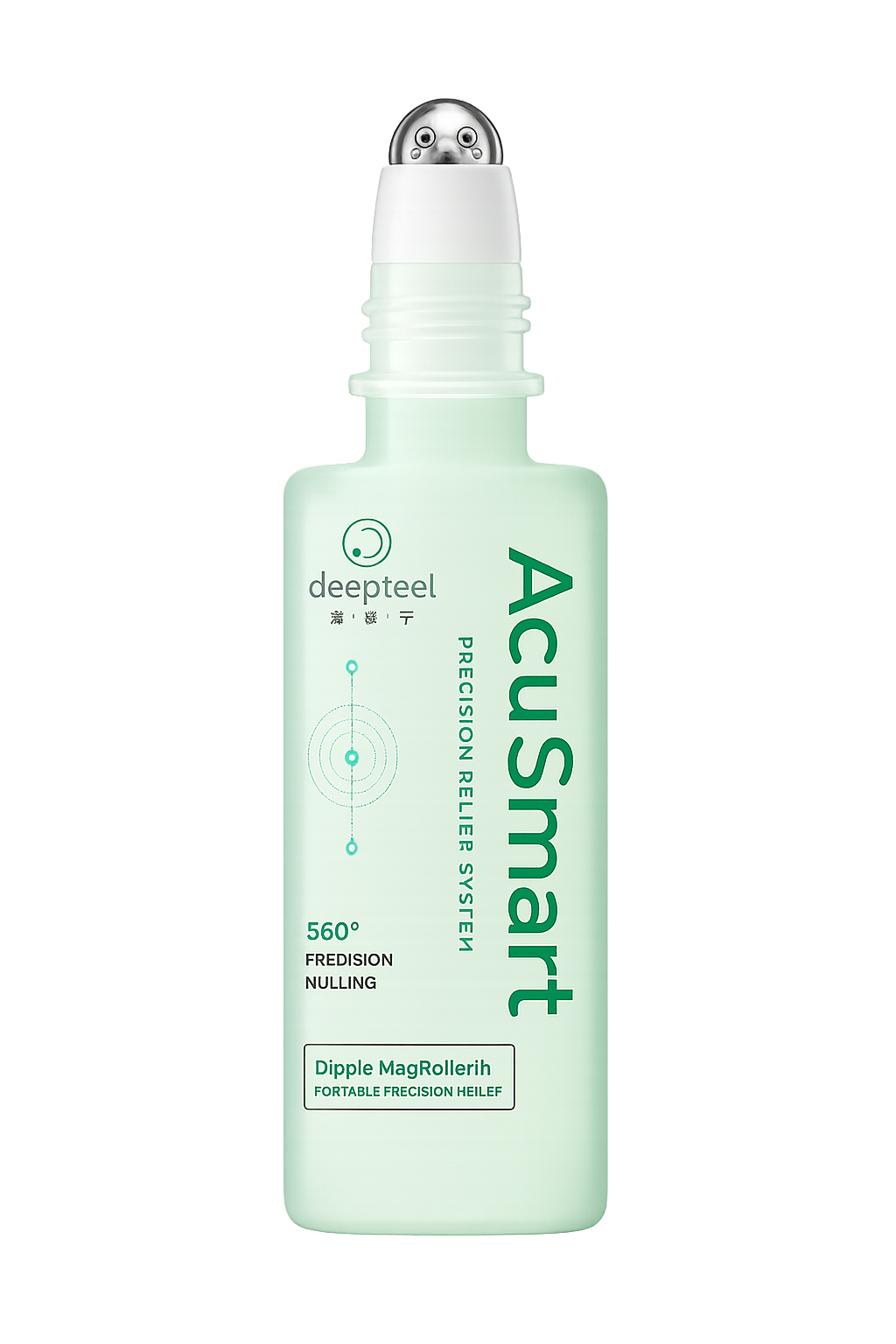
  • Section 45: Accessibility Requirements
  • Section 49: Admin Dashboard Requirement
  • Section 50: CMS Content Management Workflow
  • Section 51: Technical Architecture Requirement

Data Structure Must Not Allow:

  • Frontend-only QR reward approval
  • Frontend-only order success
  • Frontend-only referral qualification
  • Manual points editing without audit
  • Deleting Points Ledger silently
  • Deleting Legal Acceptance silently
  • Publishing unapproved CMS content
  • Showing wrong country product availability
  • Showing wrong language legal content
  • Reward redemption without ledger record
  • Referral reward without first valid backend-verified QR scan
  • Order success without payment confirmation
  • Store stock guarantee without real-time inventory support

Data Governance Rule:

The data structure must make secure, accurate, auditable, and compliant system behavior the default.

52.81
DATA STRUCTURE REQUIREMENT

MVP Data Structure Requirement

For MVP, Data Structure must include:

  • User
  • User Profile
  • User Device
  • Country
  • Language
  • Country Configuration
  • Product
  • Product Availability
  • Product Pricing, MVP / P0
  • Product Module
  • AcuSmart™ Routine
  • Relief Mode
  • Routine Step
  • Concern-to-Routine Mapping
  • QR Batch
  • QR Code
  • QR Scan Log
  • Dippie Character
  • Dippie Collection
  • Dippie Passport
  • Points Wallet
  • Points Ledger
  • Reward
  • Reward Redemption
  • Voucher
  • Referral
  • Cart, MVP / P0
  • Order, MVP / P0
  • Payment, MVP / P0
  • Refund, MVP / P0
  • Store, Phase 2-ready
  • FAQ
  • Support Ticket
  • Legal Document
  • Legal Acceptance
  • CMS Content
  • CMS Version
  • Visual Asset
  • Notification
  • Campaign
  • Accessibility Issue
  • Analytics Event
  • Admin User
  • Admin Role
  • Admin Permission
  • Audit Log
  • System Setting
  • Data relationships
  • Status standards
  • Versioning rules
  • Audit requirements
  • Privacy requirements
  • Retention rules
  • Integrity controls
  • Reconciliation rules
  • Migration rules
  • Import / export controls
  • API response standard
  • Error object standard
  • Developer-ready data objects
  • Analytics / governance events
  • Edge case handling
  • Safety-compliant data rules
52.82
DATA STRUCTURE REQUIREMENT

MVP Acceptance Criteria

This section is MVP-ready when:

Data Structure applies across the full DeepFeel™ platform
Core entity list is defined
Universal base fields are defined
User, Profile, Device, and Session entities are defined
Country, Language, and Country Configuration entities are defined
Product, Product Availability, Product Pricing, and Product Module entities are defined
AcuSmart™, Relief Mode, Routine Step, and Concern-to-Routine Mapping entities are defined
QR Batch, QR Code, and QR Scan Log entities are defined
Dippie Character, Dippie Collection, and Dippie Passport entities are defined
Points Wallet and Points Ledger entities are defined
Reward, Reward Redemption, and Voucher entities are defined
Referral entity is defined as one-tier only
Commerce entities are defined for launch commerce; in-app purchase is MVP / P0
Store entity is defined as Phase 2-ready
FAQ and Support Ticket entities are defined
Legal Document and Legal Acceptance entities are defined
CMS Content and CMS Version entities are defined
Visual Asset, Notification, Campaign, Accessibility Issue, and Analytics Event entities are defined
Admin User, Admin Role, Admin Permission, Audit Log, and System Setting entities are defined
Data relationship overview is included
Status standards are defined
Versioning requirement is defined
Audit requirement is defined
Privacy and retention requirements are defined
Integrity and reconciliation requirements are defined
Migration, import, and export requirements are defined
API response and error object standards are defined
Developer-ready data objects are included
Analytics / governance events are defined
Edge cases are covered
Data Structure follows Claims & Language Guidelines, Safety & Compliance Framework, Legal Document Requirement, Content Governance Requirement, FAQ System Requirement, UI/UX Design Principles, Key UI Components Requirement, Visual Asset System Requirement, Accessibility Requirements, Admin Dashboard Requirement, CMS Content Management Workflow, and Technical Architecture Requirement
52.83
DATA STRUCTURE REQUIREMENT

Final Data Structure Requirement Statement

The Data Structure Requirement defines the complete data foundation required to build DeepFeel™ as a scalable, secure, modular, country-aware, language-aware, CMS-managed, admin-controlled, audit-ready platform. It covers users, profiles, country and language configuration, products, product modules, AcuSmart™, 67 Relief Modes, QR codes, scan logs, Dippie, Points Wallet, Points Ledger, rewards, redemption, referral, commerce, Store Locator, FAQ, support, legal documents, CMS content, visual assets, notifications, campaigns, accessibility issues, analytics, admin roles, permissions, audit logs, and system settings. The data structure must make backend source-of-truth behavior, value-bearing transaction integrity, privacy protection, auditability, version control, country rules, language rules, and compliance safeguards the default system behavior.

53
Section Group

API Requirement

The complete backend interface layer for DeepFeel™ — versioned REST endpoints, request/response and error standards, authentication and authorization, idempotency, rate limiting, webhooks, and the full user and admin API surface, built so the backend stays the source of truth for every value-bearing and compliance-sensitive action.

Purpose: DeepFeel™ APIs must make the backend the source of truth for every value-bearing, compliance-sensitive, user-facing, and admin-controlled action — secure, versioned, country- and language-aware, idempotent, audit-ready, and backend-controlled by default.

53.1
API REQUIREMENT

Purpose

The API Requirement defines the backend API standards, endpoint structure, request / response format, authentication rules, authorization rules, error handling, versioning, security controls, data validation, audit behavior, and developer-ready API specifications required to build and operate the DeepFeel™ platform.

This section ensures DeepFeel™ APIs are:

  • Secure
  • Versioned
  • Consistent
  • Backend-controlled
  • Country-aware
  • Language-aware
  • CMS-ready
  • Admin-ready
  • Audit-ready
  • Analytics-ready
  • Compliance-ready
  • Scalable
  • Developer-ready
  • Future-module-ready

The API system supports:

  • Mobile app
  • Admin Dashboard
  • CMS content delivery
  • Authentication
  • User profile
  • Country and language configuration
  • Product catalogue
  • Product availability
  • AcuSmart™
  • 67 Relief Modes
  • QR Scan-to-Earn
  • Dippie
  • Points Wallet
  • Points Ledger
  • Reward Catalogue
  • Reward Redemption
  • Referral
  • Commerce
  • Payment confirmation
  • Store Locator
  • FAQ
  • Support
  • Legal documents
  • Notifications
  • Analytics
  • Audit logs
  • Future DeepFeel™ product modules
53.2
API REQUIREMENT

Core API Principle

The core principle is:

DeepFeel™ APIs must make the backend the source of truth for every value-bearing, compliance-sensitive, user-facing, and admin-controlled action.

Frontend must not independently decide:

  • QR verification result
  • Points issuance
  • Reward redemption success
  • Referral qualification
  • Module activation
  • Order success
  • Payment confirmation
  • Legal acceptance storage
  • Country availability
  • Published CMS content status
  • Admin approval result

Every API should answer:

  • Who is calling this API?
  • What permission is required?
  • What country / language context applies?
  • What data is requested or changed?
  • Does this action affect value, legal, safety, reward, referral, commerce, or compliance?
  • Does this need audit logging?
  • Does this need analytics tracking?
  • What happens if the request fails?
  • What safe user message should appear?
53.3
API REQUIREMENT

API Scope

API Requirement applies across the full DeepFeel™ platform:

  • Authentication API
  • User API
  • Profile API
  • Country API
  • Language API
  • Product API
  • Product Availability API
  • Product Pricing API
  • Product Module API
  • AcuSmart™ API
  • 67 Relief Modes API
  • Routine API
  • QR Scan API
  • Dippie API
  • Points Wallet API
  • Points Ledger API
  • Reward API
  • Reward Redemption API
  • Referral API
  • Commerce API
  • Cart API
  • Order API
  • Payment API
  • Store Locator API
  • FAQ API
  • Support Ticket API
  • Legal Document API
  • Legal Acceptance API
  • CMS Content API
  • Visual Asset API
  • Notification API
  • Campaign API
  • Analytics API
  • Audit Log API
  • Admin Dashboard API
  • Admin Role and Permission API
  • System Setting API
53.4
API REQUIREMENT

API Architecture Direction

DeepFeel™ should use a structured REST API or REST-first API model for MVP.

Recommended MVP API Model:

Mobile App / Admin Dashboard
→ API Gateway
→ Versioned Backend API
→ Domain Services
→ Database / CMS / Storage / External Integrations

API Architecture Rules:

AreaRequirement
API styleREST-first for MVP
API versionRequired
API gatewayRecommended
AuthenticationRequired for protected APIs
AuthorizationRequired for role or user feature access
Country contextRequired where availability differs
Language contextRequired where content differs
Audit loggingRequired for high-risk actions
Analytics eventsRequired for key flows
Error formatStandardized
DocumentationRequired before development handoff
53.5
API REQUIREMENT

API Versioning Requirement

All APIs should be versioned.

Version Pattern:

/api/v1/{resource}

Examples:
- /api/v1/auth/login
- /api/v1/users/me
- /api/v1/products
- /api/v1/qr/verify
- /api/v1/rewards/redeem
- /api/v1/admin/products

API Versioning Rules:

  • Use versioned routes from MVP
  • Do not introduce breaking changes without migration plan
  • Support older app versions during transition
  • Mark deprecated endpoints clearly
  • Document version changes
  • Use app minimum version where required

Rule:

A mobile app release should not break because backend API contracts changed without version control.
53.6
API REQUIREMENT

API Environment Requirement

DeepFeel™ APIs should be separated by environment.

Required Environments:

EnvironmentPurpose
DevelopmentDeveloper testing
StagingQA, UAT, pre-production validation
ProductionLive users
SandboxPayment, QR, integration, or partner testing
Admin PreviewCMS and admin content preview

Environment Rule:

Test data must not mix with production data.

Production APIs must not expose draft, test, or unapproved records.

53.7
API REQUIREMENT

API Base URL Requirement

API base URLs should be clearly separated by environment.

Example Pattern:

Development: https://dev-api.deepfeel.com.my/api/v1
Staging: https://staging-api.deepfeel.com.my/api/v1
Production: https://api.deepfeel.com.my/api/v1

Rule:

Frontend apps should use environment configuration, not hardcoded production URLs.
53.8
API REQUIREMENT

API Authentication Requirement

Protected APIs require authentication.

Authentication Methods:

  • Email / password login
  • Phone / OTP login
  • Social login, optional
  • Refresh token flow
  • Admin login
  • Admin MFA, recommended

Auth Token Rules:

  • Access token should be short-lived
  • Refresh token should be securely stored
  • Logout should revoke session where applicable
  • Suspended users should be blocked from protected actions
  • Deleted users should not access protected endpoints
  • Admin tokens must have stronger security controls

Rule:

Users must be authenticated for value-bearing actions such as QR points earning, rewards redemption, referral tracking, wallet history, order creation, and legal acceptance.
53.9
API REQUIREMENT

API Authorization Requirement

APIs must check permissions before returning or changing data.

User Authorization Types:

  • Guest
  • Registered user
  • Activated product user
  • AcuSmart™ activated user
  • Unsupported country user
  • Suspended user
  • Deleted user

Admin Authorization Types:

  • Super Admin
  • Product Admin
  • Content Admin
  • Compliance Admin
  • Legal Admin
  • Operations Admin
  • Commerce Admin
  • Support Admin
  • Marketing Admin
  • Analytics Viewer
  • Auditor

Authorization Rule:

Role-based access control must apply to Admin Dashboard APIs.

Feature eligibility must apply to user-facing APIs.

53.10
API REQUIREMENT

API Header Requirement

API requests should include consistent headers.

Recommended Headers:

HeaderPurpose
AuthorizationBearer token
X-App-VersionMobile app version
X-PlatformiOS / Android / Web / Admin
X-Country-RegionCountry context
X-LanguageLanguage context
X-Request-IDRequest tracing
X-Device-IDDevice identification
X-TimezoneUser or admin timezone
Content-TypeUsually application/json

Rule:

Country and language headers should be used to return correct availability and content.
53.11
API REQUIREMENT

API Request Standard

API requests should be structured, minimal, and validated.

Request Rules:

  • Use JSON body for create / update actions
  • Use query parameters for filters, pagination, sorting, and search
  • Validate required fields
  • Reject unknown high-risk fields
  • Sanitize user input
  • Use idempotency keys for payment, reward redemption, and value-bearing actions
  • Do not trust frontend-calculated value-bearing results
53.12
API REQUIREMENT

API Response Standard

All API responses should follow a consistent structure.

{
  "request_id": "REQ-000001",
  "status": "success",
  "country_region": "MY",
  "language": "en",
  "data": {},
  "meta": {
    "api_version": "v1",
    "server_time": "2026-05-25T10:00:00+08:00",
    "app_min_version": "1.0.0"
  },
  "errors": []
}

Response Rule:

Every API response should include status, data, metadata, and structured errors.
53.13
API REQUIREMENT

API Error Response Standard

Errors should be structured and developer-readable while remaining safe for users.

{
  "request_id": "REQ-000001",
  "status": "error",
  "country_region": "MY",
  "language": "en",
  "data": null,
  "meta": {
    "api_version": "v1",
    "server_time": "2026-05-25T10:00:00+08:00"
  },
  "errors": [
    {
      "error_code": "QR_DUPLICATE_SCAN",
      "message_key": "qr.error.duplicate.message",
      "user_message": "This QR code has already been scanned.",
      "technical_message": "QR status is already scanned by another user.",
      "retry_allowed": false,
      "support_reference_id": "SUP-QR-000001"
    }
  ]
}

Error Rule:

Technical messages should not expose sensitive system information to users.

User-facing messages should be CMS-managed where appropriate.

53.14
API REQUIREMENT

HTTP Status Code Standard

APIs should use standard HTTP status codes.

HTTP CodeMeaning
200Success
201Created
202Accepted / processing
204Success with no content
400Bad request
401Unauthenticated
403Unauthorized / forbidden
404Not found
409Conflict
422Validation error
429Rate limited
500Server error
503Service unavailable

Rule:

Business errors should still include structured error codes and message keys.
53.15
API REQUIREMENT

API Error Code Naming Standard

Error codes should be stable and descriptive.

Error Code Pattern:

MODULE_ERROR_REASON

Examples:
- AUTH_INVALID_OTP
- USER_ACCOUNT_SUSPENDED
- QR_DUPLICATE_SCAN
- QR_INVALID_CODE
- REWARD_INSUFFICIENT_POINTS
- REWARD_OUT_OF_STOCK
- REFERRAL_NOT_QUALIFIED
- PAYMENT_VERIFICATION_PENDING
- ORDER_PAYMENT_FAILED
- CMS_CONTENT_MISSING
- LEGAL_ACCEPTANCE_REQUIRED
- ADMIN_PERMISSION_DENIED

Rule:

Do not create vague error codes such as ERROR_001 or UNKNOWN_FAIL unless it is truly unknown.
53.16
API REQUIREMENT

Pagination Requirement

List APIs must support pagination.

Pagination Parameters:

  • page
  • page_size
  • cursor, optional
  • sort_by
  • sort_order

Pagination Response Meta:

{
  "pagination": {
    "page": 1,
    "page_size": 20,
    "total_count": 250,
    "has_next": true,
    "next_cursor": "CURSOR-ABC"
  }
}

Rule:

Large lists should never be returned without pagination.
53.17
API REQUIREMENT

Filtering and Sorting Requirement

List APIs should support filtering and sorting where useful.

Common Filters:

  • country_region
  • language
  • status
  • date_from
  • date_to
  • module
  • product_id
  • user_id
  • approval_status
  • publish_status
  • risk_level

Rule:

Admin APIs need stronger filtering than user-facing APIs.
53.19
API REQUIREMENT

Idempotency Requirement

Value-bearing APIs must support idempotency.

Idempotency Required For:

  • QR verification
  • Reward redemption
  • Referral reward issuance
  • Checkout creation
  • Payment confirmation
  • Order creation
  • Refund processing
  • Manual points adjustment
  • Legal acceptance submission

Idempotency Header:

Idempotency-Key: UNIQUE-REQUEST-KEY

Rule:

Repeated requests must not issue duplicate points, duplicate rewards, duplicate orders, duplicate refunds, or duplicate ledger records.
53.20
API REQUIREMENT

Rate Limiting Requirement

APIs must protect the platform from abuse.

Rate-Limited Actions:

  • Login attempts
  • OTP requests
  • QR scan attempts
  • Reward redemption attempts
  • Referral code submissions
  • Payment attempts
  • Support ticket submissions
  • Admin login attempts
  • CMS publishing attempts, if suspicious

Rate Limit Response Example:

{
  "error_code": "RATE_LIMIT_EXCEEDED",
  "message_key": "system.error.rate_limit",
  "user_message": "Please wait a moment before trying again.",
  "retry_after_seconds": 60
}

Rule:

Rate limits should protect the system without unfairly blocking normal users.
53.21
API REQUIREMENT

API Security Requirement

APIs must be secure by default.

API Security Rules:

  • HTTPS only
  • Authentication required for protected routes
  • Authorization required for role-based access
  • Input validation
  • Output filtering
  • Rate limiting
  • Secure token handling
  • Sensitive data masking
  • Payment webhook verification
  • QR payload validation
  • Admin action audit logging
  • File upload scanning, if applicable
  • CORS restrictions for web/admin

Rule:

Security must protect user data, reward value, QR integrity, commerce transactions, and admin operations.
53.22
API REQUIREMENT

API Privacy Requirement

APIs must protect user privacy.

Privacy Rules:

  • Return only required user data
  • Mask sensitive fields where possible
  • Restrict admin access to personal data
  • Do not expose session tokens
  • Do not expose full payment details
  • Do not expose unnecessary device identifiers
  • Support data access request APIs if required
  • Support account deletion workflow
  • Audit admin access to sensitive data

Rule:

Admin convenience must not override user privacy.
53.23
API REQUIREMENT

API Logging Requirement

APIs should log operational and security-relevant actions.

Logs Should Capture:

  • Request ID
  • Endpoint
  • User ID or admin ID, if authenticated
  • Status code
  • Error code
  • Latency
  • Timestamp
  • Device / platform, where relevant
  • Country / language context
  • High-risk action reason, if applicable

Rule:

Logs should not store sensitive personal data, raw passwords, full tokens, or unnecessary payment details.
53.24
API REQUIREMENT

API Audit Requirement

High-risk API actions must create audit logs.

Audit-Logged API Actions:

  • Admin permission change
  • CMS publish
  • Legal document publish
  • Safety disclaimer change
  • Product availability change
  • Product pricing change
  • QR code blocking
  • Manual points adjustment
  • Reward rule change
  • Referral rule change
  • Refund approval
  • User suspension
  • Campaign publish
  • Country configuration change

Rule:

Audit logs must include actor, action, target record, timestamp, before / after values where applicable, and reason for high-risk actions.
53.25
API REQUIREMENT

Authentication API

Authentication APIs manage login, registration, session refresh, logout, and account security.

Required Endpoints:

MethodEndpointPurpose
POST/auth/registerCreate user account
POST/auth/loginLogin user
POST/auth/otp/requestRequest OTP
POST/auth/otp/verifyVerify OTP
POST/auth/refreshRefresh token
POST/auth/logoutLogout user
POST/auth/delete-accountRequest account deletion

Rule:

Authentication APIs must apply rate limiting, security logging, and error handling.
53.26
API REQUIREMENT

User Profile API

User APIs manage current user profile and settings.

Required Endpoints:

MethodEndpointPurpose
GET/users/meGet current user
PATCH/users/meUpdate user profile
GET/users/me/settingsGet user settings
PATCH/users/me/settingsUpdate user settings
GET/users/me/activity-summaryGet user activity summary

Rule:

Users should only access their own profile unless admin permissions apply.
53.27
API REQUIREMENT

Country and Language API

Country and Language APIs return supported markets and localization settings.

Required Endpoints:

MethodEndpointPurpose
GET/countriesGet supported countries
GET/countries/{country_region}Get country configuration
GET/languagesGet supported languages
GET/countries/{country_region}/languagesGet languages supported by country

Rule:

Country determines availability.

Language determines content display.

53.28
API REQUIREMENT

Product API

Product APIs power Shop, Product Detail, activation eligibility, and country-specific availability.

Required Endpoints:

MethodEndpointPurpose
GET/productsGet product catalogue
GET/products/{product_id}Get product detail
GET/products/{product_id}/availabilityGet product availability
GET/products/{product_id}/pricingGet product pricing
GET/products/{product_id}/moduleGet linked product module

Rule:

Product API must respect country availability, language, publish status, and compliance status.
53.29
API REQUIREMENT

Product Module API

Product Module APIs support AcuSmart™ and future product modules.

Required Endpoints:

MethodEndpointPurpose
GET/modulesGet available modules
GET/modules/{module_id}Get module detail
GET/modules/{module_id}/eligibilityCheck module eligibility
POST/modules/{module_id}/activateActivate eligible module

Rule:

Module activation must be backend-controlled and eligibility-based.
53.30
API REQUIREMENT

AcuSmart™ API

AcuSmart™ APIs support guided routines, safety, and completion flow.

Required Endpoints:

MethodEndpointPurpose
GET/acusmartGet AcuSmart™ module overview
GET/acusmart/routinesGet routine list
GET/acusmart/routines/{routine_id}Get routine detail
POST/acusmart/routines/{routine_id}/startStart routine
POST/acusmart/routines/{routine_id}/completeComplete routine
POST/acusmart/routines/{routine_id}/feedbackSubmit feedback

Rule:

AcuSmart™ API must use safe wellness language and must not create diagnosis, treatment, cure, or guaranteed outcome behavior.
53.31
API REQUIREMENT

67 Relief Modes API

67 Relief Modes APIs expose all modes as structured records.

Required Endpoints:

MethodEndpointPurpose
GET/relief-modesGet all relief modes
GET/relief-modes/{mode_id}Get mode detail
GET/relief-modes/categoriesGet mode categories
GET/relief-modes/recommendedGet recommended modes, if supported

Rule:

All 67 modes must be backend-managed records, not hardcoded screens.
53.32
API REQUIREMENT

Concern-to-Routine Mapping API

Mapping APIs suggest routines based on user-selected concerns or body areas.

Required Endpoints:

MethodEndpointPurpose
GET/routine-mappingsGet concern-to-routine mappings
POST/routine-mappings/suggestSuggest routine based on concern

Rule:

Suggestion APIs should provide wellness guidance only, not diagnosis.
53.33
API REQUIREMENT

QR Scan API

QR APIs verify QR scans and return backend-approved outcomes.

Required Endpoints:

MethodEndpointPurpose
POST/qr/verifyVerify scanned QR
GET/qr/scansGet user scan history
GET/qr/scans/{scan_id}Get scan detail
POST/qr/scans/{scan_id}/supportCreate support case from scan

QR Verify Request Example:

{
  "qr_payload": "encrypted_or_hashed_qr_payload",
  "product_id": "PROD-ACUSMART-001",
  "country_region": "MY",
  "language": "en",
  "device_id": "DEVICE-001"
}

QR Verify Response Example:

{
  "scan_id": "SCAN-000001",
  "scan_result": "valid",
  "product_verified": true,
  "points_awarded": 20,
  "dippie_awarded": true,
  "module_activated": true,
  "message_key": "qr.result.success.message"
}

Rule:

QR verification must be backend-determined and scan logs must be created for every scan attempt.
53.34
API REQUIREMENT

Dippie API

Dippie APIs manage Dippie reveal, My Dippie Passport progress, duplicate action handling, Trade with Friends share cards, completion reward lock sets, Golden Dippie reward claims, and collection history.

Required Endpoints:

MethodEndpointPurpose
GET/dippie/passportGet My Dippie Passport overview, progress, reward milestone, lock history, and CTA state
GET/dippie/collectionGet collected Dippies, duplicate quantities, locked stamps, and eligible stamps
GET/dippie/collection/{dippie_id}Get Dippie detail, quantity, duplicate status, and lock status
POST/dippie/revealReveal Dippie after backend eligibility; return new, duplicate, or Golden result
POST/dippie/duplicate/keepConfirm Keep Duplicate and increase stamp quantity
POST/dippie/duplicate/trade-shareGenerate DeepFeel-branded Trade with Friends share card and suggested caption
POST/dippie/passport/redeem-completionRedeem 6-normal-Dippie completion gift reward and lock one eligible unique set
POST/dippie/golden/claimCreate Golden Dippie 1g Gold Bar claim request for admin verification
GET/dippie/passport/scan-historyGet scan history related to My Dippie Passport stamps and Dippie reveals
GET/dippie/passport/redemption-locksGet completed lock sets and redemption history

Rules:

Dippie reveal must be based on backend eligibility and must not be tied to product efficacy or health outcome.
Duplicate Keep and completion redemption endpoints must be idempotent.
Reward redemption must lock only eligible unlocked stamps.
Locked stamps must remain visible and cannot be reused for repeated reward redemption.
Trade with Friends in MVP generates a share post only; it does not transfer ownership automatically.
53.35
API REQUIREMENT

Points Wallet API

Points Wallet APIs show current point balance and point summary.

Required Endpoints:

MethodEndpointPurpose
GET/points/walletGet current wallet balance
GET/points/summaryGet points summary
GET/points/expiringGet expiring points

Rule:

Wallet balance should be derived from or reconciled against Points Ledger.
53.36
API REQUIREMENT

Points Ledger API

Points Ledger APIs return transaction history.

Required Endpoints:

MethodEndpointPurpose
GET/points/ledgerGet user point transactions
GET/points/ledger/{ledger_id}Get transaction detail

Rule:

Points Ledger should be append-only where possible.

Do not silently edit historical transactions.

53.37
API REQUIREMENT

Reward Catalogue API

Reward Catalogue APIs return redeemable rewards.

Required Endpoints:

MethodEndpointPurpose
GET/rewardsGet reward catalogue
GET/rewards/{reward_id}Get reward detail
GET/rewards/{reward_id}/availabilityCheck reward availability

Rule:

Reward API must respect country, language, points balance, reward status, stock, terms, and publish status.
53.38
API REQUIREMENT

Reward Redemption API

Reward Redemption APIs perform value-bearing redemption.

Required Endpoints:

MethodEndpointPurpose
POST/rewards/{reward_id}/redeemRedeem reward
GET/rewards/redemptionsGet redemption history
GET/rewards/redemptions/{redemption_id}Get redemption detail
GET/rewards/vouchers/{voucher_id}Get voucher detail

Redeem Request Example:

{
  "reward_id": "REWARD-000001",
  "country_region": "MY",
  "language": "en"
}

Redeem Response Example:

{
  "redemption_id": "REDEEM-000001",
  "redemption_status": "confirmed",
  "points_deducted": 100,
  "voucher_id": "VOUCHER-000001",
  "message_key": "reward.redemption.success.message"
}

Rule:

Reward redemption must be idempotent and must only complete after backend confirms points deduction and reward availability.
53.39
API REQUIREMENT

Referral API

Referral APIs support one-tier referral only.

Required Endpoints:

MethodEndpointPurpose
GET/referral/meGet referral code and summary
GET/referral/historyGet referral history
POST/referral/apply-codeApply referral code
GET/referral/termsGet referral terms

Rule:

Referral reward must only unlock after the referred user scans their first valid backend-verified product QR.

Registration alone must not trigger referral reward.

53.40
API REQUIREMENT

Cart API

Cart APIs apply to launch commerce. Commerce is included in launch; in-app purchase is MVP / P0.

Required Endpoints:

MethodEndpointPurpose
GET/cartGet active cart
POST/cart/itemsAdd item to cart
PATCH/cart/items/{cart_item_id}Update cart item
DELETE/cart/items/{cart_item_id}Remove cart item
POST/cart/validateValidate cart before checkout

Rule:

Cart price and availability must be revalidated before checkout.
53.41
API REQUIREMENT

Order API

Order APIs manage checkout and order history.

Required Endpoints:

MethodEndpointPurpose
POST/ordersCreate order draft
GET/ordersGet order history
GET/orders/{order_id}Get order detail
POST/orders/{order_id}/cancelCancel order if eligible

Rule:

Order success must not appear until backend and payment confirmation are complete.
53.42
API REQUIREMENT

Payment API

Payment APIs must use secure backend and gateway verification.

Required Endpoints:

MethodEndpointPurpose
POST/payments/create-intentCreate payment intent
GET/payments/{payment_id}/statusGet payment status
POST/payments/webhookReceive gateway webhook
POST/payments/{payment_id}/verifyVerify payment status

Rule:

Payment gateway webhook or verified backend payment status must be the source of truth.
53.43
API REQUIREMENT

Refund API

Refund APIs apply if refunds are supported.

Required Endpoints:

MethodEndpointPurpose
POST/refunds/requestRequest refund
GET/refundsGet refund history
GET/refunds/{refund_id}Get refund detail

Rule:

Refund approval and processing must be permission-controlled and audit-logged.
53.44
API REQUIREMENT

Store Locator API

Store Locator is Phase 2 but should be API-ready.

Required Endpoints:

MethodEndpointPurpose
GET/storesSearch stores
GET/stores/{store_id}Get store detail
POST/stores/report-issueReport store issue

Store Search Query:

  • country_region
  • state
  • city
  • area
  • latitude
  • longitude
  • radius
  • product_id

Rule:

Store Locator API must not imply guaranteed stock unless real-time inventory integration exists.

Required disclaimer:

Store availability may vary. Please contact the store before visiting.
53.45
API REQUIREMENT

FAQ API

FAQ APIs provide country-aware, language-aware help content.

Required Endpoints:

MethodEndpointPurpose
GET/faq/categoriesGet FAQ categories
GET/faqSearch / list FAQ
GET/faq/{faq_id}Get FAQ detail
POST/faq/{faq_id}/feedbackSubmit FAQ helpfulness feedback

Rule:

FAQ API must return only approved and published FAQ content.
53.46
API REQUIREMENT

Support Ticket API

Support APIs allow users to create and track support requests.

Required Endpoints:

MethodEndpointPurpose
POST/support/ticketsCreate support ticket
GET/support/ticketsGet user support tickets
GET/support/tickets/{ticket_id}Get ticket detail
POST/support/tickets/{ticket_id}/replyReply to ticket

Rule:

Support tickets should carry related scan, order, reward, or FAQ context where possible.
53.48
API REQUIREMENT

Legal Acceptance API

Legal Acceptance APIs store user consent and agreement records.

Required Endpoints:

MethodEndpointPurpose
POST/legal/acceptancesSubmit legal acceptance
GET/legal/acceptancesGet user acceptance history

Acceptance Request Example:

{
  "document_id": "LEGAL-TERMS-MY-EN",
  "document_version": "1.0",
  "country_region": "MY",
  "language": "en",
  "acceptance_method": "checkbox_confirm"
}

Rule:

Legal acceptance records must be immutable where possible and must store version, country, language, timestamp, user, and app version.
53.49
API REQUIREMENT

CMS Content API

CMS Content APIs provide content by key, country, language, and publish status.

Required Endpoints:

MethodEndpointPurpose
GET/cms/contentGet content by keys
GET/cms/content/{content_key}Get single content item
GET/cms/screens/{screen_id}Get screen content bundle

CMS Content Request Example:

{
  "content_keys": [
    "home.hero.title",
    "qr.result.success.message"
  ],
  "country_region": "MY",
  "language": "en"
}

Rule:

Production CMS API must not return draft, unapproved, expired, blocked, or archived content.
53.50
API REQUIREMENT

Visual Asset API

Visual Asset APIs return asset references and metadata.

Required Endpoints:

MethodEndpointPurpose
GET/assets/{asset_id}Get asset metadata
GET/assetsGet assets by module / usage
GET/assets/fallbackGet fallback asset

Rule:

Visual Asset API must return approved, published, accessibility-ready assets with fallback support.
53.51
API REQUIREMENT

Notification API

Notification APIs manage user notification preferences and in-app notification inbox.

Required Endpoints:

MethodEndpointPurpose
GET/notificationsGet in-app notifications
PATCH/notifications/{notification_id}/readMark notification as read
GET/notifications/preferencesGet preferences
PATCH/notifications/preferencesUpdate preferences
POST/notifications/register-deviceRegister push token

Rule:

Notifications must respect country, language, user preferences, approval status, and destination screen rules.
53.52
API REQUIREMENT

Campaign API

Campaign APIs return active campaigns.

Required Endpoints:

MethodEndpointPurpose
GET/campaignsGet active campaigns
GET/campaigns/{campaign_id}Get campaign detail

Rule:

Campaign API must only return active, approved, country-eligible, language-eligible campaigns within valid dates.
53.53
API REQUIREMENT

Analytics API

Analytics APIs collect event data.

Required Endpoints:

MethodEndpointPurpose
POST/analytics/eventsTrack analytics events
POST/analytics/batchTrack batched events

Analytics Event Example:

{
  "event_name": "qr_verification_completed",
  "user_id": "USER-12345",
  "country_region": "MY",
  "language": "en",
  "module": "qr_scan",
  "screen_id": "SCREEN-QR-RESULT-001",
  "event_properties": {
    "scan_result": "valid",
    "points_awarded": 20
  },
  "occurred_at": "2026-05-25T10:00:00+08:00"
}

Rule:

Analytics APIs should not collect unnecessary sensitive personal data.
53.54
API REQUIREMENT

Admin API Overview

Admin APIs power the Admin Dashboard and require strict permission control.

Admin API Areas:

  • Admin login
  • Admin users
  • Roles and permissions
  • User management
  • Country and language management
  • Product management
  • AcuSmart™ management
  • 67 Relief Modes management
  • QR registry
  • Scan logs
  • Dippie management
  • Points ledger review
  • Reward management
  • Referral monitoring
  • Commerce management
  • Store Locator management
  • FAQ management
  • Legal document management
  • CMS content management
  • Visual asset management
  • Support ticket management
  • Notifications
  • Campaigns
  • Analytics dashboard
  • Audit logs
  • System settings

Rule:

Admin APIs must require admin authentication, role-based permission checks, and audit logging for high-risk actions.
53.55
API REQUIREMENT

Admin User Management API

Required Endpoints:

MethodEndpointPurpose
GET/admin/usersSearch users
GET/admin/users/{user_id}View user detail
GET/admin/users/{user_id}/activityView user activity
PATCH/admin/users/{user_id}/statusSuspend / reactivate user

Rule:

Admin user data access must be permission-controlled and privacy-aware.
53.56
API REQUIREMENT

Admin Product API

Required Endpoints:

MethodEndpointPurpose
GET/admin/productsList products
POST/admin/productsCreate product
GET/admin/products/{product_id}View product
PATCH/admin/products/{product_id}Update product
PATCH/admin/products/{product_id}/availabilityUpdate availability
PATCH/admin/products/{product_id}/pricingUpdate pricing

Rule:

Product and pricing changes must follow approval and audit rules.
53.57
API REQUIREMENT

Admin AcuSmart™ and Relief Modes API

Required Endpoints:

MethodEndpointPurpose
GET/admin/acusmart/routinesList routines
POST/admin/acusmart/routinesCreate routine
PATCH/admin/acusmart/routines/{routine_id}Update routine
GET/admin/relief-modesList all modes
POST/admin/relief-modesCreate mode
PATCH/admin/relief-modes/{mode_id}Update mode

Rule:

Routine and Relief Mode publishing requires safety and compliance review.
53.58
API REQUIREMENT

Admin QR API

Required Endpoints:

MethodEndpointPurpose
GET/admin/qr/batchesList QR batches
POST/admin/qr/batchesCreate QR batch
GET/admin/qr/codesSearch QR codes
PATCH/admin/qr/codes/{qr_id}/statusUpdate QR status
GET/admin/qr/scansReview scan logs

Rule:

QR blocking, batch changes, and fraud flags must be audit-logged.
53.59
API REQUIREMENT

Admin Points and Rewards API

Required Endpoints:

MethodEndpointPurpose
GET/admin/points/wallets/{user_id}View user wallet
GET/admin/points/ledgerSearch points ledger
POST/admin/points/manual-adjustmentManual points adjustment
GET/admin/rewardsList rewards
POST/admin/rewardsCreate reward
PATCH/admin/rewards/{reward_id}Update reward
GET/admin/rewards/redemptionsView redemptions

Rule:

Manual points adjustment must require reason, permission, and audit log.
53.60
API REQUIREMENT

Admin Referral API

Required Endpoints:

MethodEndpointPurpose
GET/admin/referralsSearch referrals
GET/admin/referrals/{referral_id}View referral detail
PATCH/admin/referrals/{referral_id}/statusReview referral status

Rule:

Referral reward rules must remain one-tier and backend-verified.
53.61
API REQUIREMENT

Admin Commerce API

Commerce Admin APIs apply to launch commerce. Commerce is included in launch; in-app purchase is MVP / P0.

Required Endpoints:

MethodEndpointPurpose
GET/admin/ordersSearch orders
GET/admin/orders/{order_id}View order detail
PATCH/admin/orders/{order_id}/statusUpdate order status
GET/admin/paymentsSearch payments
GET/admin/refundsSearch refunds
PATCH/admin/refunds/{refund_id}/approveApprove refund
PATCH/admin/refunds/{refund_id}/rejectReject refund

Rule:

Refund approval and order status changes must be permission-controlled and audit-logged.
53.62
API REQUIREMENT

Admin CMS API

Required Endpoints:

MethodEndpointPurpose
GET/admin/cms/contentList CMS content
POST/admin/cms/contentCreate CMS content
PATCH/admin/cms/content/{content_id}Update CMS content
POST/admin/cms/content/{content_id}/submit-reviewSubmit for review
POST/admin/cms/content/{content_id}/approveApprove content
POST/admin/cms/content/{content_id}/publishPublish content
POST/admin/cms/content/{content_id}/rollbackRollback content

Rule:

CMS API must block publishing if required approval, country rule, language rule, fallback, or legal requirement is missing.
53.64
API REQUIREMENT

Admin Support API

Required Endpoints:

MethodEndpointPurpose
GET/admin/support/ticketsSearch support tickets
GET/admin/support/tickets/{ticket_id}View ticket
PATCH/admin/support/tickets/{ticket_id}/assignAssign ticket
POST/admin/support/tickets/{ticket_id}/replyReply to ticket
PATCH/admin/support/tickets/{ticket_id}/statusUpdate ticket status

Rule:

Support Admin must not provide medical diagnosis or treatment advice.
53.65
API REQUIREMENT

Admin Notification and Campaign API

Required Endpoints:

MethodEndpointPurpose
GET/admin/notificationsList notifications
POST/admin/notificationsCreate notification
PATCH/admin/notifications/{notification_id}Update notification
POST/admin/notifications/{notification_id}/sendSend notification
GET/admin/campaignsList campaigns
POST/admin/campaignsCreate campaign
PATCH/admin/campaigns/{campaign_id}Update campaign
POST/admin/campaigns/{campaign_id}/publishPublish campaign

Rule:

Notifications and campaigns must not use fear-based, medical urgency, income promise, or misleading reward language.
53.66
API REQUIREMENT

Admin Analytics and Audit API

Required Endpoints:

MethodEndpointPurpose
GET/admin/analytics/overviewView dashboard metrics
GET/admin/analytics/qrView QR metrics
GET/admin/analytics/rewardsView rewards metrics
GET/admin/analytics/commerceView commerce metrics
GET/admin/audit-logsSearch audit logs
GET/admin/audit-logs/{audit_id}View audit log detail

Rule:

Audit logs should be read-only and exportable only by authorized roles.
53.67
API REQUIREMENT

Webhook API Requirement

Webhooks are required for payment and may be used for external integrations.

Required Webhooks:

MethodEndpointPurpose
POST/payments/webhookPayment gateway result
POST/integrations/notification-webhookNotification provider event, if needed
POST/integrations/delivery-webhookDelivery / shipping event, if needed

Webhook Rules:

  • Verify webhook signature
  • Validate event source
  • Store webhook event ID
  • Handle duplicate webhook safely
  • Use idempotency
  • Audit payment-related events
  • Do not trust unverified webhook payload
53.68
API REQUIREMENT

API Validation Requirement

APIs must validate incoming data.

Validation Rules:

  • Required fields must exist
  • Field types must be correct
  • Country code must be valid
  • Language code must be valid
  • Status values must be allowed
  • IDs must match existing records
  • User must own requested user-facing record
  • Admin must have permission
  • Value-bearing action must pass backend business rules

Rule:

Invalid API requests should fail safely and return structured validation errors.
53.69
API REQUIREMENT

API Business Rule Validation

Business rules must be enforced on backend APIs.

Business Rules To Enforce:

  • QR can only be rewarded once according to rule
  • Duplicate QR scans must not issue duplicate rewards
  • Reward redemption requires sufficient points
  • Referral reward requires first valid QR scan
  • Order success requires payment confirmation
  • Legal-sensitive feature requires legal acceptance
  • Country-specific product must be available before display
  • CMS content must be approved before production display
  • Admin publish requires permission and approval

Rule:

Business rules must not depend only on frontend UI restrictions.
53.70
API REQUIREMENT

API Idempotency Object

{
  "idempotency_key": "IDEMP-USER-12345-REDEEM-000001",
  "endpoint": "/api/v1/rewards/REWARD-000001/redeem",
  "request_hash": "hash_of_request_body",
  "first_request_at": "2026-05-25T10:00:00+08:00",
  "last_request_at": "2026-05-25T10:00:05+08:00",
  "response_status": "success",
  "response_reference_id": "REDEEM-000001",
  "status": "completed"
}
53.71
API REQUIREMENT

API Request Object

{
  "request_id": "REQ-000001",
  "endpoint": "/api/v1/qr/verify",
  "method": "POST",
  "user_id": "USER-12345",
  "device_id": "DEVICE-001",
  "country_region": "MY",
  "language": "en",
  "app_version": "1.0.0",
  "request_payload": {
    "qr_payload": "encrypted_or_hashed_qr_payload"
  },
  "created_at": "2026-05-25T10:00:00+08:00"
}
53.72
API REQUIREMENT

API Response Object

{
  "request_id": "REQ-000001",
  "api_version": "v1",
  "status": "success",
  "country_region": "MY",
  "language": "en",
  "data": {
    "scan_id": "SCAN-000001",
    "scan_result": "valid"
  },
  "meta": {
    "server_time": "2026-05-25T10:00:00+08:00",
    "app_min_version": "1.0.0"
  },
  "errors": []
}
53.73
API REQUIREMENT

API Error Object

{
  "error_code": "REWARD_INSUFFICIENT_POINTS",
  "message_key": "reward.error.insufficient_points",
  "user_message": "Earn more points to redeem this reward.",
  "technical_message": "Wallet balance is lower than points_required.",
  "retry_allowed": false,
  "support_reference_id": "SUP-REWARD-000001"
}
53.74
API REQUIREMENT

API Analytics / Governance Events

Recommended API analytics and governance events:

  • api_request_received
  • api_request_completed
  • api_request_failed
  • api_validation_failed
  • api_authentication_failed
  • api_authorization_failed
  • api_rate_limit_triggered
  • api_idempotency_reused
  • api_business_rule_blocked
  • api_latency_threshold_exceeded
  • api_webhook_received
  • api_webhook_verified
  • api_webhook_rejected
  • api_error_response_returned
  • api_deprecated_endpoint_called
  • api_admin_high_risk_action_called
53.75
API REQUIREMENT

API Edge Cases

Edge CaseRequired Handling
Missing auth tokenReturn 401
User lacks accessReturn 403
Admin lacks permissionReturn 403 and audit if high-risk attempt
Invalid countryReturn validation error
Invalid languageUse fallback or return validation error
Duplicate requestUse idempotency result
QR service timeoutReturn pending / retry-safe state
Payment webhook duplicatedIgnore duplicate safely
Payment webhook delayedKeep order pending
Reward out of stockBlock redemption safely
Points ledger mismatchTrigger reconciliation
CMS content missingReturn approved fallback or safe unavailable
Legal document missingBlock legal-sensitive feature
App version outdatedReturn update-required response
Rate limit exceededReturn 429 with retry_after
Backend unavailableReturn service unavailable
53.76
API REQUIREMENT

API Safety and Compliance Rules

API Requirement must follow:

  • Section 38: Claims & Language Guidelines
  • Section 39: Safety & Compliance Framework
  • Section 40: Legal Document Requirement
  • Section 41: Content Governance Requirement
  • Section 42: FAQ System Requirement
  • Section 43: UI/UX Design Principles
  • Section 44: Key UI Components Requirement
  • Section 45: Visual Asset System Requirement
  • Section 45: Accessibility Requirements
  • Section 49: Admin Dashboard Requirement
  • Section 50: CMS Content Management Workflow
  • Section 51: Technical Architecture Requirement
  • Section 52: Data Structure Requirement

API Must Not Allow:

  • Frontend-only QR reward approval
  • Frontend-only order success
  • Frontend-only referral qualification
  • Reward redemption without ledger record
  • Referral reward without first valid backend-verified QR scan
  • Order success without payment confirmation
  • Manual points adjustment without audit
  • Publishing unapproved CMS content
  • Showing wrong country product availability
  • Showing wrong language legal content
  • Deleting critical ledger records silently
  • Admin override without permission and audit
  • Store stock guarantee without real-time inventory support

API Governance Rule:

The API layer must make secure, compliant, auditable, backend-controlled behavior the default.

53.77
API REQUIREMENT

MVP API Requirement

For MVP, API Requirement must include:

  • API versioning
  • Environment separation
  • Authentication API
  • Authorization rules
  • Country and language API
  • Product API
  • Product Module API
  • AcuSmart™ API
  • 67 Relief Modes API
  • Concern-to-Routine Mapping API
  • QR Scan API
  • Dippie API
  • Points Wallet API
  • Points Ledger API
  • Reward Catalogue API
  • Reward Redemption API
  • Referral API
  • Commerce API, MVP / P0
  • Cart API, MVP / P0
  • Order API, MVP / P0
  • Payment API, MVP / P0
  • Refund API, MVP / P0
  • Store Locator API, Phase 2-ready
  • FAQ API
  • Support Ticket API
  • Legal Document API
  • Legal Acceptance API
  • CMS Content API
  • Visual Asset API
  • Notification API
  • Campaign API
  • Analytics API
  • Admin API overview
  • Admin user management API
  • Admin product API
  • Admin AcuSmart™ and Relief Modes API
  • Admin QR API
  • Admin Points and Rewards API
  • Admin Referral API
  • Admin Commerce API, MVP / P0
  • Admin CMS API
  • Admin Legal API
  • Admin Support API
  • Admin Notification and Campaign API
  • Admin Analytics and Audit API
  • Webhook API
  • Validation rules
  • Business rule validation
  • Response standard
  • Error standard
  • HTTP status code standard
  • Idempotency support
  • Rate limiting
  • Logging
  • Audit logging
  • Security controls
  • Privacy controls
  • Developer-ready API objects
  • Analytics / governance events
  • Edge case handling
  • Safety-compliant API rules
53.78
API REQUIREMENT

MVP Acceptance Criteria

This section is MVP-ready when:

API Requirement applies across the full DeepFeel™ platform
API versioning is defined
API environment separation is defined
API request and response standards are defined
API error standard is defined
HTTP status code standard is defined
Authentication and authorization rules are defined
Country and language API rules are defined
Product and product module APIs are defined
AcuSmart™ and 67 Relief Modes APIs are defined
Concern-to-Routine Mapping API is defined
QR Scan API is defined with backend verification rule
Dippie API is defined
Points Wallet and Points Ledger APIs are defined
Reward Catalogue and Redemption APIs are defined
Referral API is defined as one-tier only
Commerce, Cart, Order, Payment, and Refund APIs are defined for launch commerce; in-app purchase is MVP / P0
Store Locator API is Phase 2-ready
FAQ and Support APIs are defined
Legal Document and Legal Acceptance APIs are defined
CMS Content and Visual Asset APIs are defined
Notification, Campaign, and Analytics APIs are defined
Admin APIs are defined
Webhook API requirement is defined
Validation and business rule validation are defined
Idempotency requirement is defined
Rate limiting requirement is defined
Security, privacy, logging, and audit requirements are defined
Developer-ready API objects are included
Analytics / governance events are defined
Edge cases are covered
API Requirement follows Claims & Language Guidelines, Safety & Compliance Framework, Legal Document Requirement, Content Governance Requirement, FAQ System Requirement, UI/UX Design Principles, Key UI Components Requirement, Visual Asset System Requirement, Accessibility Requirements, Admin Dashboard Requirement, CMS Content Management Workflow, Technical Architecture Requirement, and Data Structure Requirement
53.79
API REQUIREMENT

Final API Requirement Statement

The API Requirement defines the complete backend interface layer required to operate DeepFeel™ as a secure, scalable, modular, country-aware, language-aware, CMS-managed, admin-controlled, audit-ready platform. It covers authentication, users, country and language configuration, products, product modules, AcuSmart™, 67 Relief Modes, QR Scan-to-Earn, Dippie, Points Wallet, Points Ledger, rewards, redemption, referral, commerce, Store Locator, FAQ, support, legal documents, CMS content, visual assets, notifications, campaigns, analytics, admin operations, webhooks, validation, idempotency, error handling, security, privacy, logging, and audit controls. The API layer must make backend verification, value-bearing transaction integrity, compliance control, country rules, language rules, CMS governance, and auditability the default system behavior.